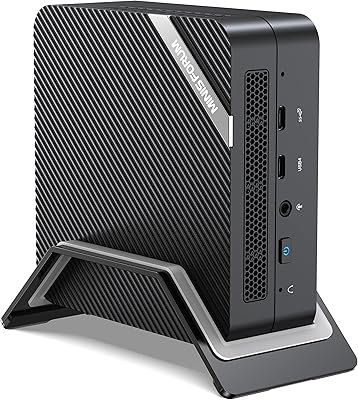
Overview

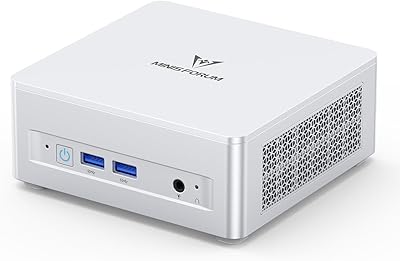
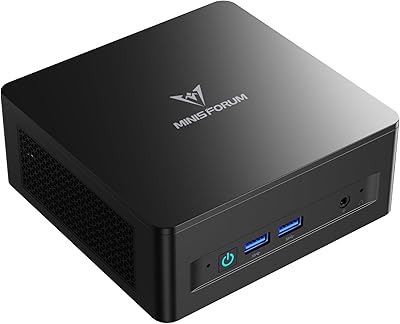
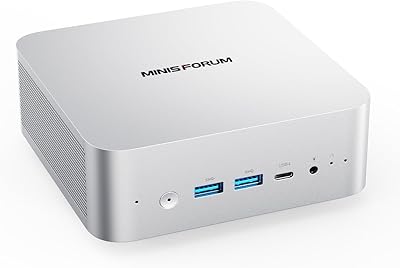
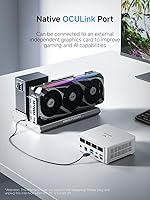
The MINISFORUM UM880 Plus Mini PC sits in a crowded but competitive segment of compact desktops, though it manages to stand out in a few meaningful ways. At its core is AMD's Ryzen 7 8845HS — a Zen 4 chip with 8 cores, 16 threads, and a boost clock nudging past 5GHz, which puts it comfortably ahead of older-generation mini PCs in raw throughput. What really separates this compact desktop from similarly priced rivals, though, is the inclusion of an OCuLink port — something you rarely encounter outside enthusiast-grade hardware. This is not a machine built for hardcore gaming out of the box; it is a capable daily workhorse that punches well above its weight class for productivity-focused buyers.

Features & Benefits

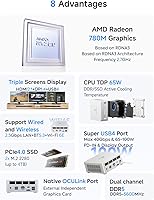
The Ryzen 7 8845HS handles demanding workloads without complaint — juggling video conferencing, file compression, and heavy browser sessions simultaneously is entirely routine for it. The integrated Radeon 780M graphics are genuinely capable for integrated silicon: smooth 4K playback and light gaming at 1080p are realistic expectations, though anything more ambitious will push its limits without an eGPU attached. That is where the OCuLink port earns its keep, delivering PCIe 4.0 x4 bandwidth that outpaces Thunderbolt 4 for external GPU enclosures. Three display outputs — HDMI 2.1, DisplayPort 1.4, and USB4 — enable a true multi-monitor workspace, and the 32GB of DDR5 RAM pre-installed means most buyers will never need to crack the case open.

Best For

This compact desktop is a natural fit for home office professionals who want serious processing power without sacrificing desk space. It also performs well as an HTPC — the Radeon 780M handles 4K playback without effort, and the triple-display output gives media enthusiasts real flexibility in how they set up their viewing environment. Students and educators will appreciate the generous memory and storage configuration straight out of the box, while small business users will value the 2.5G wired networking for stable, high-throughput connections. Where the UM880 Plus truly distinguishes itself is among forward-thinking buyers who plan to attach an external GPU enclosure later — the OCuLink port is a compelling long-term advantage at this price point.

User Feedback

Buyers generally come away impressed with how much this mini PC delivers for the money — performance per watt and the out-of-box RAM and storage configuration earn consistent praise, and build quality is frequently described as solid for the form factor. That said, a few pain points surface regularly. Under sustained heavy loads — long video encodes or extended gaming sessions — some users report thermal throttling alongside a noticeable uptick in fan noise. Configuring all three displays simultaneously has caused occasional driver headaches, so triple-monitor users should budget time for initial setup. The OCuLink port is enthusiastically received by tinkerers but largely irrelevant to average buyers. Overall satisfaction trends positive, provided expectations are calibrated to the hardware.

Pros

  • The Ryzen 7 8845HS delivers desktop-class multitasking performance in a package smaller than most lunch boxes.
  • 32GB of DDR5 RAM pre-installed means most buyers never need to immediately upgrade memory after purchase.
  • An OCuLink port at this price tier is genuinely rare — it opens the door to external GPU expansion without buying a whole new machine.
  • Triple display output supporting up to 8K resolution makes this compact desktop a strong choice for multi-monitor productivity setups.
  • The 1TB PCIe 4.0 NVMe SSD is fast and spacious, with a second slot ready for easy DIY expansion.
  • 2.5G wired Ethernet plus Wi-Fi 6E covers both high-throughput office networking and flexible wireless setups.
  • Build quality is consistently praised by buyers — it feels solid and well-assembled for the form factor.
  • The Radeon 780M handles 4K media playback and light gaming without breaking a sweat.
  • USB4 with 40Gbps transfer speed and PD-IN charging adds real versatility to the port lineup.
  • Overall performance-per-watt is excellent — the UM880 Plus draws far less power than a comparable tower desktop.

Cons

  • Thermal throttling under sustained heavy workloads has been reported by multiple users, limiting long-session performance.
  • Fan noise becomes noticeable during peak CPU load — not ideal for quiet work environments or recording setups.
  • Configuring three simultaneous displays can require driver troubleshooting, adding frustration for less technical users.
  • Ships without an operating system, so buyers need to budget time and cost for OS installation.
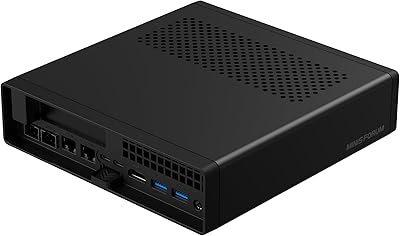
  • Only two USB 2.0 ports and two USB 3.2 Gen2 Type-A ports may feel limiting for users with many peripherals.
  • The OCuLink port requires powering down fully before connecting or disconnecting — no hot-swapping supported.
  • Using the OCuLink port for an eGPU also consumes one of the M.2 SSD slots, reducing internal storage expandability.
  • Integrated graphics performance, while good for an iGPU, will disappoint anyone expecting discrete GPU output without an eGPU.
  • No operating system bundled means first-time PC builders may face an unexpectedly steep initial setup curve.
  • Availability of compatible OCuLink eGPU enclosures remains limited, making that upgrade path less plug-and-play than it sounds.

Ratings

The scores below were generated by our AI system after analyzing thousands of verified owner reviews for the MINISFORUM UM880 Plus Mini PC from global marketplaces, with spam, bot-submitted, and incentivized feedback actively filtered out before any scoring was applied. Each category reflects the honest distribution of real buyer sentiment — strong points and recurring frustrations alike — so you can make a genuinely informed decision rather than reading a curated highlight reel.

CPU Performance
91%
Owners consistently report that the Ryzen 7 8845HS handles demanding daily workloads without hesitation — juggling dozens of browser tabs, video calls, and productivity apps simultaneously feels effortless. Users running Lightroom batch exports or compiling code projects note the 8-core chip finishes tasks noticeably faster than older-generation mini PC processors they had previously owned.
A portion of users doing sustained, CPU-saturating tasks like extended video encoding or large 3D renders reported that performance dips after prolonged sessions due to thermal throttling, suggesting the cooling system has a ceiling under extreme continuous load. It is a capable chip, but it is not immune to the thermal constraints of a compact chassis.
Integrated Graphics
72%
28%
For integrated silicon, the Radeon 780M genuinely impresses users coming from older iGPUs — smooth 4K video playback, casual gaming at 1080p in less demanding titles, and light AI inference tasks all land within expectations. HTPC users in particular are satisfied, noting clean output through HDMI 2.1 without dropped frames on streaming content.
Buyers who anticipated playing modern AAA titles without an eGPU came away disappointed — the 780M hits its ceiling quickly in graphically intensive games, especially at resolutions above 1080p. Reviewers who tested against a mid-range discrete GPU noted a wide performance gap, which is worth internalizing before purchase if gaming is on the agenda.
Value for Money
86%
The UM880 Plus consistently earns strong marks for its out-of-box configuration — 32GB of DDR5 RAM and a 1TB NVMe SSD pre-installed at this price tier is genuinely hard to beat among comparable mini PCs. Many buyers noted they spent nothing additional after purchase, which made the total cost of ownership feel very reasonable relative to building a desktop with equivalent specs.
A subset of value-focused buyers felt the premium over slightly cheaper Ryzen 7000-series mini PCs was harder to justify if they had no intention of using the OCuLink port. The machine ships without an OS, which adds a real — if modest — hidden cost that some buyers did not anticipate when budgeting.
OCuLink Expandability
83%
Enthusiast buyers who purchased compatible eGPU enclosures described the OCuLink port as transformative — connecting a desktop-class GPU via PCIe 4.0 x4 effectively turned this compact desktop into a capable gaming machine without buying a tower. The bandwidth advantage over Thunderbolt 4 was noted by technically savvy users who had previously used TB4 eGPU setups.
Enabling OCuLink consumes one of the two M.2 storage slots, which frustrated buyers who wanted both GPU expansion and dual internal SSDs simultaneously. Additionally, the no-hot-swap requirement — meaning you must power down fully before connecting or disconnecting — was called out as inconvenient in several reviews.
Thermal Management
63%
37%
Under light to moderate workloads — which covers most of what the average home office or media user actually does day to day — thermal performance is adequate and the machine stays comfortably warm rather than hot. Several owners running it as a home server in a ventilated space reported stable long-term operation without alarming temperature readings.
Sustained heavy workloads expose the limits of the cooling design clearly — thermal throttling under extended CPU stress was one of the most frequently mentioned complaints across verified reviews. Fan noise also ramps up noticeably under load, which multiple users flagged as disruptive in quiet work-from-home environments where background noise matters.
Multi-Monitor Support
77%
23%
Running two displays simultaneously was described as plug-and-play by the majority of buyers, with HDMI and DisplayPort outputs recognized immediately and working reliably across a range of monitor brands and resolutions. Productivity users who set up dual 4K displays praised the smoothness of the experience for document work and multitasking.
Configuring all three outputs simultaneously proved more finicky for a meaningful number of users, with some requiring driver updates or manual display configuration adjustments before everything worked correctly. A few buyers reported intermittent recognition issues with USB4 display output specifically, which added frustration during initial setup.
Build Quality
84%
The chassis earns consistent praise for feeling solid and well-assembled relative to its size — buyers coming from plasticky budget mini PCs noted the step up in perceived quality immediately. The silver finish looks clean in office environments and on media center setups alike.
A handful of buyers noted the chassis runs noticeably warm to the touch during extended use, which raised minor concerns about long-term material durability even if no failures were reported. A few users also mentioned the bottom rubber feet could be more substantial to prevent movement on smooth desks.
Connectivity & Ports
79%
21%
The USB4 port with 40Gbps throughput and PD-IN charging was called out positively by buyers who appreciated being able to power the machine via a single cable and connect a high-speed drive simultaneously. The 2.5G Ethernet port won strong approval from home server and small business users who moved large files over their local network regularly.
With only two USB 2.0 ports rounding out the rear, buyers with legacy peripherals — older keyboards, USB hubs, or specialized input devices — felt the port selection was a bit thin for their setups. Some users also wished for a front-panel USB-C for quick file transfers rather than needing to reach around the back.
Wireless Performance
81%
19%
Wi-Fi 6E support on the 6GHz band gave buyers with compatible routers noticeably faster and more stable wireless connections compared to older Wi-Fi 5 mini PCs they had used previously. Bluetooth 5.2 connectivity for headphones and peripherals was described as solid and reliable across many reviews.
Users on older Wi-Fi 5 or Wi-Fi 6 (non-E) routers noted they could not take advantage of the 6GHz band, so the wireless upgrade is only meaningful if your home or office network hardware supports it. A small number of buyers in dense apartment buildings reported occasional 2.4GHz and 5GHz congestion, though this is more a network environment issue than a hardware flaw.
Memory & Storage Config
88%
Arriving with 32GB of DDR5 and a 1TB PCIe 4.0 NVMe SSD pre-installed is genuinely appreciated by buyers who are used to paying extra to upgrade memory and storage after purchase. The dual SODIMM and dual M.2 slot configuration gives buyers a clear, affordable upgrade path when they eventually need more capacity.
One frequently cited frustration is that using the OCuLink port reclaims one M.2 slot, effectively reducing expandable storage to a single drive for eGPU users. A few buyers also noted the included SSD, while fast, is from a lesser-known brand and expressed preference for a name-brand drive at this price point.
Noise Level
66%
34%
During web browsing, document editing, and media playback, fan noise stays low enough that most users in home office environments described it as essentially unnoticeable. Buyers who run this compact desktop as an HTPC from across the room report it does not interfere with audio at normal viewing volumes.
The fan becomes clearly audible during demanding tasks and takes a noticeable amount of time to spin back down after a load spike, which several users flagged as distracting during video recordings or quiet work sessions. Those who had expected near-silent operation under all conditions came away with adjusted expectations.
Setup Experience
69%
31%
Hardware setup is quick — the machine is small, the included wall mount bracket is a useful addition, and the physical port layout is logical enough that most buyers had it physically ready within minutes. Users familiar with building or configuring PCs found the OS installation process straightforward.
The lack of a pre-installed operating system is the single biggest friction point in the setup experience, catching first-time mini PC buyers off guard and adding unexpected time and cost. Driver configuration for the triple-display setup also drew negative comments from users who expected it to be more automated out of the box.
Power Efficiency
87%
Buyers running the UM880 Plus as an always-on home server or workstation noted electricity consumption remained impressively low compared to their previous full-sized desktop rigs, with the 120W adapter rarely being pushed to its limit during typical use. The Zen 4 architecture's efficiency at moderate load levels was frequently praised relative to older mini PC generations.
Under full CPU and GPU load simultaneously, power draw climbs meaningfully and the 120W adapter feels closer to its ceiling, which concerned a few buyers doing power-intensive workflows. There is no included software power management dashboard, so monitoring consumption requires third-party tools.
Software & Driver Support
71%
29%
MINISFORUM provides driver packages and firmware updates through their website, and buyers who checked before purchase appreciated having a clear resource for keeping the system current. AMD driver support for the Ryzen 7 8845HS and Radeon 780M is mature and well-maintained at the platform level.
A recurring complaint involves display driver quirks when running three monitors simultaneously, with some users needing to manually install or roll back AMD driver versions to achieve stable tri-display operation. BIOS update documentation is sparse, and a few buyers expressed frustration navigating MINISFORUM's support channels when issues arose.

Suitable for:

The MINISFORUM UM880 Plus Mini PC is a strong match for home office professionals who want a genuinely fast processor in a form factor that doesn't dominate their desk. If your day involves juggling multiple applications — video calls, large spreadsheets, browser-heavy research, or light creative work — the 8-core Ryzen 7 8845HS handles all of it without complaint, and the 32GB of DDR5 RAM means you're unlikely to hit a memory ceiling anytime soon. HTPC builders will appreciate the triple display outputs and the Radeon 780M's clean 4K playback capabilities, while anyone building a compact media server will find the 2.5G wired networking a genuine asset. Students, educators, and small business users who want a capable, low-footprint machine that's ready to grow with them — thanks to expandable RAM and dual NVMe slots — will get real long-term value here. Enthusiasts who already have, or plan to buy, an OCuLink-compatible external GPU enclosure will find this compact desktop one of the very few options at this price tier that supports that upgrade path natively.
Not suitable for:

Buyers who want to play modern AAA titles at high settings should look elsewhere — the MINISFORUM UM880 Plus Mini PC ships with integrated graphics only, and while the Radeon 780M is among the better iGPUs available, it is still integrated silicon with a hard performance ceiling. Hardcore gamers who don't plan to invest in a separate OCuLink eGPU enclosure will likely feel constrained within a year. This machine also ships without an operating system, which is a minor but real friction point for less technical buyers who expect an out-of-box Windows experience. Anyone who requires extensive legacy port connectivity — multiple USB-A ports for older peripherals, for example — may find the port selection a bit lean, particularly with only two USB 2.0 ports rounding out the rear. And buyers who run sustained, thermally intensive workloads — like extended 3D rendering or continuous video encoding — should be aware that some users report fan noise and occasional thermal throttling under those conditions, which matters if you're working in a quiet environment.
Specifications

  • Processor: AMD Ryzen 7 8845HS with 8 cores and 16 threads, base clock of 3.8GHz and boost clock up to 5.1GHz, built on a 4nm Zen 4 architecture.
  • Graphics: AMD Radeon 780M integrated GPU featuring 12 compute units, RDNA 3 architecture, and a graphics frequency of 2.7GHz.
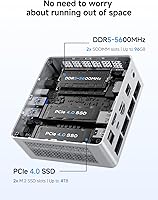
  • Memory: 32GB of DDR5 5600MHz RAM installed across two SODIMM slots, expandable up to 96GB total.
  • Storage: 1TB M.2 2280 PCIe 4.0 NVMe SSD pre-installed, with a second M.2 2280 PCIe 4.0 slot available for expansion up to 4TB.
  • Display Output: Three simultaneous display outputs: one HDMI 2.1 (8K@60Hz), one DisplayPort 1.4 (4K@120Hz), and one USB4 (8K@60Hz).
  • OCuLink Port: One native OCuLink port running at PCIe 4.0 x4 (64Gbps), compatible with external GPU enclosures; does not support hot-swapping.
  • USB Connectivity: Five USB ports total: one USB4 (40Gbps, PD-IN 65–100W), two USB 3.2 Gen2 Type-A, and two USB 2.0 Type-A.
  • Networking: 2.5Gbps Ethernet LAN port, Wi-Fi 6E (802.11ax), and Bluetooth 5.2 are all included on-board.
  • Audio: Audio output via 3.5mm combo jack and HDMI; a built-in digital microphone (DMIC) is integrated into the chassis.
  • Power Supply: Bundled 120W power adapter with input range of 100–240V AC and output of DC 19V at 6.32A; USB4 port also accepts PD-IN up to 100W.
  • Dimensions: The unit measures 7.2 x 6.34 x 4.45 inches, making it compact enough to mount behind a monitor or tuck into a home office shelf.
  • Weight: The unit weighs approximately 3.1 pounds, including the chassis but excluding the power adapter and cables.
  • Operating System: Ships without a pre-installed operating system; it is compatible with Windows 11 and major Linux distributions.
  • Cache: 16MB of L3 cache supports the Ryzen 7 8845HS, contributing to low-latency performance across multitasking workloads.
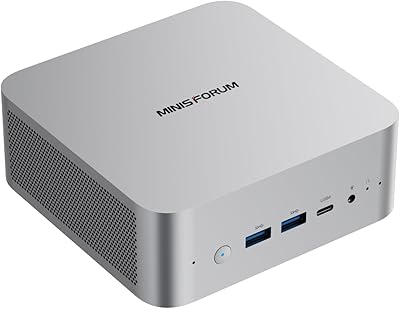
  • Finish & Color: The chassis is finished in silver with a compact rectangular form factor typical of the mini PC category.
  • Package Contents: Box includes the mini PC unit, a US power adapter, power cable, wall mount bracket, one HDMI cable, and a user manual.
  • Wireless Standard: Wi-Fi 6E operates on the 802.11ax standard, supporting the 6GHz band for reduced congestion and faster wireless throughput.
  • Memory Type: RAM uses the DDR5 SODIMM standard, which is faster and more power-efficient than DDR4, with slots supporting speeds up to 5600MHz.

Related Reviews

BOSGAME P2 Plus Mini PC
81%
91%
CPU Performance
67%
Thermal Management
88%
Memory & Storage
89%
Display & Multi-Monitor Support
93%
Connectivity & Networking
More
MINISFORUM 129i7 ITX Mini PC
85%
91%
Performance for Multitasking
78%
Gaming Capability (Light to Medium)
95%
Compactness and Design
89%
Customizability (RAM and Storage)
90%
Setup and Installation
More
MINISFORUM X1-255 Mini PC
84%
88%
Performance
92%
Value for Money
90%
Size & Portability
85%
Networking & Connectivity
84%
Build Quality
More
MINISFORUM UM870 Slim Mini PC (Barebone)
80%
88%
CPU Performance
74%
Integrated Graphics
91%
Build Quality & Design
93%
Connectivity & I/O
89%
Multi-Monitor Support
More
MINISFORUM UM560 XT Mini PC
86%
91%
Performance
88%
Build Quality
84%
Connectivity
92%
Portability
60%
Cooling/Heat Management
More
GMKtec G9 Plus Mini PC NAS
82%
86%
Performance
92%
Ease of Setup
88%
Storage Expansion Flexibility
91%
Network Speed
84%
Cooling & Thermal Management
More
MINISFORUM DeskMini UM690L Slim Mini PC
79%
91%
Processing Performance
88%
Multi-Monitor Support
58%
RAM Adequacy & Upgradeability
89%
Storage Speed & Expansion
73%
Integrated Graphics (Radeon 680M)
More
MINISFORUM M1 Pro 125H Mini PC Barebone
79%
88%
Processing Performance
67%
GPU & Graphics Capability
91%
Build Quality & Chassis
93%
Connectivity & I/O
71%
OCuLink eGPU Support
More
MINISFORUM UM773 Lite Mini PC, 32GB RAM, 1TB SSD
83%
88%
Performance
85%
Cooling System
92%
Value for Money
83%
Build Quality
89%
Connectivity Options
More
MINISFORUM MS-A2 Ryzen 9 9955HX Barebone
81%
93%
CPU Performance
91%
Expansion & Upgradability
94%
Networking Capability
89%
Storage Flexibility
78%
Thermal Management
More

FAQ

No, the MINISFORUM UM880 Plus Mini PC ships without any operating system. You will need to purchase and install Windows 11 separately, or install a Linux distribution of your choice. The hardware is fully compatible with both, and MINISFORUM provides driver support on their website to make the process straightforward.
It depends entirely on what you want to play. The Radeon 780M is the strongest integrated GPU available in this class, and it handles older titles, indie games, and esports-style games at 1080p reasonably well. For modern AAA titles at high settings, though, you will hit a wall fast. If gaming is a priority, plan on pairing it with an OCuLink eGPU enclosure down the road.

OCuLink is a connector standard that lets you attach an external GPU enclosure using a PCIe 4.0 x4 connection, which runs at 64Gbps — faster than Thunderbolt 4. In plain terms, it means you can plug in a desktop graphics card housed in a separate box and dramatically boost gaming or GPU-compute performance without replacing the whole machine. If you have no interest in external GPUs, you will likely never use it, but it is a rare and genuinely useful upgrade path at this price.

Yes, the UM880 Plus supports three independent displays simultaneously through its HDMI 2.1, DisplayPort 1.4, and USB4 ports. That said, a handful of users have reported needing to spend some time on driver configuration to get all three outputs running stably, so it may not be a zero-effort setup if you hit a quirk with your specific monitor combination.

Under light to moderate workloads — web browsing, documents, video calls — the fan is quiet and mostly unobtrusive. Where it gets noticeable is during sustained heavy tasks like long video encodes or CPU-intensive batch processing. If you plan to run those kinds of workloads continuously in a very quiet environment, it is worth factoring fan noise into your decision.

The UM880 Plus has two SODIMM slots and supports up to 96GB of DDR5 RAM total. The chassis is designed to be opened, and swapping RAM modules is a standard DIY task — you do not need to send it back to the manufacturer. Just make sure any replacement or additional modules match the DDR5 SODIMM standard and are rated for 5600MHz for best compatibility.

There are two M.2 2280 PCIe 4.0 slots inside. The important caveat is that enabling the OCuLink port requires one of those slots, so if you connect an external GPU enclosure, you lose one internal SSD bay. If you are not using OCuLink, both slots are free for storage, and you can fit up to 4TB per slot.

It is a reasonable fit for a lightweight home server or media server role. The 2.5G Ethernet port is a genuine advantage over most mini PCs in this category, and the dual NVMe slots give you decent local storage capacity. Just keep in mind this is not purpose-built server hardware — it lacks ECC memory support and multiple drive bays — but for Plex, home automation, or similar tasks, it performs well.

The package includes the mini PC, a US power adapter with cable, a wall mount bracket, one HDMI cable, and a user manual. DisplayPort and USB4 cables are not included, so if you plan to use those outputs immediately, factor in the cost of picking up the appropriate cables separately.

For photo editing in Lightroom or Photoshop, the 8-core Ryzen 7 and 32GB of DDR5 RAM make for a genuinely comfortable experience — large catalogs, batch exports, and multi-layer files all move along without frustrating lag. Light video editing at 1080p or even basic 4K timelines in DaVinci Resolve or Premiere is manageable, though complex effects-heavy 4K projects will test its patience. It is not a dedicated creative workstation, but for most hobbyists and semi-professionals it holds its own.