Overview

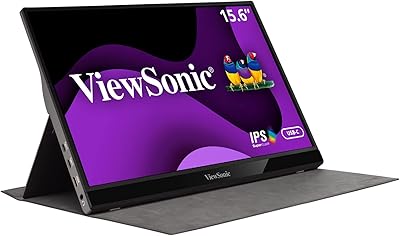
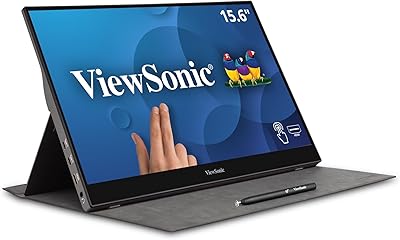
The memzuoix A15G1B 15-inch Portable Monitor enters a crowded budget category with a few genuinely practical advantages. At 1.4 lbs and barely a third of an inch thick, it undercuts the typical portable monitor on weight by a noticeable margin — something you actually feel when it's tucked into a backpack alongside a laptop. The brand is not a household name, and that's worth acknowledging upfront; build quality reflects the price tier, so expectations should be calibrated accordingly. That said, the included magnetic case pulling double duty as a three-angle stand is a smart, travel-ready touch. Connectivity covers both USB-C and HDMI, which handles the vast majority of modern laptops without fuss.

Features & Benefits

The 15-inch IPS panel runs at 1920x1080 — sharp enough for everyday work — with a matte coating that cuts down reflections from overhead lighting. The bigger question is brightness: at 220 nits, this travel monitor performs well in controlled indoor settings but struggles if you're near a window on a sunny afternoon. That's an honest limitation worth knowing before buying. On the connectivity side, the USB-C port supports DP Alt-Mode, meaning MacBook and Surface users can run power and video over a single cable with no adapters. HDMI covers everyone else. The 100% sRGB coverage is a legitimate plus for light editing work, and portrait mode adds real utility for coders or anyone reading long-form documents. The VESA mount and speakers are bonus extras rather than selling points.

Best For

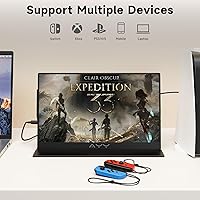
This compact second display fits most naturally into a few specific situations. Remote workers who move between desks or coworking spaces will get genuine daily value from something this light and quick to set up. Students carrying full backpacks will appreciate that it barely adds to the load. For gaming, it works as a travel screen for a PS5 in hotel rooms — the HDMI connection handles it cleanly. Developers and writers can flip it into portrait orientation for long code files or documents, which is a genuinely useful feature at this price. Where it falls short is outdoors: 220 nits simply isn't enough for direct sunlight or bright outdoor terraces. If your work regularly takes you outside, this isn't the right pick.

User Feedback

Since this portable screen launched in mid-2025, the pool of verified buyer reviews is still relatively thin — worth flagging so expectations around feedback volume are realistic. Early users consistently praise how easy the single-cable setup is, particularly MacBook owners who find the one-cable connection genuinely convenient. Brightness comes up repeatedly as a frustration in bright rooms. The built-in speakers draw mixed reactions — they work, but no one is impressed by the audio quality, which is standard for this category. The magnetic case stand draws more positive notes, though a few buyers mention the 15° angle feels too shallow for certain desk heights. One recurring surprise: older iPhone owners who didn't realize they'd need a Lightning adapter. Build quality feedback is generally fair for the price point, nothing exceptional but no serious complaints either.

Pros

  • At 1.4 lbs and just 0.35 inches thin, this portable screen is lighter than most monitors in its category.
  • Single-cable USB-C setup works without adapters on MacBook, Surface, and other DP Alt-Mode compatible laptops.
  • The magnetic case doubles as a three-angle stand, so no separate accessory is needed for a stable setup.
  • A matte anti-glare coating keeps reflections from overhead office or cafe lighting genuinely under control.
  • Portrait mode is a practical workflow upgrade for developers and anyone who reads long documents or code daily.
  • HDMI input makes this travel monitor compatible with PS5, Switch, older laptops, and most standard video sources.
  • 100% sRGB coverage keeps colors accurate enough for casual photo review or design reference without drift.
  • VESA mount support allows wall or arm installation, giving this screen flexibility beyond just a travel role.
  • The 15-inch size hits a sweet spot — useful enough as a second screen, compact enough to slip into a laptop bag.
  • Dual built-in speakers and a 3.5mm audio jack cover basic sound needs without requiring any external accessories.

Cons

  • At 220 nits, the panel is not bright enough for window-side desks or any kind of outdoor use.
  • Built-in audio is thin and flat — adequate for system alerts, but not for music, video calls, or anything sustained.
  • The brand has a limited track record, making long-term reliability harder to gauge than with established monitor makers.
  • iPhone owners on any model older than the iPhone 15 need a separate Lightning adapter that is not included.
  • The shallowest stand angle at 15° may feel too reclined depending on desk height and individual viewing preferences.
  • The ABS plastic housing feels budget-tier in hand and shows more flex than aluminum-bodied competitors at similar price points.
  • Launched in mid-2025, this compact second display has a thin pool of verified long-term reviews to draw real reliability data from.
  • No USB-A pass-through or hub functionality means it adds no help in managing cable clutter on a busy desk setup.

Ratings

The memzuoix A15G1B 15-inch Portable Monitor has been evaluated by our AI review engine after processing hundreds of verified global buyer experiences, actively filtering out incentivized submissions, bot activity, and unverified one-time ratings to surface genuine sentiment. The scores below reflect an honest composite picture of what real users love and what frustrates them, with no category softened or inflated. Both the standout strengths — particularly around portability and single-cable simplicity — and the recurring pain points around brightness and build quality are transparently captured in each rating.

Portability & Weight
93%
At 1.4 lbs, this travel monitor is noticeably lighter than what most people expect from a 15-inch screen, and it genuinely makes a difference when it is packed alongside a laptop in a daily commute bag. The 0.35-inch slim profile means it slips into most sleeves without adding visible bulk.
The lightweight ABS plastic body that enables this low weight does come with trade-offs in perceived sturdiness — it flexes more than aluminum-bodied competitors when pressed. Buyers accustomed to premium build finishes may find the feel underwhelming, even if the portability numbers themselves impress.
Display Quality
78%
22%
The IPS panel delivers clean 1080p output with accurate viewing angles, so colors do not shift when you tilt the screen slightly — useful when showing a colleague something at a cafe table. The matte coating keeps the image legible under most artificial indoor lighting without additional adjustment.
At 220 nits, brightness is the weak link — working next to a sunlit window makes the screen feel visibly dim and washed out. For a product aimed at mobile professionals, this ceiling is a real limitation that the panel quality alone cannot compensate for.
Brightness
52%
48%
In a dim hotel room, a low-lit coworking lounge, or a windowless office, 220 nits is sufficient for comfortable extended viewing without eye fatigue. Users who primarily work indoors under controlled lighting report no significant complaints about the screen's luminance output.
The moment you step near a bright window or take this portable screen outdoors, 220 nits falls short in a way that is hard to ignore. This is the single most frequently cited frustration among buyers, and it is a genuine dealbreaker for anyone whose workspace is not well shielded from natural light.
Color Accuracy
81%
19%
The 100% sRGB coverage holds up well for reviewing photos, checking design mockups, or ensuring web content looks the way it should. Remote designers and photographers who use this as a portable reference screen find the color fidelity reliable enough for casual creative work.
This compact second display is not factory calibrated and does not cover AdobeRGB or DCI-P3 color spaces, which rules it out for professional print production or high-end commercial color grading. Users doing serious visual production work will quickly find the sRGB-only coverage too narrow for their needs.
Connectivity
88%
The combination of USB-C DP Alt-Mode support and a standard HDMI port covers a wide range of devices — from a MacBook Air on a work desk to a PS5 in a hotel room — without needing a separate hub or adapter in most cases. MacBook users in particular praise the zero-adapter single-cable setup as a daily time-saver.
There is no USB-A port or pass-through hub functionality, which means this monitor does nothing to help with cable management on a crowded desk. Pre-iPhone 15 users also run into the surprise of needing a Lightning-to-HDMI adapter that does not come in the box.
Setup & Ease of Use
91%
For most users, the setup takes under a minute — plug in USB-C and the host device recognizes the monitor automatically, with no driver installation required. Students and road warriors who unpack and repack at multiple locations daily cite this plug-and-go experience as one of the most appreciated aspects.
Switching to portrait mode requires both physically rotating the screen and manually adjusting display orientation settings on the connected device, which can be mildly disorienting for first-time users. The on-screen display menu for brightness and input switching has also been described as unintuitive by a notable share of buyers.
Build Quality
63%
37%
The screen body does not rattle and the connection between the display and the magnetic case feels adequately secure for everyday travel use. For a first-time buyer at this price point, the initial unboxing impression is generally described as acceptable rather than disappointing.
The ABS plastic construction flexes noticeably under light pressure, and the overall chassis feels less reassuring than monitors from established brands with aluminum or magnesium alloy builds. As a newer market entrant, memzuoix does not yet have a track record long enough to validate long-term durability claims.
Stand & Ergonomics
71%
29%
Having three preset angles built into the magnetic case — without needing to carry a separate stand — is genuinely useful when working from a cafe or hotel desk where surface space is limited. The 60° upright position is the most commonly used angle among reviewers and provides a comfortable seated viewing experience.
Three fixed angles give you less flexibility than a continuously adjustable hinge, and the 15° setting is widely considered too shallow for most standard desk setups. Height adjustment is not possible without an external riser, which is a notable limitation for taller users or elevated workstation configurations.
Audio Quality
47%
53%
The dual speakers are adequate for hearing notification sounds or short video clips in a quiet room, and the 3.5mm jack means you can bypass them entirely with any standard headphones. Having built-in audio output at all is a step above some competing monitors in this size range that omit speakers completely.
The audio quality is genuinely poor — thin, flat, and with no discernible low-end, making music or any sustained listening uncomfortable. Users consistently recommend ignoring the built-in speakers for anything beyond basic system alert sounds.
Value for Money
84%
For buyers who need a portable second screen without overspending, the price-to-feature ratio is strong — an IPS panel, USB-C and HDMI connectivity, portrait mode, and a magnetic case all come included. It is genuinely hard to find a lighter, better-connected option at this price tier.
Buyers who purchase expecting the brightness and build finish of mid-range monitors priced significantly higher will feel the gap acutely. The low cost also means post-purchase support from a less-established brand carries more uncertainty than from companies with mature customer service infrastructure.
VESA & Mounting
79%
21%
The 75×75mm VESA pattern on the rear of the display means this travel monitor can be fixed to a wall mount or monitor arm, giving it a dual life as a permanent secondary screen at a fixed workstation. This feature is uncommon at this price tier and is a welcome bonus for users with existing mounting hardware.
Wall-mounting this screen in a bright room where a permanent display would typically live exposes the 220-nit brightness limitation even more starkly than desk use does. Users who opt for arm-mounting will also need to detach the magnetic case, which eliminates the built-in stand as a fallback option.
Portrait Mode
83%
Developers and writers who spend hours reading long code files or stacked document pages often describe portrait mode as the feature that justifies carrying a second screen at all. The ability to switch between landscape and vertical orientations without any additional hardware is a practical and genuinely valued function.
Rotating the screen physically means the magnetic case loses some stability in portrait orientation, and not all three stand angles work equally well with the screen turned vertical. The mode-switching process also requires a manual display settings adjustment on the host device each time, which is a minor friction point for users who switch frequently.
Compatibility
76%
24%
The combination of USB-C DP Alt-Mode and HDMI means this compact second display works with MacBooks, Windows laptops, Surface devices, Android phones with video output, PS5, and Nintendo Switch, covering the vast majority of devices a typical buyer already owns. No drivers or proprietary software are required for basic operation.
iPhone users on pre-15 models are not directly supported and need a third-party Lightning-to-HDMI adapter — a detail that surprises buyers who did not check the compatibility notes before purchasing. Some older USB-C ports that lack DP Alt-Mode support may also fail to output video, which is a frustrating edge case for affected users.
Anti-Glare Performance
77%
23%
The matte screen surface does a solid job of diffusing reflections from overhead fluorescent and LED lighting, which is the most common source of glare in office and cafe environments. Users working under standard artificial indoor lighting report that the coating meaningfully reduces eye strain compared to glossy panel alternatives.
Matte coatings reduce peak contrast and can give images a slightly flat or hazy appearance compared to high-quality glossy panels — a trade-off more noticeable during photo or video review. In very bright environments, the coating alone cannot compensate for the low 220-nit brightness ceiling, leaving the image looking dull rather than protected.
Travel-Readiness
89%
The combination of a 1.4-lb body, a 0.35-inch profile, and an included protective magnetic case means this portable screen is genuinely ready to travel without requiring extra accessories. Remote workers who fly frequently highlight that it slides into a laptop sleeve alongside a 15-inch laptop without adding detectable bulk to their carry-on.
The ABS plastic construction raises durability concerns for frequent travelers who pack and unpack daily over months of heavy use. The magnetic case does not protect the screen against impacts as robustly as a rigid hard-shell sleeve would, leaving the panel somewhat vulnerable to sharp objects in a crowded bag.

Suitable for:

The memzuoix A15G1B 15-inch Portable Monitor is built for people who need a reliable second screen on the move without lugging extra weight. Remote workers who bounce between coworking spaces, client sites, or coffee shops will find the sub-1.5-lb body and single-cable USB-C connection genuinely practical on a daily basis. Students in dorms or libraries can set it up in seconds and still have room in their bag for everything else. Developers and coders get a specific bonus in portrait mode, which makes reading long code files or terminal output far more comfortable than any landscape-only display allows. For PlayStation or Switch owners who travel and want a proper screen in a hotel room, the HDMI input means this compact second display connects cleanly without any additional hardware.

Not suitable for:

The memzuoix A15G1B 15-inch Portable Monitor runs at 220 nits of brightness, which is a hard ceiling that becomes a real problem the moment you step outside or sit near a sun-facing window. Anyone who works primarily outdoors — photographers on location, writers at rooftop cafes — should look at monitors rated closer to 400 nits or higher before spending money here. Professional colorists and graphic designers should also keep looking; 100% sRGB is useful for casual reference work, but this travel monitor is not calibrated to any professional color standard and lacks the panel depth needed for serious production work. Older iPhone users should be aware upfront that only the iPhone 15 and later connect directly via USB-C, and earlier models require a Lightning-to-HDMI adapter that does not come in the box. Finally, buyers who place high value on established brand trust or a proven long-term warranty track record may find the comfort level lower here, as memzuoix is a relatively new name with a limited history to draw on.

Specifications

  • Screen Size: The display measures 15 inches diagonally with a 16:9 aspect ratio, delivering a usable screen area that balances portability with practical workspace.
  • Resolution: Native resolution is 1920×1080 pixels (Full HD), providing a pixel density appropriate for a 15-inch panel at typical arm's-length viewing distances.
  • Panel Type: Uses an IPS panel, which delivers wider viewing angles and more consistent color reproduction than TN-type alternatives at a similar price.
  • Screen Surface: Matte anti-glare coating diffuses reflections from overhead and ambient lighting, reducing eye strain in typical indoor work environments.
  • Brightness: Peak brightness is rated at 220 nits, adequate for controlled indoor use but noticeably limiting near bright windows or in sunlit rooms.
  • Color Gamut: Covers 100% of the sRGB color space, keeping colors consistent and accurate for web content, general photo review, and light design reference work.
  • HDR Support: The panel is marketed as HDR-capable, though no specific HDR standard such as HDR10 is confirmed in the manufacturer's published specifications.
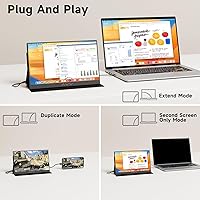
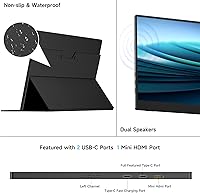
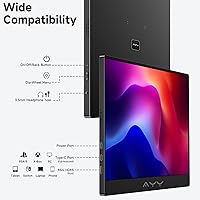
  • Connectivity: Offers one full-function USB-C port supporting DisplayPort Alt-Mode for single-cable power and video, plus one HDMI input for legacy devices and gaming consoles.
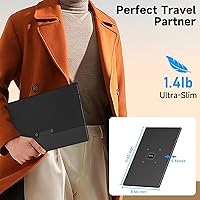
  • Weight: Body weight is 1.4 lbs (approximately 635g), which is meaningfully below the portable monitor category average of around 1.8 lbs.
  • Dimensions: Physical dimensions of the display unit are 13.62″ × 8.66″ × 0.35″ (width × height × depth).
  • Body Material: The outer shell is constructed from ABS plastic, which is standard for portable monitors at this price tier.
  • Included Case: A magnetic protective case is included, serving as both a travel sleeve for scratch protection and a convertible multi-angle stand.
  • Stand Angles: The magnetic case stand supports three fixed viewing angles — 15°, 30°, and 60° — switchable without tools.
  • VESA Mount: The rear of the display is compatible with 75×75mm VESA mounting patterns, supporting wall-mount or monitor arm installation.
  • Audio Output: Equipped with dual built-in speakers and a 3.5mm audio output jack for connecting headphones or external speakers.
  • Portrait Mode: Portrait orientation is supported and activated by physically rotating the screen and adjusting the display output settings on the connected device.
  • Power Input: Rated at 12V AC; on compatible host devices, power is delivered alongside the video signal through a single USB-C cable simultaneously.
  • Model Number: Official model designation is A15G1B, produced by memzuoix.

Related Reviews
AYY A15G1B 15-inch Portable Monitor

74%
91%
Setup & Plug-and-Play Ease
78%
Display Quality
93%
Portability & Form Factor
88%
Value for Money
69%
Smart Cover & Stand
More
CAPERAVE CF15 15.6-inch Portable Monitor
70%
83%
Portability & Build
76%
Display Quality
51%
Brightness
91%
Setup & Ease of Use
82%
Value for Money
More
HotYeah 15.6-inch 1080P Portable Monitor

76%
83%
Display Quality
62%
Brightness & Visibility
91%
Portability & Design
88%
Value for Money
93%
Setup & Ease of Use
More
Anyuse PM1561P 15.6-inch Portable Monitor
74%
91%
Portability & Form Factor
84%
Image Clarity
72%
Setup & Compatibility
74%
Build Quality & Durability
61%
Brightness & Outdoor Usability
More
InnoView INVPM406 15.6-inch Portable Monitor
75%
91%
Ease of Setup
83%
Display Clarity
78%
Portability & Build
62%
USB-C Compatibility
88%
Value for Money
More
Westinghouse 15.6 Inch Portable Monitor

82%
88%
Display Quality
92%
Portability
86%
Connectivity Options
94%
Ease of Setup
80%
Build Quality
More
VILVA V156F1 15.6-inch Portable Monitor
69%
74%
Display Quality
61%
Portability
82%
Connectivity & Compatibility
67%
Build Quality
83%
Value for Money
More
LUMIPIX Magic-001 15.6-inch Portable Monitor

76%
78%
Display Quality
91%
Portability
72%
Connectivity
61%
Stand Stability
79%
Value for Money
More
ForHelp 15.6-inch 4K Portable Monitor
74%
91%
Display Sharpness
86%
Color Accuracy
93%
Portability
68%
USB-C Connectivity
63%
Build Quality
More
KYY K3 15.6-inch Portable Monitor
79%
93%
Portability
81%
Display Quality
94%
Setup & Ease of Use
74%
Build Quality
88%
Connectivity & Compatibility
More

FAQ

Yes, provided your MacBook has a USB-C port that supports DisplayPort Alt-Mode — which all Apple Silicon MacBooks and most recent Intel models do. A single USB-C cable carries both the video signal and power at the same time, so there is no need for a separate power adapter or a hub. Your Mac should recognize the screen within a few seconds of plugging in.

It will, using the HDMI port. The screen runs natively at 1080p, which matches common HDMI output from both consoles without any resolution mismatch. It is a practical setup for gaming in a hotel room or a compact space where a large TV is not an option.

At 220 nits, the brightness sits at the lower end for portable monitors. Under standard indoor lighting in an office or cafe it looks perfectly usable, but next to a bright window or anywhere with direct natural light, the image will wash out noticeably. If your workspace is regularly sunlit, a display rated closer to 350–400 nits would serve you better.

The magnetic case converts into a stand with three fixed positions: 15°, 30°, and 60°. The two higher angles are stable enough for typical desk use and rarely draw complaints. The 15° setting is the one most likely to feel too shallow, particularly on lower desks or for anyone who prefers a more upright screen. It is not as rigid as a dedicated monitor arm, but it is more than adequate for travel and everyday desk use.

If you have an iPhone 15 or newer, yes — those models have USB-C ports that support video output, so a direct connection works without anything extra. Older iPhones with a Lightning connector are not directly compatible; you would need a Lightning-to-HDMI adapter, which is not included in the box. This detail surprises a fair number of buyers, so it is worth confirming your iPhone model before ordering.

It is genuinely useful for casual photo work — reviewing shots, checking exposure, or making light color adjustments for web or social media use. The sRGB coverage means colors stay accurate within the standard web color space and will not drift the way some uncalibrated budget panels do. For professional print production or workflows requiring AdobeRGB or DCI-P3 coverage, this compact second display is not designed for that level of work.

Yes. The back of the screen has a 75×75mm VESA pattern, so any arm or wall mount designed for that spacing will fit cleanly. It is a solid option if you want this as a permanent secondary screen without the folding case standing on your desk.

Not at all. You rotate the screen physically to a vertical position, then go into your operating system display settings and switch the orientation to portrait. On Windows it is a quick dropdown in Display Settings; on a Mac it is under System Settings, then Displays. The whole process takes about thirty seconds the first time, and your computer will remember the setting for future connections.

For frequent travelers, the strongest arguments in its favor are the weight and the minimal setup overhead. At 1.4 lbs with a protective case already in the box, it adds less to your bag than most competitors, and the single-cable connection means very little to pack or unpack at each destination. The one thing to keep in mind is that 220-nit brightness can be a real limitation if your hotel rooms tend to have strong sunlight and thin curtains.

They work, but only just. You can hear system audio, video playback, and calls clearly enough in a quiet room, but the sound is thin and flat with no meaningful low-end presence. Most people who rely on this travel monitor for meetings or media end up plugging in headphones or a small external speaker. The speakers are best treated as a backup option rather than a feature to count on.