Overview

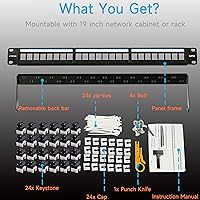
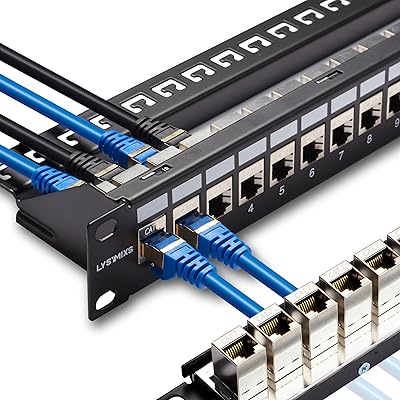
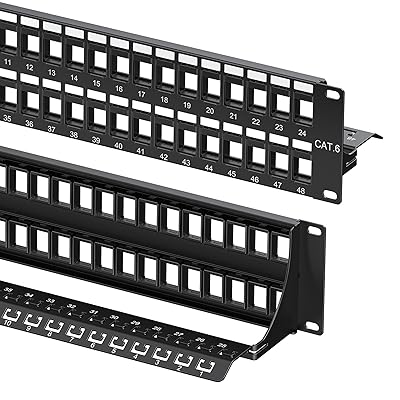
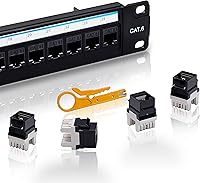
The Lysymixs 24-Port Cat6 Keystone Patch Panel takes a different approach than the typical fixed punch-down panel you would find filling most server closets — instead of terminating all 24 runs directly into a shared frame, each port is an independent keystone jack that clicks in and out on its own. That distinction matters more than it sounds. Lysymixs is not a household name in networking, but this modular panel has been quietly earning a following among home lab builders and small office installers since it launched in mid-2022. It fits a standard 19-inch rack, weighs under two pounds, and comes ready to install with a back bar, end caps, zip ties, and a punch tool included.
Features & Benefits

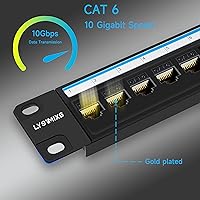
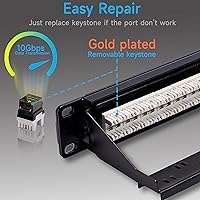
The real draw of this keystone patch panel is port-level serviceability. If a jack goes bad, you snap it out and replace it without touching the other 23 — no re-terminating the whole frame. The included gold-plated RJ45 keystones are rated for 10 Gigabit throughput, which is more than adequate for Cat6 runs in most small-scale deployments. Beyond Ethernet, the open keystone format lets you drop in coax, HDMI, fiber, or USB modules if your rack needs mixed connectivity. The back bar does real work too: anchoring cables with the included zip ties keeps termination points under far less mechanical stress, which is where a lot of patch panel failures actually start.

Best For

This modular panel makes the most sense for people who expect to touch their cabling more than once. Home lab builders still figuring out their topology will appreciate being able to reconfigure ports without rewiring from scratch. IT admins managing a small office switch closet will value swapping a faulty jack themselves rather than scheduling a cabling contractor. It also suits AV and hybrid racks where a mix of signal types — Ethernet alongside HDMI or coax — needs to share the same 1U of rack space. If you are wiring a permanent enterprise installation that will never move, a traditional fixed panel might serve you better. But for anything dynamic, this is a smarter starting point.

User Feedback

Buyers who switched from fixed punch-down panels consistently call out individual port swapping as the standout practical advantage — it is the kind of thing you do not fully appreciate until a port goes bad on a traditional panel. Criticism tends to cluster around two areas: some users report minor inconsistency in keystone jack quality across a single panel, with the occasional jack feeling looser than the rest. The snap-in mechanism also draws skepticism from those who question how it holds up to repeated cycling over years. The included punch tool works in a pinch, but most experienced installers recommend a dedicated 110 blade tool. Port labeling and rack-mount hardware are generally rated as functional but basic — sufficient, not impressive.

Pros

  • Individual keystones snap in and out without tools, making single-port repairs a two-minute job.
  • Open slot format lets you mix Ethernet, coax, HDMI, and fiber in the same 1U of rack space.
  • Gold-plated RJ45 contacts deliver reliable Cat6 performance across typical office and home lab run lengths.
  • Backward compatible with Cat5e wiring, so you can upgrade the panel without rewiring every run.
  • Back bar with zip tie anchors keeps cable strain off termination points and reduces long-term failure risk.
  • Ships with a punch tool, end caps, and zip ties — genuinely useful accessories, not just filler.
  • Transparent end caps let you confirm cable seating visually without pulling patch cables or opening jacks.
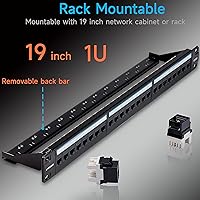
  • Fits any standard 19-inch rack without modification or adapter hardware.
  • Significantly undercuts brand-name alternatives while offering modular repairability those panels often lack.

Cons

  • Keystone jack quality is inconsistent across the 24 included ports — expect one or two that feel slightly off.
  • The plastic snap-in retention mechanism raises durability questions after repeated removal and reinsertion cycles.
  • Included punch tool lacks a spring mechanism, leading to inconsistent termination depth on a full 24-port run.
  • No writeable label strip or labeling channel included, which becomes a real problem in multi-room wiring setups.
  • Rack screws are thin and prone to cam-out — many buyers strip one during first installation and need replacements.
  • Spare keystone jacks are sold separately, so a port failure without stock on hand means downtime while you wait.
  • Lysymixs has limited brand history and no established long-term warranty or support infrastructure to speak of.
  • Transparent end caps are fragile and easy to lose during installation, with no extras included in the package.
  • High-density 10Gb deployments across all ports simultaneously may surface performance gaps versus premium-tier panels.

Ratings

The Lysymixs 24-Port Cat6 Keystone Patch Panel has been evaluated by our AI rating engine after processing verified purchase reviews from buyers across North America, Europe, and Asia-Pacific — with spam, incentivized, and bot-flagged submissions actively filtered out before scoring. The resulting scores reflect a genuine cross-section of real installer experiences, from first-time home lab builders to seasoned small business IT admins. Both the standout strengths and the recurring friction points are weighted transparently in every category below.
Ease of Installation
88%
Buyers consistently describe the keystone snap-in process as dramatically less frustrating than working a traditional 110-block frame, especially inside a compact network cabinet where hand clearance is tight. Most first-timers report completing all 24 ports in under an hour with minimal prior cabling experience.
A portion of reviewers note that getting the punch-down angle right on the keystone jacks takes a few practice runs, and the included punch tool lacks the ergonomic grip of a dedicated blade tool, which can slow things down for those terminating a full 24 ports in one session.
Port Repairability
93%
This is where the modular panel genuinely earns its keep. IT admins dealing with a single failed jack can swap it out in under two minutes without disturbing adjacent ports or re-punching anything — a workflow that simply does not exist on a fixed punch-down panel.
The benefit only applies if you have spare keystone jacks on hand. Buyers who did not stock extras report being caught off guard when a port fails, since replacement keystones are sold separately and shipping lead times can leave a port dark for days.
Build Quality
71%
29%
The metal chassis feels solid enough for a rack that does not move often, and the back bar is a genuine structural addition rather than a decorative afterthought. Most buyers who installed this in a stable home lab or office closet report no flex or rattle issues after months of use.
The plastic snap-in retention mechanism on the keystone slots is the most criticized component. Several long-term users report that jacks feel slightly looser after being removed and reinserted multiple times, raising reasonable questions about how the mechanism holds up beyond two or three swap cycles.
Keystone Jack Quality
74%
26%
The gold-plated contacts perform well in actual throughput tests, and buyers running Cat6 Ethernet to workstations, NAS units, and VoIP phones report stable 1Gb connections with no dropped packets. The 10Gb rating is credible at shorter run lengths typical of office and home lab environments.
Quality consistency across the 24 included jacks is an ongoing theme in critical reviews. Some buyers find one or two jacks per panel that feel slightly off — either with less positive snap engagement or marginally looser cable retention — which is a noticeable quality control gap at this price tier.
Mixed-Media Flexibility
86%
The ability to populate empty keystone slots with coax, HDMI, fiber, or USB modules is a meaningful practical advantage for AV integrators or hybrid network builds where running separate panels would waste rack space. Buyers building media rooms or studio racks especially appreciate this.
The panel ships with only RJ45 Ethernet keystones installed. Any mixed-media configuration requires sourcing and purchasing compatible third-party keystone modules separately, which adds cost and compatibility research that some buyers did not anticipate upfront.
Cable Management
81%
19%
The rear bar with integrated zip tie anchors makes a real difference in keeping cable bundles organized and off the termination points. Buyers managing 20-plus cable runs in a tight cabinet say the strain relief setup prevents the slow loosening that plagues panels without any rear support.
The zip ties included in the box are functional but thin, and a few buyers replaced them immediately with heavier-duty alternatives. The back bar itself provides one row of anchor points, which can feel limiting when cable bundles arrive from multiple directions.
Port Labeling & Identification
62%
38%
Port numbers are molded directly into the panel chassis, which means they do not peel or fade the way adhesive label strips do on cheaper panels. For basic numbered identification, this works cleanly out of the box with no extra materials needed.
There is no writeable label strip or dedicated labeling channel included, which becomes a real organizational problem once cable runs have custom identifiers. Buyers managing multi-room or multi-floor wiring schemas report having to apply third-party labels or tape — a small but consistent frustration.
Rack-Mount Hardware
67%
33%
The panel fits a standard 19-inch rack without modification, and buyers report that the mounting ears align cleanly to standard EIA hole spacing. For a 1U installation in an open-frame or enclosed rack, the hardware does what it needs to do.
The included rack screws are described by multiple reviewers as thin and prone to cam-out during installation. Several buyers stripped a screw head on the first install and had to source replacements, which is an avoidable frustration for what should be a five-minute rack mount.
Included Punch Tool
58%
42%
Having any punch tool in the box is a practical gesture, particularly for buyers who are brand new to structured cabling and may not own one yet. In a pinch, it gets the job done on lighter-gauge wire without noticeable damage to the keystone contacts.
Experienced installers almost universally dismiss the included tool as inadequate for a full 24-port session. The lack of a spring-loaded mechanism means inconsistent termination depth, and several reviewers blame it for jacks that seemed correctly punched but tested poorly — recommending a proper Fluke or Paladin blade tool instead.
Transparency End Caps
79%
21%
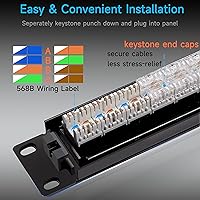
The clear plastic end caps that secure cable tails into the keystones are a small but appreciated detail. During patch cable audits or troubleshooting, being able to see cable seating at a glance without removing anything saves real time in a busy rack.
The caps are small and easy to lose during installation, and the panel does not include spares. A few buyers report caps cracking after being clipped and unclipped a handful of times, suggesting the plastic formulation is on the brittle side.
Compatibility & Standards
84%
Buyers migrating from older Cat5e wiring find this modular panel works as a direct upgrade path — the keystones accept Cat5e termination without any adapter or modification. This backward compatibility makes it an easy choice for phased network upgrades rather than full rewires.
A small number of reviewers running high-density 10Gb switches across all 24 ports simultaneously report slightly elevated error rates compared to panels from established brands like Leviton or Tripp Lite, suggesting the Cat6 spec compliance, while adequate for most, may sit at the lower edge of the standard.
Value for Money
83%
At its price point, the modular panel undercuts brand-name equivalents from Tripp Lite or Leviton by a meaningful margin while offering a feature — individual port swapability — that many premium fixed-frame panels do not provide at all. Home lab builders on a real budget consistently rate it as a strong return on investment.
The value calculation shifts if you factor in replacing low-quality keystones or rack screws out of pocket. Buyers who have owned panels from more established brands note that the per-unit savings can partially erode once accessory replacements and the occasional faulty jack are accounted for.
Brand Reliability & Support
59%
41%
Lysymixs has been responsive to some buyers who reported defective jacks, with replacement units shipped in documented cases. For a lesser-known brand in a category dominated by Panduit and Leviton, that responsiveness is worth acknowledging.
The brand has a limited track record compared to established networking hardware manufacturers, and long-term support continuity is an open question. Buyers who treat their cabling infrastructure as a long-term investment may reasonably prefer a brand with a decades-long warranty history behind it.

Suitable for:

The Lysymixs 24-Port Cat6 Keystone Patch Panel is a strong fit for anyone whose cabling setup is expected to evolve over time rather than stay fixed forever. Home lab enthusiasts who are still experimenting with their network topology will appreciate being able to pull a jack, move it, or swap it without re-terminating an entire frame. Small business IT admins who handle their own infrastructure will find genuine value in being able to fix a dead port themselves in minutes rather than waiting on a contractor. The open keystone slot format also makes this modular panel unusually practical for AV and hybrid racks, where coax, HDMI, or USB runs need to share 1U of rack space alongside standard Ethernet. Installers working in compact wall-mount cabinets or cramped server closets — where maneuvering a traditional 110-block punch-down tool is genuinely awkward — will notice the difference immediately. If your network is a living, breathing thing that gets reconfigured every year or two, this is the kind of panel that actually supports that workflow.
Not suitable for:

The Lysymixs 24-Port Cat6 Keystone Patch Panel is not the right call for permanent, high-density enterprise installations where long-term mechanical reliability and strict standards compliance are non-negotiable. If your rack is going into a data center or a structured cabling system that will be audited against TIA-568 or ISO 11801 requirements, the brand lacks the certification track record and documentation that procurement teams typically require. Buyers who push all 24 ports to sustained 10Gb simultaneously — think dense virtualization hosts or high-throughput storage networks — may find the performance ceiling tighter than advertised compared to panels from Panduit, Leviton, or Tripp Lite. This modular panel also demands a modest parts inventory mindset: if you do not keep spare keystone jacks on hand, a single port failure can leave a run dark while you wait for replacements to ship. Anyone who prefers a set-it-and-forget-it installation with zero ongoing maintenance interaction will likely be better served by a fixed punch-down panel from a more established manufacturer.
Specifications

  • Port Count: The panel provides 24 individually removable keystone ports arranged across a single 1U rack chassis.
  • Cable Category: Designed for Cat6 wiring with full backward compatibility for existing Cat5e installations.
  • Connector Type: Each port uses a punch-down RJ45 keystone jack that snaps independently into the panel frame.
  • Transmission Speed: Gold-plated keystone contacts support up to 10 Gigabit Ethernet throughput under Cat6 specification conditions.
  • Contact Plating: All 24 RJ45 keystone jacks feature gold-plated contacts for improved conductivity and corrosion resistance.
  • Form Factor: The panel occupies 1U of space and mounts to any standard 19″ EIA rack without modification.
  • Dimensions: Packaged dimensions measure 19.65″ x 4.09″ x 2.24″, with an installed chassis depth suitable for most enclosed and open-frame racks.
  • Weight: The fully assembled panel weighs 1.65 pounds, making it easy to handle during single-person rack installation.
  • Media Slot Support: Empty keystone slots accept non-RJ45 keystone modules including coax, fiber, HDMI, and USB connector types.
  • Keystone Mechanism: Each keystone jack is retained by a plastic snap-in clip that allows individual removal and reinsertion without tools.
  • Rear Cable Support: A rear metal bar with integrated zip tie anchor points provides strain relief for incoming cable bundles.
  • End Caps: Transparent plastic end caps secure patch cable tails within each keystone jack and allow visual confirmation of cable seating.
  • Included Accessories: The package contains the panel chassis, 24 pre-installed RJ45 keystones, a rear bar, transparent end caps, cable zip ties, and a basic punch-down tool.
  • Model Number: The manufacturer designates this panel with model code patchpanel-k24 for ordering and support reference purposes.
  • Brand: Manufactured by Lysymixs, a networking accessories brand that entered the market in 2022 and primarily sells through Amazon.
  • Port Numbering: Port numbers are molded directly into the panel chassis beside each keystone slot for permanent, fade-proof identification.
  • Wiring Standard: Keystones support both T568A and T568B wiring configurations depending on installer preference or site standard.
  • First Available: This modular panel was first listed for purchase in July 2022 and has accumulated verified reviews across multiple global markets since then.

Related Reviews
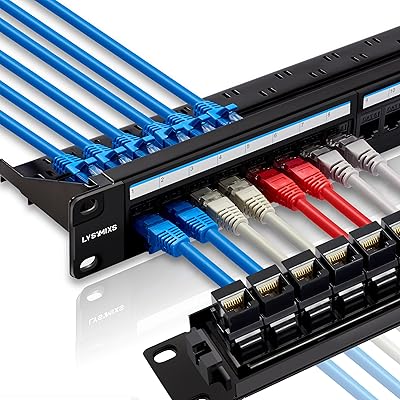
Lysymixs 24 Port RJ45 Patch Panel Cat6 Feed Through
89%
91%
Ease of Installation
94%
Performance (Speed/Connectivity)
88%
Build Quality
82%
Cable Management
85%
Durability
More
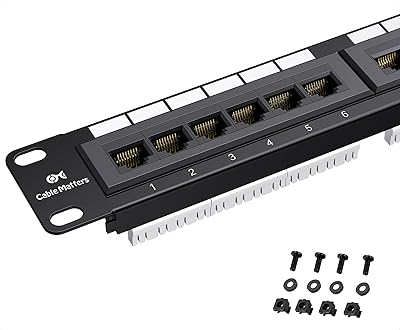
Cable Matters 24-Port Cat6 Patch Panel
87%
91%
Ease of Installation
87%
Build Quality
68%
Cable Management
94%
PoE Support
90%
Reliability
More
Rapink 24-Port Cat6A Patch Panel with Inline Keystone
88%
94%
Setup & Installation
89%
Build Quality
91%
Performance (Network Speed)
85%
Ease of Use
87%
Compatibility with Ethernet Cables
More
Lysymixs 24 Port RJ45 Patch Panel Cat7 STP Feed Through
87%
92%
Ease of Installation
88%
Build Quality
89%
Performance & Speed
85%
Cable Management
91%
Value for Money
More
Rapink 48-Port Cat6 Patch Panel
82%
93%
Value for Money
86%
Port Termination Quality
67%
Build Quality & Housing
91%
Ease of Installation
89%
Compatibility & Cable Flexibility
More
Cable Matters 48-Port 2U Keystone Patch Panel
86%
91%
Build Quality
87%
Value for Money
93%
Port Density & Rack Efficiency
88%
Cable Management
84%
Port Labeling & Documentation
More
Cable Matters 8-Port Mini Patch Panel
84%
91%
Ease of Installation
86%
Build Quality
58%
Port Capacity
83%
PoE & Power Delivery
88%
10G Performance
More
TRENDnet TC-P48C5E 48-Port Cat5e Patch Panel
79%
83%
Build Quality
79%
Port Labeling & Organization
86%
Punch-Down Termination
67%
Cable Management
91%
NDAA Compliance
More
TRENDnet TC-P12C6AS 12-Port Cat6A Shielded Patch Panel
86%
89%
Build Quality
85%
Ease of Installation
91%
Shielded Design (EMI Reduction)
90%
Performance (10G Ethernet Support)
87%
Compatibility (Networking Standards)
More
NICGIGA GS2421P 24-Port PoE+ Gigabit Switch
77%
91%
Value for Money
93%
Ease of Setup
78%
PoE Performance
84%
Build Quality
62%
Thermal Management
More

FAQ

The 24 RJ45 keystone jacks are pre-installed in the panel slots and ready to accept your cable runs. You still need to punch down your field cables into each jack using a 110-blade punch-down tool — that part is unavoidable. The keystones just snap out of the frame if you need to work on them away from the rack, which is a lot easier than terminating directly on a fixed frame.

It will get the job done in a pinch, but most experienced installers skip it pretty quickly. The tool lacks a spring-loaded mechanism, which means you have to apply consistent manual pressure for each termination — easy to get wrong across 24 ports. If you are terminating more than a few jacks, a proper 110-blade punch-down tool from Fluke, Paladin, or even an inexpensive Klein will give you more consistent, reliable results.

Yes, the keystone jacks are fully compatible with Cat5e wiring and will accept it without any modification. You will be capped at Cat5e performance on those runs, obviously, but the panel itself does not force a full rewire. This makes it a practical upgrade option if you want a modular, maintainable panel without the cost of replacing every cable run at once.

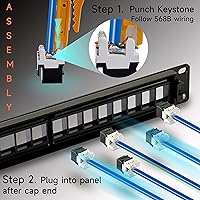
It is straightforward. Disconnect the patch cable from the front and unclip the end cap on the rear. Then press the retention tab on the keystone jack and pull it out of the slot — no screwdriver needed. Punch your cable run into a new jack, snap it back into the slot, and you are done. The whole process takes about two minutes once you have done it once.

As long as your cabinet accepts standard 19″ rack-mount equipment, this panel will fit. Most residential and small office wall-mount cabinets use standard EIA hole spacing, so you should be fine. Just measure your cabinet depth beforehand — the rear bar adds a few inches of depth behind the chassis that you need clearance for.

Yes, that is one of the more practical advantages of the keystone format. Any empty slot in the panel can accept a compatible keystone module — coax, HDMI, fiber, USB, or even a blank passthrough cover. You source the specific keystone modules you need separately and click them directly into the open slots alongside your Ethernet jacks.

The main trade-off is brand assurance versus modular flexibility. Tripp Lite and Leviton have decades of documentation, certifications, and warranty infrastructure behind them, which matters in commercial or enterprise installs. This modular panel, on the other hand, gives you individual port repairability that most fixed punch-down panels from those brands at a comparable price do not offer. For a home lab or small office where you manage the gear yourself, the Lysymixs panel often wins on practical usability. For anything client-facing or compliance-sensitive, the established brands are the safer call.

Everything you need to wire all 24 ports comes in the box — the keystones are already installed. However, the panel does not include spare jacks, so if one fails or gets damaged during installation, you will need to order a replacement separately. Keeping a small stock of compatible Cat6 keystone jacks on hand is a smart move, especially for a production environment where a dead port needs to be fixed the same day.

The panel does not include a writeable label strip or a dedicated labeling channel, which is a genuine limitation. Port numbers are molded into the chassis, but those only give you sequential numbering — not room names, switch port mappings, or whatever custom scheme your install uses. Most buyers end up applying adhesive label tape directly to the panel face, or using a label maker to produce strips they stick on below the port row.

Either will work with this panel. T568B is the more common choice in North American commercial installations, so if you are connecting to existing infrastructure you did not wire yourself, that is usually the safer default. The important thing is consistency — whichever standard you choose, use it on both ends of every run. Mixing T568A on one end and T568B on the other will give you a crossover cable rather than a straight-through, which will cause connection failures.