

Overview

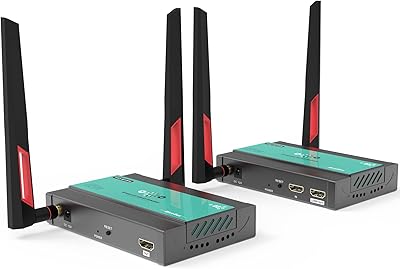
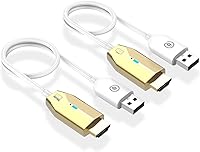
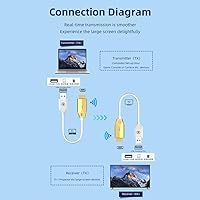
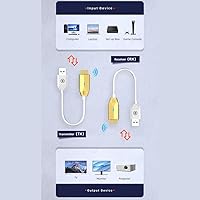
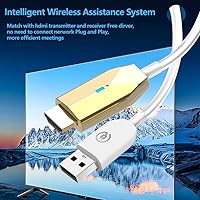
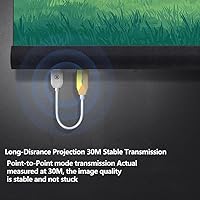
The Lotorasia HDMI-30 Wireless HDMI Extender is a compact transmitter-receiver pair that takes aim at one of the most frustrating parts of modern home and office setups: the tangle of cables running across floors and behind desks. It operates over a 5GHz Wi-Fi signal and claims a range of up to 165 feet, generous enough to cover most living rooms, conference rooms, or classrooms. Setup asks nothing of you — no app to download, no driver to hunt for, no Bluetooth handshake to troubleshoot. Plug both units in and they find each other automatically. The gold-finished aluminum alloy housing feels more considered than what you would expect at this price point.

Features & Benefits

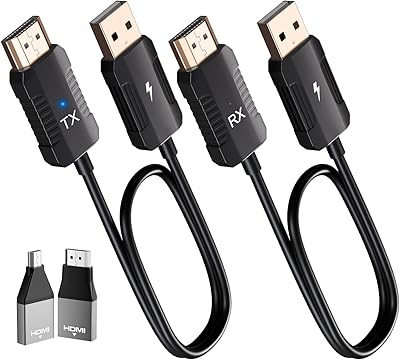
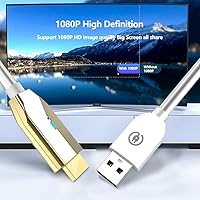
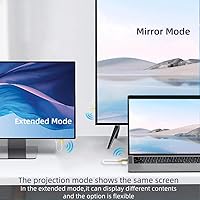
What sets this wireless HDMI kit apart from a simple cable extension is real flexibility in how you use it. Both mirror and extend modes are supported, so you can duplicate your laptop screen on a projector during a meeting or use your TV as a true second monitor while working. Video tops out at 1080P at 60fps, which handles most streaming, gaming, and presentation content without complaint. The 25-inch cables attached to each unit give you some slack when the nearest HDMI port is tucked behind a TV stand. Compatibility is broad — Windows, Mac, Linux, PS4/5, and digital cameras all work without fuss. The manufacturer calls the latency near-zero, which holds true for casual use, though competitive gaming may expose occasional stutters.

Best For

This transmitter-receiver pair is well suited to anyone who wants a no-fuss wireless display without reading a manual or calling IT support. It shines in home environments where running a cable from a laptop to a wall-mounted TV would mean drilling or hiding wires. Presentation-heavy office workers and teachers will appreciate how reliably it reconnects each session. Console gamers who want to run a PS5 or PS4 to a projector in a room where cables would be impractical will find it a solid fit. Camera operators previewing footage on a larger monitor without stepping over cables will also benefit. Just keep in mind the 5GHz signal drops noticeably through thick or multiple walls.

User Feedback

Buyers consistently praise the plug-and-play setup, with many noting they had a working connection within minutes and zero technical headaches. The auto-pairing is a genuine highlight for less tech-savvy users. On the flip side, several reviewers flag that real-world range falls short of the advertised figure, particularly through walls or in apartments packed with competing Wi-Fi networks. A handful report intermittent signal drops during fast-action video, which aligns with the reality that near-zero latency is a best-case figure. Build quality comments are mostly positive at this price tier, though a few buyers note the units feel lighter than expected. Compatibility issues surface occasionally, most often with older HDMI source devices.

Pros

  • Plug-and-play setup works without any app, driver, or manual configuration — genuinely foolproof.
  • Auto-detection between transmitter and receiver means reconnecting each session takes seconds, not minutes.
  • Both mirror and extend display modes are supported, adding real flexibility beyond simple screen duplication.
  • The aluminum alloy housing feels more durable and dissipates heat better than typical plastic budget alternatives.
  • Broad compatibility covers Windows, Mac, Linux, and PS4/5 without extra adapters or workarounds.
  • At just over three ounces total, this wireless HDMI kit is light enough to carry daily in a laptop bag.
  • 1080P at 60fps output handles presentations, streaming, and casual gaming without visible quality issues.
  • The 25-inch attached cables provide useful slack when ports are recessed or awkwardly positioned.
  • Works with digital cameras for wireless monitor preview, a niche but genuinely useful capability.
  • Audio and video stay in sync reliably across normal usage sessions, avoiding a common budget AV pitfall.

Cons

  • Advertised 165-foot range is a best-case figure; real-world usable distance through walls is far shorter.
  • Signal stability degrades quickly in apartments or offices with congested 5GHz Wi-Fi environments.
  • Input latency is noticeable enough in fast-action gaming to affect gameplay in reflex-dependent titles.
  • No 4K support limits usefulness for anyone already using a higher-resolution display.
  • Auto-pairing occasionally fails on first plug-in, requiring an unplug-replug cycle to trigger detection.
  • After-sale documentation is thin, and brand support responses are frequently criticized as unhelpful.
  • Older HDMI source devices and certain laptop models cause compatibility failures with no clear fix.
  • The attached cables can feel slightly loose in some HDMI port configurations, a potential long-term issue.
  • High-bitrate audio formats are not supported, ruling this out for home theater or audiophile setups.
  • Units can run noticeably hot after extended use in enclosed or poorly ventilated spaces.

Ratings

The Lotorasia HDMI-30 Wireless HDMI Extender has been rated by our AI system after processing verified buyer reviews from global markets, with spam, bot-submitted, and incentivized feedback actively filtered out. Scores reflect the honest distribution of real user experiences — not a curated highlight reel. Where this transmitter-receiver pair earns praise, the scores show it; where buyers ran into walls, literally and figuratively, those frustrations are reflected too.

Ease of Setup
91%
The plug-and-play experience is where this kit genuinely earns its reputation. Buyers from non-technical backgrounds — teachers, retirees, small business owners — repeatedly note that both units connected automatically within seconds, with no app, no pairing screen, and no manual diving required. That kind of friction-free first use builds real confidence.
A small but consistent group of users reports that the auto-detection occasionally fails on the first plug-in, requiring an unplug-replug cycle to trigger the handshake. This is minor for most, but for someone mid-presentation it can cause a stressful 30-second scramble.
Signal Stability
67%
33%
In open-plan spaces — a living room with a clear line of sight between couch and TV, or a single-room office setup — signal consistency is genuinely solid. Users in these environments describe holding a stable 1080P feed through hour-long Netflix sessions and extended work-from-home video calls without a single drop.
Move one wall between the transmitter and receiver and the experience degrades noticeably. Buyers in apartments with dense construction or in offices sharing the 5GHz band with a dozen other networks report stuttering, freezing frames, and occasional full disconnections that required a manual reset to recover.
Video Quality
84%
At 1080P and 60 frames per second, the picture output is clean and color-accurate for everyday use. Presentation slides look sharp on a projector, streaming content from a laptop to a wall TV holds up without visible compression artifacts, and camera preview monitoring is clear enough for practical on-set use.
The kit tops out at 1080P, which feels limiting for buyers who already own 4K displays. Users expecting the same visual fidelity they get from a direct HDMI cable will notice a subtle softness in very high-detail content, and HDR passthrough is not supported.
Latency Performance
62%
38%
For casual gaming, video playback, and presentation work the perceived lag is low enough that most users simply do not notice it. Watching a film or running a PowerPoint wirelessly feels no different from a wired connection in these scenarios, which is all the average buyer really needs.
The zero-latency claim does not hold up under scrutiny in competitive or fast-reflex gaming scenarios. Multiple buyers testing with PS4 and PS5 titles describe a visible input delay that makes twitch-based games noticeably harder. For rhythm games or online shooters, the latency is a real problem, not a theoretical one.
Transmission Range
58%
42%
In ideal conditions — same room, no obstructions, minimal 5GHz interference — the kit performs respectably at distances most home and small-office users actually care about. Spanning a 30-foot living room or reaching across a single-floor classroom works reliably in these controlled setups.
The advertised 165-foot range is a best-case lab figure that most real-world environments will never replicate. Buyers in multi-room homes consistently report usable range of 30 to 50 feet at most before signal quality degrades. This is arguably the most overstated spec on the entire product page.
Build Quality
73%
27%
The aluminum alloy housing gives the units a more premium feel than the plastic shells common at this price tier. The gold finish, while polarizing aesthetically, does not feel cheap to the touch, and the overall construction feels solid enough to survive regular packing and unpacking for presenters on the move.
The attached cables feel noticeably lighter than the housing itself, and a few buyers describe the HDMI connector on the cable as slightly loose in certain port configurations. For a device that gets plugged and unplugged frequently, that connector junction is a potential long-term weak point.
Device Compatibility
71%
29%
The broad compatibility list — covering Windows, Mac, Linux, PS consoles, TV boxes, and digital cameras — means most buyers can find a working use case without extra adapters. Mac users in particular appreciate not needing a driver installation, which is a common pain point with budget AV hardware.
Compatibility issues cluster around older HDMI source devices and certain smart TV receiver configurations. A recurring thread in negative reviews involves specific laptop models where the transmitter is detected but no signal passes through, with no clear fix offered in documentation.
Audio Transmission
77%
23%
Audio passes through cleanly alongside video for the vast majority of use cases. Buyers using the kit for movie streaming or meeting presentations report no sync issues between the audio and video feeds, which is a common failure point in cheaper wireless display solutions.
A subset of users notes that audio occasionally cuts out independently of video during longer sessions, requiring a reconnect to restore. There is also no support for high-bitrate audio formats, which matters to buyers hoping to use this kit in a home theater context with a dedicated AV receiver.
Value for Money
82%
18%
Relative to the price tier this kit occupies, the feature set is genuinely competitive. Getting plug-and-play wireless HDMI with both mirror and extend modes, broad OS compatibility, and a decent build quality in a single affordable package is a reasonable proposition for users with straightforward display needs.
Buyers who push the hardware beyond casual use — through walls, for competitive gaming, or for 4K content — quickly feel the gap between what they paid for and what they actually get. At that point the value calculation shifts, and a pricier competing product starts looking more justified.
Heat Management
78%
22%
The aluminum housing does its job in normal operation. Users running the kit for several hours continuously report that the units get warm but never hot enough to cause concern or require manual cool-down breaks, which is reassuring for all-day presentation or monitoring setups.
Extended sessions in poorly ventilated spots — tucked behind a monitor, crammed into an AV cabinet — can push the temperature higher than feels comfortable. A couple of buyers mention the transmitter becoming noticeably hot after two-plus hours of continuous use in enclosed spaces.
Portability
86%
Weighing just over three ounces in total, this is genuinely portable kit. Professionals who carry a laptop bag to client meetings or classrooms find the two compact units easy to toss in a side pocket and forget about until they need them. Setup and teardown take under a minute.
The 25-inch attached cables, while useful for reaching recessed ports, do add a bit of awkward bulk when coiling everything back into a bag. A cleaner detachable cable design would make travel packing more convenient.
Indicator Lights & Feedback
69%
31%
The onboard status LEDs give enough basic feedback to tell you whether the units have paired successfully and whether a signal is actively being transmitted. For simple go/no-go troubleshooting this is sufficient and better than nothing.
The LED behavior is not documented well enough to interpret error states. When something goes wrong — a failed pairing or a dropped signal — the lights offer no meaningful diagnostic information, leaving users to guess whether the fix is a replug, a power cycle, or something else.
Documentation & Support
54%
46%
Setup is simple enough that the thin included guide covers the majority of use cases without leaving buyers stranded. For the plug-and-play majority, the documentation is just adequate enough to get the job done.
Buyers who hit edge cases — unusual device pairings, persistent pairing failures, OS-specific issues — find the documentation nearly useless. Brand support response times and solution quality are frequently criticized in reviews, and there is no meaningful online knowledge base to fall back on.

Suitable for:

The Lotorasia HDMI-30 Wireless HDMI Extender is a strong fit for anyone whose primary frustration is running HDMI cables across a room — and who operates within a single, relatively open space. Teachers and trainers who connect a laptop to a classroom projector multiple times a day will appreciate how reliably the kit reconnects without any setup ritual each session. Home users who want to mirror a laptop screen to a wall-mounted TV from the couch, without drilling cable channels or draping a wire across the floor, will find this transmitter-receiver pair covers that exact need cleanly. Office workers who move between meeting rooms carrying a laptop will value how easily both units slip into a bag and deploy in under a minute. Content creators who need a quick wireless preview of camera output on a larger monitor, without a permanent cable run, also land squarely in the sweet spot for this kit. If your environment is a single room with a clear or near-clear line of sight between source and display, this is a genuinely practical solution at a price that does not require much justification.

Not suitable for:

The Lotorasia HDMI-30 Wireless HDMI Extender is the wrong tool for buyers who need to transmit through multiple walls, across floors, or in environments already saturated with 5GHz Wi-Fi traffic — the real-world range falls well short of the headline figure in those conditions. Competitive gamers should look elsewhere entirely; the input delay, while barely perceptible during casual play, is real enough to affect performance in fast-reflex or online multiplayer titles where every millisecond counts. Anyone who has already invested in a 4K display will find the 1080P ceiling frustrating, as there is no upscaling and no HDR support to bridge the gap. Buyers who need a rock-solid, zero-tolerance connection — think live event production, broadcast monitoring, or critical client-facing demos in unpredictable venues — should invest in a more professional-grade solution rather than relying on a budget wireless kit. Finally, users who anticipate needing meaningful brand support or detailed troubleshooting documentation if something goes wrong should be aware that after-sale resources for this product are thin.

Specifications

  • Brand: Manufactured and sold under the Lotorasia brand, model number HDMI-30.
  • Signal Band: Operates exclusively over the 5GHz Wi-Fi frequency band for reduced interference compared to 2.4GHz alternatives.
  • Transmission Range: Rated up to 165 ft (50 m) in open, unobstructed line-of-sight conditions; real-world range through walls will be shorter.
  • Video Resolution: Supports full HD output at 1080P and 60 frames per second for smooth, sharp video transmission.
  • Audio Support: Transmits stereo and standard digital audio alongside video; high-bitrate or lossless audio formats are not supported.
  • Display Modes: Offers both Mirror mode (duplicating the source screen) and Extend mode (using the display as a second monitor).
  • Latency: Manufacturer rates latency as near-zero; independent user testing suggests a perceptible delay under demanding real-time conditions.
  • Connector Type: Both units connect via HDMI, with an integrated 25-inch cable on each unit to accommodate recessed or rear-facing ports.
  • Compatible Sources: Works with laptops, desktop PCs, PS4/5 consoles, digital cameras, and TV boxes as signal sources.
  • Compatible Displays: Compatible output destinations include HDTVs, projectors, and external monitors with an HDMI input port.
  • Operating Systems: Plug-and-play compatible with Windows, Mac OS, and Linux; no driver or application installation is required.
  • Housing Material: Enclosure is constructed from aircraft-grade aluminum alloy designed to aid heat dissipation during extended operation.
  • Color Finish: Units are finished in gold, providing a visually distinct look compared to the typical black or grey AV hardware aesthetic.
  • Weight: The combined kit weighs approximately 3.2 oz, making it compact and practical to carry in a standard laptop bag.
  • Power Source: Both transmitter and receiver units draw power directly via USB, typically sourced from the connected host device or a USB charger.
  • HDR Support: HDR video passthrough is not supported; the kit is limited to standard dynamic range content at 1080P.
  • 4K Support: Maximum output resolution is capped at 1080P; 4K source signals will be downscaled and are not natively passed through.
  • Date Available: This product was first made available for purchase in May 2024.

Related Reviews
Weeryyi Wireless HDMI Extender Receiver
83%
91%
Value for Money
88%
Ease of Setup
85%
Signal Stability
83%
Range Performance
70%
Latency
More
J-Tech Digital Wireless HDMI Extender 1X2 (JTECH-WEX200V3)
85%
91%
Value for Money
95%
Setup & Installation
88%
Signal Strength
92%
Latency for Video Playback
80%
Range Performance
More
Mirabox Wireless HDMI Transmitter and Receiver Extender 1x4-1080P@60Hz
85%
88%
Signal Strength & Range
91%
Setup & Installation
85%
Latency & Performance
83%
Build Quality
89%
Multi-Screen Setup
More
Mirabox HDMI Extender 400ft
85%
94%
Signal Quality
85%
Ease of Setup
90%
Build Quality
91%
Transmission Range
89%
Audio Performance
More
OREI EX-500IR HDMI Extender
88%
94%
Transmission Distance
92%
Signal Quality
89%
Ease of Installation
85%
Build Quality
88%
Power over Cable (PoC) Functionality
More
TESmart HDMI KVM Extender Receiver
85%
91%
Signal Stability
86%
Installation Ease
90%
Build Quality
88%
Heat Dissipation
93%
Compatibility
More
DxInvb Wireless HDMI Transmitter and Receiver Kit
75%
91%
Ease of Setup
58%
Device Compatibility
74%
Wireless Range & Stability
69%
Video Quality
83%
Build Quality & Portability
More
AGPTEK LKV373A 1080P HDMI Extender
86%
93%
Signal Reliability
88%
Installation Ease
89%
Compatibility with Devices
85%
Build Quality
91%
Value for Money
More
gofanco HDBaseT HDMI Extender 4K 60Hz
86%
88%
Video Performance
91%
Installation Ease
80%
Signal Reliability
75%
Range at 4K
95%
Range at 1080p
More
Vrriis Wireless HDMI Transmitter and Receiver 250m
83%
88%
Range and Signal Stability
92%
Setup and Installation
65%
Signal Quality in Obstructed Spaces
89%
Value for Money
80%
Dual Frequency Support (2.4GHz/5.8GHz)
More

FAQ

No, nothing at all. You plug the transmitter into your source device and the receiver into your display, and they find each other automatically. There is no app to download, no Bluetooth to pair, and no driver installation on any supported operating system. It really is as straightforward as it sounds for the vast majority of setups.

It can work through a single standard drywall partition, but do not count on the advertised 165-foot range in that scenario. Real-world usable distance drops significantly through walls, and dense materials like concrete or brick will cut the signal further. For best results, keep the transmitter and receiver in the same room with as few obstructions as possible.

It works for casual gaming and general console use, but competitive or fast-reflex gaming is where it shows limitations. The latency, while low enough to feel acceptable during slower-paced games, is noticeable in titles that demand quick reactions. If you are playing single-player adventures or watching content, it is fine; if ranked online matches are your priority, a wired connection will serve you better.

Yes, that is one of the more useful features of this wireless HDMI kit. You can switch between mirror mode and extend mode, so your display acts as a true second monitor rather than just a copy of your primary screen. This makes it practical for productivity work where having extra screen real estate actually matters.

It does not. The maximum output resolution is 1080P at 60fps, so if your display is a 4K screen, the output will be downscaled accordingly. For presentations, streaming, and casual use this is rarely a problem, but buyers expecting to pass a 4K signal through should look at a different product.

Usually an unplug-and-replug of the transmitter is enough to trigger a fresh automatic reconnection. Most users report the reconnect takes only a few seconds once the units detect each other again. It is not a common occurrence in clean environments, but in congested 5GHz spaces it can happen more than once during a long session.

Yes, Mac OS is supported out of the box with no configuration needed. The transmitter-receiver pair operates as a standard display device at the operating system level, so macOS recognizes it the same way it would any HDMI monitor or projector. You can switch between mirror and extend modes using the standard display settings in System Preferences or System Settings.

They get warm, especially after an hour or more of continuous operation. The aluminum housing helps manage heat better than a fully plastic shell would, but tucking either unit into an enclosed cabinet or stacking it under other devices is not a great idea for long sessions. In open air on a desk or shelf, the temperature stays within a comfortable range.

Both audio and video travel over the same wireless connection, so you do not need a separate audio cable running to your display. Standard stereo and common digital audio formats come through cleanly and in sync with the video. The only caveat is that high-bitrate formats like Dolby TrueHD or DTS-MA are not supported, so a full home theater audio setup would still need a different solution.

It is a solid choice for those environments as long as the room is not too large and the 5GHz band is not overloaded with competing devices. Teachers and presenters who have used it consistently praise how quickly it reconnects at the start of each session without any ritual. One practical tip: keep both units stored together and test the connection before a critical presentation, especially in venues with heavy network traffic.