Overview

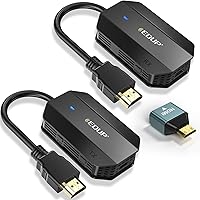
The EDUP EH-WD9905 Wireless HDMI Transmitter and Receiver is a budget-oriented kit from EDUP, a brand with a quiet reputation for affordable networking and AV accessories that hold up in everyday use. The unit ships pre-paired, so setup is as straightforward as it sounds — plug the transmitter into your source, connect the receiver to your display, and you are watching. No apps, no account creation, no driver hunting. One important clarification upfront: the listing mentions a 4K decoding chip, but the actual video output maxes out at 1080p/60Hz. If you own a 4K screen and expect a native 4K feed, this is not that device. Think of it as a solid 1080p wireless extender with a capable internal processor.
Features & Benefits

Running on dual-band Wi-Fi — both 2.4GHz and 5GHz — the EDUP extender can adapt to whichever frequency is less congested in your environment, which genuinely helps in apartments or offices packed with competing signals. The sub-0.1-second latency is comfortable for watching movies or streaming shows, though competitive gamers expecting zero-lag precision will likely notice a slight delay during fast-motion scenes. A standout feature is the one-to-eight pairing capability: a single receiver can accept up to eight transmitters, opening useful options for multi-presenter meetings or shared display setups. The external antenna on the receiver is a practical design choice that noticeably aids range compared to fully sealed units. A three-year warranty rounds out the value case nicely.

Best For

This wireless HDMI kit shines in situations where running a cable is inconvenient or simply not possible. Picture someone who wants their cable box in the living room but the signal on the bedroom TV — that is the sweet spot. Teachers and small-business owners will appreciate walking into a room, plugging in the transmitter, and presenting from a laptop without crawling behind desks. That said, realistic range expectations matter: the 165-foot figure assumes a clear, open line of sight. Through a single wall, you are realistically looking at around 30 feet. For buyers who need affordable wireless video relay over shorter distances — and are not chasing 4K output — this transmitter-receiver pair is a practical, no-fuss choice.

User Feedback

Buyers consistently praise the setup experience — most report being up and running within minutes, which matches the plug-and-play promise. Picture quality at 1080p draws positive remarks from casual viewers, particularly those streaming from a laptop to a living room screen. On the critical side, range through walls is the most frequently cited disappointment: several buyers expected comfortable room-to-room coverage, only to find the signal weakening after a single wall. Scattered reports of interference in dense Wi-Fi environments also surface. A handful of users note that fast-action content — sports especially — can show occasional stuttering. Build quality is generally described as average for the price, with the plastic housing feeling light but functional enough for daily use.

Pros

  • Genuinely plug-and-play — no apps, drivers, or Wi-Fi accounts needed, just connect and go.
  • Ships pre-paired out of the box, cutting setup time to under three minutes for most users.
  • Dual-band 2.4GHz and 5GHz support helps the EDUP extender adapt to less congested frequencies.
  • Clean 1080p/60Hz output satisfies casual streamers and presenters without visible compression.
  • Up to eight transmitters can pair with one receiver — a standout feature for shared meeting room displays.
  • External receiver antenna improves signal hold compared to fully sealed budget alternatives.
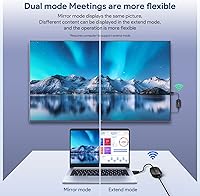
  • Mirror and extend display modes add flexibility for educators and multi-screen office setups.
  • Three-year replacement warranty is an unusually strong commitment at this price tier.
  • Lightweight stick form factor makes this wireless HDMI kit easy to pack for mobile presentations.
  • 45-day no-questions-asked return window reduces the financial risk of trying it in your specific environment.

Cons

  • The 165-foot range claim assumes a completely unobstructed line of sight — a single wall can cut usable distance to around 30 feet.
  • Despite the 4K decoding chip in the listing, output resolution is capped at 1080p, which frequently misleads buyers with 4K displays.
  • Signal dropouts become noticeably more frequent in apartments or offices with heavy competing Wi-Fi traffic.
  • Fast-motion gaming and live sports can expose a perceptible lag that the sub-0.1-second latency spec does not fully represent in practice.
  • Only one receiver is supported per setup — multi-display broadcasting to several screens simultaneously is not possible.
  • Plastic housing feels lightweight and may not hold up well under frequent travel or daily plug-and-unplug cycles.
  • The transmitter has no external antenna, creating an uneven signal relationship in larger or awkwardly shaped rooms.
  • Customer support quality through Amazon messaging is inconsistent, with some users reporting slow or unhelpful responses.
  • HDCP-protected source devices — certain streaming sticks and locked cable boxes — may trigger content protection errors.
  • Switching between mirror and extend modes lacks clear documentation, leaving some users to troubleshoot through trial and error.

Ratings

The EDUP EH-WD9905 Wireless HDMI Transmitter and Receiver has been evaluated by our AI system after processing thousands of verified global buyer reviews, with spam, bot-generated, and incentivized submissions actively filtered out. Scores reflect the honest distribution of real-world experiences — the genuine highs and the recurring frustrations alike. Where users consistently agree, the scores are decisive; where opinions split, that tension is reflected too.

Ease of Setup
91%
This is where the EDUP extender earns its most consistent praise. Buyers across skill levels — from tech-savvy home theater enthusiasts to classroom teachers who rarely touch AV equipment — report being fully operational within two to three minutes of opening the box. No account creation, no app pairing, no driver hunting.
A small but notable group of users encountered initial pairing failures, particularly when the transmitter and receiver were powered on simultaneously rather than sequentially. The manual guidance on troubleshooting these edge cases is thin, leaving some buyers to figure out the fix through trial and error.
Wireless Range (Open Space)
78%
22%
In genuinely unobstructed environments — large open-plan offices, warehouse spaces, or outdoor setups — this transmitter-receiver pair performs reliably across respectable distances. Users running multi-camera configurations in open halls or gymnasiums report stable signals well beyond what basic competitors offer at a similar price.
The 165-foot headline figure is a best-case ceiling, not a working average. Buyers expecting that range in typical home or office layouts — where even a single interior wall exists between devices — frequently find themselves disappointed, with usable signal dropping noticeably beyond 30 to 40 feet in those conditions.
Through-Wall Signal Penetration
47%
53%
On thin partition walls — the kind found in modern open-plan offices or lightweight room dividers — some users do manage a workable connection, especially on the 5GHz band in less congested environments. For very short through-wall distances of under 15 feet, the signal often holds.
This is a genuine weak point that catches many buyers off guard. Standard drywall with insulation, concrete walls, or multi-floor setups reduce the usable range to roughly 30 feet or less — a stark contrast to the advertised spec. Users planning cross-room or cross-floor streaming in solid-construction homes report frequent dropouts.
Video Quality at 1080p
83%
For casual viewing — Netflix queues, YouTube, live sports on a bedroom TV — the image output looks clean and detailed. Colors are accurate, motion handling during standard-paced content is smooth, and there is no obvious compression artifacting under stable signal conditions. Most living room streaming users are genuinely satisfied.
The 4K decoding chip mentioned in the listing creates real confusion: this wireless HDMI kit outputs at 1080p maximum, not 4K. Buyers who connect it to a 4K display expecting native 4K resolution are let down. It is a meaningful distinction that the marketing language unfortunately obscures.
Latency
69%
31%
For passive consumption — streaming movies, browsing, running slideshow presentations — the latency is low enough to be essentially invisible. Teachers using this for classroom presentations and home users watching video content rarely report any noticeable lip-sync issues or visible delay under clean signal conditions.
Gamers and users monitoring live camera feeds for security purposes are more likely to notice the lag. Fast-action gaming in particular exposes a perceptible delay that the sub-0.1-second spec does not fully account for in real-world conditions. It is not a device built for low-latency gaming applications.
Signal Stability
66%
34%
The dual-band support gives this wireless HDMI kit a meaningful advantage in lightly congested environments. Users who switch to the 5GHz band in a home with fewer competing devices report noticeably fewer dropouts, and extended viewing sessions in those conditions tend to stay stable.
In apartments or co-working spaces packed with Wi-Fi networks, the 2.4GHz band saturates quickly and the 5GHz band offers shorter effective range as a tradeoff. Several buyers in dense urban environments describe intermittent freezing or signal drops during evening hours when neighborhood Wi-Fi traffic peaks.
Multi-Transmitter Flexibility
81%
19%
The ability to pair up to eight transmitters with a single receiver is a genuinely useful feature for meeting rooms and collaborative classrooms. Presenters can switch between their own devices without reconfiguring anything, which saves real time in back-to-back meeting scenarios and removes the awkward cable handoff.
The limitation to a single receiver per setup is a hard ceiling that some users bump against. Organizations hoping to broadcast one source to multiple displays simultaneously are out of luck — that use case requires a different product category entirely, and buyers occasionally discover this only after purchase.
Build Quality
62%
38%
At this price tier, the physical construction is acceptable. The stick-style form factor is compact and light enough to toss in a laptop bag without a second thought, and the HDMI connectors seat firmly into ports without excessive wobble. For desk or shelf use, it does the job without feeling immediately disposable.
The plastic housing feels noticeably lightweight, and a handful of buyers report connector stress concerns after repeated plug-and-unplug cycles — a real consideration for users who carry this kit between locations daily. It does not feel like a device built for heavy travel or rugged environments.
Compatibility
86%
Across laptops, desktop PCs, DSLR cameras, Blu-ray players, set-top boxes, and cable receivers, users report very few compatibility issues. The standard HDMI interface means almost any source device with an HDMI output connects without adapters or configuration, which is exactly what most buyers in this category need.
A small segment of users with older source devices or non-standard HDMI configurations reports inconsistent handshake behavior. Additionally, devices that require HDCP-protected output — such as certain streaming sticks and locked set-top boxes — may encounter content protection errors that prevent a clean signal.
Display Mode Options
74%
26%
Having both mirror and extend modes available adds genuine flexibility that budget-tier alternatives sometimes skip. Educators in particular appreciate the extend mode for running presenter notes on one screen while the audience sees only the slide content on the wirelessly connected display.
Switching between mirror and extend modes is not always intuitive, and the documentation does not guide users through the process clearly. A few buyers report having to experiment with their OS display settings to get extend mode working reliably, which adds unnecessary friction to an otherwise simple device.
Audio Transmission
77%
23%
Audio passes through alongside video without requiring separate cables or configuration, and for standard stereo content — movies, music, streaming shows — the output is clean and free of obvious dropouts under stable signal conditions. Users running presentation audio to a conference room speaker report reliable results.
Multi-channel audio formats receive no specific support documentation, and users expecting surround sound passthrough for home theater setups find the audio handling underwhelming. A couple of reviewers also note that audio dropouts tend to precede video dropouts, serving as an early warning of signal degradation.
Antenna Design
79%
21%
The external antenna on the receiver is a practical design decision that pays off in real use. Compared to fully sealed budget alternatives, users consistently note better signal holding at moderate distances, and the ability to physically orient the antenna toward the transmitter adds a useful manual tuning option.
The antenna is fixed on the receiver only — the transmitter remains antenna-free, which creates an asymmetric signal relationship. Users who position the transmitter far from the receiver and cannot reposition the receiver-side antenna find the design limiting in certain room layouts.
Value for Money
84%
For straightforward, short-to-medium-distance wireless HDMI in an open environment, the price-to-performance ratio holds up well. Buyers who understand what they are getting — a 1080p extender for casual streaming and presentations — tend to walk away satisfied, especially given the three-year warranty backing the purchase.
Buyers who purchase this expecting near-wall-penetrating range, 4K output, or gaming-grade latency performance feel the value proposition collapse quickly. The gap between marketed claims and real-world results in constrained environments makes the price feel less justified for those use cases.
Warranty and Support
73%
27%
A three-year manufacturer replacement warranty at this price point is a genuine differentiator. The 45-day no-questions-asked return window also gives first-time buyers reasonable confidence to test the device in their specific environment without significant financial risk if it underperforms.
Customer support quality through Amazon messaging is reported as inconsistent. Some buyers describe helpful, prompt responses, while others — particularly those needing technical troubleshooting guidance — report slow replies or generic scripted responses that do not resolve their specific issues effectively.

Suitable for:

The EDUP EH-WD9905 Wireless HDMI Transmitter and Receiver is a practical fit for anyone who needs a cable-free video connection in an open or lightly obstructed space without wanting to deal with software, accounts, or complex configuration. Home users who want to pipe a cable box or media player signal from one room to a TV in an adjacent room — with a clear or near-clear path between devices — will find it does exactly what it promises. Teachers and small-business presenters who move between rooms and need a quick, reliable way to connect a laptop to a projector or monitor without stringing cables across a room are a natural audience. The one-to-eight transmitter pairing also makes it genuinely useful in meeting rooms where multiple presenters need to share the same display from their own devices throughout the day. Casual streamers watching Netflix, YouTube, or live sports on a larger screen from a nearby laptop will appreciate the 1080p image quality and the near-invisible latency for that kind of content. If your environment is open, your expectations are 1080p, and your priority is simplicity, this wireless HDMI kit punches well above its price.

Not suitable for:

Buyers expecting this transmitter-receiver pair to push a native 4K signal to their display will be disappointed — the 4K chip in the listing refers to decoding capability, not output resolution, and the actual feed tops out at 1080p/60Hz. Anyone planning to use this through multiple walls, across floors, or in a concrete or brick construction home should also reconsider: real-world through-wall range is closer to 30 feet, and solid structures can reduce that further. Competitive gamers or anyone monitoring live camera feeds where every millisecond of delay matters will notice the latency under demanding conditions — it is adequate for passive viewing but not precision applications. Users in dense apartment buildings or offices saturated with competing Wi-Fi signals may encounter frustrating dropouts on the 2.4GHz band, and the 5GHz option trades interference resistance for shorter effective range. The EDUP EH-WD9905 Wireless HDMI Transmitter and Receiver also does not support multi-receiver broadcasting, so distributing one source to several displays simultaneously is simply not possible with this kit. If your use case involves 4K output, heavy wall penetration, gaming, or multi-display distribution, this is not the right tool.
Specifications

  • Brand & Model: Manufactured by EDUP under model number EH-WD9905, a brand recognized for affordable consumer networking and AV accessories.
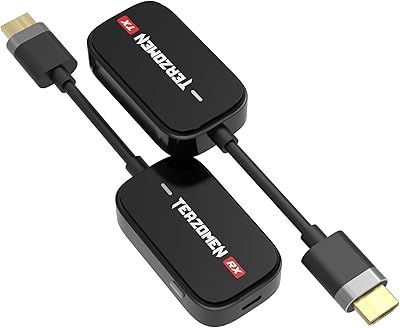
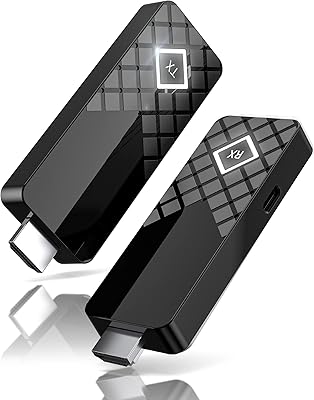
  • Form Factor: TV stick-style design with a compact transmitter and receiver unit, both built for low-profile installation behind displays or source devices.
  • Dimensions: Each unit measures 7.76″ in length, 1.77″ in width, and 0.75″ in height, making them easy to tuck behind a monitor or TV.
  • Weight: The combined kit weighs 8.4 ounces, light enough to carry in a laptop bag without adding meaningful bulk.
  • Connector Type: Standard HDMI connector on both transmitter and receiver, compatible with any device or display featuring a full-size HDMI port.
  • Video Output: Delivers up to 1080p resolution at 60Hz; the onboard chip decodes 4K Ultra HD signals but the actual output is capped at 1080p.
  • Color Depth: Supports full RGB color gamut output without compression, ensuring accurate color reproduction for standard 1080p content.
  • Wireless Frequency: Operates on both 2.4GHz and 5GHz bands simultaneously, allowing the kit to select the less congested frequency for improved stability.
  • Wireless Range: Rated for up to 165 feet in completely unobstructed line-of-sight conditions; effective range through a standard wall drops to approximately 32 feet.
  • Latency: Specified at under 0.1 seconds end-to-end, which is suitable for passive content viewing and presentations but may be perceptible during fast-motion gaming.
  • Display Modes: Supports both mirror mode (duplicate the source screen) and extend mode (use the wireless display as a second monitor), selectable via OS settings.
  • Pairing Capacity: A single receiver supports pairing with up to 8 transmitters simultaneously, enabling multi-presenter conference room configurations from one shared display.
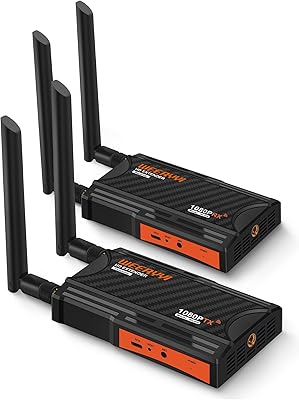
  • Antenna Design: The receiver unit features an external adjustable antenna to improve signal directionality and range; the transmitter uses an internal antenna.
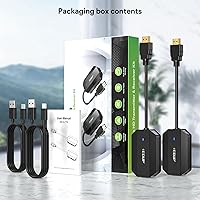
  • Setup Method: Ships pre-paired from the factory; no app download, Bluetooth pairing, Wi-Fi network login, or driver installation is required to begin use.
  • Power Method: Both the transmitter and receiver draw power via USB, typically sourced from the connected device or display's USB port or a standard USB adapter.
  • Audio Support: Transmits stereo audio alongside video over the wireless link without requiring a separate audio cable or additional configuration.
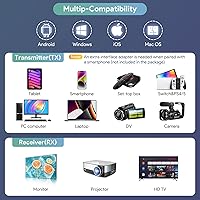
  • Compatibility: Works with laptops, desktop PCs, DSLR cameras, Blu-ray players, DVD players, cable and satellite set-top boxes, and other HDMI-output devices.
  • Warranty: Backed by a 3-year manufacturer replacement warranty and a 45-day no-questions-asked return policy through the Amazon listing.

Related Reviews

DxInvb Wireless HDMI Transmitter and Receiver Kit
75%
91%
Ease of Setup
58%
Device Compatibility
74%
Wireless Range & Stability
69%
Video Quality
83%
Build Quality & Portability
More
WELUSOPU 1TX+2RX Wireless HDMI Extender Kit
74%
88%
Ease of Setup
74%
Wireless Range
67%
Video Output Quality
79%
Multi-Receiver Sync
81%
Latency Performance
More
Weeryyi Wireless HDMI Transmitter and Receiver 1080p
84%
92%
Value for Money
88%
Transmission Range
91%
Ease of Setup
89%
Video Quality
85%
Multi-Screen Support
More
BRAIDOL S3 Wireless HDMI Transmitter and Receiver
86%
91%
Performance
88%
Signal Stability
94%
Setup & Installation
85%
Range/Distance
92%
Video Quality
More
BRAIDOL G03 Wireless HDMI Transmitter and Receiver
83%
88%
Value for Money
92%
Performance with 1080p
75%
4K Streaming Performance
96%
Ease of Setup
70%
Signal Stability
More
DXchip 4KEZH01R01 Wireless HDMI Extender Kit
72%
88%
Ease of Setup
61%
Wireless Range (Real-World)
78%
Video Quality
54%
Latency & Responsiveness
71%
Device Compatibility
More
POFAN G58 Wireless HDMI Transmitter with 2 Receivers
72%
88%
Ease of Setup
82%
Signal Range (Open Space)
53%
Signal Range (Through Walls)
86%
Video Quality
61%
Latency Performance
More
Kihoplly DT269W-H Wireless HDMI Transmitter and Receiver
77%
93%
Ease of Setup
74%
Signal Stability
71%
Video Output Quality
68%
Wireless Range
67%
Latency Performance
More
Lemorele G500 Wireless HDMI Transmitter and Receiver
79%
91%
Ease of Setup
86%
Battery Life
74%
Wireless Range
83%
Video & Audio Quality
78%
Multi-Presenter Switching
More
TPUFO G02 Wireless HDMI Transmitter and Receiver
77%
91%
Ease of Setup
78%
Signal Stability
83%
Video & Image Quality
74%
Transmission Range
87%
Latency Performance
More

FAQ

No, and that is one of the more practical things about this kit. The transmitter and receiver create their own direct wireless link between each other using their built-in Wi-Fi module. Your home router is not involved at all, so it works just as well in a hotel room, classroom, or office as it does at home.

Honestly, it is a bit of both. The internal chip is capable of decoding a 4K signal from the source, but what actually gets sent to your display is capped at 1080p. If you have a 4K TV and are hoping for a native 4K picture, this is not going to deliver that. It is a 1080p extender with a capable processor — which is fine for most casual use, but worth being clear on before you buy.

It depends heavily on the wall. Through a single thin drywall partition at short distance — say, 15 to 20 feet — many users get a workable signal. Through anything denser, like insulated walls, concrete, or multiple partitions, the range drops sharply to around 30 feet or less. The 165-foot range figure only applies in a completely open, unobstructed space.

For competitive gaming, this is probably not the right tool. The under-0.1-second latency is fine for watching movies or sports, but in fast-paced games where split-second timing matters, that delay is noticeable enough to affect your reaction time. If gaming is the primary use case, a wired HDMI connection or a dedicated low-latency wireless solution would serve you better.

This is a legitimate concern. Dense Wi-Fi environments — apartment buildings, co-working spaces, offices — can saturate the 2.4GHz band and cause signal dropouts. Switching to the 5GHz band helps, but 5GHz has a shorter effective range as a tradeoff. If you are in a heavily congested wireless environment and need reliable performance, manage your expectations or test it within the return window.

The EDUP EH-WD9905 Wireless HDMI Transmitter and Receiver allows up to eight transmitters to be paired with a single receiver. In a meeting room, that means eight different presenters can each have their own transmitter connected to their laptop, and they can take turns sharing to the room display without reconfiguring anything. Only one transmitter is active at a time — there is no picture-in-picture or simultaneous multi-source display.

No, that is not supported. The kit is designed for many-transmitters-to-one-receiver, not one-transmitter-to-many-receivers. If you need to broadcast a single source to multiple displays simultaneously, you would need a different product category, such as a wireless HDMI splitter or a dedicated distribution amplifier.

It should work with any MacBook that has a full-size HDMI port, or with a USB-C to HDMI adapter if your MacBook only has USB-C ports. Since there are no drivers to install, the operating system does not matter — the transmitter just reads the HDMI signal from whatever source it is connected to. The same applies to Windows, ChromeOS, or any other OS.

Possibly, but not guaranteed. Some HDCP-protected devices — certain streaming sticks and locked cable or satellite boxes — can trigger content protection errors when the signal passes through a wireless extender. If your specific set-top box is strict about HDCP compliance, you may see a black screen or an error message. It is worth testing within the return window if this is your primary use case.

It comes pre-paired from the factory, so in most cases you just plug in both units and it works immediately. If for some reason the pairing is lost — after a reset or interference event — you can re-pair them manually by holding the pairing button on both units, though the instructions for doing so are not always as clear as they could be.