Overview

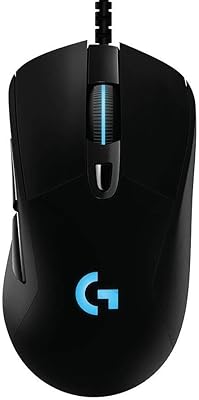
The Logitech G502 Proteus Spectrum Gaming Mouse has been a fixture on gaming desks since its release, and it still holds up as a wired option worth considering. Built around the PMW3366 optical sensor rather than Logitech's newer Hero tech, this gaming mouse leans on a track record of accuracy instead of chasing the latest spec sheet. What sets it apart isn't just tracking performance but its tunable weight system, which lets you add or remove small weights to get the balance feeling just right in your hand. RGB lighting zones are here too, offering a bit of personalization, though they're clearly a secondary feature rather than the main draw. Priced in the mid-range, it reads less like a flashy new release and more like a dependable long-term tool built for gamers who know what they want.

Features & Benefits

On the spec sheet, this gaming mouse covers the essentials gamers actually care about. The optical sensor scales up to 12,000 DPI, and on-the-fly DPI shifting means you can drop sensitivity for a precise headshot, then bump it back up without digging through software mid-match. Eleven programmable buttons give plenty of room for macros, weapon swaps, or whatever shortcuts your game of choice rewards. The five removable 3.6g weights are where things get personal: shift them around the chassis and you can noticeably change how the mouse feels in fast flicks versus slow tracking. RGB Lightsync lighting lets you match your setup's color scheme across multiple zones, and the braided 6-foot cable resists the kind of fraying and snagging that cheaper cords develop. It works fine across Windows and Mac, too.

Best For

This gaming mouse tends to find its way into the hands of FPS and MOBA players who care more about consistent, predictable tracking than flashy extras. If you're someone who likes physically adjusting weight rather than relying purely on software tweaks, the tuning system here will feel like a genuine perk rather than a gimmick. It also suits desktop setups where a wired connection is preferred for its reliability, especially during competitive play where dropped input just isn't an option. Anyone stepping up from a budget mouse will likely notice the improved ergonomics and grip almost immediately. And for buyers who'd rather invest in a model with a long track record and thousands of real-world reviews than gamble on something brand new, the Proteus Spectrum makes a solid, low-risk case for itself.

User Feedback

Feedback from people who've actually used this gaming mouse day to day skews heavily positive, particularly around sensor accuracy and how consistently it tracks during fast, erratic movements. Durability comes up often too, with several long-term owners reporting their unit is still going strong years after purchase, which says a lot for a peripheral that gets daily wear. Comfort ratings are generally strong for medium to large hands, though smaller-handed users sometimes mention it feels a bit bulky. Not every comment is glowing: a number of reviewers find the companion software clunky or unintuitive compared to lighter competitors, and a few note the cable feels stiff right out of the box before it loosens up with use. Overall, complaints are minor next to the praise for reliability.

Pros

  • Sensor accuracy holds up well even during fast, erratic in-game movements
  • Adjustable weight system lets you fine-tune balance instead of settling for one fixed feel
  • Eleven programmable buttons give real flexibility for macros and quick in-game commands
  • Braided cable resists fraying and tangling far better than typical rubber cords
  • Long-term owners frequently report units still performing reliably years after purchase
  • On-the-fly DPI shifting is genuinely useful for snap precision during critical moments
  • Works smoothly across both Windows and Mac without compatibility headaches
  • RGB lighting adds a nice personal touch without feeling like the main selling point
  • Comfortable, contoured shape suits medium to large hands during extended sessions

Cons

  • Uses the older PMW3366 sensor instead of Logitech's newer Hero sensor technology
  • Companion software can feel clunky and outdated compared to lighter competing apps
  • Cable feels noticeably stiff out of the box before it breaks in
  • Smaller hands may find the body shape a bit bulky or front-heavy
  • Wired-only design rules it out for anyone needing a wireless setup
  • Spec listings referencing battery life and wireless connectivity create unnecessary buyer confusion
  • Bulkier profile compared to newer ultra-light gaming mice on the market
  • Full button customization requires installing and configuring separate Logitech software

Ratings

These scores for the Logitech G502 Proteus Spectrum Gaming Mouse were generated by AI after analyzing thousands of verified user reviews from around the world, with spam, bot activity, and incentivized feedback actively filtered out. The result is a transparent breakdown that reflects both what people genuinely love about this gaming mouse and where real owners run into friction.

Sensor Accuracy & Tracking
89%
Gamers consistently report rock-solid tracking during fast flick shots and quick directional changes, especially in competitive FPS sessions. The PMW3366 sensor delivers smooth, jitter-free movement that feels precise even at high speeds, which is exactly what ranked play demands.
A handful of users compare it unfavorably to Logitech's newer Hero sensor, noting marginally less polling consistency at extreme DPI levels. It is not cutting-edge anymore, so esports purists chasing the absolute latest tracking tech may want to look at newer releases.
DPI Range & Customization
84%
With a 12,000 DPI ceiling and on-the-fly shifting, users like dropping sensitivity instantly for precision aiming, then snapping back to full speed for quick navigation. It is flexible enough to cover sniping and fast-paced brawling without swapping mice mid-match.
Some casual users say they rarely use sensitivities anywhere near the max DPI, calling it more of a marketing number than a daily-use feature. A few also wish DPI stages were easier to reconfigure without opening the software.
Button Programmability
87%
Eleven programmable buttons give MOBA and MMO players room to map abilities, pings, and macros without reaching for the keyboard mid-fight. Reviewers frequently mention how natural the thumb buttons feel once muscle memory kicks in.
A few buyers find the sheer number of buttons unnecessary for genres like simple FPS titles, where only two or three ever get used. Button placement also takes some adjustment for players coming from simpler two-button mice.
Weight Tuning System
88%
The five removable 3.6g weights let players fine-tune balance for their exact grip style, and many describe finally finding a comfortable feel after experimenting with placements. It stands out for users who previously felt stuck with fixed-weight mice.
A small number of reviewers say the weight differences feel subtle rather than dramatic, especially for casual players who never adjust the default configuration. Swapping weights also requires removing a small panel, which some find slightly fiddly mid-session.
Build Quality & Durability
91%
Long-term owners frequently highlight how well this gaming mouse holds up after years of daily use, with clicks and tracking staying consistent over time. The overall housing feels solid rather than hollow, even under heavy desk wear.
A few users mention the side grips can show wear faster than the rest of the shell after extended use. Button springs on heavily used units occasionally feel slightly looser over time, though failures appear uncommon overall.
Ergonomics & Comfort
77%
23%
Medium to large-handed users consistently praise the contoured shape for long gaming sessions, saying it reduces fatigue compared to flatter, symmetrical mice. The palm and claw grip support feels deliberate rather than generic.
Buyers with smaller hands often find the body too large or front-heavy for comfortable extended use. It is not a universal fit, and some recommend checking dimensions carefully before buying.
RGB Lighting & Customization
80%
20%
The multi-zone Lightsync lighting lets users match their setup's color scheme, and many appreciate that it adds personality without being overdone. It feels like a nice bonus rather than a gimmick tacked onto the design.
Some reviewers note the lighting effects feel basic compared to newer RGB ecosystems with more granular customization. A few also mention brightness adjustments require digging through software menus rather than quick physical controls.
Cable Quality
73%
27%
The braided 6-foot cable resists fraying noticeably better than older rubber cords, and users like having enough length to reach across larger desk setups. It generally holds up well over years of daily movement.
Several buyers mention the cable feels stiff and slightly springy right out of the box, which can affect glide until it loosens up. A short break-in period is often needed before it stops resisting natural hand movement.
Software Experience
66%
34%
Once configured, the software reliably saves custom profiles, button mappings, and lighting settings without needing constant readjustment between sessions. Users who take time to set it up once generally find it stays out of the way afterward.
A common complaint is that the interface feels dated and clunky compared to lighter, more modern configuration apps from competing brands. Several reviewers mention occasional lag or confusing menus when adjusting settings for the first time.
Cross-Platform Compatibility
85%
Buyers using both Windows and Mac systems appreciate that core functions like clicking, tracking, and basic DPI work without extra setup. It is a convenient option for users who switch between operating systems regularly.
Mac users occasionally mention that full button customization and lighting control work best on Windows, with some advanced features feeling more limited elsewhere. This creates a slightly uneven experience depending on platform.
Value for Money
82%
18%
Given its mid-range price and how long units tend to last, many buyers feel they got strong long-term value rather than paying for a short-lived trend product. The combination of tunable weights and proven reliability reinforces that sentiment.
Buyers expecting the newest sensor technology at this price point sometimes feel slightly let down compared to similarly priced mice with more current internals. It rewards long-term ownership more than impulse buyers chasing the newest specs.
Sensor Technology & Modernity
71%
29%
Despite using the older PMW3366 sensor, most users say real-world performance still feels sharp and responsive for nearly all competitive gaming scenarios. It remains a trusted, well-tested choice rather than an unproven newer alternative.
Tech-focused buyers comparing spec sheets often point out it is not Logitech's latest sensor generation, which can feel outdated for shoppers prioritizing cutting-edge hardware. This is more a perception issue than a real-world performance problem for most players.

Suitable for:

The Logitech G502 Proteus Spectrum Gaming Mouse makes the most sense for competitive FPS and MOBA players who care about consistent, predictable tracking over flashy extras. It is also a strong pick for anyone who likes physically tuning their gear, since the removable weights let you dial in balance rather than guessing based on software profiles alone. Desktop gamers who prefer a wired connection for guaranteed responsiveness, especially during ranked matches, will appreciate having one less variable to worry about. Players upgrading from an entry-level mouse should notice the improved shape and grip almost right away. It is equally well suited to buyers who would rather invest in a model with years of real-world reviews behind it than take a chance on something newly released. If your hands fall in the medium to large range, the fit tends to work especially well over long sessions.
Not suitable for:

This gaming mouse is not the right call for anyone chasing the absolute newest sensor technology, since it still runs on the older PMW3366 rather than Logitech's current Hero sensor. Players with small hands may find the body feels a little large or front-heavy, even with lighter weight configurations installed. Anyone who strictly needs a wireless setup should look elsewhere, as this model is corded only, and the spec listing's mention of battery life and wireless connectivity is misleading. Buyers who prioritize sleek, lightweight minimalism over customization options may also find it bulkier than newer ultra-light competitors. People who dislike fiddling with companion software to unlock full button functionality might find the setup process more involved than expected. The Logitech G502 Proteus Spectrum Gaming Mouse simply was not designed with that crowd in mind.
Specifications

  • Sensor: It uses Logitech's PMW3366 optical sensor for tracking movement.
  • Max Sensitivity: The sensor supports DPI settings up to 12,000.
  • DPI Switching: An on-the-fly DPI button lets you change sensitivity instantly during gameplay.
  • Buttons: There are 11 programmable buttons available for custom commands and macros.
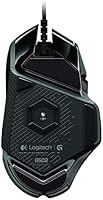
  • Weight Tuning: Five removable 3.6g weights are included for adjusting total weight and balance.
  • Lighting: RGB Lightsync lighting offers customizable colors across multiple zones on the mouse.
  • Connection Type: The mouse connects via a wired USB connection.
  • Cable Length: The braided cable measures 6 feet, or 1.83 meters, in length.
  • Power Source: It runs on corded electric power with no battery required for core operation.
  • Operating System: It is compatible with both Windows and Mac operating systems.
  • Item Weight: The mouse weighs 4.3 ounces before any tuning weights are added.
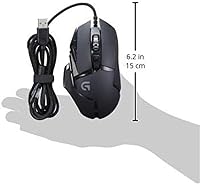
  • Dimensions: The mouse measures 1.57 by 2.95 by 5.2 inches in length, width, and height.
  • Color: It is available in a black colorway.
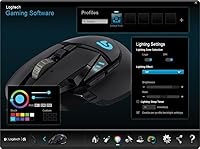
  • Software: Configuration of buttons and lighting is handled through Logitech's companion software.
  • Build Material: The shell uses a durable plastic housing designed for everyday gripping and use.

Related Reviews

Logitech G502 X Gaming Mouse
83%
91%
Click Responsiveness
89%
Sensor Accuracy
84%
Build Quality
82%
Weight & Ergonomics
78%
Cable Quality
More
Logitech G203 Wired Gaming Mouse
81%
83%
Tracking Accuracy
88%
Click Feel
79%
Ergonomics & Comfort
82%
Build Quality
86%
RGB Lighting
More
Logitech G403 Hero
Logitech G403 Hero
80%
93%
Sensor Accuracy
81%
Build Quality
84%
Ergonomics & Comfort
88%
Click Response
78%
Weight & Balance
More
Logitech G PRO X Superlight
84%
96%
Weight & Ergonomics
94%
Sensor Accuracy
93%
Wireless Performance
91%
Battery Life
84%
Click Feel & Switches
More
Pulsar X3 Mini Wireless Gaming Mouse
80%
91%
Sensor Performance
88%
Click Feel & Switches
93%
Weight & Build
79%
Ergonomics & Grip Fit
89%
Wireless Latency
More
Pulsar X2F Wireless Fingertip Gaming Mouse
80%
94%
Weight & Form Factor
89%
Sensor Performance
91%
Polling Rate (8K Wireless)
88%
Switch Feel & Click Quality
78%
Grip & Ergonomics
More
Trust Gaming GXT 144 Rexx Vertical Ergonomic Gaming Mouse
85%
89%
Ergonomics & Comfort
92%
Precision & Performance
85%
RGB Customization
78%
Software & Configuration
84%
Build Quality & Durability
More
Pulsar Gaming Gears Xlite v3 Medium Wireless Gaming Mouse
88%
93%
Ergonomics & Comfort
91%
Wireless Performance
89%
Battery Life
86%
Build Quality
94%
Precision & Sensor Accuracy
More
Logitech POP Mouse
Logitech POP Mouse
82%
93%
Silent Click Performance
89%
SmartWheel Scrolling
87%
Multi-Device Connectivity
91%
Battery Life
71%
Ergonomics & Hand Fit
More
Logitech M325 Wireless Mouse
82%
88%
Scroll Wheel Performance
93%
Battery Life
78%
Comfort & Ergonomics
81%
Wireless Reliability
84%
Value for Money
More

FAQ

It is wired only, connecting through a USB cable. Some online listings mention battery life or wireless specs, but that information does not apply here, since this model relies on a corded electric connection.

It uses the PMW3366 optical sensor rather than Logitech's newer Hero sensor. It is still considered accurate and reliable for most gaming scenarios, just not the most recent sensor technology on the market.

Yes, this gaming mouse comes with five removable 3.6g weights. You can add, remove, or reposition them inside the weight tray to change the overall feel and balance to suit your grip and playstyle.

Yes, the Logitech G502 Proteus Spectrum Gaming Mouse is compatible with both Windows and Mac systems. Some advanced customization features may work best through Logitech's software on Windows, though basic functionality works fine on both.

There are 11 programmable buttons in total. You can assign macros, shortcuts, or specific in-game actions to most of them using the companion software.

Yes, this Logitech mouse features RGB Lightsync lighting with multiple zones you can customize independently. It is a nice personalization touch, though it is not the main reason most buyers choose this mouse.

It tends to fit medium to large hands more comfortably based on user feedback. If you have smaller hands, you may find the body a bit large, so it is worth comparing dimensions to a mouse you already own before buying.

Some users mention the braided cable feels a little stiff right out of the box. It generally softens and becomes easier to manage after a short break-in period of regular use.

Basic functions like clicking and tracking work right away without installing anything. The companion software is only needed if you want to customize buttons, adjust lighting, or save custom profiles.

Quite durable, based on long-term owner feedback. Many people report their unit still performs reliably after several years of regular gaming sessions, which speaks well to its overall build quality.