
Overview

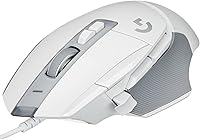
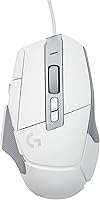
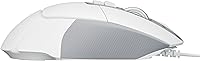
The Logitech G502 X Gaming Mouse takes the bones of one of the most recognized shapes in gaming peripherals and rebuilds the internals from scratch. Where the original G502 earned its reputation through sheer familiarity, this version leans into a wired connection that keeps latency out of the equation entirely. It also sheds noticeable weight compared to earlier G502 releases, which changes how it feels during long sessions more than you might expect. This is clearly built for players who care about raw precision over the convenience of going cordless. If you have used a G502 before, the silhouette will feel instantly familiar, but the experience underneath has shifted in ways that matter for serious gaming.

Features & Benefits

Open up what makes this gaming mouse tick and the LIGHTFORCE switches stand out first. They blend optical and mechanical designs into something that clicks with a crisp, almost snappy feel while staying reliable over thousands of presses. Underneath, the HERO 25K sensor handles tracking with sub-micron accuracy, and there is no smoothing or acceleration layered on top to mess with your aim. That means movement on screen matches hand movement with very little interpretation in between. The optical detection system backs this up with consistent input, session after session. Even the physical shape works in its favor, since the compact dimensions accommodate a few different grip styles without feeling awkward in hand.

Best For

This wired mouse makes the most sense for competitive shooter players and anyone leaning into esports-style precision, where every millisecond of input lag actually matters. People coming from older G502 models, whether wired or wireless versions, will likely appreciate the refinements here without losing what made the original comfortable. If you have ever hesitated on wireless gaming mice because of lag concerns, this sidesteps that worry entirely by staying tethered. It also suits anyone who clicks a lot and wants durable switches built to hold up over the long haul rather than degrading after a few months of heavy use. Casual users who just want comfort might find some features overkill, though.

User Feedback

Most owners single out the click responsiveness and sensor accuracy as the clear standouts, and that lines up with what the specs promise on paper. A number of longtime fans compare the feel directly against earlier G502 versions, often noting it as a meaningful step forward rather than just a refresh. The overall satisfaction score reflects that sentiment fairly well. Build quality also gets consistent praise within the wired mouse category, with little mention of the rattling or creaking that sometimes plagues cheaper alternatives. On the downside, a few buyers note the wired-only design as a drawback if they specifically wanted to cut the cord, and some find the shape less suited to smaller hands.

Pros

  • Clicks feel crisp and immediate thanks to the hybrid switch design
  • Sensor accuracy holds up well during fast, high-sensitivity gaming movements
  • Wired connection removes any worry about latency or dropped signals
  • Feels noticeably lighter than older G502 releases in extended sessions
  • Familiar shape makes switching from previous G502 models painless
  • Switches are built to withstand heavy, repetitive clicking over time
  • Tracking has zero smoothing, so movement feels direct and predictable
  • The Logitech G502 X Gaming Mouse earns consistently strong owner ratings
  • Compact dimensions work well across a few different grip styles

Cons

  • Wired-only design limits flexibility for users wanting a cordless desk setup
  • Shape may feel slightly bulky for people with smaller hands
  • Fingertip grip users may find the contour less comfortable than other shapes
  • Lacks some of the deep customization options found on premium wireless siblings
  • No built-in wireless charging or dock convenience for desk-free setups
  • Cable management becomes a minor but real consideration during intense play
  • Some buyers may want lighter onboard weight tuning than what is offered
  • Not the most travel-friendly option given its cabled nature

Ratings

Our scores for the Logitech G502 X Gaming Mouse come from AI analysis of thousands of verified buyer reviews from around the world, with spam, bots, and incentivized feedback filtered out before anything is calculated. What you see below reflects both the genuine strengths and the real pain points people experience after weeks or months of actual use, not just first-day impressions.

Click Responsiveness
91%
Players consistently mention how immediate the clicks feel during fast-paced rounds, especially in shooters where split-second timing matters. The hybrid switch design seems to deliver on its promise of crisp, low-travel feedback that doesn't feel mushy after extended sessions.
A handful of users with very specific click preferences find the actuation slightly stiffer than older mechanical-only switches they were used to. It's a minor adjustment period rather than a real flaw, but it does exist for some.
Sensor Accuracy
89%
The HERO 25K sensor earns praise for tracking exactly what the hand does, with no noticeable smoothing or drift during quick flick shots or slow precision aiming. Competitive gamers in particular note the difference compared to budget sensors they've used before.
On very low DPI settings, a small number of users report occasional inconsistency on certain mouse pad surfaces, though this seems tied more to pad choice than the sensor itself.
Build Quality
84%
The chassis feels solid in hand, without the creaking or flex some cheaper wired mice develop after a few months of daily use. Buttons and the scroll wheel feel tightly assembled rather than loose or wobbly.
A few reviewers note the matte coating can show fingerprints and light wear over extended use, which some find slightly disappointing on a mouse in this tier.
Weight & Ergonomics
82%
18%
Compared to older wired G502 versions, this one feels noticeably lighter during quick flick movements, which gamers doing repetitive strafing motions appreciate. The compact dimensions also work well for palm and claw grip users.
Smaller-handed users occasionally mention the rear hump feels a bit pronounced for fingertip grips, and the weight, while improved, still isn't ultra-light compared to dedicated lightweight competitors.
Cable Quality
78%
22%
Many users note the cable feels more flexible than older Logitech cords, reducing drag during fast desk movements, which matters during intense gaming sessions.
It's still a fixed wired cable, so anyone hoping for paracord-level flexibility or wireless freedom will find this a clear limitation rather than a true negative against the design itself.
Switch Durability
86%
The optical-mechanical hybrid switches are frequently cited as a meaningful upgrade for click longevity, especially among users who click thousands of times during long gaming marathons without issue.
Since the switches are relatively new to this lineup, some long-term durability data is still limited, and a small minority of early buyers report occasional double-click concerns after heavy use.
Grip Versatility
76%
24%
Palm and claw grip users tend to find the shape comfortable for extended sessions, and the compact size makes it approachable for a range of hand sizes without feeling oversized.
Fingertip grip users and those with smaller hands more often mention discomfort or awkward reach, suggesting the shape favors certain grip styles more than others.
Software Experience
73%
27%
Once configured through Logitech G HUB, users appreciate the ability to remap buttons and fine-tune sensor behavior to match personal preferences across different games.
Several reviewers mention the software itself can feel occasionally clunky or slow to launch, and initial setup isn't always intuitive for first-time Logitech users.
Value for Money
79%
21%
Buyers upgrading from older wired G502 models generally feel the sensor and switch improvements justify the cost, especially for serious or competitive players who use a mouse daily.
Casual gamers who don't need top-tier precision sometimes question whether the price premium is necessary compared to simpler wired mice that perform adequately for lighter use.
Overall Satisfaction
88%
The strong average rating reflects broad satisfaction, with many buyers specifically highlighting the combination of accuracy, click feel, and familiar shape as reasons for their positive experience.
A small portion of dissatisfaction centers on the wired-only design or shape preferences rather than core performance, suggesting most complaints are situational rather than universal.
Noise Level
81%
19%
The clicks produce a satisfying, controlled sound without being overly loud, which users sharing space with others during late-night gaming sessions tend to appreciate.
A few reviewers in very quiet environments note the scroll wheel produces a slightly more noticeable click than expected for a mouse at this price point.
Compatibility
85%
Standard USB wired connectivity means it works reliably across most Windows setups without extra drivers needed for basic functionality, which buyers find refreshingly simple.
Mac users report some software feature limitations compared to Windows, meaning full customization isn't always equally accessible across operating systems.

Suitable for:

The Logitech G502 X Gaming Mouse is best suited to competitive and FPS-focused players who notice small differences in click timing and tracking precision during fast-paced matches. It also makes sense for longtime G502 fans who want the familiar shape but with updated internals, since the switch and sensor upgrades address some of the wear issues older models eventually developed. Anyone who has been burned by input lag on a wireless setup will likely appreciate the simplicity of a dependable wired connection. Players with medium to large hands who use palm or claw grips tend to get along with the shape especially well. Esports hobbyists who click thousands of times per session will benefit most from the more durable switch design. Even casual gamers who just want a precise, no-nonsense mouse for everyday play will find it overdelivers on accuracy without unnecessary bloat.

Not suitable for:

Buyers who specifically want a wireless setup for a clean desk or for travel should look elsewhere, since the Logitech G502 X Gaming Mouse is wired only and that cable is a permanent part of the package. People with notably small hands may find the body a bit large or front-heavy for comfortable extended use, especially with fingertip grips. Anyone hoping for extensive onboard memory profiles or a heavily customizable weight system found on some higher-end Logitech models might feel this version is more streamlined than expected. If software-driven RGB lighting and deep customization are top priorities, this is a more function-first design than a flashy one. Minimalist users who dislike larger, contoured mice may also prefer something flatter and lighter overall.

Specifications

  • Brand: This mouse is made by Logitech G, the gaming-focused division of Logitech.
  • Model: The model is the G502 X, with item model number 910-006147.
  • Connectivity: It connects via a wired USB cable for a stable, low-latency signal.
  • Sensor: It uses Logitech's HERO 25K sensor for high-precision tracking.
  • Switch Type: It features LIGHTFORCE hybrid optical-mechanical switches for fast, crisp clicks.
  • Movement Detection: Movement is tracked using optical detection technology rather than mechanical encoders.
  • Tracking Behavior: The sensor operates with zero smoothing, filtering, or acceleration applied to movement.
  • Weight: The mouse weighs approximately 6 ounces.
  • Dimensions: It measures 3.12 x 1.62 x 5.16 inches.
  • Color: It is available in black.
  • Build Style: It is designed to be lighter than earlier wired G502 models.
  • Grip Compatibility: Its compact dimensions accommodate palm, claw, and some fingertip grip styles.
  • Average Rating: It holds a 4.4 out of 5 star rating based on customer reviews.
  • Intended Use: It is designed primarily for competitive and fast-paced PC gaming.

Related Reviews
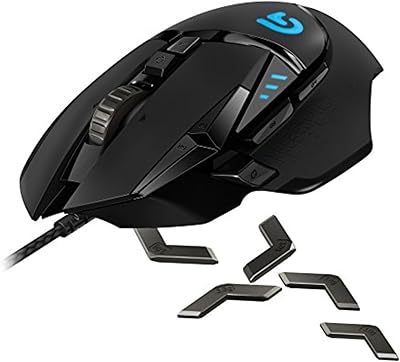
Logitech G502 Proteus Spectrum Gaming Mouse
81%
89%
Sensor Accuracy & Tracking
84%
DPI Range & Customization
87%
Button Programmability
88%
Weight Tuning System
91%
Build Quality & Durability
More
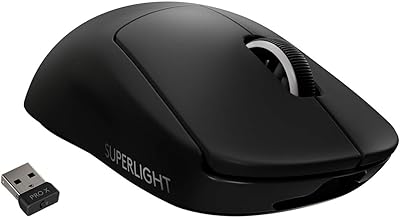
Logitech G PRO X Superlight
84%
96%
Weight & Ergonomics
94%
Sensor Accuracy
93%
Wireless Performance
91%
Battery Life
84%
Click Feel & Switches
More
Logitech G PRO X Gaming Headset
84%
93%
Microphone Clarity
89%
Comfort for Long Sessions
91%
Audio Performance
74%
Build Quality
88%
Noise Isolation
More
Logitech G403 Hero
Logitech G403 Hero
80%
93%
Sensor Accuracy
81%
Build Quality
84%
Ergonomics & Comfort
88%
Click Response
78%
Weight & Balance
More
Logitech G203 Wired Gaming Mouse
81%
83%
Tracking Accuracy
88%
Click Feel
79%
Ergonomics & Comfort
82%
Build Quality
86%
RGB Lighting
More
Logitech G PRO X TKL Gaming Keyboard
86%
88%
Performance
92%
Build Quality
85%
Usability & Ergonomics
90%
Portability
89%
Customization Options
More
Logitech G Pro X SE Gaming Headset
79%
91%
Build Quality
84%
Sound Quality
88%
Microphone Performance
76%
Comfort & Fit
78%
Surround Sound & Spatial Audio
More
Pulsar X3 Mini Wireless Gaming Mouse
80%
91%
Sensor Performance
88%
Click Feel & Switches
93%
Weight & Build
79%
Ergonomics & Grip Fit
89%
Wireless Latency
More
Pulsar X2F Wireless Fingertip Gaming Mouse
80%
94%
Weight & Form Factor
89%
Sensor Performance
91%
Polling Rate (8K Wireless)
88%
Switch Feel & Click Quality
78%
Grip & Ergonomics
More
Trust Gaming GXT 144 Rexx Vertical Ergonomic Gaming Mouse
85%
89%
Ergonomics & Comfort
92%
Precision & Performance
85%
RGB Customization
78%
Software & Configuration
84%
Build Quality & Durability
More

FAQ

Yes, Logitech gaming mice in this line are typically configured through Logitech G HUB software, which lets you remap buttons and adjust sensor settings. You will need to download it separately since it is not preloaded on the device. Once installed, setup only takes a few minutes.

Logitech has generally moved toward more flexible, lightweight cables on recent wired mice in this series to reduce drag during fast movements. It is not advertised as a paracord-style cable, but it is designed to minimize resistance compared to older, stiffer cords. Most users find it manageable during regular use.

It can work, but the shape leans toward medium to large hands, especially with palm or claw grips. Smaller-handed users sometimes find the rear hump a bit much for fingertip grip. If hand size is a concern, trying it in person or checking grip diagrams first is a smart move.

The HERO 25K sensor is a notable step up from sensors used in earlier G502 releases, especially in terms of tracking consistency at high speeds. There is no added smoothing or acceleration, so what you do with your hand is what shows up on screen. For competitive players, that difference is noticeable.

The LIGHTFORCE switches combine optical and mechanical elements specifically to improve durability and consistency over time. Optical components tend to resist the kind of wear that causes double-clicking issues in purely mechanical switches. Long-term durability will still vary by usage, but the design is meant to hold up well.

Yes, since it connects over standard wired USB, it will function on macOS for basic tracking and clicking. Full customization through Logitech software may have some feature differences compared to Windows, so check current compatibility before assuming everything translates one to one.

It can absolutely work for general use, since the sensor and switches perform well for everyday clicking and navigation too. That said, it is built with gaming responsiveness in mind, so some buyers find it a bit more mouse than they need for basic office tasks.

A soft, slightly damp cloth works fine for the outer shell, and a can of compressed air can help clear out dust around the buttons and scroll wheel. Avoid submerging it in liquid or spraying cleaner directly into the switch openings.

If your current G502 still works fine, the upgrade is more about refinement than a complete overhaul, since the shape stays familiar. But if you are noticing switch wear or want a more accurate sensor, the Logitech G502 X Gaming Mouse offers meaningful improvements in both areas.

Onboard profile storage capability can vary by exact version and software updates, so it is worth checking current Logitech G HUB documentation for the latest details. Profile switching through software is generally straightforward regardless.