Overview

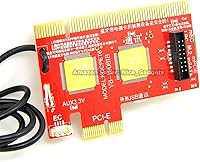
The Lingvetron KQCPET6 V8 Motherboard Diagnostic Tester takes a genuinely different approach to hardware fault-finding — instead of a traditional POST card that slots into a PCIe slot, this diagnostic tester kit routes diagnosis data through the machine's USB ports. That single design choice opens up compatibility across desktops, laptops, Macs, servers, mini PCs, and even Android smartphones and tablets. Rather than a built-in LED display showing cryptic hex codes, it pairs with a dedicated Android app that reads and interprets fault data directly on your phone. That sounds convenient, and it mostly is — but this is not plug-and-play. You will need to study the included PDF guides carefully before getting reliable, useful results from it.
Features & Benefits

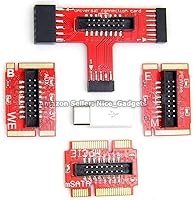
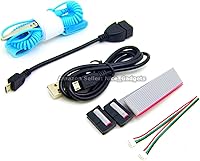
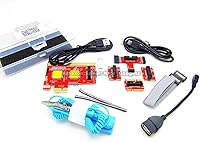
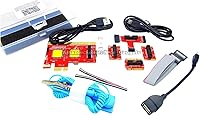
The kit handles a wide range of connection types — standard USB Type-A, micro USB, and USB Type-C — and ships with a set of bus connector adapters to fit different motherboard layouts. What separates the KQCPET6 V8 tester from older POST cards is the Android companion app, which auto-interprets faults and displays them on your phone screen instead of forcing you to cross-reference hex codes against a printed chart. Worth knowing up front: the app is distributed as an APK file, not through Google Play, so you will need to enable sideloading on your Android device. On the hardware side, the PCB construction feels solid, and at 3 ounces the unit fits easily into any technician's carry bag.

Best For

This USB motherboard analyzer suits independent repair technicians who routinely work across different machine types — desktops one day, a Mac the next, an Android tablet after that. IT students wanting real diagnostic experience beyond classroom simulations will also find it genuinely instructive. Small repair shops will appreciate having a capable option that does not demand the budget of professional bench equipment. The tool also makes practical sense when you want a quick read on a suspect machine without disassembling it first, which saves real time on jobs where you simply need to confirm whether the board is the culprit before committing to a full teardown.

User Feedback

Experienced technicians tend to speak well of this diagnostic tester kit, highlighting its cross-platform versatility and the convenience of readable fault data appearing on a phone screen. The friction points are mostly in setup. The two-cable configuration — one cable powering the unit, one going to the motherboard — catches a lot of new users off guard, and the APK sideloading requirement makes some buyers hesitant. Seller support gets favorable mentions when things go sideways. The honest pattern across reviews is clear: buyers who read the guides before starting tend to come away satisfied, while those expecting instant results tend to struggle and rate it lower.

Pros

  • Works across a genuinely broad range of hardware including desktops, laptops, Macs, servers, and Android devices.
  • The companion Android app eliminates the tedious process of looking up POST codes manually one by one.
  • Supports USB Type-A, micro USB, and USB Type-C connections out of the box.
  • Comes with a full adapter kit to accommodate different motherboard connector types.
  • At 3 ounces and pocket-sized, this diagnostic tester kit travels easily in any tool bag.
  • Detailed PDF guides, flowcharts, and video walkthroughs are included for both beginners and experienced users.
  • Allows for a fast external fault check before committing to a full machine teardown.
  • Seller support is frequently praised for being responsive when buyers hit setup roadblocks.
  • Solid PCB construction gives the hardware a durable, professional feel despite the compact form factor.

Cons

  • The Android APK must be sideloaded manually — it is not available on Google Play, which raises concerns for some buyers.
  • Plugging the two USB cables in the wrong order causes connectivity issues that are easy to stumble into without reading the manual first.
  • No iOS support exists, so iPhone and iPad users cannot run the diagnostic app at all.
  • The setup and pairing process has a steep enough learning curve that casual users frequently struggle before getting usable results.
  • Cached diagnostic data from a previous test can interfere with results if you forget to unplug and restart between machines.
  • No built-in display means the kit is completely dependent on a working Android device to function.
  • First-time users who skip the documentation often misinterpret results or assume the unit is defective.
  • The APK installation process may be flagged by Android security settings, requiring manual permission overrides.

Ratings

The scores below reflect an AI-driven analysis of verified global user reviews for the Lingvetron KQCPET6 V8 Motherboard Diagnostic Tester, with spam, bot-generated, and incentivized feedback actively filtered out before scoring. Each category is rated independently based on real buyer experiences — technicians, students, and shop owners alike — so both the genuine strengths and the recurring frustrations are represented honestly. No score has been softened to flatter the product.

Cross-Platform Compatibility
83%
Technicians working across mixed-brand environments consistently praise how this USB motherboard analyzer handles desktops, laptops, Macs, servers, and Android devices without needing separate tools. For a shop that sees everything from aging Windows towers to MacBooks in a single week, that breadth is a real operational advantage.
Compatibility with very old or highly proprietary motherboard architectures is not guaranteed, and a small number of users found certain niche machines were not reliably recognized. Mac support in particular works through USB only, which narrows what can actually be diagnosed on Apple hardware.
Ease of Setup
51%
49%
For users who commit to reading the documentation beforehand, the setup process follows a logical sequence and the included flowcharts do help clarify the two-cable configuration. Experienced technicians who have worked with POST diagnostic tools before tend to get up and running without major issues.
This is where the most negative feedback accumulates. Casual users and first-timers frequently report confusion around the dual-cable setup, unclear initial pairing steps, and the requirement to manually sideload an Android APK — none of which are obvious without careful study of the guides.
Android App Quality
62%
38%
The app-based readout is the core value proposition here, and when it works correctly, it genuinely removes the tedious step of cross-referencing POST codes against printed tables. Buyers who successfully get the app running appreciate how it auto-interprets fault data and presents it in a readable format on their phone screen.
The app is not available on Google Play, which means buyers must sideload it manually — a process that triggers Android security warnings and makes some users abandon setup entirely. There is no iOS version at all, locking out a significant portion of potential users from the start.
Diagnostic Accuracy
74%
26%
Among experienced PC repair technicians, the KQCPET6 V8 tester earns solid marks for pinpointing faulty motherboard components without requiring full disassembly. Several reviewers noted it helped them correctly identify failed voltage regulators and memory controller issues that would have taken much longer to isolate manually.
A recurring issue is cached data from a previous test session bleeding into a new diagnosis if the unit is not properly reset between machines. This can produce misleading results and has caused some users to misdiagnose a healthy board as faulty when testing multiple machines in succession.
Build Quality
77%
23%
The PCB construction feels solid and purpose-built rather than cheap, and the discrete transistor and capacitor components are the kind of hardware-grade parts you would expect in a professional diagnostic tool. At 3 oz, it is impressively light without feeling flimsy.
The unit does not come with protective casing or a storage pouch, so the exposed PCB is vulnerable to damage if rattled around in a shared tool bag. A few long-term users noted wear on connector contacts after heavy repeated use.
Portability
88%
Measuring just 5.51 x 4.33 x 1.38 inches and weighing next to nothing, this diagnostic tester kit is easy to throw into any carry bag before a house call or a day at the shop. Field technicians who move between client sites frequently called out its size as a genuine practical advantage.
While the unit itself is compact, the full kit including all the bus connector adapters takes up more space than the main board alone suggests. There is no dedicated organizer pouch included, so keeping the adapters together without losing pieces requires some personal organization.
Documentation Quality
71%
29%
The included PDF guides are more thorough than what most comparable diagnostic tools provide, with step-by-step flowcharts and video references that cover a range of machines and scenarios. For a product with this much functional complexity, having layered documentation is genuinely appreciated by users who use it.
The guides are clearly written by non-native English speakers in some sections, which creates ambiguity at exactly the moments where precision matters most. Several users flagged that the precautions and cable sequencing steps in particular needed re-reading multiple times before they made practical sense.
Value for Money
79%
21%
As a mid-range diagnostic tool that covers multiple platforms and includes an adapter kit, video guides, and app-based fault interpretation, this USB motherboard analyzer offers more functional scope than simpler POST cards at similar or higher prices. For a small repair shop, the cost-per-use math works out favorably over time.
Buyers who struggle with setup and never get the tool working correctly tend to view it as poor value regardless of list price. If the Android sideloading requirement is a dealbreaker, the effective value drops to zero since the kit cannot function without the app.
Customer Support
76%
24%
The seller receives notably positive mentions for responsiveness when buyers reach out with setup or connectivity questions. Multiple reviewers credited direct support interactions with saving their purchase after they hit walls during initial configuration.
Support is reactive rather than proactive — there is no live chat or quick-start card in the box that might prevent the most common setup mistakes before they happen. Response times may also vary depending on time zone and volume, which is not ideal when you need a tool working for a job.
Adapter Kit Completeness
73%
27%
The multi-port bus connector adapter set covers a solid range of motherboard form factors, which is exactly what you need when you are servicing machines from different eras and manufacturers. Technicians working with both older ATX boards and newer compact form factors found enough coverage in the included kit.
Edge cases exist — particularly with certain proprietary server board configurations — where the included adapters do not quite fit, requiring improvisation or additional hardware. The kit works well for mainstream consumer and commercial hardware but may fall short in specialized enterprise environments.
Connectivity Reliability
63%
37%
When both USB cables are connected correctly and in the right sequence, the connection between the kit and the target motherboard is generally stable throughout a diagnostic session. Users who follow the documented procedure report consistent, repeatable readings across multiple test runs on the same machine.
The dual-cable setup creates a fragile dependency — one cable wrong and the whole connection becomes unstable or fails silently. This is the single most cited source of frustration across negative reviews, and the fact that it is a documented known issue rather than a design flaw does little to reduce real-world friction.
Learning Curve
48%
52%
Users who approach this diagnostic tester kit as a professional instrument — something that requires study before use — tend to come away satisfied with what they learned and what the tool can do. The included materials do cover the necessary ground if you are willing to work through them.
For anyone expecting a consumer-grade plug-and-play experience, the learning curve is steep enough to be a dealbreaker. The combination of manual APK installation, dual-cable sequencing, and reset-between-tests requirements means there is a meaningful time investment before the first successful diagnosis.
Multi-Device Workflow
69%
31%
Being able to move between a desktop, a laptop, and an Android tablet in a single diagnostic session with one kit is something competing tools rarely offer at this price point. Technicians running busy queues of varied machines found real efficiency gains once they had the workflow dialed in.
The mandatory reset and cable unplug routine between each machine slows down batch diagnostics more than users expect. In a high-volume repair environment, that interruption accumulates into a noticeable time cost across a full day of testing.

Suitable for:

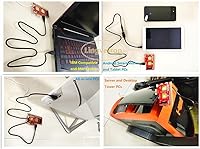
The Lingvetron KQCPET6 V8 Motherboard Diagnostic Tester is a strong fit for independent PC repair technicians who regularly encounter a wide mix of machines — desktops, laptops, older Macs, servers, and even Android devices — and need a single portable tool that can handle most of them. Rather than investing in separate diagnostic solutions for each platform, this USB motherboard analyzer covers the bases through one compact kit. Small repair shops operating on tighter equipment budgets will find it a practical alternative to expensive bench-top diagnostic systems. Computer science students and hardware enthusiasts building their troubleshooting skills hands-on will also get real value from it, especially paired with the included guides and flowcharts. It is also well-suited to situations where a quick external check is all you need before deciding whether a full disassembly is even worth attempting.
Not suitable for:

The Lingvetron KQCPET6 V8 Motherboard Diagnostic Tester is not the right tool for someone who wants to unbox it, plug it in, and get instant answers. The setup process demands patience — you need to read the PDF documentation carefully, understand the two-cable configuration, and be comfortable sideloading an Android APK outside of Google Play, since the companion app is not available through the standard store. Users without an Android device running version 6.0 or later are effectively locked out of the diagnostic readout entirely, as there is no built-in display and no iOS app alternative. Casual PC owners troubleshooting a single machine one time will likely find the learning investment disproportionate to their need. Anyone expecting a drop-in replacement for a traditional POST card with a simple hex display will also be disappointed by the app-dependent workflow.
Specifications

  • Brand: This diagnostic tester kit is manufactured by Qiguan Electronics Co., Ltd. and sold under the Lingvetron brand.
  • Model Number: The unit carries the item model designation KQCPET6 V8, also referenced as KQMET8 STC LMC6 in some documentation.
  • Dimensions: The board measures 5.51 x 4.33 x 1.38 inches, making it compact enough to carry in a standard tool bag.
  • Weight: The complete unit weighs 3 oz, so it adds virtually no burden to a mobile repair kit.
  • USB Interfaces: The kit supports standard USB Type-A, micro USB, and USB Type-C connections to cover a wide range of host machines.
  • Compatible Systems: Tested compatibility includes Windows, Linux, Android 6.0 and later, and Mac machines accessible via USB.
  • Companion App: Diagnostic results are displayed through a dedicated Android APK, available in both 32-bit and 64-bit versions, distributed outside Google Play.
  • Display Type: There is no built-in digital display; all fault readouts are handled exclusively through the Android companion application on a paired phone.
  • Adapter Kit: The package includes a multi-port bus connector adapter set designed to accommodate different motherboard form factors and connector types.
  • PCB Construction: The main board is built with PCB substrate, discrete transistors, and capacitor components intended for reliable repeated diagnostic use.
  • Included Guides: Step-by-step PDF manuals, visual flowcharts, and video instructions are included to walk users through setup and interpretation of results.
  • App Platform: The companion diagnostic app runs on Android only; there is currently no iOS version available for iPhone or iPad users.
  • First Available: This product was first listed and made available for purchase in February 2014, indicating an established product with a multi-year track record.
  • Category Rank: At time of review, this USB motherboard analyzer held a rank of number 869 in the Computer Cleaning and Repair category on Amazon.
  • Discontinuation: The product is confirmed as not discontinued by the manufacturer and remains actively available for purchase.

Related Reviews

GIGABYTE B550M Motherboard
87%
89%
Performance
91%
Ease of Installation
85%
Build Quality
92%
Storage Performance (PCIe 4.0 & M.2 Slots)
87%
Compatibility with Ryzen Processors
More
Dlyfull B4 Universal Battery Tester
77%
92%
Battery Compatibility
86%
Display Clarity
74%
Ease of Use
71%
Reading Accuracy
67%
Build Quality
More
GIGABYTE A620I AX Mini-ITX Motherboard
74%
83%
Value for Money
79%
Build Quality
88%
BIOS Experience
86%
Connectivity & Networking
67%
Thermal & VRM Performance
More
ASRock Z390 PRO4 Motherboard
86%
88%
Performance for Gaming
84%
Overclocking Stability
92%
Value for Money
90%
Ease of Installation
85%
Multi-Graphics Setup (CrossFireX)
More
GIGABYTE Z390 UD Motherboard
85%
88%
Performance for Mining
85%
PCIe Slot Performance
90%
RAM Compatibility & Speed
92%
Value for Money
87%
Build Quality
More
Gigabyte B550M DS3H Motherboard
85%
91%
Value for Money
87%
Performance in Gaming
90%
Stability and Reliability
89%
Power Delivery (VRM)
94%
LAN Connectivity (Speed & Stability)
More
Gigabyte B450M DS3H Motherboard
82%
91%
Value for Money
89%
Ease of Installation
83%
Gaming Performance
87%
Connectivity Options
80%
Build Quality
More
ASRock B550 PRO4 Motherboard
85%
88%
Performance
84%
Build Quality
90%
Ease of Setup
91%
Compatibility with AMD Ryzen 3rd Gen
85%
PCIe 4.0 Performance
More
ASRock H610M/AC Motherboard
83%
91%
Value for Money
88%
Installation Ease
85%
Performance for General Use
80%
Gaming Performance
86%
Build Quality
More
GIGABYTE A520M S2H Motherboard
82%
91%
Value for Money
88%
Overclocking Performance
85%
Build Quality
93%
Ease of Setup
87%
Storage Speed (M.2 Slot)
More

FAQ

You need the Android app — there is no screen or display built into the unit itself. All diagnostic results are read and displayed through a companion APK you install on your Android phone. The app comes included with the kit, but you will need to sideload it manually since it is not on Google Play.

Unfortunately, no. The companion app is Android-only, and without it the kit cannot display any results. If your only mobile device is an iPhone or iPad, this USB motherboard analyzer is not going to work for you as designed.

You will need Android 6.0 or later. Both 32-bit and 64-bit APK versions are included in the package, so it should cover most modern Android phones as long as they meet that minimum OS version.

The manufacturer states the APK has passed Android security scan checks. That said, sideloading any app outside of Google Play does require you to manually enable installation from unknown sources in your Android settings, which some users find uncomfortable. If that is a dealbreaker, it is worth factoring in before purchasing.

It is compatible with Mac machines as long as you are connecting via USB, which covers the diagnostic use case here. The kit is not limited to Windows — Linux machines are also supported. Just make sure you follow the guide specific to the machine type you are testing.

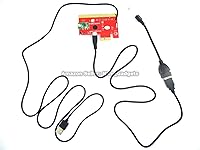
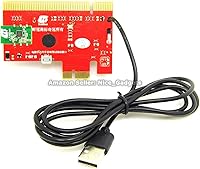
One USB cable powers the unit itself — that one connects to an Android charger or power source. The second, separate cable is what carries the diagnostic data and connects to the USB port on the motherboard being tested. Connecting them in the wrong order is one of the most common mistakes users make, and it causes unstable or failed readings, so it is worth double-checking the guide before you start.

The Lingvetron KQCPET6 V8 Motherboard Diagnostic Tester is designed to work with a broad range of machines, including older desktop PCs and laptops, not just current-generation hardware. As long as the machine has a functional USB port, it should be testable. That said, always check the latest version of the included guide for any compatibility notes specific to older platforms.
It depends on how much time you are willing to invest upfront. This is not a plug-and-play tool — you really do need to read through the PDF guides and watch the included video walkthroughs before your first use. Beginners who put that time in tend to get reliable results; those who skip the documentation usually struggle. If you are patient and methodical, it is learnable.

You need to unplug the USB cable and restart the kit between each machine you test. If you skip that step, cached data from the previous board can interfere with the new reading and give you misleading results. The guide covers this specifically, so it is one of those things to read before you start a batch of diagnostics.

Several buyers have reported positive experiences reaching out directly to the seller for help. Response times and the quality of guidance get decent marks in user feedback. Given that setup can be tricky the first time, knowing that support is reachable if you get stuck is a reasonable reassurance before buying.