Overview

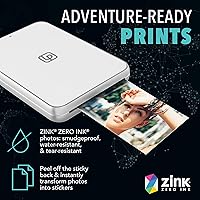
The Lifeprint Ultra Slim Portable Bluetooth Photo Printer is one of those gadgets that genuinely surprises you the first time you hold it — at just 19mm thick and 6.4 oz, it slips into a jacket pocket without a second thought. It connects to iOS and Android over Bluetooth and pairs with a free companion app to bring your phone photos to life on sticky-back 2×3-inch prints. What sets it apart from other compact printers is Hyperphoto technology, which lets you embed a video clip into a physical print — scan it later with the app and the photo essentially plays. No ink cartridges, no toners, just ZINK zero-ink paper doing the work.
Features & Benefits

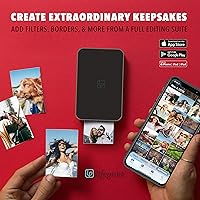
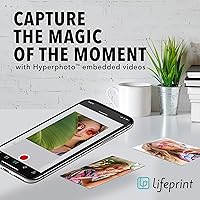
The headline trick is Hyperphoto video embedding — you link a video to a photo before printing, and anyone with the Lifeprint app can scan the print and watch that video play. It works like a lightweight augmented reality layer and genuinely impresses people who have never seen it before. Beyond that novelty, the glossy sticky-backed prints work as stickers on laptops, water bottles, or scrapbook pages. The built-in editing suite covers cropping, brightness, filters, and text overlays, so you are not just printing raw shots. You can pull images directly from Instagram, Snapchat, Facebook, and your camera roll — Apple Live Photos included. The tray holds 10 sheets at a time.

Best For

This pocket photo printer is tailor-made for a specific kind of user — someone who lives on social media, shares constantly, and wants something physical to show for it. Students decorating dorm rooms, travelers collecting memories, and bullet journal enthusiasts who want custom sticker-prints will find it fits naturally into their routine. It also makes a thoughtful gift choice for teens or young adults who would not think to buy it for themselves. If you host parties and want a fun interactive prop, the video-in-photo feature alone makes it a conversation starter. For high-volume or high-resolution photo printing, though, this Bluetooth instant printer is not the right tool.

User Feedback

Owners frequently call the Hyperphoto feature a genuine wow moment, and most find Bluetooth pairing and initial setup refreshingly straightforward. Where opinions get more mixed is around print quality — at 313×400 dpi, results are perfectly fine for stickers and keepsakes, but they will not satisfy anyone used to a dedicated photo printer. The ongoing paper cost comes up regularly; the starter pack includes only 5 sheets, and refill packs become a recurring expense worth budgeting for upfront. App stability draws polarized reactions — some users love the social features, while others report occasional glitches. Battery performance during longer print sessions is also flagged as a limitation by more frequent users.

Pros

  • Genuinely pocketable at 19mm thick and 6.4 oz — easy to carry anywhere without planning around it.
  • Sticky-backed ZINK prints double as stickers, making every photo immediately usable on laptops, water bottles, and notebooks.
  • No ink cartridges or toners to manage — zero-ink technology keeps the experience clean and hassle-free.
  • Hyperphoto video embedding is a real conversation starter at parties and events, delivering a wow moment most people have never seen before.
  • Bluetooth pairing is fast and straightforward for most iOS and Android users right out of the box.
  • Prints directly from Instagram, Snapchat, Facebook, and your camera roll — no file transfers or workarounds needed.
  • Built-in editing tools let you crop, adjust brightness, add filters and text before printing without switching apps.
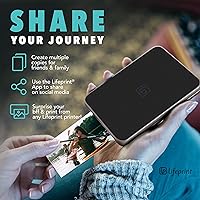
  • Remote wireless printing to other owners anywhere in the world adds a genuinely personal, creative way to stay connected.
  • Apple Live Photo support is a standout perk for iPhone users who want to preserve motion in their prints.
  • The compact size and fun feature set make this pocket photo printer one of the more distinctive gift options in its price range.

Cons

  • Print resolution caps at 313×400 dpi, which means fine detail and subtle tones do not survive the process well.
  • Only 5 sheets are included in the starter pack — barely enough to test the printer before needing a refill.
  • ZINK paper refill packs create a recurring cost that adds up fast and is easy to underestimate at purchase.
  • Almost every meaningful feature — editing, video embedding, remote printing — is locked behind the companion app with no workaround.
  • App stability is inconsistent, with reported crashes, Bluetooth drops, and sluggish performance on older devices.
  • The Hyperphoto feature loses its novelty quickly if the people around you already know how it works.
  • Battery performance drops noticeably during extended back-to-back print sessions at events or gatherings.
  • Remote printing to other Lifeprint owners is useless if nobody in your circle owns one.
  • The plastic casing picks up scratches and shows wear faster than expected with regular daily use.
  • Android users on non-flagship or older OS devices face a higher rate of pairing and connectivity issues than iOS users.

Ratings

The scores below for the Lifeprint Ultra Slim Portable Bluetooth Photo Printer were generated by our AI system after analyzing thousands of verified global buyer reviews, with spam, bot-submitted, and incentivized feedback actively filtered out before scoring. Each category reflects the full spectrum of real user experiences — not just the highlights — so both the strengths and the genuine frustrations are baked into every number. Where this printer earns praise, you will see it; where recurring pain points surfaced consistently, those are reflected just as honestly.
Portability & Form Factor
93%
Users consistently describe carrying this printer in a jacket pocket, purse, or small backpack without giving it a second thought. At 19mm thick and under 7 oz, it is one of the thinnest portable photo printers available, and buyers who travel frequently say it slips into their kit the way a phone charger does — barely noticeable until you need it.
A small number of users note that the slim profile makes it feel slightly fragile compared to chunkier competitors, and a few report minor scuffs appearing on the casing after regular pocket or bag use without a protective sleeve.
Hyperphoto Video Feature
78%
22%
The ability to embed a video clip into a physical print and watch it play through the app genuinely surprises people who have never encountered it before. At parties, family gatherings, and school events, buyers say it consistently draws a crowd — the reactions from people scanning a still photo and seeing it suddenly move are described as priceless.
The feature depends entirely on both parties having the Lifeprint app installed, which limits its magic to a smaller audience than many buyers initially expect. A portion of users also note the novelty fades faster than anticipated once the initial surprise wears off, and a few report inconsistent scanning performance under poor lighting.
Print Quality
62%
38%
For casual social media keepsakes, sticker decoration, and scrapbook use, the 2×3-inch prints look vibrant and cheerful. Colors are punchy, faces are recognizable, and the glossy finish gives prints a polished look that holds up well on water bottles and laptop lids.
At 313×400 dpi, fine detail and subtle tonal gradations do not survive the printing process cleanly, and buyers comparing these results against dedicated photo printers are regularly disappointed. Outdoor landscapes and group shots with intricate backgrounds tend to show the resolution ceiling most clearly.
App Experience
59%
41%
When it works smoothly, the Lifeprint app is genuinely fun — pulling photos from Instagram, Snapchat, and the camera roll into one editing space feels intuitive, and the social sharing features appeal strongly to younger users who are already comfortable bouncing between multiple platforms.
App stability is the most polarizing aspect of this product in user reviews. Crashes during editing sessions, Bluetooth connectivity drops mid-print, and sluggish performance on older devices are recurring themes. A meaningful subset of buyers feel the app is the weakest link in an otherwise capable little printer.
Ease of Setup & Use
84%
Bluetooth pairing is described by the majority of buyers as quick and painless — most are printing within minutes of opening the box. The app guides first-time users through the process clearly, and even less tech-savvy buyers in gift recipient reviews tend to get up and running without needing help.
Occasional pairing failures on Android devices, particularly older models running earlier OS versions, are reported often enough to be worth noting. A handful of users also mention that re-pairing after the printer has been idle for a day or two requires more steps than expected.
ZINK Paper & Ink System
71%
29%
Zero-ink printing means no cartridges to replace, no smearing, and no mess — which buyers who have dealt with clogged inkjet heads in the past genuinely appreciate. The sticky-backed paper adds functional value that plain photo paper cannot match, making prints immediately usable as stickers or labels.
The ongoing cost of ZINK paper refill packs is the single most frequently mentioned long-term frustration in buyer reviews. The starter pack includes only 5 sheets, which runs out almost immediately, and the per-print cost of refills adds up faster than buyers expect when first purchasing the device.
Battery Life
67%
33%
For casual sessions — printing a handful of shots at a birthday party or during a short trip — the built-in lithium polymer battery holds up well enough. Buyers who use it intermittently throughout a day generally report no issues finishing a standard pack of 10 sheets on a single charge.
Extended print sessions, like printing multiple packs back-to-back at an event, push the battery noticeably. Several users report the printer warming up and performance slowing before they finish a larger batch, and a few note that charging via the included USB cable takes longer than they would like between sessions.
Social & Remote Printing
74%
26%
The ability to wirelessly send a photo to a friend who also owns a Lifeprint printer — from anywhere in the world — is a feature that its target audience finds genuinely appealing. Long-distance families and friend groups separated by college or travel describe it as a creative and personal way to stay connected.
The remote printing feature is only as useful as your social circle — if nobody else you know owns a Lifeprint device, this capability is completely inaccessible. Buyers who purchased specifically for this feature and then discovered limited adoption among friends express visible disappointment in their reviews.
Build & Materials
66%
34%
The white matte casing has a clean, modern look that feels intentional rather than cheap at first handling. The slim dimensions are consistently praised, and the overall aesthetic matches well with the social-forward, youth-oriented audience it is designed for.
Long-term durability concerns surface in reviews from buyers who have used the printer regularly for six months or more. The plastic casing picks up scratches, the paper feed slot feels somewhat flimsy, and a small number of users report mechanical feed issues developing after sustained use.
Value for Money
68%
32%
As a gift or an entry point into instant photo printing for a teenager or student, the upfront cost feels justifiable given the novelty of the Hyperphoto feature and the sticker-print functionality. Buyers who purchase it as a fun creative tool rather than a serious photo printer tend to rate the value positively.
When buyers factor in the recurring cost of ZINK paper refills, the total cost of ownership looks less attractive over time. Users who expected photo-lab-quality output for the price are the most likely to feel the value proposition does not hold up against what dedicated photo printers at similar or slightly higher price points can produce.
Editing Suite
72%
28%
Having crop, brightness control, text overlay, and filter tools built directly into the print workflow is a practical convenience that buyers appreciate, especially since it removes the need to edit in a separate app before printing. The interface is clean enough that casual users can produce a customized print in under a minute.
The editing tools are functional but limited — there is no fine color correction, no advanced retouching, and filter options feel basic compared to standalone editing apps. Power users or anyone used to more granular photo editing will find the suite adequate but not particularly impressive.
Social Platform Integration
77%
23%
Direct printing from Instagram, Facebook, Snapchat, and the camera roll covers the sources most users actually pull photos from day-to-day. Apple Live Photo support is a specific highlight for iPhone users who want to preserve those brief motion clips in a physical format.
Integration quality varies by platform and app version — Instagram and camera roll printing tend to work reliably, while some users report inconsistent image quality or access issues when pulling from Facebook or Snapchat depending on current app permissions and OS updates.
Print Speed
70%
30%
Individual prints come out in roughly 40 to 60 seconds, which feels reasonable for casual one-off printing at a social event or while traveling. There is a satisfying tactile quality to watching the print emerge, and the wait time is short enough that it does not disrupt the flow of group use.
Printing back-to-back sheets in quick succession can slow things down, and the printer occasionally needs a brief pause between prints during longer sessions. For anyone hoping to churn out 20 or 30 prints at a party without delays, the speed becomes a mild but noticeable bottleneck.
Compatibility & Connectivity
76%
24%
Bluetooth connectivity with both iOS and Android devices covers the vast majority of potential users, and the app is available on both platforms without significant feature disparity. iPhone users in particular report a smooth experience printing directly from their camera roll and Live Photos.
Compatibility issues are more common on Android, particularly with non-flagship devices or older OS versions where Bluetooth handshakes are less reliable. A subset of Android users report needing multiple pairing attempts or app reinstalls to get consistent connectivity, which undercuts the otherwise accessible setup experience.

Suitable for:

The Lifeprint Ultra Slim Portable Bluetooth Photo Printer was clearly designed with a specific kind of buyer in mind, and for that buyer it works remarkably well. Teenagers, college students, and young adults who live on social media and want something physical to show for it will find this pocket photo printer fits naturally into their lifestyle — it turns Instagram shots and Snapchat memories into sticky-back prints you can slap on a laptop or dorm wall within seconds. Travelers who refuse to carry bulky gear will appreciate that it genuinely disappears into a bag, and the zero-ink paper system means there are no cartridges to restock mid-trip. Scrapbookers, bullet journal creators, and anyone who decorates personal items with stickers will get direct practical value out of every print. Gift-givers looking for something that feels thoughtful and a little unexpected — rather than just another piece of standard tech — will find this Bluetooth instant printer checks that box reliably, especially for recipients aged 13 to 25.
Not suitable for:

Anyone whose primary goal is producing high-quality photo prints should look elsewhere before committing to this device. The Lifeprint Ultra Slim Portable Bluetooth Photo Printer prints at 313×400 dpi, which is serviceable for fun sticker-sized keepsakes but falls noticeably short of what dedicated photo printers deliver — fine details, subtle gradients, and complex backgrounds tend to lose clarity. If you are not comfortable relying on a companion app for virtually every function — editing, printing, video embedding, remote sharing — this printer will frustrate you, because none of those features work without it. Buyers sensitive to ongoing consumable costs should also do the math upfront: the starter pack ships with only 5 sheets, and ZINK paper refills add a recurring expense that accumulates quickly with regular use. Android users with older or non-flagship devices may encounter inconsistent Bluetooth pairing and app performance issues that undercut the otherwise simple experience. Finally, anyone hoping to use the Hyperphoto video feature broadly should know it requires the recipient to also have the app installed — without that, a print is just a print.
Specifications

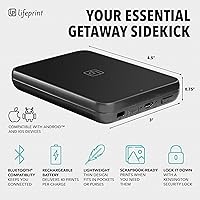
  • Dimensions: The printer measures 0.8″ deep, 4.7″ wide, and 3.2″ tall, making it small enough to fit in most jacket pockets.
  • Thickness: At just 19mm, this is one of the slimmest portable photo printers currently available in its category.
  • Weight: The unit weighs 6.4 oz, so it adds virtually no meaningful burden to a travel bag or daily carry.
  • Print Size: All prints are produced at 2×3 inches on glossy sticky-backed ZINK photo paper.
  • Print Resolution: Maximum color and monochrome print resolution is 313×400 dpi, suitable for casual keepsakes and sticker use.
  • Ink System: The printer uses ZINK zero-ink technology, which means no cartridges, toners, or ribbons are ever required.
  • Paper Type: Compatible exclusively with ZINK 2×3-inch glossy sticky-back photo paper; standard photo paper is not supported.
  • Tray Capacity: The paper input tray holds a maximum of 10 sheets at one time.
  • Connectivity: The printer connects to smartphones and tablets wirelessly via Bluetooth only; no Wi-Fi or USB printing is supported.
  • Compatible OS: The Lifeprint app is available for both iOS and Android, covering the two major mobile operating systems.
  • Battery: A built-in rechargeable lithium polymer battery is included and pre-installed; no external batteries are required.
  • Wattage: The printer operates at 3.7 watts, reflecting its low-power portable design.
  • Control Method: All print functions, editing tools, and social features are controlled exclusively through the free Lifeprint app.
  • Hyperphoto Support: The printer supports Hyperphoto video embedding, which links a video clip to a physical print viewable via the app.
  • Social Integration: The app supports direct printing from Instagram, Facebook, Snapchat, the device camera roll, and Apple Live Photos.
  • Remote Printing: Users can wirelessly send photos to any other Lifeprint device owner anywhere in the world through the app.
  • In the Box: Each unit ships with the printer, five sheets of ZINK film, a USB charging cable, and a printed user manual.
  • Warranty: The printer is covered by a limited manufacturer warranty provided by Lifeprint.
  • Languages: The user manual and app interface support English, French, German, Italian, and Spanish.
  • Model: This unit is the LP2X3SLIMW, part of the Lifeprint Ultra Slim series launched in October 2018.

Related Reviews

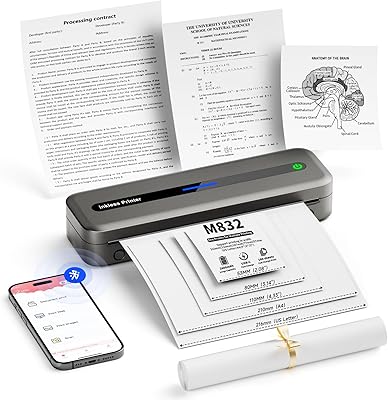
PhoFuta Portable Bluetooth Thermal Printer
84%
91%
Portability
77%
Print Quality
89%
Battery Life
85%
Ease of Use
82%
Wireless Connectivity
More
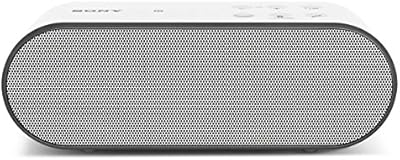
Sony SRSX2 Ultra-Portable Bluetooth Speaker
84%
85%
Sound Quality
92%
Portability & Design
76%
Battery Life
89%
Connectivity (Bluetooth & NFC)
81%
Speakerphone Functionality
More
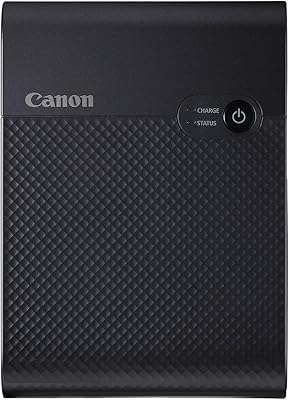
Canon SELPHY Square QX10 Portable Photo Printer
83%
91%
Print Quality
89%
Ease of Use
93%
Portability
78%
Print Speed
84%
Battery Life
More
HP Sprocket Select Portable Photo Printer
75%
93%
Portability & Form Factor
67%
Print Quality
91%
Ease of Setup
74%
App Experience
52%
Paper & Consumable Costs
More
LG GP60NB50
LG GP60NB50
79%
93%
Ease of Setup
91%
Portability & Form Factor
78%
Compatibility
69%
Read & Write Performance
82%
Build Quality & Durability
More
Kodak Mini 3 Retro Portable Photo Printer
77%
88%
Print Quality
62%
Value for Money
71%
App Experience
93%
Portability & Size
84%
Build Quality & Design
More
LG BP60NB10 Ultra Slim Portable Blu-ray Drive
76%
88%
Build Quality & Form Factor
74%
Noise Level During Playback
86%
Compatibility & Plug-and-Play Setup
61%
UHD 4K Playback Experience
91%
M-DISC Archival Support
More
Caraele 640GB Portable External Hard Drive
73%
83%
Value for Money
76%
Build Quality
88%
Portability & Form Factor
61%
Transfer Speed
91%
Setup & Ease of Use
More
Maxone 250GB Ultra Slim Portable External Hard Drive
87%
94%
Portability & Size
89%
Value for Money
90%
Build Quality & Durability
85%
Data Transfer Speed
88%
Compatibility
More
LG GP60NS50 Ultra Slim Portable DVD±RW Drive
82%
94%
Portability & Size
89%
Ease of Use
62%
Writing Speed
91%
M-DISC Support
88%
Compatibility Across Platforms
More

FAQ

You do need the Lifeprint app installed to print anything — there is no way to print directly from your camera roll without it. That said, once the app is set up and your phone is paired, pulling a photo from your camera roll and printing it takes under a minute. The app also connects to Instagram, Snapchat, and Facebook, so you are not limited to photos already saved on your device.

Before you print a photo, you use the Lifeprint app to link a video clip to that image. The app then embeds a digital marker into the printed photo. Later, when someone opens the Lifeprint app and points their phone camera at that print, the linked video plays over the photo on their screen — think of it as a lightweight augmented reality layer. The catch is that the person scanning the print also needs to have the app installed, otherwise the print just looks like a normal photo.

The printer uses ZINK 2×3-inch sticky-backed glossy photo paper, and it only works with this specific paper type — you cannot use generic or third-party alternatives. Refill packs are available from Lifeprint directly and through major online retailers, typically sold in packs of 20 or 50 sheets. The per-print cost is higher than standard inkjet printing, so if you plan to print frequently, it is worth factoring refill costs into your budget before buying the printer.

Yes, the starter pack includes just 5 sheets of ZINK film, which honestly runs out very quickly once you start experimenting. It is enough to confirm everything is working and get a feel for print quality, but most buyers order an additional pack of refills at the same time as the printer itself to avoid running dry almost immediately.

The Lifeprint Ultra Slim Portable Bluetooth Photo Printer officially supports both iOS and Android, and the app is available on both platforms. That said, real-world performance on Android tends to be a bit more variable than on iPhone — users with older Android devices or earlier OS versions occasionally report Bluetooth pairing issues or app instability. If you are on a current-generation Android flagship, you are unlikely to have problems, but it is worth checking recent app reviews for your specific device if you are concerned.
The sticky-backed ZINK prints are reasonably water-resistant once applied to a smooth surface like a water bottle, and they hold up better than standard paper photo prints would. They are not fully waterproof, so extended submersion or heavy condensation may eventually cause the edges to lift or the image to degrade, but for typical water bottle use most buyers report the prints lasting well.

The built-in lithium polymer battery charges via the included USB cable. For casual use — printing a sheet here and there throughout the day — most users find the battery lasts comfortably through a standard outing. Where it shows strain is during back-to-back print sessions, like printing multiple full packs at a party; in those situations, some users report the printer needing a rest or a top-up charge before finishing the job.

Yes, that is exactly what the remote wireless printing feature is designed for. As long as both of you have the Lifeprint app installed and your own Lifeprint printers, you can send a photo to their device from anywhere in the world — it works through the app rather than a direct Bluetooth connection. It is a genuinely fun feature for staying connected with friends or family at a distance.

Be realistic about expectations here — at 313×400 dpi, the prints are not framing-quality. They look cheerful and vibrant for stickers, scrapbooks, and small keepsakes, but fine detail, subtle shadows, and complex backgrounds do not come through cleanly. If you are looking for crisp, gallery-worthy 2×3-inch prints, a dedicated dye-sublimation printer will serve you better. For fun, everyday social-style printing, the quality is perfectly adequate.

The printer requires a Bluetooth-connected smartphone running the Lifeprint app to function — it cannot operate as a standalone device. There is no way to pre-load photos onto the printer for offline printing, and all editing, photo selection, and print triggering happen through the app. If your phone battery dies or you lose the Bluetooth connection mid-session, printing will stop until the connection is restored.

Where to Buy