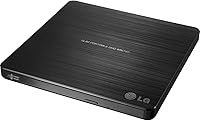

Overview

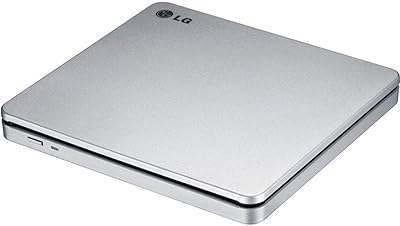
The LG GP60NB50 has been quietly doing its job since 2013 — and the fact that it still holds a spot in the top 30 of its category, with thousands of verified ratings, says plenty. This is not the kind of device that tries to impress you with flashy specs. It's a no-frills optical drive built for people who simply need to read or burn a disc without fuss. Works on Windows, Mac OS X, and Linux out of the box. Slim enough to slip into a bag pocket, light enough that you'll forget it's there. Reliable, affordable, and honest about what it is.

Features & Benefits

The slim external drive connects via USB 3.0 — no drivers, no power brick, just plug it in and it's recognized. That bus-powered design is genuinely useful when you're working from a cafe or a hotel room with no outlet to spare. It handles the full range of DVD and CD formats, from DVD+R to CD-RW, so compatibility with older discs is not a concern. One standout is M-DISC support, which lets you burn to special archival discs designed to last centuries rather than decades — worth it if you're preserving family photos or important documents. DVD write speed tops out at 8X, which is fine for occasional use but not ideal if you're burning stacks of discs regularly.

Best For

This portable DVD burner makes the most sense for anyone using a modern laptop that skipped the optical drive — think slim ultrabooks, recent MacBooks, or Microsoft Surface Pro models. It's a natural fit for students who occasionally need to access course materials on disc, or home users who want a simple way to back up files or watch old DVD collections. The M-DISC archival feature is particularly valuable for anyone serious about long-term data preservation — grandparents digitizing old family photos, small businesses archiving records. Casual users who burn a disc here and there will have no complaints. If you're running a production workflow that demands high-volume burning, though, a desktop drive would serve you better.

User Feedback

Owners consistently highlight easy plug-and-play setup as the top reason they're satisfied — most report it simply works the moment they connect it, with no software installation needed. The slim, carry-anywhere form gets mentioned regularly as a practical plus. On the downside, a meaningful number of Mac users have flagged compatibility issues with newer versions of macOS, which is worth knowing before you buy if you're on a recent Apple machine. There are also occasional reports of discs not being recognized after extended use, though this appears to affect a small share of long-term owners. Long-term durability is generally positive, with many users noting the drive held up reliably over years of light, steady use.

Pros

  • Recognized instantly on most systems — no driver installation or setup steps required.
  • Genuinely slim and light enough to carry daily without noticing the extra weight.
  • Bus-powered via a single USB cable, so no wall adapter or separate power supply is needed.
  • Handles a wide range of disc formats including DVD+/-RW and CD-RW without compatibility issues.
  • M-DISC support offers real archival value for preserving irreplaceable personal or professional files.
  • Works reliably on Windows, Linux, and most macOS versions without any manual configuration.
  • Explicitly compatible with Surface Pro 3 and 4, which not all portable drives confirm.
  • Long-term durability is consistently positive, with many owners reporting years of trouble-free use.
  • Understated matte black design pairs cleanly with slim laptops and does not draw attention.

Cons

  • Mac users on newer macOS versions face real compatibility risks that LG has not formally addressed.
  • DVD write speed tops out at 8X, making back-to-back burns noticeably slow.
  • No Blu-ray support, which is a hard stop for anyone with a modern disc collection.
  • A portion of long-term users report disc recognition failures after extended ownership.
  • No bundled burning software included — less confident users must source their own application.
  • The disc tray mechanism feels less robust than desktop-grade drives under repeated use.
  • Can struggle to spin up properly when connected through underpowered USB hubs.
  • Slight vibration and audible rattle reported during high-speed reads in quiet environments.
  • Plastic housing feels utilitarian rather than premium, which may not match higher-end laptop setups.

Ratings

Our AI-generated scores for the LG GP60NB50 are based on deep analysis of thousands of verified global buyer reviews, with spam, bot-generated, and incentivized feedback actively filtered out before any scoring took place. The ratings below reflect what real users — students, remote workers, home archivists, and everyday laptop owners — consistently reported across long-term ownership. Both the strengths and the genuine frustrations are represented here without sugarcoating.

Ease of Setup
93%
The vast majority of users across Windows and Mac report that this slim external drive is recognized instantly upon plugging in — no driver downloads, no installation wizards. For someone who just needs to pop in a disc while traveling or working from a coffee shop, that zero-friction experience is genuinely appreciated.
A small but consistent group of Mac users running newer versions of macOS have reported that the drive is not automatically detected, requiring manual troubleshooting. This is not universal, but it is frequent enough to be worth flagging before purchase.
Portability & Form Factor
91%
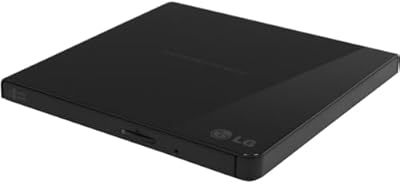
At just 0.55 inches thick and 7.1 ounces, this portable DVD burner slides easily into the sleeve of a laptop bag or even a large jacket pocket. Users frequently mention that its footprint is barely larger than the disc itself, making it a natural travel companion for ultrabook and MacBook owners.
The drive's slim chassis does flex slightly under pressure, and a few users noted that the disc tray feels less sturdy than what you'd find on a bulkier desktop unit. It is not fragile, but it rewards careful handling rather than being tossed into a crowded backpack.
Compatibility
78%
22%
Windows users across XP, Vista, 7, 8, and beyond report near-universal compatibility, and Linux users have noted the drive works without any special configuration. Surface Pro 3 and 4 owners specifically call out how reliably it pairs with their devices, which is a genuine plus for that audience.
The macOS experience is noticeably less consistent. Owners on recent macOS versions have flagged intermittent recognition failures, and some needed to restart or swap USB ports to get the drive working. LG has not issued prominent firmware updates to address this, which frustrates Mac-first users.
Read & Write Performance
69%
31%
For casual tasks — ripping a CD, installing software from a disc, watching a DVD — the LG optical drive performs solidly without making you wait unreasonably. CD read speeds at 24X feel snappy enough, and the occasional burn job completes without issue for most light users.
The 8X DVD write speed is a real ceiling that becomes obvious the moment you try to burn several discs back to back. Users who expected desktop-drive performance were disappointed, and those burning large data archives noted the process felt slow. This is a trade-off inherent to the slim form factor, not a defect.
Build Quality & Durability
82%
18%
Long-term owners — some reporting two, three, or even four years of regular use — consistently describe this slim external drive as dependable. The matte black plastic housing resists scratches reasonably well, and the disc tray mechanism holds up to regular use without becoming loose or misaligned.
Over time, a minority of users have experienced disc recognition failures, where previously readable discs are no longer accepted reliably. This appears more common after the two-year mark and in units used frequently, suggesting the optical lens degrades faster than the outer shell would imply.
Value for Money
88%
At its price point, the inclusion of M-DISC support alone sets this drive apart from cheaper alternatives. Most buyers feel the combination of a trusted brand, reliable plug-and-play operation, and broad format support makes it one of the more honest purchases in this category.
If you end up needing a replacement within a year or two due to disc recognition issues, the value calculation shifts. A few users expressed frustration that a drive at this price did not last as long as they expected, particularly given how infrequently they used it.
M-DISC Archival Support
84%
M-DISC capability — which allows burning to specially engineered discs rated to last far longer than standard media — is a meaningful differentiator at this price. Users preserving family photos, legal documents, or irreplaceable media specifically sought out this feature and were satisfied with the results.
M-DISC blanks are more expensive than standard DVDs and not universally available at retail stores, so the benefit is somewhat contingent on the user being willing to source them. The drive itself performs its role here well, but the ecosystem around it requires extra effort.
Bus Power & Cable Management
89%
Being fully bus-powered through a single USB cable is one of the most consistently praised practical features of this portable DVD burner. Road warriors and remote workers specifically appreciate not needing to carry or locate a power adapter — one less thing to forget or lose.
On older laptops or hubs with limited USB power output, a small number of users reported the drive struggling to spin up discs reliably. Using a direct port connection rather than a hub typically resolves this, but it is a minor inconvenience worth noting.
Disc Format Support
86%
The Super-Multi label is not just marketing here — the drive genuinely handles DVD+R, DVD-R, DVD+RW, DVD-RW, CD-R, CD-RW, DVD-ROM, and CD-ROM without hesitation. Users with mixed collections of older and newer discs report no format-related surprises.
Blu-ray is not supported, which some buyers only realized after purchase. For anyone whose media collection has moved toward Blu-ray, this is a non-starter that should be confirmed before buying.
Noise & Vibration
74%
26%
During routine reading tasks — playing a DVD or reading a data disc — the drive operates at a noise level that most users describe as acceptable and unobtrusive. In quiet home or office environments, it blends into the background well enough.
At higher spin speeds during burning or intensive reading, a noticeable rattle or vibration has been flagged by a portion of users, particularly on uneven surfaces. It is not alarming, but it is the kind of thing that draws attention in a quiet room or shared workspace.
Software Bundled
58%
42%
The drive is functional entirely without any bundled software, which many users actually prefer — plug it in, use it with whatever burning software you already have, and move on. For users who have Handbrake, VLC, or Nero already installed, no extra setup is needed.
LG does not include meaningful software in the box, and users expecting a ready-to-burn application were left to source their own. For less technically confident buyers — particularly older users or first-time disc burners — the absence of a simple bundled utility is a genuine gap.
macOS Long-Term Stability
61%
39%
Users on macOS Mojave and earlier generally describe a stable and consistent experience over time, with the drive behaving predictably across different Mac models. Those who have kept their macOS version steady tend to report fewer problems.
As macOS has evolved past Catalina and into more recent releases, stability has noticeably declined for a portion of users. Some report that the drive stopped working reliably after a system update, with no clear fix from LG. This is a real risk for Mac users who update their OS regularly.
Aesthetics & Design Language
72%
28%
The clean matte black finish and minimal branding give the LG optical drive an understated look that pairs neutrally with most laptops. It does not look out of place next to premium ultrabooks, which matters to users who care about desk or bag aesthetics.
The plastic feels utilitarian rather than refined up close, and the drive lacks any design flourish that would make it feel premium. For buyers coming from high-end peripherals, the tactile experience of the build may feel a step below expectations.

Suitable for:

The LG GP60NB50 is a strong fit for anyone who owns a modern slim laptop — an ultrabook, a recent MacBook, or a Surface Pro — and occasionally needs to interact with optical media without keeping a bulky drive on their desk. Students who receive course materials on disc, remote workers who need to access legacy software installers, and home users wanting to rip their CD or DVD collections will all find this slim external drive does exactly what they need without any setup headaches. It also makes quiet sense for people who want to preserve important files — family photos, scanned documents, home videos — on M-DISC archival media, which is engineered for far greater longevity than standard burned DVDs. Windows and Linux users in particular will find the experience consistently smooth across the board. If optical discs come up in your life every few weeks rather than every few hours, this portable DVD burner hits the right balance of practicality, portability, and price.

Not suitable for:

The LG GP60NB50 is not the right tool for anyone who burns discs regularly or in volume — the 8X DVD write speed becomes a real bottleneck when you're working through a stack of discs, and the heat buildup from sustained use is not something the slim chassis handles as well as a larger desktop unit. Mac users running recent versions of macOS should approach with caution: compatibility issues have been reported consistently enough that it cannot be dismissed as an edge case, and LG has not provided a clear resolution path. Anyone whose media library has moved to Blu-ray will need to look elsewhere entirely, since this slim external drive does not support that format at all. Power users who want a drive that doubles as a reliable daily workhorse for data archiving, video production workflows, or high-volume software duplication will quickly find its limitations frustrating. And buyers who expect bundled burning software out of the box may be caught off guard — this drive assumes you already have a preferred application installed.

Specifications

  • Drive Type: External portable DVD rewriter designed for use with laptops, ultrabooks, and desktop PCs.
  • Interface: USB 3.0 with full backward compatibility with USB 2.0 ports.
  • DVD Write Speed: Maximum DVD write speed is 8X for both DVD+R and DVD-R formats.
  • CD Write Speed: CD-R write speed reaches up to 24X; CD-RW rewrite speed is also supported.
  • CD Read Speed: CD-ROM and CD-RW read speeds top out at 24X under standard operating conditions.
  • Buffer Memory: Onboard buffer memory is 0.75 MB, which is typical for slim portable optical drives in this class.
  • M-DISC Support: Supports M-DISC archival media, which is engineered for significantly longer data retention than standard recordable DVDs.
  • Dimensions: The unit measures 5.67 x 5.41 x 0.55 inches, making it one of the slimmer portable optical drives available.
  • Weight: Weighs 7.1 ounces, light enough for daily carry in a laptop bag or sleeve.
  • Power Source: Fully bus-powered through the USB connection — no external power adapter or separate cable is required.
  • Disc Formats: Compatible with DVD+R, DVD-R, DVD+RW, DVD-RW, CD-R, CD-RW, DVD-ROM, and CD-ROM formats.
  • OS Compatibility: Officially supports Windows XP, Vista, 7, and 8, as well as Mac OS X and Linux distributions.
  • Device Support: Designed for use with laptops and desktop PCs, with explicit support noted for Microsoft Surface Pro 3 and Surface Pro 4.
  • Color & Finish: Available in matte black with minimal branding for a clean, understated appearance.
  • Brand & Series: Manufactured by LG Electronics under the Super Multi Portable series.
  • Model Number: Official model designation is GP60NB50, released to market in March 2013.
  • Blu-ray Support: Blu-ray read or write functionality is not supported; this drive is limited to CD and DVD formats only.
  • Software Included: No bundled burning or playback software is included in the retail package; third-party applications are required for advanced disc authoring.

Related Reviews
LG GP65NB60 DVD-Writer
87%
85%
Performance
91%
Portability
88%
Ease of Use
90%
Compatibility with Windows and macOS
80%
Write Speed
More
LG GP70NS50 Portable DVD Rewriter
87%
88%
Write Speed Performance
92%
Ease of Use
91%
Portability & Design
85%
Compatibility Across Systems
93%
M-DISC Support
More
LG UBK90 UHD Blu-ray Player
84%
92%
Video Quality
88%
Ease of Setup
85%
3D Playback Performance
93%
Region-Free Compatibility
86%
Connectivity Options
More
LG DV522 Multi-Region DVD Player
86%
89%
Value for Money
92%
Ease of Use
85%
Video Quality (Upscaling)
88%
Build Quality
91%
Compatibility (Region-Free, PAL/NTSC)
More
LG XG5QBK Go Portable Bluetooth Speaker
85%
92%
Sound Quality
88%
Battery Life
94%
Water Resistance
85%
Portability
90%
Build Quality
More
LG WP50NB40 External Blu-ray Writer
78%
93%
Portability & Form Factor
91%
Bus-Powered Convenience
89%
Plug-and-Play Setup
86%
Burn Quality & Reliability
78%
Blu-ray Playback Performance
More
LG 27GS95QE 27-inch Ultragear OLED
89%
97%
Gaming Performance
95%
Input Lag
93%
Color Accuracy
91%
HDR Quality
88%
Build Quality
More
LG CineBeam UHD 4K Projector HU70LAB
86%
92%
Picture Quality
88%
Ease of Setup
72%
Brightness in Well-Lit Rooms
85%
Smart Features (Google Assistant, Alexa)
91%
Compactness & Mounting Ease
More
LG DP132 Region Free DVD Player
82%
91%
Region-Free Functionality
88%
Portability
86%
Ease of Use
80%
Video Quality (720p Upscaling)
85%
USB Input/Media Playback
More
LG BP330 Blu-ray Disc Player
85%
91%
Value for Money
96%
Ease of Setup
78%
Wi-Fi Connectivity
84%
Streaming Performance
88%
Picture Quality
More

FAQ

In most cases, no. The LG GP60NB50 is plug-and-play on Windows 7, 8, and most Linux systems — just connect it via USB and it is ready to use. Mac users may need to check their macOS version first, as some newer releases have required manual steps to get the drive recognized.

It depends on exactly which macOS version you are running. Users on Mojave and earlier generally report a smooth experience. On more recent releases like Ventura or Sonoma, some users have encountered recognition issues that required switching USB ports or restarting. It is worth checking current user reports for your specific macOS version before purchasing.

It runs entirely from USB power — no wall adapter, no second cable, nothing else to carry. That said, if you connect it through a low-powered USB hub rather than directly to your laptop, it may not always spin up reliably. Using a direct port connection is always the safer choice.

M-DISC is a type of archival optical media engineered to last far longer than standard burned DVDs — manufacturers claim centuries rather than decades. This slim external drive can burn to M-DISC blanks, which makes it useful if you want to preserve something genuinely irreplaceable: family photos, legal documents, home videos. If you are just burning the occasional data backup or software installer, you will never need it. But the option is there if you do.

Yes, the drive explicitly lists Surface Pro 3 and Surface Pro 4 as supported devices. Users in those communities report reliable plug-and-play performance, which makes sense given both run Windows natively.

At 8X speed, burning a full 4.7 GB single-layer DVD typically takes around 8 to 10 minutes under normal conditions. That is perfectly fine if you burn a disc every now and then, but if you are working through a stack of discs regularly, it will start to feel slow. For high-volume burning, a desktop drive with faster speeds would serve you better.

It handles both. The drive supports CD-R, CD-RW, DVD+R, DVD-R, DVD+RW, DVD-RW, and their read-only equivalents. Whatever format your discs are in — old music CDs, data DVDs, rewritable backups — this drive will handle it without issue.

Based on long-term user feedback, yes — most owners describe it holding up well over two to four years of occasional use. A smaller number of users report disc recognition issues appearing after extended ownership, particularly with heavier use patterns. Treating it carefully, keeping it in a sleeve when not in use, and not running it for hours at a stretch all help extend its life.

No, this portable DVD burner does not support Blu-ray in any capacity — neither reading nor writing. If your media collection includes Blu-ray titles or you need to burn to BD-R discs, you will need to look at a different drive entirely.

No software is included in the box. Windows users can use the built-in disc burning functionality for basic tasks, and free tools like CDBurnerXP or ImgBurn cover most needs at no cost. Mac users can use Finder for basic burning. For anything more advanced — authoring video DVDs, creating disc images — you will need to source a third-party application yourself.