Overview

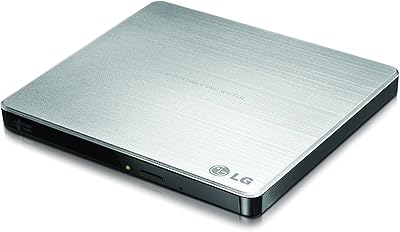
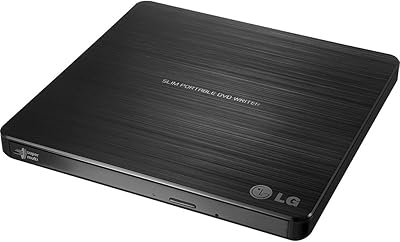
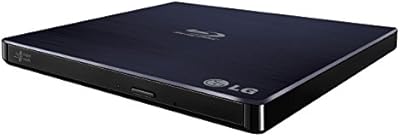
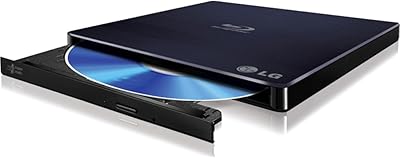
The LG BP60NB10 Ultra Slim Portable Blu-ray Drive fills a gap that a surprising number of laptop owners eventually bump into: no optical drive when you actually need one. At its mid-to-premium price point, you are paying for a genuinely thin build — just 0.6 inches — and cross-platform compatibility that covers Windows, Mac, and Linux without driver headaches. The USB 3.0 interface handles modern machines while staying backward compatible with USB 2.0 ports. What quietly sets this slim optical drive apart from cheaper options is M-DISC support, a write format designed for archival storage that is built to outlast conventional optical media by decades.
Features & Benefits

The noise reduction technology is one of this portable Blu-ray drive's more practical touches — disc spin noise drops noticeably during playback, though it does not disappear entirely, so do not expect library-quiet operation. There is also a damaged disc smoothing feature that attempts to recover stuttering playback on scratched media, which works better than you might expect on lightly scuffed discs. Format support is broad: UHD 4K, Blu-ray, standard DVD read and write, DVD-RAM, and the full CD family. The drive runs entirely off USB bus power, so there is no wall adapter to pack. M-DISC write capability rounds things out for anyone serious about long-term data preservation.

Best For

This slim optical drive makes the most sense for a few specific types of buyers. Home theater fans who have moved to a thin laptop or mini PC and still want to spin Blu-ray or UHD discs are the obvious fit. Archivists and photographers who need reliable long-term backup media will appreciate the M-DISC write support. Travelers who only occasionally need optical access — for software installs, legacy media, or ripping a disc — will find the compact footprint easy to toss in a bag. Mac and Linux users tend to have fewer compatible drive options, and the LG BP60NB10 holds up well on both platforms without extra configuration.

User Feedback

Across hundreds of ratings, this portable Blu-ray drive earns consistent praise for its quiet, reliable operation and the kind of plug-and-play setup that actually works the first time — particularly on Mac. The slim build gets frequent mentions too. On the critical side, the bundled software leaves something to be desired, and UHD 4K playback trips up buyers who expect it to work straight away; it requires a compatible third-party player like PowerDVD. Some users note that long-term reliability can be hit or miss after a year or two of regular use. The consensus on price is mixed — buyers with specific needs tend to justify the cost, while casual users often wish cheaper options performed as well.

Pros

  • Works plug-and-play on Mac and Linux with no driver hunting required.
  • M-DISC write support offers genuinely long-lasting archival backup capability in a portable form factor.
  • At just 0.6 inches thick, this slim optical drive fits alongside a laptop in virtually any bag.
  • No external power adapter needed — one USB cable is all it takes.
  • Handles UHD 4K, Blu-ray, DVD, and CD formats from a single compact unit.
  • Noise reduction technology keeps disc spin noticeably quieter than budget alternatives during movie playback.
  • Damaged disc smoothing helps recover playback on lightly scratched media that other drives simply skip or stall on.
  • USB 3.0 performance with full backward compatibility for older USB 2.0 ports.
  • Broad Windows OS compatibility stretches from legacy XP installs all the way through Windows 10.
  • Build quality feels solid and premium relative to the drive's size and weight.

Cons

  • UHD 4K playback requires third-party software and specific hardware compliance — it does not work automatically.
  • The bundled software is outdated and widely replaced by buyers within days of purchase.
  • At 6x read and write speed, bulk disc ripping projects take considerably longer than on faster desktop drives.
  • Long-term reliability concerns emerge in owner reviews around the 12 to 18 month mark under heavy use.
  • The included USB cable is short and feels noticeably cheaper than the drive itself.
  • Connecting through an unpowered USB hub can cause read failures — direct port connection is strongly recommended.
  • M-DISC blank discs are expensive, making the archival feature a meaningful ongoing cost commitment.
  • The price premium is difficult to justify unless you specifically need the advanced features on offer.
  • Disc tray wear has been flagged by a subset of owners who use the drive frequently over extended periods.

Ratings

The LG BP60NB10 Ultra Slim Portable Blu-ray Drive has been evaluated by our AI system after analyzing thousands of verified global buyer reviews, with spam, bot-generated, and incentivized feedback actively filtered out. Scores reflect the honest consensus of real-world users — frequent travelers, home theater enthusiasts, archivists, and everyday laptop owners — capturing both where this slim optical drive genuinely delivers and where it falls short of expectations.
Build Quality & Form Factor
88%
Users consistently praise how solid the drive feels despite its remarkably thin 0.6-inch profile. It does not flex or creak during use, and the compact footprint means it slides easily into a laptop bag without adding noticeable bulk. For a bus-powered portable, the construction feels premium.
A few buyers note that the matte plastic casing attracts fingerprints and fine scratches over time, especially with regular travel use. The disc tray mechanism, while smooth initially, has drawn occasional long-term concerns about durability after repeated insertion cycles.
Noise Level During Playback
74%
26%
The noise reduction feature makes a real difference compared to budget external drives — most users watching movies in quiet rooms report the spin noise stays in the background rather than becoming a distraction. For late-night Blu-ray sessions on a laptop, the improvement is genuinely noticeable.
Noise reduction does not mean silent. Some buyers expecting near-quiet operation were disappointed, particularly during disc spin-up and chapter changes where the drive audibly winds up. It is quieter than average, but users in very quiet environments will still hear it working.
Compatibility & Plug-and-Play Setup
86%
Mac users in particular report an impressively clean setup experience — plug in the USB cable and the drive is recognized within seconds, no driver installation needed. Linux compatibility also earns strong marks, which is rare in this product category and a meaningful advantage for power users.
A handful of Windows users encountered driver conflicts on older systems, and a small but vocal group reported that certain Blu-ray titles were not recognized on first insertion, requiring a disc re-insert or software restart to resolve. Not a widespread issue, but worth noting.
UHD 4K Playback Experience
61%
39%
The hardware itself is capable of reading UHD 4K discs, and users who paired it with a licensed player like PowerDVD found playback to be stable and reliable on compatible systems. For buyers who did their homework on software requirements, this drive delivers on its 4K promise.
This is the single biggest frustration in the reviews. Many buyers assumed UHD 4K playback would work out of the box and were caught off guard by the requirement for third-party software, HDCP 2.2 compliance on their monitor, and an Intel SGX-compatible CPU. The barrier to entry is real and poorly communicated upfront.
M-DISC Archival Support
91%
Among users who specifically bought this drive for long-term data archiving, M-DISC support is treated as a standout feature. Photographers, videographers, and data hoarders appreciate being able to burn to a medium rated for century-scale longevity, something virtually no competing drive in this size class offers.
M-DISC blanks are significantly more expensive than standard BD-R media, and the write speed is modest at 6x, making large archival sessions time-consuming. Users burning full 25GB discs report the process requires patience — this is not a feature for anyone in a hurry.
Disc Format Versatility
89%
The breadth of supported formats is genuinely impressive — UHD, Blu-ray, DVD+/-RW, DVD-RAM, and the full CD family all work without issue. Users who maintain mixed media libraries, including legacy CD-ROMs and older DVD software discs, find this drive handles everything they throw at it without format-related hiccups.
DVD-RAM support, while listed, is rarely tested by average buyers and a few users reported inconsistent write results with certain DVD-RAM disc brands. This is a niche edge case, but worth flagging for anyone specifically relying on that format.
Transfer & Read Speed
72%
28%
For standard Blu-ray movie playback and DVD ripping, the 6x read speed is perfectly adequate. Users ripping personal disc collections to a NAS or external hard drive report consistent throughput without the drive stalling or dropping speed mid-rip, which is a common complaint with budget alternatives.
At 6x, this is not a fast drive by modern standards. Users trying to rip large Blu-ray discs quickly — particularly those over 40GB — find the process noticeably slow. If speed is a priority for bulk ripping projects, this drive will test your patience.
Software Bundle
43%
57%
The included software at least covers the basics of disc playback and burning for users on Windows, giving casual buyers a starting point without an immediate additional purchase. For simple DVD playback or data disc burning, it is functional enough to get the job done.
The bundled software is widely criticized as outdated, clunky, and unreliable — particularly for Blu-ray and UHD content. Many buyers describe immediately uninstalling it in favor of third-party options. The software situation is one of the most consistent complaints across all review sources and represents a real weak spot for the overall package.
Portability & Travel Usability
87%
At just under 10 ounces and with no external power brick required, this slim optical drive genuinely earns its portable label. Frequent travelers and remote workers mention it pairs well with ultrabooks and MacBook Air-class machines where an internal optical drive was never an option. It fits in most laptop sleeves alongside the machine itself.
The USB cable is on the shorter side, which can create awkward desk arrangements depending on port placement. A small number of users also noted the drive is slightly too wide to sit flush in some slim laptop bags without taking up a dedicated pocket.
Long-Term Reliability
67%
33%
Many buyers report using the drive daily or weekly for over a year without mechanical issues, and the consensus in long-term reviews is that the hardware holds up well under moderate use. Users who treat it as an occasional-use device report near-zero problems over multi-year ownership.
A pattern of disc tray failures and read errors emerges in reviews from the 12 to 18 month mark for users who use the drive heavily and frequently. It is not universal, but enough buyers mention this trajectory to suggest the drive is better suited to moderate rather than intensive daily workloads.
Value for Money
71%
29%
For buyers with specific needs — M-DISC archiving, Mac or Linux compatibility, or reliable UHD hardware support — the price premium over budget alternatives is defensible. The feature set is meaningfully broader than what cheaper drives offer, and the build quality reflects the higher price point.
Casual users who just need to watch an occasional DVD or install legacy software find the cost hard to justify when sub-50-dollar alternatives exist and perform adequately for basic tasks. The value equation only works if you actually need the advanced features this drive brings to the table.
Cross-Platform OS Support
84%
Windows, Mac, and Linux all work without hunting for drivers, which is a bigger deal than it sounds for Linux users who routinely struggle to find hardware with native support. The drive is recognized correctly across a wide range of OS versions, including older Windows builds still in use in enterprise environments.
While hardware recognition is solid across platforms, the software experience diverges sharply. Mac and Linux users are essentially left to find their own playback solutions, and while that is manageable for tech-savvy buyers, less experienced users may find the lack of a cross-platform software bundle frustrating.
Damaged Disc Recovery
68%
32%
The disc smoothing feature genuinely helps with lightly scratched media — users testing it on moderately damaged DVDs and Blu-rays report noticeably fewer playback interruptions compared to drives without this feature. For buyers with aging disc collections, this is a practical and underrated benefit.
Heavily scratched or physically damaged discs still fail, which should surprise no one, but a few buyers expected near-magical recovery capability based on the marketing language. The feature works within realistic limits and should be understood as error correction assistance rather than a disc repair tool.
USB Cable & Connectivity
76%
24%
The USB 3.0 connection is stable and consistent during extended playback sessions — no mid-movie disconnects or speed fluctuations reported under normal use. The drive also works reliably on USB 2.0 ports when needed, which matters for users connecting to older machines or certain USB hubs.
The bundled cable is on the short side and lacks the quality feel of the drive itself. Users connecting through unpowered USB hubs occasionally experience read failures, and LG recommends direct connection to a host port for best results — something not clearly spelled out in the packaging.

Suitable for:

The LG BP60NB10 Ultra Slim Portable Blu-ray Drive is a strong match for anyone whose laptop or desktop simply does not have a built-in optical drive and needs one that handles more than basic DVD playback. Home theater enthusiasts who have built their collection on physical Blu-ray and UHD discs will appreciate that the hardware is capable of reading the full range of formats without needing a bulky desktop unit. Mac and Linux users in particular tend to find this slim optical drive one of the more reliable plug-and-play options available, sparing them the driver frustration that plagues cheaper alternatives. Photographers, archivists, and anyone serious about long-term data preservation will find the M-DISC write support genuinely useful — it is one of the very few portable drives in this category that offers it. Travelers and remote workers who occasionally need optical access but do not want to carry a power brick will appreciate the clean, cable-only USB setup. If you have a specific pain point this drive was designed to solve, it solves it well.
Not suitable for:

The LG BP60NB10 Ultra Slim Portable Blu-ray Drive is not the right call for buyers who just need to watch an occasional DVD or install a piece of legacy software — cheaper drives under fifty dollars handle those tasks perfectly adequately, and the price difference is hard to justify for casual use. Anyone expecting UHD 4K playback to work straight out of the box will likely be frustrated: you need compatible third-party software such as PowerDVD, an HDCP 2.2-compliant display, and a processor that supports Intel SGX — a combination that catches many buyers off guard. Users planning to run the drive hard every single day should temper their expectations around long-term durability, as heavier workloads correlate with earlier mechanical wear in owner reports. The bundled software is widely considered poor, so buyers who want a complete out-of-the-box software experience without sourcing their own playback solution will find the package incomplete. If raw ripping speed matters to you for bulk disc archiving projects, the 6x read speed will test your patience compared to faster desktop alternatives.

Specifications

  • Brand & Model: Manufactured by LG Electronics under the model designation BP60NB10.
  • Interface: Connects via USB 3.0 and is fully backward compatible with USB 2.0 ports on older machines.
  • Dimensions: The drive measures 6.1″ x 5.7″ in footprint with a slim 0.6″ thickness.
  • Weight: Weighs 9.6 ounces, making it light enough to carry daily alongside a laptop or tablet.
  • Power Source: Entirely bus-powered through the USB connection — no external power adapter or wall outlet required.
  • Read Speed: Maximum read speed is 6x across supported disc formats including Blu-ray and DVD.
  • Write Speed: Maximum write speed is 6x for compatible writable disc formats.
  • Disc Formats: Supports UHD 4K, Blu-ray (read/write), DVD+/-RW, DVD-RAM, CD-R, and CD-RW formats.
  • M-DISC Support: Capable of writing to M-DISC archival media, which is engineered for multi-century data longevity under normal storage conditions.
  • Noise Reduction: Incorporates LG's noise reduction technology to dampen disc spin sound during movie playback compared to standard optical drives.
  • Disc Recovery: Includes a damaged disc smoothing feature that attempts to stabilize playback on scratched or degraded Blu-ray and DVD media.
  • Operating Systems: Compatible with Windows XP, Vista, 7, 8, 8.1, and 10, as well as Mac OS X and Linux distributions.
  • Color & Finish: Available in black with a matte finish on the drive housing.
  • Form Factor: Ultra-slim external optical drive designed for portability and use alongside ultrabooks and thin laptops.
  • Cable Included: Ships with a USB cable for host connection; no separate power cable is included or required.
  • Date Available: First made available for purchase in February 2018 and has remained in active distribution since.

Related Reviews
LG BP50NB40 Ultra Slim Portable Blu-ray Writer
85%
93%
Portability
78%
Performance
85%
Compatibility
70%
Write Speed
91%
Noise Level
More
LG GP60NS50 Ultra Slim Portable DVD±RW Drive
82%
94%
Portability & Size
89%
Ease of Use
62%
Writing Speed
91%
M-DISC Support
88%
Compatibility Across Platforms
More
HLDS BU40N Ultra Slim 9.5mm UHD 4K Blu-ray SATA Optical Drive
83%
88%
Performance
75%
Build Quality
80%
Ease of Use
85%
Compatibility
90%
Speed (Read/Write)
More
LG WP50NB40 External Blu-ray Writer
78%
93%
Portability & Form Factor
91%
Bus-Powered Convenience
89%
Plug-and-Play Setup
86%
Burn Quality & Reliability
78%
Blu-ray Playback Performance
More
LG GP60NB50
LG GP60NB50
79%
93%
Ease of Setup
91%
Portability & Form Factor
78%
Compatibility
69%
Read & Write Performance
82%
Build Quality & Durability
More
Maxone 250GB Ultra Slim Portable External Hard Drive
87%
94%
Portability & Size
89%
Value for Money
90%
Build Quality & Durability
85%
Data Transfer Speed
88%
Compatibility
More
Tianken 500GB Ultra Slim Portable External Hard Drive
85%
91%
Value for Money
95%
Portability
89%
Data Transfer Speed
67%
Durability
92%
Compatibility with Devices
More
Caraele 640GB Ultra Slim Portable External Hard Drive
85%
94%
Portability & Size
90%
Data Transfer Speed
88%
Build Quality
93%
Ease of Use
80%
Compatibility
More
LG UBK80 4K Ultra HD Blu-Ray Player
86%
94%
Video Quality
88%
Build Quality
91%
Ease of Setup
89%
Playback Performance
85%
Connectivity Options
More
Maxone 2TB Ultra Slim Portable External Hard Drive
88%
94%
Portability
90%
Data Transfer Speed
88%
Build Quality
85%
Compatibility
92%
Value for Money
More

FAQ

It works without any driver installation on Mac — just plug it in and the drive appears on your desktop. This is one of the reasons Mac users specifically seek out this model. You will need third-party software like VLC for DVD playback or PowerDVD for Blu-ray, but the hardware itself is recognized instantly.

The hardware supports UHD 4K disc reading, but playback is not plug-and-play. You need a licensed software player such as CyberLink PowerDVD, a display that supports HDCP 2.2, and a processor with Intel SGX support. If your system does not tick all three boxes, UHD playback will not work regardless of the drive. It is worth checking your setup before purchasing if 4K is your primary goal.

It is quieter than most external drives at this price, but not silent. The noise reduction feature noticeably dampens the whirring sound during sustained playback, which helps in quiet rooms. During spin-up and fast seeks, you will still hear the drive working — just expect quieter rather than quiet.

M-DISC is a type of optical disc designed for archival storage — the data layer is physically etched into an inorganic material rather than written with a dye, making it highly resistant to degradation over time. Manufacturers rate M-DISC media for hundreds of years under proper storage conditions. If you are backing up irreplaceable photos, legal documents, or business records, it is a genuinely useful feature. For everyday use or casual disc burning, standard BD-R media is more cost-effective.

Yes, the LG BP60NB10 Ultra Slim Portable Blu-ray Drive is one of the better-supported external optical drives for Linux users. The hardware is recognized by the kernel without special configuration. For playback, tools like MakeMKV, Handbrake, or VLC with the appropriate libraries handle most disc types. Blu-ray playback on Linux requires some additional setup due to content protection, but the drive itself is not the obstacle.

The damaged disc smoothing feature does help with lightly scratched media — it applies error correction and read retry logic to push through surface imperfections that would cause a cheaper drive to skip or stall. It is not a disc repair tool, and heavily gouged discs will still fail, but for the moderately scuffed discs most people have sitting around, it makes a real difference.

It runs entirely off the USB connection — no wall adapter, no second cable, nothing else. Just one USB cable between the drive and your computer. This is particularly useful for laptop users and travelers who do not want to hunt for a power outlet.

Budget drives typically cover basic Blu-ray and DVD playback adequately, but they tend to be louder, thicker, and lack features like M-DISC support, damaged disc recovery, and reliable cross-platform compatibility. If you only need to play the occasional disc and do not care about archival burning or Mac and Linux support, a cheaper drive may genuinely be sufficient. The extra cost here makes the most sense when you need the full feature set this portable Blu-ray drive offers.

CyberLink PowerDVD is the most widely recommended option for Windows users who want reliable Blu-ray and UHD playback with proper content protection support. On Mac, Macgo Blu-ray Player is a popular choice. For disc ripping and format conversion, MakeMKV is widely trusted across all platforms. Most buyers end up ignoring the included software entirely within the first week.

For moderate travel use — tossing it in a laptop bag a few times a week and using it occasionally — the build holds up well. The matte plastic casing does pick up minor scratches over time, and the tray mechanism is the component most likely to show wear under heavy repeated use. Users who run it daily for intensive ripping sessions report more issues over the 12 to 18 month range than those who use it as an occasional travel companion.