Overview

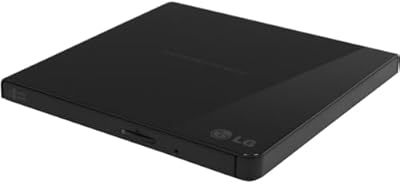
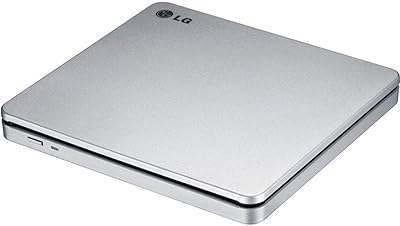
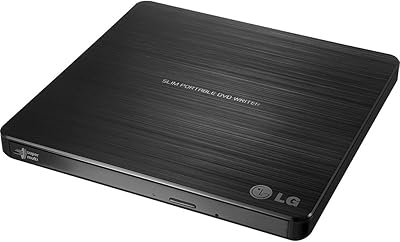
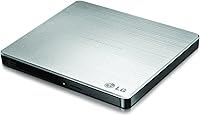
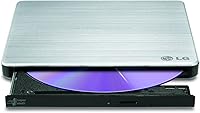
The LG GP60NS50 Portable External DVD Writer is the kind of no-fuss peripheral that disappears into your workflow — plug it in, it works, done. At just over half an inch thick and weighing 7 ounces, this slim external DVD drive genuinely fits into a laptop bag without adding noticeable bulk. It has held a top position in its category since its 2012 launch, which reflects consistent real-world performance more than anything a product page could claim. Works across Windows, macOS, and Linux in most cases without driver installation, making it broadly accessible regardless of your setup or technical comfort level.
Features & Benefits

One feature that sets this portable disc writer apart from cheaper alternatives is M-DISC support. M-DISC is an archival-grade disc format engineered to retain data for an extraordinary length of time — a smart choice when burning irreplaceable photos, legal records, or family memories. The drive pulls power directly from USB, so there is no wall adapter to carry around. Write speeds reach 8x for DVDs and 24x for CDs, adequate for occasional use but not designed for bulk duplication jobs. Plug-and-play behavior across major operating systems keeps setup friction low for virtually any user.

Best For

This slim external DVD drive is the natural pick for MacBook and ultrabook owners who occasionally need disc access but do not want a drive permanently occupying desk space. It suits home users looking to archive old CDs, family DVDs, or important files onto long-lasting M-DISC media. Students and remote workers benefit from how effortlessly it travels. Anyone still running software that ships on physical media will find it equally practical. Linux users, who often encounter driver headaches with optical drives, will find this one a reliable exception that works without extra configuration or hunting for third-party software.

User Feedback

With a 4.5-star average across nearly 6,000 ratings, the LG optical drive has earned a level of collective trust that is genuinely hard to fabricate at that volume. Most buyers highlight easy setup and consistent performance over repeated sessions as the core reasons they would purchase again. On the downside, a handful of Mac users have flagged compatibility hiccups with certain macOS versions — worth checking for system updates if issues arise. Burning at maximum speed can occasionally produce failed discs, though that is a trait shared across most optical drives. A small fraction of buyers report dead-on-arrival units, which is expected for any hardware sold at this scale.

Pros

  • Plug-and-play on Windows, macOS, and Linux with no driver installation needed in most cases.
  • M-DISC support makes this slim external DVD drive a genuine option for long-term data archiving.
  • Bus-powered via USB means no separate power adapter to carry or misplace.
  • Slim enough at 0.55 inches thick to slip into a laptop bag without taking up real estate.
  • Lightweight at 7 ounces — you genuinely forget it is in your bag.
  • Sustained top-25 bestseller ranking reflects years of consistent buyer satisfaction, not a sales spike.
  • Nearly 6,000 ratings averaging 4.5 stars signals broad reliability across a wide range of users.
  • Broad OS compatibility makes it usable across mixed-device households or work environments.
  • Durable enough that multiple buyers report trouble-free use spanning several years.
  • Affordable price point for a brand-name drive from a well-established electronics manufacturer.

Cons

  • An 8x DVD write speed is adequate but noticeably slow if you burn discs with any regularity.
  • No Blu-ray support whatsoever — this is strictly a CD and DVD drive.
  • Some Mac users on specific macOS versions have reported intermittent compatibility problems.
  • Burning at maximum rated speed occasionally produces failed or unreadable discs.
  • A small but consistent percentage of buyers receive non-functional units straight out of the box.
  • USB 2.0 interface, while backward compatible, is a dated standard that limits theoretical transfer headroom.
  • No bundled software of real value included — you need to source your own burning application.
  • Not suited for heavy-duty or repeated daily use; built for occasional access, not production workloads.

Ratings

The scores below for the LG GP60NS50 Portable External DVD Writer were generated by our AI review engine after analyzing thousands of verified global buyer reviews, with automated filtering applied to remove incentivized, duplicate, and bot-generated submissions. Every category reflects the honest distribution of real user experiences — strengths are credited where earned, and recurring pain points are scored accordingly without being softened.
Ease of Setup
93%
The overwhelming majority of buyers across Windows, macOS, and Linux report that this slim external DVD drive is recognized instantly upon plugging in, with no driver hunting required. For non-technical users — students, older adults, home office workers — that zero-configuration experience is exactly what they needed and rarely taken for granted.
A small but consistent group of Mac users on specific OS versions report that the drive is not immediately recognized, requiring a system update or workaround to resolve. These cases are the exception rather than the rule, but they are real and worth acknowledging for macOS users on less common builds.
Portability
94%
At 7 ounces and just over half an inch thick, this portable disc writer genuinely disappears into a laptop bag. Remote workers and students who carry it daily note that it adds no perceptible weight or bulk, which is a meaningful real-world advantage over bulkier competitors in the category.
The drive does not come with a dedicated carrying pouch or case, so users who travel frequently need to source their own protective sleeve to prevent surface scratches. The cable, while short enough to stay tidy, can feel slightly awkward to wrap and store neatly during transit.
Read Performance
81%
19%
For everyday disc reading tasks — installing software, pulling data off old CDs, or playing back a DVD — the drive performs reliably and consistently. Users who use it to recover files from aging disc collections report very few read errors even on discs showing minor wear.
At 8x DVD read speed, the drive is not fast by any modern standard, and reading a data-heavy disc can feel slow compared to internal drives from even a decade ago. Users expecting snappy performance for frequent read-intensive tasks may find the pace frustrating over time.
Write Performance
72%
28%
For occasional burning — archiving family photos, creating a backup disc, or duplicating a data set — the 8x DVD write speed is entirely adequate and produces reliable results when used with quality media. Most home users burning a disc every few weeks will never feel limited by this speed.
Burning a full single-layer DVD at maximum speed takes roughly 8 to 12 minutes, which adds up quickly if you are working through a stack of discs. Several users also note that burning at the full rated speed occasionally produces coaster discs, and dialing back to 4x or 6x results in more consistent outcomes.
Build Quality
74%
26%
The drive feels solid for its weight class and does not flex or creak under normal handling. Users who have owned this portable disc writer for two or three years report that it continues to function without performance degradation, which speaks well of its internal mechanism durability.
The plastic casing picks up fingerprints and light scratches over time, and the tray mechanism feels somewhat delicate compared to desktop optical drives. A handful of long-term users note that the tray eject becomes less smooth after extended use, particularly when the drive has been transported frequently without a protective case.
OS Compatibility
83%
Confirmed plug-and-play behavior on Windows 10, Windows 11, most macOS versions, and multiple Linux distributions makes the LG optical drive unusually versatile for a peripheral in this price tier. Linux users in particular praise it for working out of the box without manual driver configuration, which is far from guaranteed with optical drives.
The compatibility picture is slightly cloudier on macOS, where some users on newer OS releases have encountered intermittent recognition failures. These issues are not universal, but they are reported frequently enough across reviews that Mac users should factor in the possibility of needing a software update or firmware check before the drive works reliably.
M-DISC Support
88%
For users with a genuine archival need — digitizing irreplaceable home videos, storing legal documents, preserving photography collections — the M-DISC capability adds meaningful long-term value that most competing drives in this price range simply do not offer. Buyers who understand what M-DISC is consistently cite it as a key reason they chose this drive over cheaper alternatives.
M-DISC media must be purchased separately and costs noticeably more per disc than standard DVD-R blanks, which can add up for users wanting to archive large collections. Additionally, many casual buyers are not aware of the feature at all, meaning its value goes unrealized by a significant portion of owners.
Value for Money
86%
Given the brand reliability, broad OS compatibility, M-DISC support, and years-long bestseller status, the price feels well-justified for buyers who need dependable occasional access to optical media. Many reviewers explicitly note that they went through cheaper off-brand alternatives before landing on this drive and consider the cost difference worth it.
For buyers who only need to read a disc once or twice a year, even a mid-range price for an occasional-use peripheral can feel hard to rationalize. There are cheaper drives available that handle basic CD and DVD reading adequately, making value perception highly dependent on how frequently and seriously the buyer plans to use it.
USB Power Reliability
79%
21%
Running entirely off USB bus power is a genuine convenience, and the large majority of users report that the drive works without hesitation from a standard laptop USB port. The absence of a power brick is one of the most frequently praised practical advantages, especially for users who already carry a lot of accessories.
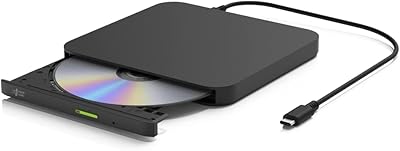
A subset of users with lower-powered USB ports — particularly on older laptops or certain USB hubs — report that the drive occasionally fails to spin up correctly without a direct connection to the host machine. LG includes a secondary USB connector on the cable for additional power draw, but not all users are aware of this or find it sufficient.
Long-Term Durability
76%
24%
A notable number of reviews come from buyers who have used the same unit for three, four, or even five years without hardware failure, which is encouraging for a portable peripheral with moving optical parts. The longevity trend across verified reviews is one of the stronger arguments for choosing this drive over lower-cost alternatives.
Because the drive uses a tray-loading mechanism, the moving parts are inherently more vulnerable to wear than slot-loading designs. Some long-term users report tray alignment issues or reduced read accuracy after a few years of regular use, particularly when the drive has been stored or transported without protection.
Noise Level
77%
23%
During casual disc reading — browsing a software disc or playing back a CD — the drive operates quietly enough that it blends into normal working environments. Users in shared office spaces or libraries mention that it does not create the kind of mechanical noise that draws attention.
At higher write speeds, the drive emits a noticeable spinning and vibration noise that some users find distracting in quiet rooms. The noise is not unusual for optical drives in this class, but buyers accustomed to the near-silence of modern SSDs may find the mechanical sound jarring the first few times.
DOA and QC Consistency
63%
37%
The majority of buyers receive a fully functional unit straight out of the box and proceed to use it without any quality-related issues. For a product sold at this volume over more than a decade, consistent baseline functionality is itself a meaningful indicator of reasonable manufacturing standards.
A persistent minority of reviewers report receiving dead-on-arrival units that fail to be recognized or refuse to eject properly from day one. While this rate is not extraordinary for electronics at this scale, it is visible enough across the review pool to be a genuine concern and warrants purchasing from a seller with a clear return policy.
Cable Design
68%
32%
The included USB cable is long enough to reach comfortably from a laptop port to the drive resting beside it on a desk or table. The dual-head design for supplemental power draw is a thoughtful inclusion for edge cases where a single USB port does not deliver sufficient current.
The cable is fixed and non-detachable, so if it becomes damaged the entire drive's usability is compromised unless a compatible replacement is sourced separately. Several users also find the cable slightly stiff, making it less cooperative when trying to coil it neatly for storage inside a laptop bag.

Suitable for:

The LG GP60NS50 Portable External DVD Writer is a strong fit for anyone whose laptop or ultrabook lacks a built-in optical drive but who still encounters discs on a regular basis. MacBook owners are the most obvious beneficiary — the drive requires no driver installation on macOS in most cases, and its slim, lightweight build means it can live in a laptop bag without ever being noticed. Home users looking to digitize or archive old CDs, home videos on DVD, or important data files will also get real value here, particularly because M-DISC support opens the door to long-term archival-grade storage. Students and remote workers who occasionally deal with software installs, training materials, or media that still ship on disc will find this portable disc writer practical and easy to carry. Linux users, who often face optical drive compatibility headaches, will appreciate that this drive largely works without manual configuration.

Not suitable for:

The LG GP60NS50 Portable External DVD Writer is not the right tool for anyone who burns discs in volume or needs professional-grade duplication speed. At a maximum 8x DVD write speed, burning a full disc takes several minutes — fine for occasional use, but frustrating as a regular workflow. Users who need Blu-ray playback or burning are completely out of luck, as this is a DVD and CD drive only. Some Mac users on specific operating system versions have reported compatibility issues, so if you are running a less common or freshly updated macOS build, it is worth checking community forums before buying. This portable disc writer is also not a good match for anyone who needs an always-on desktop solution; it is designed for portability and light use, and repeated heavy-duty burning sessions may shorten its lifespan over time.

Specifications

  • Brand: Manufactured by LG Electronics, a well-established South Korean consumer electronics company with a long history in optical storage hardware.
  • Model: The specific model identifier is GP60NS50, part of LG's ultra-slim portable optical drive lineup.
  • Drive Type: External portable DVD rewriter capable of reading and writing both DVD and CD formats.
  • Interface: Connects via USB 2.0 and is backward compatible with USB 3.0 ports, requiring no separate power adapter in most setups.
  • DVD Write Speed: Maximum DVD-R write speed is 8x, which is adequate for occasional disc burning but not suited for high-volume duplication.
  • CD Write Speed: Maximum CD write speed reaches 24x, allowing standard audio or data CDs to be burned in a reasonable amount of time.
  • DVD Read Speed: DVD read speed is rated at 8x, sufficient for software installation, data retrieval, and media playback.
  • M-DISC Support: Supports M-DISC, an archival-grade optical disc format engineered for dramatically longer data retention compared to standard recordable media.
  • Dimensions: The unit measures 5.67 x 5.41 x 0.55 inches, making it one of the slimmest external optical drives available in its category.
  • Weight: Weighs 7 ounces, light enough to carry in a laptop bag without adding meaningful bulk or strain.
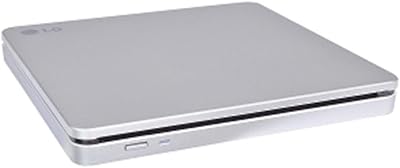
  • Color: Available in silver, giving it a neutral, professional appearance that pairs well with most modern laptops and ultrabooks.
  • Compatible OS: Works with Windows, macOS, and Linux operating systems, with plug-and-play functionality on most configurations without additional drivers.
  • Power Source: Bus-powered entirely through the USB connection, so no wall outlet or external power brick is required during normal use.
  • TV Connectivity: Includes TV connectivity support, allowing the drive to connect to compatible televisions for disc playback without a computer intermediary.
  • Platform: Designed for use with laptops and desktop PCs, and also compatible with Microsoft Surface Pro 3 and 4 tablets.
  • Date Released: First made available in November 2012, giving it a long and well-documented track record in the consumer optical drive market.

Related Reviews

LG GP65NB60 Portable USB DVD Burner
81%
96%
Ease of Setup
88%
Read & Burn Performance
93%
Portability & Size
62%
Build Quality
81%
Disc Compatibility
More
LG GP70NS50 Portable DVD Rewriter
87%
88%
Write Speed Performance
92%
Ease of Use
91%
Portability & Design
85%
Compatibility Across Systems
93%
M-DISC Support
More
Verbatim 43886 Slimline External DVD Writer
79%
92%
Ease of Setup
81%
Build Quality
94%
Portability
78%
Read Performance
74%
Write Performance
More
Hitachi-LG GP96Y External DVD Drive
74%
91%
Ease of Setup
83%
OS Compatibility
77%
Fire TV Integration
84%
Read Performance
63%
Write Performance
More
LG GUD0N Ultra Slim External DVD Writer
76%
91%
Noise Level
93%
Portability
88%
Disc Format Support
94%
Ease of Setup
62%
USB Power Reliability
More
LG GP60NB50
LG GP60NB50
79%
93%
Ease of Setup
91%
Portability & Form Factor
78%
Compatibility
69%
Read & Write Performance
82%
Build Quality & Durability
More
LG BP50NB40 Portable Blu-ray Writer
79%
93%
Portability & Form Factor
91%
Mac Compatibility
88%
M-DISC Archival Support
58%
Transfer & Write Speed
84%
Noise & Vibration During Operation
More
LG AP70NS50 Portable External DVD Writer
79%
83%
Build Quality
91%
Portability
78%
Read & Write Performance
61%
USB Power Reliability
86%
Compatibility (OS & Disc Formats)
More
Transcend TS8XDVDS-K Portable DVD Writer
78%
93%
Ease of Setup
91%
Portability & Form Factor
72%
Read Reliability
78%
Write Performance
74%
Build Quality
More
POFOTO PD07 7.5″ Portable DVD Player
72%
88%
Ease of Setup
61%
Battery Life
67%
Screen Quality
63%
Audio Performance
58%
Build Quality & Durability
More

FAQ

No, the drive runs entirely off USB power. As long as your laptop or desktop has a functioning USB port, you are set. On rare occasions with very low-power USB ports, some users have found connecting via a USB Y-cable helps, but for the vast majority of machines it is completely self-powered.

In most cases, yes. The LG GP60NS50 Portable External DVD Writer is recognized by macOS as a plug-and-play device and does not require a separate driver download on most versions of the operating system. That said, a small number of users have reported hiccups on specific macOS builds, so if you run into issues it is worth checking whether a system update resolves them.

M-DISC is an archival disc format designed to last far longer than standard DVD-R or CD-R media under normal storage conditions. Yes, you do need to purchase M-DISC branded discs separately to take advantage of this feature. If you are backing up irreplaceable family photos, important documents, or legal records, it is worth the small extra investment in the media itself.

Absolutely. While the drive uses a USB 2.0 connection natively, it is fully compatible with USB 3.0 ports. You will not get USB 3.0 speeds since the drive itself is the bottleneck, but it will work without any issues.

No, this slim external DVD drive handles CDs and DVDs only. It has no Blu-ray capability whatsoever, either for reading or writing. If Blu-ray support is important to you, you will need to look at a different drive specifically marketed as a Blu-ray burner.

At the maximum 8x write speed, burning a full 4.7GB single-layer DVD typically takes around 8 to 12 minutes depending on the content and your system. That is perfectly reasonable for occasional use, but if you are regularly duplicating large numbers of discs you may find the speed limiting over time.

Yes, this portable disc writer works with Windows 11. The drive was originally listed for Windows 8 compatibility, but it operates fine on later versions of Windows including 10 and 11, as optical drives use standardized drivers that Windows manages natively.

The drive does not come bundled with any particularly noteworthy burning software. Windows users can use the built-in disc-burning functionality in File Explorer for basic tasks, while Mac users can use the Finder or Disk Utility. For more advanced burning needs, free options like ImgBurn on Windows or commercial software like Roxio work well with this drive.

The drive can connect directly to a compatible television via USB to enable disc playback. Not all TVs support this, and functionality depends on your television's ability to read from external USB optical drives. It is a useful bonus feature but should not be the primary reason to purchase this drive, as compatibility varies by TV brand and model.

Yes, the the LG optical drive is built with portability in mind and holds up reasonably well for frequent travelers who use it on a regular but not industrial basis. The slim, solid construction handles being tossed in a bag without issue for most users. That said, like any optical drive, it has moving internal parts, so investing in a small protective sleeve for long trips is a sensible precaution.

Where to Buy