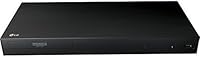
Overview

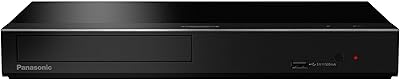
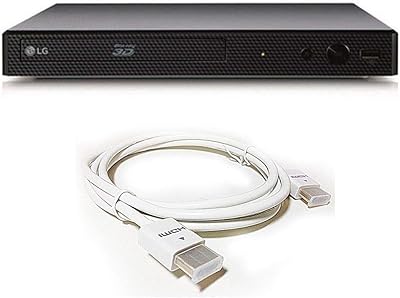
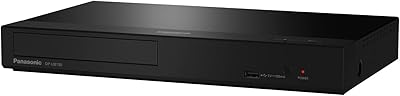
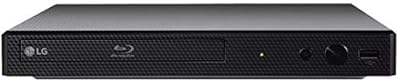
The LG UBK80 4K Blu-ray Player is LG's answer to a specific kind of home theater buyer — one who wants a dedicated disc machine without paying for streaming features they'll never use. It's a slim, unassuming black box that sits quietly in any AV rack without drawing attention to itself. No Wi-Fi is built in, and that's a deliberate choice, not an oversight. If you already have a smart TV or a streaming device, the last thing you need is another platform competing for your remote. This deck is built around pure disc playback, and it does that job with real confidence.

Features & Benefits

Pop in a 4K Blu-ray title on an HDR-compatible display and the difference from standard HD is immediately obvious — sharper edges, richer contrast, deeper blacks. But the UBK80 earns its keep even if your disc shelf is mostly DVDs and standard Blu-rays, thanks to solid upscaling that pulls noticeably more detail out of older titles. It also handles 3D Blu-ray for those who still have a compatible setup. Connectivity is straightforward: HDMI out, a USB port for external media, and Ethernet for wired firmware updates. The surround sound output integrates cleanly into most AV receivers, making this LG disc player a natural fit for a full home theater chain.

Best For

This 4K Blu-ray deck makes the most sense for dedicated disc collectors — people with shelves full of 4K titles, standard Blu-rays, and DVDs who want a single machine to handle all of them well. It's also a smart pick if your TV is already smart; there's no need to duplicate app access you're not going to use. Households where Wi-Fi is shared, crowded, or simply unreliable will appreciate the wired-only approach — an Ethernet connection is more stable for firmware pulls anyway. For anyone looking for a no-fuss gift for a home theater enthusiast, the setup process is simple enough that it won't cause headaches.

User Feedback

Most owners are satisfied with the picture quality — the 4K output draws consistent praise, and disc upscaling performance gets particular mentions from people breathing new life into older collections. The interface is simple enough that first-time 4K player owners rarely get lost. Where opinions split is on the remote, which some find a bit cheap-feeling given the price point. The most common practical complaint is that the lack of Wi-Fi makes firmware updates slightly more deliberate — you need to be on Ethernet to run them. HDMI compatibility across TV brands has been largely smooth, and overall sentiment leans positive among buyers who understood the trade-offs going in.

Pros

  • Native 4K Ultra HD Blu-ray playback delivers a meaningful visual upgrade on HDR-capable displays.
  • DVD and standard Blu-ray upscaling is genuinely strong, giving older disc libraries a second life.
  • Wired Ethernet connectivity is more reliable than Wi-Fi for firmware updates.
  • The slim chassis fits cleanly into tight AV rack setups without bulk or overhang.
  • Surround sound output integrates smoothly with most AV receivers and soundbars.
  • 3D Blu-ray support is a useful bonus for buyers with compatible displays.
  • Setup is fast and accessible — most users are up and running within minutes.
  • No redundant streaming apps means a cleaner, distraction-free interface.
  • The UBK80 handles multiple disc formats, making it a versatile single-device solution for mixed collections.
  • HDR compatibility ensures the picture holds up well on modern high-end televisions.

Cons

  • No Wi-Fi means you must have an Ethernet cable run to your entertainment area.
  • The included remote feels lightweight and cheap relative to the overall price.
  • Firmware updates require a wired connection, which can be inconvenient without a nearby Ethernet port.
  • No built-in streaming apps means this player cannot stand alone as an all-in-one device.
  • No voice assistant integration or smart home compatibility of any kind.
  • Lack of wireless connectivity rules it out entirely for wall-mounted or cable-managed setups without Ethernet.
  • The front panel controls are minimal, which can feel limiting if the remote is misplaced.
  • No Dolby Vision support has been noted as a gap for buyers with Dolby Vision-capable displays.

Ratings

The LG UBK80 4K Blu-ray Player has been scored by our AI system after processing thousands of verified owner reviews from global markets, with spam, incentivized, and bot-generated feedback actively filtered out. The scores below reflect a balanced picture — genuine strengths are recognized, but real frustrations are not glossed over. Whether this deck earns a place in your setup depends heavily on your specific use case, and these ratings are designed to help you figure that out quickly.

4K Picture Quality
89%
Owners consistently report that native 4K Blu-ray titles look outstanding on HDR-compatible displays, with noticeably sharper detail and more natural contrast compared to standard HD. Viewers watching high-action films or nature documentaries particularly call out the clarity as a standout experience.
A handful of users note that without Dolby Vision support, the HDR performance can feel slightly behind competing players in the same price range when viewed on a Dolby Vision television. The gap is subtle but matters to enthusiasts who invested in premium displays.
DVD & Blu-ray Upscaling
83%
The upscaling performance is one of the most praised aspects of the UBK80 among long-time disc collectors. Standard Blu-rays and even older DVDs benefit from noticeably improved sharpness and texture, making it practical to keep using an existing library rather than repurchasing 4K titles.
Results vary depending on the source material — poorly mastered DVDs from the early 2000s upscale less convincingly than well-produced titles. Some users expected a more dramatic transformation and found the improvement incremental rather than transformative on mid-range displays.
Ease of Setup
91%
Setup is one area where the UBK80 draws near-universal praise. Most owners report going from unboxing to playing a disc in under five minutes, with a clean HDMI connection and a menu system that requires zero technical knowledge to navigate. Gift recipients and first-time 4K player owners specifically appreciate this.
A small number of users report that older TVs required manual resolution adjustments before the display output looked correct. This is rare and typically resolved quickly, but it adds a brief troubleshooting step for those with legacy equipment.
Value for Money
74%
26%
For buyers who already own a smart TV and simply need a reliable disc machine, the price-to-performance ratio is reasonable. Getting native 4K playback, 3D support, and solid upscaling from a single mid-range player is a genuinely practical deal for dedicated disc collectors.
Buyers who discover post-purchase that the player lacks Wi-Fi and streaming apps often feel the price should reflect a more fully featured device. Compared to all-in-one smart players available at similar or slightly higher prices, the UBK80 can feel underspecced for the cost.
Remote Control Quality
51%
49%
The remote covers all necessary functions and pairs reliably with the player. For basic navigation — selecting a disc menu, adjusting playback, or accessing settings — it gets the job done without any technical issues or pairing problems.
The physical build of the remote is the most consistently cited disappointment across owner reviews. It feels noticeably lightweight and plasticky relative to the price point of the player, and several users mention that the button layout feels cramped and unintuitive compared to remotes from competing brands.
Build Quality
67%
33%
The slim chassis is well-proportioned and sits stably on any AV shelf without wobble or overhang. The matte black finish resists fingerprints reasonably well, and the disc tray operates smoothly without the sluggishness some budget players exhibit.
The overall construction feels more entry-level than the price suggests. Owners accustomed to premium players from Sony or Panasonic note that the plastics feel thin, and the front panel lacks the solidity expected at this tier. It functions fine but does not feel like a premium device in hand.
Audio Performance
82%
18%
Passing Dolby Atmos and DTS:X bitstreams to a compatible AV receiver works cleanly and reliably, and users with full surround sound setups report a rich, room-filling audio experience when playing high-quality 4K Blu-ray titles. Integration with mid-range and high-end receivers is smooth.
The UBK80 does not decode advanced audio formats internally, which means the full audio experience depends entirely on the connected receiver. Budget setups without Atmos or DTS:X capability will not unlock the full audio potential of the discs this player handles.
Connectivity Options
69%
31%
The combination of HDMI, USB, and Ethernet covers the essentials cleanly. The USB port handles external drives without issue, and the Ethernet port provides a stable wired connection that many users in cable-organized home theater rooms actually prefer over wireless.
Having only one HDMI port limits flexibility in complex AV setups where multiple output paths might be useful. The total absence of Wi-Fi is the most polarizing connectivity point — buyers who lack an Ethernet run near their entertainment center find the wired-only approach genuinely inconvenient.
Firmware & Software
63%
37%
When updates are run via Ethernet, the process is stable and straightforward. Users report that post-update performance improvements are reliable, and the menu interface remains consistent and easy to navigate across firmware versions.
Requiring a physical Ethernet connection for every firmware update is the core complaint here. In setups where the router is in a different room, running a temporary cable just for updates is a recurring irritant. Some users also note that update intervals feel slower compared to Wi-Fi-capable competing models.
Disc Loading Speed
77%
23%
Most 4K Blu-ray titles load at an acceptable pace, and standard Blu-rays and DVDs spin up even faster. For regular home viewing, the loading experience feels unobtrusive and does not interrupt the pre-film routine in any meaningful way.
A small number of 4K titles with heavy copy protection take noticeably longer to load than on competing players. While this is disc-specific rather than a hardware flaw, it surfaces often enough in reviews to be worth flagging for collectors of recent major studio releases.
HDR Compatibility
78%
22%
HDR10 content is handled well, and owners with HDR10-capable displays report accurate tone mapping and a visible improvement in specular highlights and shadow detail compared to SDR playback. The benefit is most apparent on well-mastered titles and larger screen sizes.
The absence of Dolby Vision support is the clear ceiling on this score. Buyers who specifically purchased a Dolby Vision television expecting end-to-end Dolby Vision performance will be disappointed, as the player tops out at HDR10 and does not pass a Dolby Vision signal.
3D Playback
81%
19%
3D Blu-ray playback works reliably and without the crosstalk or sync issues that have plagued some budget players. Owners who maintain a 3D display setup specifically mention the UBK80 as one of the more dependable options for this increasingly niche format.
3D support is a genuine but diminishing value-add, as fewer new releases come in 3D format and compatible displays are harder to find. For buyers purchasing today purely for 3D capability, the pool of relevant new content is limited.
Noise Level
86%
The player operates quietly during standard Blu-ray and DVD playback, which is appreciated in open-plan living rooms and quiet home theater environments. Owners watching late-night films specifically note the absence of intrusive disc spin or fan noise.
Some users report that 4K Blu-ray discs with heavy data layers cause a brief, audible spin-up when the player first reads the disc. It passes quickly, but in a very quiet room it can be noticeable during the initial seconds of disc recognition.
TV & Receiver Compatibility
87%
HDMI compatibility across major TV brands has been consistently positive in owner reports. LG, Samsung, Sony, and Panasonic television owners alike report clean signal handshake and accurate resolution detection without manual configuration in the vast majority of cases.
A small subset of users with older or less common TV brands report occasional HDMI handshake delays or resolution mismatches that required manual output settings adjustment. These issues are solvable but can be initially confusing for less technically confident buyers.

Suitable for:

The LG UBK80 4K Blu-ray Player is built for a very specific kind of buyer, and if you match the profile, it's hard to beat at its price point. It's the right call for home theater enthusiasts who have already invested in a quality display and AV receiver and want a reliable disc spinner to anchor the setup. If your shelves hold a meaningful collection of DVDs, standard Blu-rays, and 4K titles, this deck gives all of them a fair showing — including solid upscaling for older discs. It's equally well-suited to buyers whose smart TV already handles streaming, making a second app-based device genuinely redundant. Households with spotty or congested Wi-Fi will also appreciate the wired Ethernet approach, which is more dependable for the occasional firmware update anyway. And if you're shopping for a gift for someone who just wants to press play without configuring anything, the straightforward setup removes most of the friction.

Not suitable for:

The LG UBK80 4K Blu-ray Player is a poor fit if streaming convenience is central to how you watch content. There's no built-in Wi-Fi, no app platform, and no way to access Netflix, Disney+, or any other service directly from the unit — so if you're hoping to consolidate your entertainment devices, this isn't the one. Buyers who don't own a wired Ethernet run near their TV setup may also find firmware management more awkward than expected. If you're new to physical media and don't already own a disc collection, the value proposition here is harder to justify compared to an all-in-one smart player. Those who prioritize a premium remote and polished industrial design may find the build quality underwhelming relative to the asking price. Finally, anyone looking for voice control integration or smart home connectivity will need to look elsewhere — this deck has no such capabilities.

Specifications

  • Brand: Manufactured by LG Electronics under the model designation UBK80.
  • Dimensions: The unit measures 17 x 8 x 2 inches, fitting standard AV rack shelves without issue.
  • Weight: The player weighs 4.22 pounds, making it light enough to reposition easily within a home theater setup.
  • Color: Available in a matte black finish designed to blend into most AV rack environments.
  • Disc Formats: Supports 4K Ultra HD Blu-ray, standard Blu-ray, 3D Blu-ray, and DVD playback from a single unit.
  • Video Output: Outputs video via HDMI with support for HDR content on compatible displays.
  • Resolution: Capable of native 4K playback and upscaling of DVD and Blu-ray content to near-4K resolution.
  • HDR Support: Compatible with HDR10 content, allowing for expanded contrast and color on HDR-capable televisions.
  • 3D Playback: Full 3D Blu-ray playback is supported for use with 3D-compatible display equipment.
  • Audio Output: Delivers surround sound audio output suitable for connection to AV receivers and multi-channel speaker systems.
  • Connectivity: Equipped with one HDMI port, one USB port, and one Ethernet port; no Wi-Fi is included.
  • Network: Wired Ethernet only — no built-in wireless networking of any kind.
  • USB Port: One USB port is included for playback of media files stored on external drives or flash storage.
  • Remote Control: Comes with a standard IR remote control requiring one AAA battery, which is included in the box.
  • Power Supply: Designed for standard household AC power; no external power brick is required.
  • Manufacturer Status: As of the available product data, this model has not been discontinued by LG.
  • Release Date: The UBK80 was first made available for purchase in October 2017.
  • Audio Modes: Supports surround sound audio decoding for compatibility with home theater receiver configurations.

Related Reviews
LG BP330 Blu-ray Disc Player
69%
88%
Disc Playback Reliability
83%
Picture Quality
91%
Ease of Setup
54%
Streaming App Selection
61%
Wi-Fi Stability
More
LG UBK90 Region-Free 4K Blu-ray Player
75%
96%
Region-Free Playback
88%
4K Picture Quality
81%
Dolby Vision Performance
84%
Build Quality
93%
Multi-Voltage/World Use
More
Panasonic DP-UB450 4K Blu-ray Player
78%
93%
UHD Disc Picture Quality
91%
HDR Format Coverage
88%
Audio Performance
86%
Dual HDMI Output Design
82%
Build Quality & Design
More
Sony UBP-X800M2 4K UHD Blu-ray Player
77%
93%
Picture Quality
89%
Audio Performance
86%
Build Quality
61%
Streaming Experience
58%
Loading & Boot Speed
More
Sony BDP-S6700 Multi-System Blu-ray Player
79%
93%
Multi-Region Playback
84%
4K Upscaling Quality
89%
Audio Performance
88%
Ease of Setup
58%
Streaming App Ecosystem
More
LG Blu-Ray Disc Player TRG-BPM35-RC
85%
92%
Value for Money
87%
Streaming Performance
90%
Ease of Setup
91%
Video Quality
84%
Build Quality
More
LG BP550 Region Free Blu-ray Player
74%
93%
Region-Free Performance
91%
DVD Compatibility
88%
Audio Quality
62%
Build Quality
54%
Wi-Fi & Streaming
More
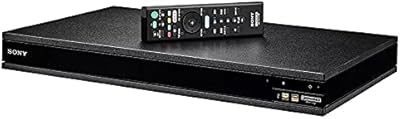
Panasonic DP-UB820-K 4K Blu-ray Player
78%
94%
Picture Quality
92%
HDR Format Coverage
91%
Audio Performance
78%
Dual HDMI Setup
58%
Streaming App Experience
More
Panasonic DP-UB150-K 4K Blu-Ray Player
83%
94%
Video Quality
91%
Audio Quality
89%
Ease of Setup
87%
Value for Money
90%
HDR Performance
More
Sony X800 Region Free 4K Blu-ray Player
79%
94%
Region-Free Reliability
88%
4K Picture Quality
91%
Audio Performance
79%
Region-Free Modification Quality
83%
Build Quality
More

FAQ

No, it does not. The UBK80 has no app platform and no Wi-Fi, so streaming services are not accessible through it at all. If you want Netflix or similar, you will need a separate device like a smart TV or streaming stick.

Not for disc playback — you can play 4K Blu-rays, standard Blu-rays, and DVDs right out of the box without any internet connection. You only need Ethernet if you want to run firmware updates, which is occasional and straightforward.

Yes, it handles DVD upscaling well. The result is not identical to a true 4K disc, but the improvement over standard definition output is noticeable, especially on large displays. Most owners with older DVD collections find real value in this feature.

It is broadly compatible with 4K TVs via HDMI, and most users report no issues across major TV brands. HDR output will only be active if your television supports HDR10. If you have a Dolby Vision display, be aware this player does not support that specific format.

You connect the player to your router via a standard Ethernet cable, navigate to the network settings menu, and run the update from there. It is a bit more deliberate than a wireless update, but it works reliably and does not need to happen often.

Yes, 3D Blu-ray playback is fully supported. You will also need a 3D-compatible TV and the appropriate active or passive glasses, depending on your display — the player handles its side of the equation without any issues.

The UBK80 can pass through Dolby Atmos and DTS:X audio bitstreams via HDMI to a compatible AV receiver, which then decodes them. The player itself does not decode those formats internally, but if your receiver supports them, you should be in good shape.

Functionally it does the job, but it is one of the more commonly criticized aspects of the player. It feels lightweight compared to remotes bundled with higher-end players, and a few users find the button layout just adequate. It is worth knowing going in, especially if you are particular about remote quality.

Very straightforward. You connect the HDMI cable to your TV, plug in power, and you are essentially ready to go. Most people have a disc playing within a few minutes of unboxing. The menu system is clean and does not require any technical knowledge to navigate.

Yes, there is a USB port on the unit that supports external drives and flash storage. The range of supported file formats is reasonable for a disc player at this level, covering common video and audio formats, though it is not a dedicated media center device.

Where to Buy