Overview

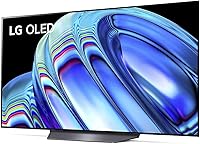
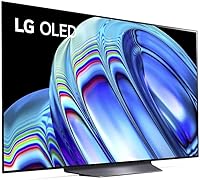
The LG B2 55-Inch OLED Smart TV sits at the entry point of LG's 2022 OLED lineup, and honestly, that label undersells it. OLED means every pixel generates its own light — no backlight, no blooming, no compromises on contrast. That's a fundamentally different experience from LED or QLED panels, where local dimming can only approximate true black. The 55-inch size hits a sweet spot for most living rooms: large enough to feel immersive, not so large it overwhelms a normal-sized space. Driving it all is the a7 Gen5 AI Processor, which handles real-time picture and sound adjustments. The webOS platform ties everything together with quick access to every major streaming service right out of the box.
Features & Benefits

What makes this OLED TV genuinely compelling is how those 8 million self-lit pixels perform in practice. In a dark room watching a film with heavy shadow detail, the blacks aren't just deep — they're absolute. HDR content under Dolby Vision IQ looks exactly as the director intended. For gaming, the picture gets more interesting: a 120Hz refresh rate combined with VRR, NVIDIA G-SYNC, FreeSync Premium, ALLM, and HGiG support puts this squarely in serious gaming territory. The four HDMI 2.1 ports mean you can keep a PS5, Xbox, and PC all connected simultaneously. Dolby Atmos handles the audio side, and the a7 Gen5 processor adapts dynamically to content rather than applying one-size-fits-all picture settings.

Best For

The LG B2 makes the most sense for a few specific types of buyers. Gamers with a next-gen console or a gaming PC will find the Game Optimizer mode and comprehensive VRR support make this a capable, responsive display. Home theater fans who don't want to spend flagship money still get Dolby Vision, proper black levels, and wide color volume. Cord-cutters will appreciate native access to Netflix, Prime Video, Disney+, Apple TV, and over 300 free LG Channels without hunting for apps. If you're coming from an older LED TV, the jump in picture quality is stark enough to be immediately noticeable. The 55-inch format suits most medium-to-large rooms without dominating the space.

User Feedback

Among verified buyers, this 55-inch OLED holds a strong 4.6-star rating, and the feedback is fairly consistent: picture quality straight out of the box genuinely impresses people, especially the black level performance and color accuracy. The webOS interface earns positive marks for being intuitive, and the Magic Remote is a consistent fan favorite. Where things get more nuanced: burn-in concerns come up regularly, though LG includes pixel-refreshing routines designed to manage long-term risk — it's a real consideration, not a dealbreaker, if you're mindful about content variety. Some buyers note that peak brightness falls short in sun-drenched rooms compared to high-nit QLED alternatives. The stand not being included also catches buyers off guard at unboxing.

Pros

  • Absolute black levels and infinite contrast make dark scenes and HDR films look genuinely stunning.
  • Four HDMI 2.1 ports let you keep every next-gen console and device connected at once without swapping cables.
  • Out-of-box color accuracy is consistently praised — most buyers need little to no manual calibration.
  • Comprehensive gaming feature set including VRR, ALLM, HGiG, and Game Optimizer covers both console and PC use cases.
  • Dolby Vision IQ adapts HDR tone mapping to your room lighting automatically, which makes a real difference in practice.
  • The webOS platform is fast, intuitive, and ships with every major streaming app already installed.
  • The Magic Remote with point-and-click navigation makes browsing streaming menus noticeably faster than a standard remote.
  • The LG B2 offers a genuine entry point into OLED picture quality at a price that undercuts most competing OLED options.
  • The 55-inch size fits most medium-to-large living rooms without overwhelming the space or requiring viewing distance adjustments.
  • Built-in Google Assistant and Alexa support slots into almost any existing smart home setup without extra hardware.

Cons

  • The TV stand is sold separately — a frustrating and often unexpected extra cost at unboxing.
  • Peak brightness falls short in bright or sunlit rooms where high-nit QLED panels hold a clear advantage.
  • Burn-in risk is real for users who regularly display static overlays or leave the same channel on for hours.
  • The built-in audio is underwhelming for the caliber of the display — a soundbar purchase feels almost mandatory.
  • The webOS home screen displays ads that grow more intrusive over time and cannot be fully disabled.
  • Motion interpolation defaults can produce an artificial look on film content until manually adjusted or disabled.
  • Wi-Fi connectivity can be unstable on congested 2.4GHz networks, requiring a switch to 5GHz to resolve.
  • Voice recognition misfires often enough in noisy environments to make it an unreliable day-to-day control method.
  • Only two USB ports limits simultaneous peripheral and storage connections for more demanding setups.
  • As a 2022 model, buyers should compare it against current-generation OLED panels before committing at full retail price.

Ratings

The LG B2 55-Inch OLED Smart TV earns an overall strong reception across thousands of verified global purchases, and the scores below reflect what real buyers consistently report — filtered for spam, bot activity, and incentivized submissions. Our AI analysis surfaces both the genuine strengths that make this 55-inch OLED a standout at its price tier and the honest limitations that matter depending on your setup and viewing habits.
Picture Quality
94%
Owners repeatedly describe the image as transformative compared to their previous LED sets — particularly in dark or dimly lit rooms where the absolute blacks make HDR content look almost three-dimensional. Out-of-the-box color accuracy gets consistent praise, with many buyers noting they made minimal adjustments to the default picture mode.
In brightly lit living rooms or spaces with large windows, the B2 struggles to punch through ambient light the way high-nit QLED panels can. A handful of buyers coming from premium LCD displays found the peak brightness underwhelming for daytime sports viewing.
Black Level & Contrast
97%
This is where the LG B2 simply has no real competition at its price point. Every pixel switching off independently means shadow detail in films like dark thrillers or sci-fi space scenes is rendered with a depth that backlit panels cannot replicate regardless of their local dimming zones.
There is virtually no criticism here from a technical standpoint, though a small number of users noted the occasional appearance of the OLED ABL (Automatic Brightness Limiter) slightly dimming very bright full-screen content — a characteristic of the panel technology itself, not a defect.
Gaming Performance
91%
Gamers with a PS5 or Xbox Series X consistently highlight the low input lag in Game Optimizer mode as a real advantage in fast-paced competitive titles. The combination of ALLM for automatic game detection, HGiG for accurate HDR tone mapping, and broad VRR support across both NVIDIA G-SYNC and FreeSync Premium makes this one of the most versatile gaming displays at this price.
A small segment of PC gamers reported occasional compatibility quirks with VRR at certain refresh rate ranges that required manual troubleshooting. The Game Optimizer menu, while feature-rich, has a learning curve that less technical buyers found initially confusing.
HDR Performance
88%
Dolby Vision IQ dynamically adjusts tone mapping based on ambient light, which means a movie watched in the evening genuinely looks different — and better calibrated — than in the afternoon. HDR10 and HLG content also benefit from the a7 Gen5 processor applying scene-by-scene adjustments that preserve highlight detail without crushing shadows.
The B2 is not a high-brightness HDR panel by design, so specular highlights in HDR content — reflections on water, explosions, sun glare — never reach the visual pop that a 1000-nit-plus QLED can produce. For buyers prioritizing HDR spectacle over HDR accuracy, that distinction matters.
Smart TV & Interface
83%
The webOS platform is genuinely one of the cleaner smart TV experiences available, and buyers regularly commend how quickly they found their preferred apps on first setup. Access to Netflix, Prime Video, Disney+, Apple TV, and over 300 free LG Channels without any extra hardware is a practical convenience most users appreciate immediately.
A recurring complaint involves the growing presence of advertising on the webOS home screen, which some users find intrusive over time. A minority of reviewers also reported that the platform occasionally slows down after extended use periods, requiring a full reboot to restore snappy navigation.
Remote Control & Usability
82%
18%
The Magic Remote gets strong marks from most buyers — the point-and-click functionality, scroll wheel, and voice shortcut buttons make navigating streaming apps noticeably faster than a traditional directional-pad remote. Setup is straightforward and the remote pairs almost instantly.
The Magic Remote is not universally loved: some buyers find the cursor drift frustrating in practice, particularly when seated at unconventional angles to the TV. A few users noted the remote feels lighter and cheaper than expected for a panel at this price tier.
Audio Quality
67%
33%
For casual streaming and everyday TV watching, the built-in speakers with Dolby Atmos decoding are adequate and better than many slim-panel competitors. Dialogue clarity in particular gets decent marks from buyers watching news or talk content without an external audio system.
Anyone using this OLED TV for a serious home theater setup will almost certainly need to pair it with a soundbar or AV receiver — the built-in audio simply lacks the bass and spatial width that Dolby Atmos promises. Multiple reviewers mentioned this felt like the biggest gap between the visual and audio experience.
Build Quality & Design
79%
21%
The slim OLED panel profile looks genuinely premium mounted on a wall, and the bezel is thin enough to disappear during viewing. Most buyers describe the overall construction as solid and appropriately premium-feeling for the category.
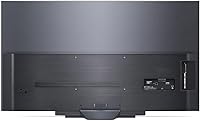
The stand is sold separately, which catches a meaningful number of buyers off guard at unboxing — this is mentioned frequently enough in negative reviews to be worth flagging. The back of the unit, while typical for OLED panels, is not as finished-looking as the front for buyers who mount it in open shelving rather than on a wall.
Value for Money
86%
At its typical street price, the LG B2 consistently ranks among the most accessible paths into genuine OLED picture quality, and buyers overwhelmingly frame it as a strong purchase when comparing it against similarly priced LED alternatives. The four HDMI 2.1 ports alone represent hardware headroom that more expensive competing models sometimes withhold.
Buyers who later discover the stand is not included feel the advertised price misrepresents the true cost of a ready-to-use setup. Additionally, as a 2022 model, those purchasing close to the end of its retail cycle should weigh whether a newer-generation panel offers meaningfully better value.
Burn-In Risk
62%
38%
LG includes automatic pixel-refreshing routines and screen-saver protections that run during standby, and users who vary their content diet across streaming, gaming, and casual browsing report no visible burn-in issues over extended ownership periods. The built-in safeguards are meaningfully more developed than earlier OLED generations.
Burn-in anxiety is the single most discussed concern in one-star and two-star reviews, particularly among users who display static content for extended periods — news tickers, sports score overlays, or static game HUDs. The risk is real and worth taking seriously, even if LG's mitigations reduce it significantly for typical use.
Brightness (SDR & HDR)
71%
29%
In a properly darkened room, the B2 produces a satisfying and immersive image without needing to push extreme brightness levels, and most buyers watching evening content are fully satisfied with what the panel delivers in standard and HDR modes alike.
In a living room with large windows or overhead lighting, the B2 can look noticeably washed out compared to high-brightness QLED competitors. This is a fundamental characteristic of entry-level OLED panels, not a defect, but buyers in bright environments should factor it into their decision seriously.
Setup & Installation
78%
22%
The initial TV setup process is described by most buyers as quick and straightforward, with the on-screen wizard walking through Wi-Fi, streaming logins, and picture preferences in a logical sequence. Wall mounting is supported by the standard 300x200mm VESA pattern, which is compatible with a wide range of third-party mounts.
The missing stand creates an immediate friction point for buyers who planned on a tabletop setup without realizing it required a separate purchase. A few buyers also mentioned that the quick-start guide understates the complexity of configuring the more advanced picture and gaming settings.
Connectivity & Ports
89%
Four HDMI 2.1 ports is an unusually generous allocation for this tier and a practical differentiator for buyers running multiple devices simultaneously — a gaming console, a streaming stick, a soundbar, and a cable box can all stay plugged in without rotating cables. Wi-Fi and Bluetooth 5.0 cover wireless needs reliably.
Only two USB ports is a minor but real limitation for buyers who want to connect USB storage and a peripheral simultaneously. Some users also reported the Wi-Fi connection occasionally dropping in apartments with congested 2.4GHz networks, requiring a switch to 5GHz to stabilize.
Motion Handling
85%
Fast-motion content — live sports, action sequences, racing games — is handled cleanly at 120Hz, and the OLED response time ensures motion blur is minimal compared to most LCD panels. Sports fans in particular mention the clarity during fast lateral movement as a genuine upgrade from their previous sets.
The motion interpolation (TruMotion) settings can introduce the well-known soap-opera effect if left at higher presets, and new buyers unfamiliar with the setting sometimes find this jarring before discovering the adjustment. Turning TruMotion off or setting it to a lower value is typically the recommended fix.
Voice Assistant & Smart Home
74%
26%
Having both Google Assistant and Alexa built in means this OLED TV fits naturally into most existing smart home ecosystems without requiring a separate hub or device. Buyers with established Alexa routines found the integration worked reliably for basic TV control and compatible device management.
Voice recognition accuracy in noisier environments gets mixed reviews, and some buyers noted that complex multi-step voice commands frequently misfire or require repetition. LG ThinQ AI integration outside of the core TV functions can feel limited for buyers expecting deeper smart home automation.

Suitable for:

The LG B2 55-Inch OLED Smart TV is the right call for anyone who watches most of their content in a controlled lighting environment and wants the best possible picture quality without paying flagship prices. Gamers with a PS5, Xbox Series X, or a capable gaming PC will find the full suite of features — VRR, ALLM, HGiG, NVIDIA G-SYNC, FreeSync Premium, and the Game Optimizer mode — genuinely useful rather than just marketing checkboxes. Home theater enthusiasts who prioritize accurate Dolby Vision HDR and true cinematic black levels over raw brightness will feel right at home. Streaming-heavy households benefit from native app support across every major platform plus a clean webOS interface that makes switching between services quick and painless. And for buyers still running a mid-2010s LED TV, the jump to this 55-inch OLED is dramatic enough that almost everyone in that position comes away impressed.
Not suitable for:

The LG B2 55-Inch OLED Smart TV is not the right fit for buyers whose primary viewing room gets strong, uncontrolled natural light throughout the day — in that scenario, a high-brightness QLED panel will simply look better and hold up more reliably against glare. Buyers who plan to display static content for hours at a time — a persistent news channel ticker, a sports scoreboard overlay, or a paused video game HUD — need to take the burn-in risk seriously; LG's pixel-refresh routines reduce the risk, but they do not eliminate it entirely for heavy static-image use. Anyone expecting a complete out-of-the-box tabletop setup should know the stand is sold separately and budget accordingly. Audiophiles or home theater purists will almost certainly need to add a soundbar or AV receiver, since the built-in speakers fall well short of what the visual experience deserves. Finally, buyers chasing the absolute latest OLED technology should consider whether a newer-generation panel — with improved brightness and processing — better fits their long-term expectations.

Specifications

  • Screen Size: The panel measures 55 inches diagonally, making it a practical fit for medium-to-large living rooms typically viewed from 7 to 12 feet away.
  • Display Technology: Uses OLED (Organic Light-Emitting Diode) technology, where each of the 8 million pixels produces its own light and can switch off completely for true black output.
  • Resolution: Outputs native 4K UHD resolution at 3840 x 2160 pixels, delivering four times the pixel density of standard 1080p HD panels.
  • Refresh Rate: Supports a native 120Hz refresh rate, enabling smooth rendering of fast motion in sports, action films, and high-frame-rate video games.
  • Processor: Powered by the a7 Gen5 AI Processor 4K, which applies real-time scene analysis to dynamically adjust picture sharpness, noise reduction, and sound output.
  • HDR Formats: Compatible with Dolby Vision IQ, HDR10, and HLG, covering the full range of HDR standards used across streaming platforms, physical media, and broadcast content.
  • Audio Format: Decodes Dolby Atmos content natively, with 100W of built-in speaker output across integrated drivers designed for clear dialogue and moderate room fill.
  • HDMI Ports: Equipped with four HDMI 2.1 ports, all supporting 4K at 120Hz, VRR, and ALLM — an unusually complete allocation for a panel at this price tier.
  • USB Ports: Includes two USB ports for connecting external storage devices, media drives, or compatible peripherals directly to the TV.
  • Gaming Features: Supports VRR, NVIDIA G-SYNC, AMD FreeSync Premium, ALLM, HGiG tone mapping, and the dedicated Game Optimizer mode for low-latency, high-fidelity gaming performance.
  • Smart Platform: Runs LG's webOS with ThinQ AI, providing access to Netflix, Prime Video, Disney+, Apple TV, HBO Max, and over 300 free LG Channels from the home screen.
  • Voice Assistants: Has both Google Assistant and Amazon Alexa built in, allowing hands-free TV control and integration with compatible smart home devices without any additional hardware.
  • Wireless: Supports dual-band Wi-Fi and Bluetooth 5.0 for stable wireless streaming, wireless audio device pairing, and smart home connectivity.
  • VESA Mount: Compatible with the 300 x 200mm VESA mounting standard, fitting a wide range of third-party wall mounts sold separately.
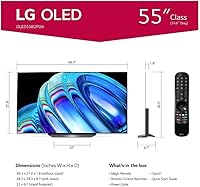
  • Dimensions: The unit measures 48.3″ wide, 9.7″ deep, and 29.3″ tall (without stand), and weighs 56.3 pounds — manageable for a two-person wall-mount installation.
  • Power: Rated at 100W power consumption, operating on AC 120V at 50/60Hz standard North American household current.
  • Aspect Ratio: Displays content in the standard 16:9 widescreen aspect ratio, matching the native format of most streaming, broadcast, and gaming content.
  • In the Box: The package includes the television panel, Magic Remote, AA batteries, and a power cable — the stand is not included and must be purchased separately.

Related Reviews
LG B3 55-Inch OLED Smart TV
80%
94%
Picture Quality
91%
Gaming Performance
97%
Contrast & Black Levels
63%
Brightness
82%
Smart TV Experience
More
LG OLED C1 55-inch 4K Smart TV
86%
96%
Picture Quality
93%
Gaming Performance
62%
Peak Brightness
88%
Smart TV Platform
91%
Build Quality & Design
More
LG 55-inch OLED evo C4 Smart TV
81%
96%
Picture Quality
93%
Gaming Performance
71%
Brightness
78%
Value for Money
74%
Smart TV & Software
More
LG 55-Inch OLED evo AI 4K C5 Series Smart TV
86%
94%
Picture Quality
89%
Sound Quality
91%
Gaming Performance
86%
Smart Features
92%
Build Quality
More
LG 55-Inch QNED85 4K Smart TV
82%
86%
Picture Quality
82%
Color Accuracy
74%
Contrast & Black Levels
89%
Motion Handling
81%
Gaming Performance
More
LG UQ7570 55-inch 4K Smart TV
75%
88%
Smart Platform
74%
Picture Quality
83%
Value for Money
61%
Gaming Performance
91%
Streaming Experience
More
LG 55UM7300PUA 55-Inch 4K Smart LED TV
82%
89%
Display Quality
85%
Smart Features
82%
Voice Control
92%
Value for Money
88%
Wi-Fi Connectivity
More
LG 55NANO90UPA 55-inch 4K Smart NanoCell TV
86%
93%
Picture Quality
88%
Sound Performance
85%
User Interface & Smart Features
78%
Motion Handling (TruMotion 240)
80%
Gaming Performance (120Hz)
More
LG 55UP8000PUA 55-inch 4K Smart UHD TV
82%
88%
Picture Quality
85%
Smart Features
90%
Gaming Performance
92%
Value for Money
80%
Ease of Setup
More
LG OLED G4 65-inch 4K Smart TV
82%
97%
Picture Quality
94%
Gaming Performance
98%
Black Levels & Contrast
58%
Burn-In Risk
91%
Design & Build Quality
More

FAQ

The stand is sold separately — this catches a lot of buyers off guard, so it is worth knowing before you order. If you are planning a tabletop setup rather than a wall mount, budget for an LG-compatible stand or a compatible third-party option at the same time.

Yes, it is genuinely well-suited for next-gen consoles. All four HDMI ports are HDMI 2.1, which means you get 4K at 120Hz, VRR, and ALLM support. The Game Optimizer mode reduces input lag significantly, and HGiG mode ensures HDR tone mapping is handled accurately by the console rather than being overridden by the TV.

It is a real concern worth taking seriously, but it is not a dealbreaker for most typical viewing habits. LG includes automatic pixel-refresh routines that run during standby to counteract uneven pixel wear. The main risk applies to viewers who leave static content — like a news ticker or a game HUD — displayed for many consecutive hours on a regular basis. Varied content use across streaming, gaming, and general TV watching carries a much lower risk.

Honestly, this is where the LG B2 has a real limitation. OLED panels at this tier do not reach the peak brightness levels that high-nit QLED TVs can, so in a room flooded with sunlight the image can look washed out. If your room has large windows and you watch a lot of daytime content, a high-brightness QLED may serve you better.

Netflix, Prime Video, Disney+, Apple TV, and HBO Max are all available directly through the webOS platform with no setup required. On top of that, LG Channels gives you access to over 300 free ad-supported channels covering movies, sports, comedy, and news — all without a subscription.

Yes, easily. The TV has four HDMI 2.1 ports, so you can keep a PS5, Xbox Series X, a gaming PC, and a soundbar all connected simultaneously without rotating cables. Each port supports 4K at 120Hz, so there is no compromise on which device gets the best connection.

The Magic Remote uses a gyroscope to function like a laser pointer — you move it to steer an on-screen cursor and click to select, similar to a computer mouse. Most users pick it up quickly, and it makes navigating streaming apps much faster than a traditional directional-pad remote. A minority of users find the cursor drift frustrating at unusual seating angles, but adjusting the pointer sensitivity in the settings usually helps.

It supports Dolby Vision IQ, which is the more advanced version that adjusts HDR tone mapping based on the ambient light in your room. In practice, on a film mastered in Dolby Vision, the difference compared to standard HDR is visible — shadow detail is better preserved and highlight rendering feels more intentional. It is most impressive in a dimly lit room where the OLED panel can take full advantage of the format.

For casual news watching, sitcoms, or background streaming, the built-in speakers are adequate and dialogue comes through clearly. But if you are using this TV for movies, gaming, or any content where immersive audio matters, the built-in audio will feel thin and underpowered relative to what the display is doing. Most serious users add a soundbar — it is not strictly required, but the difference is hard to ignore once you hear it.

For most people in that position, the jump is immediately and dramatically noticeable. The contrast difference alone — where blacks are absolute rather than a dark gray — changes how every type of content looks. HDR content that previously looked flat or overblown tends to resolve properly on an OLED panel, and colors read as more natural and three-dimensional. If your current TV is more than five years old, the difference will likely feel significant within the first few minutes of watching.