Overview
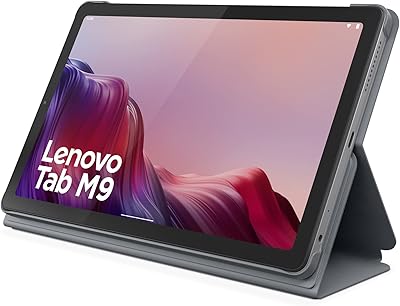
The Lenovo Tab M8 4th Gen 8″ Tablet enters a crowded entry-level market with a clear focus: give families a dedicated device for kids without spending a fortune. At just 8 inches, it fits comfortably in smaller hands and slips easily into a backpack. Unlike many budget tablets that arrive as bare hardware, this family tablet ships with a folio case and integrated stand already in the box — a genuine value-add that most competitors charge extra for. Running Android 12 Go, a stripped-down version of Android optimized for modest specs, it keeps things moving without the overhead of a full OS. It won't replace a premium tablet, but it was never meant to.
Features & Benefits
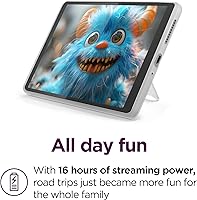
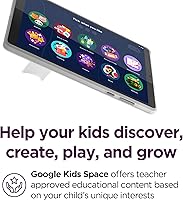
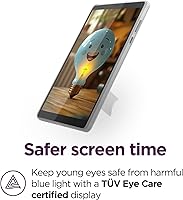
The standout feature for most parents will be Google Kids Space, which curates teacher-approved apps and content tailored to a child's age and interests — no rabbit holes, no accidental stumbles into adult territory. Family Link parental controls layer on top, letting you set screen time limits and manage permissions from your own phone. The TÜV Eye Care certification is a thoughtful touch for families who use the tablet during bedtime reading or extended story sessions. Battery life is genuinely impressive at up to 19 hours of video playback, easily lasting a full travel day on one charge. The octa-core MediaTek chip paired with 32GB of storage rounds out a capable, if modest, hardware package.
Best For
This kids tablet makes the most sense for parents buying a first dedicated device for a young child — think ages 4 to 10. If you've been reluctant to hand your kid your personal phone or an expensive tablet, this family tablet offers a sensible middle ground with built-in guardrails to back it up. Families who travel frequently will appreciate how compact and light it is; at under 1.6 pounds, it disappears in a bag. It also suits households that simply need a reliable media and light learning device without paying flagship prices. Just keep expectations grounded — this isn't built for productivity, multitasking, or demanding apps.
User Feedback
Owners consistently praise the battery longevity and how straightforward Google Kids Space is to set up — most parents report having it ready for a child within minutes. The included folio case also earns positive mentions for feeling sturdier than expected at this price. That said, the 2GB of RAM draws complaints; when kids pile on too many apps or switch between them quickly, there is noticeable lag. Some buyers wish for more than 32GB of base storage, especially once downloaded videos and apps start accumulating. Display quality is generally accepted as decent for the price, though nobody is calling it sharp. Build durability gets mixed marks — the case helps, but this is no rugged tablet.
Pros
- Battery life is outstanding — up to 19 hours of video playback easily covers a full travel day.
- Google Kids Space offers genuinely curated, teacher-approved content that takes the guesswork out of child-safe setup.
- Family Link parental controls are robust and manageable from a parent's own phone.
- The included folio case with stand adds real everyday value without an extra purchase.
- At under 1.6 pounds, this kids tablet is light enough for small hands to hold comfortably.
- TÜV Eye Care certification makes extended reading or bedtime use less hard on young eyes.
- 32GB of storage is a solid baseline for an entry-level kids device at this price.
- Three years of security updates offers longer-term software support than many rivals in this category.
- Setup is straightforward — most parents report the device is ready for a child within minutes.
- Accidental damage coverage through Premium Care adds meaningful peace of mind for family use.
Cons
- 2GB of RAM causes noticeable lag when switching between apps or running heavier titles.
- Android 12 Go is a trimmed-down OS that limits compatibility with some full-featured apps.
- 32GB of storage fills up faster than expected once videos, apps, and updates accumulate.
- The 1280 x 800 display resolution is adequate but looks soft compared to slightly pricier alternatives.
- The 5MP rear camera is mediocre and unlikely to satisfy kids who enjoy taking photos or video.
- Performance noticeably degrades over time as storage fills and more apps are installed.
- The folio case offers basic protection but is not rated for serious drops or rough outdoor handling.
- Wi-Fi is limited to 802.11ac and there is no option for cellular connectivity.
- The tablet runs warm during extended streaming or gaming sessions, which some users find uncomfortable.
- Older children may quickly outgrow the Kids Space environment and find the hardware too underpowered for their needs.
Ratings
The scores below for the Lenovo Tab M8 4th Gen 8″ Tablet were generated by our AI after analyzing thousands of verified buyer reviews worldwide, with spam, bot submissions, and incentivized feedback actively filtered out. Both what users genuinely love and what consistently frustrates them are reflected here without sugarcoating. If you see a low score, there is a real pattern of complaints behind it.
Value for Money
Battery Life
Parental Controls
Performance
Display Quality
Build Quality
Ease of Setup
Storage Capacity
Audio Quality
Portability
Camera Quality
Software Experience
Eye Care Features
Long-term Reliability
Suitable for:
The Lenovo Tab M8 4th Gen 8″ Tablet is built squarely for parents who want a safe, controlled digital environment for young children without spending a lot. If you have a kid between roughly 4 and 10 years old who needs their own device for videos, learning apps, and light games, this family tablet checks the right boxes. The built-in Google Kids Space and Family Link controls mean you're not just handing over an open Android device and hoping for the best — the guardrails are already baked in. Families who travel frequently will find the compact size and exceptional battery life especially practical, since it can handle a long flight or road trip without needing a charger. It's also a smart pick for households that want to protect a more expensive personal device from sticky fingers and accidental drops.
Not suitable for:
Buyers expecting a versatile, all-ages tablet for productivity, gaming, or media creation will likely find this kids tablet underwhelming. The 2GB of RAM and Android 12 Go operating system are deliberately lean, and that shows when you push beyond basic tasks — multitasking stutters, and heavier apps can feel sluggish in a way that frustrates older kids and adults quickly. The 32GB of base storage sounds reasonable but fills up faster than expected once you factor in app installs, downloaded videos, and system overhead. Teens or adults who want to browse freely, stream in high definition, or run demanding educational software should look at a higher-spec device. The Lenovo Tab M8 4th Gen 8″ Tablet is also not a rugged tablet by design, so if your child is particularly rough on hardware, the included folio case alone may not be enough protection long-term.
Specifications
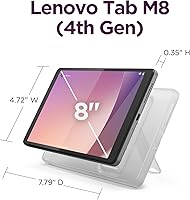
- Display Size: The tablet features an 8″ HD IPS touchscreen display suited for comfortable viewing in smaller hands.
- Resolution: Screen resolution is 1280 x 800 pixels, delivering clear enough visuals for video playback and educational apps.
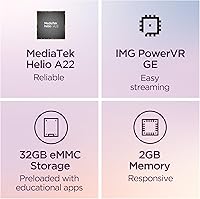
- Processor: Powered by a MediaTek Helio A22 octa-core processor designed for efficient everyday performance at a budget tier.
- RAM: The device comes with 2GB of RAM, which handles basic tasks but shows limits under heavier multitasking.
- Storage: 32GB of internal storage is included, with practical usable space reduced after the OS and pre-installed apps.
- Operating System: Runs Android 12 Go, a lightweight version of Android optimized for devices with modest hardware specifications.
- Battery Life: Rated for up to 19 hours of online video playback on a single charge, supporting full-day use.
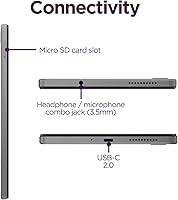
- Wi-Fi: Supports 802.11ac (Wi-Fi 5) wireless connectivity; there is no cellular or LTE option available on this model.
- Rear Camera: Equipped with a 5MP rear-facing camera suitable for basic photos and video calls, but not photography-focused use.
- Dimensions: The tablet measures 4.72 x 7.79 x 0.35 inches, making it slim and easy to carry or hold single-handed.
- Weight: Weighs 1.57 pounds including the folio case, keeping it light enough for extended handheld use by children.
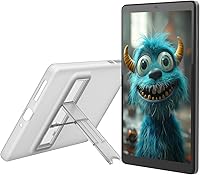
- Included Accessories: Ships with a clear folio case featuring an integrated kickstand for hands-free landscape viewing out of the box.
- Eye Safety: Display carries TÜV Eye Care certification, with a dedicated Reading Mode designed to reduce blue light exposure.
- Parental Controls: Google Family Link app integration allows parents to set screen time limits, approve apps, and monitor activity remotely.
- Kids Content: Google Kids Space provides a curated library of teacher-approved apps, books, and videos tailored to children's interests.
- Security Updates: Lenovo commits to up to three years of security updates, extending the device's safe usable lifespan for families.
- Damage Coverage: Eligible for Lenovo's Premium Care accidental damage protection plan, offering additional peace of mind for family use.
- Color: Available in Arctic Gray, a neutral tone that resists showing minor scuffs and wear from regular handling.
Related Reviews
Lenovo Tab M8 2nd Gen 32GB Tablet
Lenovo Tab One 8.7-inch Android Tablet
Callsky-Tab Ctab 8 Android Tablet
Samsung Galaxy Tab A7 Lite 8.7″ Tablet
Lenovo Legion Tower 5 Gen 8 Desktop
CALLSKY-NOTE Cpad 8 8-Inch Kids Tablet
ALLDOCUBE iPlay 70 mini Ultra 8.8-inch Tablet
Rode NT1 4th Gen Condenser Microphone
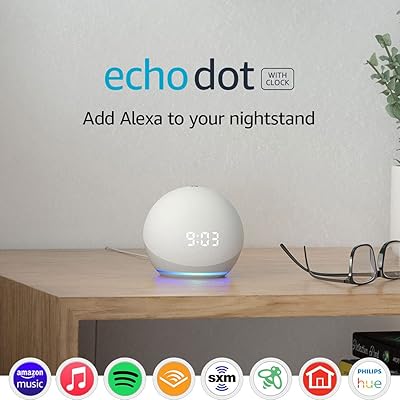
Amazon Echo Dot 4th Gen Smart Speaker