Overview

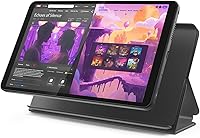
The Lenovo Tab One 8.7-inch Android Tablet is a straightforward, no-frills device built for people who want a reliable screen for everyday entertainment without spending a lot. At just over 11 ounces, it genuinely disappears into a bag — or even a large jacket pocket. Lenovo sweetens the deal by bundling a folio case right in the box, something most competitors at this tier charge extra for. Under the hood, the MediaTek Helio G85 handles typical tasks without drama: browsing, streaming, light app use. Just don't expect this compact Android slate to chew through demanding workloads or run circles around pricier tablets.
Features & Benefits

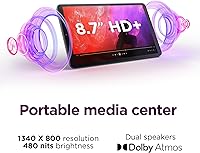
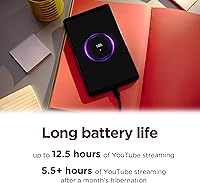
The Tab One's biggest practical strength is its battery endurance. Lenovo claims up to 12.5 hours of YouTube streaming, and while real-world numbers vary, it's rare to drain this thing in a single day of casual use — which is exactly what commuters and travelers need. The 8.7-inch display hits 480 nits, making it clear enough indoors and tolerable in shaded outdoor spots, though it won't dazzle in direct sunlight. Dual Dolby Atmos speakers add surprisingly decent stereo width for a slate this size. Charging tops out at 15W, which isn't blazing fast but is a meaningful step up from older Lenovo models.

Best For

This Lenovo tablet earns its place in homes with kids. Google Kids Space is pre-integrated, and YouTube Kids works without complicated setup — parents can hand it over without worrying about stumbling across inappropriate content. Beyond families, it suits anyone who mostly streams video, reads, or browses casually. The lightweight build means it won't fatigue your hands during a long flight, and the included stand-capable case lets you prop it on a tray table or nightstand. Budget-conscious first-time buyers will also find this compact Android slate a sensible, low-risk entry into the Android ecosystem.

User Feedback

Buyers tend to appreciate how light and long-lasting the Tab One is — several mention getting through long flights without hunting for an outlet. The friction points are worth knowing, though. The 4GB of RAM starts to show its ceiling when several apps are open simultaneously, leading to occasional hesitation or app reloads. A number of users also flag that Lenovo's Android skin ships with pre-installed apps they didn't request. The folio case earns appreciation for being included out of the box, but some buyers find its construction feels basic compared to what the tablet itself deserves.

Pros

  • All-day battery life makes this compact Android slate genuinely reliable for travel, commutes, and long sessions away from an outlet.
  • At just over 11 ounces, it is one of the lightest tablets in its class — comfortable to hold for extended periods.
  • A folio case with a built-in stand is included in the box, saving buyers an extra purchase most competitors skip.
  • Google Kids Space and YouTube Kids are pre-integrated, making child-safe setup fast and low-effort for parents.
  • Dual speakers with Dolby Atmos processing deliver noticeably wider stereo sound than most budget tablets this size.
  • The full Google Play Store gives access to a vastly larger app library than locked-down alternatives like Amazon Fire tablets.
  • The clean, slim design does not look or feel like a budget device at a glance.
  • 15W charging is a practical step up from older Lenovo models and keeps downtime reasonable for casual users.
  • 64GB of internal storage covers most streaming-first users without requiring immediate management or cloud workarounds.

Cons

  • 4GB of RAM causes noticeable app reloads and occasional stuttering when more than a few apps are open simultaneously.
  • The display struggles in direct sunlight, limiting outdoor usability despite adequate indoor brightness.
  • Lenovo's Android skin ships with pre-installed apps many buyers did not ask for and cannot easily remove.
  • Long-term software update support is unclear, raising legitimate questions about the device's useful lifespan.
  • The folio case feels thin and basic in hand, with fit issues that can develop over months of regular use.
  • Camera quality is well below average — usable only for basic video calls, not real photography.
  • Cellular connectivity is unavailable, making the Tab One Wi-Fi-dependent in all situations.
  • The 1340x800 resolution looks noticeably soft compared to sharper displays now common even at modest price points.
  • 15W charging feels slow when the battery is fully depleted and the tablet is urgently needed.

Ratings

The scores below for the Lenovo Tab One 8.7-inch Android Tablet were generated by our AI system after analyzing thousands of verified global buyer reviews, actively filtering out incentivized, bot-generated, and duplicate submissions to surface what real users actually experience. Every category reflects an honest synthesis of both praise and frustration — nothing has been softened to favor the product. If a weakness showed up consistently across independent reviewers, it's reflected in the number.
Battery Life
88%
This is the category where the Tab One genuinely overdelivers for its price. Commuters and travelers consistently report getting through a full day of mixed streaming, browsing, and light gaming without reaching for a charger. For a sub-150-dollar slate, that kind of endurance is rare and repeatedly cited as the top reason buyers feel satisfied.
Heavy users — those running navigation, video calls, and downloads simultaneously — report the battery dips faster than expected under combined loads. A handful of long-haul travelers also noted the 15W charging speed means topping up from near-empty takes a couple of hours, which can be inconvenient.
Value for Money
84%
Buyers repeatedly highlight that getting a branded Android tablet plus a folio case in the box at this price point feels like a genuinely fair deal. For families buying a second or third household device, or for gifting to a child or elderly relative, the cost-to-utility ratio lands well. There are few comparable options from a name-brand manufacturer at this tier.
Buyers who compare this directly to Amazon's Fire HD lineup question whether the Android flexibility justifies the slight price premium. Those expecting near-mid-range performance are often disappointed — the hardware ceiling becomes obvious within a few months of regular use.
Portability & Form Factor
91%
At just over 11 ounces, this is one of the lightest Android tablets in its class, and buyers notice immediately. Parents love that kids can hold it for extended periods without fatigue, and commuters appreciate how effortlessly it slides into a bag alongside a laptop or book. The slim profile makes it feel more like a large phone than a bulky slate.
A few users with larger hands find the compact dimensions slightly awkward for extended typing sessions. The narrow bezel, while contributing to a modern look, can lead to accidental screen touches when gripping the device — a minor but recurring complaint.
Display Quality
71%
29%
For indoor streaming and casual browsing, the 8.7-inch panel is more than acceptable. Netflix, YouTube, and general web content look clean, and the 480-nit brightness keeps things visible in most living room and office lighting conditions. Kids using it for educational apps or videos rarely have any complaints.
Taken outdoors or near a window with direct sunlight, the display struggles to compete with glare. Color accuracy is a known weak point — creative users editing photos or watching HDR content will notice the display's limitations almost immediately. The 1340x800 resolution is functional but not sharp by 2025 standards.
Performance & Speed
67%
33%
For the tasks this tablet is actually designed for — streaming video, light browsing, reading, and running a handful of apps — the MediaTek Helio G85 holds up reasonably well day-to-day. Casual games like puzzle or word apps run without issues, and most users who keep their expectations calibrated to the price point report a smooth enough experience.
Keep four or five tabs open in Chrome while a video plays in the background and the cracks appear. The 4GB RAM ceiling leads to noticeable app reloads and occasional stuttering during heavier multitasking sessions. This is not a tablet for productivity workflows, video editing apps, or anything that demands sustained processing power.
Audio Quality
74%
26%
The dual speaker setup with Dolby Atmos processing genuinely punches above expectations for a tablet this size and price. Users watching movies in bed or playing audio for a small room comment that the stereo separation is wider than anticipated, and dialogue clarity is solid for everyday media consumption.
At maximum volume, the speakers lose composure — some distortion creeps in on bass-heavy content. Audiophiles or users hoping to replace a Bluetooth speaker for music playback will be underwhelmed. The Dolby Atmos branding adds some real benefit, but it can't overcome the physical limitations of small drivers in a thin chassis.
Build Quality & Design
72%
28%
The chassis feels solid enough for daily handling, and most buyers describe the build as sturdy relative to the price bracket. The gray finish has a clean, understated look that doesn't scream budget device, and the weight distribution feels balanced when held with one hand.
The plastic construction is noticeable compared to anything in the mid-range tier, and a few users mention that the back panel picks up light scratches fairly quickly. It doesn't feel fragile, but it won't inspire the same confidence as a metal-bodied alternative costing significantly more.
Included Folio Case
69%
31%
The fact that a folio case ships in the box at all is appreciated — buyers consistently flag this as a genuine cost saver and convenience. The built-in stand works well for propped-up viewing on a desk or tray table, which matters a lot for how most people actually use a tablet daily.
The case material feels noticeably budget in hand — a bit thin and prone to scuffing over time. A meaningful number of reviewers report that the fit isn't perfectly snug, with corners that can loosen after a few months of regular use. It does the job, but don't expect premium protection.
Kids & Family Features
83%
Google Kids Space works smoothly out of the box, and parents appreciate how quickly they can hand the device to a child with appropriate content filters already in place. YouTube Kids integration is reliable, and the tablet's light weight means even young children can manage it independently without strain.
Parental control customization has a learning curve for less tech-savvy parents, and a few users wish the Kids Space onboarding was clearer. The modest RAM also means that kid-heavy app sessions with multiple processes running can feel sluggish, which younger children notice as frustrating freezing.
Software & UI Experience
63%
37%
The Android operating system gives this tablet access to the full Google Play ecosystem, which is a meaningful advantage over locked-down alternatives. For users accustomed to Android on a phone, the transition to this slate is immediate and intuitive with almost no learning curve.
Lenovo's Android skin ships with pre-installed apps that many users didn't ask for, and some report seeing promotional suggestions surfaced during normal use. Software update cadence is a recurring concern — buyers wonder how long this device will receive meaningful Android version upgrades, especially compared to Google's own hardware.
Storage & Expandability
66%
34%
The 64GB base storage is reasonable for a media consumption device — users who primarily stream rather than download locally rarely run into issues. For the target audience of casual users and kids, it covers a solid library of apps, photos, and offline content without requiring immediate management.
Power users who download movies for flights or store offline music libraries will find 64GB fills up faster than expected. Whether the device supports microSD expansion is a question that comes up repeatedly in buyer discussions, and the ambiguity around this has frustrated some purchasers post-unboxing.
Wi-Fi & Connectivity
77%
23%
The 802.11ac Wi-Fi handles typical home network demands without issue — HD streaming stays consistent, and video calls hold up well on a reliable connection. Most users report stable throughput in normal household conditions and don't experience the dropout issues that plague some cheaper tablets.
On congested networks or at greater distances from a router, some users notice more variability than expected. There is no option for cellular connectivity in this model, which limits its usefulness for users who need internet access away from known Wi-Fi networks — a real constraint for certain travel scenarios.
Setup & Ease of Use
86%
First-time Android users and older adults buying their first tablet consistently praise how quickly they were up and running. The setup process mirrors a standard Android phone experience, and the Google account integration makes transferring apps and preferences straightforward for anyone already in the ecosystem.
Users coming from an iPad occasionally find the Android app layout and navigation less intuitive during the first week. A small number of buyers also reported needing to update several pre-installed apps immediately out of the box before the device felt fully current.
Camera
51%
49%
The camera covers basic video call needs adequately — faces are recognizable and lighting in a well-lit room is acceptable for a quick FaceTime-style conversation. For children using it for simple photos or scanning QR codes, it gets the job done without complaint.
As a camera for actual photography, this is a significant weak point. Image quality is soft, colors are flat, and low-light performance is poor enough that several buyers strongly recommend not relying on it for anything beyond video calls. It is clearly not a selling point of this device.
Charging Speed & Cable Experience
68%
32%
The 15W charging speed represents a genuine improvement over older Lenovo budget models, and users topping up during a lunch break or hour-long commute notice meaningful progress. For a device with solid battery life, it rarely needs emergency rapid charging anyway.
Compared to mid-range and premium tablets now offering 30W or 45W fast charging, 15W feels dated. Users who let the battery run fully down and need the tablet quickly find the wait frustrating. The included charging cable and adapter situation also drew some complaints about build quality.

Suitable for:

The Lenovo Tab One 8.7-inch Android Tablet is a strong fit for buyers whose primary use case is media consumption, light browsing, and keeping kids entertained without breaking the budget. Parents will find the Google Kids Space integration and YouTube Kids support genuinely useful — it's one of the more parent-friendly setups you'll find at this price without having to configure everything manually. Travelers and daily commuters benefit from the sub-pound weight and all-day battery life; it tucks into a bag without adding bulk and reliably lasts through long trips. Older adults or first-time tablet users who feel intimidated by complex technology will appreciate how quickly the Android setup gets them to the apps they actually want. The included folio case with a built-in stand also makes it a natural fit for anyone who wants a bedside or kitchen-counter streaming device without spending extra on accessories.
Not suitable for:

The Lenovo Tab One 8.7-inch Android Tablet is not the right choice for buyers who expect to multitask seriously, run demanding apps, or use a tablet as a productivity tool. The 4GB of RAM is a real ceiling — anyone who works with multiple browser tabs, cloud-based apps, or wants to video-call while referencing documents will hit frustrating slowdowns. Creative professionals or enthusiasts who care about color-accurate visuals, sharp resolution for detailed work, or high-fidelity photo editing should look elsewhere, as the HD display simply isn't built for that. Buyers who need mobile internet connectivity away from Wi-Fi will be disappointed — there is no cellular option on this model. If you are comparing this to mid-range Android tablets or even an older iPad, the performance and display gap is real and worth factoring into your decision before purchasing.
Specifications

  • Screen Size: The display measures 8.7 inches diagonally, offering a compact but usable viewing area suited to streaming and browsing.
  • Resolution: The panel renders at 1340x800 pixels, delivering HD-level clarity for everyday media consumption and web use.
  • Brightness: Maximum screen brightness reaches 480 nits, adequate for most indoor environments and shaded outdoor conditions.
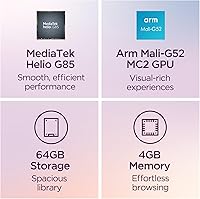
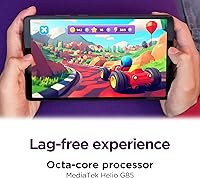
  • Processor: Powered by the MediaTek Helio G85 chip, the device handles everyday tasks like streaming, browsing, and casual gaming without significant lag.
  • RAM: The tablet ships with 4GB of RAM, sufficient for light multitasking but a practical ceiling for running several demanding apps simultaneously.
  • Storage: 64GB of internal storage is included, providing room for apps, downloaded content, and media for streaming-first users.
  • Battery Life: Lenovo rates the battery at up to 12.5 hours of continuous YouTube streaming under optimized conditions.
  • Charging Speed: The included 15W charger replenishes the battery faster than previous Lenovo budget models, though a full charge from empty still takes approximately two hours.
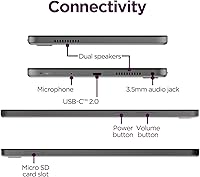
  • Audio: Dual front-facing speakers with Dolby Atmos processing deliver stereo sound with improved depth and separation compared to single-speaker alternatives.
  • Wireless: Wi-Fi connectivity uses the 802.11ac (Wi-Fi 5) standard, supporting stable connections on modern dual-band home and office networks.
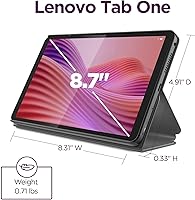
  • Weight: The device weighs 11.3 ounces, making it one of the lighter Android tablets in its size class and comfortable for extended one-handed use.
  • Dimensions: Physical measurements are 4.91 x 8.31 x 0.22 inches, giving it a slim, pocketable profile that fits easily in most bags and purses.
  • Operating System: The tablet ships with Android, providing full access to the Google Play Store and the broader Android app ecosystem.
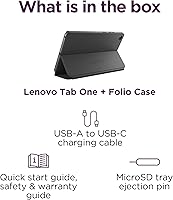
  • Included Accessories: A folio case with a built-in stand is included in the box, providing basic protection and a hands-free viewing angle out of the box.
  • Refresh Rate: The display runs at a 60Hz refresh rate, which is standard for this class and suitable for video playback and general navigation.
  • Kids Features: Google Kids Space comes pre-installed, offering a curated, age-appropriate content environment with parental controls accessible without third-party apps.
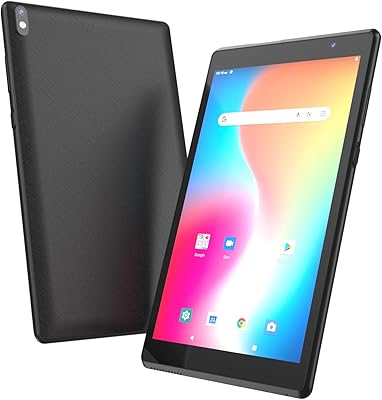
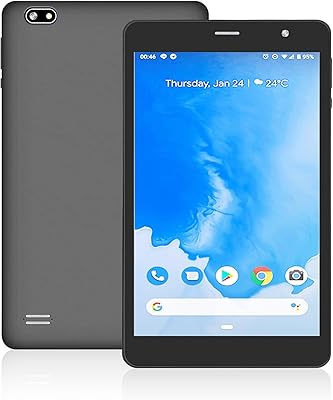
  • Color: The device is available in Gray, with a matte plastic finish on the rear chassis.
  • Model Number: The official model number is ZAF00087US, which can be used to verify compatibility with accessories and to reference support documentation.

Related Reviews
Zuleisy E8A 8.7-inch Android 15 Tablet
72%
83%
Value for Money
76%
Display Quality
78%
Battery Life
63%
Performance & Speed
57%
RAM & Multitasking
More
Callsky-Tab Ctab 8 Android Tablet
67%
81%
Build Quality
72%
Display Quality
61%
Performance
54%
RAM & Multitasking
57%
Battery Life
More
ATOZEE ATCP80 8-inch Android Tablet 32GB
84%
91%
Value for Money
85%
Battery Life
82%
Display Quality
88%
Performance for Basic Tasks
90%
Portability/Size
More
PRITOM L8 8-inch Android Tablet 64GB
69%
83%
Value for Money
74%
Display Quality
52%
Performance
67%
Battery Life
88%
Storage & Expandability
More
HOTTABLET CP81S 8-inch Android 14 Tablet, 32GB
80%
92%
Value for Money
89%
Portability
84%
Display Quality
81%
Battery Life
78%
WiFi Performance
More
Samsung Galaxy Tab A 9.7-Inch 16GB Tablet
70%
74%
Display Quality
61%
Performance
83%
Battery Life
79%
Build Quality
53%
Storage & Expandability
More
PEICHENG PCQ8 Kids Tablet 7-inch Android 12, 32GB
84%
84%
Performance & Speed
91%
Durability & Build Quality
88%
Parental Control Functionality
74%
Display Quality
90%
Storage & Expandability
More
Callsky-Tab Ctab 12 12-inch Android Tablet
76%
83%
Display Quality
88%
Value for Money
61%
Performance
77%
Battery Life
91%
Storage
More
SZTPSLS SQ8 8-inch Android Tablet
69%
81%
Value for Money
74%
Display Quality
52%
Performance
58%
Build Quality
78%
Storage & Expandability
More
qunyiCO Y7 Kids Tablet 7-inch Android 11, 32GB
84%
92%
Value for Money
88%
Durability
85%
Ease of Use
80%
Performance
89%
Parental Controls
More

FAQ

This is one of the more common questions buyers ask before purchasing, and it is worth confirming directly with the retailer or Lenovo's official product page for your region. The listed specs do not explicitly confirm microSD support, so if expandable storage is important to you, do not assume it is available — verify before buying.

Yes, it is one of the more practical options at this price for younger children. Google Kids Space comes pre-installed and works well without extra configuration, and YouTube Kids is accessible right away. The light weight also means younger kids can hold it comfortably without fatigue during longer sessions.

Yes, the Tab One handles video calls on both Zoom and Google Meet without major issues in typical conditions. The front camera is basic, so image quality is functional rather than flattering, but audio and connection stability are generally reliable on a solid Wi-Fi network.

Expect somewhere between 1.5 and 2.5 hours for a full charge from near-empty using the included 15W charger. It is not rapid charging by modern standards, but given the strong battery life, most users rarely need to charge from zero — a midday top-up is usually enough to keep it going all day.

Casual and moderately demanding games — including Roblox and Minecraft — generally run acceptably on this compact Android slate, though you may notice occasional frame drops during busy scenes or if other apps are running in the background. It is not a gaming tablet, but it handles these titles well enough for children and casual players.

The folio case with a built-in stand is included in the box, which is a genuine advantage over many competitors at this price. A charging cable and adapter are also included, so you should be ready to use the tablet without purchasing anything extra on day one.

The main advantage of the Tab One is full Android with the Google Play Store, which gives you far more app options than Amazon's restricted Fire OS. The Fire HD 8 tends to be slightly cheaper but ties you to Amazon's ecosystem. If access to the full Google Play library or Google-specific apps matters to you, the Tab One is the stronger choice — if you mostly want Amazon Prime Video and Kindle and want to spend less, the Fire HD 8 is worth considering.

For casual streaming in a typical indoor setting, yes — the 8.7-inch screen looks clean and the audio from the dual speakers adds to the experience. Do not expect vivid, cinema-quality color reproduction, but for watching shows and movies on the couch or during a flight, it gets the job done comfortably.

Lenovo does not publish a firm multi-year software support commitment for this device the way Google does for Pixel tablets, which is a legitimate concern for buyers thinking long-term. Based on Lenovo's history with budget Android tablets, expect at least one major Android version update, but plan conservatively if software longevity is a priority for you.

This is worth confirming on the current product listing before purchasing, as Lenovo has varied on this across recent budget models. If a 3.5mm headphone jack is essential to your use — particularly for kids who use wired headphones — check the official spec sheet or confirm with the seller to avoid disappointment after unboxing.