Overview

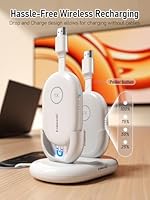
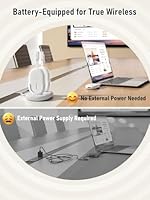
The Lemorele G500 Wireless HDMI Transmitter and Receiver arrived in late 2024 as a practical answer to a very common conference room headache: the cable scramble before a presentation begins. Unlike solutions that piggyback on your office Wi-Fi, this wireless presentation kit builds its own independent 2.4G/5G connection between the two units, so network congestion or IT restrictions never enter the picture. The transmitter carries a built-in rechargeable battery, meaning no fumbling for a power outlet at the podium. A compact charging dock stores both units together, keeping everything organized and ready between sessions.
Features & Benefits

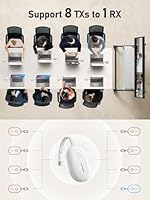
The battery inside the transmitter is sized to cover a full morning of back-to-back meetings — roughly three and a half to four hours — without needing a recharge mid-session. The signal travels up to 165 feet in a straight, unobstructed line, which is more than enough for a standard lecture hall or large boardroom; just keep in mind that walls and partitions will shrink that number meaningfully. For busy rooms, the Lemorele G500 supports up to eight transmitters at once, all from the same kit, and a single button press is all it takes to switch between presenters. Output is full 1080p at 60Hz, which handles presentations, videos, and detailed slides cleanly.

Best For

This HDMI casting system makes the most sense for organizations where presentations happen frequently and involve more than one person. Corporate meeting rooms with rotating presenters, university classrooms where the instructor needs to roam freely, and small business conference setups that lack dedicated AV support are all strong fits. The plug-and-play design means no IT involvement is required to get up and running — the units pair with each other automatically. It also suits anyone who has grown tired of hunting for an open wall outlet before a meeting; the self-contained dock means the kit is fully charged and ready to go every morning.

User Feedback

With around 56 ratings at time of writing, the sample is still relatively small — but the early picture is encouraging. Buyers consistently mention easy initial setup and the convenience of not needing a power cable at the presenter end as standout positives. A few users have flagged mild latency in demanding video playback situations, and some note that the stated range drops noticeably once a wall or two is in the way. The charging dock gets mixed mentions: some appreciate the tidy organization, while others find it adds bulk to carry. Compatibility appears solid across Windows laptops, though Mac users may want to verify before purchasing.

Pros

  • No corporate Wi-Fi needed — the system builds its own private wireless link between units.
  • Truly cable-free at the presenter end, which removes a surprisingly common meeting-room friction point.
  • Initial setup takes minutes with no software, drivers, or IT involvement required.
  • The built-in battery comfortably covers a full morning block of meetings on a single charge.
  • Switching between presenters is a single button press, keeping meetings moving without awkward pauses.
  • The charging dock keeps both units stored and topped up together, so the kit is always ready.
  • Full 1080p output keeps slides, spreadsheets, and visuals sharp on large projector screens.
  • Works cleanly across a wide range of Windows laptops and business devices without compatibility issues.
  • The self-contained kit format means nothing gets lost — transmitter, receiver, and dock live together.
  • Covers the practical range of most standard lecture halls and boardrooms in open-plan configurations.

Cons

  • Effective range drops noticeably in rooms with interior walls, glass dividers, or dense furniture.
  • Mac compatibility has been inconsistent, with some users experiencing connection drops or setup friction.
  • Battery life is sufficient for a half-day but will not cover a full day of back-to-back sessions.
  • The charging dock adds meaningful bulk when carrying the full kit between rooms or buildings.
  • Multi-transmitter support only works with units from the same compatible kit family, not third-party hardware.
  • Latency during fast video playback is perceptible enough to be distracting in video-heavy presentations.
  • The troubleshooting documentation is thin, making edge-case issues harder to resolve independently.
  • With fewer than 60 reviews at launch, long-term durability and reliability data is still limited.
  • No granular on-device signal strength feedback makes it harder to diagnose mid-presentation drop issues.

Ratings

The scores below for the Lemorele G500 Wireless HDMI Transmitter and Receiver were produced by our AI rating engine after systematically analyzing verified purchase reviews from buyers worldwide, with spam, bot-generated, and incentivized feedback actively filtered out. The result is an honest, balanced snapshot of what real users — mostly IT coordinators, office managers, and educators — actually experience day to day. Both the genuine strengths and the friction points that come up repeatedly are reflected directly in each score.
Ease of Setup
91%
Most buyers report being up and running within a few minutes straight out of the box, with no software installation or network credentials required. The automatic pairing between transmitter and receiver is consistently described as reliable, which matters enormously when a meeting is about to start and there is no time to troubleshoot.
A small number of users note that initial pairing occasionally requires a manual reset when switching between different room setups. The included documentation, while adequate, could do more to explain what to do when the automatic connection does not establish on the first attempt.
Battery Life
86%
For a single morning block of meetings or a full lecture session, the built-in battery holds up well without needing a top-up. Users who swap between rooms appreciate not having to hunt for a free wall outlet at every stop, which is the exact scenario this kit was designed around.
A half-day is roughly the ceiling in real-world use, so back-to-back full-day workshops will require a mid-session recharge. A few buyers mention that battery drain accelerates noticeably when the signal has to work harder — for example, in environments with significant wireless interference.
Wireless Range
74%
26%
In open, unobstructed spaces like large lecture halls and open-plan boardrooms, the range is genuinely impressive and comfortably covers most professional environments. Users in university settings specifically praise the ability to present from the back of the room without any signal degradation.
The headline distance figure assumes a clear line of sight, and real-world performance in rooms with dividing walls, glass partitions, or heavy furniture is noticeably shorter. Several buyers in standard office buildings with multiple interior walls report the effective range dropping to roughly half the advertised maximum.
Video & Audio Quality
83%
For slide-based presentations, spreadsheets, and standard video content, the 1080p output looks sharp and consistent on both projectors and large-panel displays. Users running corporate presentations note that text legibility and color accuracy hold up well even on screens well over 100 inches diagonal.
A subset of buyers reports a slight but perceptible delay when streaming video content with audio, which is noticeable enough to be distracting during product demos or training videos. The kit handles static and low-motion content better than fast-moving video, so pure video playback use cases may want to manage expectations.
Multi-Presenter Switching
78%
22%
The one-button switching concept works cleanly in practice, and teams who regularly hand off between presenters appreciate how it removes the awkward cable-swap moment during meetings. For organizations that bought additional transmitters from the same kit family, the handoff is quick enough that it does not disrupt meeting flow.
It is worth being clear that the multi-transmitter capability requires all units to be from the same compatible kit — you cannot simply add arbitrary third-party transmitters. A few buyers discovered this limitation after assuming any HDMI transmitter would work alongside the receiver, leading to frustration and returns.
Charging Dock Design
77%
23%
The two-compartment dock is genuinely useful for keeping the kit consolidated in one spot, and the bidirectional insertion support means you never have to fiddle with orientation when docking in a hurry. The LED charge indicators give a clear, at-a-glance status check before a meeting starts.
Some users find the dock adds more bulk than expected when carrying the full kit between rooms or buildings, particularly when the USB-C cables are included. A compact or travel-friendly design iteration would make this significantly more practical for people who move between spaces throughout the day.
Build Quality
73%
27%
The units feel solid enough for an office environment, and the white finish looks professional alongside typical AV equipment. Nothing about the construction feels flimsy in normal handling, which is reassuring for equipment that gets plugged and unplugged repeatedly throughout the week.
At this price tier, the plastic housing does not feel particularly premium, and a few users question its long-term durability under daily heavy-use conditions. There are no reports of early failures yet, but the review pool is still relatively small and the product is newer to market.
Compatibility
79%
21%
Windows laptop users across a wide range of manufacturers report consistent, plug-and-play compatibility with no driver installation needed. The standard HDMI connection means it works with most business laptops, desktops, and even some tablets without any adapter fuss.
Mac users have had a more mixed experience, with some reporting reliable operation and others encountering connectivity inconsistencies that required reconnection or a system settings adjustment. Buyers planning to use this primarily with Apple hardware should verify compatibility with their specific device and macOS version before committing.
Value for Money
81%
19%
For a conference-room-ready wireless HDMI kit with a built-in battery and charging dock included in the box, the price sits at a reasonable point compared to enterprise AV alternatives that cost several times more and require professional installation. Small businesses and academic institutions on modest AV budgets tend to see this as a practical middle ground.
Buyers who only need a basic one-to-one wireless display link may find the full feature set more than they need, and simpler cheaper options exist for that narrower use case. The value equation is strongest when the multi-presenter and battery features are actually being used regularly.
Portability
76%
24%
The transmitter itself is compact and pocketable, and the lightweight form factor means it is easy to keep attached to a laptop bag for users who present in different locations throughout the week. The battery-powered design removes one of the main portability barriers that plague competing products.
Bringing the full kit — transmitter, receiver, dock, and cables — requires a dedicated pouch or compartment and adds meaningful weight to a laptop bag. Users who only need the transmitter end will find it highly portable, but the overall system is not as grab-and-go as the marketing implies.
Network Independence
93%
The fact that this system creates its own private wireless link between the two units is a significant practical advantage in corporate and institutional settings where guest Wi-Fi access is restricted or unreliable. IT managers in particular appreciate that it requires zero network configuration and leaves no footprint on the office network infrastructure.
The independent wireless channel can occasionally experience interference in environments already saturated with 2.4GHz and 5GHz signals, such as dense office floors with dozens of access points. Switching the system to the 5GHz band typically resolves this, but the option could be more clearly surfaced in the setup process.
Instruction Manual & Support
62%
38%
Basic setup is intuitive enough that most users never open the manual at all, which is a reasonable sign that the out-of-box experience is well-designed. For simple one-transmitter scenarios, the hardware largely guides itself.
When something does go wrong — a pairing failure, a signal drop, a compatibility question — the included documentation offers limited troubleshooting depth. Customer support responsiveness from Lemorele has received mixed feedback, and buyers who run into edge-case issues may find themselves relying on community forums rather than official guidance.
Indicator & Status Feedback
71%
29%
The LED indicators on the charging dock give enough information to confirm charge status at a glance, which is a small but genuinely useful touch for a device that needs to be ready at a specific time. Signal status on the transmitter itself is also visible without needing to check a connected screen.
A few users wish the status feedback were more granular — for example, a clearer indicator of signal strength or connection quality during active use. When issues occur mid-presentation, there is limited on-device feedback to help diagnose whether the problem is range, interference, or a pairing issue.

Suitable for:

The Lemorele G500 Wireless HDMI Transmitter and Receiver is a strong fit for organizations where presentations happen regularly and cable management is a genuine operational headache. IT coordinators setting up dedicated conference rooms will appreciate that the system requires zero network integration — it pairs privately between units and stays off the corporate network entirely. University lecturers who move around the room while presenting, or who need to cover significant distance between their laptop and a ceiling-mounted projector, will find the range more than adequate in open hall environments. Small businesses that lack dedicated AV staff benefit most from the plug-and-play simplicity; there is no software to install, no settings to configure, and no specialist knowledge required to get a presentation on screen. Teams that rotate between multiple presenters in a single session — product demos, panel-style meetings, training workshops — will also get tangible value from the one-button switching capability, provided all transmitters are sourced from the same compatible kit.

Not suitable for:

The Lemorele G500 Wireless HDMI Transmitter and Receiver is not the right choice for every wireless display scenario, and it is worth being clear about where it falls short before purchasing. Anyone needing to project through multiple walls or across a dense, obstacle-filled floor plan should temper range expectations significantly — the advertised distance applies to open, unobstructed spaces, which describes fewer real offices than the marketing suggests. Users who primarily stream fast-moving video content with synchronized audio, such as for film screenings or video-heavy training sessions, may find the occasional latency noticeable enough to be frustrating. Mac-first organizations should verify compatibility carefully, as the experience on Apple hardware has been less consistent than on Windows machines according to early buyers. If you only ever have one presenter and a simple fixed-room setup, the full feature set here is more than you need, and a more affordable single-transmitter alternative would serve just as well. Finally, anyone expecting enterprise-grade after-sales support and detailed troubleshooting resources should know that Lemorele is still a smaller brand and the support infrastructure reflects that.

Specifications

  • Brand & Model: Manufactured by Lemorele under the model designation G500.
  • Wireless Bands: The system operates across both 2.4GHz and 5GHz Wi-Fi bands, allowing users to switch to the less congested band in dense wireless environments.
  • Transmission Range: Rated for up to 50 metres (approximately 165ft) in a clear, unobstructed line-of-sight condition; real-world range through walls will be shorter.
  • Video Resolution: Supports full 1080p output at 60Hz, delivering smooth, detailed visuals suitable for projectors, interactive whiteboards, and large-panel displays.
  • Built-in Battery: The transmitter unit contains a 2000mAh lithium-ion battery, providing roughly 3.5 to 4 hours of active use per full charge.
  • Connector Type: Both the transmitter and receiver use standard HDMI connectors, requiring no proprietary adapters for most laptops and display devices.
  • Multi-Transmitter Support: The receiver supports simultaneous pairing with up to 8 transmitters from the same compatible kit, with one-button source switching between them.
  • Network Dependency: The transmitter and receiver establish a direct private wireless link, operating entirely independently of any external Wi-Fi router or corporate network.
  • Charging Dock: The included 2-compartment charging dock accepts the transmitter in either orientation and uses smart chip control for overcharge, overvoltage, and overload protection.
  • Charge Indicators: Four LED indicators on the transmitter display current battery level, illuminating simultaneously and staying solid when a full charge is reached.
  • Compatible Devices: Designed for use with laptops, desktop PCs, tablets, and smartphones that support HDMI output, either natively or via an appropriate adapter.
  • Package Contents: Each kit includes one receiver, one transmitter, one 2-compartment charging dock, two USB-C charging cables, and a printed user manual.
  • Item Weight: The complete kit weighs 1.26 pounds, making it practical for transport between meeting rooms or off-site locations.
  • Package Dimensions: The retail packaging measures 8.03 x 6.85 x 2.83 inches, compact enough to store in a desk drawer or laptop bag pocket.
  • Color: The units and charging dock are finished in white, giving the kit a clean, professional appearance alongside typical office AV equipment.
  • Availability Date: The G500 was first made available in October 2024, making it a recent addition to the wireless presentation market.

Related Reviews

DxInvb Wireless HDMI Transmitter and Receiver Kit
75%
91%
Ease of Setup
58%
Device Compatibility
74%
Wireless Range & Stability
69%
Video Quality
83%
Build Quality & Portability
More
DXchip 4KEZH01R01 Wireless HDMI Extender Kit
72%
88%
Ease of Setup
61%
Wireless Range (Real-World)
78%
Video Quality
54%
Latency & Responsiveness
71%
Device Compatibility
More
Terzomen AirLink Wireless HDMI Transmitter and Receiver
83%
91%
Ease of Setup
88%
Wireless Performance
84%
Range and Connectivity
89%
Compatibility with Devices
85%
Streaming Quality (1080p)
More
WELUSOPU 1TX+2RX Wireless HDMI Extender Kit
74%
88%
Ease of Setup
74%
Wireless Range
67%
Video Output Quality
79%
Multi-Receiver Sync
81%
Latency Performance
More
LZLOO Wireless HDMI Transmitter and Receiver
77%
91%
Ease of Setup
74%
Signal Stability
68%
Wireless Range
77%
Video Output Quality
71%
Latency Performance
More
BRAIDOL G03 Wireless HDMI Transmitter and Receiver
83%
88%
Value for Money
92%
Performance with 1080p
75%
4K Streaming Performance
96%
Ease of Setup
70%
Signal Stability
More
IOGEAR GWHD11
IOGEAR GWHD11
75%
72%
Signal Stability
84%
Video Quality
61%
Wireless Range
91%
Setup & Ease of Use
83%
Audio Performance
More
Vrriis Wireless HDMI Transmitter and Receiver 250m
83%
88%
Range and Signal Stability
92%
Setup and Installation
65%
Signal Quality in Obstructed Spaces
89%
Value for Money
80%
Dual Frequency Support (2.4GHz/5.8GHz)
More
BRAIDOL S3 Wireless HDMI Transmitter and Receiver
86%
91%
Performance
88%
Signal Stability
94%
Setup & Installation
85%
Range/Distance
92%
Video Quality
More
TPUFO G02 Wireless HDMI Transmitter and Receiver
77%
91%
Ease of Setup
78%
Signal Stability
83%
Video & Image Quality
74%
Transmission Range
87%
Latency Performance
More

FAQ

No, and that is actually one of the most practical things about this kit. The transmitter and receiver create their own private wireless link directly between the two units, so your office network, guest Wi-Fi restrictions, and IT policies are completely irrelevant. Just plug the receiver into your display, connect the transmitter to your laptop, and you are ready to go.

In typical meeting conditions — slides, documents, standard video clips — most users get somewhere between three and a half and four hours before needing a recharge. If you are running back-to-back all-day sessions, plan to dock the transmitter during a lunch break. The charging dock makes this straightforward since you just drop it in and it starts topping up automatically.

It works with many Mac setups, but compatibility on Apple hardware has been less consistent than on Windows machines based on early user reports. Some Mac users report a smooth experience, while others encounter intermittent connection issues depending on their specific model and macOS version. If your team is primarily Mac-based, it is worth testing thoroughly before a full deployment.

Yes, provided those laptops each have a transmitter from the same compatible kit. The system supports up to eight transmitters paired to one receiver at the same time, and switching between presenters is a single button press on the transmitter. Just be aware that you cannot mix in third-party HDMI transmitters — all units need to be from the same Lemorele G500 Wireless HDMI Transmitter and Receiver kit family.
Honestly, in a typical office with interior walls and dividers, you should expect noticeably less than the headline figure. The rated range applies to open, unobstructed line-of-sight conditions. For most standard conference rooms and classrooms, the range is more than adequate, but if your setup involves presenting through multiple solid walls, test the distance before committing to a fixed installation.

The transmitter will stop sending a signal, so the display will go blank. You would need to either plug the transmitter into a USB-C power source to continue, or swap in a second charged transmitter if you have one available. The dock charges the unit relatively quickly, so a short break is usually enough to get back a workable charge level.

For slide decks, PDFs, and standard document sharing, the latency is minimal and most users do not notice it in practice. Where it becomes more apparent is during fast-motion video playback with synchronized audio — the slight delay is perceptible enough to be distracting in that context. For pure presentation use, it is not a real concern.

No software or driver installation is required on either Windows or Mac. The transmitter connects via HDMI and is recognized as a standard display output device by your operating system. This is one of the consistently praised aspects of the kit — you can hand a transmitter to a visitor or a new employee and they can use it immediately without any setup steps.

Yes, the receiver connects to the projector via a standard HDMI cable and can stay permanently installed. Once it is set up, presenters just need the transmitter unit, which they plug into their laptop when they enter the room. The receiver holds its pairing settings, so there is no re-configuration needed between sessions.

The dock uses a built-in smart chip that monitors charge level and automatically cuts power once the transmitter is fully charged, protecting the battery from overcharge damage. Four indicator lights on the transmitter all illuminate simultaneously to confirm a full charge, so you can check readiness at a glance before a meeting starts without having to power the unit on.