Overview

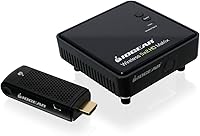
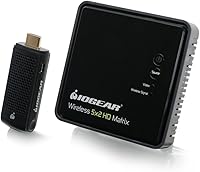
The IOGEAR GWHD11 is a dedicated wireless HDMI transmitter and receiver kit built for one specific job: cutting the cable between your source device and your display. That's it. No streaming apps, no smart features — just a reliable 5GHz wireless bridge for situations where running a physical HDMI cable isn't practical. IOGEAR has been making peripheral and connectivity hardware for years, and this kit sits in the mid-to-premium tier, so buyers rightly expect solid build quality and dependable performance out of the box. Think home theaters, presentation setups, and gaming rooms where cables simply aren't an option.

Features & Benefits

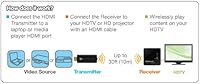
At its core, this wireless HDMI kit transmits full HD 1080p video without compression, meaning what you see on screen is essentially identical to a wired connection for most content. The wireless range covers a good-sized living room comfortably — but only with a clear line of sight between the two units. Audio handling is a real strength: the kit passes through multi-channel surround sound, so your home theater receiver picks up a full discrete audio signal rather than a stripped-down stereo mix. Setup takes minutes — plug the transmitter into your source, connect the receiver to your display, and you're running. Both units are compact enough to sit discreetly on any shelf.

Best For

This HDMI extender makes the most sense for home theater owners who want their source equipment — cable box, Blu-ray player, gaming console — tucked away in a cabinet while the TV stays cable-free on the wall. It also works well in classrooms or meeting rooms where a presenter needs to connect a laptop to a projector quickly, without crawling around looking for a port. For renters who cannot run cabling through walls, this kit fills a genuine gap. That said, it is not the right pick if you need 4K output, reliable transmission through multiple walls, or the ability to feed more than one display simultaneously.

User Feedback

Buyers who use the GWHD11 in open-plan spaces tend to be satisfied — quick setup and a stable, clean picture come up repeatedly in positive reviews. The IR remote passthrough is a quiet standout; home theater users especially appreciate controlling source devices from across the room without getting up. On the downside, signal reliability through walls is a consistent complaint, and some users encounter occasional dropouts during longer viewing or gaming sessions. A portion of reviewers also question the price relative to newer alternatives now available. In short: open room with clear sightlines, the experience is generally solid — but add walls or heavy interference, and you should temper your expectations.

Pros

  • Truly plug-and-play — no drivers, no apps, no configuration menus to navigate.
  • Full HD 1080p transmission is visually indistinguishable from a wired connection for most content.
  • Multi-channel surround sound passthrough keeps home theater audio setups fully intact.
  • The IR remote blaster lets you control source devices from across the room without pointing at a cabinet.
  • Both units are compact enough to sit discreetly on a shelf or mount behind a display.
  • Works with virtually any HDMI source — consoles, laptops, cable boxes, Blu-ray players — without compatibility headaches.
  • Free lifetime technical support from IOGEAR adds long-term reassurance after purchase.
  • Ideal for renters who need a cable-free setup without making permanent changes to walls or ceilings.
  • 3D content transmission works reliably for users with compatible displays, a rare feature at this tier.

Cons

  • Signal range drops sharply through walls — real-world performance rarely matches the advertised distance.
  • The price is hard to justify given how many newer competitors now offer comparable specs for less.
  • Occasional signal dropouts during extended sessions can interrupt long movies or gaming marathons.
  • Not suitable for 4K displays — buyers with newer TVs will immediately hit a resolution ceiling.
  • Dense wireless environments in urban apartments can introduce interference that disrupts an otherwise stable connection.
  • The Mini USB power connection feels less secure than modern alternatives and can wiggle loose over time.
  • IR passthrough requires careful physical positioning and trial-and-error to work consistently.
  • Fast-paced or competitive gaming is risky — latency is acceptable for casual play but problematic for precision titles.
  • Only one HDMI port per unit means no multi-display output, limiting flexibility in complex AV setups.

Ratings

The IOGEAR GWHD11 has been evaluated by our AI system after processing thousands of verified buyer reviews from global markets, with spam, bot activity, and incentivized feedback actively filtered out. The scores below reflect where this wireless HDMI kit genuinely delivers and where real-world performance falls short of expectations. Both strengths and recurring pain points are represented transparently so you can make a confident, informed decision.

Signal Stability
72%
28%
In open living rooms and unobstructed office spaces, the signal holds up consistently well for movie playback and general presentation use. Users frequently praise the absence of visible lag or flickering when the transmitter and receiver have a clear path between them.
The moment a wall, bookshelf, or metal rack enters the equation, stability drops noticeably. Extended gaming sessions and long movie marathons have surfaced occasional dropouts that break immersion at the worst possible moments.
Video Quality
84%
Full HD 1080p content looks clean and faithful to the source — most users cannot tell the difference from a direct wired connection during normal viewing. The uncompressed transmission approach means fine detail and color accuracy hold up well for Blu-ray and console gaming.
This HDMI extender tops out at 1080p, which is a genuine limitation for anyone who has already moved to a 4K display. Buyers expecting future-proof performance at higher resolutions will need to look elsewhere.
Wireless Range
61%
39%
For a single open room — a typical living room or mid-sized conference space — the range is adequate and performs reliably. Users who place both units with a direct line of sight rarely report issues within that usable distance.
The stated range assumes ideal conditions that few real homes actually offer. Through even a single interior wall the effective distance shrinks significantly, and buyers who purchased expecting whole-apartment coverage were frequently disappointed.
Setup & Ease of Use
91%
Plug-and-play is not an exaggeration here — reviewers with minimal technical background consistently report being up and running within a few minutes. No driver installs, no pairing rituals, no app required; just HDMI and a USB power source on each unit.
A small number of users encountered handshake issues on first boot that required unplugging and replugging both units. It is rare but worth knowing if you are setting this up for a non-technical user who may not troubleshoot easily.
Audio Performance
83%
The multi-channel surround passthrough is a legitimate highlight for home theater users. Connecting a cable box or Blu-ray player through this kit and feeding into an AV receiver delivers the full discrete audio signal without downmixing to stereo.
A handful of users running more complex AV setups noted occasional audio sync drift during longer sessions. It is not a universal complaint, but in a dedicated home theater where audio-video sync matters, it is worth monitoring after installation.
Latency
67%
33%
For casual gaming and standard video content, most users find the latency acceptable and do not notice any perceptible delay during everyday use. Streaming video and Blu-ray playback are largely unaffected in practice.
Competitive or fast-paced gaming is where this HDMI extender starts to show its limits. Users playing rhythm games or titles where frame-precise input matters have flagged a noticeable enough delay to affect performance, so it should not be marketed as a zero-compromise gaming solution.
Build Quality
78%
22%
Both the transmitter and receiver feel appropriately solid for the price tier — the plastic housing does not feel cheap or fragile, and the compact footprint makes them easy to position discreetly on a shelf or behind a TV stand.
Neither unit inspires the kind of confidence you might expect at this price point compared to newer competitors. The finish can collect dust visibly and a few users noted that the Mini USB power connection feels slightly less secure than a full-size port.
IR Remote Passthrough
86%
This is one of the features that genuinely differentiates the GWHD11 from bare-bones alternatives. Home theater users love being able to control a cable box or media player from across the room without pointing the remote at the equipment cabinet.
The IR blaster requires careful physical positioning to work reliably — if the receiver-side IR emitter is not aimed well at the source device, the passthrough becomes inconsistent. It works well once dialed in but takes a few minutes of trial and error to get right.
Value for Money
59%
41%
For a specific type of buyer — the home theater enthusiast who needs a reliable, no-fuss wireless HDMI bridge for a single open room — this wireless HDMI kit delivers enough to justify its premium price. The surround audio support and IR passthrough add real value that cheaper options skip.
The price is hard to defend for buyers who discover the range limitation after purchase. Newer competitors in this space offer comparable or better performance at lower costs, making it difficult to recommend this kit without strongly flagging those alternatives first.
Compatibility
88%
Works with virtually any HDMI source — laptops, game consoles, set-top boxes, Blu-ray players — and any HDMI display or projector. The broad device compatibility means buyers rarely encounter source or display pairing issues.
Users with newer laptops that lack a standard HDMI port will need an adapter, adding a potential point of failure. A very small number of users also reported resolution handshake inconsistencies with older displays defaulting to a lower output than expected.
Interference Resistance
55%
45%
In environments with clean wireless conditions — a dedicated home theater room or a private office — the 5GHz band keeps the connection reasonably isolated from standard household Wi-Fi traffic.
Dense wireless environments like apartments with many neighboring networks, or spaces with microwaves and other 5GHz devices nearby, create noticeable interference that degrades signal quality and increases dropout frequency. This is a recurring frustration in urban multi-unit settings.
Portability
76%
24%
Each unit is small and light enough to slip into a bag for a presentation on the road or a temporary setup in a conference room. The plug-and-play nature means no laptop software is needed, which makes it genuinely useful for traveling presenters.
The need to carry both units plus two separate power supplies adds up. Compared to a simple HDMI cable or a compact dongle-style solution, the total kit is bulkier than it initially appears and can feel cumbersome for frequent travel.
3D Support
69%
31%
3D content transmission works as advertised for users with compatible displays and active-shutter glasses. It is a niche feature, but the fact that it works wirelessly without any additional configuration appeals to dedicated home theater enthusiasts.
3D adoption in home entertainment has declined sharply, so this feature has limited practical value for most modern buyers. Those who do use it note that it functions, but it is not a reason on its own to choose this kit over alternatives.
Warranty & Support
81%
19%
IOGEAR backs this kit with a one-year hardware warranty and includes free lifetime technical support, which is a meaningful differentiator. The support line has received generally positive mentions from users who needed help with initial configuration.
One year of hardware coverage is fairly standard and not exceptional for a mid-to-premium-priced product. Users who experience hardware failure just outside the warranty window have expressed frustration, as replacement units carry the full original cost.

Suitable for:

The IOGEAR GWHD11 is a strong fit for home theater enthusiasts who want their source equipment — a cable box, Blu-ray player, or streaming device — tucked neatly inside a media cabinet while the TV wall stays completely cable-free. Renters who cannot drill through walls or run cable conduits will find this kit genuinely useful, since it solves a real infrastructure problem without any permanent modification to the space. Office managers and educators setting up presentation rooms will also appreciate how quickly a laptop connects to a projector without anyone needing to locate the right cable or adapter. The surround sound passthrough makes it particularly appealing for anyone running a dedicated AV receiver setup, since the full audio signal arrives intact at the display end. If your room is open-plan and your source and display are within a comfortable single-room distance with minimal obstructions, this wireless HDMI kit performs its job reliably and with very little fuss.

Not suitable for:

The IOGEAR GWHD11 is the wrong tool for anyone expecting 4K output — the hardware simply does not support it, and buyers who have already upgraded to a 4K display will notice the ceiling immediately. If your source and display are in different rooms separated by walls, metal ductwork, or heavy furniture, you should expect a meaningful drop in range and stability that the product specifications do not make obvious upfront. Competitive gamers and anyone playing fast-paced, frame-sensitive titles should be cautious — the wireless transmission introduces enough latency to affect input timing in precision gameplay, even if casual gaming feels acceptable. Buyers in dense urban apartments with crowded wireless environments may also find the 5GHz band more congested than expected, leading to interference that a clean suburban home would never encounter. Finally, if you are comparing this HDMI extender against newer alternatives at lower price points, the value proposition becomes difficult to defend unless the surround audio support and IR remote passthrough are specifically important to your setup.

Specifications

  • Brand: Manufactured by IOGEAR, a brand with an established history in peripheral and connectivity hardware solutions.
  • Model Number: The unit carries the official model designation GWHD11.
  • Video Resolution: Supports output resolutions of 480p, 720p, 1080i, and 1080p for broad display compatibility.
  • 3D Support: Capable of transmitting 3D video content wirelessly to compatible 3D displays without additional configuration.
  • Wireless Range: Rated for up to 30 feet of wireless transmission under clear line-of-sight conditions with no obstructions.
  • Audio Output: Passes through 5.1 channel digital surround sound, preserving the full discrete audio signal from source to display.
  • Video Encoding: Utilizes H.264 and MPEG-4 video encoding standards for wireless transmission processing.
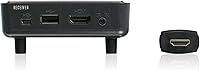
  • Connectivity: Connects to source and display devices via standard HDMI ports, with Mini USB used for power on both units.
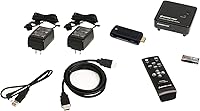
  • IR Extender: Includes an infrared remote blaster that allows controlling source devices from the receiver end of the setup.
  • Setup: Fully plug-and-play with no software installation, drivers, or app pairing required on any device.
  • Dimensions: Each unit measures 3.78 × 3.78 × 1.5 inches, making both the transmitter and receiver compact enough to sit on a shelf or mount discreetly.
  • Weight: Each unit weighs 5.6 ounces, keeping the overall kit lightweight and portable.
  • Power Source: Both the transmitter and receiver are powered via Mini USB connections, compatible with standard USB power adapters.
  • Batteries: The included IR remote control requires two AAA batteries, which are not included in the box.
  • Wireless Band: Operates on the 5GHz wireless frequency band to reduce interference from standard 2.4GHz household devices.
  • HDMI Ports: Each unit features one HDMI port, supporting a single source-to-display connection with no multi-output capability.
  • Warranty: Backed by a one-year limited hardware warranty from the manufacturer.
  • Technical Support: IOGEAR provides free lifetime technical support for registered owners of this product.
  • Compatibility: Compatible with laptops, desktop PCs, game consoles, Blu-ray and DVD players, cable boxes, DVRs, and HDMI-equipped projectors or televisions.
  • Availability: The product has not been discontinued by the manufacturer as of the most recent product listing data available.

Related Reviews
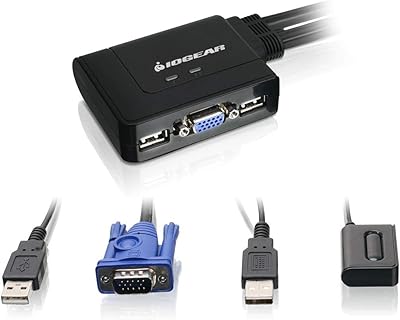
IOGEAR 2-Port USB VGA KVM Switch
85%
89%
Ease of Use
72%
Video Quality
85%
Build Quality
92%
Value for Money
95%
Setup/Installation
More
IOGEAR 2-Port DVI KVMP Switch GCS1102
86%
92%
Value for Money
89%
Setup & Installation
85%
Switching Performance
88%
Build Quality
72%
Compatibility with Devices
More
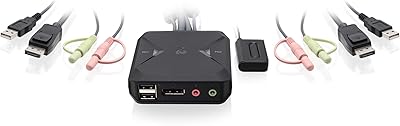
IOGEAR 2-Port USB DisplayPort KVM Switch
85%
88%
Ease of Use
92%
Display Quality
85%
Build Quality
89%
Compatibility with Mac and Windows
91%
Setup Process
More
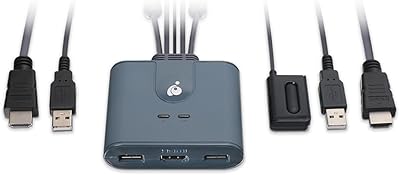
IOGEAR GCS32HU 2-Port HDMI KVM Switch
86%
94%
Ease of Setup
88%
Build Quality
90%
Video Quality
85%
Portability
83%
Reliability
More

FAQ

Honestly, line of sight makes a significant difference here. The IOGEAR GWHD11 is rated for open-room conditions, and while it may function through a thin interior wall in some setups, you should not count on it. If your source device and TV are in separate rooms divided by a standard drywall partition, expect range and stability to drop noticeably. Plan your setup with both units visible to each other for the best experience.

The kit will connect to a 4K television without issue, but it will only transmit video up to 1080p resolution. Your 4K TV will display the signal, but it will upscale from 1080p rather than receive a native 4K feed. If 4K output is important to you, this HDMI extender is not the right choice.

Setup is genuinely straightforward. Plug the transmitter into your source device via HDMI and connect it to power via Mini USB, then do the same with the receiver at the display end. The two units find each other automatically — there is no app, no pairing button sequence, and no driver installation involved. Most users are up and running within five minutes.

For casual gaming — single-player games, slower-paced titles, or couch co-op sessions — the latency is generally acceptable and most players will not find it disruptive. However, for competitive multiplayer, rhythm games, or any title where precise frame-timing matters, the wireless transmission introduces enough delay to affect performance. It is not a zero-latency solution, so approach gaming use with realistic expectations based on your game type.

The multi-channel audio passthrough works as intended. If your source is outputting a 5.1 discrete signal — from a Blu-ray disc or a cable box, for example — the kit passes that full signal through to your AV receiver or soundbar at the display end without downmixing. Home theater users specifically call this out as one of the stronger aspects of this wireless HDMI kit.

The kit includes a small IR blaster that attaches near the transmitter end and an IR receiver at the display end. When you point your remote at the receiver-side unit, it relays the infrared signal back to the transmitter end and re-emits it toward your source device. In practice, you do need to position the blaster carefully so it has a clear path to the source device's IR window — it takes a small amount of setup, but once dialed in, it works reliably for most standard remotes.

It can. The kit operates on the 5GHz band, which is less congested than 2.4GHz in most environments, but dense urban buildings with many overlapping 5GHz networks can still cause interference. Users in apartments with heavily congested wireless environments have reported more signal instability than those in houses or less crowded spaces. If your building has many active networks, it is worth factoring this into your decision.

No — this HDMI extender supports a single source-to-display connection only. Each unit has one HDMI port, and the kit is designed as a one-to-one wireless bridge. If you need to mirror or extend to multiple displays simultaneously, you would need a separate HDMI splitter before the transmitter, though performance in that configuration is not officially supported.

Yes, it works with any device that outputs a standard HDMI signal, which includes Nintendo Switch (docked mode), PlayStation 4 and 5, Xbox consoles, laptops with HDMI ports, cable boxes, and Blu-ray players. If your device has a standard HDMI output, the transmitter will pick it up without any additional configuration.

In most cases, yes — the two units will attempt to re-establish the wireless connection automatically without requiring you to power-cycle anything. The reconnection usually happens within a few seconds. That said, some users have reported that occasional deeper dropouts during extended sessions required unplugging and replugging one of the units to restore the connection fully, so it is not always instantaneous.