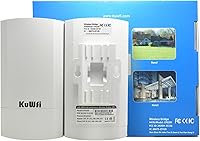
Overview

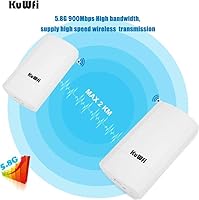
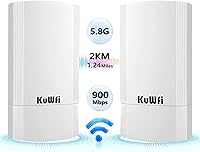
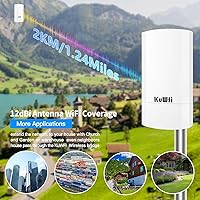
The KuWFi CPE200 900Mbps Outdoor Wireless Bridge is a point-to-point kit built for one practical job: getting internet from one building to another without burying a single cable. It operates on the 5.8GHz band and, under ideal conditions, can push wireless links across distances up to about 1.2 miles. The kit ships with two bridge units, PoE injectors, and cabling, so you're not hunting for missing parts on day one. The IP65-rated housing shrugs off rain and dust, and handles temperature swings that would trouble lesser outdoor gear. At its price point, it sits squarely in the practical middle ground — not the cheapest option around, but far less painful than trenching fiber.
Features & Benefits

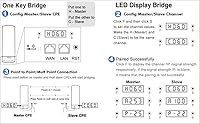
What stands out about this outdoor WiFi bridge is how much thought went into reducing setup friction. The physical H/C switch on each unit designates it as master or slave — no logging into a router interface required. Pair that with a one-second auto-pair reset and you can have both units talking in minutes. The built-in LED display gives you live readouts of signal strength, channel, and operating mode right on the unit, which is genuinely useful when you're up a ladder adjusting antenna aim. PoE power delivery keeps the install clean — one cable per unit, no outdoor power outlet needed. It also supports multiple modes and up to four SSIDs, giving real flexibility to segment camera or IoT traffic.

Best For

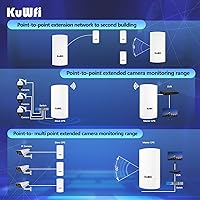
This wireless bridge unit makes the most sense for people who need to connect two separate structures without digging up a yard. Homeowners running internet to a detached garage or barn are the most common use case, and it works just as well for farms stretching Starlink coverage across open fields. Security installers will find it useful for getting IP camera feeds back to a central NVR without running additional cabling. Small businesses with two nearby buildings can use it to avoid the cost of a dedicated leased line or buried fiber run. That said, this is not a fit for locations with heavy tree cover between endpoints — clear line of sight is simply non-negotiable here.

User Feedback

Across several hundred reviews, the CPE200 kit earns a reasonably positive reputation — most buyers got it working without serious trouble, and the LED-guided pairing draws consistent praise from people who aren't network professionals. Where the feedback gets more nuanced is on throughput: real-world speeds tend to run well below the headline figure, particularly at longer distances, and performance drops sharply if anything interrupts the signal path — even scattered trees can be enough. A handful of buyers also noted the included PoE injectors get noticeably warm during extended sessions. Customer support is inconsistent; some users got quick help, others waited far longer. The one-year warranty is standard for this category, so manage expectations accordingly.

Pros

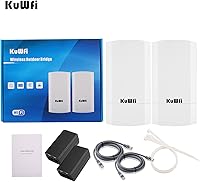
  • Comes as a complete kit — both units, injectors, and cables are included, so you can start the install the same day it arrives.
  • The physical master-slave switch and auto-pair reset make initial setup approachable for people who have never configured networking hardware before.
  • IP65 weatherproofing means it holds up through rain, dust, and a wide range of outdoor temperatures without special shelter.
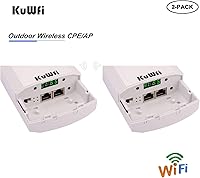
  • PoE power delivery keeps the install tidy — one cable per unit handles both data and power with no outdoor outlet required.
  • The built-in LED display lets you check signal strength and operating mode right on the unit, which is useful when aligning the antenna.
  • Supports multiple operating modes including AP, repeater, and point-to-multipoint, so it can adapt to different network layouts.
  • Range across open, unobstructed ground is genuinely usable at distances that would be impractical to cable without professional help.
  • Up to four separate SSIDs can be broadcast, making it easy to isolate camera or IoT traffic from your main network.
  • The CPE200 kit hits a price point that makes the cable-free building link financially practical for homeowners and small businesses alike.
  • Compact and lightweight enough to mount discreetly on a pole, eave, or fence post without heavy hardware.

Cons

  • Real-world throughput lands well below the advertised ceiling, especially at longer distances or in less-than-ideal conditions.
  • The wired Ethernet ports cap out at 100Mbps, which becomes a bottleneck for anyone with a fast internet connection.
  • Any obstruction between the two units — including scattered trees — can significantly degrade or kill the wireless link.
  • The included PoE injectors run noticeably warm under sustained load, which may raise long-term reliability concerns for some users.
  • Customer support response times are inconsistent, and resolving technical issues can take longer than expected.
  • The one-year warranty is standard for this price tier and offers no real advantage over competing products in the same category.
  • No built-in remote management or cloud monitoring means troubleshooting a dropped link requires physical access to the units.
  • Setup documentation is basic and may leave less experienced users piecing together steps from online forums or video guides.

Ratings

The scores below were generated by our AI review engine after analyzing verified buyer feedback for the KuWFi CPE200 900Mbps Outdoor Wireless Bridge from multiple global sources, with spam, bot-generated, and incentivized reviews actively filtered out before scoring. Each category reflects the honest balance of what real users praised and what genuinely frustrated them — nothing is glossed over. Strengths and recurring pain points are weighted equally so you get a clear, unbiased picture before committing.
Ease of Setup
81%
19%
The physical H/C switch and one-press auto-pairing genuinely impressed a wide range of buyers, including those with no networking background. Being able to see signal strength on the LED display while adjusting antenna aim in the field — without needing a laptop or phone — removes a real barrier for first-time installers.
A meaningful share of users hit roadblocks when the bridge conflicted with their existing router's DHCP settings, requiring manual IP configuration that the basic documentation does not prepare you for. In those cases, the otherwise smooth setup experience stalls quickly without some background knowledge or forum-diving.
Real-World Range
74%
26%
Across open land — farms, flat rural properties, cleared lots — the CPE200 kit delivers on its long-range promise for most buyers. Users bridging a house to a barn or detached garage across a few hundred meters consistently report stable, working links that hold up day to day.
The rated maximum distance assumes ideal, unobstructed conditions that rarely exist outside a test environment. Several buyers who expected solid performance through moderate tree cover or across hilly terrain found the link unreliable or unusable, which caused genuine frustration given the product positioning.
Actual Throughput
62%
38%
For typical use cases — sharing internet to a secondary building, streaming a security camera feed, or browsing — the actual speeds delivered are more than sufficient. Buyers using this to extend a modest fixed-line or Starlink connection generally have no complaints about what they receive at the remote end.
The gap between the advertised throughput ceiling and real-world performance is wide enough to matter. Users expecting high-bandwidth performance were often let down, and the 100Mbps cap on the Ethernet ports further limits the link for anyone with a faster internet plan — a spec detail that catches buyers off guard.
Build Quality
77%
23%
The housings feel solid and purposeful for outdoor use, and the IP65 weatherproofing has held up well for most buyers through rain, wind, and temperature swings across multiple seasons. The compact, flat-panel form factor makes clean pole or eave mounting straightforward without specialized brackets.
Some reviewers noted the included PoE injectors feel less robust than the bridge units themselves and run noticeably warm during extended continuous operation — a concern for installs where the injector is tucked into a confined space. The overall build inspires reasonable but not exceptional confidence for a permanent outdoor install.
Weather Resistance
83%
The IP65 rating translates to genuine real-world durability in the field. Buyers in rainy climates and those dealing with cold winters report the units continuing to function without degradation after prolonged outdoor exposure, which is the baseline ask for any outdoor networking hardware.
While the units themselves hold up well, no guidance is provided on protecting the Ethernet cable entry point from moisture over time, which a few long-term users flagged as a potential weak point. The PoE injectors indoors also need weather-appropriate housing if installed in unheated outbuildings.
Value for Money
78%
22%
Relative to hiring an electrician or contractor to trench and bury an Ethernet cable between buildings, this outdoor WiFi bridge pays for itself almost immediately in most residential or small-business scenarios. Buyers consistently acknowledge the price-to-functionality ratio as a genuine strength, especially for a complete kit.
The 100Mbps Ethernet port cap feels like a cost-cutting measure that ages poorly as internet speeds increase, and it undercuts the value argument for anyone on a faster plan. A small number of buyers also felt the PoE injector quality did not quite match the price point of the overall kit.
Line-of-Sight Sensitivity
55%
45%
When the installation site genuinely allows for clear, unobstructed line of sight — open farmland, a clear rooftop-to-rooftop path — the link is stable and dependable. Buyers who planned their install carefully around this requirement rarely have complaints about connection consistency.
5.8GHz is inherently sensitive to physical obstructions, and a significant portion of negative reviews trace directly to buyers underestimating this. Partial tree cover, a neighboring structure, or even a chain-link fence can introduce enough signal degradation to make the link unreliable, and the product materials do not warn buyers clearly enough about this limitation.
PoE Power System
72%
28%
The inclusion of PoE injectors in the kit means installers only need to run a single Ethernet cable to each mounting point, which simplifies the physical installation significantly. Buyers mounting units on poles far from power outlets particularly appreciate not needing to run a separate power line.
The bundled injectors run warm enough that some users expressed concern about long-term reliability, particularly in warm climates or enclosed spaces. A few buyers reported injector failure before the bridge units showed any issues, suggesting the injectors are the weakest component in the kit.
LED Display Utility
79%
21%
Having a live readout of signal strength, operating mode, and channel directly on the unit is a practical advantage that competing products at this price often skip. It makes fine-tuning antenna alignment a one-person job, which buyers doing solo installs find genuinely useful.
The display is small and requires being physically close to the unit to read clearly, which is awkward when the unit is mounted high on a pole. Some buyers wished the display showed more granular signal data rather than just broad indicator levels during alignment.
Multi-Mode Flexibility
71%
29%
Support for AP, repeater, PTP, and PTMP modes gives installers options beyond a simple two-building bridge, and buyers who set up multi-point networks — linking a house, a barn, and a workshop on the same property — found the added flexibility genuinely useful.
Switching between modes and configuring PTMP setups requires more comfort with networking concepts than the basic documentation provides. Users who pushed beyond the standard two-unit PTP setup reported needing to rely on community forums and trial-and-error more than they expected.
IP Camera Compatibility
76%
24%
Security installers found the direct Ethernet connection at the remote unit to be a clean, practical solution for extending camera coverage without additional switching hardware. Running IP camera feeds across a property boundary without cabling is exactly what this wireless bridge unit handles reliably.
Buyers using older analog camera systems or non-standard NVR setups occasionally ran into compatibility friction that required manual network configuration to resolve. The documentation does not cover camera-specific setup scenarios in enough depth to help users who are not already familiar with IP networking basics.
Customer Support
47%
53%
When support responses do arrive, buyers report that the guidance provided is generally relevant and attempts to address the specific technical issue raised rather than offering only generic troubleshooting steps. A portion of users did get their problems resolved through the support channel.
Response times are inconsistent enough that multiple reviewers described waiting days or longer for a reply to a straightforward technical question. For a product that often gets installed in remote locations where downtime has real consequences, slow support is a meaningful reliability concern that weighs on the overall ownership experience.
Documentation Quality
51%
49%
The included manual covers the basics of the standard two-unit PTP setup adequately enough for users who simply follow the H/C switch and auto-pair process. For the majority of buyers doing a straightforward install, the documentation gets them started without needing outside help.
Anything beyond the default setup — manual IP addressing, PTMP configuration, SSID segmentation, or camera integration — is barely addressed, pushing users to online forums or YouTube for guidance. Given that the product targets semi-technical DIYers, the documentation feels noticeably underdeveloped relative to the feature set.
Mounting & Installation
75%
25%
The slim form factor and reasonable weight make physical mounting uncomplicated on standard outdoor brackets, and the PoE-only power requirement keeps cable runs simple. Buyers doing pole mounts on fence posts or rooftop eave installs consistently found the physical installation portion of the process smooth.
The kit does not include mounting hardware, which means buyers need to source their own brackets or clamps before installation day. A small number of users also noted the cable entry point lacks a proper weatherproofing boot, which could become a maintenance concern in wet climates over several years.

Suitable for:

The KuWFi CPE200 900Mbps Outdoor Wireless Bridge is a strong fit for anyone who needs to push internet connectivity across a gap between two separate structures without the cost or effort of buried cabling. Homeowners with a detached garage, workshop, barn, or guest cabin are exactly who this kit was designed for — the PoE-powered units mount cleanly on eaves or poles, and the physical switch-and-pair setup keeps the process manageable even without networking experience. Farmers and rural property owners extending Starlink coverage across open land will find the range more than adequate when there is a clear path between the two endpoints. Small businesses sharing a single internet connection between two nearby buildings on the same property can avoid a costly fiber run entirely. Security installers also benefit, since the Ethernet port at the remote unit lets an IP camera or NVR connect directly without any additional switching gear on that end.
Not suitable for:

The KuWFi CPE200 900Mbps Outdoor Wireless Bridge is not the right tool if your install site has trees, buildings, or any solid obstruction sitting between the two endpoints — 5.8GHz signals do not punch through barriers the way lower-frequency options can, and even a few mature trees in the signal path can cut performance dramatically. Buyers expecting real-world throughput close to the headline speed will likely be disappointed; actual speeds in typical deployments run at a fraction of the theoretical maximum, which matters if you are planning to stream high-bandwidth content to multiple devices simultaneously. The 100Mbps ceiling on the wired Ethernet ports also becomes a bottleneck if your internet connection is faster than that, making this a poor fit for gigabit-speed ISP customers. Anyone who needs enterprise-grade reliability, consistent vendor support, or robust remote management should look at more purpose-built commercial hardware instead. Finally, buyers in locations with extreme weather variability beyond the rated operating range, or those who need multi-point mesh coverage rather than a single fixed link, will find this outdoor WiFi bridge too narrow in scope.

Specifications

  • Wireless Standard: Both units operate on the 802.11ac (WiFi 5) protocol, which provides a solid balance of speed and outdoor range on the 5.8GHz band.
  • Frequency Band: Single-band 5.8GHz operation reduces interference from common household devices but requires a clear path between the two endpoints.
  • Max Throughput: The wireless link is rated up to 900Mbps under ideal lab conditions, though real-world deployments typically deliver a fraction of that figure.
  • Transmission Range: The kit is rated for links up to approximately 1.24 miles (2KM) across open, unobstructed terrain with proper antenna alignment.
  • Ethernet Speed: Each unit includes one 10/100Mbps Ethernet port, which caps the wired data rate at 100Mbps regardless of wireless performance.
  • Power Supply: Both units are powered via PoE at 24V; injectors are included in the kit, so no external power outlet is needed at the mounting point.
  • Weather Rating: The enclosures carry an IP65 rating, meaning they are fully dust-tight and protected against low-pressure water jets from any direction.
  • Operating Temp: The units are rated to operate reliably across a temperature range of -30°C to 55°C, covering most outdoor climates year-round.
  • Storage Temp: For storage or shipping, the safe temperature range extends from -40°C down to a ceiling of 70°C without risk of damage to internal components.
  • Dimensions: Each bridge unit measures 9.06 x 3.94 x 1.18 inches, a slim flat-panel form factor that mounts easily on a pole or under an eave.
  • Weight: Each unit weighs approximately 1.96 pounds, light enough that standard outdoor pole mounts or wall brackets handle it without issue.
  • Operating Modes: The kit supports AP, Repeater, Point-to-Point (PTP), and Point-to-Multipoint (PTMP) modes, allowing flexible deployment across different network layouts.
  • SSID Support: Up to four separate wireless SSIDs can be broadcast simultaneously, useful for segmenting camera, IoT, or guest traffic from the main network.
  • LED Display: A built-in LED display on each unit shows current operating mode, active channel, and live signal strength without requiring access to a web interface.
  • Pairing Method: A physical H/C switch designates each unit as host or client, and a one-second press of the reset button initiates automatic pairing between the two.
  • Kit Contents: The package includes two bridge units, two PoE injectors, network cables, and a user manual — everything needed for a basic two-point installation.
  • Warranty: KuWFi covers the kit with a one-year manufacturer warranty plus a 30-day money-back window, which is standard for outdoor networking hardware at this price tier.
  • Compatibility: The Ethernet port at the remote unit supports direct connection to IP cameras, NVRs, PCs, smart TVs, and other wired devices without additional switching gear.

Related Reviews

EnGenius EnStation6 Kit Outdoor Wireless Bridge
76%
84%
Throughput Performance
72%
Range & Coverage
61%
Ease of Setup
88%
Build Quality & Weatherproofing
76%
Value for Money
More
EnGenius ENH500-AX Outdoor Wireless Bridge
85%
93%
Long-Range Performance
90%
Weatherproofing & Durability
78%
Installation & Setup
85%
Wi-Fi Speed & Stability
88%
Signal Strength
More
eoqo CPE355 Outdoor Wireless Bridge
69%
84%
Ease of Setup
67%
Real-World Range
58%
Throughput & Data Speed
79%
Build Quality & Weatherproofing
71%
PoE Camera Output
More
GOOD STORY WB504H Outdoor Wireless Bridge
71%
88%
Ease of Setup
81%
Link Stability
63%
Real-World Range
69%
Throughput Performance
83%
Value for Money
More
TP-Link CPE210 Outdoor Wireless Access Point
75%
88%
Long-Range Performance
91%
Value for Money
83%
Build Quality
58%
Ease of Setup
86%
Antenna & Signal Focus
More
AdaLov CPE660 Wireless Bridge
76%
83%
Ease of Setup
71%
Real-World Range
63%
Actual Data Throughput
84%
Build Quality & Weather Resistance
79%
Value for Money
More
AdaLov CPE366 Point-to-Point Wireless Bridge
75%
86%
Ease of Setup
71%
Range Performance
82%
Throughput & Speed
84%
Value for Money
67%
Build Quality
More
AdaLov CPE661 Outdoor Wireless Bridge
80%
83%
Ease of Setup
76%
Real-World Range
71%
Throughput & Speed
89%
Dual WiFi Broadcasting
88%
Build Quality
More
UeeVii CPE58G Flex Point-to-Point Wireless Bridge
77%
83%
Ease of Setup
67%
Real-World Range
74%
Throughput Performance
71%
Build Quality
81%
Weather Resistance
More
abetap X83 Wireless Outdoor Security Camera
71%
91%
Ease of Installation
83%
Image Quality
76%
Night Vision Performance
62%
Battery Life
79%
Motion Detection Accuracy
More

FAQ

Not really. The physical H/C switch on each unit handles the master-slave role assignment, and a quick press of the reset button pairs them automatically. The LED display walks you through signal strength in real time, so you can adjust aim without ever logging into a router interface. Most people with basic DIY confidence get it running in under an hour.

Plan for somewhere in the range of 150 to 300Mbps under normal conditions at moderate distances — not the headline figure. Throughput drops as distance increases and is sensitive to anything in the signal path. If your internet connection is under 100Mbps anyway, the wired Ethernet port will be your actual ceiling, not the wireless link.

It is the single most important factor in whether this works well or barely works at all. The 5.8GHz band does not penetrate solid objects the way lower frequencies do. Even a cluster of mature trees between your house and the target building can chop performance dramatically. Before buying, walk the path between your two points and check for obstructions.

Yes, and this is one of the most common use cases. You connect the host unit to your Starlink router via Ethernet, mount both units with a clear line of sight, and the remote building gets wired or wireless connectivity through the client unit. Just keep in mind the 100Mbps Ethernet port cap, which may limit throughput if your Starlink plan delivers more than that.

The IP65 rating covers rain, dust, and humidity, and the operating temperature range goes well below freezing, so typical winter conditions in most climates are fine. Extreme cold-weather installs in sub-Arctic environments might push the limits, but for the continental US, Canada, or most of Europe, it should handle seasonal weather without trouble.

Yes. The Ethernet port on the client-side unit connects directly to a camera, NVR, or small switch. You do not need additional hardware at the remote end for a basic camera setup. This makes the outdoor WiFi bridge a practical option for getting surveillance footage back to a recorder inside the main building.

Yes, both units need to be powered continuously. If either one loses power — whether from an outage, a tripped breaker, or a PoE injector issue — the link drops. It is worth putting the injectors on a small UPS if uptime matters to your setup.

The LED display on each unit shows live signal strength, so you can make small angle adjustments while watching the indicator. A good general rule is to aim for a strong, stable signal reading before tightening your mount hardware. Some users find it helpful to have a second person at the remote unit while the first adjusts the host-side angle.

Generally yes — it connects to your existing router via Ethernet on the host side, so it works regardless of who your ISP is or what router you own. The only requirement is an available Ethernet port on your router. ISP-provided combo modem-routers usually have at least one spare port for this.

Start by confirming the H/C switch is set differently on each unit — one must be H and the other C. Then try a fresh reset by holding the button for about one second on both units before attempting to pair again. If you are still stuck, manually assigning IP addresses with the correct gateway can resolve issues caused by conflicting DHCP settings between the bridge and your existing router.