Overview

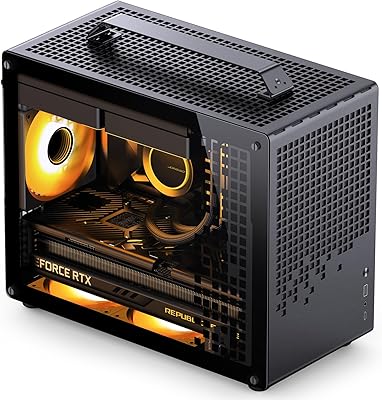
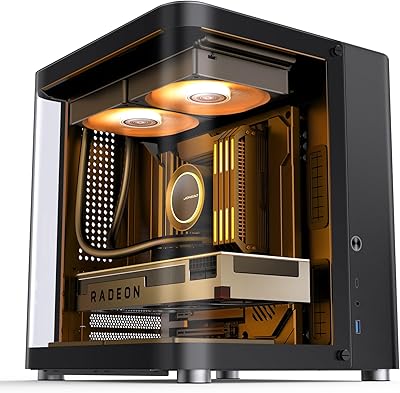
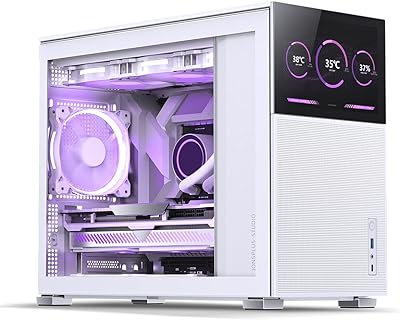
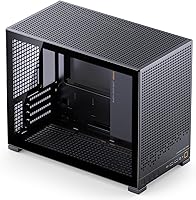
The Jonsbo D32 Pro Micro-ATX Mini Tower Case arrived in early 2025 as a genuinely interesting option for builders who want a smaller footprint without giving up the hardware flexibility they would expect from a full-size tower. At just 24 liters, this compact mATX case punches above its weight class by offering A/B mode switching — a physical reconfiguration that lets you install either a standard motherboard or a modern back-connect board without buying a different chassis. The tempered glass side panel keeps the interior visible and tidy, which matters if you are building something you actually want to look at. It has already cracked the top 35 in Amazon's Computer Cases category, a notable achievement for a product less than a year old.
Features & Benefits

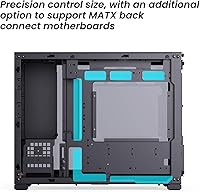
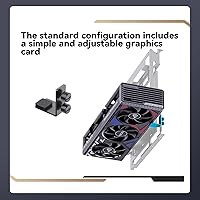
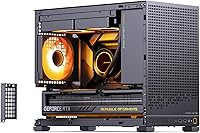
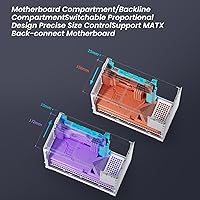
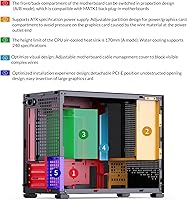
The standout feature is that A/B mode system. In plain terms: mode A installs your motherboard the traditional way; mode B rotates the orientation to support back-connect boards — the kind where CPU, RAM, and power cables route behind the motherboard tray for a completely clean look through the glass. The D32 Pro accommodates GPUs up to 365mm, covering most current high-end cards, though real-world clearance depends on your PSU size and cable routing. A detachable PCIe slot cover makes sliding in large cards far less frustrating than in many competing cases. Cooling-wise, you get 240mm AIO support and up to 163mm of air cooler clearance, with both ATX and SFX/SFX-L PSUs supported.

Best For

This mini tower makes the most sense for a specific kind of builder. If you are planning around a BTF or back-connect motherboard — think ASUS BTF or MSI Project Zero — and do not want a chassis that forces compromises, the D32 Pro is one of the few compact cases that genuinely accounts for that workflow. It also suits anyone who needs to fit a long GPU without stepping up to a mid-tower footprint. The clean interior with adjustable cable cover makes it a reasonable pick for desk-side builds where looks count. Builders upgrading from an older mATX case will appreciate the USB 3.2 front I/O and the improved overall build quality compared to budget options from a few years back.

User Feedback

Early buyers are largely positive — a 4.7-star average across 200 ratings is a strong signal for a case released this recently. The most consistent praise centers on build ease and the A/B mode switching process, which users describe as more intuitive than expected for a feature that sounds complicated on paper. On the flip side, a handful of reviewers raise concerns about airflow in tighter configurations, a fair critique for any compact case with limited panel perforation. Some builders note that the drive bay situation is more conditional than the specs suggest — if you max out GPU and PSU size, storage options shrink noticeably. Overall the D32 Pro holds up well against alternatives like the Fractal Pop Mini at a comparable price point.

Pros

  • One of the only compact mATX cases with genuine A/B mode support for BTF and back-connect motherboards.
  • Fits GPUs up to 365mm, covering most current high-end cards in a 24-liter chassis.
  • Accepts both standard ATX and SFX/SFX-L power supplies, giving builders real PSU flexibility.
  • Detachable PCIe bracket makes installing long graphics cards noticeably less frustrating.
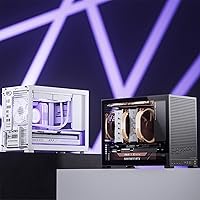
  • Clean minimalist exterior suits home office and gaming desks equally well.
  • Tempered glass side panel is thick and rattle-free, showing off tidy builds effectively.
  • USB 3.2 front I/O is a practical upgrade over what older mATX cases in this tier offered.
  • All-metal construction feels solid for the price, with no sharp edges during assembly.
  • Adjustable cable management cover actively hides wire bulk behind the motherboard tray.
  • Strong early buyer satisfaction with a top-35 ranking in Computer Cases within months of launch.

Cons

  • No USB-C on the front panel, which feels like a missed step for a 2025 release.
  • Airflow under sustained combined CPU and GPU load can push temperatures higher than in ventilated mid-towers.
  • Drive bay counts are conditional — maximizing GPU and PSU size leaves less room for storage than the specs imply.
  • The A/B mode switching process requires disassembly and is not quick to reverse mid-build.
  • No acoustic dampening material anywhere inside, so fan noise is more noticeable at higher loads.
  • PSU cable routing behind the tray can be a tight fit with thicker modular cables from high-wattage units.
  • Documentation is thin on edge cases, particularly for first-time BTF builders navigating B mode alignment.
  • 16A plug PSUs are excluded, which can catch some regional buyers off guard if they do not read the fine print.

Ratings

The Jonsbo D32 Pro Micro-ATX Mini Tower Case has been scored by our AI system after analyzing verified buyer reviews from global markets, with spam, bot-submitted, and incentivized feedback actively filtered out. The ratings below reflect a balanced picture of what real builders experienced — the genuine strengths and the friction points that came up repeatedly across different build configurations. Both sides of the story are represented transparently so you can judge whether this compact mATX case fits your specific setup.
Build Quality & Materials
83%
The all-metal construction feels noticeably more solid than competing cases at this price tier, and buyers consistently note there are no sharp edges during installation — a detail that matters when you are reaching inside repeatedly. Panel fitment is tight and consistent, with minimal flex when the side glass is handled.
A few buyers noted the metal finish shows fingerprints easily, and the black coating on some interior surfaces can feel thin under close inspection. Nothing structural, but it suggests cost savings were made in finishing rather than the frame itself.
BTF & Back-Connect Motherboard Support
91%
This is the D32 Pro's most distinctive capability and the reason many buyers chose it over more established names. The A/B mode switchover is straightforward once you read the manual, and builders pairing it with ASUS BTF or MSI Project Zero boards report a genuinely cleaner result than any standard case could offer at this volume.
Switching between modes requires some disassembly and is not something you would do casually mid-build. If you later decide to change motherboard types, plan for a proper teardown. The process is documented, but not as tool-free as some competing designs.
GPU Compatibility & Clearance
78%
22%
Supporting cards up to 365mm theoretically covers most current high-end GPUs, and several builders confirmed fitting RTX 4080 and RX 7900 XT class cards without modification. The detachable PCIe bracket makes sliding long cards in considerably less stressful than in cases with fixed slot covers.
The 365mm limit is real-world conditional — with an ATX PSU and thicker cables, actual usable GPU length can shrink noticeably. A handful of builders with triple-slot, long-shroud cards reported tighter-than-expected clearance to the front panel or PSU shroud, requiring cable management adjustments.
Cooling Performance & Airflow
67%
33%
The 240mm AIO support and 163mm air cooler clearance covers the vast majority of popular cooling hardware, including most 240mm all-in-one units from Corsair, Arctic, and DeepCool. Builders running mid-range CPUs with a 240mm AIO reported thermal results comparable to larger cases in light to moderate workloads.
Airflow is the most consistently raised concern in user feedback. As a compact case with limited panel perforation, sustained heavy loads — particularly with a high-TDP GPU and CPU running simultaneously — can push temperatures higher than in more ventilated mid-towers. Builders in warmer climates or running workstation-style loads should plan fan placement carefully.
Cable Management
81%
19%
The adjustable cable management cover behind the motherboard tray is a practical touch that actively hides the inevitable wire bulk, especially useful in B mode builds where the clean aesthetic is the whole point. Multiple routing cutouts are well-positioned for standard ATX layouts.
The space behind the tray is not particularly deep, and thicker PSU cables — especially with modular ATX units — can make closing the rear cover a firm push. Builders using high-wattage PSUs with large cable heads mentioned this as a minor but real annoyance.
PSU Compatibility
74%
26%
Accepting both standard ATX and SFX/SFX-L power supplies gives builders genuine flexibility in sourcing components. Most common modular PSUs from Corsair, Seasonic, and be quiet! fit without issue, and the bottom-mount position keeps the weight distribution sensible for a case this size.
The 16A plug exclusion catches some buyers off guard — it is easy to miss in the product listing and primarily affects certain regional or server-grade PSUs. A few SFX-L users also noted the mounting bracket requires careful alignment, and the provided hardware is just adequate rather than generous.
Storage Options
62%
38%
Having up to four 2.5-inch bays is generous for a 24-liter case and suits modern builders who run an NVMe boot drive plus one or two SSDs for storage. For the majority of gaming or home office builds, the available bays cover what is actually needed.
The shared slot arrangement between 2.5-inch and 3.5-inch bays means you cannot maximize both simultaneously, and the total count drops fast depending on GPU length and PSU size. Builders wanting two 3.5-inch HDDs alongside multiple SSDs will likely find themselves making unwanted trade-offs.
Installation Experience
84%
The overall assembly process drew positive comments for a compact case — panel removal is logical, the GPU installation with the detachable PCIe cover is noticeably easier than in rivals, and the layout does not force awkward hand angles during motherboard seating. Builders report the first build taking a reasonable amount of time even without prior experience with Jonsbo products.
The manual, while functional, could be clearer on the A/B mode switching steps for first-time BTF builders. A couple of buyers mentioned that screw locations for certain standoff configurations were not immediately obvious, adding some trial-and-error time to an otherwise smooth process.
Tempered Glass Panel
79%
21%
The glass is thick enough to feel premium and does not rattle or flex under normal handling. It shows off clean back-connect builds particularly well, and the visibility angle covers the full motherboard and GPU without distortion at normal desk viewing distances.
The glass attachment mechanism is functional but not tool-free — removing it for cleaning or component access requires a bit more deliberation than magnetic or latch-based designs from competitors. Some buyers also noted the glass can pick up smudges during installation more readily than frosted alternatives.
Front I/O & Connectivity
77%
23%
USB 3.2 on the front panel is a meaningful upgrade over the USB 3.0 found on older mATX cases in this category, and the port placement is practical for a case likely sitting on a desk. The power button has a solid tactile response that feels appropriate for the overall build quality.
The front I/O does not include a USB-C port, which is becoming a genuine expectation at this price point in 2025. Builders with modern peripherals that default to USB-C will rely on adapters or rear ports, which is a minor inconvenience that competing cases have already addressed.
Aesthetic & Visual Design
86%
The minimalist exterior with no aggressive RGB cutouts or gamer-angled lines makes this compact mATX case genuinely versatile — it fits a home office environment as naturally as a gaming desk. The combination of clean glass and a blacked-out interior creates a sharp, understated look that ages well.
There is no built-in RGB and no easy pathway for integrated lighting beyond what your components provide. For builders who want a lit-up interior out of the box, the D32 Pro requires additional investment in RGB fans or strips, adding to the effective cost.
Noise & Vibration Control
66%
34%
At moderate loads, the metal construction and reasonably snug panel fitment keep resonance low, and several buyers noted it was quieter than expected for a case without dedicated dampening material. Fan-only builds at idle are near-silent in a typical room environment.
There is no acoustic foam or vibration dampening material anywhere in the case, which becomes apparent under sustained load when fans spin up. In a compact volume, this is a harder problem to solve than in larger cases, and builders sensitive to noise should factor in aftermarket dampening or low-noise fan options.
Value for Money
88%
At its asking price, the D32 Pro delivers a feature set that would have cost noticeably more from established Western brands even a year ago. BTF support, ATX PSU compatibility, and 365mm GPU clearance in a 24-liter chassis represents a genuinely competitive offer in the current mATX market.
The value case weakens slightly if you end up needing an SFX PSU upgrade or additional fans to compensate for the airflow limitations — those add-on costs are real. Compared to slightly pricier competitors with tool-free designs and USB-C front I/O, the gap in overall polish becomes more visible.
Documentation & Setup Guidance
59%
41%
The included manual covers the basic build steps and identifies the key components clearly enough for an experienced builder to get moving quickly. Jonsbo has improved its documentation compared to earlier product generations, which longtime community members have noted.
For a case with a genuinely novel feature like A/B mode switching, the documentation does not go deep enough on edge cases — particularly for BTF board alignment in B mode or SFX-L PSU fitting specifics. New builders relying solely on the manual reported more confusion than those who supplemented it with community build logs or video guides.

Suitable for:

The Jonsbo D32 Pro Micro-ATX Mini Tower Case is purpose-built for a specific kind of builder, and those builders will get a lot out of it. If you are planning a BTF or back-connect motherboard build — using something like an ASUS BTF or MSI Project Zero board — this is one of the very few compact cases that actually accommodates that workflow without forcing compromises. It also makes strong sense for PC enthusiasts who want to fit a genuinely powerful GPU into a smaller chassis without stepping up to a full mid-tower footprint. Home office users who want a tidy, visually clean build sitting on or beside a desk will appreciate the tempered glass panel and the cable management cover that hides the inevitable wire bulk. Builders upgrading from an older mATX case will notice the improvement in hardware compatibility and front I/O immediately, and anyone pairing standard ATX or SFX power supplies with a mid-to-high-end GPU will find the component support range covers most realistic builds without unusual workarounds.
Not suitable for:

The Jonsbo D32 Pro Micro-ATX Mini Tower Case is a harder sell the moment your priorities shift outside its specific design targets. If you run sustained heavy workloads — think CPU and GPU both under full load for extended periods — the limited panel perforation and compact 24-liter volume create thermal constraints that a more ventilated mid-tower simply would not. Builders with large NAS-style storage needs should also look elsewhere, since the drive bay situation is conditional and shared, meaning two full-size HDDs alongside a long GPU and ATX PSU may not all coexist comfortably. Anyone expecting tool-free panel access or a USB-C front port will find the D32 Pro behind where some competitors already are on those fronts. If you have no interest in BTF or back-connect motherboards and just want a straightforward mATX build with maximum airflow flexibility, there are alternatives at similar price points — like the Fractal Pop Mini or Cooler Master NR400 — that trade the A/B mode novelty for a more mature, ventilation-focused layout.
Specifications

  • Form Factor: Micro-ATX Mini Tower with support for Mini-ITX and Micro-ATX motherboards in both standard and BTF back-connect orientations.
  • Volume: Internal volume is 24 liters, placing it firmly in the compact end of the mATX case category.
  • Dimensions: The case measures 396×207×314mm (feet included), equivalent to approximately 15.6×8.15×12.4 inches.
  • Weight: Shipping weight is 5.44kg (11.97 lbs), typical for an all-metal chassis of this size.
  • Material: Primary construction is steel metal throughout, with a tempered glass side panel for interior visibility.
  • Motherboard Support: Compatible with Mini-ITX and standard Micro-ATX boards in A mode, and Micro-ATX BTF back-connect boards when switched to B mode.
  • GPU Clearance: Maximum supported GPU length is 365mm, subject to PSU type and cable routing within the chassis.
  • CPU Cooler Height: Maximum CPU air cooler height clearance is 163mm, accommodating most tower coolers in the mid-to-large range.
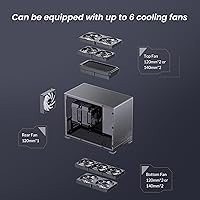
  • AIO Support: Supports up to a 240mm all-in-one liquid cooler radiator installation.
  • PSU Compatibility: Accepts standard ATX and SFX/SFX-L power supplies; 16A plug variants are explicitly not supported.
  • Drive Bays: Provides up to four 2.5-inch bays and up to two 3.5-inch bays, with the 3.5-inch mounts shared with two of the 2.5-inch positions.
  • Side Panel: Full tempered glass side panel is included as standard, with a fixed attachment mechanism requiring tool use for removal.
  • Front I/O: Front panel connectivity includes USB 3.2 ports; no USB-C port is provided.
  • USB Ports: Three USB 3.0/3.2 ports are available on the front panel for peripheral and storage device connections.
  • A/B Mode: A physical A/B mode switch reconfigures the internal motherboard orientation to support either standard or BTF back-connect board layouts.
  • PCIe Design: PCIe expansion slots use a detachable bracket design to allow easier insertion and removal of long graphics cards.
  • Cable Management: An adjustable cable management cover on the motherboard tray side is included to conceal rear wiring and maintain a clean interior appearance.
  • PSU Position: Power supply is bottom-mounted, which keeps the center of gravity low and isolates PSU heat from the main airflow path.
  • Color: Available in black with a matching blacked-out interior finish throughout the chassis.
  • Acoustic Dampening: No acoustic foam or vibration dampening material is included; noise reduction relies entirely on fan selection and component fit.

Related Reviews

Jonsbo TK-1 Micro ATX Mini Tower Case
84%
88%
Build Quality
91%
Cooling Performance
85%
Ease of Assembly
89%
Design and Aesthetics
80%
Compatibility with Components
More
Jonsbo Z20 Micro-ATX Mini Tower Case
80%
93%
Build Quality & Materials
91%
Portability & Carrying Handle
78%
Internal Layout & Compatibility
89%
GPU Clearance & Large Component Support
87%
Cooling Support & Thermal Flexibility
More
Antec VSK3000E Micro ATX Mini Tower Case
82%
89%
Build Quality
91%
Value for Money
68%
Cooling Performance
85%
Ease of Installation
80%
Port Availability
More
Antec NX200 M Micro-ATX Mini-Tower Computer Case
84%
87%
Cooling Performance
83%
Build Quality
88%
Ease of Setup
80%
Size and Space Efficiency
84%
Storage Options
More
Thermaltake Tower 300 Black Micro-ATX Case
84%
88%
Cooling Performance
90%
Build Quality
85%
Design and Aesthetics
82%
Size and Compatibility
80%
Ease of Setup
More
Jonsbo D31 Mesh SC Micro ATX Case
86%
91%
Ease of Build
88%
Airflow and Cooling
89%
Compatibility with Components
84%
Build Quality
92%
Design and Aesthetics
More
SilverStone FARA H1M Mid-Tower Micro-ATX Case
82%
91%
Airflow Performance
88%
Build Quality
85%
Cooling Options
65%
Cable Management
82%
Aesthetics
More
Segotep Memphis M-ATX Mini Tower PC Case
83%
87%
Build Quality
91%
Airflow & Cooling
89%
Ease of Installation
85%
Design & Aesthetics
78%
Size & Space Efficiency
More
GAMDIAS AURA GC10M ARGB mATX PC Case
78%
91%
Value for Money
72%
Build Quality
78%
Airflow Performance
87%
ARGB Lighting
61%
Cable Management
More
Cooler Master Q300L V2 Micro-ATX Tower Case
77%
91%
Value for Money
83%
Airflow Performance
77%
Build Quality
81%
Tempered Glass Panel
72%
Cable Management
More
Montech KING 95 PRO ATX Mid-Tower PC Gaming Case
85%
91%
Cooling Performance
87%
Cable Management
88%
Build Quality
90%
Aesthetics
82%
Ease of Assembly
More

FAQ

A/B mode refers to a physical reconfiguration of the case internals that changes how the motherboard is oriented. Mode A is the standard layout for conventional mATX boards, while mode B rotates the setup to support back-connect or BTF motherboards — the kind where all the CPU, RAM, and power cables connect from behind the board for a cleaner front-facing look. Switching requires some disassembly, so it is worth deciding which mode you need before you start your build rather than mid-way through.

It depends on the specific card. The Jonsbo D32 Pro Micro-ATX Mini Tower Case supports GPUs up to 365mm in length, which technically covers many RTX 4090 models, but triple-slot, long-shroud 4090s are right at the edge. Your ATX PSU size and cable routing will also affect real-world clearance, so check your specific card's dimensions against 365mm before committing — and consider using a compact modular PSU to give yourself more cable management breathing room.
You can absolutely use a standard ATX PSU — the D32 Pro is one of the few compact mATX cases that accommodates both ATX and SFX/SFX-L units. The one exception to watch for is 16A plug PSUs, which are not supported. Most mainstream modular ATX units from brands like Seasonic, Corsair, or be quiet! will fit fine.

This is where the specs can be a little misleading. The listed maximum of four 2.5-inch bays and two 3.5-inch bays assumes ideal conditions with no hardware conflicts. In practice, if you are running a long GPU and a full-size ATX PSU, expect to use two to three 2.5-inch bays comfortably. The 3.5-inch and 2.5-inch slots share mounting positions, so filling both simultaneously is not always possible.

Moderately, but it has limits. The all-metal construction keeps resonance relatively low, and at idle or light loads the case is quite quiet. The problem is there is no acoustic foam anywhere inside, so as fans spin up under load you will hear them. If low noise is a priority, invest in quality low-noise fans and consider a 240mm AIO to keep the CPU cooler running at lower RPMs.

Not tool-free, unfortunately. Unlike cases with magnetic or latch-based panels, the glass on this mini tower requires a screwdriver to remove. It is not a complicated process, but if you clean your case interior regularly you will notice the extra steps compared to more convenient panel designs from competitors.

Yes, a 240mm AIO is supported. Radiator mounting is at the top of the case, which is the standard position for compact mATX builds. Make sure to check your AIO's tube length if you are using a large tower cooler in other configurations, but most 240mm units from popular brands like Arctic, DeepCool, or Corsair fit without modification.

It depends on your habits. If you regularly plug in USB-C devices — external SSDs, newer controllers, or smartphones — directly into the front panel, the absence is genuinely inconvenient and you will be routing cables to the rear. For users who primarily use USB-A peripherals, it is not a dealbreaker. Either way, it is worth factoring in relative to competing cases that do include a front USB-C port at similar price points.

The D32 Pro's main advantage is its BTF back-connect motherboard support, which neither the Pop Mini nor the NR400 offer in the same way. The Fractal Pop Mini edges ahead on airflow design and tool-free access, while the NR400 has a more mature layout for conventional builds. If you are not planning a BTF board, those alternatives are worth comparing seriously; if a clean back-connect build is the goal, the D32 Pro has a clear edge in this size class.

It is manageable, but not the most forgiving option for a complete beginner. The installation process is logical and the detachable PCIe cover makes GPU installation easier than many competitors. The complication comes if you are also doing a BTF build in B mode — that configuration adds steps that the manual does not fully explain. If this is your first build and you are not using a BTF board, it is a reasonable choice; if you are going BTF for the first time, budgeting extra time and referencing community build guides will help considerably.

Where to Buy