j5create JVAW76 ScreenCast 4K Wireless Display Adapter


Overview
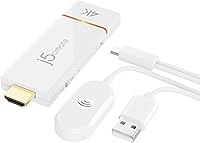
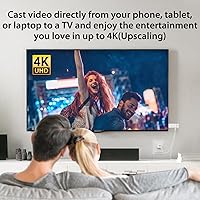
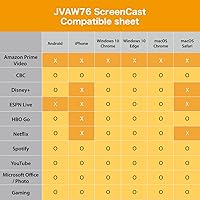
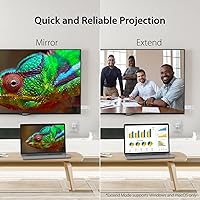
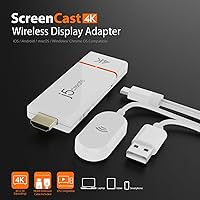
The j5create JVAW76 ScreenCast 4K Wireless Display Adapter is a compact HDMI dongle that lets you beam content from virtually any phone, tablet, or laptop onto a bigger screen without running a single cable. What sets it apart from budget options is the external antenna, which genuinely helps in larger rooms where a built-in antenna would struggle. It covers Miracast, AirPlay, and Google Cast in one unit — a rare combination at this price tier. Worth knowing upfront: Miracast works as a standalone connection, but if you plan to use AirPlay or Chromecast, you will need an active Wi-Fi network nearby.
Features & Benefits
The triple-protocol support is the headline feature here — covering Miracast, AirPlay, and Google Cast means you are not locked into one ecosystem, which matters if your household or office runs a mix of Apple and Windows devices. The advertised 4K capability is real, but keep in mind your source device and display both need to support 4K for it to actually kick in; otherwise it defaults to lower resolutions just fine. A customizable background and PIN code security (Miracast only) make this casting adapter feel more professional during client-facing presentations. Firmware updates have added features over time, which is reassuring for long-term ownership.
Best For
This wireless display adapter makes the most sense for professionals who regularly present from different devices — someone switching between a MacBook, an Android phone, and a Windows laptop in the same week will appreciate not needing three separate solutions. It is also a solid pick for frequent travelers who want to use hotel room TVs as a second screen without relying on the hotel's notoriously unreliable smart TV apps. Households with mixed Apple and Android devices will find it particularly useful, and anyone burned by inconsistent smart TV casting will welcome having a dedicated, plug-in receiver that just works.
User Feedback
Sitting at a solid 4-star average, most buyers are satisfied with the protocol versatility and the ease of getting Miracast up and running quickly. Where things turn more critical is the AirPlay and Chromecast setup, which requires navigating Wi-Fi configuration steps that some users find unintuitive. Latency is a real concern for anyone thinking about gaming or smooth video playback — multiple reviewers note it is not ideal for those use cases. Signal stability in apartments with thick walls can be inconsistent. On the positive side, j5create's support team generally earns decent marks for responsiveness when setup problems arise.
Pros
- Supports Miracast, AirPlay, and Google Cast in one compact dongle — rare at this price.
- Miracast works as a fully standalone connection with no Wi-Fi network required.
- The external antenna provides noticeably better range than flat, antenna-free competitors.
- PIN code security and customizable backgrounds make presentations feel polished and professional.
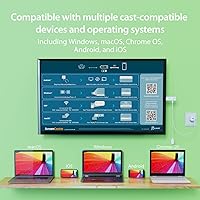
- Compatible with Windows, macOS, iOS, and Android — covers virtually every device a household or office uses.
- Firmware updates have added real features over time, showing active manufacturer support since launch.
- Compact enough to live in a laptop bag permanently without adding meaningful bulk.
- 4K-ready output gives this casting adapter useful longevity as high-resolution displays become the norm.
Cons
- AirPlay and Chromecast setup involves a multi-step Wi-Fi configuration process that the manual undersells badly.
- Real-world range through walls falls well short of the advertised 50-foot figure.
- Latency makes it unsuitable for gaming, fast video, or video calls where lip-sync matters.
- PIN code and custom background features are locked to Miracast only — unavailable for AirPlay or Chromecast users.
- The dongle runs noticeably warm during extended sessions, which may concern users leaving it plugged in for hours.
- Requires a separate power connection, adding one more cable to manage when traveling.
- Firmware update process is clunky and has caused temporary issues for a small number of users.
- Buyers who only need one casting protocol will find cheaper single-protocol dongles offer better value.
- 4K output requires every link in the chain — source, content, and display — to support it, which limits its real-world impact.
Ratings
The j5create JVAW76 ScreenCast 4K Wireless Display Adapter earns a strong overall showing in our AI-driven scorecard, built by analyzing verified buyer reviews from multiple global markets while actively filtering out incentivized, bot-generated, and spam feedback. Across more than a dozen evaluation categories, this casting adapter demonstrates real strengths in protocol versatility and portability, but also surfaces consistent frustrations around setup complexity and latency that any honest assessment must reflect.
Protocol Compatibility
Ease of Setup
Signal Stability
Latency & Responsiveness
4K Performance
Build Quality & Design
Portability
Firmware & Software Updates
Presentation Features
Value for Money
Compatibility Range
Customer Support
Audio Transmission
Wireless Range (Real-World)
Suitable for:
The j5create JVAW76 ScreenCast 4K Wireless Display Adapter was built for people who live in multi-device households or work across mixed ecosystems, and it genuinely earns its place in that context. If you regularly switch between a MacBook, an Android phone, and a Windows laptop — sometimes within the same workday — carrying a single dongle that handles all three without fuss is a real quality-of-life improvement. Business professionals who present in client offices or conference rooms will particularly appreciate the Miracast standalone mode, which works without any pre-existing Wi-Fi network, plus the PIN code lock and customizable background screen that make shared presentation environments feel more controlled. Frequent travelers who have grown frustrated with hotel smart TV apps that half-work, buffer constantly, or require creating an account just to mirror a phone screen will find this casting adapter a reliable workaround. It also suits anyone upgrading from an older 1080p dongle who wants to be 4K-ready without spending flagship money, provided their display and source device support it.
Not suitable for:
The j5create JVAW76 ScreenCast 4K Wireless Display Adapter is not the right tool for every situation, and being clear about that upfront saves a lot of buyer disappointment. If your sole use case is casting from a single Apple device to a TV, a dedicated AirPlay-native device will almost certainly deliver a smoother, more reliable experience at a comparable or lower price point — you would be paying for protocol versatility you never use. Gamers and anyone who needs low-latency mirroring for fast-motion video or interactive applications should look elsewhere entirely; wireless display technology at this tier introduces enough lag to make those use cases genuinely frustrating. Buyers in apartments or offices with thick concrete or brick walls should also temper their expectations around range, since the real-world signal drops off meaningfully through solid barriers despite what the specifications suggest. And if your only planned casting method is Chromecast or AirPlay, know that both require a functioning Wi-Fi network to operate — there is no standalone mode for those protocols, which is a hard constraint in environments without reliable infrastructure.
Specifications
- Brand: Manufactured by j5create, a brand specializing in connectivity and display accessories for professional and consumer use.
- Model: The exact model designation is JVAW76, part of j5create's ScreenCast wireless display adapter lineup.
- Protocols: Supports three wireless display standards: Miracast, AirPlay, and Google Cast (Chromecast), covering virtually all major device ecosystems.
- Max Resolution: Capable of outputting up to 4K resolution, provided both the source device and the connected display also support 4K.
- Connector: Uses a standard HDMI connector to plug directly into any HDMI-equipped television, monitor, or projector.
- Dimensions: The dongle measures 0.43 x 1.26 x 3.74 inches, making it small enough to carry in a laptop bag pocket or shirt pocket.
- Weight: Weighs 5.6 ounces including the external antenna, which is compact enough for daily travel without adding noticeable bulk.
- Wireless Range: Rated for up to 50 ft (15 m) in an open, unobstructed environment; real-world range through walls will be shorter.
- Antenna: Features an external repositionable antenna designed to extend signal coverage beyond what internal-only antenna designs typically achieve.
- Power: Requires a separate power connection to operate; a power cable or USB power source must be connected alongside the HDMI plug.
- Compatible OS: Works with Windows, macOS, iOS, and Android devices, covering the full range of mainstream laptops, tablets, and smartphones.
- Custom Background: Allows users to set a personalized idle background screen, a feature available exclusively when using the Miracast protocol.
- PIN Security: Supports PIN code protection to prevent unauthorized casting connections, but this security feature is limited to Miracast mode only.
- Finish: The housing uses a matte finish that resists fingerprints and gives the dongle a professional appearance suitable for client-facing environments.
- Firmware: Supports over-the-air or manual firmware updates, which j5create has used to add features and address performance issues since the 2022 launch.
- Availability: First made available for purchase in February 2022 and has remained an active, supported product in j5create's lineup since then.
Related Reviews
AIMIBO Q3ZL 4K Wireless Display Adapter

ASUS ProArt Display PA169CDV 15.6” 4K Pen Display
j5create JVU430 4K Webcam
SmartSee Miracast 1080P Wireless Display Adapter
Kihoplly DT269W-H Wireless HDMI Transmitter and Receiver
ZIIDOO LYJSQ Bluetooth 5.0 Audio Adapter
Belkin SoundForm Adapt Over-Ear Headset
DXchip 4KEZH01R01 Wireless HDMI Extender Kit
YOYIRYB BF-A70 4K Solar Security Cameras