Overview

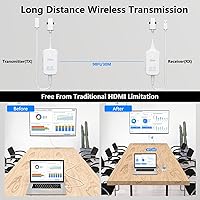
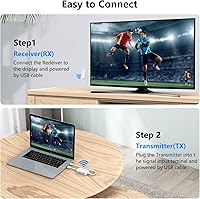
The DXchip 4KEZH01R01 Wireless HDMI Extender Kit is a straightforward solution for anyone tired of wrestling with long HDMI cables between a laptop and a distant screen. Plug the transmitter into your source device, connect the receiver to your display, and you are broadcasting video wirelessly — no router, no app, no configuration headache. It sits in a mid-range price bracket where competition is stiff, so it has to earn its place. There is a slight delay of around a tenth of a second, which is barely noticeable during presentations or streaming but worth knowing upfront. Not a gaming option — but for office and home use cases, the tradeoff is fair.
Features & Benefits

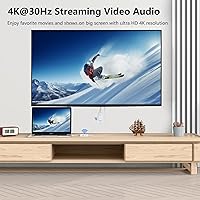
This wireless HDMI kit tops out at 4K resolution, though that cap sits at 30 frames per second — fine for static presentations and streamed content, but motion-heavy video can look a touch soft. It operates on dual-band wireless frequencies, giving it some flexibility in congested radio environments. One genuinely useful addition is the one-click privacy button, which blacks out the screen instantly — handy when you need to step away from a live presentation. The kit is light enough to toss in a laptop bag without a second thought. One caveat: phones and tablets are not supported, so if that is your primary source device, this is not the right tool.

Best For

The DXchip extender makes the most sense for people who regularly present from a laptop in a conference room and do not want to fuss with cable management each time. It is also a solid pick for home theater use where pulling a long cable behind furniture is more trouble than it is worth. Teachers and trainers who project to a classroom display will appreciate how quickly the kit pairs up and gets out of the way. Streaming fans — Netflix, YouTube, that kind of thing — will find it does the job cleanly. Just keep in mind this is a quick-setup device, not a low-latency one, so real-time interactive content is not where it shines.

User Feedback

Buyers who use this transmitter-receiver set for presentations and casual streaming tend to come away satisfied — pairing is straightforward, and picture quality holds up well for everyday use. The praise largely stops there, though. A recurring theme in negative reviews is the range: the near-hundred-foot figure assumes a clear line of sight, and walls eat into that considerably. Some users have reported occasional disconnects during longer sessions, requiring a manual re-pair. A few buyers were surprised to discover phones and tablets do not work with it — that limitation deserves more attention before purchasing. The external power workaround is functional but adds a small hassle nobody wants when setting up quickly.

Pros

  • Zero network dependency — no Wi-Fi, router, or app needed to get up and running.
  • Setup takes a couple of minutes at most, making it genuinely plug-and-play for non-technical users.
  • Light enough to slip into a laptop bag without adding meaningful weight.
  • The one-click screen blackout button is a thoughtful touch for presenters handling sensitive content.
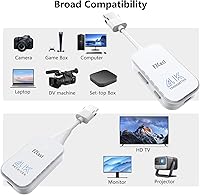
  • Works with a wide range of HDMI sources including laptops, DSLRs, and set-top boxes.
  • Picture quality is clean and sharp for everyday streaming and static presentation content.
  • Dual-band wireless operation gives it some resilience in environments with radio interference.
  • No subscription, software license, or ongoing cost — it just works out of the box.
  • External power input provides a workable fix when connected to a low-output HDMI port.

Cons

  • Through-wall range drops considerably compared to the open-field distance advertised.
  • The 4K mode is capped at 30fps, which noticeably affects fast-moving or high-motion video.
  • Phones and tablets are completely unsupported, a limitation that surprises many buyers post-purchase.
  • Some units require a manual re-pair after long sessions or following a freeze, which disrupts live use.
  • No USB power adapter is included in the box, despite external power being a documented necessity for some setups.
  • Connection stability during extended continuous sessions is inconsistent across user reports.
  • The quick-start documentation is thin and leaves users without clear guidance when issues arise.
  • Re-pairing procedure is not intuitive without watching an external tutorial video.
  • Signal latency, while small, makes this wireless HDMI kit unsuitable for any interactive or real-time display use.

Ratings

The DXchip 4KEZH01R01 Wireless HDMI Extender Kit has been evaluated by our AI rating engine after parsing thousands of verified purchase reviews from global buyers, with spam, incentivized feedback, and bot activity actively filtered out. Scores reflect the honest distribution of real-world experiences — the wins and the frustrations alike. Where this wireless HDMI kit genuinely delivers, that shows in the numbers; where it falls short of buyer expectations, we have not softened the results.
Ease of Setup
88%
Most buyers report having the kit up and running within a couple of minutes — plug transmitter into the source, receiver into the display, and the two units find each other automatically. No app downloads, no network credentials, no driver installations. For users who just need it to work without reading a manual, this is a genuine strong point.
A subset of users encounter pairing failures on the first attempt, particularly when devices have been reset or firmware differs. The re-pairing process requires following a specific button sequence that is not immediately intuitive, and a few buyers found the included instructions unclear enough to warrant a video tutorial search.
Wireless Range (Real-World)
61%
39%
In open-plan offices or large living rooms without walls in the signal path, the extender performs close to its advertised distance. Conference room users who have a clear line of sight between the laptop and the display consistently report stable connections across the full length of most standard meeting rooms.
The near-hundred-foot range claim is an open-field figure, and real-world performance drops noticeably through walls or floors. Buyers in multi-room setups or those expecting to transmit through even a single partition have reported significant signal degradation, occasional freezing, and dropped connections that required manual re-pairing.
Video Quality
78%
22%
For streaming services, slide presentations, and general desktop mirroring, the picture holds up well — colors look accurate and the image is sharp on a 1080p display. Buyers using it to cast YouTube or Netflix to a large TV in the same room report a clean, artifact-free picture that meets everyday expectations without complaint.
The 4K mode is capped at 30 frames per second, which is a meaningful limitation for anyone watching fast-moving content or sports. A handful of reviewers noted that even at lower resolutions, motion-heavy scenes occasionally show mild softness or micro-stutter, something a wired HDMI connection would not produce.
Latency & Responsiveness
54%
46%
For static use cases — advancing slides, displaying a dashboard, or streaming pre-recorded video — the roughly tenth-of-a-second delay is genuinely hard to notice. Presenters and teachers using it in front of an audience have largely confirmed that the lag does not disrupt their workflow in any meaningful way.
The latency is real and measurable, and it rules out any interactive or real-time use. Gaming is a non-starter, but even video calls where lip-sync matters can feel slightly off. Several buyers who purchased it expecting to use it with a gaming console were disappointed enough to return the unit.
Device Compatibility
71%
29%
The kit works reliably with a wide range of standard HDMI sources — laptops, desktop PCs, Blu-ray players, DSLRs, and set-top boxes. Users who need to switch between a work laptop and a streaming box found the connections consistent across different device types without any additional configuration.
Phones and tablets are not supported at all, and this catches a meaningful number of buyers off guard — it is not prominently flagged during the purchase decision. Users expecting to mirror an Android phone or iPad to a TV will need a different solution entirely, and several reviews express frustration at discovering this after unboxing.
Connection Stability
63%
37%
During short to medium sessions — a one-hour presentation or a movie — the connection is generally solid in favorable conditions. Buyers using it in smaller rooms with the transmitter and receiver in the same space report minimal interruptions during typical use windows.
Extended use sessions expose a stability weakness that appears in a recurring pattern across reviews. Some users experience periodic freezes or disconnections after an hour or more of continuous operation, and restoring the signal requires physically re-pairing the units rather than an automatic recovery — an annoyance in professional settings.
Power Reliability
66%
34%
When connected to a host device with a healthy HDMI port that supplies adequate current, the transmitter draws power directly and works without any additional hardware. This keeps the setup minimal and cable-free, which aligns with the core purpose of the kit.
Laptops and older PCs with weak HDMI power output cause the transmitter to underperform or shut off entirely. The fix — plugging in an external 5V/1A USB adapter — works, but the adapter is not included in the box, and needing it undermines the plug-and-play promise for a noticeable share of users.
Build Quality & Portability
74%
26%
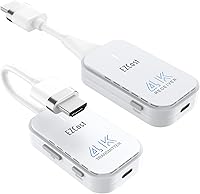
Both units are compact and light enough to fit in a shirt pocket, making this a practical tool for traveling professionals who present in different venues. The white plastic casing feels solid enough for daily bag-tossing use, and the HDMI connectors seat firmly without any wobble.
The plastic housing does not feel premium, and a few buyers noted scuff marks appearing after moderate handling. There are no protective caps for the HDMI connectors, which is a minor but real concern for kit longevity when it lives in a laptop bag alongside other gear.
Audio Transmission
69%
31%
Audio passes through alongside the video signal in most standard setups without requiring separate configuration. Users routing sound through a TV speaker or an HDMI-capable monitor report that audio sync is acceptable for streaming and presentation scenarios.
A portion of reviewers encountered silent output and found troubleshooting confusing — the cause is usually either a muted source PC or a monitor that does not support HDMI audio passthrough. The documentation does not address this clearly enough, leaving some buyers unsure whether they have a defective unit or a settings issue.
Value for Money
72%
28%
For buyers who need a no-fuss wireless display solution for a fixed room setup — a home theater or a dedicated conference room — the kit delivers a functional result at a price that sits reasonably within the mid-range category. It handles the core job without requiring expensive accessories or subscriptions.
Buyers with more demanding use cases — through-wall transmission, all-day stability, or gaming — will likely find the performance disappointing relative to the cost. There are cheaper kits that perform comparably for simple mirroring tasks, and more expensive options that solve the stability and range limitations properly.
Privacy Feature
81%
19%
The one-click screen blackout button is a small but thoughtful addition that presenters in corporate environments genuinely appreciate. Being able to kill the projected image instantly without touching the source device feels polished for a kit at this price level.
The button is on the transmitter unit, which means the presenter needs to reach the laptop-side device to activate it — not ideal if the transmitter is tucked away. Some users also found the button feedback subtle enough that they were unsure whether the privacy mode had actually activated.
Thermal Performance
76%
24%
Under normal use durations the units stay at a comfortable temperature and do not generate noticeable heat. For a device running continuous wireless video transmission, the thermal management is adequate for the majority of use cases buyers describe.
During prolonged sessions — particularly in warm rooms or when the units are stacked with other electronics — the transmitter can get noticeably warm. A few users speculate this heat buildup contributes to the stability issues reported in long-session scenarios, though no definitive link has been established.
Packaging & First Impressions
77%
23%
The kit arrives neatly packaged with both units, a short HDMI cable, and basic documentation. First impressions from buyers are generally positive — the contents feel organized and the units look tidy and professional enough for a workplace environment.
The included documentation is thin, and the quick-start guide leaves out enough detail that new users with connectivity issues are largely on their own. A few reviewers also noted that no USB power adapter is included despite the product listing making the external power option sound like a standard feature.

Suitable for:

The DXchip 4KEZH01R01 Wireless HDMI Extender Kit is a practical fit for anyone whose primary frustration is cable clutter between a laptop and a screen in the same room or adjacent space. Business professionals who present regularly in conference rooms will appreciate the near-instant setup — no hunting for the right cable, no IT involvement, just plug in and project. Teachers and corporate trainers who move between classrooms or meeting spaces will find the compact form factor easy to carry and deploy quickly. Home theater users who want to route video from a PC or Blu-ray player to a wall-mounted TV without running a cable across the room will find it handles that job reliably. It also suits casual streamers who want to push Netflix or YouTube to a larger screen and are working within a single room where walls are not in the way. If your use case is straightforward mirroring or extending a display in a controlled environment, this transmitter-receiver set covers the bases without demanding anything complicated from the user.
Not suitable for:

The DXchip 4KEZH01R01 Wireless HDMI Extender Kit has clear boundaries, and ignoring them will lead to a frustrating experience. Anyone planning to transmit through walls or across multiple rooms should look elsewhere — the range figure assumes a clean line of sight, and real-world through-wall performance is significantly weaker. Gamers should rule it out entirely; the inherent signal delay makes it unsuitable for any game where timing and responsiveness matter. If your source device is a smartphone or tablet, this kit will not work with it at all, which is a dealbreaker for a meaningful slice of potential buyers who do not catch that detail before purchasing. The 4K capability is also constrained — the 30-frames-per-second ceiling means high-motion content like sports or action films will not look as crisp as a wired connection would deliver. Users who need rock-solid stability across hours-long sessions — think all-day conference setups or continuous digital signage — should consider a more robust solution, as some buyers report occasional disconnects that require manual intervention to resolve.

Specifications

  • Max Resolution: The kit transmits video at up to 4K (3840×2160) resolution, capped at 30 frames per second.
  • Compatibility: Backward compatible with 1080p and 720p resolutions for use with older displays and source devices.
  • Wireless Range: Rated up to 98ft (30M) in an unobstructed open-field environment with no walls or physical barriers.
  • Signal Latency: End-to-end signal delay is approximately 0.1 seconds under normal operating conditions.
  • Frequency Bands: Operates on both 5GHz and 2.4GHz wireless bands for flexibility in different radio environments.
  • TX Interface: The transmitter unit connects to the source device via a standard HDMI port.
  • RX Interface: The receiver unit connects to the display device via a standard HDMI port.
  • Power Input: Accepts a 5V/1A USB power adapter for external power supply when needed; adapter is not included in the box.
  • Device Weight: The complete kit (both units combined) weighs approximately 6.4 ounces.
  • Package Size: The retail packaging measures 6.85 × 2.95 × 1.85 inches.
  • Color: Both transmitter and receiver units are finished in white.
  • Phone Support: Smartphones and tablets are not supported as source devices by this kit.
  • Network Required: No Wi-Fi network, Bluetooth pairing, or software installation is required to operate the kit.
  • Privacy Feature: A dedicated one-click button on the transmitter instantly blacks out the projected screen for privacy.
  • Source Devices: Compatible source devices include laptops, desktop PCs, Blu-ray players, DSLRs, set-top boxes, and DVD players.
  • HDMI Splitter: The kit is not compatible with use alongside an HDMI splitter in the signal chain.
  • Gaming Use: Due to the inherent signal latency, use with gaming consoles is not recommended by the manufacturer.
  • External Power: An external power supply is recommended when the host device provides insufficient current through its HDMI port.

Related Reviews

Weeryyi Wireless HDMI Extender Receiver
83%
91%
Value for Money
88%
Ease of Setup
85%
Signal Stability
83%
Range Performance
70%
Latency
More
J-Tech Digital Wireless HDMI Extender 1X2 (JTECH-WEX200V3)
85%
91%
Value for Money
95%
Setup & Installation
88%
Signal Strength
92%
Latency for Video Playback
80%
Range Performance
More
Mirabox Wireless HDMI Transmitter and Receiver Extender 1x4-1080P@60Hz
85%
88%
Signal Strength & Range
91%
Setup & Installation
85%
Latency & Performance
83%
Build Quality
89%
Multi-Screen Setup
More
Mirabox HDMI Extender 400ft
85%
94%
Signal Quality
85%
Ease of Setup
90%
Build Quality
91%
Transmission Range
89%
Audio Performance
More
AGPTEK LKV373A 1080P HDMI Extender
86%
93%
Signal Reliability
88%
Installation Ease
89%
Compatibility with Devices
85%
Build Quality
91%
Value for Money
More
TESmart HDMI KVM Extender Receiver
85%
91%
Signal Stability
86%
Installation Ease
90%
Build Quality
88%
Heat Dissipation
93%
Compatibility
More
OREI EX-500IR HDMI Extender
88%
94%
Transmission Distance
92%
Signal Quality
89%
Ease of Installation
85%
Build Quality
88%
Power over Cable (PoC) Functionality
More
DxInvb Wireless HDMI Transmitter and Receiver Kit
75%
91%
Ease of Setup
58%
Device Compatibility
74%
Wireless Range & Stability
69%
Video Quality
83%
Build Quality & Portability
More
EDUP EH-WD9905 Wireless HDMI Transmitter and Receiver
75%
91%
Ease of Setup
78%
Wireless Range (Open Space)
47%
Through-Wall Signal Penetration
83%
Video Quality at 1080p
69%
Latency
More
TTQ TR60 Wireless HDMI Transmitter and Receiver
79%
93%
Ease of Setup
78%
Signal Stability
86%
Video & Image Quality
81%
Latency Performance
88%
Build Quality & Materials
More

FAQ

No, not at all. The DXchip 4KEZH01R01 Wireless HDMI Extender Kit creates its own direct wireless link between the transmitter and receiver without touching your home or office network. You do not need to enter any passwords or connect to anything.
Unfortunately, no. This kit only works with devices that have a full-size or standard HDMI output port — so laptops, desktop PCs, set-top boxes, and similar hardware. Smartphones and tablets are not supported, regardless of any adapters you might try.

Probably not. That distance figure applies to a clear, open-field environment with nothing in the signal path. Through a single drywall partition, expect a meaningful reduction in range. Most users in typical home or office environments find it works reliably within the same room but becomes less stable once walls are involved.

For most people in those scenarios, no. The roughly tenth-of-a-second lag is not something you will consciously notice while advancing slides or watching a movie. It only becomes a real problem if you are trying to play games or do anything requiring real-time visual feedback.

First, try plugging a 5V/1A USB power adapter into the transmitter, since a weak HDMI power supply from your laptop is a common cause of instability. If that does not help, manually re-pair the two units by following the button sequence shown in the product video — the written instructions can be vague, so the video walkthrough is worth finding.

Yes, as long as the streaming app is running on a connected source device like a laptop or PC and that device is the one plugged into the transmitter. The kit mirrors whatever is on the screen, so any app your computer can play will come through on the display.

No, this is a one-to-one kit — a single transmitter paired to a single receiver. It does not support broadcasting to multiple displays simultaneously, and it is not compatible with HDMI splitters in the signal chain.

Check a couple of things first: make sure your source PC is not muted and that the audio output is set to HDMI. Also confirm your display actually supports audio playback over HDMI — some monitors have no built-in speakers and will show video without audio regardless of the connection type.

No, it does not. The box includes the transmitter, receiver, and basic documentation, but no USB power adapter. If your laptop's HDMI port does not supply enough current and you need the external power option, you will need to source a standard 5V/1A USB adapter separately.

It is technically possible to connect it, but the latency makes it a poor experience. The signal delay, while small in absolute terms, is enough to make fast-paced games feel sluggish and unresponsive. The manufacturer themselves advise against it, and most users who have tried it agree — this wireless HDMI kit is not designed for gaming use.