Overview

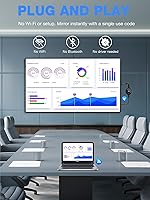
The AIMIBO Q3ZL 4K Wireless Display Adapter arrived in early 2025 as one of the more ambitious entries in the crowded wireless dongle space, promising hassle-free casting without requiring any app installation or network configuration. Plug it into an HDMI port, power it up, and your device should recognize it immediately — that is the pitch. It targets a broad audience: road warriors who need a quick way to present in unfamiliar conference rooms, home users who want to cut the cord between laptop and TV, and travelers who would rather not haul cables. At its mid-range price point, it competes directly with more established names, which raises the bar for what it needs to deliver.

Features & Benefits

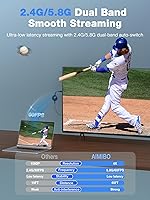
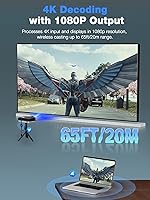
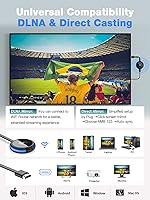
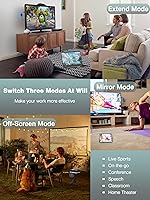
The hardware inside this wireless display dongle is more capable than you might expect for the size. A dual-band 2.4G/5G chip handles the wireless connection, and switching to 5G noticeably reduces stuttering during fast-moving video — sports broadcasts and action sequences hold up reasonably well. Resolution support goes up to 4K, though real-world sharpness depends heavily on your source device and signal conditions; congested 2.4GHz environments will disappoint. Two casting modes add practical flexibility: Direct mode creates its own network so you can cast anywhere without a router nearby, while DLNA mode connects through your existing WiFi and unlocks an extend screen option. Coverage reaches up to 65 feet, and the adapter supports AirPlay, Miracast, DLNA, and Cast protocols across all major platforms.

Best For

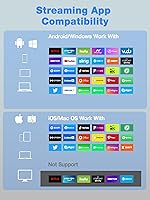
This screen mirroring stick is genuinely well-suited for business travelers and presenters who walk into rooms with HDMI displays and need to get something on screen fast, with no negotiating with hotel WiFi or hunting for the right cable. Teachers casting from a mix of devices will appreciate the multi-protocol support. Android and Windows users get the most out of it — they can stream Netflix, Prime Video, and other DRM-protected services without restriction. Apple users, however, should understand upfront: iOS and macOS devices are limited to mirroring HDCP-free apps only, meaning Netflix and Disney+ will not cast from an iPhone or MacBook. If your workflow is entirely Apple-based and streaming is the main goal, this adapter is not the right fit.

User Feedback

Early buyers of the AIMIBO casting adapter are largely positive about how quickly it connects out of the box — the no-app setup genuinely seems to work as advertised for most users. Latency in 5G Direct mode draws favorable comments from people using it for presentations and YouTube, though a handful report more noticeable lag during longer video files. Build quality gets a mixed reception; the unit feels light, which some read as portable and others as cheap. The Apple streaming limitation is the most consistent source of frustration — multiple reviewers mention they were unaware before buying that popular services would not work on their iPhones. Since this launched only recently, long-term durability and connection reliability remain open questions worth revisiting.

Pros

  • Connects to HDMI displays in seconds with no app installation or network login required
  • Direct mode creates its own wireless network, making it usable anywhere — no router needed
  • Supports AirPlay, Miracast, DLNA, and Cast, covering virtually every mainstream device type
  • 5G band delivers noticeably lower latency, keeping fast video content smooth and watchable
  • DLNA extend mode lets you use your TV as a second screen while working on your device
  • Wireless range holds up well across large rooms and open office layouts
  • Compact and light enough to slip into a shirt pocket or small travel pouch
  • Android and Windows users can cast Netflix, Prime Video, and other streaming apps without restriction

Cons

  • Apple device users cannot mirror Netflix, Disney+, or any HDCP-protected app — a major blind spot
  • The 4K quality claim depends heavily on signal conditions; congested WiFi environments reduce sharpness noticeably
  • Build quality feels lightweight in a way that raises questions about how it holds up with daily use
  • Long-term connection reliability is unproven given the product only launched in early 2025
  • Some users report occasional lag during longer video playback even on the 5G band
  • The Apple streaming restriction is not prominently disclosed, leading to frustrated post-purchase surprises
  • DLNA extend mode is router-dependent, removing one of the adapter's key advantages in router-free settings
  • No included carrying case or protective sleeve despite being marketed as a travel companion

Ratings

The scores below for the AIMIBO Q3ZL 4K Wireless Display Adapter were generated by our AI rating engine after analyzing verified global buyer reviews, actively filtering out incentivized, bot-submitted, and duplicate feedback to surface only authentic user experiences. Both the genuine strengths and the real frustrations are reflected here — nothing has been smoothed over to make the product look better than it is. Where buyers consistently disagreed, the score lands in the middle and the tension is explained in full.

Ease of Setup
83%
Most Android and Windows users report that connecting for the first time takes under two minutes — plug into HDMI, connect to the dongle's network on your device, and you are casting. Presenters in particular praise how little they have to think about it when setting up in an unfamiliar room.
A small but vocal group of iOS users ran into confusion on first use, expecting a completely automatic pairing that still required a couple of manual steps. The experience is close to effortless, but calling it entirely zero-configuration slightly oversells it for Apple device owners.
Latency Performance
76%
24%
On the 5G band in Direct mode, most users find latency low enough for slide presentations, video calls, and casual video streaming without noticeable lip-sync issues. Switching to 5G when available makes a meaningful, real-world difference compared to staying on 2.4GHz.
Fast-motion content like live sports or action-heavy gaming revealed lag that some users found distracting, particularly in crowded wireless environments. The low-latency claim holds up better in controlled settings than in a busy office or hotel conference floor.
Video & Image Quality
74%
26%
When conditions are good — a clear 5G signal, a capable source device, and a modern 4K display — the picture quality impresses users who compare it to competing dongles in the same price range. Colors appear accurate and text remains sharp enough for presentations.
Real-world 4K performance is inconsistent; several buyers noted softness or compression artifacts during high-motion scenes when the wireless signal was anything less than strong. The 4K label sets an expectation that the dongle can only reliably meet under near-ideal conditions.
Apple Device Compatibility
51%
49%
For HDCP-free tasks — mirroring Safari, Keynote, Office, YouTube, or Zoom — the dongle works on iPhones and MacBooks without any app download, which is genuinely useful for professional presentations and classroom use.
The inability to mirror Netflix, Disney+, or any DRM-protected content from Apple devices is the single biggest source of buyer dissatisfaction in reviews. Many users felt this critical limitation was buried in the fine print, and a meaningful portion returned the product specifically because of it.
Android & Windows Streaming
88%
Android and Windows users get the fullest experience this screen mirroring stick can offer, with unrestricted casting of Netflix, Prime Video, HBO Max, and other streaming apps working reliably in testing. This audience consistently leaves the most positive reviews with the fewest complaints.
A handful of Android users reported occasional disconnects when casting for extended periods, suggesting connection stability under sustained streaming loads may not be perfect. It is not a widespread issue, but worth noting for users planning long movie sessions.
Wireless Range
78%
22%
In open living rooms and medium-sized conference rooms, the 65-foot range claim holds up well for most users, allowing them to move around without the connection dropping. Teachers casting from the back of a classroom or presenters roaming a boardroom report solid signal.
Through walls or in rooms with heavy interference, the effective range drops noticeably below the advertised figure. Users in apartments with dense surrounding WiFi activity found themselves needing to stay closer to the display than expected.
Dual Casting Modes
82%
18%
The flexibility of having both a router-free Direct mode and a DLNA network-based mode is a practical advantage that regular travelers and road warriors genuinely appreciate. Switching between the two modes is straightforward once you understand the difference.
The Extend screen feature is only available in DLNA mode, which requires a router — meaning users who rely on Direct mode for travel cannot access one of the adapter's more compelling productivity features without a network present.
Build Quality
63%
37%
The dongle is compact and genuinely pocketable, which users who carry it daily find convenient. For a travel-focused accessory, the small footprint is a legitimate advantage over bulkier alternatives.
The lightweight plastic construction draws consistent criticism from buyers who feel the build quality does not match the asking price. Several reviewers noted it feels fragile enough that they worry about long-term durability with regular travel use.
Portability
91%
At 3.2 ounces and smaller than most TV remotes, the AIMIBO casting adapter slides into a pocket, laptop bag, or even a shirt pocket without any bulk. Travelers who previously carried HDMI cables or laptop adapters find this a significantly lighter option.
The lack of any included carrying pouch or protective case means the dongle rattles loose in a bag alongside other gear. For a product marketed at travelers, a basic sleeve would have been a welcome addition.
Connection Stability
69%
31%
Under typical conditions — a single device casting in a moderately quiet wireless environment — the connection holds steady without requiring reconnection. Short-session users like classroom presenters rarely encounter problems.
During extended use sessions exceeding 30 to 45 minutes, a subset of users reports intermittent dropouts that require a quick reconnect. The issue appears more common in the DLNA mode than in Direct mode, and long-term patterns remain unclear given the product is newly launched.
Protocol Coverage
86%
Supporting AirPlay, Miracast, DLNA, and Cast in a single device means the dongle works across virtually every device a business user or teacher is likely to encounter, including mixed-OS environments with both Android phones and Windows laptops in the same room.
While the breadth of protocol support is impressive, the implementation quality is uneven — AirPlay on Apple devices works only within its HDCP-free limitations, which undercuts the perceived universality of the multi-protocol feature set.
Value for Money
71%
29%
For Android and Windows users who take advantage of the full streaming and casting capabilities, the price feels reasonable relative to what established competitors charge for similar functionality. Travelers who use it regularly tend to consider it money well spent.
Apple-centric buyers who discover the streaming limitations post-purchase almost universally feel the price is not justified for what they can actually do with it. The value equation is highly dependent on your device ecosystem and intended use case.
Instruction Clarity
58%
42%
The initial physical setup — plugging in and switching inputs — is intuitive enough that most users get the hardware side right without reading anything. Basic casting for Android and Windows requires minimal guidance.
The documentation does a poor job of explaining the Apple HDCP restrictions upfront, and multiple reviewers specifically mention that the distinction between Direct and DLNA modes was confusing until they experimented on their own. Clearer onboarding materials would reduce a lot of post-purchase frustration.

Suitable for:

The AIMIBO Q3ZL 4K Wireless Display Adapter is a strong pick for anyone whose primary frustration with screen mirroring has been complicated setup processes. Business travelers who regularly walk into conference rooms, hotel meeting spaces, or classrooms and need to get a presentation on screen quickly will find the no-router Direct mode genuinely useful — no negotiating with venue WiFi, no dongles to borrow. Teachers who work with mixed-device classrooms benefit from the broad protocol support, since the adapter handles AirPlay, Miracast, and Cast without requiring students or colleagues to install anything. Android and Windows users in particular get the most complete experience, with full access to streaming services like Netflix and Prime Video over a stable 5G connection. Campers, weekend travelers, and anyone who wants to turn a portable monitor or hotel TV into a proper viewing screen will also appreciate how little space this screen mirroring stick takes up in a bag.

Not suitable for:

The AIMIBO Q3ZL 4K Wireless Display Adapter is genuinely not the right tool if your main goal is streaming DRM-protected content from an iPhone, iPad, or MacBook. Apple devices are restricted to HDCP-free apps only, which rules out Netflix, Disney+, Hulu, and most major streaming services — a significant limitation that is easy to overlook before buying. If your household or workflow is entirely Apple-based and entertainment streaming is the primary use case, this wireless display dongle will disappoint you. Users who need guaranteed, rock-solid 4K performance in demanding environments should also temper expectations; wireless 4K quality is real but contingent on signal conditions, and a crowded 2.4GHz band will drag the experience down. Finally, since this adapter only launched in early 2025, buyers who prioritize proven long-term reliability backed by years of user data may want to wait or consider more established alternatives.

Specifications

  • Brand: Manufactured by AIMIBO, a consumer electronics brand focused on wireless display and connectivity accessories.
  • Model: The model number is Q3ZL, which identifies this specific hardware revision of the adapter.
  • Resolution: Supports up to 4K Ultra HD output, with actual image quality dependent on source device capability and wireless signal conditions.
  • WiFi Bands: Equipped with a dual-band WiFi chip supporting both 2.4GHz and 5GHz frequencies for flexible connectivity options.
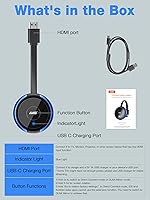
  • Connector: Uses a standard full-size HDMI connector, compatible with any HDMI-equipped TV, monitor, or projector.
  • Casting Modes: Offers two modes: Direct mode (device-to-dongle, no router required) and DLNA mode (router-based, supports screen extension).
  • Protocols: Compatible with AirPlay, Miracast, DLNA, and Cast protocols to support a wide range of source devices.
  • Wireless Range: Rated for a maximum wireless range of up to 65 feet (approximately 20 meters) under open, unobstructed conditions.
  • Display Modes: Supports both Mirror mode (duplicate your screen) and Extend mode (use the TV as a secondary display) via DLNA.
  • OS Compatibility: Works with iOS, Android, Windows, and macOS operating systems without requiring a dedicated companion app installation.
  • Streaming Support: Android and Windows devices support full streaming app casting including Netflix; iOS and macOS are restricted to HDCP-free apps only.
  • Dimensions: Measures 7.87 × 2.75 × 0.59 inches, making it slim enough to fit in a jacket pocket or small travel pouch.
  • Weight: Weighs 3.2 ounces, light enough to carry daily without adding meaningful bulk to a bag or briefcase.
  • Power Source: Powered via a USB connection, typically drawing power from the TV or monitor USB port or a standard USB charger.
  • Color: Available in Blue as the standard color option for this model variant.
  • Launch Date: First made available in April 2025, making it a recently introduced product with a limited long-term reliability track record.

Related Reviews
j5create JVAW76 ScreenCast 4K Wireless Display Adapter
74%
91%
Protocol Compatibility
63%
Ease of Setup
69%
Signal Stability
58%
Latency & Responsiveness
72%
4K Performance
More
AIMIBO Q3 Wireless HDMI Extender
75%
91%
Ease of Setup
73%
Signal Stability
67%
Transmission Range
71%
Video Quality
82%
Latency Performance
More
ASUS ProArt Display PA169CDV 15.6” 4K Pen Display
87%
94%
Color Accuracy
89%
Portability
90%
Touchscreen Responsiveness
85%
Build Quality
92%
Wacom Pen Precision
More
SmartSee Miracast 1080P Wireless Display Adapter
66%
71%
Ease of Setup
83%
Android Compatibility
44%
iOS Compatibility
51%
Windows Compatibility
58%
Streaming Stability
More
Anytrox THT-020-8 Wireless HDMI Extender
78%
93%
Ease of Setup
78%
Video Quality
71%
Wireless Stability
82%
Audio-Video Sync
67%
Wireless Range
More
YOYIRYB BF-A70 4K Solar Security Cameras
76%
83%
Image Quality
79%
Night Vision
71%
Solar Reliability
81%
Motion Tracking
86%
Setup & Installation
More
LZLOO Wireless HDMI Transmitter and Receiver
77%
91%
Ease of Setup
74%
Signal Stability
68%
Wireless Range
77%
Video Output Quality
71%
Latency Performance
More
DXchip 4KEZH01R01 Wireless HDMI Extender Kit
72%
88%
Ease of Setup
61%
Wireless Range (Real-World)
78%
Video Quality
54%
Latency & Responsiveness
71%
Device Compatibility
More
Sunweyer SW12 Lite Wireless CarPlay Adapter
84%
89%
Wireless Performance
94%
Ease of Setup
85%
Streaming Quality
80%
Compatibility with Vehicles
88%
Build Quality
More
ZIIDOO LYJSQ Bluetooth 5.0 Audio Adapter
72%
84%
Ease of Setup
88%
Display Screen Utility
67%
Connection Stability
73%
Audio-Video Sync
61%
Audio Quality
More

FAQ

Correct — the AIMIBO Q3ZL 4K Wireless Display Adapter uses AirPlay natively, so your iPhone or iPad should detect it without any third-party app. That said, there is an important caveat: only apps that are not DRM-protected will mirror successfully. Anything involving Netflix, Disney+, or similar services will not cast from an Apple device due to HDCP content restrictions.

Yes, and this is one of its more practical features. In Direct mode, the wireless display dongle creates its own local network between itself and your device, so you bypass hotel WiFi entirely. Just plug it into the TV HDMI port, power it up, and connect your laptop or phone directly to it.

Yes, Android users can cast Netflix, Prime Video, and other DRM-protected streaming services without restriction. The limitation only applies to Apple devices — iPhone and Mac users are blocked from mirroring those apps due to HDCP copy protection, which is an industry-wide constraint rather than a product flaw.

For presentation slides, documents, and standard web browsing, latency is generally low enough that most users do not notice it. Switching to the 5G band reduces lag further. Fast-motion video like live sports may show some delay depending on your wireless environment, so it is less ideal for latency-sensitive gaming.

It supports both. Mirror mode duplicates your screen on the TV, which is useful for presentations. Extend mode, available through DLNA, lets you use the TV as a separate second display so you can drag windows across screens — handy if you are working from a hotel room or temporary desk setup.

It draws power via a USB connection, and most modern TVs have a USB port that provides enough current to run it. If your display does not have a USB port, a standard USB phone charger works as well. No proprietary power brick is included or required.

Switching to the 5G band helps significantly in crowded spaces since that frequency is less saturated than 2.4GHz. That said, if the venue has heavy 5GHz traffic too, some degradation in video quality is possible. For router-free reliability in busy environments, Direct mode on 5G is your best option.

Like most wireless range claims, 65 feet is a line-of-sight estimate under ideal conditions. Through walls or in rooms with interference, expect the reliable range to be somewhat less. For typical room-sized use — a living room, classroom, or mid-sized conference room — the range holds up well for most users.

Yes, MacBook users can mirror apps that do not use DRM protection, which covers the most common presentation tools: Safari, Microsoft Office, Keynote, Zoom, Google Slides, and similar apps all work fine. The restriction only kicks in with streaming services that enforce HDCP, so for professional presentations this screen mirroring stick is a solid choice for Mac users too.

It is a fair concern. Since the adapter only became available in April 2025, there is limited data on how it holds up over months of regular use. Early buyer feedback is largely positive for core functionality, but if long-term durability is a priority for you, it is worth checking back for updated reviews in a few months before committing.