
Overview

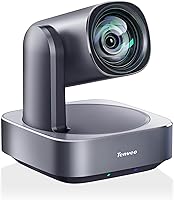
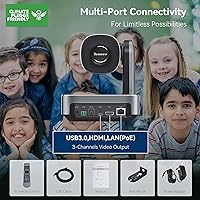
The Tenveo VL12U 4K PTZ Camera sits in a competitive but well-defined space — capable enough for professional AV environments, accessible enough for organizations without dedicated camera operators. It earned a Red Dot Design Award in 2023, which is a meaningful signal of industrial credibility rather than just marketing decoration. Churches, hybrid meeting rooms, and lecture halls are its natural habitat. Connecting via USB 3.0 is genuinely plug-and-play on most systems, while the RJ45 port opens up more advanced IP streaming configurations. One thing to flag upfront: there is no built-in microphone, so budget for an external audio solution if your setup depends on it.

Features & Benefits

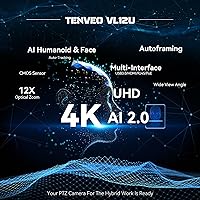
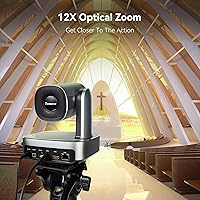
At its core, this PTZ camera pairs a 1/2.8-inch Sony CMOS sensor with a 12x optical zoom that spans a wide 78.36° field of view down to a tight 7.5° telephoto — all without the softness that digital zoom introduces. The AI tracking system detects both full humanoid shapes and faces, and notably holds its lock even when a subject is temporarily blocked from view. For installs, PoE support is a practical win: one Ethernet cable handles power, video, and control simultaneously. Add 255 storable preset positions and combined 2D/3D noise reduction, and this streaming camera handles varied indoor lighting conditions without constant manual adjustment.

Best For

This PTZ camera is a strong fit for small-to-medium churches that want reliable, hands-free tracking during services without dedicating a volunteer to camera duty. Corporate AV teams running Zoom or Microsoft Teams meetings will appreciate its broad software compatibility and multi-interface output. Educators benefit from the auto-framing modes that keep a moving presenter centered without operator input. Semi-professional streamers who need RTSP output and H.264/H.265 encoding have that covered too. The flexible mounting options — ceiling, wall, tripod, or desktop — mean it fits most room configurations without requiring additional hardware purchases.

User Feedback

Buyers generally respond positively to the VL12U's image quality and the convenience of AI auto-tracking, particularly in single-presenter scenarios. The PoE setup earns praise from IT-managed environments, though non-technical users occasionally find the initial network configuration less intuitive than expected. Zoom motor noise is worth monitoring — some users notice it during quiet recordings, which matters in chapel or classroom settings. The web UI for managing presets has drawn mixed reactions; functional, but not particularly polished. On value, opinions split along use-case lines: organizations replacing a camera operator tend to see strong return, while those comparing it to budget PTZ alternatives weigh the price gap more carefully.

Pros

  • AI auto-tracking reliably keeps a single moving presenter centered without any manual camera control.
  • True 12x optical zoom delivers sharp, distortion-free close-ups without the softness of digital zoom.
  • PoE support means a single Ethernet cable handles power, video, and control — clean installs with less cable clutter.
  • Simultaneous 4K output via HDMI and USB 3.0 gives flexibility for both local display and computer capture.
  • 255 preset positions make repeatable camera angles fast to recall during live events or services.
  • Plug-and-play USB 3.0 connection works on Windows and macOS without additional driver installation.
  • 2D and 3D noise reduction keeps the image clean in variable or mixed indoor lighting conditions.
  • Flexible mounting options — ceiling, wall, tripod, or desktop — suit a wide range of room configurations.
  • Red Dot Design Award 2023 reflects a build quality and industrial design that holds up in professional environments.
  • RTSP streaming with H.264 and H.265 encoding makes it compatible with serious live production workflows.

Cons

  • No built-in microphone means every buyer must budget for and source a separate audio solution.
  • The web UI for preset configuration is functional but feels unpolished and can frustrate less technical users.
  • PTZ motor noise is noticeable in quiet environments like chapels or small classrooms during live recordings.
  • AI tracking works well for solo presenters but can struggle or hesitate in multi-person or fast-movement scenarios.
  • Initial PoE and IP streaming setup has a learning curve that non-IT users often find more complex than expected.
  • The price point is difficult to justify for static or low-complexity shooting needs that do not require tracking or zoom.
  • No built-in preview screen means you need a connected monitor or device to frame shots during setup.
  • Occlusion recovery, while present, is not instant — brief tracking loss can occur when subjects move behind obstacles quickly.

Ratings

The scores below for the Tenveo VL12U 4K PTZ Camera were generated by our AI rating engine after analyzing verified global buyer reviews, actively filtering out incentivized, bot-generated, and spam submissions to surface genuine user sentiment. This PTZ camera performs strongly in several critical categories but shows real friction points that prospective buyers deserve to know about upfront. Both the standout strengths and the recurring frustrations are reflected transparently in every score below.

Image Quality
88%
Buyers consistently praise the sharpness and color accuracy delivered by the Sony CMOS sensor, especially in well-lit church sanctuaries and conference rooms. The 4K output holds up well on large displays, and the noise reduction does meaningful work in environments with mixed or uneven lighting.
In lower-light conditions — basement meeting rooms or dimly lit chapels — some users notice a slight loss of crispness even with noise reduction active. A handful of reviewers also feel that 4K is constrained to 30fps, which can appear slightly less fluid during fast movement compared to 60fps alternatives.
AI Auto-Tracking
79%
21%
For single-presenter scenarios like sermons, lectures, or solo conference calls, the tracking performs reliably and keeps the subject centered without any manual input. The occlusion recovery feature genuinely helps in cases where a speaker briefly steps behind a podium or lectern.
In multi-person environments or when subjects move quickly across the frame, the tracking can hesitate or momentarily latch onto the wrong individual. Users in busy classrooms or panel-style events report more inconsistency, and the camera sometimes takes a few seconds to re-lock after losing a subject.
Zoom Performance
84%
The 12x optical zoom is one of the VL12U's more appreciated features — buyers in large sanctuaries and auditoriums find it genuinely useful for pulling tight shots of a speaker from a rear-of-room mount without any visible image softening. The wide-to-telephoto range covers most real-world indoor scenarios without needing to reposition the camera.
The zoom motor produces audible mechanical noise during movement, which is the most consistently flagged issue from buyers recording in quiet environments. In a chapel or small meeting room with microphones placed near the camera, that noise can creep into recordings and requires mitigation through microphone placement.
PoE & Connectivity
83%
AV professionals and IT-managed installs genuinely appreciate the PoE support — running a single Cat6 cable to a ceiling mount instead of managing separate power and data runs simplifies installation considerably. The simultaneous HDMI and USB 3.0 output is practical for setups that need both a local monitor feed and a computer capture source.
Non-technical users frequently find the initial PoE and IP network configuration more involved than anticipated, particularly if they are not familiar with static IP addressing or PoE switch requirements. The camera does not include a PoE switch or injector, which is an additional cost some buyers overlook at purchase.
Ease of Setup
71%
29%
Plug-and-play via USB 3.0 is genuinely straightforward — most users report being recognized immediately by Zoom, Teams, or OBS on both Windows and macOS without any driver installation. For basic conferencing use, the out-of-box experience is smooth.
Once you move beyond basic USB connection into PoE, IP streaming, or preset configuration via the web UI, the setup complexity increases noticeably. Several reviewers describe the web interface as functional but confusing, and the user manual does not always provide sufficient guidance for less experienced installers.
Build Quality & Design
86%
The Red Dot Award 2023 recognition aligns with what buyers describe in practice — the camera feels solid and professional, with a clean industrial aesthetic that does not look out of place mounted in a church or corporate boardroom. The motorized housing moves without excessive wobble.
A small number of users report that the plastic housing, while sturdy at first, shows minor wear around the mount attachment points over time with repeated repositioning. The silvery finish, while attractive, tends to show fingerprints during handling and installation.
Web UI & Software
58%
42%
The web-based control interface does cover the key functions buyers need — preset management, tracking mode switching, and basic image adjustments are all accessible without installing proprietary software. For users who take time to learn it, the depth of control is reasonable.
The UI design feels dated and unintuitive compared to competing PTZ cameras at similar price points, and several buyers report that certain settings are poorly labeled or buried in submenus. First-time users frequently need to consult forums or support emails to accomplish tasks that should be self-explanatory.
Preset System
81%
19%
Having 255 storable presets is a practical advantage for productions that need multiple repeatable angles — a church that switches between wide congregation shots, tight pulpit shots, and choir angles benefits from fast, one-touch recall. The 10 IR remote presets handle the most common live switching needs without touching a computer.
Setting up a large number of presets requires patience with the web UI, which slows down the initial configuration process. A few users also note that presets occasionally drift slightly in position after power cycling, requiring periodic recalibration.
Compatibility
89%
Broad software compatibility is one of the cleaner stories for the VL12U — Zoom, Teams, OBS, Vmix, and others recognize it without friction, and Windows support going back to version 7 is a genuine convenience for organizations running older IT infrastructure. macOS compatibility is equally reliable.
A handful of users on older macOS versions or non-standard Linux-based streaming systems report occasional recognition issues that require workarounds. Compatibility with third-party PTZ controllers varies and is not always fully documented by the manufacturer.
Mounting Flexibility
85%
The included wall mount bracket and support for desktop, tripod, ceiling, and wall configurations cover the majority of real-world installation scenarios without requiring extra purchases. Churches and conference rooms with varied ceiling heights and room layouts appreciate having multiple options in the box.
For ceiling installations specifically, buyers often need a separate ceiling adapter or drop-mount kit that is not included, adding a small but unexpected additional cost. The mounting hardware feels adequate rather than premium for the price tier the camera occupies.
Motor Noise
61%
39%
In louder environments — large event halls, rooms with background music, or spaces where microphones are positioned away from the camera — the motor noise is essentially a non-issue and does not interfere with recorded or streamed audio.
In quiet recording environments like chapels, small classrooms, or boardrooms with sensitive room microphones, the mechanical sound produced during pan, tilt, and zoom movements is noticeable enough to be a recurring complaint. This is the single most consistent audio-related pain point in buyer feedback.
Value for Money
73%
27%
For organizations replacing a camera operator role — where the labor cost savings accumulate over time — the pricing is easier to rationalize. Church AV coordinators and hybrid meeting managers who use the full feature set tend to feel the investment is justified within a few months of regular use.
Buyers who need only static or minimally dynamic shots, or who are comparing against budget PTZ alternatives with fewer features, find the price harder to defend. There is a meaningful gap between this camera and lower-cost options, and not every use case takes advantage of what fills that gap.
Audio Integration
34%
66%
The camera's lack of a microphone is at least clearly disclosed in the product documentation, which means informed buyers can plan their audio solution in advance rather than discovering the gap after delivery.
No built-in microphone is a hard limitation that affects every buyer regardless of use case — it is not a minor omission at this price tier, and the absence is especially jarring for first-time PTZ buyers in church or education settings who reasonably expect integrated audio. Budget for a dedicated audio source is mandatory.
Customer Support
69%
31%
Tenveo provides a dedicated support email and advertises lifetime technical assistance, which gives buyers some reassurance when dealing with setup complexity. Response times for straightforward configuration questions are generally reported as acceptable.
Support responsiveness for more complex technical issues — network streaming problems, firmware questions, or integration with third-party controllers — is less consistent, with some buyers waiting several days for useful replies. The lifetime support promise is meaningful on paper but its real-world reliability depends on the issue type.

Suitable for:

The Tenveo VL12U 4K PTZ Camera is genuinely well-matched to organizations that need reliable, operator-free video coverage in a fixed indoor space. Small and mid-sized churches are perhaps the most natural fit — the AI auto-tracking handles a moving speaker without requiring a dedicated volunteer behind a controller, and the preset system means recurring angles for worship, readings, or announcements can be recalled instantly. Corporate AV teams managing hybrid meetings will find the broad software compatibility practical, since it works natively with Zoom, Microsoft Teams, and OBS without driver headaches. Educators running lecture-capture setups benefit from the same hands-free tracking logic, keeping a presenter centered even when they move across a stage or whiteboard. For semi-professional streamers who need IP-based output with H.264 or H.265 encoding, the RJ45 port and PoE support add real infrastructure flexibility that USB-only cameras simply cannot offer.

Not suitable for:

The Tenveo VL12U 4K PTZ Camera is not the right call for every buyer, and being clear about that matters. Anyone expecting built-in audio is going to be caught off guard — there is no microphone whatsoever, so a separate audio solution is a non-negotiable addition to the budget. Outdoor use is also off the table; this camera is designed for controlled indoor environments, and using it outside risks both image quality and hardware longevity. Buyers on a tight budget who are comparing it against entry-level PTZ options will find the price gap harder to justify if their use case is simple — a static shot in a small room with no tracking needs does not require this level of capability. Non-technical users who are not comfortable navigating a web UI or configuring network settings may also find the initial setup more involved than expected, particularly around PoE and IP streaming configuration. If your production needs multi-camera switching or PTZ control from a professional broadcast controller, verify compatibility with your specific hardware before purchasing.

Specifications

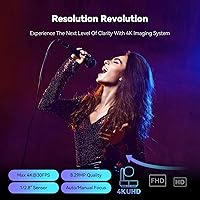
  • Image Sensor: The camera uses a 1/2.8-inch Sony CMOS sensor with 8.29 megapixels of effective resolution for sharp, detailed indoor footage.
  • Video Resolution: Maximum output is 4K (3840x2160) at 30fps, available simultaneously via both HDMI and USB 3.0 connections.
  • Optical Zoom: A 12x optical zoom lens covers a diagonal field of view from 78.36° at wide angle down to 7.5° at full telephoto.
  • Connectivity: The camera includes USB 3.0, HDMI, and RJ45 (PoE) interfaces for flexible connection to computers, displays, and network infrastructure.
  • IP Streaming: Supports MJPG, H.264, and H.265 encoding for IP streaming at resolutions up to 1080p over the RJ45 network port.
  • PoE Support: Power over Ethernet (PoE) allows a single Cat5e or Cat6 cable to simultaneously carry power, control signals, and video data.
  • Pan and Tilt: The motorized head supports 350° of pan movement and 180° of tilt, enabling full room coverage from a fixed mount position.
  • Preset Positions: Up to 255 camera angle presets can be stored and recalled, with 10 of those accessible directly via the included IR remote.
  • AI Tracking: Onboard AI detects humanoid shapes and faces, maintains subject lock during partial occlusion, and supports both Presenter and Autoframing modes.
  • Noise Reduction: Combined 2D and 3D digital noise reduction helps maintain image clarity in variable or low indoor lighting environments.
  • Microphone: There is no built-in microphone; an external audio source is required for any recording or streaming setup that needs sound.
  • Mounting Options: The camera supports desktop, tripod, wall, and ceiling mounting configurations using the included wall mount hardware.
  • Dimensions: The unit measures 6.77 x 6.77 x 7.56 inches, making it compact enough for most room installations without dominating the space.
  • Weight: The camera body weighs 2.97 pounds, which is manageable for ceiling and wall mounting with standard AV hardware.
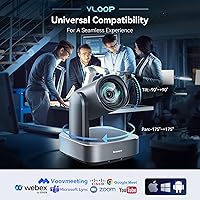
  • OS Compatibility: Works with Windows 7, 8.1, 10, and 11 as well as macOS 10.7 and higher, with plug-and-play USB recognition on supported systems.
  • Software Support: Compatible with Zoom, Microsoft Teams, Skype, OBS, Vmix, and YouTube Live without requiring proprietary software installation.
  • PTZ Control: Camera movement and presets can be managed via the included IR remote or a web-based UI accessible over the local network.
  • In the Box: Package includes the camera unit, IR remote control, wall mount bracket, USB 3.0 cable, 12V 2A power adapter, and a user manual.
  • Design Award: The VL12U received the Red Dot Design Award in 2023, recognizing its industrial design and build quality.
  • Warranty: Tenveo offers a 30-day money-back guarantee and lifetime technical support via email for registered buyers.

Related Reviews
iuZee UHD12U-4K 4K PTZ Camera with 12X Optical Zoom
84%
88%
Video Quality
92%
Ease of Setup
85%
Zoom Performance
89%
Build Quality
87%
Low-Light Performance
More
Prisual PT20X-4K 4K PTZ Camera
82%
91%
Image Quality
83%
Low-Light Performance
76%
Auto-Tracking Reliability
88%
Zoom Performance
79%
Build & Hardware Quality
More
SV3C HX02 4K PTZ Outdoor Security Camera
73%
88%
Image Quality
83%
Night Vision Performance
86%
PTZ Coverage & Rotation
74%
Auto-Tracking Accuracy
81%
WiFi Stability & Connectivity
More
Tenveo VHD630A-NDI PTZ Camera Bundle
88%
95%
AI Auto-Tracking Accuracy
92%
Video Quality
90%
Zoom Performance
88%
Controller Usability
85%
Installation & Setup
More
OBSBOT Tail Air NDI
OBSBOT Tail Air NDI
77%
91%
AI Tracking Accuracy
88%
Image Quality
87%
PTZ Range & Positioning
89%
Connectivity & Protocol Support
74%
NDI Integration
More
HXVIEW BU-H800 4K 30X Optical Zoom PTZ Camera
76%
91%
Zoom Clarity
83%
Night Vision Performance
79%
Auto-Tracking
87%
Image Quality
76%
Smart Detection
More
Reolink RLC-823S1W PTZ Security Camera
76%
92%
Image Quality
88%
Night Vision Performance
86%
PTZ Mechanics
78%
Auto-Tracking
89%
Optical Zoom & 3D Zoom
More
Reolink RLC-823S2 PTZ Security Camera
79%
93%
Optical Zoom Quality
91%
Image & Video Clarity
88%
Night Vision Performance
79%
Pan, Tilt & Auto-Tracking
74%
Smart Detection Accuracy
More
AVKANS 4K NDI PTZ Camera with AI Tracking
85%
89%
AI Tracking Accuracy
91%
Ease of Setup (PoE & NDI Integration)
88%
Video Output Flexibility (HDMI, SDI, USB, IP)
85%
Build Quality
90%
Software Compatibility (OBS, Zoom, vMix)
More
Jennov PS6006 4K 8MP Outdoor PTZ POE Camera
83%
94%
Video Quality
90%
Night Vision Performance
75%
Ease of Setup
89%
Zoom & Tracking Functionality
88%
Weatherproof Durability
More

FAQ

For most setups, yes — plug the USB 3.0 cable into your computer and it should be recognized automatically by Zoom, Teams, or any other conferencing software without additional drivers. macOS and modern Windows versions handle it natively. That said, if you plan to use the IP streaming features or configure presets through the web UI, you will need to spend some time on network setup.

No, there is not. The Tenveo VL12U 4K PTZ Camera has no built-in audio capability whatsoever. If you need sound — and for churches or meeting rooms, you almost certainly do — you will need a separate microphone or audio interface connected to your computer or mixer independently.

For a single presenter moving at a moderate pace, the tracking works reliably in most conditions. It uses both face detection and full-body humanoid recognition, so it can re-acquire a subject even if they briefly step behind something. Where it tends to struggle is in crowded scenes with multiple people moving simultaneously — the camera can hesitate or briefly follow the wrong subject. For solo presenter use cases like a sermon or a lecture, it performs well.

PoE stands for Power over Ethernet, which means a single network cable (Cat5e or Cat6) can carry both the power supply and the video or control data simultaneously. To use it, you need a PoE-capable network switch or a PoE injector — standard switches do not provide power over the cable. If your IT infrastructure already has PoE switches, the installation becomes very clean with just one cable run to the camera.

No — this streaming camera is designed exclusively for indoor use. Outdoor environments introduce lighting variability, moisture, and temperature extremes that the hardware is not rated for. Using it outside risks both image degradation and potential hardware damage.

Presets can be configured either through the web-based UI (accessed via the camera's IP address on your local network) or using the IR remote. The remote gives you quick access to 10 presets, while the web UI allows you to store and manage up to 255. The web UI is functional but not particularly intuitive, so budget some time for initial configuration, especially if you are not familiar with network-connected AV gear.

Yes, the camera supports simultaneous 4K output through both HDMI and USB 3.0 at the same time. This is useful if you want to feed a local display — say, a confidence monitor or a production switcher — while also capturing on a laptop or streaming PC without splitting the signal externally.

This is worth taking seriously. The PTZ motors on this camera produce some audible noise during pan, tilt, and zoom movements, which is common for motorized cameras at this price tier. In a very quiet room where microphones are close to the camera, that mechanical sound can potentially be picked up. If your microphones are positioned near the congregation or altar rather than near the camera itself, the impact is usually minimal, but it is something to test before committing to a permanent ceiling install.

The box includes a wall mount bracket, but for ceiling mounting you may need an additional ceiling mount adapter depending on your specific fixture. The camera itself supports ceiling orientation, but confirm your mounting solution is rated for the camera's weight of just under 3 pounds before purchasing third-party hardware.

Tenveo provides a dedicated Amazon support email address and advertises lifetime technical support. Based on general buyer feedback, response times vary — most users report getting helpful replies within a business day or two for setup-related issues, though response speed for more complex technical problems can be less consistent. The 30-day money-back window gives you a reasonable buffer to test the camera thoroughly before that guarantee period closes.