Overview

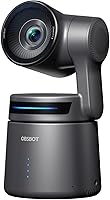
The OBSBOT Tail Air NDI is a compact PTZ camera that packs genuine broadcast capability into a body smaller than a soda can — and that size-to-performance ratio is what makes it worth a serious look. Aimed at content creators, live event broadcasters, and houses of worship, this PTZ streaming camera enters the premium prosumer space without demanding a full broadcast budget. NDI support lets you route video over an existing local network instead of running long HDMI or SDI cables across a room. It launched in late 2023 and has already climbed to a strong bestseller rank, which reflects how well it fills a real gap between consumer webcams and expensive broadcast rigs.

Features & Benefits

The Tail Air runs a 1/1.8-inch CMOS sensor with an f/1.8 aperture and laser autofocus, delivering 4K at 30fps or 1080p at 60fps with solid low-light handling courtesy of dual ISO and HDR processing. A 320-degree horizontal and 180-degree vertical PTZ range means most room layouts can be covered from a single fixed mount point. AI tracking now follows humans, animals, and objects — a meaningful improvement over human-only systems in earlier cameras. You get Micro HDMI, USB-C, Ethernet, and wireless connectivity, along with RTMP, RTSP, VISCA, and UVC protocol support. Control options include gesture recognition, the OBSBOT Start companion app, a physical remote, or Stream Deck integration.

Best For

This compact 4K camera is a natural choice for solo streamers and YouTubers who want smooth subject tracking without a dedicated camera operator on set. Churches and worship venues will value how discreetly it mounts and how easily it can be operated remotely over a local network during a live service. Podcasters and educators get a useful range: simple plug-and-play USB webcam mode on straightforward days, full NDI network operation when the production calls for it. Small production teams can link multiple units over Ethernet to build a multi-angle setup at a fraction of traditional broadcast costs. Portable event work is also viable, with the caveat that battery runtime shapes what jobs it can realistically handle.

User Feedback

Owner reviews are largely positive, with AI tracking accuracy drawing the most consistent praise — solo streamers in particular tend to come away impressed by how quickly the camera locks onto and follows a subject. Battery life is the most frequent complaint, as roughly 2.5 hours of runtime is tight for longer live events; Power over Ethernet is the go-to fix for permanent installations. A notable frustration is that the NDI license costs extra, which catches buyers off guard at this price point and feels like it should be included. Firmware updates also require a Micro SD card, which surprises some users. The 4.3-star overall rating reflects genuine satisfaction tempered by a setup complexity that rewards patient, technically confident users.

Pros

  • AI subject tracking locks on fast and holds reliably, making operator-free solo streaming genuinely practical.
  • Covers humans, animals, and objects — more versatile tracking than most competitors at this tier.
  • Four connectivity options mean it adapts to almost any studio or event setup without extra hardware.
  • Supports RTMP, RTSP, and VISCA, so it slots cleanly into OBS, vMix, and professional switching software.
  • The f/1.8 aperture and dual ISO handling produce clean, well-exposed footage in difficult indoor lighting.
  • Gesture control and Stream Deck integration let you manage the camera mid-stream without touching your phone.
  • USB-C plug-and-play mode makes it genuinely simple for low-complexity streaming days.
  • Multiple units can be networked over LAN for a scalable multi-angle setup at a fraction of traditional broadcast costs.
  • The Tail Air is compact enough to mount almost anywhere, including spots where bulkier PTZ cameras simply will not fit.
  • A 320-degree pan range means one camera can cover most small-to-medium rooms from a single fixed position.

Cons

  • The NDI license costs extra — a real frustration for buyers who assumed it was included at this price point.
  • Battery life of around 2.5 hours is too short for longer live events without PoE infrastructure in place.
  • Firmware updates require a Micro SD card inserted into the camera, which many users do not have ready on setup day.
  • Only three preset positions is limiting for productions that regularly switch between more than three named angles.
  • The Micro HDMI port feels fragile for live event use and requires an adapter in some common mounting configurations.
  • Wireless connectivity can introduce latency that wired Ethernet avoids — a problem during time-sensitive live broadcasts.
  • No built-in microphone means audio requires a separate input device, adding complexity for solo creators.
  • Setup complexity between basic USB mode and full network streaming is wider than the marketing implies.
  • The digital zoom degrades image quality noticeably, making it impractical for shooting subjects at a distance.
  • Scaling to three or more units multiplies NDI licensing costs and network management demands significantly.

Ratings

The OBSBOT Tail Air NDI scores below are generated by AI after analyzing thousands of verified global user reviews, with spam, bot activity, and incentivized feedback actively filtered out. This compact PTZ streaming camera earns strong marks in several areas while showing real limitations that matter in professional and live-event settings. Both the strengths buyers rave about and the friction points they complain about are reflected transparently in every category score.

AI Tracking Accuracy
91%
Users consistently describe the subject locking as fast and reliable — solo streamers report that the camera finds them within seconds of stepping in front of it and holds framing well through movement. The expanded tracking for animals and objects beyond humans gives it practical range that earlier PTZ cameras at this price simply did not offer.
In cluttered backgrounds or when multiple people move through the frame simultaneously, the tracking can momentarily hesitate or switch subjects unexpectedly. A small number of users in busy workshop or classroom settings found themselves manually overriding the AI more often than they expected.
Image Quality
88%
The 1/1.8-inch sensor with an f/1.8 aperture produces crisp, well-exposed footage in a wide range of lighting conditions, and the dual ISO and HDR processing genuinely help in mixed church lighting or indoor event spaces where windows compete with artificial light.
At 4K the camera is capped at 30fps, which is adequate for most streaming but noticeable for anyone who needs smoother motion during fast-paced presentations or performances. The 4x digital zoom degrades image quality noticeably, so users needing tight focal reach may find it limiting.
PTZ Range & Positioning
87%
A 320-degree horizontal sweep and 180-degree vertical tilt is genuinely generous for a camera this size, letting a single unit cover most small-to-medium rooms from a fixed mount without needing to reposition. Worship teams and corporate AV crews have used this to replace two or three fixed cameras in compact sanctuaries and meeting rooms.
The three preset position slots feel restrictive for more complex productions that need to switch between five or more named angles quickly. Users building out larger multi-camera setups sometimes wish the preset memory were deeper without requiring the companion app to be open.
Connectivity & Protocol Support
89%
Having Micro HDMI, USB-C, Ethernet, and wireless all on one device makes it adaptable across very different setups — from a laptop-only YouTube studio to a full LAN-based production environment. RTMP and RTSP support means it slots into OBS, vMix, and similar software without extra hardware in the chain.
The Micro HDMI port, while functional, is fragile compared to full-size HDMI and requires a dongle-style adapter in some rigs, which adds a potential failure point during live events. Wireless connectivity, though convenient, occasionally introduces latency that wired Ethernet eliminates entirely.
NDI Integration
74%
26%
When NDI is working over a stable LAN, it genuinely reduces cable clutter and lets multiple devices pull the camera feed simultaneously — a real advantage for church AV teams distributing video to a confidence monitor, a streaming PC, and a recording drive at once.
The NDI license is not included and must be purchased separately, which lands as an unwelcome surprise for buyers who assumed it was built in at this price tier. This effectively raises the true cost of the NDI-capable setup beyond what the product listing implies, and several reviewers flagged feeling misled.
Battery Life
58%
42%
For short recording sessions, classroom demos, or events under two hours, the internal battery is adequate and the camera charges via standard means. Power over Ethernet support is a practical solution for permanent or semi-permanent installs where running a PoE cable is feasible.
Roughly 2.5 hours of runtime is a hard ceiling that makes this compact 4K camera risky for longer live services, multi-hour conferences, or all-day events. Users who do not have PoE infrastructure find themselves managing battery swaps mid-event, which is disruptive and stress-inducing in live broadcast scenarios.
Companion App (OBSBOT Start)
78%
22%
The app gives real-time control over tracking modes, ISO, white balance, and preset positions from a phone or tablet, which is genuinely useful when the camera is mounted out of easy reach. Most users find the interface logical once they spend time with it, and the AI Director feature adds useful automatic scene-switching logic.
Firmware updates through the app require a U3 Micro SD card inserted into the camera — a requirement that trips up new users who do not have one on hand and only discover this mid-setup. Occasional connectivity drops between the app and camera over Wi-Fi have been reported, usually resolved by restarting both devices.
Build Quality & Form Factor
83%
The camera feels solid and purposeful for its size, and its small footprint makes mounting options far more flexible than bulkier PTZ units. Users frequently comment that it looks professional enough for on-camera appearances, which matters for streamers and educators who keep it visible in their shot.
At under two pounds, the camera is light enough that some mount combinations feel slightly unstable without a quality tripod or wall-mount bracket. The plastic housing, while well-finished, does not inspire the same confidence as metal-bodied competitors at similar or higher price points.
Ease of Setup
69%
31%
In basic USB webcam mode, setup is close to plug-and-play — connect via USB-C and most streaming software detects it immediately without driver installation. For casual streamers and educators, this simplicity is a genuine draw.
Moving beyond USB webcam mode into full NDI or Ethernet streaming involves meaningful configuration work across the app, network settings, and sometimes firmware updates, which can frustrate buyers who expected everything to work out of the box. The setup complexity gap between beginner and advanced modes is wider than the product marketing suggests.
Gesture Control
72%
28%
Gesture control works well in clean shooting environments where the camera has a clear view of the operator, and solo creators find it genuinely freeing to start or stop recording without touching any device. It adds a layer of professionalism to live streams by removing the need to reach for a phone mid-broadcast.
In busy or visually noisy environments — multiple people in frame, cluttered backgrounds — unintended gesture triggers are a reported nuisance. The recognition range is also limited, meaning gestures need to be deliberate and relatively close to the lens to register consistently.
Multi-Camera Scalability
81%
19%
Multiple units can be networked together over LAN and controlled from a single interface, which is exactly what small production teams and church AV departments need to build a credible multi-angle broadcast without a large capital investment. The compatibility with vMix and OBS via NDI or RTMP makes integration into existing workflows relatively straightforward.
Scaling up to three or more units pushes network management complexity significantly, and teams without a dedicated AV or IT person on staff can find synchronization and switching between units harder to manage than expected. NDI licensing costs also multiply per unit, adding to the total investment.
Low-Light Performance
76%
24%
The f/1.8 aperture and 2-micron pixel size do meaningful work in dimly lit sanctuaries, evening event spaces, and home studios that rely on desk lamps rather than professional lighting rigs. Dual ISO handling reduces the harshness of noise in shadow areas compared to smaller-sensor competitors.
In very dark conditions — candlelit ceremonies, dim stage lighting — noise becomes visible enough to affect broadcast quality, and the HDR mode can occasionally introduce slightly artificial-looking tonal transitions. Users with genuinely challenging lighting situations may still need supplemental lighting to get the most out of the sensor.
Value for Money
71%
29%
Measured against dedicated PTZ cameras with comparable AI tracking, the Tail Air offers a compelling hardware package at a noticeably lower entry price. For solo creators and small venues, the combination of features in one compact body represents real cost savings versus assembling the same capability from separate components.
Once the NDI license and any necessary accessories — PoE switch, quality mount, Micro SD card — are factored in, the true cost of a deployment-ready setup climbs noticeably from the base price. Buyers on tight budgets may find the all-in cost harder to justify than the headline price implies.
Audio Handling
63%
37%
The camera does support AAC, MP3, WAV, and FLAC audio formats, and pairing it with an external audio source via compatible interfaces works well for users who already have a microphone setup in their streaming chain.
There is no built-in microphone, which means users expecting a fully self-contained broadcast solution will need to budget for and configure a separate audio input. This is a notable omission for solo creators who want a single-cable, single-device workflow without an audio mixer in the mix.

Suitable for:

The OBSBOT Tail Air NDI is built for people who need a camera to do the work of an operator they do not have. Solo YouTubers and streamers are the most obvious fit — if you regularly present, teach, or perform on camera without anyone behind the lens, the AI tracking alone justifies serious consideration. Churches and worship venues are another strong match, particularly those that want a discreet, remotely controlled camera they can tuck into a corner and manage from a tablet during a live service. Podcasters and educators who want simple USB webcam functionality today but the option to grow into a full LAN-based multi-camera setup later will find the range of connectivity options genuinely future-proof. Small AV teams running corporate events or community broadcasts over an existing network infrastructure will also appreciate how much cable clutter this PTZ streaming camera eliminates compared to traditional HDMI or SDI routing.

Not suitable for:

Buyers expecting a fully self-contained broadcast tool out of the box should pause before purchasing the OBSBOT Tail Air NDI, because the true cost of a production-ready setup is higher than the base price suggests. The NDI license is sold separately, which pushes the total investment up in a way that catches many buyers off guard — if NDI is the main reason you are buying this camera, factor that cost in before you commit. The roughly 2.5-hour battery life makes this compact 4K camera a poor fit for long uninterrupted events like full-day conferences or multi-hour ceremonies where PoE infrastructure is not available. Anyone hoping for a genuine no-configuration experience should also know that moving beyond basic USB webcam mode into network streaming requires real setup work across the app, firmware, and network settings. Videographers who need smooth high-frame-rate footage — sports, fast-paced performance, dance — will find the 4K cap at 30fps limiting, and the 4x digital zoom degrades noticeably, so this is not the right tool for shooting across large venues.

Specifications

  • Sensor: The camera uses a 1/1.8-inch CMOS sensor with 2-micron pixels, designed to capture more light per pixel than smaller sensors common in this class.
  • Aperture: A fixed f/1.8 maximum aperture allows strong light intake, supporting cleaner images in low-light and mixed indoor environments.
  • Resolution: Records and streams at up to 4K at 30fps or 1080p at 60fps, with output in MJPEG, H.264, or H.265 formats.
  • Digital Zoom: Offers up to 4x digital zoom, though image quality degrades noticeably at higher zoom levels due to the absence of optical zoom.
  • Focus System: Laser autofocus provides fast, accurate subject acquisition and maintains sharp focus across the PTZ movement range.
  • PTZ Range: Supports 320-degree horizontal pan and 180-degree vertical tilt, covering broad scene areas from a single fixed mounting point.
  • Preset Positions: Stores up to 3 named preset positions that can be recalled via the companion app, remote control, or Stream Deck.
  • Connectivity: Connects via Micro HDMI, USB-C, Ethernet, Wi-Fi, and Bluetooth, offering four distinct signal routing options for different production environments.
  • Protocol Support: Supports RTMP, RTSP, VISCA, UVC, OSC, and NDI protocols; the NDI license is not included and requires a separate purchase.
  • AI Tracking: Tracks humans, animals, and objects using onboard AI, with single-target tracking mode active by default during live sessions.
  • Control Methods: Operated via the OBSBOT Start companion app (iOS and Android), gesture recognition, a physical remote control, or Stream Deck integration.
  • Battery Life: Internal lithium polymer battery provides approximately 2.5 hours of continuous operation; Power over Ethernet (PoE) enables indefinite plug-in use.
  • Storage: Uses Micro SD cards for local file storage; a U3-rated Micro SD card must be inserted to perform firmware updates.
  • Light Correction: Dual ISO and HDR processing work together to manage exposure in high-contrast scenes such as windowed rooms or stage lighting environments.
  • Dimensions: Measures 2.72 x 2.87 x 5.31 inches, making it smaller than a standard soda can and compatible with most standard camera mounts.
  • Weight: Weighs 1.76 pounds including the battery, which is light enough for flexible mounting but requires a stable bracket on extended arms.
  • Audio Formats: Supports MP3, WAV, AAC, and FLAC audio formats when paired with an external audio source; no built-in microphone is included.
  • Video Formats: Encodes footage in MJPEG, H.264, and H.265, with H.265 offering the most efficient file sizes for recording and local storage.
  • Power Options: Powered by the internal lithium polymer battery, USB-C power input, or Power over Ethernet via the RJ45 Ethernet port.
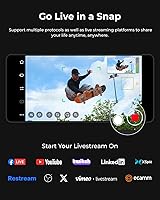
  • Platform Support: Compatible with major streaming platforms including YouTube, Twitch, and Facebook via RTMP, and integrates with OBS, vMix, and similar software through UVC or NDI.

Related Reviews
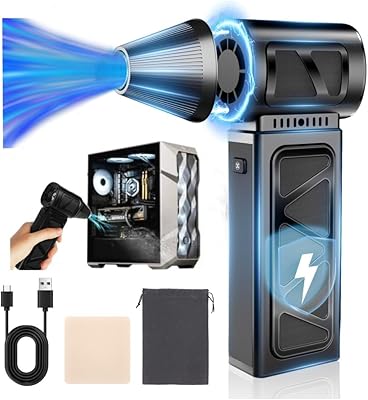
YUHUO Compressed Air Duster 360000 RPM Electric Air Duster
86%
88%
Performance & Power
91%
Ease of Use
85%
Battery Life
93%
Portability & Size
67%
Noise Level
More
Bumble and bumble Don't Blow It Fine (H)air Styler Air Dry Cream, 5 Fl Oz
84%
88%
Effectiveness for Fine Hair
90%
Lightweight Feel
85%
Volume and Body
92%
Ease of Use
80%
Scent/Fragrance
More
realme Buds Air 5
realme Buds Air 5
85%
89%
Sound Quality
91%
Active Noise Cancellation (ANC)
90%
Battery Life
84%
Comfort & Fit
87%
Gaming Performance
More
CAGIWIRU GG08 Cordless Electric Air Duster
71%
77%
Airflow Performance
58%
Battery Life & Runtime
71%
Build Quality & Durability
88%
Portability & Ergonomics
82%
Nozzle Variety & Fit
More
Meudeen Air Duster AD08A
85%
91%
Cleaning Performance
85%
Ease of Use
93%
Eco-Friendliness
75%
Noise Level
88%
Accessories Included
More
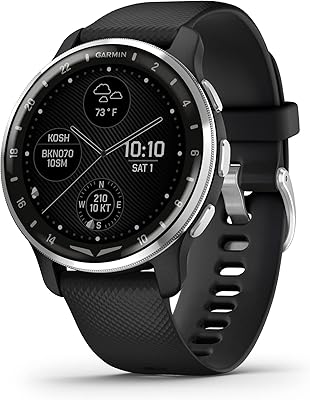
Garmin D2 Air X10
Garmin D2 Air X10
87%
89%
Aviation Features
92%
GPS Accuracy
85%
Battery Life
88%
Ease of Use
90%
Health Tracking
More
SDFM Air Duster-X15
SDFM Air Duster-X15
84%
90%
Cleaning Power
88%
Battery Life
92%
Portability
85%
Speed Settings
87%
Ease of Use
More
realme Buds Air 7
realme Buds Air 7
85%
88%
Sound Quality
94%
Battery Life
85%
Noise Cancellation
80%
Build Quality
90%
Comfort & Fit
More
NEBULA Capsule Air Projector
86%
94%
Portability
88%
Battery Life
91%
Ease of Setup
85%
Brightness in Low Light
80%
Audio Quality
More
Goweto Go-AD08PL Electric Air Duster
84%
88%
Airflow Power & Cleaning Performance
92%
Ergonomics & Comfort
64%
Power Source & Convenience
86%
Versatility & Attachments
89%
Value & Cost Savings
More

FAQ

NDI requires a separate license purchase — it is not included with the camera. This catches a lot of buyers off guard, so factor that additional cost into your budget before you buy, especially if NDI support is your primary reason for choosing this camera over cheaper alternatives.

Yes, absolutely. Switching the OBSBOT Tail Air NDI into UVC mode via the PC software turns it into a standard plug-and-play USB webcam that most applications recognize automatically. It is one of the things users appreciate most — the ability to keep it simple when the production does not demand more.

Expect around 2.5 hours of continuous use on a full charge. For events longer than that, the cleanest solution is running it over Power over Ethernet, which keeps it powered indefinitely through the same cable carrying your network signal. If you are at a venue without PoE infrastructure, plan for a battery swap or bring a USB-C power bank as a backup.

Yes, it integrates with both OBS and vMix. In UVC mode it appears as a standard webcam source, and with an NDI license active it can be pulled into vMix or OBS with the NDI plugin as a network source. RTMP and RTSP output options also give you additional routing flexibility depending on your setup.

Firmware updates require inserting a U3-rated Micro SD card into the camera before starting the update process through the companion app. If you do not have a U3 card on hand, the update will not work — this is a detail many users miss on first setup, so it is worth having a compatible card ready before you need it.

The Tail Air works very well in church environments. A common approach is two to three units covering the stage from different angles, all networked over Ethernet and controlled remotely from a tablet or laptop in the sound booth. Each unit does need its own NDI license for full network-based operation, so account for that cost when planning a multi-camera deployment.

For normal presenter movement — walking, gesturing, moving between a desk and a whiteboard — the tracking is smooth and responsive. If someone walks completely out of frame, the camera holds its last position and reacquires when the subject returns. Very fast lateral movement or crowded scenes with multiple people crossing paths can cause brief hesitation, but for most streaming and worship applications it performs reliably.

There is no built-in microphone, so you will need to handle audio separately. This is worth knowing upfront if you were hoping to use this as a single all-in-one streaming device. Most users pair it with a USB audio interface, a wireless lav system, or a mixer feeding directly into their streaming software.

The camera has a standard tripod thread, so most ball-head wall mounts and ceiling brackets designed for small PTZ cameras are compatible. Given that it weighs under two pounds, the mount choice is more about cable management and positioning flexibility than load-bearing capacity. OBSBOT also sells its own mounting accessories that are specifically designed for the Tail Air form factor.

It can, especially in busy environments where people move naturally in front of the lens. The gesture recognition requires reasonably deliberate hand signals at a reasonable distance, which helps, but in a room with multiple people moving around — a classroom, a workshop, a busy event space — unintended triggers have been reported by users. For those environments, controlling the camera through the app or a remote is the more reliable option.