Overview

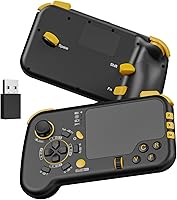
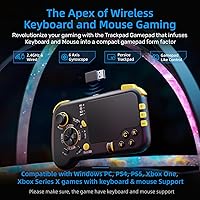
The IFYOO GTP01 Wireless Gaming Touchpad Controller is a genuinely unusual device — think of it as a TV remote that grew up into a proper input tool, combining a keyboard layout, a precision trackpad, and a traditional gamepad form factor into one handheld unit. It targets a specific kind of gamer: someone who wants mouse-level precision from the couch without dragging a desk into the living room. Setup is simple — plug in the 2.4GHz USB receiver and you're done, no drivers required. But here's the part worth reading twice: game compatibility matters. This wireless hybrid controller only works in titles that natively support keyboard and mouse input, which rules out a large chunk of the console library. At its mid-range price, it sits above budget dongles but demands some homework before buying.
Features & Benefits

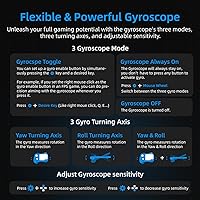
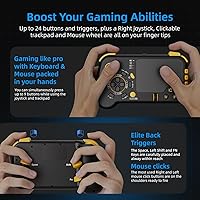
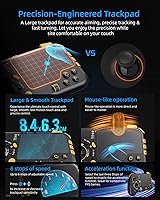
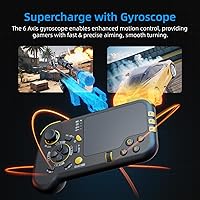
The trackpad is the heart of this touchpad gamepad, behaving more like a high-end laptop pad than the plastic nub found on budget alternatives. Six sensitivity levels let you tune how snappy your cursor feels — high for fast FPS turns, low for careful ARPG targeting. The built-in gyroscope adds useful nuance: tilt the controller to fine-tune aim rather than fighting the thumbstick alone. Three modes and three turning axes mean you can configure it to match how you naturally hold the device. The ALPS analog joystick and micro switch buttons feel crisp for this form factor, and dual scroll wheels with back buttons add depth that is rarely available in similarly sized devices. A rechargeable battery is included — no hunting for AAs mid-session.

Best For

The GTP01 makes the most sense for living room PC gamers and Steam Deck users who want the kind of cursor precision a standard controller cannot provide, without setting up a keyboard tray. It is also a solid pick for FPS or ARPG players on Xbox or PlayStation who find thumbstick aiming frustrating but do not want to commit to sitting at a desk. Travelers and compact-setup users will appreciate that this wireless hybrid controller replaces two separate devices in one carry. That said, it is not the right tool for games demanding rapid full-keyboard typing — its layout is not optimized for that — and titles that block keyboard and mouse input on consoles will simply not respond at all. Know your game list before buying.

User Feedback

Buyers who stick with the GTP01 generally come around on it — the recurring theme in positive reviews is how natural the trackpad feels after a short adjustment period, with several users specifically calling out gyro aiming as a welcome supplement for fine corrections rather than primary aim control. On the critical side, the button layout learning curve is real. It takes time to internalize where everything sits, and a few buyers found the FN remapping system confusing at first. Build quality gets mostly favorable remarks — the textured grip and micro switch click are frequently mentioned positives. Battery life appears solid based on user reports, though some note inconsistent console performance across titles, reinforcing that compatibility research is essential before committing.

Pros

  • The precision trackpad offers six sensitivity levels, making it genuinely tunable for both slow tactical play and fast FPS response.
  • Plug-and-play 2.4GHz wireless setup works out of the box with no driver installation required.
  • Gyro aiming adds a useful layer of fine correction on top of trackpad control, particularly helpful in FPS games.
  • Micro switch buttons and an ALPS joystick give the GTP01 a tactile quality noticeably above similarly priced competitors.
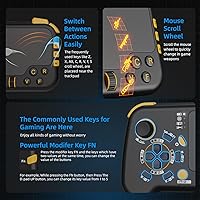
  • Back buttons and dual scroll wheels are practical additions rarely found on a device this compact.
  • The built-in rechargeable battery means no AA replacements, and battery life holds up well according to consistent buyer reports.
  • Compatible across Xbox One, Xbox Series X|S, PS4, PS5, PC, and Mac, making it versatile across a mixed gaming setup.
  • At 13.1 ounces and sized close to a standard controller, this touchpad gamepad is genuinely portable and easy to travel with.
  • The FN modifier key system allows button remapping per game, which is useful when switching between different genres regularly.

Cons

  • Only works with titles that natively support keyboard and mouse input — incompatible games simply will not respond at all.
  • The button layout has a real learning curve that can disrupt gameplay for the first several sessions.
  • Console game compatibility is inconsistent; some titles that appear supported behave unpredictably in practice.
  • The FN remapping system, while flexible, is not immediately intuitive and lacks clear onscreen guidance.
  • At 13.1 ounces, extended handheld sessions may cause fatigue for users with smaller hands.
  • Not a practical solution for games requiring fast, full-keyboard text input or complex hotkey-heavy interfaces.
  • Platform restrictions on PlayStation and Xbox can vary by game update, so compatibility may change without warning.
  • No companion app or software means all configuration happens through button combinations, which some users find fiddly.

Ratings

The scores below reflect an AI-driven analysis of verified global buyer reviews for the IFYOO GTP01 Wireless Gaming Touchpad Controller, with spam, bot activity, and incentivized feedback actively filtered out to ensure the results represent genuine purchase experiences. Ratings span the full spectrum of this device's performance — from where it genuinely impresses to where it falls short — so you get an honest picture before committing. Both the enthusiastic praise and the recurring frustrations from real users are transparently factored into every score.

Trackpad Precision
83%
Users consistently describe the trackpad as the standout feature of the GTP01, noting it feels closer to a quality laptop pad than anything else in this form factor. For FPS titles where cursor speed matters, the six sensitivity levels give players meaningful control over how the surface responds, and most users land on a setting that works for them within an hour or two.
A subset of buyers note that the trackpad can feel slightly less responsive at the lowest sensitivity settings, making precise micro-adjustments harder than expected. A few users with larger hands also report accidentally grazing the pad during non-trackpad actions, causing unintended cursor movement mid-game.
Game Compatibility
54%
46%
On PC and in supported console titles, this touchpad gamepad works reliably with no fuss. Living room PC gamers using it through Steam particularly benefit, since a wide range of Steam titles support keyboard and mouse input natively, giving the device a solid practical library to work with.
This is where the most buyer frustration concentrates. Compatibility is entirely dependent on the game's own support for keyboard and mouse, and many console buyers discover after purchase that their specific titles do not qualify. Platform-level restrictions on Xbox and PlayStation can also shift with firmware updates, making compatibility feel unstable over time.
Gyroscope Performance
71%
29%
Buyers who invest time in configuring the gyro report that it meaningfully improves fine aiming corrections in FPS games, particularly during slow peeks or long-range tracking where thumbstick drift would normally cost accuracy. The three turning axis options help users tune the motion response to match their natural wrist movement.
The gyro aiming learning curve is steep, and buyers who expected it to work intuitively out of the box were often disappointed. Several reviewers noted that gyro drift becomes noticeable during extended sessions, requiring occasional recalibration that breaks the flow of gameplay.
Button Layout & Ergonomics
61%
39%
Once the layout is internalized, users who stuck with the GTP01 through the initial adjustment period describe the button placement as logical and efficient for its dual keyboard-gamepad role. The back buttons and scroll wheels in particular draw praise as genuinely useful additions that reduce finger repositioning mid-game.
The button layout is the most polarizing aspect of this wireless hybrid controller. Many buyers describe the first few sessions as disorienting, and a notable number of negative reviews come from users who never got past that initial awkwardness. Those accustomed to either a traditional controller or a keyboard will find neither muscle memory translates well here.
Build Quality
76%
24%
The textured grip surface receives consistent positive mentions, with users noting it stays comfortable and non-slip during extended couch sessions. Micro switch buttons are a notable step above the membrane alternatives found on budget competitors, and the ALPS joystick feels appropriately solid for the price tier.
Some buyers report that the plastic shell feels slightly hollow when tapped, raising mild durability concerns for heavier-handed users over the long term. The scroll wheels, while functional, are described by a few users as having less defined click resistance than the primary buttons.
Wireless Reliability
82%
18%
The 2.4GHz connection is broadly praised for being stable across typical living room distances, with very few reports of significant input lag or unexpected disconnects during normal use. Plug-and-play setup across all listed platforms is consistently mentioned as hassle-free, which is a real advantage for console users who dread driver installations.
A small number of buyers experienced intermittent disconnects when the USB receiver was plugged into a rear port and the controller was used at the far edge of a large room. Signal reliability appears to drop more noticeably when other 2.4GHz devices are operating nearby simultaneously.
Battery Life
78%
22%
Verified buyer feedback is largely positive about battery endurance, with users reporting that the GTP01 holds up through multiple long gaming sessions before needing a charge. The built-in lithium-ion setup removes the recurring cost and inconvenience of disposable batteries, which is appreciated by regular users.
IFYOO does not publish an official rated hour figure, which leaves buyers unable to plan around it accurately. A small segment of reviewers noted the battery indicator system is not intuitive, meaning some users were caught off guard by a low charge without clear advance warning.
Setup & Ease of Use
69%
31%
The initial hardware setup is genuinely simple — insert the USB receiver, and the device connects automatically with no configuration screens or driver prompts. For PC users especially, this zero-friction start is a meaningful plus compared to Bluetooth alternatives that can require repeated pairing steps.
The ease of use score drops significantly once you move past initial pairing. The FN remapping system is not self-explanatory, and the user manual is described by buyers as sparse and sometimes confusing. Users who do not enjoy reading technical documentation will likely struggle to unlock the device's full feature set.
FPS Gaming Performance
79%
21%
For FPS play specifically, the combination of trackpad targeting and supplementary gyro correction gives the GTP01 a meaningful accuracy advantage over thumbstick-only controllers in supported titles. Buyers who play games like first-person shooters on PC through a TV setup describe the experience as a genuine upgrade over both mouse-on-couch workarounds and standard controllers.
The performance advantage disappears in titles without keyboard and mouse support, and even in supported games, players accustomed to a dedicated gaming mouse will notice the trackpad still cannot fully replicate that level of flick-shot precision under pressure.
Portability
84%
At its given dimensions and weight, the GTP01 consolidates what would otherwise require a separate keyboard and mouse into a single handheld unit that fits easily in a travel bag. Buyers who game across multiple setups — home TV, hotel room, a friend's console — highlight this as a practical advantage over carrying dedicated peripherals.
At 13.1 ounces, it is noticeably heavier than a standard controller, which some users feel during longer portable sessions. The USB receiver is small enough to misplace easily, and there is no built-in storage slot for it on the device itself, which is a minor but recurring complaint from travelers.
Value for Money
67%
33%
Buyers who researched the compatibility requirements before purchasing and use the device within its supported ecosystem generally feel the price is justified given the hardware quality and feature depth compared to budget alternatives. The inclusion of back buttons, dual scroll wheels, and a gyro at this tier is genuinely competitive.
For buyers who discovered the keyboard-and-mouse-only limitation after purchasing, the value perception drops sharply. The price point also means expectations are higher, and those who experience persistent learning curve difficulties tend to feel the investment was not worthwhile relative to a well-known traditional controller.
ARPG & Strategy Suitability
72%
28%
In slower-paced ARPG and strategy titles where precision matters more than reflexes, the trackpad proves particularly useful for map navigation, menu targeting, and skill selection. Several buyers who play games in these genres describe the touchpad gamepad as the best couch option they have found for this style of play.
Games that require rapid hotkey sequences or frequent text input expose the layout's limitations quickly. ARPG titles with dense skill bars can be difficult to manage efficiently through the FN remapping layer alone, and some buyers ultimately maintained a separate keyboard nearby for those interactions.
Platform Versatility
66%
34%
The hardware compatibility list is genuinely broad — Xbox One through Series X, both PlayStation generations, PC, Mac, and Steam Deck are all officially supported. For multi-platform households, this range means the device can travel between setups without purchasing separate input solutions for each system.
Having compatible hardware is only half the equation. Console users find that actual usable game titles are far fewer than the platform support list implies, because each game must individually support keyboard and mouse. This creates a disconnect between the device's theoretical versatility and its practical day-to-day range.

Suitable for:

The IFYOO GTP01 Wireless Gaming Touchpad Controller is a strong fit for living room PC gamers and Steam Deck users who want genuine cursor precision without a desk setup — essentially anyone tired of the gap between thumbstick control and mouse-level accuracy. Console players who primarily play FPS or ARPG titles on Xbox or PlayStation, where keyboard and mouse input is officially supported, will find the trackpad and gyro aiming combination meaningfully better than what a standard controller offers. Travelers and compact-setup gamers who want a single handheld device instead of carrying a separate keyboard and mouse will appreciate how much the GTP01 consolidates into one ergonomic unit. It also suits accessibility-focused users who find traditional gamepad layouts restrictive, since the FN remapping system and back buttons offer real flexibility in how controls are assigned.
Not suitable for:

The IFYOO GTP01 Wireless Gaming Touchpad Controller is a poor match for anyone who has not first confirmed their game library supports keyboard and mouse input — this is a hard technical requirement, not a preference, and it eliminates a significant portion of the console catalog outright. Players who expect instant comfort will also be frustrated: the button layout is genuinely unfamiliar and takes focused time to internalize before it stops slowing you down mid-game. Anyone who needs rapid, fluid full-keyboard text input — for MMO chat, strategy game commands, or browsing — will find the compact layout a real obstacle compared to even a small dedicated keyboard. Similarly, buyers who prioritize a completely plug-and-play experience with zero learning investment should look elsewhere, because getting the most out of this wireless hybrid controller requires deliberate configuration and patience.
Specifications

  • Connectivity: Uses a 2.4GHz wireless connection via a compact USB receiver that plugs into the host device.
  • Compatible Platforms: Works with Xbox One, Xbox Series X|S, PS4, PS5, PC running Windows 7 through 11, and Mac OS.
  • Dimensions: The controller measures 6.77 x 4.25 x 1.65 inches, roughly comparable in footprint to a standard gamepad.
  • Weight: The unit weighs 13.1 ounces, which is slightly heavier than a typical wireless controller due to its integrated components.
  • Trackpad Sensitivity: The precision trackpad offers 6 discrete speed levels, adjustable to suit slow tactical aiming or fast cursor movement.
  • Gyroscope: An onboard gyroscope supports 3 operational modes, 3 turning axes, and 6 adjustable speed stops for motion-based aiming.
  • Joystick Type: The analog joystick uses an ALPS mechanism, which provides more consistent feel and longer durability than generic alternatives.
  • Button Type: All primary buttons use micro switch mechanisms, delivering a crisp, tactile click response with each press.
  • Extra Controls: The layout includes back buttons, dual scroll wheels, and an FN modifier key for per-button remapping without software.
  • Battery Type: A built-in lithium-ion battery is included and rechargeable via the supplied USB cable, eliminating the need for disposable batteries.
  • Driver Requirement: No drivers or software installation are required; the device operates as plug-and-play on all supported platforms.
  • Input Limitation: The controller only functions in games that natively support keyboard and mouse input on the target platform.
  • Model Number: The official model identifier is IFYOO-GTP01P-Black2.
  • Package Contents: The box includes the controller unit, a 2.4GHz USB wireless receiver, a USB charging cable, and a printed user manual.
  • Manufacturer: The GTP01 is designed and manufactured by IFYOO, a brand focused on specialty gaming input devices.

Related Reviews

Rii RK707 3-in-1 Wireless Game Controller, Keyboard, and Mouse Combo
83%
86%
Ease of Use
80%
Build Quality
84%
Performance in Gaming
88%
Battery Life
65%
Ergonomics
More
Pulsar Gaming Gears X3 Wireless Gaming Mouse
86%
94%
Precision & Tracking Performance
89%
Ergonomics & Comfort
91%
Lightweight Design
87%
Durability & Build Quality
90%
Button Responsiveness & Switch Longevity
More
Pulsar X2F Wireless Fingertip Gaming Mouse
80%
94%
Weight & Form Factor
89%
Sensor Performance
91%
Polling Rate (8K Wireless)
88%
Switch Feel & Click Quality
78%
Grip & Ergonomics
More
Pulsar Gaming Gears Xlite v3 Medium Wireless Gaming Mouse
88%
93%
Ergonomics & Comfort
91%
Wireless Performance
89%
Battery Life
86%
Build Quality
94%
Precision & Sensor Accuracy
More
Logitech Wireless Touchpad
84%
80%
Performance
85%
Ease of Use
88%
Wireless Connectivity
83%
Build Quality
82%
Ergonomics
More
IFYOO G59 Gaming Mouse
86%
88%
Performance
90%
Ergonomics
92%
Connectivity Options
86%
Battery Life
78%
Customizability
More
Alienware Pro Wireless Gaming Headset
87%
91%
Sound Quality
88%
Noise Cancellation
90%
Comfort for Long Sessions
95%
Battery Life
92%
Charging Speed
More
Vakedy HW20
Vakedy HW20
78%
91%
Battery Life
88%
Value for Money
83%
Wireless Performance
61%
Microphone Quality
74%
Comfort & Fit
More
YOTMS Wireless Gaming Headset Q2
85%
88%
Comfort for Long Sessions
91%
Sound Quality (7.1 Surround)
85%
Battery Life
70%
Microphone Performance
90%
Ease of Setup
More
Skullcandy PLYR Wireless Gaming Headset
77%
91%
Battery Life
88%
Wireless Performance
76%
Sound Quality
69%
Microphone Quality
83%
Comfort & Fit
More

FAQ

No, the IFYOO GTP01 Wireless Gaming Touchpad Controller is fully plug-and-play. Just insert the USB receiver into your console or PC and it should be recognized immediately with no additional setup required.
Not with every game — this is the most important thing to understand before buying. The GTP01 only works in titles that officially support keyboard and mouse input. If a game does not list that support, the controller will not register in it at all. Always check your specific game's compatibility before purchasing.

Think of gyro aiming as a fine-tuning layer, not a replacement for the trackpad. You use the trackpad to swing your view roughly toward a target, then subtle tilts of the controller let you make precise adjustments. It takes some getting used to, but most users find it adds real accuracy in FPS games once the movement becomes natural.

IFYOO does not publish an official hour rating, but buyer reports consistently describe the battery as lasting through extended sessions without issue. Recharging via USB cable is straightforward, and having a built-in battery means you will never be caught without replaceable AAs at an inconvenient moment.

Yes, and it is worth being honest about this. The layout is unlike a standard controller or a traditional keyboard, so the first few hours of use can feel disorienting. Most users report that it clicks into place after dedicated practice, but if you are not willing to invest that time, this wireless hybrid controller may frustrate you early on.

Yes, the Steam Deck is listed as a compatible device. Since the Steam Deck runs a Linux-based OS and many Steam games support keyboard and mouse natively, it is actually one of the better use cases for this touchpad gamepad, especially for traveling or couch gaming.

The surface area and sensitivity are in a similar range to a mid-size laptop trackpad, but the tuning is optimized for gaming rather than desktop navigation. The six sensitivity levels let you push it toward faster, more responsive cursor behavior than most laptop pads allow by default.

Yes, the FN modifier key lets you reassign the D-pad and several other buttons to different inputs, which is useful when switching between genres with different control needs. The remapping happens directly on the device without any companion app, though it does require learning the key combination process from the manual.

It can be a good option for accessibility-focused users, particularly because the trackpad removes the need for precise thumbstick micro-movements and the button remapping adds flexibility. That said, at 13.1 ounces with a compact grip, users with limited grip strength may find sustained holds tiring.

Mac OS is listed as a compatible platform, and since the device connects as a standard wireless input device, basic cursor and trackpad functions should work for general navigation. However, it is designed around gaming use cases, so do not expect the same refined experience you would get from a dedicated Mac peripheral.