IFYOO G59 Tri-Mode Wireless Gaming Mouse







Overview
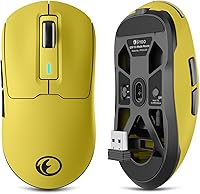
The IFYOO G59 Tri-Mode Wireless Gaming Mouse is a budget-oriented peripheral that punches reasonably well for its price, offering wireless flexibility and a genuinely lightweight build to everyday users and casual gamers alike. IFYOO has carved out a niche in affordable peripherals, and the G59 fits that pattern — it's not trying to compete with flagship gaming mice, but rather serve users who want wireless convenience without a heavy investment. The yellow and black colorway leans gaming without going overboard, and the lack of RGB keeps things simple. Released in mid-2024, it's already ranked in the top 1,100 in Computer Mice on Amazon, which says something about its real-world appeal.
Features & Benefits
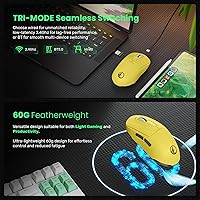
Three connectivity options cover most real-world needs — 2.4GHz wireless for low-latency gaming, Bluetooth for hopping between a laptop and tablet, and wired USB-C when the battery runs low. At 60 grams, this lightweight wireless mouse is genuinely competitive in its weight class; you feel the difference within minutes. The PAW3104 optical sensor tops out at 8,000 DPI across six steps, paired with a 500Hz polling rate — solid for casual play but not a tournament-grade setup. Battery capacity sits at 600mAh, and the dongle tucks neatly inside the mouse body so you won't lose it in transit. A paracord-style cable rounds out the package for wired sessions without drag.
Best For
This tri-mode gaming mouse makes the most sense for people who want wireless flexibility on a tight budget. Students switching between a Bluetooth-connected laptop and a 2.4GHz desktop setup will find the multi-device pairing genuinely useful day-to-day. It's also a reasonable pick for light competitive gamers — think MOBAs or casual shooters rather than ranked FPS titles where sensor precision is critical. The 60g build appeals to anyone dealing with wrist fatigue during long sessions. Mac users can plug in and get going, but there's no driver support on macOS, so button remapping and DPI tuning stay Windows-only. As an entry-level wireless option, it covers the basics well without unnecessary complexity.
User Feedback
Buyers consistently highlight how noticeably light the G59 feels compared to their previous mice, with several noting reduced wrist strain after long work sessions. Battery life earns generally positive marks, with most users reporting multi-day use before needing a charge. That said, a few reviewers flag that the DPI button placement feels awkward mid-game and that click feedback is softer than expected. Wireless latency in 2.4GHz mode draws little complaint, but Bluetooth users occasionally mention a slight lag spike. Build quality impressions are mixed — the plastic feels light, which some appreciate and others read as flimsy. Overall, the value-to-weight ratio is the most repeated positive takeaway across reviews.
Pros
- Tri-mode connectivity covers 2.4GHz, Bluetooth, and wired USB-C in a single affordable package.
- At just 60g, the G59 is noticeably lighter than most mice in its price range.
- The 2.4GHz dongle stores inside the mouse body, so you will not misplace it while traveling.
- A paracord-style USB-C cable reduces drag significantly during wired sessions.
- 500Hz polling rate delivers responsive tracking for everyday use and casual gaming.
- Six adjustable DPI steps give enough flexibility for switching between precision tasks and fast movements.
- The 600mAh battery holds up well across multiple days of moderate daily use.
- Windows users can remap all six buttons and adjust macros through the included driver software.
- The compact, no-frills design works well for bag-friendly portable setups.
Cons
- Driver software is Windows-only, leaving Mac users with no customization options at all.
- The PAW3104 sensor is not suited for fast-paced competitive gaming where precision tracking matters most.
- Click feel is softer and less tactile than many buyers in this category expect.
- Bluetooth mode can introduce occasional latency spikes, making it unreliable for gaming use.
- Plastic construction feels light in a way that some users interpret as fragile rather than intentional.
- DPI button placement receives recurring criticism for being awkward to reach during active use.
- No RGB lighting may disappoint buyers who expect gaming aesthetics at any price point.
- With only six programmable buttons, power users needing extensive macro setups will find it limiting.
Ratings
The scores below for the IFYOO G59 Tri-Mode Wireless Gaming Mouse were generated by our AI engine after analyzing verified purchase reviews from buyers worldwide, with spam, bot-submitted, and incentivized feedback actively filtered out. Each category reflects the honest distribution of real user sentiment — strengths and frustrations alike — so you get a clear picture of where this mouse earns its keep and where it falls short.
Value for Money
Wireless Performance
Weight & Ergonomics
Build Quality
Battery Life
Sensor Accuracy
Software & Customization
Connectivity Setup
Click Feel
Portability
DPI Range & Steps
Aesthetics
Paracord Cable
Suitable for:
The IFYOO G59 Tri-Mode Wireless Gaming Mouse is a strong fit for budget-conscious buyers who want genuine wireless flexibility without spending a lot. Students who work across a laptop and desktop will appreciate being able to switch between Bluetooth and 2.4GHz without re-pairing constantly. The 60g build is a real draw for anyone who spends hours at a keyboard and notices fatigue by the end of the day — whether that's a remote worker grinding through spreadsheets or a casual gamer running long sessions in slower-paced titles. Windows users get the added benefit of the customization driver, which lets them remap buttons and fine-tune DPI steps to match their workflow. For someone who just wants a reliable, light, multi-mode mouse at an accessible price, this tri-mode gaming mouse covers the essentials without unnecessary complexity.
Not suitable for:
The IFYOO G59 Tri-Mode Wireless Gaming Mouse is not the right tool for serious or competitive gamers who need a precision-grade sensor. The PAW3104 is a capable budget optical sensor, but it is not in the same conversation as the sensors found in mid-range or premium gaming mice — fast-paced shooters or ranked competitive play will expose its limitations. Mac users should also think carefully before buying: there is no driver support on macOS, which means no button remapping, no macro setup, and no DPI customization beyond what the hardware cycle allows out of the box. Users who prefer a heavier, more substantial mouse feel — common among those used to full-size ergonomic designs — may find the lightweight build underwhelming rather than freeing. If you need a mouse that works equally well as a deeply customizable input device across both Windows and macOS, this lightweight wireless mouse will leave you wanting more.
Specifications
- Model: The mouse is officially designated as the IFYOO G59, model number IFYOO-G59-Yellow&Black.
- Connectivity: Supports three input modes: 2.4GHz wireless via USB dongle, Bluetooth, and wired USB-C.
- Sensor: Uses a PAW3104 optical sensor, a budget-tier tracking chip suited for general and casual gaming use.
- Max DPI: Tracking sensitivity can be set up to a maximum of 8,000 DPI across six discrete adjustment levels.
- Polling Rate: Operates at a 500Hz polling rate, reporting cursor position to the system 500 times per second.
- Weight: The mouse body weighs 60g, placing it firmly in the lightweight category for its price range.
- Battery: Powered by a built-in 600mAh lithium polymer battery that recharges via the included USB-C cable.
- Cable: A 1.6-meter paracord-style USB-C cable is included for wired use, designed to minimize resistance and drag.
- Buttons: Features 6 programmable buttons that can be remapped using the Windows driver software.
- Dongle Storage: The 2.4GHz wireless receiver stores inside a dedicated slot in the mouse body when not in use.
- Dimensions: The mouse measures 6.5 x 4.96 x 2.24 inches in its retail packaging configuration.
- OS Support: Compatible with Windows 10 and 11 for full driver functionality; Mac users can use the mouse plug-and-play without software customization.
- Color: Available in a yellow and black colorway with a gaming-oriented aesthetic and no RGB lighting.
- Package Contents: Box includes the G59 mouse with wireless receiver pre-inserted, a 1.6m USB-C cable, and a printed user manual.
- Manufacturer: Designed and sold by IFYOO, a brand focused on producing affordable gaming peripherals.
- Release Date: The G59 was first listed for sale on Amazon in May 2024.
- Item Weight: Total packaged item weight is listed at 7 ounces, including cable and accessories.
Related Reviews
Alienware AW725H Wireless Gaming Headset
Pulsar X3 Mini Wireless Gaming Mouse
Pulsar X2F Wireless Fingertip Gaming Mouse

Pulsar Gaming Gears Xlite v3 Medium Wireless Gaming Mouse
Redragon M915WL Wireless Gaming Mouse

Xtrfy M4 Wireless Ultralight Gaming Mouse
IFYOO GTP01 Wireless Gaming Touchpad Controller

Alienware Pro Wireless Gaming Mouse
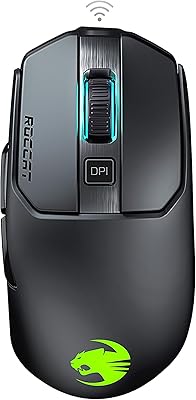
ROCCAT Kain 200 Wireless Gaming Mouse