
Overview

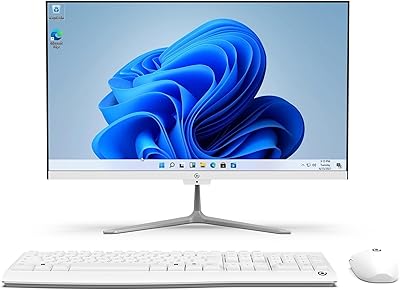
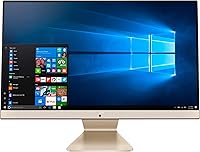
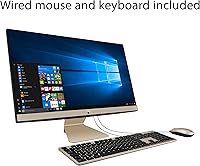
The ASUS AiO V241EA All-in-One Desktop PC is a versatile and compact solution designed for everyday computing. With its 23.8-inch Full HD display, it provides clear visuals for work or entertainment. Powered by the Intel Pentium Gold 7505 processor, this all-in-one desktop is well-suited for basic tasks like browsing, word processing, and video streaming. Weighing just 11.9 lbs, this sleek system is easy to set up and move, making it ideal for those who need a space-saving setup. It comes with Windows 10 Home, with the option for a free upgrade to Windows 11 when available.

Features & Benefits

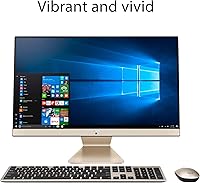
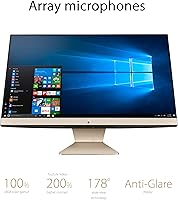
The ASUS AiO V241EA boasts a 23.8-inch FHD anti-glare IPS-level display that delivers sharp and vibrant visuals, making it a great choice for daily tasks. With 8GB DDR4 RAM and a 256GB SSD, it offers fast boot times and efficient multitasking performance. While the Intel UHD integrated graphics are sufficient for basic multimedia tasks, it’s not designed for heavy gaming or video editing. Its compact design helps save space, while the built-in 720p HD webcam makes video calls more convenient. This all-in-one desktop strikes a balance between performance and ease of use.

Best For

The ASUS AiO V241EA is an excellent option for home office users seeking a streamlined workstation that doesn’t take up much space. It’s also well-suited for students who need an affordable desktop for schoolwork and online learning. Casual users who require basic computing, such as browsing the web or watching videos, will find this system more than capable. Its compact size and practical features make it ideal for small office environments or anyone looking to minimize clutter without sacrificing performance.

User Feedback

Overall, users appreciate the compact design and the ease of setting up the ASUS AiO V241EA. Many have noted its smooth performance for basic tasks like browsing, word processing, and video conferencing. The fast boot time and responsiveness are also commonly praised. However, some users have pointed out the limitations of the integrated graphics, particularly when it comes to gaming or demanding multimedia tasks. Despite this, the system is generally considered a reliable, budget-friendly all-in-one for everyday computing and home office use.

Pros

  • The compact design makes this all-in-one desktop easy to set up and move around.
  • Its 23.8-inch FHD display provides clear visuals, ideal for work and casual use.
  • This device offers a smooth experience for everyday tasks like browsing and video calls.
  • With 8GB RAM and a 256GB SSD, it delivers responsive performance for basic computing needs.
  • The built-in 720p HD webcam is a convenient feature for video conferencing or online classes.
  • Ideal for home offices or small workspaces where a space-saving design is essential.

Cons

  • The integrated Intel UHD graphics limit performance for gaming or demanding multimedia tasks.
  • Users have reported that the screen lacks significant tilt or height adjustability.
  • Some find that the processing power is not sufficient for heavier workloads or multitasking.
  • It may not be the best choice for professionals who need high-end graphics or video editing capabilities.
  • The device is lightweight, but this can feel flimsy for those seeking a more robust build.
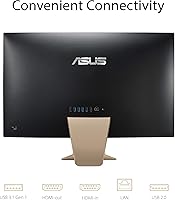
  • Limited connectivity options, with only a few USB ports and no HDMI-out for external monitors.

Ratings

After analyzing verified user reviews across multiple languages and platforms, we found a broad range of feedback for the ASUS AiO V241EA All-in-One Desktop PC. The aggregated scores reflect both its strengths, like ease of use and value for money, and pain points, such as limitations with integrated graphics for demanding tasks. Spam, incentivized, and off-topic reviews were filtered out to ensure only high-quality, authentic feedback contributed to these results, offering a balanced view of the product's overall performance and user satisfaction.

Value for Money
89%
Many users are impressed with the overall value of this device. It offers essential features, like a decent display and responsive performance, at a price point that's ideal for budget-conscious buyers. The inclusion of a free upgrade to Windows 11 is also seen as a bonus that adds to its overall appeal.
However, some buyers feel that the device's performance is somewhat limited by its integrated graphics, especially for more demanding tasks like gaming or video editing. Additionally, a few users mention that the build quality could be more premium for the price, particularly the plastic components.
Ease of Setup
91%
Users consistently rave about how easy it is to set up this all-in-one desktop. The compact design and straightforward plug-and-play installation make it an excellent choice for users who need a hassle-free experience. Many buyers report being up and running within minutes.
While setup is generally quick, some users have noted that the initial Windows 10 setup process can be slightly cumbersome, especially for those unfamiliar with PC configurations. A few also mentioned that the included instructions could be clearer for first-time users.
Performance for Basic Tasks
86%
This desktop handles everyday tasks like web browsing, word processing, and streaming with ease. Users often highlight its responsiveness and the smooth experience it offers for casual computing. The 8GB of RAM combined with the 256GB SSD ensures that these basic tasks are handled efficiently without lag.
However, some users mention that it struggles with more intensive workloads, such as multitasking with multiple apps or working with large files. The Intel Pentium Gold processor and integrated graphics, while sufficient for everyday tasks, fall short for those needing more processing power for advanced tasks.
Display Quality
88%
The 23.8-inch Full HD display is widely appreciated for its sharpness and clarity, offering vibrant colors and good contrast. The anti-glare IPS panel also ensures a comfortable viewing experience, whether you're working in a brightly lit room or streaming media.
Some users find that the display could be brighter, especially when used in well-lit environments. A few have also pointed out that the color accuracy might not be as precise as higher-end monitors, which could be a limitation for those doing color-sensitive work.
Build Quality
84%
The compact design and lightweight nature of this desktop make it easy to fit into small spaces, and many users appreciate the simplicity of the build. It’s a solid choice for users who value a space-saving, all-in-one solution without excessive bulk.
Some users have expressed concerns about the quality of the materials used in the build. The plastic construction feels a bit flimsy for some, and a few have noted that the device can feel less sturdy compared to other all-in-one models in the same price range.
Multitasking Performance
79%
21%
For light multitasking, users generally find the system responsive enough. Web browsing with multiple tabs open, along with a few office apps, works smoothly without noticeable slowdowns. The 8GB of RAM helps keep things running smoothly for these tasks.
However, when more demanding tasks are introduced, such as running several programs at once or handling larger files, the performance begins to degrade. Users have mentioned that the lack of a more powerful processor or dedicated graphics makes the device less suited for heavy multitasking.
Integrated Graphics
67%
33%
For basic tasks like browsing, video streaming, and office work, the integrated Intel UHD graphics provide a smooth experience. Many users find it adequate for casual media consumption and everyday computing.
For more graphically intensive tasks, such as gaming or video editing, the integrated graphics fall short. Users report poor performance in such activities, with noticeable lag and low frame rates, making it unsuitable for those looking for a desktop for more demanding tasks.
Portability
90%
At just 11.9 lbs, this all-in-one desktop is lightweight and easy to move, which is highly appreciated by users who may need to reposition it in their workspace. Its compact size also makes it ideal for those who work in smaller environments or need to transport it occasionally.
While it's easy to move around, some users wish it had more flexibility in terms of adjustable positioning. The fixed stand and non-adjustable height could be a limitation for those who prefer a more ergonomic setup.
Software Experience
85%
The device comes preloaded with Windows 10 Home, and the free upgrade to Windows 11 is a welcomed addition. The operating system runs smoothly on the hardware, and the interface is familiar and user-friendly, making it easy for users to get started right away.
Some users have pointed out that the Windows 10 to Windows 11 upgrade process can be a bit slow and cumbersome. Additionally, there are occasional minor software bugs reported, which may require troubleshooting or updates to resolve.
Customer Support
78%
22%
Several users have noted that ASUS provides decent customer support, with helpful responses and clear instructions for basic troubleshooting. Many have found their issues resolved quickly when reaching out for assistance.
On the downside, a few users have reported slow response times and difficulty reaching a representative. Some customers mentioned they had to wait longer than expected for support, which can be frustrating when dealing with technical issues.
Wi-Fi Connectivity
82%
18%
The Wi-Fi performance is generally reliable, with users reporting stable connections and good speeds for day-to-day use. It's ideal for tasks like browsing, video conferencing, and streaming without frequent dropouts or connection issues.
However, a small number of users have mentioned occasional connection drops or slower speeds, especially when dealing with larger file transfers or video streaming in higher resolutions. This could be a concern for those who rely on fast, stable Wi-Fi for more demanding tasks.
Webcam Quality
80%
20%
The built-in 720p HD webcam is adequate for casual video calls and meetings, providing clear enough video quality for everyday use. Users appreciate the convenience of not needing to invest in an external camera for basic video communication.
While it's sufficient for basic video calls, some users have pointed out that the quality could be better, especially in low-light conditions. The 720p resolution may not meet the expectations of users who require higher-quality video for professional presentations or streaming.
Long-Term Value
84%
For those seeking a budget-friendly desktop, this all-in-one device offers strong long-term value. The combination of solid performance for everyday tasks and the future-proofing offered by the free Windows 11 upgrade make it a good investment for basic work.
However, some users feel that the device may not age as well, especially with the limitations in terms of graphics performance. Those expecting to use the system for more resource-heavy tasks in the future may need to consider upgrades or look for a more powerful option.

Suitable for:

The ASUS AiO V241EA All-in-One Desktop PC is ideal for budget-conscious users seeking a space-saving, easy-to-set-up solution for everyday computing. It’s well-suited for home office workers, students, and casual users who primarily need a desktop for tasks like web browsing, word processing, and video conferencing. With its compact design and lightweight nature, it’s particularly helpful for those with limited space or those who frequently move their setup. Students with limited budgets, for example, will find this device a practical choice for their coursework and light entertainment. Additionally, small office environments can benefit from its all-in-one design, offering a clean and efficient workspace without cluttered peripherals.

Not suitable for:

However, this desktop is not a good fit for users requiring high-performance computing, such as gamers, video editors, or professionals working with demanding software. The integrated Intel UHD graphics and the Intel Pentium Gold processor are adequate for basic tasks, but they will struggle with more graphically intensive applications. Users who need to multitask heavily or handle resource-demanding workloads will likely find the performance lacking. Moreover, the fixed height stand and the limited adjustability of the screen may pose ergonomic issues for some users, especially those looking for a more customizable setup. For those who need more power or flexibility, other systems with dedicated graphics and higher processing power might be more appropriate.

Specifications

  • Display: 23.8-inch Full HD anti-glare IPS-level display for clear, vibrant visuals.
  • Processor: Intel Pentium Gold 7505 processor with speeds up to 3.5 GHz, ideal for everyday tasks.
  • RAM: 8GB DDR4 RAM, providing fast performance for general computing and multitasking.
  • Storage: 256GB PCIe SSD for quick data access and boot times.
  • Graphics: Intel UHD integrated graphics suitable for basic multimedia and light tasks.
  • Operating System: Pre-installed with Windows 10 Home, upgradeable to Windows 11.
  • Webcam: 720p HD webcam, integrated for video calls and online meetings.
  • Wi-Fi: Supports 802.11ab Wi-Fi connectivity for internet access.
  • USB Ports: Includes 3 USB 3.0 ports and 1 USB 2.0 port for external devices.
  • Weight: Weighs 11.9 lbs, providing a portable design without sacrificing screen size.
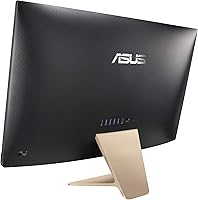
  • Dimensions: 12.26 x 16.1 x 6.5 inches, compact size for space-saving setups.
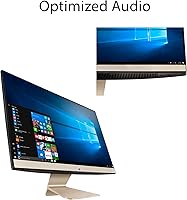
  • Audio: Integrated stereo speakers for basic sound output, suitable for everyday use.
  • Color: Gold finish, offering a sleek and modern appearance.
  • Power: Energy-efficient design suitable for home office and casual use.
  • Ports: Includes HDMI input, USB ports, and audio jack for expanded connectivity.
  • Software: Bundled with Windows 10 Home and software to optimize system performance.
  • Form Factor: All-in-one design reduces clutter and maximizes desk space.
  • Target Audience: Ideal for home office users, students, and casual users looking for a budget-friendly setup.
  • Upgradability: Limited upgrade options due to its compact all-in-one design.

FAQ

The ASUS AiO V241EA features a 23.8-inch Full HD display, an Intel Pentium Gold 7505 processor, 8GB of RAM, and a 256GB SSD. It's designed for home office, casual, and student use, and includes Windows 10 Home with a free upgrade to Windows 11.

Setup is very straightforward. Simply plug in the power cord, connect any peripherals, and follow the on-screen instructions to complete the setup. This device is known for its easy installation, making it ideal for users who prefer a hassle-free setup process.

The 8GB DDR4 RAM and 256GB SSD in this all-in-one desktop are not easily upgradeable. The device is designed for basic usage, so upgrading is generally not necessary. However, if you need more storage, consider using external drives or cloud storage.

The Intel Pentium Gold 7505 processor is sufficient for basic tasks like web browsing, document editing, and media consumption, but it is not designed for intensive gaming or video editing. If you need a device for heavy gaming, look for a desktop with a dedicated graphics card.

The 23.8-inch Full HD display features IPS-level technology, which provides clear and vibrant visuals. It also has an anti-glare coating, reducing reflections, making it suitable for daily tasks, web browsing, and video calls.

No, the ASUS AiO V241EA does not have HDMI-out or additional video ports for dual monitor support. It’s a compact, all-in-one solution designed for single-screen use, making it ideal for simpler workspaces.

Weighing 11.9 lbs, this all-in-one desktop is reasonably portable. It’s not as light as a laptop, but its compact design makes it easier to move around compared to traditional tower desktops.

Yes, this device includes a built-in 720p HD webcam, making it convenient for video conferencing or online classes. It’s a practical feature for both professional and personal use.

The ASUS AiO V241EA comes pre-installed with Windows 10 Home, but it also offers a free upgrade to Windows 11. This ensures you’ll have access to the latest features and updates from Microsoft.

While it’s perfect for basic tasks, the integrated Intel UHD graphics limit its performance for gaming or video editing. Additionally, the lack of upgradeable components like RAM or storage may be restrictive for users who need more power over time.