Overview

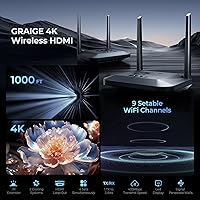
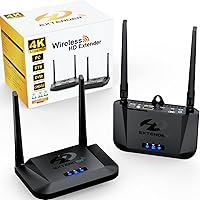
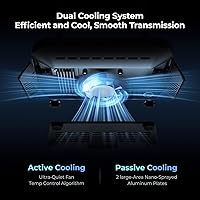
The Graige BIN-952 Wireless HDMI Transmitter Receiver sits in the mid-range tier of wireless video distribution — capable enough for serious home theater setups or small business use, without the cost of enterprise hardware. Its core promise is straightforward: send video from one source to up to three displays across different rooms, no cables required. Worth flagging upfront — this wireless HDMI extender supports 4K at 30Hz only, not 60Hz. That matters if you need smooth gaming or high-frame-rate content, but for streaming, presentations, or cable box distribution, it is rarely a problem. The dual cooling system — an active fan paired with passive aluminum plates — is a reliability feature that cheaper alternatives routinely skip.
Features & Benefits

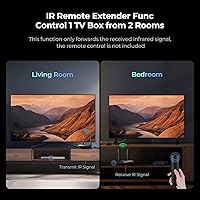
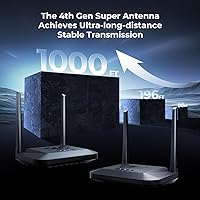
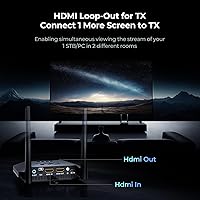
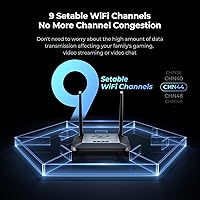
The range claim — up to 1000 feet — is the headline, and while that figure assumes open, line-of-sight conditions, real-world performance in a two-story home or mid-size office is strong enough for most setups. The HDMI loop-out port is genuinely practical: plug your local TV into the transmitter and broadcast to two additional rooms at the same time. The IR extender is a niche but useful addition — place the small sensor near your TV in a distant room and your existing remote will still control the source device, like a cable box, wherever it actually lives. Nine manually selectable Wi-Fi channels help the system sidestep congestion in environments with heavy wireless traffic.

Best For

This HDMI over Wi-Fi system is a strong match for anyone solving a specific multi-room video problem. Think one cable box shared across a bedroom, living room, and home office — without splitting subscriptions or drilling walls. It is also well-suited for small classrooms and boardrooms where a presenter needs to push content to multiple screens at once. Retail environments running digital signage from a single player will find the 1-to-3 setup particularly efficient. Security monitor installations in garages or warehouses — where cable runs are simply not feasible — are another practical fit. It is not the right pick for gamers or anyone prioritizing high-frame-rate 4K.

User Feedback

Across more than 300 ratings, the Graige transmitter kit holds a 4.5-star average — solid, though not without recurring criticisms. Setup speed is one of the most praised aspects, with many buyers reporting a working connection in under ten minutes. Signal stability over long distances also earns consistent positive mentions. On the negative side, the 4K 30Hz cap trips up buyers who expected full-spec 4K output, and the absence of an included remote is a frequent complaint. A handful of users in Wi-Fi-congested apartment buildings report occasional dropouts. Fan noise surfaces in some reviews, though the majority describe it as minimal and non-disruptive during normal use.

Pros

  • Distributes video from one source to up to three displays simultaneously — no cable runs required.
  • Quick to set up out of the box; most buyers report a working connection in under fifteen minutes.
  • The HDMI loop-out port lets you feed a local TV and wireless receivers at the same time.
  • At 1080p 60Hz, latency is low enough for presentations, cable TV, and everyday streaming.
  • Nine selectable Wi-Fi channels give users a real tool for avoiding interference in busy environments.
  • Dual cooling keeps the transmitter running reliably during extended always-on use cases like signage or CCTV.
  • IR extender lets you control a distant cable box with your existing remote — no extra hardware needed.
  • Compatible with virtually any HDMI source or display without driver installation or app setup.
  • Range in real residential and commercial environments is consistently rated better than competing kits.

Cons

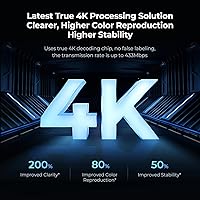
  • 4K output is capped at 30Hz — fast motion, gaming, and action content look noticeably worse at this frame rate.
  • The maximum 1000-foot range is a line-of-sight figure; expect meaningfully shorter distances through walls or floors.
  • No remote control is included, which frustrates buyers who expect one given the IR extender feature.
  • The receiver units feel cheaper in the hand than the transmitter, with HDMI ports that loosen over time.
  • Manual channel selection has no auto-optimization, so less technical users often never find the best band.
  • Documentation is thin, leaving IR extender setup and interference troubleshooting poorly explained.
  • Occasional audio-video sync drift during long sessions requires a device restart to correct.
  • Mixing receiver units from different purchase batches can cause pairing inconsistencies.

Ratings

The Graige BIN-952 Wireless HDMI Transmitter Receiver has been scored by our AI system after analyzing verified global buyer reviews, with spam, bot-generated, and incentivized feedback actively filtered out. Scores reflect honest patterns across real-world use cases — from home theater setups to small office deployments — and both the strengths and recurring frustrations are transparently factored in. No aspect has been softened or inflated.
Ease of Setup
88%
Most buyers report getting a live signal within ten minutes of unboxing, with no driver installation or app required. The plug-and-play nature is especially appreciated by non-technical users setting this up in a home living room or spare bedroom without any IT support.
A small but consistent group of users encountered pairing issues on first boot, particularly in environments with heavy Wi-Fi congestion. Manually switching channels resolves this, but the process is not well-documented in the included instructions.
Signal Stability
84%
Through-wall performance in standard residential construction is reliable enough for most multi-room setups, and buyers in two-story homes frequently report stable video across floors. Signal dropout complaints are notably rare among users who took time to select a clean Wi-Fi channel.
In apartment buildings or offices with dense wireless environments, intermittent freezing has been reported even after channel adjustment. A handful of users note that the signal degrades noticeably when multiple solid walls or metal structures sit between the transmitter and receiver.
Video Quality
79%
21%
At 1080p 60Hz, picture delivery is clean and consistent — buyers using this for cable box distribution or PC mirroring in a home office describe the image as sharp and artifact-free. Hardware decoding keeps the output looking natural rather than compressed.
The 4K 30Hz ceiling is the single most common disappointment in reviews. Buyers who purchased expecting full 4K 60Hz output — particularly for streaming 4K content from a media PC — found the frame rate limitation visibly noticeable, especially on larger screens during fast-moving scenes.
Transmission Range
81%
19%
Users in large commercial spaces like showrooms and warehouses report genuinely impressive distances, with several noting reliable performance well beyond what competing kits delivered. For large residential properties — big backyards, detached garages, multi-wing layouts — the range holds up better than expected.
The 1000-foot figure is a controlled line-of-sight ideal and buyers should not expect it in typical built environments. Real-world range through walls and floors is considerably shorter, and users who planned layouts based on the maximum spec sometimes found themselves repositioning equipment.
Multi-Room Distribution
86%
The 1-to-3 receiver configuration is a genuine differentiator for buyers trying to share a single cable box or media PC across several rooms. Running the same source to a bedroom, living room, and home office simultaneously works as advertised, with consistent sync across all displays.
Expanding beyond three receivers requires purchasing additional kits, and users have noted that mixing units from different batches occasionally causes pairing friction. There is also no independent control over individual receiver outputs — all screens receive the same signal simultaneously.
IR Extender Functionality
72%
28%
Buyers who actually use the IR extender tend to rate it positively — the ability to change channels or control a set-top box from a bedroom using the same remote you have always owned is a convenient touch that works without any extra configuration.
This feature goes unused by a large portion of buyers, partly because the manual explains it poorly. Some users also report limited compatibility with certain remote control brands, and the emitter cable is short enough to restrict placement flexibility near the receiver.
Cooling System & Heat Management
83%
The combination of an active fan and passive aluminum plates keeps the transmitter running at reasonable temperatures even during extended sessions. Buyers using this in always-on digital signage or CCTV monitoring roles appreciate that the unit does not throttle or shut down unexpectedly after hours of use.
The fan is audible in very quiet rooms, which bothers a subset of users who placed the transmitter near a bedroom TV or in a silent office. It is not loud by any objective standard, but in noise-sensitive environments, the constant low hum draws occasional complaints.
HDMI Loop-Out Utility
78%
22%
Being able to feed a local display directly from the transmitter while simultaneously broadcasting to other rooms is a practical feature that buyers in multi-screen setups consistently appreciate. It eliminates the need for a separate HDMI splitter in most common configurations.
The loop-out port introduces a minor signal delay in some setups when both the local and wireless outputs are active together. A few buyers also note that not all source devices play nicely with the simultaneous output, with certain streaming boxes defaulting to one output only.
Build Quality & Durability
74%
26%
The units feel solid enough for stationary use — the aluminum cooling plates give the transmitter a reassuringly sturdy feel compared to all-plastic alternatives in the same category. Buyers who have run this continuously for several months report no physical deterioration.
The plastic housing on the receivers feels noticeably cheaper than the transmitter body. Several buyers flagged that the HDMI ports feel slightly loose after repeated cable swaps, which is a concern for installations where the cables are frequently connected and disconnected.
Channel Management & Interference Avoidance
76%
24%
Having nine manually selectable bands gives technically inclined users a real tool for navigating crowded wireless environments. Conference room and classroom users in particular find this useful when nearby networks would otherwise cause disruption during presentations.
Channel selection is entirely manual with no automatic optimization, which means less experienced users may never find the cleanest band. The process requires consulting a small display on the unit, and without better documentation, many buyers simply leave it on the default setting.
Compatibility
85%
The system works with essentially any HDMI source or display — game consoles, PCs, Blu-ray players, cable boxes, projectors, and monitors all connect without driver or firmware fuss. Buyers appreciate not having to research compatibility before purchasing.
A small number of users encountered handshake issues with older HDMI 1.4 displays or non-standard resolutions. There are also occasional reports of the system not maintaining a stable connection with certain streaming sticks that manage HDMI signals aggressively.
Latency
71%
29%
For non-interactive use cases like streaming cable TV, watching movies, or displaying signage, the latency is imperceptible to the vast majority of buyers. At 1080p 60Hz the lag is genuinely low and consistently praised in presentation and classroom contexts.
At 4K 30Hz output, latency increases enough to make gaming impractical — something buyers discover only after setup. Even for standard streaming, a small number of users notice a slight audio-video sync drift over time, requiring periodic device restarts to correct.
Value for Money
77%
23%
For buyers who need multi-room video distribution without running cables through walls, the feature set relative to price lands reasonably well. The loop-out, IR extender, and multi-receiver support together represent more utility than comparably priced single-receiver kits offer.
Buyers who only need a basic one-to-one wireless HDMI connection may find the price harder to justify when simpler options exist at lower cost. If the 4K 30Hz limitation ends up being a dealbreaker, the value calculation shifts unfavorably given what the price point suggests.
Documentation & Support
58%
42%
Initial setup is simple enough that most buyers never need to consult the manual at all. For basic plug-in-and-go use, the included quick-start card covers the essential steps adequately and the unit behaves predictably out of the box.
The included manual is thin and offers little guidance for troubleshooting interference, using the IR extender properly, or optimizing channel selection. Customer support response times draw scattered criticism, and buyers dealing with edge-case technical issues often end up searching for community help online instead.

Suitable for:

The Graige BIN-952 Wireless HDMI Transmitter Receiver is a strong match for anyone who needs to distribute video from a single source to multiple rooms without running cables through walls or ceilings. It fits naturally into homes where one cable box or media PC needs to reach a bedroom, living room, and home office at the same time — a setup that would otherwise require either duplicate subscriptions or expensive in-wall wiring. Small business environments benefit too: a teacher mirroring a laptop to three classroom displays, a hotel lobby feeding the same content to multiple screens, or a retail store running digital signage from one central player are all use cases this system handles with minimal fuss. It also works well for security or CCTV monitor extensions in garages, workshops, or outbuildings where laying HDMI cables would be impractical. Buyers on large properties — think multi-wing homes, outdoor entertainment areas, or warehouse floors — will find the long-range capability genuinely useful, provided they set realistic expectations about real-world versus advertised distances.
Not suitable for:

The Graige BIN-952 Wireless HDMI Transmitter Receiver is the wrong choice for anyone whose primary use case involves gaming, fast-motion sports, or any application that demands true 4K at 60Hz. The system caps 4K output at 30Hz, which is fine for static presentations or slow-paced streaming but introduces visible motion blur and frame stutter on large screens during action-heavy content. Buyers in densely packed apartment buildings or offices with heavily congested Wi-Fi may also run into stability headaches that manual channel switching alone cannot fully resolve. If you only need to extend HDMI from one device to one display in the same room or across a short distance, the feature set here is overkill and simpler, less expensive options would serve better. Anyone expecting to control source devices remotely without some extra setup effort should also note that the IR extender is not intuitive to configure, and no remote control is included in the box.
Specifications

  • Brand: Manufactured by Graige under the model designation BIN-952.
  • Video Resolution: Supports 4K output at 30Hz and 1080p output at 60Hz, with hardware decoding for both modes.
  • Transmission Range: Rated up to 1000 ft under open line-of-sight conditions; real-world through-wall range will be shorter.
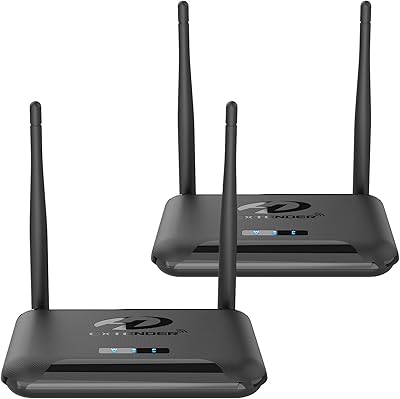
  • Configuration: One transmitter supports up to three receivers simultaneously, enabling multi-room video distribution from a single source.
  • Wi-Fi Channels: Provides 9 manually selectable Wi-Fi bands to reduce interference in crowded wireless environments.
  • HDMI Loop-Out: The transmitter includes a secondary HDMI output port for feeding a local display while broadcasting wirelessly to receivers.
  • IR Extender: Package includes one IR emitter and one IR receiver, allowing remote control of source devices from a distant room.
  • Cooling System: Uses a dual approach combining an active fan with a temperature control algorithm and passive dual nano-sprayed aluminum plates.
  • Connectivity: Supports HDMI, Wi-Fi, USB, and IR connectivity across transmitter and receiver units.
  • Compatible Sources: Works with any HDMI-output device including DVD and Blu-ray players, PCs, set-top boxes, and game consoles.
  • Compatible Displays: Compatible with any HDMI-input device including televisions, projectors, and monitors.
  • Package Dimensions: Box measures 6.46 x 5.08 x 4.57 inches, suitable for standard shelf or closet storage.
  • Weight: Total package weight is 1.32 lbs (0.6 kg) including both transmitter and receiver units.
  • Color: Both transmitter and receiver units are finished in black.
  • Control Interface: Units are operated via physical button controls; no smartphone app or programming is required.
  • Audio Support: Transmits audio alongside video signal over the wireless connection, supporting standard HDMI audio formats.
  • Power: Both units are powered via USB connections, with cables included in the package.
  • Availability Date: First made available for purchase on February 26, 2025.

Related Reviews

PAKITE BIN-850 Wireless HDMI Transmitter Receiver
75%
88%
Ease of Setup
79%
Signal Stability
58%
Through-Wall Range
83%
Video Quality
41%
1080i Compatibility
More
DxInvb Wireless HDMI Transmitter and Receiver Kit
75%
91%
Ease of Setup
58%
Device Compatibility
74%
Wireless Range & Stability
69%
Video Quality
83%
Build Quality & Portability
More
TPUFO G02 Wireless HDMI Transmitter and Receiver
77%
91%
Ease of Setup
78%
Signal Stability
83%
Video & Image Quality
74%
Transmission Range
87%
Latency Performance
More
MpioLife Wireless HDMI Kit V6
74%
91%
Ease of Setup
78%
Wireless Range (Open Space)
47%
Through-Wall Performance
83%
Video Quality
69%
Latency & Responsiveness
More
Weeryyi Wireless HDMI Transmitter and Receiver 1080p
84%
92%
Value for Money
88%
Transmission Range
91%
Ease of Setup
89%
Video Quality
85%
Multi-Screen Support
More
TTQ TR60 Wireless HDMI Transmitter and Receiver
79%
93%
Ease of Setup
78%
Signal Stability
86%
Video & Image Quality
81%
Latency Performance
88%
Build Quality & Materials
More
Anytrox THT-020-8 Wireless HDMI Extender
78%
93%
Ease of Setup
78%
Video Quality
71%
Wireless Stability
82%
Audio-Video Sync
67%
Wireless Range
More
WELUSOPU 1TX+2RX Wireless HDMI Extender Kit
74%
88%
Ease of Setup
74%
Wireless Range
67%
Video Output Quality
79%
Multi-Receiver Sync
81%
Latency Performance
More
LZLOO Wireless HDMI Transmitter and Receiver
77%
91%
Ease of Setup
74%
Signal Stability
68%
Wireless Range
77%
Video Output Quality
71%
Latency Performance
More
BRAIDOL TR50 Wireless HDMI Transmitter and Receiver
85%
91%
Performance & Connectivity
89%
Video Quality (4K/1080P)
95%
Ease of Use & Setup
88%
Signal Range (30m)
86%
Portability & Design
More

FAQ

It does work through walls — buyers regularly use it across floors in two-story homes or between rooms separated by standard drywall construction. That said, the 1000-foot figure is a best-case, open-air measurement. Through multiple walls, concrete, or metal structures, you should expect noticeably shorter reliable range, so plan your setup accordingly.

Yes, one transmitter supports up to three receiver units simultaneously, all displaying the same source content. Keep in mind that all three screens will show the same feed — there is no way to send different content to different receivers from a single transmitter.

Compatibility with streaming sticks is hit-or-miss. The transmitter works with any standard HDMI output, but streaming sticks manage HDMI signals in their own way and a small number of users have reported handshake issues. A dedicated media player or set-top box connected directly to the transmitter via HDMI tends to work more reliably than a stick plugged into the transmitter port.

Not ideally. At 4K the output is capped at 30Hz, and even at 1080p 60Hz there is enough latency that fast-paced or competitive gaming will feel noticeably sluggish. This system is designed for passive viewing — streaming, presentations, cable TV — rather than interactive gaming.

The IR extender lets you control a device connected to the transmitter — like a cable box — using your regular remote from wherever the receiver is placed. You plug the small IR emitter into the transmitter and point the IR receiver toward where you will be sitting near the remote display. When you press a button on your remote near the receiver, the signal travels back through the system and controls the source device in the other room. It works without any programming, but the placement of the IR sensor matters — it needs a clear view of your remote.

Most users describe the fan as a low, constant hum that fades into the background quickly. It is unlikely to bother you during normal TV watching. In a very quiet bedroom at night with the volume low, some people do notice it, so if you are particularly noise-sensitive, consider placing the transmitter unit away from the immediate viewing area.

The system operates on its own dedicated wireless bands separate from your home router, so it does not compete directly with your internet connection. The nine manually selectable channels let you pick a band that avoids overlap with nearby networks. In dense apartment buildings with many surrounding networks, you may need to experiment with channels to find the cleanest one.

No remote is included in the box. The IR extender feature is designed to work with whatever remote you already own for your source device — it is an extender, not a replacement. Physical controls on the units themselves are limited to channel selection and power.

You can absolutely use just one receiver — or two — without any issue. You only power on the receivers you need, and the transmitter broadcasts to whichever units are active. There is no requirement to use all three at once.

For most buyers, getting a live picture on the first receiver takes under fifteen minutes from unboxing. The process is plug-and-play for basic use — connect the transmitter to your source, connect the receiver to your display, power both on, and the pairing happens automatically. Channel adjustment and IR extender setup take a bit longer if needed, but the core video connection is quick.