Overview

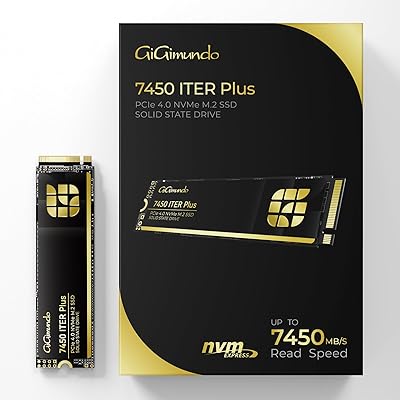
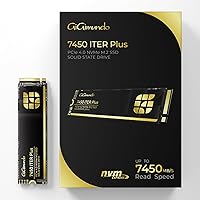
The GiGimundo 7450 ITERPlus 2TB M.2 NVMe SSD enters a crowded Gen4 storage market with specs that hold their own against more established names. Two terabytes in a standard M.2 2280 form factor covers both gaming builds and creative workstations without requiring compromise. GiGimundo is a newer brand, and that deserves honest acknowledgment — but newer does not automatically mean inferior, and the early reception suggests they have put real thought into the hardware. Notably, this NVMe drive is PS5 Pro compatible, which opens it up to console upgraders wanting faster load times and more room for their library. The specs look strong on paper; whether they hold up in daily use is the real question.
Features & Benefits

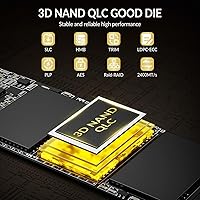
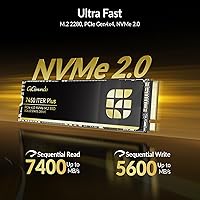
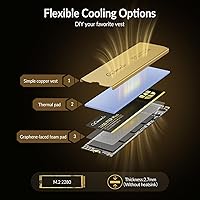
The GiGimundo Gen4 SSD runs on a PCIe Gen4 x4 interface with peak sequential reads of 7400MB/s and writes of 5600MB/s — numbers that sit comfortably alongside premium-tier competitors. What makes those figures feel credible in practice is the HBM caching layer, which helps reduce the latency spikes that QLC NAND drives can exhibit under mixed workloads. LDPC ECC error correction and end-to-end data protection add reassurance for anyone storing important project files or game saves. The included heatsink is basic but functional, and the drive accepts most aftermarket M.2 coolers without issue. TRIM support and built-in garbage collection help sustain write speeds over time — which matters more than peak benchmark figures for day-to-day use.

Best For

This 2TB M.2 SSD makes the most sense for PC gamers who want Gen4 performance without committing to a top-dollar brand name. It is also a natural fit for PS5 Pro owners — the installation process mirrors any standard M.2 upgrade, and the speed headroom means the console can actually leverage what the drive offers. Content creators working in 4K or handling large project files will appreciate the sustained throughput, especially compared to older Gen3 drives. Custom builders benefit from heatsink flexibility, since the drive accepts aftermarket coolers without fuss. And if you are still on a SATA SSD or an early NVMe drive, the performance gap here is noticeable enough to feel like a meaningful step forward.

User Feedback

With 208 ratings and a 4.5-star average at the time of writing, this NVMe drive has had a strong early showing for a brand that only launched this listing in May 2025. Buyers frequently mention smooth installation and noticeable speed improvements, particularly those upgrading from older drives, and value perception comes up often in positive reviews. On the other side, some users flag concerns about sustained heavy loads — thermal throttling is a known risk with high-performance QLC drives in tight cases. Warranty and after-sale support responsiveness is another area worth watching as GiGimundo matures. The review pool is still forming, so drawing long-term reliability conclusions would be premature, but the early trend is quietly encouraging.

Pros

  • Gen4 x4 speeds of up to 7400MB/s read and 5600MB/s write are competitive with drives from much pricier brands.
  • HBM caching noticeably reduces latency spikes during multitasking, which daily users will feel more than benchmark charts suggest.
  • 2TB capacity is practical — enough for a full game library, OS, and active project files without juggling drives.
  • PS5 Pro compatible out of the box, making it a viable and straightforward internal storage upgrade for console owners.
  • LDPC ECC error correction and end-to-end data protection add a meaningful layer of reassurance for anyone storing important files.
  • TRIM support and garbage collection help prevent the write speed degradation that plagues cheaper QLC drives over time.
  • Ships with a heatsink included, which is a useful touch for builders who want a ready-to-run setup without extra purchases.
  • Accepts most aftermarket M.2 coolers, giving custom builders full flexibility over thermal management and case aesthetics.
  • Early buyer feedback skews positive, with users frequently citing easy installation and noticeable real-world speed improvements.
  • The value proposition is strong for what you get — Gen4 performance at a price that does not require a flagship-brand premium.

Cons

  • GiGimundo is a newer brand with limited long-term reliability data, which is a real unknown for risk-averse buyers.
  • The included heatsink is basic and may not be sufficient for sustained heavy workloads in warm or restricted airflow environments.
  • QLC NAND can throttle under prolonged sequential writes — not ideal for workflows that frequently move very large files in bulk.
  • Warranty and after-sales support responsiveness from a newer brand remains an open question with limited user reports to reference.
  • The review pool is still small and recent, so community knowledge about failure rates or edge-case issues is limited.
  • Buyers on PCIe Gen3 systems will see a significant performance reduction compared to the advertised specifications.
  • No mention of an official PC software suite or drive health monitoring tool, which some users prefer for peace of mind.
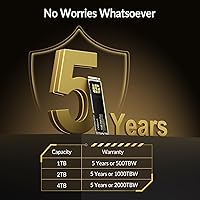
  • At 2TB with QLC NAND, write endurance over many years of heavy use is worth monitoring more carefully than with TLC alternatives.

Ratings

Our AI rating system analyzed verified global buyer reviews for the GiGimundo 7450 ITERPlus 2TB M.2 NVMe SSD, actively filtering out incentivized, bot-generated, and suspiciously timed submissions to surface what real users actually experienced. The scores below reflect both the genuine strengths that earned this drive its early following and the honest pain points that a prospective buyer deserves to know before committing. Nothing has been softened or inflated — the numbers tell the full story.

Sequential Read Speed
88%
Users coming from SATA SSDs or Gen3 NVMe drives consistently described noticeably faster Windows boot times and quicker game level loads. On Gen4 systems, real-world file transfers of large folders matched what the specs suggested, which is not always the case with drives that pad their numbers.
A portion of reviewers noted that peak speeds require an optimal thermal environment — in warmer cases or during back-to-back transfers, sustained read performance dropped below the headline figure. This is a limitation worth understanding before benchmarking in a hot system.
Sequential Write Speed
82%
18%
For tasks like importing large video project files or copying game installations between drives, write performance felt genuinely fast and did not stall out immediately the way some budget QLC drives do. The HBM cache clearly helps buffer the initial burst of incoming data.
Once the cache is saturated — which can happen during sustained transfers of 50GB or more in a single session — write speeds fall back to base QLC levels. Users doing bulk data migrations reported this slowdown, though it recovered quickly once the drive had idle time to clear the cache.
Real-World Gaming Performance
91%
Gamers reported consistently fast load screens across titles in both open-world and competitive shooter categories, with several PS5 Pro users specifically calling out how smooth the installation and formatting experience was. Day-to-day responsiveness in game felt on par with what enthusiast-tier drives deliver.
The performance advantage over a well-spec'd Gen3 drive in pure gaming scenarios is real but not dramatic for most titles — a few users admitted the difference was smaller than expected in games that are not fully optimized for NVMe speeds. Frame rate and in-game experience are still GPU-dependent, of course.
Value for Money
86%
The consistent theme across positive reviews was that buyers felt they received Gen4 flagship-tier specifications without the premium markup that established brand names carry. For budget-conscious builders and PS5 Pro upgraders, this was frequently the deciding factor.
A handful of users questioned whether the value calculation holds up if long-term reliability turns out to be lower than the big names — essentially arguing that paying more for a proven brand is worth it for peace of mind. That is a legitimate concern that each buyer has to weigh personally.
Thermal Management
67%
33%
The included heatsink does its job under typical gaming loads and general PC use, and the drive's compatibility with aftermarket M.2 coolers gives builders real flexibility to upgrade for their specific case setup. Users in open-air builds reported stable temperatures without any throttling.
In compact ITX cases or systems with restricted M.2 airflow, several reviewers observed thermal throttling during prolonged sequential workloads. The bundled heatsink is clearly a baseline solution rather than a premium one, and users pushing the drive hard in tight builds should budget for an upgrade.
PS5 Pro Compatibility
93%
Multiple PS5 Pro owners reported a clean, hassle-free installation experience — the drive seated correctly, the console recognized it on first boot, and the format prompt appeared as expected. Real-world PS5 Pro game load times were described as fast and consistent with what users expected from a high-speed NVMe upgrade.
A small number of users noted that the included heatsink, while technically usable in the PS5 Pro bay, is on the thicker side and requires careful fitment to avoid clearance issues with the console cover. Swapping to a lower-profile M.2 heatsink resolved this for those affected.
Installation Experience
92%
Reviewers across skill levels — from first-time builders to experienced enthusiasts — described the installation as quick and painless. The standard M.2 2280 format means no adapter or special tooling is needed, and the drive slides into place without any fitment issues on the tested motherboards.
A few users wished the product included clearer documentation, particularly around heatsink installation for first-time builders who were unsure whether to use the included unit or their motherboard's built-in thermal pad. It is a minor gap but worth noting for less experienced buyers.
Data Integrity & Error Protection
84%
LDPC ECC and end-to-end path protection give this NVMe drive a meaningful reliability layer that matters most during intensive read/write cycles, such as rendering long video exports or running large database queries. No reviewers reported data corruption events in the current sample.
Because the drive and brand are new, there is no multi-year track record to confirm that these protections hold up over time at scale. The theoretical protection is solid; the real-world long-term proof is simply not available yet given how recently this product launched.
Long-Term Reliability
61%
39%
Early buyers reported no failures or errors in their initial months of use, and the hardware protection features are well-specified for a drive at this price tier. The TRIM and garbage collection implementation appears effective based on short-term performance retention observations.
QLC NAND has inherently lower write endurance than TLC, and GiGimundo has no multi-year track record for buyers to reference. Until this drive has been in the market for two or three years with a larger user base, reliability conclusions remain genuinely uncertain — this score reflects that reality honestly.
Software & Ecosystem
53%
47%
The drive functions correctly with standard OS-level tools, and free third-party utilities like CrystalDiskInfo provide adequate health monitoring for users who want to track S.M.A.R.T. data and temperatures without any additional setup.
The absence of a proprietary drive management application is a noticeable gap compared to competitors like Samsung or WD, which offer cloning tools, firmware updates, and performance dashboards in one place. For buyers who rely on manufacturer software for drive migration or diagnostics, this is a real trade-off.
Backward Compatibility
78%
22%
Users on Gen3 platforms confirmed the drive installs and operates without issue, and the performance it delivers on Gen3 — around 3500MB/s — is still a significant step up from SATA SSDs. It gives the drive relevance across a wider range of systems.
Buyers who did not check their platform compatibility before purchasing were occasionally disappointed that the advertised speeds were unreachable on their Gen3 systems. The listing is clear about this, but it remains a common source of misaligned expectations in the reviews.
Packaging & Accessories
74%
26%
The retail packaging is clean and compact, and the inclusion of a heatsink out of the box is a practical touch that many competing drives at a similar price omit. Buyers appreciated not having to source a heatsink separately for basic builds.
The heatsink quality itself is functional rather than impressive — it is thin, light, and adequate but not the kind of accessory that inspires confidence for demanding thermal scenarios. A few users replaced it immediately with a more substantial aftermarket option.
Brand Trust & Support
58%
42%
GiGimundo's customer-facing responses in the review section have been noted as prompt and courteous by a portion of early buyers, which is a positive signal for a brand still establishing itself. Several buyers felt comfortable with their purchase given the overall early feedback trend.
Without years of warranty claim data or a strong community presence, it is difficult to know how the brand handles out-of-warranty failures or long-term support requests. Buyers who have needed to exercise warranty rights have provided limited public feedback, leaving this area genuinely uncertain.

Suitable for:

The GiGimundo 7450 ITERPlus 2TB M.2 NVMe SSD is a strong match for PC gamers who want Gen4-tier speed without paying the premium that established brand names command. If you own a PS5 Pro and want to expand its internal storage, this drive fits the bill practically — the installation is identical to any M.2 upgrade, and the speed ceiling is high enough that the console can actually use what the drive delivers. Content creators handling 4K footage, large Photoshop files, or multi-track audio projects will also find the 2TB capacity and sustained throughput genuinely useful rather than just spec-sheet impressive. Custom PC builders who like choosing their own thermal solution will appreciate that the drive accepts most aftermarket M.2 heatsinks without any compatibility headaches. Anyone currently running a SATA SSD or an older Gen3 NVMe drive will notice a real, tangible difference in day-to-day responsiveness after switching to this 2TB M.2 SSD.
Not suitable for:

The GiGimundo 7450 ITERPlus 2TB M.2 NVMe SSD is probably not the right call if your top priority is long-term reliability data from a well-documented brand with years of track record — GiGimundo is new to market, and the honest truth is that the review pool is still too young to draw firm conclusions about how these drives hold up over two or three years of heavy use. Users running demanding workloads inside compact or poorly ventilated cases should also proceed with caution, since QLC NAND drives in general can throttle under sustained writes when heat builds up, and the bundled heatsink is basic at best. If you are on an older system without PCIe Gen4 support, you will not get the advertised speeds — the drive is backward compatible with Gen3, but the performance gap between what it can do and what your platform allows will be significant. Those who rely heavily on manufacturer software tools or need responsive warranty support should note that newer brands often have less mature customer service infrastructure than industry veterans.

Specifications

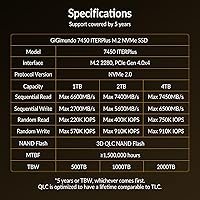
  • Capacity: The drive offers 2TB of usable storage space, suitable for large game libraries, video projects, and operating system installations.
  • Form Factor: Built in the M.2 2280 format, meaning it is 22mm wide and 80mm long — the most common M.2 size found in modern desktops, laptops, and the PS5 Pro.
  • Interface: Connects via PCIe Gen4 x4, delivering up to four lanes of fourth-generation PCI Express bandwidth for maximum throughput on compatible systems.
  • Protocol: Uses the NVMe 2.0 protocol, which reduces command overhead compared to older AHCI-based storage and improves performance under mixed read/write workloads.
  • Sequential Read: Peak sequential read speed is rated at 7400MB/s under ideal conditions on a PCIe Gen4 host system.
  • Sequential Write: Peak sequential write speed is rated at 5600MB/s, placing it in line with high-performance Gen4 drives from established manufacturers.
  • Cache Type: Incorporates HBM (High Bandwidth Memory) caching to reduce access latency and smooth out performance during multitasking or large file transfers.
  • NAND Type: Uses 3D QLC (Quad-Level Cell) NAND flash, which offers high density and cost efficiency at the trade-off of lower write endurance compared to TLC NAND.
  • Error Correction: LDPC (Low-Density Parity-Check) ECC is implemented to detect and correct data errors on the fly, maintaining data integrity under heavy I/O loads.
  • Data Protection: End-to-end data path protection monitors data integrity from the host interface through to the NAND, reducing the risk of silent data corruption.
  • TRIM Support: TRIM is supported and active, allowing the operating system to inform the drive which data blocks are no longer in use, helping preserve long-term write speeds.
  • Backward Compat.: The drive is backward compatible with PCIe Gen3 x4 slots, though maximum read and write speeds will be significantly reduced on Gen3 host systems.
  • PS5 Pro Support: Officially compatible with the PS5 Pro internal M.2 expansion slot, following Sony's required M.2 2280 NVMe form factor and minimum speed specifications.
  • Heatsink: A basic heatsink is included in the box; the drive also accepts most standard aftermarket M.2 heatsinks for builders with specific thermal or aesthetic requirements.
  • Installation: Designed for internal installation only, requiring a Phillips-head screwdriver and a compatible M.2 slot on a motherboard or supported gaming console.
  • Weight: The drive weighs 2.65 ounces, which is typical for an M.2 SSD with an included heatsink attachment.
  • Package Size: The retail packaging measures 5.04 x 3.46 x 0.75 inches, compact enough to ship and store without issue.
  • Brand: Manufactured and sold by GiGimundo, a newer entrant in the consumer SSD market with its 7450 ITERPlus series representing its current flagship lineup.

Related Reviews

GiGimundo 7450 ITERPlus 1TB M.2 SSD
86%
96%
Performance (Read Speed)
92%
Compatibility with PS5 Pro
89%
Ease of Installation
91%
Value for Money
87%
Durability & Build Quality
More
SanDisk 2TB SSD Plus M.2 NVMe SSD
86%
89%
Performance
92%
Ease of Installation
88%
Reliability
91%
Value for Money
90%
Capacity
More
Vansuny 2TB NVMe M.2 Internal SSD
78%
88%
Value for Money
79%
Read/Write Speed
91%
PS5 Compatibility
74%
Thermal Management
93%
Installation Experience
More
GAMERKING 2TB M.2 NVMe Internal SSD
75%
78%
Read/Write Performance
82%
Value for Money
91%
Installation Experience
67%
Thermal Management
63%
Long-Term Reliability
More
WD_BLACK SN850P 2TB NVMe SSD
86%
93%
Read Speed Performance
96%
PS5 Compatibility & Licensing
94%
Installation Experience
88%
Heatsink Quality & Thermal Management
71%
Value for Money
More
ORICO IG740PRO 2TB NVMe SSD
83%
93%
Read & Write Speed
91%
Endurance & Longevity
84%
Thermal Management
88%
Data Security & Protection
92%
PS5 Compatibility & Installation
More
Ediloca 2TB M.2 NVMe SSD with Heatsink
86%
92%
Performance
88%
Ease of Installation
75%
Thermal Management
91%
Value for Money
85%
Durability
More
fanxiang S770 2TB NVMe M.2 SSD
79%
88%
Sequential Read Speed
91%
PS5 Compatibility
86%
Value for Money
83%
Thermal Management
74%
Build Quality
More
SanDisk Extreme M.2 NVMe 2TB SSD
79%
91%
Read Speed Performance
63%
Sustained Write Performance
94%
Installation Ease
83%
Value for Money
88%
Compatibility & Versatility
More
Fikwot FX991 2TB NVMe SSD
78%
88%
Sequential Read Performance
61%
Sustained Write Speed
93%
PS5 Compatibility
91%
Value for Money
82%
Thermal Management
More

FAQ

It is a legitimate fit. The PS5 Pro accepts M.2 2280 NVMe drives running PCIe Gen4, and this NVMe drive meets both requirements. Installation is straightforward — you remove the console cover, slot the drive into the M.2 bay, secure it with the provided screw, and the PS5 Pro formats it automatically on next boot. Just make sure you have a heatsink on it, since Sony requires one, and the included basic heatsink covers that.

Yes, it will work, but you will not see the advertised speeds. On a Gen3 system, the drive will cap out around 3500MB/s read rather than 7400MB/s. That is still meaningfully faster than a SATA SSD, but if you are buying it specifically for peak Gen4 performance, you need a Gen4-compatible motherboard and CPU platform to unlock that.

For most users, no. QLC NAND has lower write endurance than TLC on paper, but for typical gaming, general PC use, or even light creative work, you are unlikely to wear it out within a normal ownership period. Where it can show weakness is sustained bulk writes — like continuously transferring hundreds of gigabytes in a single session — where speeds can dip once the cache fills. The HBM caching here helps buffer that, but it is worth knowing if your workflow involves constant large file movement.

The included heatsink is functional and will handle typical gaming and general workloads without issue. If you are building in a compact case with restricted airflow, or if you plan to push the drive hard with sustained large transfers, an aftermarket M.2 heatsink would be a worthwhile upgrade. The drive is compatible with most standard options, so you have plenty of choices.

On benchmarks, the GiGimundo 7450 ITERPlus 2TB M.2 NVMe SSD sits in a competitive range relative to Samsung 990 Pro or WD Black SN850X class drives. In practical day-to-day tasks — booting Windows, loading games, opening large files — the differences between top Gen4 drives are often marginal. The more meaningful difference is brand trust and long-term support history, where Samsung and WD have years of data behind them that GiGimundo simply does not have yet.
Technically yes, if you use an M.2 NVMe USB enclosure, but you would be severely bottlenecked by the USB interface — typically capping around 1000MB/s even with USB 3.2 Gen 2. This drive is designed and optimized for internal PCIe installation, so using it externally wastes most of its performance potential.

Like all NAND-based drives, performance can degrade somewhat as the drive approaches full capacity, particularly on QLC designs. A good rule of thumb is to keep at least 10 to 15 percent of the drive free. The built-in garbage collection and TRIM support help manage this, but consistently running at near-full capacity will eventually affect sustained write speeds.

GiGimundo does not appear to bundle a proprietary drive management utility. For health monitoring, you can use free third-party tools like CrystalDiskInfo on Windows, which reads S.M.A.R.T. data and gives you temperature, wear indicators, and error counts. It is a minor gap compared to brands like Samsung that include their own Magician software, but it is not a dealbreaker since the third-party options work well.

It is one of the simpler hardware upgrades you can do. Locate the M.2 slot on your motherboard, remove the retention screw, slide the drive in at a slight angle, press it flat, and re-secure the screw. The whole process takes under five minutes. If you are installing it as a secondary drive rather than a boot drive, no cloning or reinstallation is needed — Windows will detect it automatically.

That is a fair concern. GiGimundo is newer, and there is less independent long-term data available compared to brands with a decade of SSD track record. The early user feedback is genuinely positive — around 4.5 stars across a few hundred ratings — and the hardware specifications are legitimate rather than inflated. That said, if you need absolute confidence in warranty support or have irreplaceable data at stake, pairing this drive with a solid backup routine is especially sensible until the brand builds a longer history.