

Overview

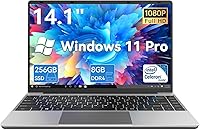
The Gezoon D-1420 14-Inch 256GB Laptop is Gezoon's entry into one of the most competitive corners of the Windows laptop market, and it comes in with a clear, honest proposition. Gezoon is a lesser-known Chinese OEM — not a household name — which naturally raises questions about build quality and support. Set your expectations accordingly: this is a light daily-use machine, built around the Intel Celeron N4020C processor, which handles browsing, documents, and video calls without breaking a sweat, but will struggle if you push it harder than that. The 180-degree flat hinge is a genuinely practical feature that few rivals bother to include at this tier.

Features & Benefits

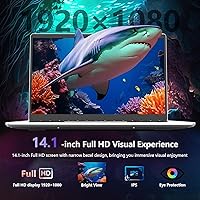
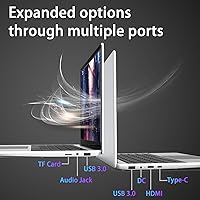
The 14.1-inch FHD display punches above its weight — 1920x1080 resolution on a budget laptop is not a given, and the clarity is appreciable for everyday work or streaming. Pair that with 8GB DDR4 RAM and a 256GB NVMe SSD, and this entry-level Windows machine boots fast and stays responsive for typical workloads. Wi-Fi 6 support is a pleasant surprise here, even if the spec sheet quietly lists 802.11ac — worth verifying your unit. The port lineup is genuinely well-rounded: two USB 3.0 ports, a USB-C, HDMI out, audio jack, and a TF card slot. Windows 11 Pro pre-installed adds BitLocker encryption and remote desktop functionality, features that matter if you're working with sensitive files.

Best For

This budget Gezoon laptop makes the most sense for students who need a dependable machine for note-taking, research, and the occasional Zoom class — nothing more demanding than that. Remote workers running email, Google Docs, or light spreadsheet work will find it perfectly capable. It's also a solid pick for first-time laptop buyers or seniors who want a familiar Windows environment without a steep learning curve. Travelers who prioritize a sub-3-pound bag over processing muscle will appreciate the slim profile. And if your household needs a backup or secondary machine that just works without drama, the D-1420 fits that role quietly and competently.

User Feedback

Buyers who've picked up the D-1420 tend to highlight the display quality and overall build as standout positives for the price — two things that are often sacrificed in this segment. The keyboard and trackpad also earn decent marks for comfort. Where the criticism clusters is around the Celeron processor: heavy Chrome usage, multiple open tabs, or background app activity can noticeably slow things down. Battery life is another recurring concern, with real-world endurance falling shorter than buyers hope. On the support side, the 365-day warranty and the brand's reported responsiveness earn genuine appreciation, especially from buyers wary of purchasing from a lesser-known name.

Pros

  • Full HD 1920x1080 display is sharp and clear for everyday work and streaming at this price point.
  • The NVMe SSD keeps boot times and app launches fast — noticeably better than older eMMC-based budget laptops.
  • 8GB DDR4 RAM handles typical daily workloads without constant slowdowns.
  • Windows 11 Pro inclusion adds BitLocker encryption and remote desktop — rare at this price tier.
  • At 2.86 lbs and under an inch thick, this budget Gezoon laptop is genuinely easy to carry daily.
  • The 180-degree hinge opening is a practical, flexible feature most rivals skip at this level.
  • Port variety is strong: USB-A, USB-C, HDMI, audio jack, and TF card slot cover most real-world needs.
  • The 365-day after-sales warranty offers meaningful reassurance when buying from a newer brand.
  • Wi-Fi 6 support helps future-proof wireless connectivity on home and campus networks.
  • Keyboard and trackpad earn consistently positive marks for comfort in buyer feedback.

Cons

  • The Celeron N4020C processor struggles noticeably when juggling multiple demanding apps or browser tabs simultaneously.
  • Battery capacity is never disclosed, and real-world endurance frequently disappoints users expecting all-day use.
  • Gezoon has limited brand recognition, making long-term repair support and parts availability uncertain.
  • The Wi-Fi 6 spec claim is inconsistently reflected in unit-level testing and buyer reports — verify before relying on it.
  • 256GB storage fills up faster than most buyers anticipate, especially with Windows updates eating into usable space.
  • No dedicated graphics mean any task beyond basic video playback is off the table.
  • Customer reviews flag occasional inconsistencies in build quality between units, suggesting variable quality control.
  • USB-C functionality appears limited on some units — charging and full data transfer support are not guaranteed.
  • There is no mention of RAM upgradeability, leaving buyers stuck at 8GB if needs grow.
  • Thermal performance under sustained load has drawn criticism, with the chassis warming up noticeably during extended sessions.

Ratings

The Gezoon D-1420 14-Inch 256GB Laptop has been scored by our AI system after processing verified buyer reviews from global markets, with spam, bot-generated, and incentivized feedback actively filtered out before scoring. The results reflect what real everyday users actually experienced — not what the spec sheet promises — capturing both the genuine strengths and the recurring frustrations of this entry-level Windows machine. Scores are distributed across categories that matter most to the buyers who actually purchased and used it, and no category has been softened to protect the brand.

Value for Money
83%
For buyers who understand exactly what they are getting, the price-to-feature ratio here is genuinely competitive. A Full HD display, NVMe SSD, 8GB RAM, and Windows 11 Pro in a sub-3-pound chassis is a combination that is hard to replicate at this price point from a recognized brand. Buyers who set realistic expectations consistently rate the value highly.
The value calculation falls apart if you need the machine to perform beyond basic tasks, since the Celeron processor bottleneck limits the practical utility of the otherwise decent spec sheet. Buyers who underestimated that limitation felt they overpaid once the multitasking constraints became apparent in daily use.
Performance
52%
48%
For single-threaded light tasks — typing a document, watching a YouTube video, joining a Zoom call — the Intel Celeron N4020C holds its own without visible stuttering. Users who stuck to one or two apps at a time reported a surprisingly smooth experience for basic academic and office workflows.
The moment Chrome loads more than five or six tabs, or a background update kicks in while you are on a call, performance degrades noticeably. Buyers using this as a work-from-home machine with multiple productivity apps open simultaneously reported frustrating slowdowns that made daily tasks feel labored rather than effortless.
Display Quality
77%
23%
The 1920x1080 panel on a 14.1-inch screen produces text and images that look crisp and clear for document work, video streaming, and web browsing — a real plus at this price tier where lower resolutions are common. Buyers coming from older or lower-spec budget laptops were frequently impressed by the visual sharpness during everyday tasks.
Brightness levels are adequate indoors but struggle in well-lit rooms or near windows, and viewing angles narrow enough that off-axis content sharing becomes awkward. Color accuracy is not a selling point here — media professionals or anyone editing photos will find the panel underwhelming compared to even modestly priced alternatives.
Portability
88%
At 2.86 lbs and under three-quarters of an inch thick, this entry-level Windows machine is genuinely easy to carry in a bag all day without fatigue. Students commuting between classes and remote workers moving between home and a coffee shop consistently highlighted how light and slip-friendly the form factor feels in practical daily use.
The all-plastic construction that keeps the weight down does introduce some flex in the chassis, particularly around the keyboard deck, which a handful of buyers flagged as feeling less premium than the slim profile suggests. It travels well, but it does not feel as robust as similarly thin machines from established OEMs.
Build Quality
67%
33%
The overall fit and finish is better than many buyers expected from an unknown brand at this price tier, with clean seams, a tidy port layout, and a hinge that feels sturdy enough for daily open-and-close use. The matte gray finish resists fingerprints reasonably well, keeping the laptop looking presentable with minimal maintenance.
Flex in the keyboard deck and lid is noticeable under moderate pressure, and the plastic chassis does not inspire confidence under heavier handling. A small but consistent portion of buyers reported minor quality control inconsistencies — slightly uneven gaps, soft-feeling keys, or trackpad clicks that felt mushy — suggesting unit-to-unit variation exists.
Keyboard & Trackpad
72%
28%
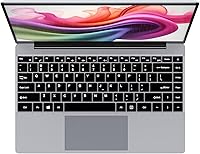
The full-size keyboard layout gives enough key spacing for comfortable extended typing sessions, and most buyers found the travel and feedback acceptable for note-taking and document writing. The oversized trackpad draws positive mentions for being accurate enough to reduce reliance on an external mouse during casual use.
The typing experience does not compare to mid-range alternatives — key travel is shallow and the overall tactile feedback feels soft rather than satisfying, which some touch typists found tiring over longer writing sessions. The trackpad, while usable, occasionally registers unintended inputs during palm-heavy typing styles.
Battery Life
48%
52%
Under very light use — a single browser window, minimal background activity, screen brightness turned down — some buyers managed to stretch the battery through a half-day of work without reaching for the charger. For short commutes or classroom sessions of two to three hours, the battery is workable.
Real-world endurance for typical mixed use lands in the four to five hour range at best, which falls well short of what most buyers need for a full school or work day. The undisclosed battery capacity is a transparency issue that repeatedly surfaced in negative reviews, with many buyers feeling misled about unplugged endurance before purchasing.
Port Selection
84%
The port lineup — two USB 3.0 Type-A, one USB-C, HDMI 1.4, a 3.5mm audio jack, and a TF card slot — covers the vast majority of real-world connection needs without requiring a hub. Buyers who frequently connect external monitors, USB peripherals, and headsets simultaneously appreciated not having to manage a dongle situation.
The USB-C port's functionality is limited and inconsistently reported by buyers — full data transfer speeds and display output are not reliably confirmed across units. The HDMI port caps at version 1.4, which is functional but limits external display refresh rates compared to machines with HDMI 2.0.
Wireless Connectivity
69%
31%
On networks that support it, wireless performance is responsive and stable for video calls, streaming, and file transfers, which is what most buyers in this segment actually need. Several users noted that the connection held steady across typical home Wi-Fi environments without dropouts during extended work-from-home sessions.
The advertised Wi-Fi 6 claim is undermined by simultaneous references to 802.11ac in the spec sheet, creating legitimate uncertainty about what standard is actually installed in any given unit. Buyers who specifically purchased for Wi-Fi 6 compatibility and later found an older adapter installed understandably felt misled.
Software & OS
79%
21%
Windows 11 Pro is a meaningful inclusion at this price tier, bringing BitLocker encryption, remote desktop capabilities, and a modern interface that most buyers already know how to navigate. First-time laptop owners and seniors in particular appreciated the familiar environment and the fact that the system arrived ready to use without additional setup complexity.
The Celeron processor means Windows 11 Pro occasionally feels heavier than the hardware can comfortably support — system updates in particular can temporarily slow the machine to a crawl if they trigger in the background during active use. A handful of buyers also noted pre-installed bloatware that needed to be cleared before the system felt fully clean.
Setup & Out-of-Box Experience
81%
19%
The laptop arrives with Windows 11 Pro pre-activated, meaning buyers can be up and running within minutes of opening the box — a notable plus for less tech-savvy users who do not want to navigate activation or driver installation. The included power adapter and straightforward physical layout make the initial experience friction-free.
Driver documentation and support resources from Gezoon are thin compared to established brands, which becomes a problem if something behaves unexpectedly after setup. A few buyers reported needing to manually update or locate drivers for peripheral compatibility, which is a minor but real barrier for non-technical users.
Customer Support & Warranty
74%
26%
The 365-day after-sales support window is longer than many competitors in this segment offer, and buyers who actually needed assistance reported response times that matched the brand's stated 12-hour turnaround commitment. For an unknown OEM, the support experience exceeded expectations often enough to earn consistent positive mentions in reviews.
Long-term support reliability beyond the warranty window is uncertain given Gezoon's limited market presence, and accessing physical repair services or replacement parts is far less straightforward than with major brands. A few buyers encountered situations where support responses were helpful in tone but limited in actual resolution capability.
Thermal Management
58%
42%
Under light workloads — document editing, basic browsing, video calls — the chassis stays comfortable to the touch and fan noise remains low enough to be unnoticeable in quiet environments. For the use cases this machine is actually designed for, thermal behavior is acceptable during typical sessions.
Sustained heavier tasks trigger noticeable warmth in the bottom panel and keyboard deck, which becomes uncomfortable during extended use on a lap. Buyer feedback includes recurring mentions of the fan ramping up under moderate load in a way that feels disproportionate to the tasks being performed, suggesting thermal headroom is limited.
Storage Adequacy
66%
34%
The 256GB NVMe SSD is fast relative to the eMMC storage common in competing budget laptops, producing noticeably quicker boot times and application launches that buyers who had previously used slower budget machines found refreshing. For users who keep their files lean and rely on cloud storage, 256GB is functional enough.
Windows 11 Pro and its updates consume a meaningful portion of the advertised 256GB, leaving buyers with significantly less usable space than expected out of the box. Users who store media files locally or install multiple applications quickly found themselves running out of room, making the TF card slot a near-necessity rather than a convenience.

Suitable for:

The Gezoon D-1420 14-Inch 256GB Laptop is a practical fit for anyone whose daily computing needs stay firmly in the light-use lane. College and high school students who spend most of their time writing papers, attending virtual classes, and browsing research tabs will find it more than capable. Remote workers juggling email, spreadsheets, and the occasional video call on a tight budget get a genuinely functional tool without overextending their wallet. Seniors or first-time laptop owners will appreciate the familiar Windows 11 Pro environment and the straightforward, no-fuss setup. The slim, sub-3-pound build also makes it an appealing travel companion or commuter machine where portability matters far more than raw speed. Households hunting for a dependable secondary laptop — one that sits ready for guest use, homework, or light admin tasks — will find this entry-level Windows machine delivers solid value for the role.

Not suitable for:

The Gezoon D-1420 14-Inch 256GB Laptop is simply the wrong tool if your work demands real processing muscle. The Intel Celeron N4020C is an entry-level chip, and it will show its limits quickly under multitasking pressure — think a dozen Chrome tabs, video editing software, or any cloud-based tool that runs heavy background processes. Content creators, developers, graphic designers, and even moderately active students running resource-hungry applications should look elsewhere. The undisclosed battery capacity is also a genuine concern for anyone who needs all-day unplugged endurance on campus or while traveling. Gamers will find nothing here to work with — the integrated Intel UHD Graphics 600 handles basic display duties and little else. Finally, buyers who prefer the peace of mind that comes with an established brand name and a proven long-term support ecosystem may feel uneasy trusting a lesser-known OEM for their primary machine.

Specifications

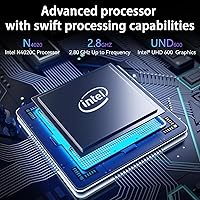
  • Processor: The laptop runs on an Intel Celeron N4020C dual-core processor with a base clock speed that boosts up to 2.8GHz under load.
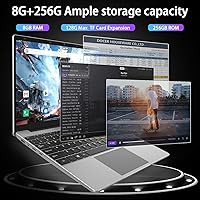
  • RAM: It comes equipped with 8GB of DDR4 LPDDR4 memory, which is soldered to the board and not user-upgradeable.
  • Storage: A 256GB NVMe SSD handles all local storage, offering faster read and write speeds than eMMC alternatives common in this price range.
  • Display: The 14.1-inch panel outputs a Full HD 1920x1080 resolution at a 16:9 aspect ratio, suitable for crisp document and media viewing.
  • Graphics: Integrated Intel UHD Graphics 600 handles all display output, with no discrete GPU present.
  • Operating System: Windows 11 Pro comes pre-installed, including BitLocker encryption and remote desktop access out of the box.
  • Wireless: The unit lists Wi-Fi 6 support, though the spec sheet also references 802.11ac — buyers should verify actual Wi-Fi standard on their unit.
  • Ports: Connectivity includes 2x USB 3.0 Type-A, 1x USB-C, 1x HDMI 1.4, 1x 3.5mm combo audio jack, 1x DC charging port, and 1x TF card slot.
  • TF Card Support: The TF card slot supports expansion cards up to 512GB, providing a practical way to extend storage without external drives.
  • Weight: The chassis weighs 2.86 lbs, making it one of the lighter options in the budget 14-inch laptop category.
  • Dimensions: The laptop measures 12.8 x 8.26 x 0.74 inches, keeping it slim enough to slide into most standard laptop sleeves and bags.
  • Hinge Design: A 180-degree flat-open hinge allows the screen to lie completely flat on a surface, which is useful for collaborative viewing or scanning documents.
  • Keyboard: The unit includes a full-size keyboard layout paired with an oversized trackpad intended to reduce fatigue during extended typing sessions.
  • Battery: The battery is built-in with a non-removable design; exact capacity in mAh or Wh is not publicly disclosed by the manufacturer.
  • Charging: The laptop charges via a dedicated DC barrel port running at 12 volts; USB-C charging is not confirmed by the manufacturer.
  • Color: The D-1420 is available in a single Gray colorway with a matte-finish plastic chassis.
  • Warranty: Gezoon provides a 365-day after-sales support window, with a stated 12-hour response time from their customer service team.
  • Bluetooth: Bluetooth connectivity is not explicitly confirmed or specified in the manufacturer's published documentation for this model.
  • Webcam: A built-in webcam is present for video calling, though resolution and exact specifications are not disclosed by Gezoon.
  • Power Supply: The included power adapter operates at 12 volts and uses a proprietary DC connector rather than a universal USB-C charging standard.

Related Reviews
HP 2025 14-inch Laptop - 16GB RAM, 128GB UFS, 256GB MSD, Windows 11 Pro
82%
89%
Value for Money
92%
Battery Life
85%
Performance
90%
Portability
81%
Build Quality
More
HP Pavilion x360 14-inch Laptop, 13th Gen Intel Core i3, 8GB RAM, 256GB SSD
82%
80%
Performance
92%
Portability
85%
Display Quality
88%
Battery Life
83%
Build Quality
More
HP 14-dq0020nr 14-inch Laptop 64GB
80%
72%
Performance
94%
Portability
88%
Battery Life
81%
Build Quality
75%
Display Quality
More
HP 14 Celeron 14-inch Touchscreen Laptop

68%
74%
Value for Money
52%
Performance
43%
Storage Adequacy
91%
Portability
61%
Display Quality
More
Dell Inspiron 14 5440 Laptop, 14-inch, Intel Core i5, 8GB RAM, 512GB SSD
86%
88%
Performance
91%
Build Quality
94%
Portability
81%
Battery Life
75%
Display Quality
More
Dell 14 Plus Laptop DB14250-14-inch 2.5K, Intel Core Ultra 7, 16GB RAM, 1TB SSD


85%
91%
Performance
94%
Display Quality
85%
Battery Life
88%
Build Quality
86%
Keyboard Usability
More
HP 14 Inch Laptop
HP 14 Inch Laptop
83%
92%
Value for Money
89%
Portability & Weight
90%
Battery Life
80%
Performance
84%
Build Quality
More
ASUS Chromebook CM14 (CM1402CM2A-DS44)
72%
83%
Value for Money
88%
Build Quality & Durability
74%
Performance & Speed
58%
Display Quality
84%
Battery Life
More
Alecewey F2 14-inch Laptop Screen Extender
85%
85%
Portability
90%
Display Quality
88%
Ease of Use
92%
Setup Time
63%
Weight
More
HP Chromebook 14a-nf0009nr 14-inch Laptop
82%
91%
Battery Life
88%
Portability & Weight
92%
Value for Money
80%
Performance for Everyday Tasks
85%
Display Quality
More

FAQ

It depends heavily on your workload. If your days consist of writing papers, attending online lectures, managing emails, and light research browsing, the D-1420 handles all of that without much fuss. Where it starts to struggle is when you pile on too many Chrome tabs simultaneously or run more demanding cloud-based tools. For pure academic productivity on a tight budget, it gets the job done — just do not expect it to multitask like a mid-range machine.

Almost certainly not on the RAM side — the 8GB DDR4 memory appears to be soldered directly onto the board, which is standard practice for laptops at this price point. Storage is trickier to confirm without opening the unit, but the NVMe interface suggests there may be an M.2 slot internally. That said, the safest and easiest storage expansion is through the TF card slot, which supports cards up to 512GB.

This is a fair concern. The product listing claims Wi-Fi 6, but the technical spec sheet simultaneously references 802.11ac, which is the older Wi-Fi 5 standard. Some buyers have reported inconsistency between units. If Wi-Fi 6 is important to you, it is worth checking your specific unit after setup through the Windows Device Manager to confirm exactly what wireless adapter is installed.

The manufacturer does not officially confirm USB-C charging for this model — the primary charging method is the proprietary 12-volt DC barrel port. Some buyers have noted the USB-C port functions mainly for data transfer. Relying on USB-C for charging is risky on this unit, so keep the included adapter handy.

This is one of the more frustrating unknowns with the Gezoon D-1420 14-Inch 256GB Laptop — the manufacturer never publicly discloses the battery capacity in mAh or Wh. Buyer feedback suggests real-world endurance typically lands somewhere in the four to six hour range under light use, but heavy browsing or video playback will shorten that. Do not count on it for a full day away from an outlet without planning accordingly.

For the price tier, the 1920x1080 resolution holds up well for text, documents, and standard-definition streaming. Most buyers are pleasantly surprised by the sharpness. That said, brightness and color accuracy are not going to match anything from a premium brand — viewing angles can narrow noticeably, and outdoor use in bright conditions is not where this display shines.

For basic video calls on Zoom, Teams, or Google Meet, the built-in webcam gets the job done in a well-lit room. The Celeron processor handles video call software without major hiccups as long as you are not running too much else in the background at the same time. Exact webcam resolution is not published, so expect functional rather than impressive quality.

Gezoon is a Chinese OEM that is not widely recognized outside of budget e-commerce circles, which is a legitimate concern. The honest answer is that the hardware itself tends to be functional and represents reasonable value for the price. The 365-day warranty and the reported responsiveness of their customer service team do offer a reasonable safety net. Just keep in mind that long-term support, driver updates, and parts availability are less predictable compared to established brands like Lenovo, HP, or Acer.

Yes, both work fine on this entry-level Windows machine. Microsoft 365 apps like Word, Excel, and PowerPoint run adequately for standard document work, especially if you are not dealing with massive spreadsheets or complex formatting. Google Docs in a browser is similarly smooth as long as you keep your open tab count reasonable. Just avoid running Office and a video call and a download simultaneously — the Celeron processor does not like heavy multitasking.

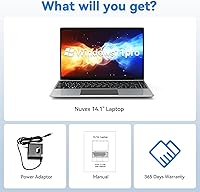
Typically the box includes the laptop itself, the proprietary 12-volt DC power adapter, and basic documentation. Gezoon does not advertise any additional accessories in the package. It arrives with Windows 11 Pro pre-activated, so setup is straightforward out of the box — just connect to Wi-Fi, complete the initial Windows configuration, and you are ready to go.



