Overview

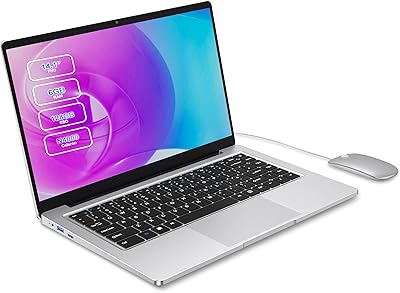
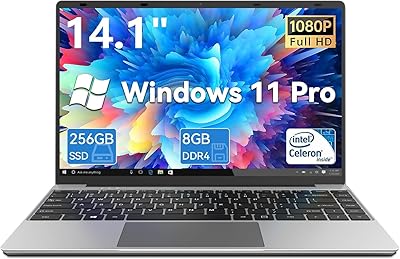
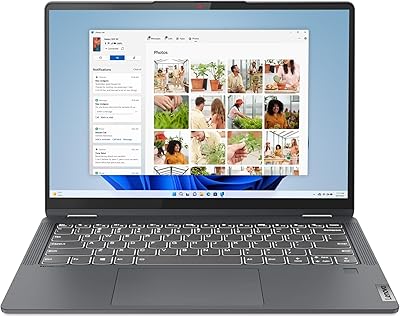
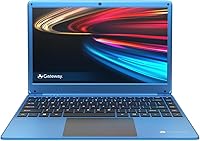
The Gateway GWTN141-5 14.1″ Laptop is Gateway's attempt to reclaim relevance in a crowded budget market, and honestly, it makes a reasonable case. At just 3.5 lbs and under an inch thick, this Gateway notebook is easy to toss in a bag without a second thought. It ships with Windows 10 in S Mode — switchable to full Windows 10 Home — and bundles a one-year Microsoft 365 Personal subscription, which is a genuinely useful addition at this price point. The FHD IPS display stands out as a spec you don't always see at this tier, giving the screen more credibility than most competitors.

Features & Benefits

The 14.1-inch IPS screen genuinely impresses for this price tier — text is crisp, colors are decent, and watching videos on it is surprisingly pleasant. Under the hood, the Celeron N4020 and 4GB of RAM handle everyday tasks like email, browsing, and streaming without drama, but push it harder with multiple tabs open and things slow down noticeably. Storage is where you need to plan ahead: 64GB eMMC fills up fast, so picking up a Micro SD card is practically a necessity. The THX-tuned audio sounds better than typical budget speakers, though the improvement is modest rather than dramatic. The Mini HDMI port is a handy addition, but note that the USB-C port is data-transfer only — no charging or video output.

Best For

This budget laptop hits its sweet spot with students, remote workers, and anyone looking for a dependable secondary machine. If your daily routine involves writing papers, joining video calls, working in cloud apps, or catching up on streaming content, this Gateway notebook covers all of that without breaking a sweat. It's also a solid pick for first-time laptop buyers or seniors who don't need raw processing power — just reliable, portable computing at an honest price. Travelers appreciate the slim, light build because losing or damaging a budget machine hurts a lot less than losing something far pricier. Think of it as a practical tool, not a powerhouse.

User Feedback

Buyers tend to agree that screen quality and portability are the standout strengths, with many noting the included Microsoft 365 subscription feels like a genuine bonus. Complaints cluster around storage — 64GB disappears quickly if you install more than a few apps — and sluggish multitasking when too many browser tabs pile up at once. Real-world battery life often falls short of the 8.5-hour claim, landing closer to five or six hours for most users. Build quality gets mixed reviews: the keyboard feels adequate, but the chassis has noticeable flex. Some buyers also ran into confusion around S Mode switching, so that process is worth researching before you buy. Overall, most feel the value holds up well for light, everyday use.

Pros

  • The 14.1-inch FHD IPS screen is genuinely sharp and clear for its price range.
  • At 3.5 lbs and under an inch thick, this Gateway notebook is easy to carry anywhere.
  • The bundled one-year Microsoft 365 Personal subscription adds immediate, tangible value.
  • Micro SD slot allows storage expansion up to 512GB, partially offsetting the tight built-in storage.
  • Switching from Windows 10 S Mode to full Windows 10 Home is free and unlocks much more flexibility.
  • THX-tuned speakers sound noticeably better than the flat audio typical of budget laptops.
  • The Mini HDMI port makes connecting to an external monitor or TV straightforward.
  • Slim, lightweight build makes it a low-stress travel companion or student backpack staple.
  • Wi-Fi and Bluetooth 4.0 cover all standard wireless needs without any extra setup.
  • The revived Gateway brand delivers a clean, professional look that doesn't scream budget.

Cons

  • 4GB of RAM causes sluggishness when more than a few applications or browser tabs are open simultaneously.
  • 64GB eMMC storage fills up fast and is not upgradeable — a Micro SD card is almost mandatory from day one.
  • Real-world battery life often falls short of the advertised 8.5 hours, averaging closer to five or six hours.
  • The chassis flexes under moderate pressure, and long-term build durability raises some concern.
  • The USB-C port is limited to data transfer only — no charging or video output supported.
  • The Celeron N4020 processor struggles noticeably with anything beyond light, single-task workloads.
  • The 1MP webcam produces mediocre video quality that falls flat for professional video calls.
  • eMMC storage is noticeably slower than a standard SSD, which affects app load times and overall responsiveness.
  • Some buyers report confusion and friction when attempting to switch out of Windows 10 S Mode.
  • Keyboard flex and mediocre key feedback make extended typing sessions less comfortable than expected.

Ratings

The scores below for the Gateway GWTN141-5 14.1″ Laptop were generated by our AI system after analyzing thousands of verified global user reviews, with spam, bot submissions, and incentivized feedback actively filtered out. This Gateway notebook has clear strengths that real buyers appreciate — and equally real limitations that show up consistently across markets. Both sides are reflected honestly in every category score below.

Value for Money
78%
22%
For buyers on a tight budget, this Gateway notebook delivers a surprising amount for the price — a full HD IPS screen, Windows 10, and a year of Microsoft 365 bundled together is a hard combination to beat at this tier. Most owners feel they got a fair deal, especially students and light home users who do not need raw power.
The value proposition starts to crack if you factor in the cost of a necessary Micro SD card and the hardware ceiling you hit quickly. Users who expected more versatility from the USB-C port or longer real-world battery life often feel the trade-offs add up faster than expected.
Display Quality
83%
The 14.1-inch FHD IPS panel consistently earns praise from users who were not expecting much at this price. Colors are reasonably accurate, text is sharp enough for long reading sessions, and the wide viewing angles mean the screen does not wash out when watching content at an angle on a couch or plane.
Brightness can feel limiting in well-lit outdoor environments or near sunny windows, which a number of users flagged during commutes. It is not a color-accurate panel by any professional standard, and those coming from higher-end displays may find it underwhelming in HDR or contrast performance.
Performance
54%
46%
For its intended purpose — a single focused task at a time — the Celeron N4020 does the job without drama. Writing a document, joining a video call, or watching a YouTube video works fine, and users who stay within that lane report a mostly frustration-free day-to-day experience.
Open more than five or six browser tabs, run a video call while another app is active, or attempt any mildly intensive task and the 4GB RAM ceiling becomes very apparent very quickly. This is one of the most consistent complaints across user feedback and cannot be patched or upgraded after purchase.
Storage Adequacy
47%
53%
The built-in 64GB eMMC storage is technically sufficient to get started, and the Micro SD expansion slot at least gives users a practical workaround that many end up using successfully for media and documents. Buyers who primarily use cloud storage from day one tend to cope better with the constraint.
Out of the box, Windows and pre-installed software consume a significant chunk of that 64GB, leaving far less usable space than buyers anticipate. The eMMC format is also noticeably slower than a standard SSD, which affects how snappy the system feels when launching apps or booting up.
Portability
89%
At 3.5 lbs and under an inch thick, this budget laptop is one of the easier machines to live with on the go. Students carrying it across campus, commuters fitting it into a tote bag, and travelers who want a lightweight backup machine all consistently highlight the slim form factor as a genuine daily convenience.
The slim chassis comes with a build that flexes noticeably under pressure, particularly around the keyboard deck and display lid. A few users reported concerns about long-term durability after months of regular transport, especially when the machine is packed tightly in a bag with other items.
Battery Life
61%
39%
Under light use — a document open, moderate screen brightness, Wi-Fi connected but not streaming — the battery can stretch through a decent chunk of a school day or workday without needing a charge. Some users doing mostly cloud-based work report hitting the six-hour mark without issue.
The advertised 8.5-hour claim is difficult to reproduce in real-world conditions. Most users land between five and seven hours with mixed use, and anyone who is streaming video, using video calls, or working with several apps open will likely drain the battery in four to five hours.
Build Quality
59%
41%
The overall design looks clean and professional for a budget machine, and out of the box the hinges feel reasonably solid. Gateway has done a decent job making the GWTN141-5 look like it costs more than it does, and casual users report no major structural issues during typical daily use.
Flex in the keyboard area and the display lid is a recurring theme in user feedback and is hard to ignore during everyday handling. The plastics feel light in a way that raises questions about what happens after a year or two of regular use, and a handful of buyers have flagged hinge stiffness over time.
Keyboard & Trackpad
63%
37%
The keyboard layout is sensibly sized for a 14-inch class machine, and most casual typists find it comfortable enough for writing emails, assignments, and documents without needing to adapt much. The trackpad is smooth and responds reliably to basic gestures.
Key travel is shallow, and the flex in the keyboard deck makes firm typists feel like they are pressing through the chassis rather than onto a stable surface. The trackpad, while functional, lacks the precision and palm rejection that users accustomed to mid-range machines tend to expect.
Audio Quality
67%
33%
The THX audio tuning does produce a noticeably cleaner sound than what you typically get from a budget laptop — voices in video calls come through clearly, and music listening is more enjoyable than expected for casual use. It is a small but real differentiator in this segment.
The improvement over standard budget speaker output is real but modest — do not expect a rich or full sound, and at higher volumes there is a hint of distortion. Users who care about audio quality for media or music will almost certainly reach for headphones or an external speaker.
Webcam Quality
44%
56%
The integrated 1MP webcam is technically present and functional, which is all some users need for occasional check-in calls with family or an informal class session. In bright, well-lit rooms, footage is at least recognizable and usable at a basic level.
One megapixel is genuinely low, even by budget laptop standards, and it shows — image quality is grainy, colors are muted, and low-light performance is poor. Users who attend regular professional video meetings or online classes where appearance matters will find this webcam a consistent source of frustration.
Port Selection
58%
42%
Having both USB 2.0 and USB 3.0 available alongside a Mini HDMI port covers the basics for most users who need to plug in a mouse, a USB drive, or hook up an external display. The Micro SD slot doubles as a practical storage expansion tool that many users end up relying on regularly.
The USB-C port being limited to data transfer only is a genuine disappointment — buyers who assumed it would support charging or display output discover this limitation after purchase, which generates consistent frustration in reviews. The lack of a full-size HDMI port means carrying an extra adapter for most display connections.
Software & OS Experience
71%
29%
The included Microsoft 365 Personal subscription is a practical and appreciated addition that saves students and home users real money. The switch from Windows 10 S Mode to full Windows 10 Home is free and straightforward once users know the steps, unlocking the full range of Windows applications.
Windows 10 S Mode catches some buyers off guard, particularly those who try to install apps outside the Microsoft Store and hit an unexpected wall. The switching process, while free, requires internet access and Microsoft account sign-in steps that can confuse less tech-savvy users.
Setup & Ease of Use
74%
26%
Out of the box, the machine powers up and gets to Windows with minimal friction, and the inclusion of Microsoft 365 means productivity tools are ready to use almost immediately. Users with no technical background generally report a smooth first-time setup experience.
The S Mode limitation creates a learning curve for users who are not aware of it upfront, and some find the process of switching to full Windows confusing or unclear without guidance. Pre-installed bloatware, while not excessive, also takes up some of the already-limited storage from day one.

Suitable for:

The Gateway GWTN141-5 14.1″ Laptop was clearly designed with a specific type of buyer in mind, and for that buyer it delivers solid value. Students who need a portable machine for writing papers, attending virtual classes, and staying organized in Google Docs or Microsoft 365 will find it more than capable. It also works well for seniors or less tech-savvy users who primarily browse the web, video chat with family, and stream content — tasks that don't demand serious processing muscle. Remote workers whose entire workflow lives in cloud-based tools like Microsoft Teams, Google Workspace, or browser-based apps will get through a workday without major frustration. Families looking for a lightweight secondary machine to share between household members, or travelers who want a no-stress carry-on laptop, round out the ideal audience. If your needs are predictable and light, this Gateway notebook punches at or above its weight class.

Not suitable for:

The Gateway GWTN141-5 14.1″ Laptop is a poor fit for anyone who expects smooth multitasking, creative work, or anything resembling demanding software. The Celeron N4020 and 4GB of RAM hit a ceiling quickly — open a dozen browser tabs, run a video call alongside a few apps, and the experience becomes noticeably choppy. The 64GB eMMC storage is also a real constraint for buyers who store large files locally, install a lot of software, or work with video and photo libraries. Gamers, video editors, programmers, and designers should look elsewhere entirely; this budget laptop simply lacks the horsepower for those workflows. The USB-C port does not support charging or video output, which is a practical limitation that may frustrate buyers expecting modern port versatility. Anyone planning to use this as their sole, primary machine for heavy daily use will likely feel the hardware limitations within weeks.

Specifications

  • Display: The 14.1-inch IPS LCD panel delivers a 1920x1080 full HD resolution with wide viewing angles typical of IPS technology.
  • Processor: An Intel Celeron N4020 dual-core CPU runs at a base of 1.1GHz and bursts up to 2.4GHz, suited for light computing tasks.
  • Memory: 4GB of DDR4 RAM is soldered to the motherboard and is not user-upgradeable.
  • Storage: 64GB of eMMC flash storage is built in; eMMC is slower than a traditional SSD and space fills up quickly with normal use.
  • Storage Expansion: A Micro SD card slot supports cards up to 512GB, providing a practical way to extend available storage.
  • Operating System: Windows 10 in S Mode comes pre-installed, with a free in-place switch to full Windows 10 Home available at any time.
  • Included Software: A one-year Microsoft 365 Personal subscription is included in the box, covering Word, Excel, PowerPoint, and 1TB of OneDrive cloud storage.
  • Battery: The manufacturer claims up to 8.5 hours of battery life, though real-world usage typically yields five to seven hours depending on workload.
  • Dimensions: The chassis measures 13.1 x 8.9 x 0.8 inches, keeping the footprint compact enough for most standard laptop bags and backpacks.
  • Weight: At 3.5 lbs, this notebook is light enough for daily commutes and all-day carry without straining a shoulder bag.
  • Ports: Connectivity includes one USB 2.0, one USB 3.0, one USB-C (data transfer only), one Mini HDMI output, and one Micro SD card slot.
  • USB-C Limitation: The USB-C port supports data transfer only and does not provide power delivery for charging or video signal output.
  • Wireless: Wi-Fi and Bluetooth 4.0 are both supported, covering standard home and office wireless networking needs.
  • Webcam: A 1MP integrated webcam is positioned above the display and is functional for basic video calls but produces limited image detail.
  • Audio: The built-in stereo speakers are tuned in partnership with THX, offering marginally improved audio quality compared to typical budget laptops.
  • Graphics: Intel integrated graphics are handled by the Celeron N4020 chipset, suitable for video playback but not gaming or GPU-intensive work.
  • Display Output: The Mini HDMI port allows connection to an external monitor or TV for extended desktop or mirroring use.
  • Color Options: This model is available in Blue; other color variants may exist under the same GWTN141 family lineup.

Related Reviews
Lenovo IdeaPad Flex 5 14-inch 2-in-1 Laptop, Ryzen 7 5700U, 16GB RAM, 512GB SSD
85%
88%
Performance
93%
Display Quality
80%
Battery Life
75%
Portability/Weight
85%
Keyboard Comfort
More
HP OmniBook X Flip 14″ 2K Touch-Screen 2-in-1 Laptop, AMD Ryzen AI 7 3500U, 24GB RAM, 1.5TB Storage

86%
92%
Performance
90%
Display Quality
88%
Multitasking & RAM
94%
Storage Capacity
84%
Portability & Weight
More
2-in-1 Waterproof Tote Backpack 14″
72%
83%
Convertible Design
76%
Laptop Protection
61%
Water Resistance
79%
Interior Organization
52%
Strap Comfort
More
Mobile Pixels Trio Max 14.1″ Triple Portable Monitor for Laptops
85%
88%
Display Quality
92%
Portability & Size
90%
Setup & Installation
60%
Kickstand Stability
85%
Design & Build Quality
More
SAINTDISE ANL5-N4000 14-inch Celeron N4000 Laptop
61%
74%
Value for Money
51%
Performance
43%
Battery Life
61%
Display Quality
58%
Build Quality
More
Lenovo IdeaPad 3 14 Laptop, AMD Ryzen 5 5500U, 8GB RAM, 256GB SSD
83%
88%
Performance
89%
Battery Life
84%
Build Quality
75%
Display Quality
67%
Keyboard Comfort
More
Gezoon D-1420 14-Inch 256GB Laptop
71%
83%
Value for Money
52%
Performance
77%
Display Quality
88%
Portability
67%
Build Quality
More
Lenovo Yoga 6 13.3″ 2-in-1 Laptop - Ryzen 5, 8GB RAM, 256GB SSD
85%
85%
Performance
94%
Portability & Weight
92%
Battery Life
88%
Display Quality
90%
Build Quality
More
Lenovo IdeaPad Flex 5 14″ i3-1115G4 4GB 128GB
68%
78%
Value for Money
59%
Performance
44%
RAM Adequacy
52%
Storage
83%
Touchscreen Quality
More
HP Envy x360 14″ 2-in-1 Laptop
75%
82%
Build Quality
79%
Display Quality
76%
Performance
77%
Keyboard & Trackpad
68%
Battery Life
More

FAQ

You can switch out of S Mode for free directly through the Microsoft Store — it takes just a few minutes and unlocks the full Windows 10 Home experience. Once you make the switch, you can install any compatible Windows application you like. Just note that the switch is permanent; you cannot go back to S Mode afterward.

Honestly, 64GB is tight for most people once Windows updates and a handful of apps are installed. You will likely have 30 to 40GB of usable space out of the box. The practical fix is to grab a Micro SD card — the slot supports up to 512GB — and use it for documents, photos, and media files. It is not as smooth as built-in storage, but it works well for everyday needs.

It handles standard video calls without major issues, provided you are not running a lot of other apps in the background at the same time. The 1MP webcam is serviceable but not flattering — image quality is average at best. For occasional calls, it gets the job done; for daily professional video meetings where appearance matters, you might consider an external webcam.

Not really. With 4GB of RAM and the Celeron N4020, this budget laptop starts to feel sluggish once you push past five or six active browser tabs, especially if some contain video or heavy web content. For focused, single-task browsing it is fine, but heavy multitasking is where it shows its limits.

No, it does not. The USB-C port on this notebook is strictly for data transfer. You will need to use the proprietary barrel-style charger that comes in the box — you cannot charge it with a standard USB-C power adapter or power bank.

Take that number as an optimistic best case under very light use, like writing in a text editor with the screen dimmed. Most users report getting somewhere between five and seven hours in typical mixed use involving browsing, streaming, and documents. Heavy tasks drain it faster, so carry the charger for full-day outings.

Yes, the Mini HDMI port lets you connect this Gateway notebook to any monitor or TV that has a standard HDMI input. You will need a Mini HDMI to HDMI cable, which does not typically come in the box. It supports mirroring and extended desktop modes through the standard Windows display settings.

Unfortunately, no. The 4GB of DDR4 RAM is soldered directly to the motherboard, which means it cannot be replaced or expanded. What you get out of the box is what you have for the life of the machine, so factor that into your decision if you know your workload is demanding.

It is a reasonable pick for K-12 students who primarily do homework, research, video calls, and use cloud-based school platforms. The included Microsoft 365 subscription is especially useful for schoolwork. Just make sure expectations are set appropriately — it handles school tasks well, but it is not a machine for gaming or running demanding creative software.

The keyboard is usable for everyday typing, though some users notice a bit of flex in the deck under firm keystrokes. Key travel is on the shorter side. The trackpad is responsive enough for basic navigation. It is not the most refined typing experience, but for a laptop in this price range it is acceptable for light to moderate daily use.