


Overview

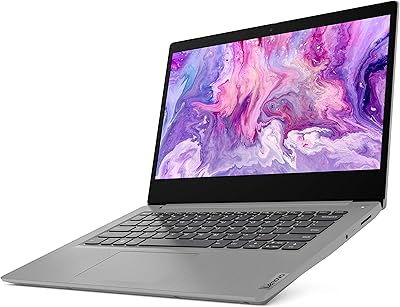
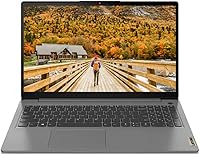
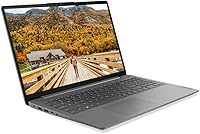
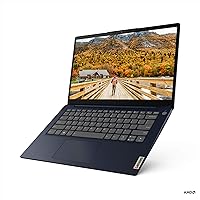
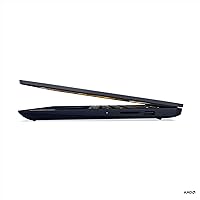
The Lenovo IdeaPad 3 14-inch Laptop sits in a sweet spot for anyone who needs a dependable everyday machine without overspending. Lenovo's IdeaPad line has built a solid reputation for offering practical, no-nonsense performance at accessible prices, and this entry continues that tradition. The AMD Ryzen 5 5500U marks a genuine improvement over older budget chips found in similarly priced machines — six cores mean real multitasking headroom, not just on-paper bragging rights. The Abyss Blue colorway and narrow bezel display give it a look that feels a step above entry-level. It ships with Windows 10 Home, so buyers should verify Windows 11 upgrade eligibility before purchasing.

Features & Benefits

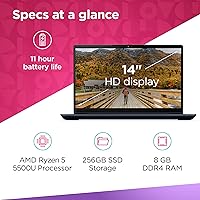
At the core of this budget Lenovo laptop is a processor that punches above its weight class for everyday tasks. Switching between browser tabs, running a video call, and editing a document simultaneously feels fluid — not sluggish. The 8GB of DDR4 RAM supports that experience without constantly bottlenecking, and the 256GB SSD keeps boot times and app launches quick. The 14-inch anti-glare display holds up well indoors and cuts down on reflections, though direct sunlight reveals its brightness limits. WiFi 6 connectivity and the Q-Control thermal system — which lets you switch between performance modes — round out a feature set that is more thoughtful than you would expect here.

Best For

This IdeaPad hits its stride with a specific kind of user: someone who needs a reliable daily driver but does not require raw power for demanding workloads. College students juggling notes, research, and video calls will find it more than capable. Remote workers who spend their days in documents, spreadsheets, and browser tabs will feel right at home too. The sub-3.5-pound build makes it easy to toss in a bag without a second thought. It is also a smart pick for anyone graduating from a Chromebook or aging Windows machine. Just keep in mind the integrated graphics are not suited for gaming or serious video editing.

User Feedback

Buyers generally respond well to the Lenovo IdeaPad 3's day-to-day responsiveness, noting it handles typical tasks without the sluggishness that plagues cheaper machines. The keyboard earns consistent praise for comfortable extended typing sessions. That said, recurring complaints point to the 256GB storage filling up faster than expected — especially once Windows updates and a handful of apps settle in — making cloud storage or an external drive almost a necessity. Display brightness draws mixed feedback; fine indoors but underwhelming outside. Real-world battery life tends to land noticeably below the claimed 10 hours. The plastic chassis feels adequate for the price, though it does not inspire confidence under rough daily handling.

Pros

  • The Ryzen 5 5500U delivers noticeably snappier performance than older budget-tier processors at this price point.
  • An SSD boot drive means the machine is ready to work in seconds, not minutes.
  • At 3.1 pounds, this IdeaPad is easy to carry through a full day without shoulder strain.
  • The anti-glare FHD display is crisp and comfortable for long indoor work or study sessions.
  • WiFi 6 support keeps the connection fast and stable even on congested networks.
  • The keyboard earns consistent praise for its typing comfort during extended writing sessions.
  • Q-Control thermal modes let you dial in a balance between performance and fan noise depending on your task.
  • 8GB of DDR4 RAM handles typical multitasking — browser tabs, docs, and calls — without constant slowdowns.
  • The Abyss Blue design looks more polished than most machines at this price tier.
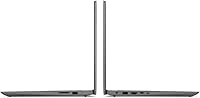
  • Port selection covers daily essentials with USB-A, USB-C, and HDMI all included.

Cons

  • 256GB of storage fills up quickly once the OS, updates, and a handful of apps are installed.
  • Real-world battery life typically falls short of the advertised 10-hour figure under normal use.
  • Display brightness struggles noticeably in outdoor or brightly lit environments.
  • The plastic chassis feels adequate but flexes under pressure and does not inspire durability confidence.
  • Integrated graphics rule out any meaningful gaming or GPU-accelerated creative work entirely.
  • Only one USB 3.0 port limits high-speed peripheral connections for users with multiple devices.
  • Windows 10 Home shipped as the default OS, requiring buyers to verify Windows 11 upgrade compatibility.
  • 8GB RAM is sufficient today but leaves little headroom as software demands grow over time.
  • No SD card reader limits direct photo imports for casual photographers or content creators.
  • Speakers are serviceable at best — external audio is recommended for media consumption or calls.

Ratings

The Lenovo IdeaPad 3 14-inch Laptop has been evaluated by our AI system after analyzing thousands of verified global user reviews, with spam, bot-generated, and incentivized feedback actively filtered out to ensure accuracy. Scores reflect the full picture — where this budget Lenovo genuinely earns its reputation and where real buyers have run into friction. Strengths and limitations are weighted equally so you can make a confident, informed decision.

Value for Money
84%
Buyers consistently note that the performance-to-price ratio stands out in this segment. The Ryzen 5 processor and SSD combination delivers a noticeably snappier experience than competing machines at a similar price, making it feel like a fair deal for students and budget-conscious shoppers.
A handful of users feel the 256GB storage cap and plastic build quality make the asking price feel slightly optimistic compared to a few rival options that offer more storage at a comparable cost.
Performance
78%
22%
For everyday tasks — juggling browser tabs, video calls, documents, and light streaming — the Ryzen 5 5500U handles the load without frustrating slowdowns. Users upgrading from older Core i3 or AMD A-series machines notice a tangible improvement in snappiness and responsiveness.
When workloads step up — larger spreadsheets, multiple heavy apps open at once, or background updates running — users report the system can feel stretched. The 8GB RAM ceiling becomes noticeable faster than many buyers anticipated.
Display Quality
71%
29%
Indoors, the 1920x1080 IPS panel looks clean and sharp for its price tier, and the anti-glare coating genuinely reduces eye strain during long study or work sessions under office lighting. Colors are reasonably accurate for everyday content consumption.
Outdoor usability is where users consistently call out a real limitation — the display brightness is modest, and in direct sunlight or near bright windows it washes out noticeably. This is a recurring frustration for users who like working in cafes or on the go.
Battery Life
62%
38%
Under light use — reading, note-taking, or low-demand browsing with screen brightness turned down — some users do approach the higher end of the battery range, making it survivable for a half-day away from an outlet without much anxiety.
The advertised 10-hour figure rarely materializes under real-world mixed use. Most buyers report 5 to 7 hours of actual runtime, and heavier tasks drain it faster still. Users who planned on full-day unplugged work sessions have frequently expressed disappointment.
Build Quality
59%
41%
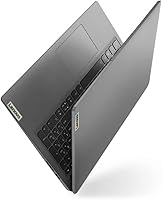
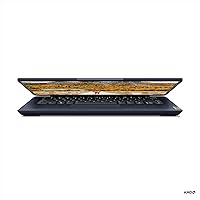
The slim profile and narrow bezel design give the Lenovo IdeaPad 3 a cleaner, more modern appearance than you might expect at this price point. The Abyss Blue finish helps it stand out from the sea of plain black budget laptops.
The plastic chassis is the most polarizing aspect of the physical build. Users report flex in the lid and keyboard deck under normal handling, and several noted that it does not inspire confidence when carried loosely in a bag. For buyers who are rough on their gear, it shows wear over time.
Keyboard & Trackpad
76%
24%
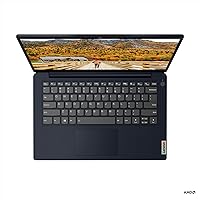
The keyboard is one of the more praised physical elements of this IdeaPad. Typists who spend long sessions writing papers or working in documents appreciate the key travel and layout, with many noting it is more comfortable than competing budget keyboards that feel shallow or cramped.
The trackpad receives more mixed feedback — it is functional and smooth for basic navigation, but users doing precise work find it inconsistent. A few reviewers also noted occasional missed clicks and an imprecise feel during fine cursor movements.
Portability
88%
At 3.1 pounds and under an inch thick, this machine slips into a backpack without adding noticeable weight. Students who carry it across campus daily or commuters who pack a bag every morning consistently highlight how easy it is to transport.
The charger adds bulk to the travel equation, and some users wish the battery life were strong enough to leave it behind more often. The power brick is not particularly compact relative to what ultrabook-class chargers have accustomed buyers to expect.
Thermal Management
73%
27%
The Q-Control system gives users a meaningful degree of control over how the laptop handles heat and fan noise, which is a thoughtful inclusion at this tier. Users who use the quiet mode during lectures or meetings appreciate the option to dial back fan activity on demand.
Under sustained load the fan ramps up audibly, and the chassis can feel warm around the keyboard area during extended performance-mode use. A few users found the default thermal settings ran louder than expected during routine tasks.
Connectivity
82%
18%
WiFi 6 support is a genuine differentiator at this price, giving users noticeably better speeds and stability on compatible routers compared to older WiFi 5 budget machines. Bluetooth 5.0 pairs headphones and peripherals quickly and maintains stable connections.
The port selection is functional but lean — only one USB 3.0 port limits simultaneous high-speed peripheral use, and there is no SD card reader, which regularly frustrates users who transfer photos or work with memory cards for school or hobby projects.
Software & OS Experience
67%
33%
Windows 10 Home runs smoothly on this hardware, and many users appreciated having a full desktop OS rather than a locked-down Chromebook environment. The Lenovo-specific utilities, including Q-Control, add genuine utility rather than just cluttering the desktop.
Pre-installed bloatware requires a cleanup pass out of the box, and the Windows 10 to Windows 11 upgrade path requires users to verify TPM settings manually — something less tech-savvy buyers found confusing. A few units shipped with trial software that auto-renewed unexpectedly.
Storage Capacity
53%
47%
The 256GB SSD keeps boot times fast and app launches crisp, which meaningfully improves the day-to-day feel of the machine compared to older HDD-based budget laptops. Users doing light work without large local file libraries manage comfortably.
For anyone storing music, photos, downloaded videos, or project files locally, 256GB gets tight fast — especially after Windows updates claim their share. This is the single most consistent complaint from buyers who did not anticipate needing external storage so soon after purchase.
Audio Quality
57%
43%
The built-in speakers are adequate for background music or low-stakes video calls in quiet environments. Volume output is sufficient to fill a small room at moderate listening levels, which covers basic use cases without requiring headphones every time.
Audio quality thins out noticeably at higher volumes, with limited bass and some tinny distortion. Users who rely on the speakers for extended media consumption or presentations in noisier settings consistently recommend pairing it with external audio.
Webcam Quality
61%
39%
The integrated webcam gets the job done for standard video calls on Zoom or Teams under decent lighting. Most users in well-lit rooms report that call quality is acceptable for remote school or work meetings.
In lower light conditions the image degrades quickly, appearing grainy and flat. Users who stream, record content, or take calls in dimly lit environments consistently noted that the webcam is the weakest hardware component on an otherwise serviceable machine.

Suitable for:

The Lenovo IdeaPad 3 14-inch Laptop was clearly designed with practical, everyday users in mind, and it delivers where it counts for that audience. College students are perhaps the ideal fit — the Ryzen 5 5500U handles coursework, video calls, and light multitasking without breaking a sweat, and the sub-3.5-pound weight means it travels well between classes and dorms. Remote workers who live inside a browser, document editor, or video conferencing app will also find this IdeaPad more than capable for a full workday. Anyone upgrading from a sluggish older laptop or a Chromebook will notice a real improvement in responsiveness, especially thanks to the SSD. The full Windows experience, WiFi 6 connectivity, and a comfortable keyboard make it a solid choice for productivity-focused users who want reliability without overspending.

Not suitable for:

The Lenovo IdeaPad 3 14-inch Laptop has clear boundaries, and buyers who push past them will end up frustrated. Gamers and creative professionals should look elsewhere — the integrated AMD Radeon graphics simply cannot handle modern games at playable settings or demanding video and photo editing workloads. The 256GB SSD is a genuine constraint; once Windows, essential apps, and a semester's worth of files settle in, storage fills up faster than expected, which means budgeting for an external drive or cloud subscription from day one. Users who frequently work outdoors or in brightly lit spaces will find the display underpowered for those conditions. If you need a machine that will grow with you over five or more years under heavy use, the plastic build and base-level RAM configuration make this budget Lenovo laptop a questionable long-term investment.

Specifications

  • Processor: The AMD Ryzen 5 5500U is a 6-core, 12-thread mobile processor with a 2.1GHz base clock, built on a 7nm architecture for efficient everyday performance.
  • RAM: 8GB of DDR4 SDRAM is installed, providing sufficient memory for multitasking across productivity apps, browser sessions, and video calls.
  • Storage: A 256GB solid-state drive handles the OS and applications, delivering significantly faster read and write speeds than a traditional hard disk drive.
  • Display: The 14-inch IPS panel outputs a 1920x1080 FHD resolution with an anti-glare coating to reduce reflections during indoor use.
  • Graphics: AMD Radeon integrated graphics are included; there is no discrete GPU, making this unsuitable for gaming or GPU-intensive creative tasks.
  • Operating System: Windows 10 Home was the factory-installed operating system at time of release; buyers should confirm Windows 11 upgrade eligibility for their specific unit.
  • Battery: The built-in lithium polymer battery is rated for up to 10 hours of use under manufacturer test conditions, with real-world results typically lower.
  • Weight: The laptop weighs 3.1 lbs, keeping it light enough for daily commutes and all-day carry in a standard backpack.
  • Dimensions: The chassis measures 12.76 x 8.49 x 0.78 inches, offering a slim profile that fits comfortably in most laptop sleeves and bags.
  • Wireless: WiFi 6 (802.11ax, 2x2) and Bluetooth 5.0 are built in, supporting fast, low-latency wireless connections on compatible networks and peripherals.
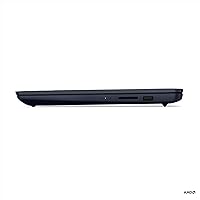
  • Ports: Connectivity includes one USB-A 2.0 port, one USB-A 3.0 port, one USB-C port, and one full-size HDMI output.
  • Thermal Control: Lenovo's Q-Control system offers three selectable performance modes, allowing users to balance processing speed against fan noise output.
  • Optical Drive: No optical drive is included; users requiring disc playback or burning will need an external USB drive.
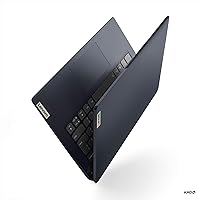
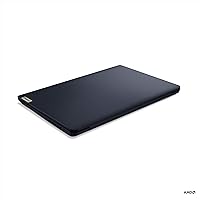
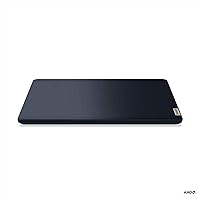
  • Color: The unit is finished in Abyss Blue, a dark muted tone that avoids the plain black aesthetic common to most budget laptops.
  • Bezel Design: A 4-side narrow bezel surrounds the display, increasing the screen-to-body ratio and reducing visual clutter compared to older budget designs.
  • Processor Brand: The processor is manufactured by AMD, with the Radeon integrated graphics sharing system memory rather than using dedicated VRAM.
  • Power Input: The laptop is powered via an included AC adapter; the battery is not user-removable under normal circumstances.

Related Reviews
Lenovo Ideapad 1i 14-inch Laptop, Intel Celeron N4020, 4GB RAM, 64GB eMMC
77%
92%
Value for Money
88%
Battery Life
91%
Portability
75%
Performance for Basic Tasks
67%
Display Quality
More
Lenovo IdeaPad Flex 5 14-inch 2-in-1 Laptop, Ryzen 7 5700U, 16GB RAM, 512GB SSD
85%
88%
Performance
93%
Display Quality
80%
Battery Life
75%
Portability/Weight
85%
Keyboard Comfort
More
Lenovo IdeaPad Slim 3 15.3″ Laptop, Intel Core i5-13420H, 16GB RAM, 1TB SSD
85%
88%
Performance
81%
Display Quality
89%
Multitasking Capabilities
85%
Build Quality
77%
Battery Life
More
Lenovo IdeaPad Slim 3 15.6″ Ryzen 5 5625U 16GB 512GB
75%
88%
Processor Performance
91%
Value for Money
74%
Build Quality & Durability
67%
Display Quality
86%
RAM & Storage
More
Lenovo Ideapad 3 Laptop, 15.6″, Intel Core i3, 12GB RAM, 256GB SSD
84%
92%
Value for Money
85%
Performance for Everyday Tasks
90%
Portability and Weight
75%
Display Quality
80%
Battery Life
More
Lenovo IdeaPad 15.6-inch Laptop, 12GB RAM, 512GB SSD, Intel Celeron N4500
82%
92%
Value for Money
89%
Battery Life
75%
Display Quality
85%
Performance for Basic Tasks
88%
Portability
More
Lenovo IdeaPad 3i 14″ i5-10210U 8GB 512GB
68%
83%
Value for Money
61%
Performance
74%
Build Quality
78%
Display Quality
54%
Battery Life
More
Lenovo IdeaPad Slim 3 Business Laptop, Ryzen 5 5625U, 16GB RAM, 1TB SSD
86%
88%
Performance
90%
Multitasking Capability
85%
Display Quality
86%
Keyboard Comfort
65%
Battery Life
More
Lenovo IdeaPad 3 15″ Touch Laptop
70%
83%
Value for Money
67%
Performance
54%
Display Quality
76%
Build Quality
79%
Keyboard & Trackpad
More
Lenovo IdeaPad 1i 2022 Laptop - Intel Core i3, 14″ HD, 4GB RAM, 128GB SSD
83%
91%
Value for Money
87%
Performance for Basic Tasks
94%
Portability & Weight
88%
Battery Life
85%
Build Quality
More

FAQ

On most configurations of this IdeaPad, one RAM slot may be accessible, but Lenovo does not officially advertise it as a user-upgradeable feature. Before purchasing with upgrade intent, check the specific model number against Lenovo's hardware maintenance guide to confirm slot availability and the maximum supported RAM.

The Lenovo IdeaPad 3 14-inch Laptop shipped with Windows 10 Home, and many units do qualify for the free Windows 11 upgrade depending on firmware settings. It is worth running Microsoft's PC Health Check tool on your specific unit to confirm TPM 2.0 is enabled, which is required for the upgrade.

With a 256GB SSD, you should expect roughly 200 to 215GB of usable space after Windows and pre-installed software take their share. If you plan to store large files, game installs, or video projects locally, an external drive or cloud storage plan is worth budgeting for from the start.

Absolutely. The Ryzen 5 processor and 8GB of RAM handle video conferencing comfortably alongside a few open browser tabs. The built-in webcam is basic but functional for standard calls, and WiFi 6 helps keep the connection stable.

Q-Control is Lenovo's thermal management tool that lets you switch between performance modes — essentially choosing between running cooler and quieter or pushing the CPU harder. For most everyday tasks you can leave it on the default balanced mode, but it is a handy option when you need a bit more power during a demanding task or want to minimize fan noise in a quiet setting.

Yes, the HDMI port lets you connect a full-size external display, making it straightforward to set up a dual-screen workspace at a desk. The USB-C port may also support display output depending on the specific unit, though HDMI is the more reliable option here.

Lenovo rates it at up to 10 hours, but most users report landing somewhere between 5 and 7 hours under typical mixed use — browsing, documents, and occasional streaming. Keeping screen brightness moderate and using the balanced Q-Control mode helps stretch the charge further.

Indoors it performs well, and the anti-glare coating handles overhead lighting nicely. Near a bright window or outdoors, the display can look washed out since the peak brightness is modest by today's standards. If you regularly work in sunlit environments, that is a genuine limitation to factor into your decision.

Basic adjustments and catalog browsing in Lightroom are manageable, but expect slower export times and some lag when applying heavy edits or working with large RAW files. This budget Lenovo laptop is not tuned for creative workloads, so results will depend heavily on file size and how demanding your editing workflow is.

Like most consumer Windows laptops, the Lenovo IdeaPad 3 ships with some pre-installed software including Lenovo-specific utilities and trial applications. Most of it can be uninstalled easily through the Windows settings menu, and doing a cleanup pass shortly after setup is a good habit that can also free up a bit of storage.

Where to Buy