Overview

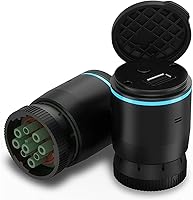
The Garmin eLog Electronic Logging Device is Garmin's push into commercial trucking compliance, aimed squarely at owner-operators and small fleets who need to meet the FMCSA's Hours of Service mandate without paying monthly fees. That last point matters more than it might seem — most ELD providers lock you into recurring subscriptions, making this a genuine one-time purchase in a field full of SaaS models. The hardware is a compact plug-in unit that connects to your truck's diagnostic port and pairs with a free smartphone app over Bluetooth. Records live on your phone and can be shared with DOT inspectors via USB or FMCSA Web Services.
Features & Benefits

Port compatibility is one of the first things to verify before buying any ELD, and this logging device covers both 9-pin J1939 and 6-pin J1708 diagnostic ports — meaning it works with most Class 7 and Class 8 diesel trucks right out of the box. The free Garmin eLog app handles everything from HOS logging to DVIRs and roadside inspection mode, connecting to the hardware over Bluetooth without needing a cellular data plan on the device itself. Worth flagging early: this ELD is strictly for commercial diesel applications. If your truck uses an OBD-II port, it simply will not work here — full stop.

Best For

This ELD makes the most sense for independent owner-operators who want solid federal compliance without the ongoing cost of a subscription-based service. It's also a practical pick for small fleets that need to keep overhead lean and avoid per-unit monthly charges that accumulate fast across multiple trucks. Drivers running older equipment with 6-pin J1708 ports will find this logging device particularly useful — many newer ELDs have quietly dropped support for that connector. Anyone already invested in Garmin's ecosystem, or who simply prefers managing records on a personal smartphone rather than a dedicated in-cab display, will feel comfortable with this setup.

User Feedback

Across more than a thousand ratings, the no-subscription pricing draws consistent praise — it's clearly the primary reason most buyers choose this ELD over competing options. Setup and port connectivity earn solid marks when used with a compatible truck. Where things get complicated is the app. Bluetooth disconnects, crashes, and sync failures appear repeatedly in negative reviews, and some drivers describe the app failing during a roadside inspection — the worst possible moment for any compliance tool. Volvo owners also note frustration that the required adapter cable is not included in the box, and customer support responsiveness has drawn mixed reactions when software problems arise.

Pros

  • No subscription fees mean your total cost drops significantly compared to most ELD competitors over two or three years.
  • Works with both 9-pin J1939 and 6-pin J1708 ports, covering a wide range of Class 7 and Class 8 diesel trucks.
  • The free companion app handles HOS logging, DVIRs, and roadside inspection mode without requiring an add-on purchase.
  • Compact and lightweight hardware — easy to install and leaves the cab uncluttered.
  • No cellular data plan required on the device; Bluetooth to your smartphone handles the connection.
  • ELD records are accessible to DOT inspectors via USB port or FMCSA Web Services, covering both inspection scenarios.
  • Garmin is a recognized brand in navigation and fleet hardware, which matters to drivers who want proven company backing.
  • A solid choice for older trucks with 6-pin J1708 ports that many newer ELDs no longer support.
  • One-time setup with no account tiers, feature paywalls, or plan upgrades to manage.

Cons

  • App stability is a real concern — Bluetooth disconnects, crashes, and sync failures appear consistently across user reviews.
  • A malfunctioning app during a roadside inspection is a serious compliance risk that several drivers have reported firsthand.
  • Volvo engine owners need a separate adapter cable that Garmin does not include in the box.
  • Customer support responsiveness has drawn mixed feedback, which is a problem when compliance issues need fast resolution.
  • The entire system depends on your personal smartphone functioning reliably — a dead battery or broken phone leaves you without records.
  • No built-in display means drivers who prefer a standalone unit are out of luck.
  • App updates have occasionally introduced new bugs rather than resolving existing ones, based on user-reported patterns.
  • Not suitable for any vehicle running an OBD-II protocol, which rules out a meaningful portion of commercial vehicles.

Ratings

Our AI-generated scores for the Garmin eLog Electronic Logging Device were produced by systematically analyzing thousands of verified owner reviews worldwide, with spam, bot activity, and incentivized feedback actively filtered out before scoring. The ratings reflect a balanced picture — where this logging device genuinely earns its marks and where real drivers have run into friction. Both strengths and recurring pain points are weighted transparently in every category below.

Value for Money
88%
The absence of any subscription fee is the single biggest reason drivers choose this ELD over competitors, and that advantage compounds over time. Owner-operators who run one truck year after year report significant savings compared to monthly-billed alternatives, making the upfront cost feel well-justified within the first year of use.
While the hardware price is reasonable for a compliance tool, drivers who encounter app problems or need replacement hardware have noted that the effective cost-per-year calculation gets murkier when troubleshooting time is factored in. A few users feel the value promise erodes when the software side requires repeated fixes.
App Stability
46%
54%
When the Garmin eLog app works as intended, drivers describe it as functional and fairly intuitive for daily HOS logging and completing DVIRs. On compatible phones with a stable Bluetooth environment, routine log entries and end-of-day submissions proceed without drama for a meaningful portion of users.
App reliability is the most-cited complaint across the entire review pool, spanning both iOS and Android users. Crashes, unexpected Bluetooth disconnects, and sync failures appear with enough regularity that multiple drivers describe the app failing at exactly the wrong moment — during a roadside inspection — which is an unacceptable risk for a compliance tool.
Port Compatibility
82%
18%
Supporting both 9-pin J1939 and 6-pin J1708 diagnostic connectors gives this logging device a broader reach than many competing ELDs that have quietly dropped J1708 support. Drivers running older Class 7 and Class 8 trucks appreciate that the included 6-pin adapter means they can get started without hunting for additional hardware.
The hard cutoff at commercial diesel ports means anyone with an OBD-II vehicle hits a wall immediately, and Volvo engine owners face a separate frustration since the required 16-pin adapter is not included in the box. These exclusions are clearly documented but still catch buyers off guard regularly.
Ease of Setup
77%
23%
Most drivers describe the initial hardware installation as genuinely simple — plug in, pair via Bluetooth, download the free app, and follow the prompts. For trucks using the 6-pin adapter, the included hardware means no additional parts run is needed before getting started, which drivers on tight schedules appreciate.
Setup smoothness depends heavily on which phone you are using and whether Bluetooth pairing cooperates on the first attempt. A subset of users reports having to re-pair the device multiple times before achieving a stable initial connection, which adds frustration to what should be a one-time process.
Roadside Inspection Readiness
58%
42%
The dual inspection access options — USB direct connection and FMCSA Web Services over Bluetooth — give drivers two paths to presenting records to a DOT inspector, which is a thoughtful design choice that acknowledges app unpredictability. USB access in particular offers a fallback that does not rely on the app functioning correctly.
In practice, the fear of app failure during an actual inspection is the most emotionally charged concern in the review pool. Drivers who have experienced a crash or freeze mid-inspection describe it as genuinely stressful, and the frequency of these reports is high enough to make this a legitimate purchase consideration rather than an edge case.
Hardware Build Quality
73%
27%
The physical device is compact and solidly constructed for its size, with most drivers reporting that the hardware itself holds up well to the vibration and temperature swings of a working truck cab. Port connectivity on the hardware side draws consistent praise — it is the software that generates complaints, not the plug.
At 3.2 ounces and with a relatively small form factor, the device does not feel premium in hand, though that is a minor aesthetic concern for a compliance tool. A small number of users report hardware failure after extended use, though these cases appear to be the exception rather than the norm.
Bluetooth Reliability
51%
49%
When the Bluetooth connection holds, drivers appreciate not needing a cellular data plan on the device and being able to glance at their phone for real-time HOS status without interacting with the hardware directly. In stationary or low-interference environments, pairing is generally stable for the initial session.
Bluetooth drops are the second-most-reported complaint after general app instability, and the two problems often occur together. Drivers who run routes through areas with high radio frequency interference, or who keep multiple Bluetooth devices active in the cab, report more frequent disconnects that require manual reconnection.
HOS Logging Accuracy
74%
26%
For FMCSA mandate compliance, the core HOS data capture — pulling engine hours and movement data from the diagnostic port — functions accurately on supported trucks according to the majority of users who have had their logs reviewed at inspections. The device reads engine data reliably when the hardware connection is clean.
Accuracy concerns arise indirectly through app sync issues rather than hardware misreads. When logs fail to sync properly after a Bluetooth disconnect, drivers occasionally discover discrepancies between what the device recorded and what the app is displaying, which creates stress around log certification at the end of a shift.
DVIR Functionality
68%
32%
The built-in Driver Vehicle Inspection Report capability inside the app covers the required pre-trip and post-trip inspection workflow without needing a separate tool or paper form. Drivers who stick with the full app workflow find it adequate for meeting the daily inspection documentation requirement.
DVIR usability gets caught in the same app reliability web — if the app crashes mid-inspection report, the partial entry is typically lost. Some drivers have reverted to paper DVIRs as a backup specifically because of this risk, which somewhat undermines the convenience argument for going fully digital.
Customer Support
44%
56%
Garmin is an established brand with formal support channels, and drivers who encounter straightforward setup questions generally report getting useful guidance. The brand name provides a level of institutional credibility that pure software ELD providers sometimes lack.
Support responsiveness for app-related issues draws some of the most frustrated feedback in the review pool. Drivers dealing with compliance-critical software bugs report slow turnaround and templated responses that do not address the specific technical problem, which is a serious gap for a product where downtime has legal consequences.
Smartphone Compatibility
71%
29%
The app covers a broad range of Android and iOS devices, and most drivers on reasonably current smartphones find the compatibility requirements easy to meet without needing to upgrade their phone. The lack of a data plan requirement on the device side removes one potential friction point for drivers with limited data budgets.
Older Android devices running versions near the 4.1 minimum floor have reported degraded app performance and more frequent crashes compared to users on current operating system versions. Drivers who use budget or older handsets as their dedicated ELD phone may encounter disproportionately more instability than users on flagship devices.
Fleet Scalability
63%
37%
For small fleets of two to five trucks, the no-subscription model scales in a straightforward way — buy a device per truck, pay once, and the ongoing cost is essentially zero. Fleet managers who have deployed it across a small number of trucks report that the per-unit economics hold up well versus alternatives.
There is no fleet management dashboard, centralized reporting portal, or remote monitoring capability built into this system. Fleet operators who need visibility across multiple drivers simultaneously will quickly outgrow this ELD, and the app-per-driver architecture makes centralizing records an entirely manual process.
Legacy Truck Support
83%
Support for 6-pin J1708 ports is a genuine differentiator in a market where many newer ELDs target only J1939-equipped trucks. Drivers running pre-2000 commercial trucks who have struggled to find compatible ELDs describe the J1708 support as the deciding factor in their purchase.
Despite the broad port coverage, the Volvo adapter omission is a persistent irritant that affects a non-trivial number of commercial drivers. The fact that it is a known compatibility gap that Garmin has not addressed by including the cable in the box reads as an oversight to buyers who discover it after purchase.

Suitable for:

The Garmin eLog Electronic Logging Device is built for independent owner-operators and small fleet managers who need FMCSA-compliant Hours of Service recording without the drag of a monthly subscription eating into tight margins. If you run one truck or a handful of them and want to pay once and move on, this logging device makes a strong case. It's particularly well-matched for drivers operating older commercial trucks with 6-pin J1708 diagnostic ports, since many competing ELDs have quietly phased out support for that connector. Drivers who are already comfortable managing information on a personal smartphone — rather than relying on a proprietary in-cab screen — will slot right into this workflow. Small fleets looking for a low-overhead compliance solution that doesn't require managing per-seat software licenses will also find the value proposition genuinely compelling over a multi-year horizon.

Not suitable for:

Before buying, there are compatibility walls worth knowing about — and the Garmin eLog Electronic Logging Device hits them hard in a few specific situations. If your commercial vehicle uses an OBD-II port rather than a J1939 or J1708 diagnostic connector, this ELD simply will not work; it is not designed for that protocol. Volvo engine owners face an additional hurdle since a separate adapter cable is required but not included in the box, adding friction to the setup process. Drivers who need a fully self-contained solution with a dedicated display — rather than depending on a personal smartphone and a Bluetooth connection — will find the app-dependent architecture limiting. Fleet operators who prioritize enterprise-grade support, real-time fleet tracking dashboards, or tightly managed driver monitoring tools should look at more full-featured fleet management platforms instead. Anyone whose smartphone runs an older Android version below 4.1 or an iOS version below 9 will face compatibility issues with the companion app.

Specifications

  • Brand: Manufactured by Garmin, a well-established name in GPS navigation and fleet technology.
  • Model Number: The official model identifier is 010-01876-00, sold under ASIN B072L856YC.
  • Dimensions: The hardware unit measures 2.7 × 1.8 × 1.8 inches, making it compact enough to tuck into most diagnostic port locations without blocking surrounding dash space.
  • Weight: The device weighs 3.2 ounces, adding negligible bulk to the vehicle's cab.
  • Supported Ports: Compatible with 9-pin J1939 and 6-pin J1708 commercial diagnostic ports, covering the majority of Class 7 and Class 8 diesel trucks.
  • Incompatible Ports: Not compatible with OBD-II (SAE J1979) protocol ports, which rules out passenger vehicles and light-duty trucks using that standard.
  • Connectivity: Pairs with a smartphone via Bluetooth for live data transfer and also supports USB connection for direct inspector access to ELD records.
  • Companion App: Requires the free Garmin eLog app, available for both Android and iOS, to complete the compliance solution.
  • OS Compatibility: Supports Android 4.1.x or higher and Apple iOS 9 or higher on compatible smartphones.
  • Subscription Fee: There are no monthly or annual subscription fees; the hardware is a single one-time purchase.
  • Regulatory Compliance: Meets the FMCSA Electronic Logging Device mandate requirements for Hours of Service recording on commercial motor vehicles.
  • In-Box Contents: The package includes the Garmin eLog device, a 6-pin J1708 adapter, and a printed quick start manual.
  • Color: The unit is finished in black.
  • Data Storage: HOS records and logs are stored locally on the paired smartphone rather than on the device hardware itself.
  • Inspector Access: DOT inspectors can access ELD records either via the device's USB port or through FMCSA Web Services over a Bluetooth connection.
  • First Available: This logging device became available for purchase in May 2017.
  • Avg. Rating: Holds an average rating of 3.9 out of 5 stars based on over 1,200 customer ratings on Amazon.
  • Volvo Compatibility: Vehicles with a Volvo engine and a 16-pin J1962 connector require a separate adapter cable that is not included in the standard package.

Related Reviews
Garmin Approach S12 GPS Golf Watch
79%
91%
GPS Accuracy
93%
Battery Life
89%
Course Library
71%
Display Readability
88%
Ease of Use
More
Garmin GT15M Transducer
87%
91%
Performance at High Speeds
89%
Ease of Installation
94%
Accuracy of Depth Readings
88%
Hull Compatibility
85%
Build Quality
More
Garmin Forerunner 165 Running Smartwatch
81%
93%
Display Quality
76%
GPS Accuracy
91%
Training & Coaching Features
71%
Battery Life
68%
Heart Rate Monitoring
More
Garmin Striker Cast Castable Sonar Fish Finder
79%
91%
Ease of Setup
71%
App Performance & Stability
84%
Sonar Accuracy
78%
Wireless Range
88%
Battery Life
More
Garmin Forerunner 735XT Multisport GPS Watch
79%
91%
GPS Accuracy
73%
Heart Rate Accuracy
88%
Battery Life
86%
Multisport Mode Functionality
84%
Build Quality & Durability
More
Garmin dēzlCam OTR725
87%
95%
Navigation Accuracy
93%
Dash Cam Video Quality
90%
Route Safety Alerts
88%
Touchscreen Responsiveness
78%
Setup & Installation
More
Garmin dezl OTR620 6-Inch Truck GPS Navigator
76%
88%
Display Quality
82%
Truck Routing Accuracy
58%
App Dependency
79%
PrePass Integration
84%
BirdsEye Satellite Imagery
More
Garmin Instinct Crossover
84%
94%
Durability & Build Quality
88%
Battery Life
89%
GPS & Health Tracking Accuracy
67%
Display Readability
81%
Ease of Use
More
Garmin inReach Explorer+ Satellite Communicator
76%
93%
Satellite Reliability
88%
Two-Way Messaging
96%
SOS & Emergency Response
78%
Navigation & Mapping
61%
Value for Money
More
Garmin Vívoactive 5 GPS Smartwatch
77%
88%
Display Quality
91%
Battery Life
74%
Health Tracking Accuracy
78%
GPS Performance
83%
Sleep Tracking
More

FAQ

No, there are no recurring fees of any kind. You pay once for the hardware and use the free Garmin eLog app indefinitely. That is one of the main reasons owner-operators choose it over competing devices that charge per month or per vehicle.

Unfortunately, no. This logging device only supports commercial diesel diagnostic ports — specifically 9-pin J1939 and 6-pin J1708. OBD-II (SAE J1979) is not supported, so if your vehicle uses that connector, you will need to look at a different ELD solution.

Yes. Trucks with a Volvo engine and a 16-pin J1962 connector require a separate adapter cable that Garmin does not include in the box. You will need to source and purchase that cable before the device will connect properly to your truck.

You need an Android phone running version 4.1 or higher, or an iPhone running iOS 9 or higher. The device itself communicates with your phone over Bluetooth, so no cellular data plan is required on the hardware. Your phone handles any data needs through your existing plan.

There are two ways. You can hand the inspector your phone with the Garmin eLog app open in roadside inspection mode, or they can connect directly to the device via USB to pull records without involving the app at all. Having the USB option as a backup is worth knowing about, especially given the app reliability concerns some drivers have reported.

Yes, Garmin lists it as not discontinued, and the eLog app continues to receive updates. That said, it is worth checking the current app store reviews before buying to get a current read on app stability, since software quality has been a recurring concern among users.

This is honestly the most common pain point in user reviews. Many drivers report a stable connection during normal use, but Bluetooth disconnects and app crashes do appear consistently in negative feedback across both iOS and Android. It is not a universal problem, but it is frequent enough that you should have a plan for reconnecting quickly if an issue arises at a weigh station.

The hardware plugs into one truck at a time since it connects directly to that vehicle's diagnostic port. If you want to equip multiple trucks, you would need one device per vehicle. For small fleets, that still works out cheaper than subscription-based alternatives over time, but the per-truck cost does add up.

Your records are stored on your smartphone, so a lost or dead phone is a real vulnerability. It is a good practice to regularly back up your ELD data through the app and to keep a phone charger accessible in the cab. If your phone fails during an active inspection, the USB access option on the device may still allow limited data retrieval, but this scenario is worth thinking through before it happens.

Most drivers describe the initial setup as pretty straightforward — plug the device into the diagnostic port, download the free app, pair via Bluetooth, and follow the in-app prompts. The quick start manual walks through the basics. Drivers with J1708 trucks can use the included 6-pin adapter right out of the box, which removes one extra step.

Where to Buy