Overview

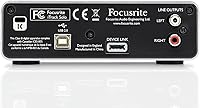
The Focusrite iTrack Solo USB Audio Interface arrived in 2012 as Focusrite's bid to bring its well-regarded preamp technology to iPad users — a relatively novel idea at the time. Unlike most budget interfaces of that era, it comes housed in an aluminum unibody case, which gives it a noticeably more solid feel than the plastic-bodied alternatives crowding the same shelf space. It draws power directly over USB, so there is no wall adapter to misplace. Beginners also get Ableton Live Lite and the Focusrite Scarlett Plug-in Suite in the box. That said, this is an older design, and anyone shopping today should honestly compare it against current-generation options before committing.

Features & Benefits

The iTrack Solo packs a lot into a compact frame. Its Focusrite mic preamp is the real draw — recording an acoustic guitar or a spoken-word voiceover through it yields noticeably clean results with a low noise floor, even at higher gain settings. You get one XLR combo input for a microphone or line source, plus a dedicated quarter-inch jack for plugging in a guitar or bass directly. The signal halo LEDs ring the gain knobs and shift color as your levels climb toward clipping, which is genuinely useful when you are tracking alone. Headphone and monitor outputs handle stereo playback, and the whole unit weighs under two pounds.

Best For

This USB audio interface is a natural fit for singer-songwriters and podcasters who record one source at a time and have no need for multiple simultaneous inputs. It works equally well for guitarists and bass players wanting a clean direct-input path into a DAW without buying extra gear. iPad users will appreciate that it runs without a wall adapter — though you will need an Apple Camera Connection Kit or a Lightning-to-USB adapter to make that connection, and those are sold separately. Students and hobbyists building a first home studio get genuine Focusrite preamp character at a reasonable entry point, along with bundled software to get started right away.

User Feedback

With a 4.2-out-of-5 rating across 116 reviews, the iTrack Solo has earned a generally positive reception. Buyers frequently highlight preamp clarity and the quality of the aluminum build, and most find setup on both Mac and Windows straightforward. The complaints worth noting are practical ones: the model has been around since 2012, and a handful of users report that driver support on the latest operating system versions is not always reliable out of the box. A few reviewers also pointed out that iPad connectivity demands an additional adapter not included in the packaging. Some buyers who compared it directly with newer Scarlett-generation models ultimately decided to spend a bit more for updated features and better OS support.

Pros

  • Focusrite preamp delivers a clean, low-noise signal that punches above its category for vocals and acoustic instruments.
  • Aluminum unibody construction feels noticeably more durable than the plastic housings common among competing budget interfaces.
  • USB bus-powered design means one less cable and no wall adapter cluttering your desk.
  • Signal halo LEDs give instant, glanceable feedback on input levels without stopping your session to check a screen.
  • Compatible with iPad, Mac, and Windows, making it one of the more versatile options for cross-platform users.
  • Bundled Ableton Live Lite and Focusrite plug-in suite give beginners a complete starting point at no extra cost.
  • Dedicated instrument input handles direct guitar and bass connection cleanly without needing a DI box.
  • Compact footprint and sub-two-pound weight make it genuinely easy to pack and use outside the home studio.
  • Setup on Mac and Windows is widely reported as straightforward, with minimal driver friction for most users.

Cons

  • Only one mic preamp input means recording two sources simultaneously is simply not possible.
  • The model dates back to 2012, and driver support on the latest operating system versions is not guaranteed to be smooth.
  • iPad connectivity requires a separately purchased Apple Camera Connection Kit or Lightning-to-USB adapter — not included.
  • Buyers comparing this against current Scarlett-generation interfaces will find the newer models offer meaningfully updated features.
  • With just 116 ratings on Amazon, the review pool is relatively thin, making it harder to gauge long-term reliability trends.
  • No phantom power indicator light, which can be a minor source of uncertainty for beginners using condenser microphones.
  • The product being discontinued by the manufacturer raises reasonable questions about ongoing firmware or driver updates.
  • No MIDI I/O, which rules it out for users who want to integrate hardware synthesizers or controllers directly through the interface.

Ratings

The scores below reflect our AI-powered analysis of verified global buyer reviews for the Focusrite iTrack Solo USB Audio Interface, with spam, incentivized feedback, and bot activity actively filtered out before scoring. Each category is weighted against real-world usage patterns — not marketing claims — so both the genuine strengths and the honest frustrations are reflected in equal measure. Buyers at every experience level should find these ratings useful for deciding whether this interface matches their actual recording needs.

Preamp Audio Quality
88%
Vocalists and acoustic guitarists consistently praise the clean, low-noise signal this preamp produces — a quality that genuinely stands out at this market tier. Recording a fingerpicked guitar or a spoken-word voiceover through the iTrack Solo yields results that require minimal corrective EQ in post, which beginners especially appreciate.
A small number of more experienced users noted that at very high gain settings, the preamp introduces a subtle coloration that cleaner, higher-end interfaces avoid. For casual home recording this is rarely an issue, but it is worth knowing for anyone chasing a truly transparent signal chain.
Build Quality
91%
The aluminum unibody chassis is the most frequently cited physical compliment across buyer reviews, and for good reason — it holds up to being slipped in and out of laptop bags repeatedly without showing wear. Knobs feel solid and rotate with satisfying resistance, which is not something you can say about many interfaces in this tier.
A handful of buyers noted that while the main chassis is robust, the USB port connection can feel slightly loose after extended daily use, which introduces some uncertainty about long-term reliability. The overall fit and finish is still well above average, but it is not immune to wear at connection points.
Ease of Setup
83%
On Mac and Windows systems running older OS versions, most buyers report a plug-and-play experience with minimal configuration needed to start recording. Beginners especially appreciated that they could be up and tracking within minutes of unboxing, without hunting through settings menus or watching tutorial videos.
The setup story gets more complicated on newer operating systems, where some users encountered driver conflicts or needed to manually adjust security permissions before the interface was recognized reliably. This is a known friction point for an older model, and it caught a meaningful number of buyers off guard.
iPad Compatibility
67%
33%
For iPad users who do have the right adapter, the iTrack Solo works genuinely well as a mobile recording solution — bus-powered, compact, and capable of delivering clean audio without draining the iPad's battery unusually fast. Musicians who record demos on an iPad while traveling found this combination practical.
The requirement for a separately purchased Apple Camera Connection Kit or Lightning-to-USB adapter is a recurring source of frustration, particularly because it is not made clear at the point of purchase. Some buyers also reported inconsistency in whether the connection was recognized reliably depending on which iPad generation and adapter combination they used.
Driver & OS Support
54%
46%
On stable, established OS versions — particularly macOS versions from a few years back and Windows 10 — the interface performs consistently without requiring constant driver management. Users who have not upgraded their systems recently tend to report a largely trouble-free experience.
This is the most problematic area for the iTrack Solo given its age. Multiple reviewers on current macOS and Windows 11 reported needing workarounds or finding that Focusrite's driver updates for this specific model have become infrequent. For buyers running up-to-date systems, this is a legitimate risk worth weighing carefully before purchasing.
Portability
89%
At 1.7 pounds and with a footprint smaller than a hardcover book, this Focusrite interface fits easily into any laptop bag without adding noticeable weight. The bus-powered design means one fewer item to pack — no adapter, no separate cable for power — which road-recording musicians and traveling podcasters found genuinely convenient.
The unit is slightly thicker than some competing ultra-slim interfaces, so it does not sit as flat in a bag as it might. This is a minor quibble rather than a real limitation, but buyers prioritizing absolute minimal packing footprint may notice it.
Value for Money
71%
29%
The bundled software — Ableton Live Lite and the Focusrite Scarlett Plug-in Suite — adds genuine value for buyers who do not already own a DAW, effectively lowering the real cost of entry into home recording. The preamp quality relative to the asking price is competitive, especially for users who have compared it against generic no-name alternatives.
The value calculation becomes harder to justify when you place the iTrack Solo side-by-side with current Scarlett Solo pricing, since the newer model offers more reliable modern driver support and updated specs for a similar or only slightly higher cost. Buyers doing their research are increasingly finding it a difficult choice to defend on pure value grounds.
Input Flexibility
62%
38%
Having both a combo XLR input and a dedicated instrument jack covers the core use cases for solo home recording — vocals, acoustic instruments, and direct guitar or bass — without needing additional gear like a separate DI box. For a one-person recording setup, this configuration is genuinely practical.
The single mic preamp channel is a hard ceiling that limits the interface to one microphone source at a time, which rules it out for anyone wanting to record two vocalists, a vocalist with a room mic, or any scenario requiring multiple simultaneous mic inputs. This is an intentional design constraint, but it does limit the product's longevity as a buyer's skills grow.
Monitoring & Output
78%
22%
The stereo output handles both studio monitor and headphone connections cleanly, with a main output knob that gives smooth, linear volume control. Buyers who use it for mixing reference playback noted that the output signal is clean and free from audible noise or interference at normal listening volumes.
There is no independent headphone volume control separate from the main output level, which means adjusting monitoring volume while recording requires touching the main knob — not ideal when you want to preserve a carefully set playback level. This is a minor but real workflow limitation for attentive home studio users.
Level Indication
84%
The signal halo LEDs are one of the more thoughtful hardware touches on this interface — they give an immediate, glanceable read on input levels without requiring the user to look at a software meter. For solo recording sessions where you are adjusting gain while also performing, this kind of physical feedback is genuinely useful.
The halo display is not granular enough to serve as a precise metering tool — it shows you roughly where you are, not exactly. Users who rely on accurate pre-clip headroom monitoring for professional-quality recording will still want to use their DAW's meter in tandem.
Bundled Software
81%
19%
Ableton Live Lite is a legitimately functional DAW that supports enough tracks and features to carry a beginner through their first year of home recording without needing to upgrade. The Focusrite plug-in suite adds compression, EQ, and reverb tools that pair well with the interface's clean preamp output.
Accessing the bundled software requires online registration, which some buyers found cumbersome, and a few reported issues redeeming their software license codes after purchase. The plug-ins are also fairly basic compared to what third-party free options offer, so more experienced users may not find them compelling beyond the initial novelty.
Noise Floor Performance
82%
18%
Recording quiet acoustic sources — a fingerpicked ukulele, a whispered vocal take, a room ambience mic — yields impressively low background noise through this interface, which is a direct reflection of Focusrite's preamp pedigree. Buyers recording late at night at low volume levels particularly appreciated not having to fight hiss in their recordings.
At maximum gain settings, a faint noise floor does become audible, which matters when recording very quiet sources that need significant amplification — ribbon microphones or high-impedance dynamics, for example. In normal use cases this is rarely an issue, but it is a ceiling worth knowing about.
Long-term Reliability
69%
31%
Buyers who have owned the iTrack Solo for several years generally report that the hardware itself remains functional without hardware failures, knob degradation, or output noise developing over time. The aluminum body holds up well physically, and units purchased at launch are still in regular use for many owners.
The long-term software story is weaker — as operating systems evolve, the risk of this older model losing stable driver support grows, and Focusrite's update cadence for it has visibly slowed. For buyers planning to use an interface for five or more years, this uncertainty about software longevity is a real consideration.

Suitable for:

The Focusrite iTrack Solo USB Audio Interface is a solid pick for first-time home studio builders who want a reputable brand without drowning in complexity on day one. Singer-songwriters who record vocals and an acoustic instrument one track at a time will find the single mic preamp more than adequate for their workflow. Podcasters needing a clean, low-noise vocal chain on a modest budget will also get real value here. Guitar and bass players who want to track direct into a DAW — without the hassle of miking an amp — will appreciate the dedicated instrument input. iPad users who record on the go can make this interface work without a wall adapter, though they should budget for a compatible Apple adapter sold separately. The bundled Ableton Live Lite and Focusrite Scarlett Plug-in Suite give beginners a functional production setup right out of the box.

Not suitable for:

Anyone who needs to record two or more sources simultaneously — a vocalist and a guitarist at the same time, for instance — will quickly run into the hard limit of one mic input on the iTrack Solo. Producers or engineers working on more complex projects with multiple channels should look at interfaces with four or more inputs from the start. Given that this model first shipped in 2012, buyers running the latest versions of macOS or Windows should do their homework on current driver support before purchasing, since some users have reported compatibility headaches after OS updates. iPad users should also know upfront that the connection requires an Apple Camera Connection Kit or Lightning-to-USB adapter that does not come in the box, adding to the total cost. If you are already comparing this against current Scarlett Solo or Scarlett 2i2 models, the newer generation offers better specs, more reliable modern driver support, and comparable pricing — making it the harder choice to justify on specs alone.

Specifications

  • Brand: Manufactured by Focusrite, a UK-based company with a long-standing reputation for professional-grade audio equipment.
  • Model: iTrack Solo, designed as Focusrite's iPad-compatible USB audio interface for personal and home studio use.
  • Dimensions: The unit measures 9 x 4 x 7 inches, offering a compact desktop footprint suitable for tight workspaces.
  • Weight: At 1.7 pounds, the iTrack Solo is light enough to carry in a laptop bag without adding meaningful bulk.
  • Case Material: The chassis is constructed from an aluminum unibody, providing greater rigidity and durability compared to plastic-bodied alternatives at this price tier.
  • Connectivity: Connects to a host computer or iPad via USB, with no additional power supply required as the unit is fully bus-powered.
  • Input Types: Features one XLR combo jack accepting a microphone or line-level source, plus one dedicated quarter-inch instrument input for guitar or bass.
  • Output Channels: Provides two-channel stereo output, accommodating both headphone monitoring and connection to studio monitors simultaneously.
  • Level Indication: Signal halo LEDs surround the gain knobs and provide real-time visual feedback on input level, shifting color as the signal approaches clipping.
  • Compatibility: Officially compatible with iPad (via separately purchased Apple adapter), Mac OS X, and Windows operating systems.
  • Bus Powered: Draws power entirely over the USB connection, eliminating the need for a wall adapter or external power brick.
  • Bundled Software: Includes Ableton Live Lite for multitrack recording and the Focusrite Scarlett Plug-in Suite for mixing and processing, both downloadable upon registration.
  • Color: Available in a black and white finish that matches the aesthetic of most modern desktop studio setups.
  • Launch Date: First made available in September 2012, making this an older-generation product relative to Focusrite's current Scarlett lineup.
  • Amazon Ranking: Holds a rank of approximately 1,030 in the Computer Recording Audio Interfaces category on Amazon, reflecting steady if modest ongoing demand.
  • User Rating: Carries an average rating of 4.2 out of 5 stars based on 116 customer ratings on Amazon.
  • Mic Preamp: Equipped with one Focusrite-designed microphone preamplifier known for delivering clean gain with a low noise floor on vocal and acoustic instrument recordings.
  • Phantom Power: Provides 48V phantom power via the XLR input to support the use of condenser microphones that require external power.

Related Reviews
Focusrite Clarett 2Pre USB Audio Interface
83%
93%
Preamp Quality
94%
Noise Floor
67%
Value for Money
82%
Air Mode Performance
71%
Driver Stability
More
Focusrite Clarett 4Pre USB 18-In/8-Out Audio Interface
87%
94%
Audio Quality
91%
Latency
88%
Build Quality
90%
Connectivity
85%
Software Bundle
More
Focusrite Scarlett 18i20 3rd Gen Audio Interface
78%
89%
Preamp Quality
93%
I/O Versatility
67%
Driver Stability
74%
Value for Money
84%
Latency Performance
More
IK Multimedia AXE I/O SOLO USB Audio Interface
87%
93%
Sound Quality
88%
Ease of Use
90%
Software Bundle Value
89%
Portability
91%
Compatibility (Mac/PC/iPad)
More
Focusrite Scarlett 18i8 3rd Gen USB Audio Interface
81%
83%
Preamp Quality
88%
Build Quality
91%
Audio Fidelity
86%
Driver Stability
79%
Value for Money
More
Focusrite Scarlett 4i4 3rd Gen Audio Interface
79%
91%
Preamp Quality
88%
Air Mode
86%
Build Quality
83%
I/O Versatility
82%
Value for Money
More
Focusrite Scarlett 2i4 2nd Gen Audio Interface
77%
88%
Preamp Quality
83%
Build Quality
86%
Value for Money
91%
Ease of Setup
79%
RCA Output Utility
More
Focusrite Scarlett 2i2 Studio 3rd Gen Bundle

82%
91%
Build Quality
88%
Preamp Quality
93%
Ease of Setup
86%
Driver Stability
83%
Value for Money
More
Black Lion Audio Revolution 2x2 Audio Interface

75%
88%
Preamp Quality
91%
Audio Transparency
86%
Clocking Performance
87%
Build Quality
73%
Value for Money
More
M-Audio M-Track Duo
M-Audio M-Track Duo
83%
88%
Preamp Clarity
93%
Value for Money
62%
Build Quality
91%
Ease of Installation
87%
Portability
More
M-Audio M-Track 2X2 USB Audio Interface
76%
84%
Build Quality
76%
Preamp Performance
82%
Ease of Setup
58%
Driver Stability
79%
Value for Money
More

FAQ

For older versions of macOS, the iTrack Solo typically works without a dedicated driver install since it can operate as a class-compliant USB device. However, given that this model launched in 2012, it is worth checking Focusrite's support site for any driver updates before buying if you are running a recent version of macOS, as some users have reported inconsistencies after major OS updates.

Yes, but not directly out of the box. The Focusrite iTrack Solo USB Audio Interface was designed with iPad compatibility in mind, but you will need an Apple Camera Connection Kit or a USB-to-Lightning adapter (for older iPads) or a USB-C adapter (for newer iPad Pro models) to make the connection work. Neither adapter is included in the box, so factor that into your total cost.

Not simultaneously on separate tracks. The iTrack Solo has one mic input and one instrument input, but only one preamp channel, so you cannot record two independent sources in true stereo or dual-mono at the same time. If recording a live vocal-and-guitar performance on two separate tracks is important to your workflow, you would be better served by a two-preamp interface like the Scarlett 2i2.

Some users report it working fine on Windows 10 and 11 in class-compliant mode, but driver support for this older model is not officially guaranteed for the latest Windows versions. It is a good idea to check Focusrite's downloads page for the most current driver before purchasing, especially if you plan to use it with proprietary software that requires low-latency ASIO performance.

The interface works with both dynamic and condenser microphones. It supplies 48V phantom power through the XLR input, so condenser mics that require it are fully supported. Dynamic microphones like a Shure SM58 or SM7B also work without phantom power, though high-impedance dynamics may need the gain turned up fairly high.

Ableton Live Lite is a genuinely functional DAW, not just a demo — it supports up to eight audio and MIDI tracks, which is more than enough for solo home recording projects. It does have limitations compared to the full version (fewer simultaneous tracks, no Max for Live, etc.), but for a singer-songwriter or podcaster just getting started, it covers the essentials well.

The aluminum unibody chassis is one of this interface's clearest advantages. Most competing interfaces at a comparable price point use plastic enclosures that feel noticeably flimsier. The iTrack Solo has a heft and rigidity that makes it feel like it can handle regular transport in a bag without worrying about cracked corners or wobbly knobs.

You can connect both. The iTrack Solo has stereo line outputs that work with a pair of powered studio monitors, as well as a front-panel headphone jack for private monitoring. You can use one or the other depending on your session, though there is no independent volume control for the monitor outputs separate from the main output knob.

The iTrack Solo is listed as not discontinued by the manufacturer, meaning you can still purchase it new. That said, Focusrite's active development focus has clearly shifted to the Scarlett line, and the iTrack Solo has not received the same generation-by-generation updates. If long-term support and driver updates matter to you, the current Scarlett Solo is the more future-proof choice.

Most beginners find setup quite manageable. You plug it into your computer via USB, install any relevant drivers from Focusrite's website, select it as your audio input and output in your DAW or system settings, and you are essentially ready to record. The signal halo LEDs make it easy to set your input level without needing to understand metering deeply. The bundled software also lowers the barrier to getting your first recording session going.

Where to Buy