Overview

The FMC 15.6-inch 2.5K 144Hz Portable Monitor enters a crowded budget segment with a surprisingly solid pitch: a sharp matte panel, a metal frame, and everything you need to get started already in the box. Unlike most rivals at this price that ship bare and expect you to hunt for cables, this portable monitor includes both a USB-C and an HDMI cable alongside a folding stand. The aluminum build feels noticeably sturdier than the plastic-shell competition. One thing worth flagging upfront: the product listing contains a resolution inconsistency, citing both 1080p and 2560x1600 in different places — real-world results may vary depending on your device and cable.

Features & Benefits

The 16:10 aspect ratio is one of this travel display's quieter advantages — that extra vertical space compared to a standard widescreen makes a real difference when you're working in documents or reading long pages. The 144Hz refresh rate is genuinely useful for gaming on a PS5 or Switch, though keep in mind you'll need the right cable and a capable source device to actually hit that number. At 400 nits behind a matte anti-glare coating, it holds up reasonably well in bright indoor environments. At 1.7 pounds and barely a third of an inch thick, the FMC screen disappears into a laptop bag without drama.

Best For

This portable monitor makes the most sense for people who need a second screen but can't justify the bulk or cost of a traditional external display. Remote workers hopping between hotel rooms and cafes will appreciate how quick to set up it is — plug in a cable and you're running. Students on a tight budget get a meaningful productivity upgrade without the commitment of a dedicated desk monitor. It's also a solid pick for console gamers who travel: having a high-refresh portable screen for PS5 or Xbox sessions in a hotel room is genuinely convenient. Anyone upgrading from an older 1080p travel display will notice the jump in sharpness.

User Feedback

Buyers consistently mention how painless the setup is — no drivers, no fussing with settings on most devices, just plug in and go. The matte finish earns specific praise from people who've owned glossy rivals and found them frustrating in well-lit rooms. Where feedback gets more mixed is around the stand's stability: it works on a flat desk but can feel a little wobbly on uneven surfaces. A handful of users also report that the display initialized at 1080p rather than the advertised higher resolution, which requires manually adjusting output settings on the host device. Cable quality gets the occasional gripe as well, though most buyers appear satisfied with the overall value this travel display delivers.

Pros

  • Ships with both USB-C and HDMI cables plus a stand, ready to use straight out of the box.
  • The matte anti-glare coating makes this portable monitor far more practical in mixed-light environments than glossy alternatives.
  • At 1.7 pounds and under a third of an inch thick, it slides into a laptop bag without any rearranging.
  • The 16:10 aspect ratio provides noticeably more vertical screen space than standard widescreen portable displays.
  • Aluminum frame construction feels considerably sturdier than the plastic-bodied competitors found at this price point.
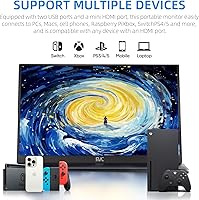
  • Compatible with a wide range of devices including MacBooks, Windows laptops, smartphones, Switch, PS5, and Xbox.
  • Plug-and-play setup on most devices requires no driver installation, getting you running quickly.
  • 400-nit brightness holds up well enough in typical indoor environments like shared offices and cafes.
  • Wide 178-degree viewing angle keeps colors accurate enough for co-presenting or side-by-side content viewing.

Cons

  • The product listing contradicts itself on resolution, making it genuinely unclear which spec your device will actually deliver.
  • Hitting the full 144Hz refresh rate is not guaranteed — it depends on your host device output and cable type.
  • Several buyers report the screen defaults to 1080p at first connection, requiring manual output settings adjustments.
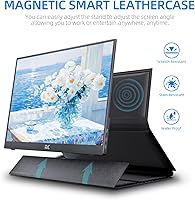
  • The bundled stand is functional but prone to wobbling on textured or uneven surfaces.
  • Cable quality feels like a cost-cutting compromise, with some buyers flagging durability concerns shortly after purchase.
  • Panel accuracy falls short of professional color standards, ruling out use for photo editing or video grading.
  • FMC has limited brand recognition, raising reasonable questions about long-term warranty support and service reliability.
  • No built-in battery means you are always dependent on a powered host device or an external USB-C power source.

Ratings

The FMC 15.6-inch 2.5K 144Hz Portable Monitor scores below are generated by AI after analyzing verified buyer reviews from global markets, with spam, bot-generated feedback, and incentivized reviews actively filtered out before any score is calculated. Ratings transparently reflect both the genuine strengths that drive high satisfaction and the real pain points — including the widely reported spec inconsistency — that affect buyer confidence. Every category is scored based on what actual owners experience in daily use, not on what the product listing claims.
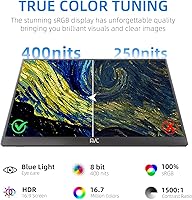
Image Quality
74%
26%
When this portable monitor outputs at its full advertised 2.5K QHD resolution, the jump in sharpness over standard 1080p travel displays is immediately visible — text is crisper, images have more definition, and the 16:10 aspect ratio gives remote workers noticeably more vertical space for documents and browsing without constant scrolling.
The resolution inconsistency in the product listing creates real uncertainty, and a meaningful share of buyers report the display initializing at 1080p rather than the higher resolution, requiring manual output adjustments. Out-of-the-box panel calibration is average, with colors leaning slightly cool and lacking the depth of pricier IPS alternatives.
Refresh Rate Performance
71%
29%
For casual console and PC gaming on the road, the 144Hz panel delivers noticeably smoother motion than the 60Hz budget alternatives most travelers settle for. Buyers who game regularly while traveling consistently note the difference is tangible once they successfully configure the display output to reach the higher refresh rate.
Reaching 144Hz is far from automatic — the right cable, a compatible source device, and a manual refresh rate selection in your OS display settings are all required, which trips up less tech-savvy buyers. A meaningful portion of users report never confirming they actually achieved it, which undercuts the spec as a reliable selling point.
Build Quality
78%
22%
The aluminum frame genuinely sets this travel display apart from the all-plastic housings that dominate the budget portable monitor category. In daily carry use — sliding in and out of laptop bags, resting on various surfaces across multiple locations — the chassis holds up without flexing or creaking the way cheaper rivals tend to.
The quality gap between the aluminum frame and the rest of the package is noticeable — the bundled cables and folding stand feel like cost-cutting compromises in terms of materials and durability. A handful of buyers also report minor bezel unevenness, suggesting quality control is not perfectly consistent across every production unit.
Portability
89%
At 1.7 pounds and barely a third of an inch thick, this travel display slips into a laptop sleeve or backpack without any meaningful weight penalty — a practical advantage that remote workers and digital nomads rate as one of its strongest assets. The included stand and both cable types mean buyers pack a complete setup without hunting for extras.
The 15.6-inch panel size, while generous for a portable display, means it is not truly compact in tight carry-on situations or cramped cafe tables where a smaller screen would be more discreet. Users with laptop bags designed around a 13-inch machine sometimes find the fit noticeably tighter than expected.
Setup & Connectivity
83%
Plug-and-play performance is the most consistently praised aspect of this portable monitor — the majority of buyers across Windows, macOS, and Android report a working display within seconds of connecting, with no driver installation or configuration required. Having both USB-C and HDMI included in the box removes the adapter guesswork that plagues many competing models at this price.
Buyers using HDMI for video signal need a separate USB-C power connection, creating a two-cable setup that surprises people expecting the simplicity of a single-cable solution. A smaller but vocal subset of users also report intermittent signal issues with certain USB-C hubs or docking stations that require unplugging and reconnecting to stabilize.
Brightness & Glare Handling
76%
24%
The pairing of 400 nits and a matte anti-glare coating makes the FMC screen genuinely practical in the environments portable monitors are actually used in — shared offices, hotel rooms with mixed light sources, and cafes near windows. Buyers who previously owned glossy portable monitors consistently highlight the matte finish as a significant quality-of-life improvement.
In direct sunlight or very bright outdoor environments, 400 nits is insufficient to maintain comfortable visibility — outdoor use is essentially impractical. A smaller number of users also find the matte coating introduces a faint milky haze over very dark content in dim rooms, which noticeably affects perceived contrast.
Value for Money
81%
19%
The combination of a 2.5K advertised panel, 144Hz refresh rate, aluminum frame, and a complete cable-and-stand accessory kit is genuinely hard to match at this price tier. Remote workers and students consistently rate perceived value highly, noting they access near-professional-tier specifications without stretching into a significantly higher budget bracket.
The spec discrepancy is the single biggest drag on value perception — buyers who expected 2.5K and got 1080p on their specific device feel understandably misled, and that sentiment visibly pulls down satisfaction ratings. The stand and cable quality also feel noticeably below the bar set by the frame, limiting how confidently satisfied buyers recommend it to others.
Stand & Ergonomics
52%
48%
The included stand works adequately in controlled settings — a flat hotel desk or office table — positioning the display at a usable angle without requiring any additional accessories on day one. For occasional, stable-surface use, most buyers accept it as a functional baseline that gets the job done.
Stand stability is a recurring and consistent complaint: on any surface that is not perfectly flat and firm, it wobbles noticeably, which is a real problem for a display sold as a travel companion used across varied environments. There is no height or tilt adjustment, so buyers with ergonomic needs or who work standing are left with no good solution.
Color Accuracy
67%
33%
For everyday productivity use — documents, spreadsheets, web browsing, and casual streaming on Netflix or YouTube — the panel renders color at a level that most buyers in non-creative roles find entirely acceptable without any adjustments. Saturated content like video playback looks reasonably vivid and engaging for a display at this price tier.
Buyers doing color-critical work such as photo editing, illustration, or video grading will find this panel clearly insufficient — it lacks factory calibration data and color gamut specifications, which are standard expectations for creative professional displays. Color uniformity also varies slightly toward the panel edges, becoming apparent on solid-color backgrounds or large single-tone areas.
Compatibility
84%
The range of supported devices is a genuine strength — working across Windows PCs, MacBooks, Android phones, Nintendo Switch, PS5, and Xbox from a single unit means buyers rarely need a different screen for a different device. USB-C and HDMI together cover nearly every scenario a typical remote worker or traveling gamer might encounter.
iPhone users face a compatibility wall, since Apple's devices do not support DisplayPort Alt Mode without specific adapters that are not included in the box, leaving a notable group of potential buyers underserved. A smaller subset of users also reports inconsistent video signal behavior with certain USB-C hubs and multi-port docking stations.
Cable Quality
54%
46%
Having both a USB-C and an HDMI cable in the box means buyers can start using the display immediately across different device types without a separate accessories purchase, which genuinely adds convenience and upfront value. For initial setup and short-term regular use, both bundled cables perform their intended function without issue.
Long-term cable durability is a recurring complaint — buyers report fraying connectors and intermittent signal drops emerging after a few months of daily use, particularly with the USB-C cable under regular bending near the connector point. This is a clear indicator that cable quality was a deliberate cost-cutting decision to keep the overall product price competitive.
Spec Transparency
48%
52%
The listing does state the core specs buyers need for initial comparison — screen size, refresh rate, brightness, and connectivity options are all referenced somewhere in the product description. Buyers who research thoroughly and understand the caveats around resolution output can still make a reasonably informed purchase decision before buying.
The simultaneous listing of 1920x1080 and 2560x1600 in different sections of the same product page is a significant credibility issue that has left many buyers feeling misled after purchase. This level of inconsistency should not require buyers to cross-reference technical forums to understand what resolution they will actually receive, and it is the most frequently cited negative theme across all user feedback.
Gaming Performance
73%
27%
As a travel gaming display, this portable monitor punches above its weight for console and casual PC use — the combination of 15.6 inches, 144Hz capability, and direct compatibility with Switch, PS5, and Xbox makes it a genuinely functional hotel room gaming setup without requiring dedicated gaming monitor hardware or additional adapters.
Reaching the full 144Hz gaming experience requires the right cable, correct output settings on the console or PC, and often a manual selection in display settings — a process that catches out buyers expecting instant gaming-ready performance out of the box. Power delivery can also become unstable during demanding PS5 sessions if the USB-C power source is underpowered.
Productivity Utility
79%
21%
For remote workers carrying a second screen from desk to desk, the 16:10 aspect ratio and 2.5K output (when fully active) create a noticeably more comfortable working environment — more vertical space for documents and code, less scrolling, and a faster transition between workspaces thanks to the reliable plug-and-play behavior across most host devices.
Without stand height or tilt adjustment, extended typing sessions can cause neck strain when the fixed monitor angle does not align with a user's natural eyeline — a real ergonomic concern for full-day desk workers. Buyers using this primarily for documents and spreadsheets also report the default color temperature feels slightly cool for comfortable long-duration sessions.
Viewing Angle
77%
23%
The 178-degree viewing angle holds up well in real co-working and presentation scenarios — colors and brightness stay consistent enough when a colleague sits beside you or a client reviews content from a moderate offset. For a portable display shared between two people at a cafe table or in a meeting, this is a practical and appreciated advantage.
While 178 degrees sounds comprehensive, real-world performance shows noticeable color shift and brightness reduction at the extreme ends of that range — it is more accurately described as wide rather than true IPS-grade off-axis consistency. Users sharing the screen from a sharply lateral position may notice washed-out dark tones and reduced contrast.

Suitable for:

The FMC 15.6-inch 2.5K 144Hz Portable Monitor is a strong fit for people who regularly work or game across multiple locations and want a meaningful display upgrade that still travels light. Remote workers splitting time between home offices, cafes, and co-working spaces will appreciate the matte panel's resistance to glare and the dual-cable setup that connects to virtually any laptop without hunting for adapters. Digital nomads who want a proper dual-screen productivity setup in a hotel room — rather than squinting at a single laptop display — get solid practical value here. Console gamers traveling with a PS5 or Switch also land in the sweet spot, since the 144Hz refresh rate supports a responsive gaming experience when the right cable and source device are in play. Students looking for a budget-conscious way to build a dual-monitor desk setup without committing to full-sized hardware will find the included accessories and straightforward setup make this an easy, sensible entry point.

Not suitable for:

The FMC 15.6-inch 2.5K 144Hz Portable Monitor is not the right choice for buyers with demanding or specialized display needs. Creative professionals doing color-critical work — photo editing, video color grading, or graphic design — should look at purpose-built displays, as portable monitors in this price range rarely deliver the panel accuracy or color gamut those workflows require. Anyone with a low tolerance for spec ambiguity will find the listing frustrating: the product simultaneously cites both 1080p and 2560x1600 resolution in different sections, and whether you actually receive the higher output depends on your host device and cable combination. Buyers who need a rock-solid, fully adjustable stand for presentations or a permanent desk setup will likely find the included stand too unstable for that purpose. Those who prioritize established brand warranties and dependable long-term after-sales support may also want to consider more recognized names in the portable monitor category.
Specifications

  • Screen Size: The display panel measures 15.6 inches diagonally.
  • Resolution: The advertised resolution is 2.5K QHD at 2560x1600 pixels, though actual output may vary depending on the connected device and cable used.
  • Refresh Rate: The panel supports a maximum refresh rate of 144Hz, which requires a compatible source device and appropriate cable to achieve.
  • Brightness: The display delivers up to 400 nits of peak brightness.
  • Aspect Ratio: The panel uses a 16:10 aspect ratio, providing more vertical screen space than standard 16:9 widescreen monitors.
  • Panel Surface: The display features a matte anti-glare coating designed to reduce reflections in mixed-light environments.
  • Frame Material: The monitor body is constructed with an aluminum frame.
  • Weight: The unit weighs 1.7 pounds (approximately 771 g).
  • Dimensions: The monitor measures 14.5 x 9 x 0.3 inches in its standard orientation.
  • Viewing Angle: The panel supports a 178-degree viewing angle, maintaining consistent color accuracy when viewed off-axis.
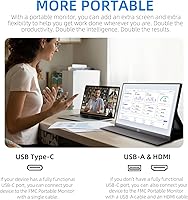
  • Video Inputs: The monitor provides one full-size HDMI port and one USB-C port for video signal input.
  • Power Source: The display is bus-powered via USB-C at 5V DC, drawing power directly from the connected host device.
  • Box Contents: The package includes one USB-C cable, one HDMI cable, and one folding stand — no additional accessories are required to begin use.
  • Compatibility: The monitor is compatible with Windows PCs, MacBooks, Android smartphones, Nintendo Switch, Xbox, and PlayStation 5.
  • Brand: This monitor is manufactured and sold under the FMC brand.

Related Reviews

Topmonitor P15.6/2.5K 15.6-inch Portable Monitor
77%
91%
Image Sharpness
87%
Color Accuracy
93%
Portability
82%
Connectivity
88%
Value for Money
More
FMC 15.6-Inch 4K Portable Gaming Monitor
87%
93%
Display Quality
91%
Portability & Design
85%
Touchscreen Performance
88%
Build Quality
90%
Connectivity
More
CAPERAVE CF15 15.6-inch Portable Monitor
70%
83%
Portability & Build
76%
Display Quality
51%
Brightness
91%
Setup & Ease of Use
82%
Value for Money
More
InnoView INVPM406 15.6-inch Portable Monitor
75%
91%
Ease of Setup
83%
Display Clarity
78%
Portability & Build
62%
USB-C Compatibility
88%
Value for Money
More
Westinghouse 15.6 Inch Portable Monitor
82%
88%
Display Quality
92%
Portability
86%
Connectivity Options
94%
Ease of Setup
80%
Build Quality
More
LUMIPIX Magic-001 15.6-inch Portable Monitor
76%
78%
Display Quality
91%
Portability
72%
Connectivity
61%
Stand Stability
79%
Value for Money
More
HotYeah 15.6-inch 1080P Portable Monitor
76%
83%
Display Quality
62%
Brightness & Visibility
91%
Portability & Design
88%
Value for Money
93%
Setup & Ease of Use
More
Anyuse PM1561P 15.6-inch Portable Monitor
74%
91%
Portability & Form Factor
84%
Image Clarity
72%
Setup & Compatibility
74%
Build Quality & Durability
61%
Brightness & Outdoor Usability
More
VILVA V156F1 15.6-inch Portable Monitor
69%
74%
Display Quality
61%
Portability
82%
Connectivity & Compatibility
67%
Build Quality
83%
Value for Money
More
ViewSonic VA1655 15.6-Inch Portable Monitor
77%
93%
Portability & Form Factor
87%
Display Quality
82%
USB-C Connectivity
74%
Build Quality
91%
Ease of Setup
More

FAQ

Yes, in most cases. If your MacBook has a USB-C or Thunderbolt port, the included USB-C cable should be enough to get the display running without any drivers or extra hardware — just plug in and your Mac should detect it automatically. If you have an older MacBook with an HDMI port, the included HDMI cable covers that scenario too, though you may need to supply separate power via a USB-C charger when going the HDMI route.

This is worth addressing directly, because the product listing is genuinely inconsistent — it references both 1920x1080 and 2560x1600 in different places. Whether you get the higher resolution depends on your source device's output capabilities and the cable you use. Many buyers do report seeing full 2.5K output with compatible hardware, but if your device defaults to 1080p, you may need to go into your display settings and manually select the higher resolution.

The 144Hz capability is real, but it is not automatic. To run the display at 144Hz, your host device needs to support that refresh rate over the connection type you are using, and you typically need to select it manually in your OS display settings. Not all laptops or consoles can push 144Hz at this resolution, so it is worth checking your device specs before assuming you will get it straight away.

Yes, it works well with the Nintendo Switch in docked mode using the included HDMI cable. This makes the FMC screen a popular choice for gaming on the road — connect the Switch dock to the monitor, supply USB-C power, and you have a dedicated travel gaming display. Keep in mind the Switch itself caps video output well below 144Hz, so the high refresh rate spec will not come into play, but games still look sharp on this panel.

It is functional but not exceptional. On a flat, hard desk surface it holds the monitor at a usable angle without much fuss. On softer or uneven surfaces — a hotel bed, an angled lap desk, or a textured tablecloth — it can feel noticeably wobbly. If you plan to use this in a fixed desk setup or for client presentations, it may be worth picking up a compact aftermarket stand or a simple monitor arm for more reliability.

When connected via USB-C, this travel display draws its power directly from the host device, so a single cable handles both video and power in most setups. If you connect via HDMI for video, you will need to power the monitor separately using a USB-C charger or a power bank. There is no built-in battery, so a power source is always required.

There is always a trade-off with matte panels: you gain meaningful glare reduction, which is genuinely useful in brightly lit offices or cafes, but you give up some of the color pop and sharpness you would get from a glossy screen. For productivity work, documents, and browsing, most people will not notice or mind. For movies or gaming where color richness matters more, the image looks slightly more subdued compared to a glossy display — but far less distracting in rooms with ambient light.

The FMC 15.6-inch 2.5K 144Hz Portable Monitor stands out in this regard relative to its price bracket, primarily because of the aluminum frame. Most competing portable monitors at this level use full plastic housings that flex and creak under light pressure. The aluminum here gives it a noticeably more solid feel in hand. That said, the internal components and bundled cable quality are more typical of this price point, so do not expect premium durability throughout.

Yes, as long as your Android phone supports video output over USB-C — often referred to as DisplayPort Alt Mode, or Samsung DeX on Samsung devices. If your phone supports it, connecting via the included USB-C cable is straightforward and generally requires no extra apps or drivers. iPhones do not support this type of direct connection, so iPhone users would need a Lightning-to-HDMI or USB-C adapter depending on their model.

Both the PS5 and Xbox connect via HDMI, and the included HDMI cable handles that directly — no extra cables needed for the video connection. You will need to power the monitor separately through its USB-C port, since gaming consoles do not supply power over HDMI. Once connected and powered, it works like any standard external display, and with the PS5 supporting up to 120Hz on compatible titles, you can get noticeably smoother gameplay than you would on a basic 60Hz screen.