Overview

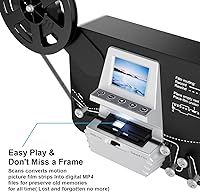
The Eyesen 8mm & Super 8 Film Scanner Digitizer is a standalone device built for one specific job: pulling decades-old home movies off aging reels and putting them somewhere safe. There's no PC required, no software to install, and no subscription to maintain. You load a reel, press go, and the machine works through it frame by frame, saving 1080P MP4 files directly to the included 32GB SD card. A built-in 2.4″ LCD screen lets you check playback on the spot. Priced between basic slide scanners and professional digitization services, it occupies a practical middle ground for families who want results without handing their irreplaceable footage to a stranger.

Features & Benefits

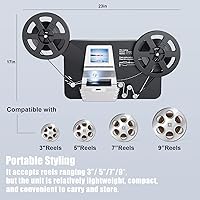
The reel-to-digital converter handles both 8mm and Super 8 film without any hardware swaps, and it accommodates reel sizes from 3″ all the way up to 9″ — covering the vast majority of what most families have stacked in their attics. Output resolution lands at 1080P (1440x1080), captured via a CMOS sensor at 20 frames per second. That frame-by-frame approach is deliberate, designed to squeeze as much detail as possible from older, sometimes deteriorating film. Files are saved as MP4, which opens natively on Windows, Mac, and Linux with no conversion needed. An included TV-out cable means you can hook straight into a television for group viewing right after scanning. At 14 x 4 x 7 inches, it is compact enough to tuck away between uses.

Best For

This home movie scanner makes the most sense for families sitting on boxes of Super 8 or 8mm reels from the 1960s through the 1980s — footage of birthday parties, vacations, or first steps that exists nowhere else. It is also a natural fit for DIY digitization enthusiasts who would rather not pay recurring fees or ship irreplaceable originals to a third-party service. Older relatives who are not comfortable with computers will appreciate that there is genuinely nothing to configure beyond loading the reel. And for gift buyers, it strikes a meaningful chord — it is one of those purchases that says you took the time to think about what someone actually values. If your goal is convenience over cinema-quality output, this fits well.

User Feedback

With a 3.6 out of 5 star average across hundreds of reviews, this film digitizer sits in that honest middle ground where opinions split based on expectations. Buyers who came in wanting a hassle-free workflow — load a reel, walk away, get a digital file — tend to leave satisfied. Those who expected broadcast-quality results were let down; the 20fps capture and compression artifacts are real limitations that critical viewers will notice. A handful of users report motor issues with older or fragile reels, including occasional jamming. On the positive side, the out-of-box experience draws consistent praise: the SD card and TV cable being included removes the usual scramble for accessories. First-time reel mounting has a learning curve, so patience on setup is worth factoring in before you dive in.

Pros

  • No computer or software required — just load a reel, insert the SD card, and start scanning.
  • Supports both 8mm and Super 8 formats without swapping any hardware or attachments.
  • Handles reel sizes from 3″ up to 9″, covering most standard home movie collections.
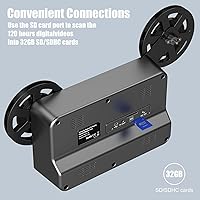
  • The 32GB SD card and TV-out cable are included, so you can start immediately out of the box.
  • MP4 output opens natively on Windows, Mac, and Linux with no conversion step needed.
  • The built-in 2.4″ LCD screen lets you check footage in real time during scanning.
  • Compact enough at four pounds to store in a cabinet between occasional use sessions.
  • A one-time purchase avoids the per-reel fees that professional digitization services charge.
  • Frame-by-frame capture helps extract usable detail even from older, faded film stock.

Cons

  • The 20fps capture rate produces noticeably choppy playback compared to professional digitization services.
  • Mjpeg-4 compression creates visible artifacts, especially on larger screens or when editing on a computer.
  • Reel mounting requires patience and multiple attempts for first-time users — the manual does not explain it well.
  • Motor reliability is inconsistent with older or warped reels, and jam incidents have damaged film for some buyers.
  • Storage is capped at 32GB with no support for higher-capacity cards, limiting large scanning sessions.
  • The 2.4″ display is too small to accurately judge video quality during capture.
  • Build quality feels consumer-grade and may show wear under sustained, heavy-use scanning sessions.
  • Some users needed third-party video tutorials to fill gaps the included documentation left unanswered.

Ratings

The Eyesen 8mm & Super 8 Film Scanner Digitizer has been evaluated by our AI system after analyzing hundreds of verified global user reviews, with spam, bot-generated, and incentivized feedback actively filtered out. Scores reflect where real buyers consistently agree — and where frustrations tend to surface — giving you a transparent, balanced picture before you commit. Both the genuine strengths and the recurring pain points are weighted equally in every category below.
Ease of Setup
82%
18%
Most buyers were genuinely surprised by how quickly they got their first reel running. The no-computer workflow means there are no drivers to install or software menus to navigate — you load the reel, insert the SD card, and press start. For less tech-savvy users, that simplicity is the single biggest selling point.
Reel mounting itself has a learning curve that catches first-timers off guard. Several reviewers noted that threading the film correctly onto the take-up reel took multiple attempts before it felt intuitive, and the manual does not always provide clear enough guidance for beginners.
Output Video Quality
61%
39%
For casual family archive purposes — watching grandparents at a 1970s barbecue or kids opening Christmas presents — the 1080P output holds up reasonably well on a standard television. The frame-by-frame capture method does extract meaningful detail from older film, which buyers appreciate.
At 20fps with mjpeg-4 compression, the footage falls noticeably short of what professional digitization services deliver. Critical viewers who expected cinematic smoothness or sharp color reproduction were consistently disappointed, particularly when projecting onto larger screens or editing files on a computer.
Film Compatibility
84%
Supporting both 8mm and Super 8 formats without any hardware changeover is a practical strength that buyers frequently call out. The range of reel sizes — from 3″ up to 9″ — means most households can work through their entire film archive using one device without running into format roadblocks.
A small but vocal group of users found that heavily shrunken or warped film from the 1960s did not feed reliably through the transport mechanism. The device works well with film in decent condition, but it is not designed to handle significantly deteriorated or brittle reels gracefully.
Motor and Transport Reliability
57%
43%
When working with relatively well-preserved reels in good condition, the motor moves film through at a consistent pace and reviewers report clean captures without major interruption. The automated transport reduces the need for manual intervention during longer scanning sessions.
This is where the most concerning feedback clusters. A meaningful number of users reported film jams, uneven transport speeds, and motor hesitation — especially with older or slightly warped reels. A few buyers described minor film damage during jamming incidents, which is a serious concern when dealing with irreplaceable footage.
Built-in Display
71%
29%
The 2.4″ color TFT LCD screen serves its purpose as a quick preview tool. Being able to check footage in real time without connecting a television is handy during the scanning process, letting you catch framing or tracking issues early rather than discovering them after a full reel is done.
The screen is small enough that assessing actual video quality from it is unrealistic. Buyers who relied solely on the built-in display were sometimes surprised when they later viewed files on a larger monitor. It functions well as a status indicator but should not be treated as a quality check tool.
SD Card and Storage
78%
22%
Including a 32GB SD card in the box is a thoughtful touch that removes an immediate out-of-pocket expense and lets buyers start scanning the same day the device arrives. The card capacity is sufficient for several hours of footage at the device's native compression level.
32GB fills up faster than some users expect, particularly if they have large reel collections. The device is limited to SD and SDHC cards up to 32GB, which means buyers cannot simply insert a higher-capacity card to extend storage — a frustrating ceiling for anyone with a sizable archive.
TV-Out Functionality
76%
24%
The included TV-out cable consistently receives positive mentions in reviews, especially from buyers who wanted to share digitized footage with family during a gathering. Plugging directly into a television for group viewing right after scanning adds immediate, tangible value to the overall package.
The cable connection is basic and the output quality mirrors the device's native video resolution, so any compression artifacts visible on a computer are equally visible on a large TV. Users expecting a polished big-screen experience from older film may find the results underwhelming at that scale.
Build Quality and Durability
63%
37%
The device has a solid enough feel for occasional home use, and buyers who use it for a focused weekend digitization project report no structural issues. The compact form factor at 14 x 4 x 7 inches makes it easy to handle and store between sessions.
Longer-term durability feedback is mixed. Some users who pushed the device through multiple large reel sessions in a short period reported motor wear signs and inconsistent transport behavior over time. It reads more like a consumer-grade appliance than a tool built for sustained, heavy workloads.
Value for Money
66%
34%
Compared to hiring a professional digitization service — which can cost significantly per reel — owning this converter outright makes financial sense for anyone with more than a handful of reels to process. The one-time purchase model appeals strongly to buyers who prefer not to entrust irreplaceable footage to a third party.
At its price point, buyers with discerning expectations around output quality will likely feel the tension. The gap between what the device costs and the video quality it actually delivers is a recurring frustration in reviews, particularly when buyers later compare results side-by-side with professionally digitized samples.
Noise Level During Operation
69%
31%
For a motorized film transport device, the operating noise is described by most reviewers as acceptable — a low hum rather than a disruptive mechanical sound. Running a scanning session in a living room while others are present is generally not an issue.
Some buyers noticed the motor sound became more pronounced and irregular when handling older or slightly warped reels that created resistance in the transport path. That change in sound is often the first warning sign of a potential jam, which adds a layer of attention required during operation.
Software and File Compatibility
81%
19%
MP4 output is about as universally compatible as a format gets. Files open natively on Windows, Mac, and Linux without any conversion step, and they upload cleanly to standard cloud storage and video sharing platforms. For buyers whose end goal is sharing footage with family online, this works without friction.
The mjpeg-4 compression standard used internally is older and less efficient than modern codecs, which results in larger file sizes relative to perceived quality. Editors who want to do post-processing on the footage in professional video software may find the files require transcoding before they work smoothly in a timeline.
Instruction Manual Clarity
54%
46%
Some buyers found the included documentation sufficient for getting through a basic first reel, particularly for the digital settings and SD card setup portions of the process. Those steps are straightforward enough that even minimal guidance gets most users there.
The manual draws consistent criticism for being vague on the mechanical side — specifically around correct reel mounting, adapter use, and what to do if the film does not feed properly. Multiple reviewers resorted to searching for third-party video tutorials to fill gaps the included documentation left open.
Portability and Storage
79%
21%
At four pounds and a compact footprint, this home movie scanner does not demand permanent shelf space. Buyers who pull it out once or twice a year to work through a batch of reels appreciate that it tucks away in a cabinet without taking up meaningful storage real estate.
While compact for what it does, the device still requires a clear, stable workspace to operate correctly, along with room to manage the reel and take-up spool simultaneously. It is not something you would realistically set up on a small desk or use in a cramped space.

Suitable for:

The Eyesen 8mm & Super 8 Film Scanner Digitizer is genuinely well-suited for families who have inherited boxes of old Super 8 or 8mm reels and simply want to preserve those memories in a format they can actually watch and share today. If your goal is getting footage off aging reels and onto an SD card — without shipping irreplaceable film to a stranger or learning video editing software — this device delivers on that core promise. It makes particular sense for older relatives or less tech-savvy users who need a straightforward, self-contained workflow with no computer involvement whatsoever. Buyers who understand they are digitizing for sentimental value rather than cinematic archiving will find the output more than acceptable for TV viewing and sharing with family. It also works well as a thoughtful gift for someone sitting on a film archive they have always meant to do something with but never had the right tool for.
Not suitable for:

The Eyesen 8mm & Super 8 Film Scanner Digitizer is not the right choice for anyone who needs professional-grade image fidelity or plans to use the digitized footage in a serious editing or restoration project. The 20fps capture rate and mjpeg-4 compression produce results that simply cannot compete with dedicated digitization services, and buyers who go in expecting broadcast-quality output will be disappointed. If you are working with heavily degraded, shrunken, or brittle film from very early decades, the motor and transport mechanism may not handle it safely — the risk of a jam on fragile stock is real and documented by multiple users. Video professionals, documentary makers, or anyone doing detailed post-production work would be better served by a professional lab, even at higher cost. Similarly, collectors with large reel archives who need consistent throughput at high volume may find the device's reliability ceiling frustrating over extended use sessions.
Specifications

  • Brand: This device is manufactured and sold under the Eyesen brand.
  • Supported Formats: Compatible with both standard 8mm and Super 8 film types using the same hardware setup.
  • Reel Sizes: Accepts reels in four sizes: 3″, 5″, 7″, and 9″ diameter, covering the most common home movie reel formats.
  • Output Resolution: Digitized video files are saved at 1080P resolution with a pixel dimension of 1440x1080.
  • Frame Rate: Film is captured frame by frame at 20 frames per second during the digitization process.
  • Output Format: All scanned footage is saved as MP4 files using mjpeg-4 compression directly to the inserted SD card.
  • Display: A built-in 2.4″ color TFT LCD screen allows real-time preview and playback without an external monitor.
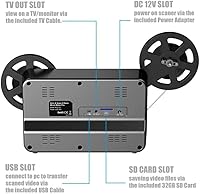
  • Storage Support: Compatible with SD and SDHC cards up to a maximum of 32GB; a 32GB card is included in the box.
  • TV Output: An analog TV-out cable is included, enabling direct playback of scanned footage on a compatible television.
  • Optical Sensor: The device uses a CMOS optical sensor to capture image data from the film during frame-by-frame scanning.
  • Connectivity: A USB port is provided for power and data connectivity with compatible host devices.
  • OS Compatibility: Digitized MP4 files are natively compatible with Windows, Mac, and Linux operating systems without additional software.
  • Dimensions: The unit measures 14 x 4 x 7 inches, providing a compact footprint suitable for desktop use and cabinet storage.
  • Weight: The device weighs 4 pounds, making it manageable for occasional repositioning during setup or storage.
  • Computer Required: No computer, external software, or internet connection is required at any stage of the digitization process.
  • Scan Method: The scanner uses a frame-by-frame capture method rather than continuous video recording to maximize image detail retention.

Related Reviews

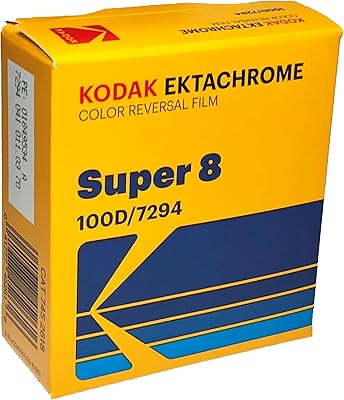
Kodak Super 8 Ektachrome 100D 7294 Film 50' Cartridge
89%
94%
Color Accuracy
91%
Cinematic Effects
86%
Ease of Use
88%
Compatibility with Super 8 Cameras
90%
Film Quality
More
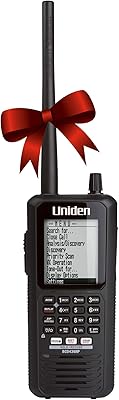
Uniden BCD436HP Digital Handheld Scanner
81%
91%
Ease of Setup
89%
Scanning Performance
87%
Display Quality
65%
Battery Life
88%
Portability & Size
More
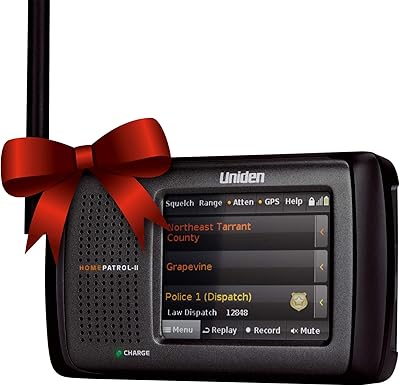
Uniden HomePatrol-2 Digital Scanner
84%
89%
Ease of Use
75%
Signal Reception
83%
Portability
91%
Channel Selection Speed
88%
Frequency Range
More
Aluratek 8″ Slim Digital Photo Frame
86%
89%
Display Quality
94%
Ease of Setup
85%
Design & Build Quality
88%
Photo Transfer & Compatibility
80%
Functionality & Features
More
Whistler WS1065 Digital Trunking Desktop Scanner
84%
88%
Performance
90%
Signal Quality
85%
Ease of Use
82%
Customizability
87%
Real-Time Monitoring
More
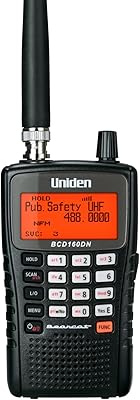
Uniden Bearcat BCD160DN Handheld Digital Scanner
85%
88%
Signal Clarity
82%
Ease of Use
90%
Portability
85%
Programming Flexibility
87%
Reception Range
More
KODAK 8 Inch Digital Picture Frame
84%
90%
Display Quality
94%
Ease of Use
87%
Build Quality
91%
Value for Money
89%
Photo Storage Compatibility
More
FLYAMAPIRIT Digital Picture Frame 8 inch
84%
88%
Display Quality
95%
Ease of Setup
80%
Motion Sensor Performance
87%
Picture Quality
85%
Build Quality
More
Atatat 8-Inch Digital Photo Frame
84%
88%
Image Quality
94%
Ease of Setup
90%
Versatility (Display Options)
65%
Build Quality
85%
Functionality (Music & Video Support)
More
Kenwood DMX4707S 6.8″ Digital Media Receiver
84%
87%
Ease of Setup
92%
Smartphone Integration
88%
Bluetooth Performance
74%
Touchscreen Responsiveness
91%
Sound Quality
More

FAQ

No, and that is genuinely one of its strongest points. The Eyesen 8mm & Super 8 Film Scanner Digitizer operates entirely on its own — you load the reel, insert the included SD card, and press start. Everything is self-contained, which makes it accessible even for users who are not comfortable with computers or video software.
Yes, the device handles both formats without any hardware swaps or setting changes. The same optical path and transport mechanism work for regular 8mm and Super 8 reels, so you can work through a mixed collection without interruption.

The converter supports 3″, 5″, 7″, and 9″ diameter reels, which covers the vast majority of consumer home movie reels produced from the 1960s through the 1980s. If your reel fits within that size range, you should be fine.

This is worth setting expectations on honestly. The output is 1080P at 20fps with mjpeg-4 compression, which is good enough for casual family viewing on a television or sharing online. That said, it does not produce results comparable to professional digitization labs — you may notice some choppiness and compression artifacts, particularly on a large screen or when editing the files afterward.

Unfortunately, no. The device only supports SD and SDHC cards up to 32GB, so you cannot simply swap in a 64GB or 128GB card to extend your sessions. For large collections, you will need to transfer files off the card periodically and continue in batches.

It takes a little patience the first time. Threading the film correctly onto the take-up reel and seating it so the transport feeds smoothly is the part that trips up most beginners. The included manual covers the basics, but many first-time users have found it helpful to watch a third-party tutorial video before their first attempt — it makes the process much clearer.

Yes, that is straightforward. A TV-out cable is included in the box, so you can plug directly into a compatible television and play back your footage immediately after scanning. It is a nice touch that makes group family viewing easy without needing to move files to another device first.

It depends on the condition of the film. For reels that are intact and still pliable, the transport mechanism generally handles them fine. However, if your film is brittle, warped, or shrunken from decades of storage, there is a real risk of jamming — and some users have reported minor film damage during those incidents. For especially fragile or historically significant footage, a professional service with trained technicians may be the safer option.

Scan time varies depending on reel size and film condition, but the frame-by-frame capture process is not fast. A larger reel can take a significant amount of time to work through completely. Plan for this to be a background task rather than something you sit and watch start to finish, especially if you have multiple reels to convert.

Yes, because the output is standard MP4 format, the files open in most video editing applications on Windows, Mac, and Linux without conversion. They can also be uploaded directly to cloud storage or video sharing platforms. One caveat: the mjpeg-4 codec used internally is older and less efficient than modern formats, so some professional editing applications may perform better after transcoding the files to a more current codec first.