

Overview

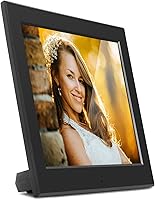
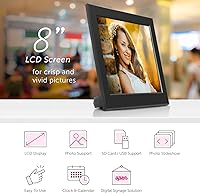
The Aluratek ASDPF08F 8″ Slim Digital Photo Frame is exactly what it sounds like: a straightforward, no-fuss display built for everyday home use. Plug it in, load an SD card or USB drive, and it starts cycling through your photos automatically — no app, no account, no setup headache. The 8-inch screen with its classic 4:3 aspect ratio suits standard photo prints well, making it feel familiar rather than awkward. There is no Wi-Fi, no cloud sync, and no remote control, which is a conscious trade-off, not an oversight. At its price tier, you are paying for reliability and simplicity, and that is precisely what this Aluratek frame delivers.

Features & Benefits

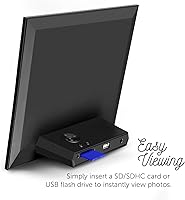
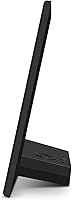
The 8-inch photo frame runs on a TFT true-color LCD panel at 1024×768 resolution — sharp enough for its size, with faces looking crisp and colors reading true. Its ultra-slim body measures under an inch deep, so it sits quietly on a shelf or nightstand without dominating the space. Loading photos is simple: insert an SD or SDHC card (up to 32GB) or a USB drive and the slideshow begins. The built-in clock and calendar make it more than just a photo display — it earns its spot on a desk by being genuinely useful day-to-day. Transition modes are configurable, and the physical button controls are easy enough that no manual is really needed.

Best For

This slim digital frame makes the most sense as a gift — specifically for someone who does not want to fiddle with apps or Wi-Fi networks. Parents, grandparents, or anyone who just wants photos to appear without a learning curve will find it low-maintenance in the best way. It works well on a bedside table, kitchen counter, or office desk, where its compact footprint and always-on clock make it practical rather than just decorative. Buyers who already organize photos on SD cards or USB drives will find the workflow intuitive. If you need cloud syncing or remote photo pushing, look elsewhere — but if simple and reliable is the brief, it hits the mark.

User Feedback

With a 4.2-star average across thousands of reviews, the 8-inch photo frame has clearly earned its following. Owners frequently mention how easy it is to get started — slide in a card, plug it in, done. Image quality draws consistent praise for everyday use, though some note that bright rooms can wash out the screen slightly. A recurring complaint involves aspect ratio cropping: photos shot in modern 16:9 formats do not fill the 4:3 panel without some letterboxing or clipping. A handful of longer-term owners mention that the physical buttons can feel less responsive over time. The absence of a remote and Wi-Fi comes up often, though most buyers in this target audience seem unbothered by it.

Pros

  • Starts the slideshow automatically the moment it powers on — no menu navigation required.
  • The ultra-slim body sits flat and unobtrusive on any shelf, desk, or nightstand.
  • SD, SDHC, and USB support means most people can load photos without buying any extra accessories.
  • The built-in clock and calendar give the frame genuine daily utility, not just decorative purpose.
  • Physical button controls are straightforward enough for users who avoid touchscreens.
  • A 4.2-star rating across a large number of real buyers signals consistently solid satisfaction.
  • Image colors look accurate and warm under normal indoor lighting conditions.
  • The compact size and light weight make it easy to reposition or pack as a gift.
  • No accounts, no passwords, no cloud setup — the entire experience is offline and private.
  • SDHC cards up to 32GB are supported, which is enough storage for thousands of photos.

Cons

  • No Wi-Fi means you cannot update photos remotely — physical media swaps are the only option.
  • Modern 16:9 smartphone photos do not fill the 4:3 screen without cropping or letterboxing.
  • Screen brightness can look washed out in sunny rooms or near windows.
  • No remote control is included, so adjusting settings requires walking up to the frame.
  • Physical buttons have been reported to feel less responsive after extended use.
  • No video playback support limits the frame to static photo slideshows only.
  • The 4:3 aspect ratio, while classic, feels dated compared to widescreen alternatives on the market.
  • No internal memory means the card or drive must stay inserted at all times for the slideshow to run.

Ratings

The scores below reflect our AI-driven analysis of thousands of verified global reviews for the Aluratek ASDPF08F 8″ Slim Digital Photo Frame, with spam, incentivized, and bot-generated feedback actively filtered out before scoring. Each category captures what real buyers genuinely experienced — not what the marketing copy promises — so both the strengths and the frustrations are represented transparently. If a category scores lower than expected, it reflects consistent patterns across a broad reviewer base, not isolated edge cases.

Ease of Setup
93%
Buyers consistently describe the initial setup as one of the fastest they have experienced with any digital frame — insert a card, plug it in, and the slideshow starts. For gift-givers handing this to a parent or grandparent with limited tech confidence, that zero-friction experience is a genuine relief and a frequently cited reason for high satisfaction.
A small number of users report confusion around formatting SD cards to the correct file system before photos display correctly, which is a minor but real stumbling block for first-time digital frame owners who do not know what FAT32 means.
Image Quality
74%
26%
For standard JPEG photos taken with point-and-shoot cameras or older DSLRs, the 1024×768 TFT panel renders colors warmly and accurately under typical indoor lighting. Family portraits and landscape shots look genuinely pleasing at normal viewing distances, which is exactly what this frame is designed to show.
The resolution and panel brightness are not exceptional — users who display recent smartphone photos or images with fine detail sometimes notice softness, and in bright rooms the screen washes out noticeably, making it a poor fit for sun-facing windowsills or well-lit office environments.
Build Quality
71%
29%
The slim plastic chassis feels well-proportioned and looks more considered than budget alternatives at this size, with a clean matte black finish that blends into most home decor without calling attention to itself. Several buyers mention it feels sturdier than the price suggests when first unboxing.
Over extended use, some owners report that the physical buttons become less responsive or develop a spongy feel, which is a consistent enough complaint to flag as a real durability concern rather than an anomaly. The stand mechanism also feels light, and the frame can tip on uneven surfaces.
Display Brightness
62%
38%
In a typical living room or bedroom setting with controlled lighting, the screen produces a warm, comfortable glow that suits casual photo viewing throughout the day. For nightstand use where ambient light is low, the brightness level is actually well-calibrated and does not feel intrusive.
In sunny rooms or spaces with overhead fluorescent lighting, the display struggles visibly — photos look faded and colors lose punch, which limits where this frame can realistically be placed. The brightness adjustment range available through the controls is narrow enough that it does not fully solve the problem in challenging lighting conditions.
Aspect Ratio Compatibility
58%
42%
For buyers whose photo libraries consist of traditionally formatted 4:3 images — think family albums from the early 2000s, point-and-shoot cameras, or printed scan digitizations — the screen fills beautifully and photos look exactly as intended without any cropping or distortion.
Modern smartphone photos are almost universally 16:9, and this is where the frame runs into real friction — images either show black bars on the sides or get cropped, neither of which looks great on a display sitting on your kitchen counter. This is one of the most common complaints in the review base and affects a large share of today's typical buyers.
Media Compatibility
81%
19%
Supporting both SD/SDHC cards up to 32GB and standard USB drives covers the majority of how everyday users store and transfer photos, and the large storage ceiling means buyers never have to curate aggressively — they can load thousands of photos and let the frame cycle through them freely.
The frame does not support HEIC files natively, which is the default format on iPhones since iOS 11, meaning Apple users need an extra conversion step before their photos will display. There is also no internal memory, so the storage media must always remain physically inserted.
Clock & Calendar Feature
86%
The built-in clock and date display transform this from a single-purpose photo gadget into something that earns its real estate on a desk or nightstand. Buyers who use it as a bedside display specifically mention appreciating being able to check the time without reaching for a phone.
The time display layout is functional but basic — there are no customization options for font size or clock style, and a handful of users mention the clock resets after a power interruption, requiring manual correction each time. It is a convenience feature, not a precision one.
Slideshow Performance
83%
The automatic slideshow launch on power-on is one of this frame's most appreciated behaviors — there is no menu to navigate, no button to press, it simply starts. Transition modes are configurable enough to feel personal without being overwhelming, and the cycling speed can be adjusted to suit the room.
Some users find that the frame does not shuffle photos randomly in a satisfying way over long sessions, meaning the same images appear in the same order repeatedly. There is also no option to mark favorite photos or create sub-albums within the slideshow queue.
Value for Money
77%
23%
For buyers who specifically want a no-Wi-Fi, physical-media-only photo frame with a clock, the price-to-function ratio is genuinely reasonable — it does exactly what it advertises without charging a premium for features the target audience does not want or need.
Compared to Wi-Fi-enabled competitors that have dropped in price over recent years, the value equation becomes harder to justify for buyers who are even moderately tech-comfortable. Shoppers who realize after purchase that they needed wireless functionality feel the price does not compensate for the missing feature set.
Remote Control
31%
69%
The absence of a remote is not a dealbreaker for users who set the frame once and leave it running indefinitely — for that use case, having no remote is simply irrelevant and does not affect the daily experience at all.
For anyone who wants to pause a slideshow, adjust brightness, or change transition modes from across the room, the lack of any remote control is a genuine inconvenience that requires physically walking up to the frame every time. This feels like an omission rather than a design choice at this price point, and it comes up repeatedly in critical reviews.
Portability & Size
88%
At just over 10 ounces and under an inch deep, this slim digital frame is easy to move between rooms, pack as a gift, or reposition on a shelf without any fuss. The footprint is compact enough that it does not crowd a nightstand or small desk, which buyers specifically call out as a plus.
The 8-inch screen, while appropriately sized for close-range personal viewing, can feel small for shared living room settings where multiple people might be watching from a distance. Buyers placing it in a larger room sometimes wish they had sized up.
Long-Term Reliability
69%
31%
A meaningful portion of the review base includes buyers who have owned the frame for two or more years and report it running without incident — the screen remains functional and the slideshow continues cycling without glitches, which builds confidence in the basic hardware.
The most consistent long-term concern involves the physical control buttons degrading over time, with some owners noting reduced responsiveness after 18 to 24 months of use. Screen brightness also appears to diminish slightly over extended periods, which is typical of TFT panels but noticeable enough to mention.
Gifting Experience
91%
As a gift, this frame checks most of the right boxes — it arrives in presentable packaging, requires no technical knowledge from the recipient, and starts working almost immediately after unboxing. Gift-givers consistently report positive reactions from parents and grandparents who had never used a digital frame before.
The one friction point in the gifting context is that the giver often needs to pre-load the SD card with photos themselves before presenting it, since the recipient may not know how to do so — which means it is not quite a fully hands-off gift straight out of the box.

Suitable for:

The Aluratek ASDPF08F 8″ Slim Digital Photo Frame was built for people who want photos displayed without any technical friction, and it excels in exactly that role. It is an ideal gift for older parents or grandparents who would never tolerate an app-based setup — just load an SD card and hand it over. The 4:3 aspect ratio suits traditional print-style photos well, which tends to match the libraries most older adults have accumulated over the years. Because it doubles as a clock and calendar, it earns a permanent spot on a nightstand or kitchen counter rather than collecting dust in a drawer. Buyers who already back up photos to SD cards or USB drives will find the workflow completely natural, with no new accounts or software to navigate.

Not suitable for:

Anyone who wants to push new photos remotely — say, updating a parent's frame from across the country — will find the Aluratek ASDPF08F 8″ Slim Digital Photo Frame frustrating to live with, since it has no Wi-Fi, no app, and no wireless capability whatsoever. If your photo library lives primarily in the cloud or on a smartphone, getting images onto physical media every time you want to refresh the display adds real friction. The 4:3 screen also means modern smartphone photos, which are typically 16:9, will either be cropped or letterboxed — a genuine annoyance if your entire collection was shot on a phone. Tech-forward buyers who expect a remote control, auto-brightness adjustment, or video playback support will find the feature set thin. And for anyone placing a frame in a brightly lit room, the screen can look washed out at certain viewing angles, which limits where it works best.

Specifications

  • Screen Size: The display measures 8 inches diagonally, offering a comfortable viewing area for tabletop or shelf placement.
  • Display Type: Uses a TFT true-color LCD panel that reproduces photos with accurate color and reasonable contrast under standard indoor lighting.
  • Resolution: The panel runs at 1024×768 pixels (XGA), which delivers crisp detail for everyday photos at this screen size.
  • Aspect Ratio: The screen uses a 4:3 aspect ratio, which aligns well with traditionally formatted print-style photos but will letterbox or crop modern 16:9 smartphone images.
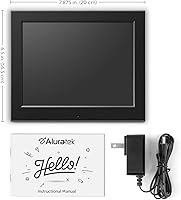
  • Dimensions: The frame measures 6.5×7.87×0.99 inches, keeping the overall footprint compact and the depth under an inch.
  • Weight: At 10.4 ounces, the frame is light enough to reposition easily without feeling flimsy on a flat surface.
  • Media Support: Accepts SD and SDHC cards up to 32GB in capacity, as well as USB drives, with no computer required to load photos.
  • Built-In Clock: Displays the current time on-screen, making the frame functional as a small bedside or desktop clock when not cycling photos.
  • Built-In Calendar: Shows the current date alongside the time, adding a layer of everyday utility beyond simple photo display.
  • Slideshow Start: The slideshow launches automatically each time the frame is powered on, requiring no manual menu navigation from the user.
  • Transition Modes: Offers multiple configurable display and transition modes so users can adjust how photos cycle and change on screen.
  • Controls: Operated via physical buttons on the frame itself; no remote control or touchscreen interface is included.
  • Wi-Fi: This frame has no wireless connectivity — all photo loading is done through physical media such as SD cards or USB drives.
  • Form Factor: Described as ultra-slim by the manufacturer, the sub-inch depth allows it to sit flat and unobtrusive in most home settings.
  • Color: Available in black, which suits most shelf, desk, or nightstand environments without drawing attention away from the photos.
  • Brand: Manufactured by Aluratek, a brand with a long-standing focus on accessible consumer electronics including digital photo frames.
  • Model Number: The exact model identifier is ASDPF08F, which is useful when searching for compatible accessories or contacting support.
  • Video Playback: This frame is designed for photo slideshows only and does not support video file playback.
  • Internal Memory: No internal storage is built in, so a loaded SD card or USB drive must remain inserted for the slideshow to function.
  • First Available: This model was first listed for sale in September 2016 and remains in active production as of the available data.

Related Reviews
Atatat 8-Inch Digital Photo Frame

84%
88%
Image Quality
94%
Ease of Setup
90%
Versatility (Display Options)
65%
Build Quality
85%
Functionality (Music & Video Support)
More
Aluratek 7-inch Distressed Wood Digital Photo Frame
78%
94%
Ease of Setup
88%
Frame Design & Aesthetics
61%
Display Quality
78%
Ease of Daily Use
92%
Gift Suitability
More
Aluratek ADMPF315F 15-inch Digital Photo Frame

76%
91%
Ease of Setup
88%
Screen Size & Presence
67%
Image Quality
86%
Storage & Compatibility
74%
Build Quality
More
Pix-Star 10-inch WiFi Digital Photo Frame
77%
88%
Ease of Setup
91%
Photo Delivery Experience
73%
Display Quality
94%
No-Subscription Value
62%
App Reliability
More
KODAK 8-Inch Digital Picture Frame
78%
93%
Ease of Setup
84%
Display Quality
88%
Simplicity & Usability
61%
Remote Control
89%
Auto On/Off Timer
More
Nethgrow 10.1″ Digital Photo Frame
86%
88%
Display Quality
91%
Ease of Use
84%
Wi-Fi Connectivity
90%
Storage Capacity
86%
App & Photo Sharing Experience
More
FLYAMAPIRIT DPF808 8-inch Digital Picture Frame
70%
91%
Ease of Setup
78%
Display Quality
72%
Motion Sensor
58%
Build Quality
83%
Value for Money
More
Kimire 10-inch WiFi Digital Photo Frame

72%
83%
Image Quality
77%
Remote Sharing Experience
81%
Setup & Ease of Use
61%
WiFi Connectivity
58%
Build Quality
More
NexFoto 27-inch Touchscreen Digital Photo Frame
84%
91%
Display Quality
89%
Ease of Setup
88%
Touchscreen Responsiveness
83%
Storage Capacity
85%
Wi-Fi Connectivity
More
Atatat P700 7-inch Digital Photo Frame
73%
91%
Ease of Setup
83%
Display Quality
88%
Value for Money
86%
Gift Presentation
74%
Auto-Rotation
More

FAQ

Not at all. Just load your photos onto an SD card or USB drive, plug the drive into the frame, and power it on. The slideshow starts on its own. There is no software to install, no account to create, and no Wi-Fi required.

The frame supports standard JPEG image files, which covers the vast majority of photos taken with cameras and smartphones. If you have images in RAW, HEIC, or other less common formats, you will need to convert them to JPEG first before loading them onto your card.

Most modern smartphones shoot in a 16:9 ratio, which does not match the frame's 4:3 panel. You will likely see either black bars on the sides or some cropping at the edges depending on how the frame handles the mismatch. Photos shot with older cameras or in square formats tend to look better on this screen.

Since the frame has no internal memory, storage depends entirely on the card or drive you use. An SDHC card up to 32GB is supported, which is enough to store tens of thousands of standard JPEG photos — far more than most people would ever want cycling on a display.

No, that is not possible with this frame. It has no Wi-Fi or network connectivity, so updating the photo library means physically swapping out the SD card or USB drive. If remote photo sharing is important to you, a Wi-Fi-enabled frame would be a better fit.

It is one of the simpler frames available at this size. Once it is set up and plugged in, the person using it really does not need to do anything — it just runs. The buttons are straightforward if they want to adjust the slideshow speed or switch modes, but day-to-day operation requires no interaction at all.

Yes, the built-in clock and calendar are active and can be displayed alongside the slideshow. This makes it a practical desktop companion that shows your photos while also keeping the time visible, similar to a combined photo frame and clock.

The screen is reasonably bright for indoor use in typical lighting conditions, but several owners have noted it can look washed out in very sunny rooms or near windows. Basic brightness adjustments are available through the on-frame controls, though the range is not extensive.

The frame is primarily designed to stand on a flat surface, and the product data does not confirm VESA mount compatibility. It is best treated as a tabletop frame rather than a wall display.

No, the frame retains your settings after being powered off. When you turn it back on, it picks up where it left off and starts the slideshow automatically using the media that is inserted. You should not need to reconfigure it each time.

Where to Buy