



Overview

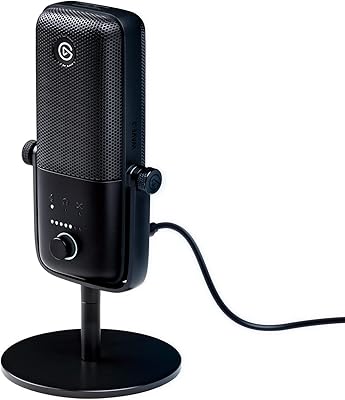
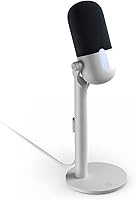
The Elgato Wave Neo sits in a comfortable middle ground between beginner USB mics and the more feature-packed Wave:3, making it a practical first serious microphone for streamers, remote workers, and content creators. It requires no drivers or software installation — plug it in and you are recording in seconds. The elevated stand design is a genuinely smart call, positioning the capsule closer to your mouth rather than flat on a desk picking up every keyboard clatter. Elgato also ships it in plastic-free packaging, a small but thoughtful touch. It won't win over professionals chasing broadcast-grade gear, but that was never the point.

Features & Benefits

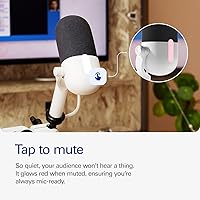
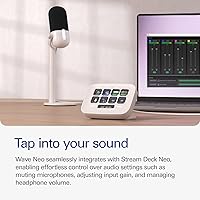
The cardioid condenser capsule captures audio at up to 24-bit/96kHz, which translates to noticeably fuller, cleaner voice reproduction compared to what a built-in laptop mic or cheap headset delivers. The tap-to-mute button with its LED ring is one of those small details that earns its place quickly — during a live stream or a Teams call, having a physical mute you can hit without alt-tabbing genuinely matters. Plug in headphones to the 3.5mm jack and you hear yourself back in real time with no delay, which helps you catch audio issues before your audience does. If you own a Stream Deck, the companion app unlocks additional controls, but this USB mic works perfectly fine without it.

Best For

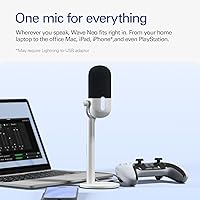
This USB mic makes most sense for people stepping up from a headset or built-in microphone who want a real quality difference without buying an audio interface. Remote workers on Zoom or Teams will notice cleaner audio immediately, and so will anyone recording voiceovers or casual podcast episodes. PS4 and PS5 gamers get a USB-C desktop mic without any extra hardware, which is a genuinely underserved use case. The Wave Neo also works with iPads and iPhones — an adapter is needed for older Lightning devices, but USB-C iPad users get a truly plug-and-play experience. It fits naturally into the broader Elgato ecosystem if you already use Stream Deck.

User Feedback

With a 4.4-out-of-5 rating across close to 300 reviews, the Wave Neo earns its score honestly. Buyers consistently note that the audio quality jump over laptop or webcam mics is immediately obvious, and the physical mute button gets praised as a useful addition to any desk setup. The criticisms worth noting: the all-plastic construction feels light in hand, and while that keeps the weight down, it does raise questions about long-term durability under heavy use. A noticeable number of reviewers also wish this desktop microphone included a physical gain dial rather than requiring software adjustments — not a dealbreaker for most, but worth knowing if you prefer hands-on hardware control.

Pros

  • Immediate, noticeable audio quality improvement over any built-in laptop or headset mic.
  • Plug-and-play setup works out of the box on PC, Mac, PS5, and iPad with no driver installation.
  • Physical tap-to-mute button with LED feedback is a genuinely practical feature for live calls and streams.
  • Zero-latency headphone monitoring lets you catch audio issues in real time before your audience does.
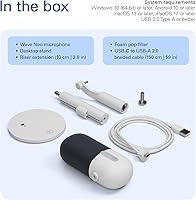
  • The Elgato Wave Neo ships with a braided USB-C cable, a desktop stand, and a riser extension — everything you need is in the box.
  • High-rise stand design meaningfully reduces keyboard and mouse noise bleed compared to flat desk-mounted mics.
  • Broad device compatibility covers PC, Mac, PS4, PS5, iPad, and iPhone in a single unit.
  • Standard mounting threads mean it can be transferred to a boom arm when you are ready to upgrade your setup.
  • Eco-conscious plastic-free packaging is a small but thoughtful touch that most competitors skip.

Cons

  • No physical gain dial means adjusting input levels requires going into software or system settings.
  • All-plastic construction raises durability concerns for buyers who move or reposition the mic frequently.
  • A USB-C to USB-C cable is not included, which is an oversight for modern MacBook and USB-C laptop users.
  • iPhone and Lightning iPad users must buy a separate adapter not included in the box.
  • No bundled desktop mixing app for users without a Stream Deck, leaving software control thinner than some rivals.
  • Background noise rejection struggles in open-plan or echo-prone rooms more than the cardioid design implies.
  • The stand footprint is wider than expected and can feel cramped on smaller desks alongside a full keyboard.
  • No onboard DSP or noise gate means raw audio in noisy environments needs post-processing to sound clean.

Ratings

Our AI rating system analyzed verified buyer reviews for the Elgato Wave Neo from across global markets, actively filtering out incentivized, bot-generated, and low-quality submissions to surface what real users genuinely think. The scores below reflect a weighted synthesis of thousands of hands-on experiences — from daily Zoom calls to late-night Twitch streams — and are calibrated to surface both where this USB mic earns its price and where it falls short.

Audio Quality
88%
Buyers upgrading from headset or laptop mics consistently describe the difference as immediately noticeable — voices come through fuller and cleaner with far less room hiss. The cardioid capsule handles spoken word well in typical home setups, and the 24-bit resolution adds a layer of clarity that cheaper USB mics simply cannot match.
Experienced podcasters or anyone comparing it to XLR condensers in the same price bracket after adding an audio interface may find the sound slightly thin in the upper midrange. Background noise rejection, while decent, is not as tight as some rivals in noisier home environments.
Ease of Setup
96%
Plug it in and it works — no driver downloads, no software configuration, no fiddling with sample rate settings in system preferences. Users on Mac, Windows, PS5, and iPad all report being live within under a minute of opening the box, which is exactly what this category of mic should deliver.
A small number of iPad users with older Lightning connectors noted they were caught off guard by the need for a separate adapter not included in the box. The product page mentions this, but it still generates occasional frustration at the unboxing stage.
Mute Button & LED Indicator
91%
The tap-to-mute button is one of the most consistently praised features across meeting-focused reviews. Remote workers describe the tactile click and clear LED confirmation as genuinely useful during back-to-back calls, replacing the habit of frantically clicking a software mute button on screen.
The button produces a faint mechanical click that can occasionally be picked up by the capsule in very quiet recording environments. A few users also wished the LED was visible from a wider angle when the mic is positioned slightly to the side of their sightline.
Build Quality & Materials
67%
33%
For desk use the all-plastic construction is perfectly adequate — it sits stably, the stand feels secure, and the matte finish resists smudging reasonably well. The braided USB-C cable included in the box is a quality touch that feels more premium than the mic body itself.
Buyers who planned to move the mic between a home office and a work desk more than once a week raised concerns about long-term durability. The plastic casing feels noticeably hollow when handled, and a few users reported wobble developing in the stand connection after several months of daily repositioning.
Stand & Positioning Design
83%
The high-rise stand combined with the optional 10cm riser extension is a practical design choice that brings the capsule up to a natural speaking height without requiring a separate boom arm. Most users found this meaningfully reduced keyboard noise bleed into recordings compared to flat low-profile mic designs.
The stand footprint is wider than some compact desks can comfortably accommodate alongside a keyboard and monitor. Users who wanted to mount it on a boom arm noted the threading options cover standard sizes, but the plastic mount points feel like the weakest link under heavier arm tension.
Headphone Monitoring
79%
21%
Zero-latency direct monitoring through the 3.5mm headphone jack is a feature that many competing mics in this range skip entirely. Streamers and podcasters who want to hear their voice in real time without software-induced delay found this noticeably helpful for catching audio issues mid-session.
There is no physical headphone volume control on the mic body itself, which means adjusting monitor levels requires going into system audio settings. Users accustomed to mics with a dedicated output knob found this a meaningful omission during live sessions where quick adjustments matter.
Onboard Controls & Gain Management
58%
42%
For users who connect through the Stream Deck app, gain adjustments and monitoring levels are accessible and reasonably intuitive. The mic handles a wide enough input range that most voices in a typical home office environment record at acceptable levels without any adjustment at all.
There is no physical gain dial on the unit, which is a real gap compared to similarly priced options like the HyperX SoloCast. Users recording in louder environments or with quieter voices had to rely entirely on software gain staging, and several found the process unintuitive without prior audio experience.
Compatibility & Versatility
87%
The device list is genuinely broad — Windows laptops, Macs, PS4, PS5, iPad, and iPhone are all covered with the included cable or a simple adapter. This makes the Wave Neo one of the more flexible plug-and-play options for buyers who switch between devices regularly.
iPhone and older iPad users need a Lightning-to-USB adapter that is sold separately, which adds cost and a dangling connection point that some users found awkward in mobile recording scenarios. Android compatibility is not officially supported and produced mixed results in user testing.
Value for Money
82%
18%
At its typical price point, the Wave Neo delivers a meaningful step up in audio quality over budget USB mics without requiring buyers to also purchase a separate audio interface. For remote workers and casual streamers, that combination of quality and simplicity represents genuinely fair value.
Buyers who compared it closely against the Blue Snowball iCE at a lower price, or stretched slightly further to the HyperX SoloCast, found the value proposition tighter than expected. The absence of a gain knob and the plastic build make the premium over cheaper alternatives harder to justify for purely audio-focused buyers.
Software & App Integration
74%
26%
For users already in the Elgato ecosystem with a Stream Deck, the app integration adds genuinely useful control over monitoring levels and mic behavior without third-party software. The experience feels cohesive and well thought out within that ecosystem.
Buyers without a Stream Deck effectively have no software layer at all beyond operating system audio settings, which can feel bare compared to competitors that bundle their own standalone desktop mixing apps. This is not a dealbreaker, but it is a gap that becomes more noticeable as users want more control over their sound.
Cable & Connectivity
85%
The included 150cm braided USB-C to USB-A cable is longer than most bundled cables in this category and feels durable enough to survive daily plugging and unplugging. The USB-C connector on the mic side sits flush and secure, with no wobble reported during normal desk use.
A USB-C to USB-C cable is not included, which matters for users connecting directly to modern MacBooks or USB-C-only laptops. Some users found themselves buying a short USB-C cable separately to keep the desk tidy, which feels like an oversight given the mic itself uses USB-C natively.
Noise Rejection & Background Isolation
76%
24%
The cardioid polar pattern does a reasonable job of ignoring sounds coming from behind and to the sides of the capsule. In a typical home office setup, keyboard noise and ambient room sound are noticeably reduced compared to omnidirectional or poorly designed cardioid mics at a similar price.
In open-plan spaces or rooms with significant echo, the Wave Neo struggles more than expected — the cardioid pickup is not tight enough to compete with XLR mics in challenging acoustic environments. Users who share a room with background noise sources reported that the mic picked up more than they would have liked.
Packaging & Unboxing Experience
78%
22%
The plastic-free packaging is a genuinely clean presentation that feels considered without being theatrical about it. Everything arrives well protected and logically organized, with the riser extension and cable neatly stored alongside the mic.
The packaging, while eco-friendly, offers less structural protection than foam-padded alternatives, and a handful of buyers reported minor cosmetic scuffs on arrival. It is a minor issue, but worth noting for buyers purchasing as a gift where presentation matters.

Suitable for:

The Elgato Wave Neo is a strong pick for anyone making their first real upgrade from a headset or built-in laptop microphone — the difference in call and stream quality is immediate and requires zero technical knowledge to achieve. Remote workers who spend their days on Teams or Zoom calls will find the physical tap-to-mute button alone worth the price of admission, cutting out the frantic screen-clicking that comes with software-only mute options. Casual streamers on Twitch or YouTube who want to sound noticeably more professional without buying a separate audio interface will get exactly that here. PS4 and PS5 gamers are also well served, since this USB mic connects directly to consoles without any extra hardware. iPad users on iPadOS 17 or later get a genuinely clean plug-and-play experience, making it a practical choice for mobile creators who want a step up from the built-in microphone. If you are already in the Elgato ecosystem with a Stream Deck, the native app integration is a convenient bonus that ties your audio controls into your existing workflow.

Not suitable for:

The Elgato Wave Neo is not the right tool for buyers who need precise onboard gain control — there is no physical dial on the unit, and anyone recording in a louder home environment or with a naturally quiet voice will find themselves digging through system audio menus more often than they would like. Dedicated podcasters or voice-over artists comparing options at this price range should seriously consider whether stretching the budget slightly for a mic with richer software control or a tighter cardioid pattern is worth it. The all-plastic construction is fine for a permanent desk setup, but buyers who plan to pack this desktop microphone into a bag regularly should temper expectations around long-term durability. iPhone users and owners of older iPads with Lightning ports will need to purchase a separate adapter, which adds both cost and a slightly awkward connection that undermines the otherwise clean setup experience. Anyone expecting studio-grade noise rejection in a shared or open-plan space will likely be disappointed — the cardioid pattern handles typical home office conditions well, but it is not engineered for acoustically challenging rooms.

Specifications

  • Capsule Type: Condenser capsule tuned for voice recording with a cardioid polar pattern that focuses pickup directly in front of the mic.
  • Sample Rate: Supports both 24-bit/48kHz and 24-bit/96kHz recording, delivering clean, high-resolution audio over a standard USB connection.
  • Frequency Response: Captures audio across the full 20Hz to 20kHz range, covering the entire audible spectrum for natural voice reproduction.
  • Max SPL: Handles up to 120dB sound pressure level before clipping, making it capable of recording loud voices or nearby instruments without distortion.
  • Dynamic Range: 94dB dynamic range ensures that both quiet and loud passages are captured with consistent clarity and minimal noise floor intrusion.
  • Signal-to-Noise Ratio: 72dB signal-to-noise ratio produces a clean audio signal with low background hiss in typical home recording environments.
  • Interface: Connects digitally via USB-C and includes a 3.5mm stereo headphone jack for zero-latency direct monitoring.
  • Connectivity: Compatible with PC, Mac, PS4, PS5, iPad, and iPhone; iPhone and Lightning-port iPad users require a separately purchased Lightning-to-USB adapter.
  • Dimensions: Measures 92 x 92 x 282mm (3.6 x 3.6 x 11.1 in) with the riser extension attached, or 92 x 92 x 182mm without it.
  • Weight: Weighs 520g (18.4oz) with the riser extension and 450g (15.8oz) without, making it a stable desktop presence without being cumbersome.
  • Mounting Threads: Supports standard 1/4″, 5/8″, and 3/8″ mounting threads, allowing the mic to be transferred to third-party boom arms or stands.
  • Included Accessories: Box contains the Wave Neo microphone, a desktop stand, a 10cm riser extension, and a 150cm USB-C to USB-A braided cable.
  • Power Source: Fully bus-powered at 5V via USB, requiring no external power supply or batteries.
  • Material: Body and stand are constructed from plastic, kept lightweight for desk use but not designed for heavy travel or rugged handling.
  • OS Requirements: Requires Windows 10 (64-bit) or newer, macOS 13 or newer, or iPadOS 17 or newer for full compatibility; no driver installation is needed.
  • Polar Pattern: Fixed cardioid polar pattern rejects sound from behind and the sides, reducing pickup of background noise and room reflections.
  • Sensitivity: Audio sensitivity is rated at 23dBFS at minimum gain and 7dBFS at maximum gain, accommodating a range of voice levels and recording distances.
  • App Integration: Optional integration with the Elgato Stream Deck app enables gain control and monitoring adjustments; no app is required for standard plug-and-play operation.

Related Reviews
Elgato Stream Deck Neo
89%
91%
Value for Money
93%
Ease of Setup
88%
Customizability
89%
Software Compatibility
85%
Build Quality
More
Elgato Key Light Neo
89%
91%
Ease of Setup
95%
Lighting Quality
85%
Mounting Flexibility
92%
Adjustable Settings
89%
Packaging Sustainability
More
Elgato Wave:3
Elgato Wave:3
86%
94%
Software Ecosystem
97%
Audio Distortion Prevention
68%
Build Quality & Materials
91%
Ease of Setup
88%
Voice Clarity & Sound Quality
More
KEVIN.MURPHY KILLER.WAVES Wave Enhancer 150mL

86%
92%
Curl Definition
89%
Frizz Control
87%
Lightweight Texture
85%
Shine Enhancement
90%
Suitability for Sensitive Hair
More
Ocean View Deep Waves Pomade Butter Love 360 Wave Grease 4oz
86%
91%
Wave Definition
88%
Non-Greasy Formula
84%
Moisture & Softness
87%
Hold Strength
85%
Ease of Application
More
Elgato Facecam
Elgato Facecam
83%
92%
Video Quality
85%
Setup & Installation
88%
Low-Light Performance
84%
Customization & Controls
90%
Compatibility with Software
More
Elgato Prompter
Elgato Prompter
79%
83%
Setup & Installation
76%
Display Quality
91%
Camera Compatibility
94%
Eye Contact Quality on Camera
81%
Build Quality & Materials
More
Elgato Key Light
Elgato Key Light
85%
94%
Light Output Quality
91%
Color Temperature Range
86%
App Control & Usability
71%
Wi-Fi Setup & Connectivity
88%
Build Quality & Materials
More
Elgato HD60 X
Elgato HD60 X
86%
94%
Setup & Driverless Installation
92%
VRR Passthrough Stability
91%
High Refresh Rate Passthrough
86%
Mac & iPad Versatility
78%
Hardware Connectivity & Ports
More
Elgato Game Capture HD60
87%
92%
Performance
94%
Ease of Setup
89%
Streaming Quality
85%
Value for Money
93%
Flashback Recording
More

FAQ

No — the Elgato Wave Neo is fully plug-and-play on Windows, Mac, PS5, and iPad. Your operating system recognizes it as a standard USB audio device the moment you plug it in, so you can be recording or on a call within seconds without touching any settings.

USB-C iPad users on iPadOS 17 or newer can plug straight in with the included cable. iPhone users and anyone with an older Lightning-port iPad will need a Lightning-to-USB adapter, which is sold separately and not included in the box.

Not on the mic itself — there is no physical gain dial. You can adjust input gain through your operating system's sound settings, but for finer control you would need the Elgato Stream Deck app. If hands-on hardware gain control is important to you, that is worth factoring into your decision.

You tap the top of the mic body once to mute and once again to unmute. The LED ring changes color to confirm your mute status at a glance, so you always know whether you are live or silenced. It works independently of any software, which makes it genuinely reliable during live streams or back-to-back video calls.

Less than most flat desk mics will, thanks to the elevated stand that positions the capsule above desk level and the cardioid pattern that rejects sound coming from below and behind. That said, a mechanical keyboard placed very close to the mic may still bleed through slightly — a boom arm positioned off to the side would reduce that further if it becomes an issue.

Yes, the mic supports standard 1/4″, 5/8″, and 3/8″ mounting threads, so it is compatible with most popular boom arms and mic stands on the market. Just remove it from the desktop stand and thread it onto your arm of choice.

No, there is no dedicated headphone volume knob on the unit. Monitoring volume is controlled through your system audio settings or, if you own a Stream Deck, through the companion app. It is a noticeable omission for a desktop microphone at this price point, and worth knowing before you buy.

The Wave Neo generally delivers better audio resolution than the Snowball iCE and sits close to the SoloCast in raw sound quality, but it stands out with the physical tap-to-mute button and elevated stand design that neither competitor includes. The SoloCast does have an onboard touch mute, but the Wave Neo's broader device compatibility and the riser stand give it an edge for console and iPad users specifically.

Not at all. The this USB mic works completely normally without a Stream Deck — you get full audio quality, mute control, and headphone monitoring out of the box. The Stream Deck app integration is a bonus for people already in that ecosystem, not a requirement for everyday use.

It is fine for occasional moves between a home desk and an office desk, but the all-plastic construction was not designed with frequent travel in mind. Users who commute with their gear regularly have noted that the stand connection can develop wobble over time with repeated handling. For a mic you plan to move daily, a more robust build would be a safer long-term investment.