Overview

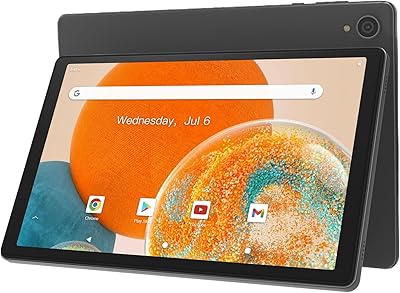
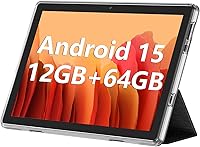
The ECOPAD THTH-K12C 10.1″ 64GB Tablet enters a crowded entry-level market where brand recognition matters less than what you actually get for the money. ECOPAD isn't a household name, but the spec sheet is competitive — a quad-core RK3562 processor, Android 15, and 64GB of storage cover the basics for light daily use. Think streaming a show before bed, reading an e-book, or jumping on a video call. It's not built to challenge a Fire HD 10 or Lenovo Tab M10 on every front, but for buyers who want a capable, no-fuss Android slate without spending much, it makes a reasonable case for itself.

Features & Benefits

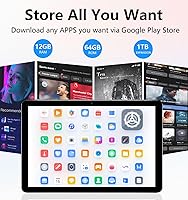
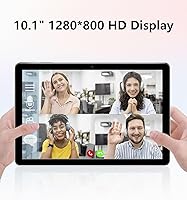
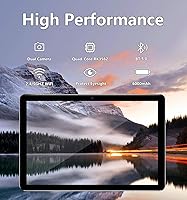
The 10.1-inch IPS screen delivers 1280x800 resolution — not Full HD, but perfectly watchable for Netflix or YouTube at this price. One thing worth knowing upfront: the advertised 12GB RAM includes 8GB of virtual extended memory, meaning only 4GB is physical. That distinction matters if you expect fluid multitasking; for casual use it's fine, but don't expect it to juggle a dozen apps without a hiccup. The 6000mAh battery is a genuine highlight, holding up well through several hours of video. Dual-band Wi-Fi, Bluetooth 5.0, and a microSD slot accepting cards up to 1TB round out a feature set that punches respectably for its price tier.

Best For

This budget Android tablet makes the most sense for a specific type of buyer. Kids and seniors who just want to stream videos, browse casually, or video chat will find it more than adequate. Students picking up a secondary study device for reading PDFs or running note-taking apps won't feel held back by the hardware. It's also a smart pick for travelers who'd rather toss a budget slate in a carry-on than risk a pricier device. If you prioritize battery life and storage over a razor-sharp display or raw processing speed, the ECOPAD slate fits the brief without requiring a significant financial commitment.

User Feedback

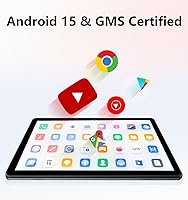
Owners of this entry-level tablet consistently highlight value for money and battery endurance as its strongest qualities — setup is straightforward, and GMS certification means full Google Play access, which isn't guaranteed on every budget device. On the flip side, buyers expecting true 12GB RAM performance have voiced disappointment once the extended memory caveat sank in. Build quality draws mixed reactions; the plastic chassis feels utilitarian rather than sturdy, which is expected at this price but still worth flagging. A handful of users also noted pre-installed bloatware and expressed uncertainty about long-term software update support from a brand without a deep track record.

Pros

  • Runs Android 15 out of the box, which is ahead of many rivals at this price point.
  • GMS certification means full Google Play access — not a given with every budget tablet.
  • The 6000mAh battery genuinely holds up through long streaming sessions without constant recharging.
  • MicroSD expansion up to 1TB gives the ECOPAD slate practical long-term storage flexibility.
  • Dual-band Wi-Fi and Bluetooth 5.0 are modern connectivity features that punch above the price tier.
  • Setup is fast and approachable, even for less tech-savvy users like seniors or first-time tablet owners.
  • At 10.1 inches, the screen size hits a comfortable middle ground for both video watching and reading.
  • Dual speakers make content consumption noticeably better than single-speaker budget alternatives.
  • The one-year warranty and reportedly responsive customer service add a layer of post-purchase reassurance.

Cons

  • The 12GB RAM claim is misleading — only 4GB is physical; the rest is virtual extended memory.
  • Pre-installed bloatware takes up storage space and cannot always be fully removed.
  • The plastic build feels cheap under the hand and shows flex under moderate pressure.
  • Outdoor screen visibility is poor, limiting usability in bright or sunny environments.
  • No 4G LTE support means the tablet is entirely dependent on available Wi-Fi connections.
  • Long-term software update commitments from ECOPAD are unclear, raising durability concerns.
  • Rear camera output is noticeably soft and underwhelms even for casual photo use.
  • Base 64GB storage fills up faster than expected once the OS and default apps are accounted for.
  • Charging speed is slow, making recovery after a fully drained battery a time-consuming wait.

Ratings

The ECOPAD THTH-K12C 10.1″ 64GB Tablet scores below are generated by AI after analyzing thousands of verified buyer reviews from global markets, with spam, bot-generated, and incentivized feedback actively filtered out. What you see reflects a genuine cross-section of real-world experiences — the wins and the frustrations alike. Strengths in battery life and everyday usability are balanced honestly against concerns around RAM transparency, build durability, and brand trust.

Value for Money
83%
Most buyers feel they got more than they paid for, especially given the Android 15 OS, dual-band Wi-Fi, and expandable storage. For a household backup tablet or a first device for a child, the price-to-feature ratio holds up well against better-known competitors.
Some users who expected flagship-tier performance felt let down once real-world limitations surfaced. The virtual RAM setup in particular makes the value perception fragile for anyone who did their homework after purchase.
Battery Life
88%
The 6000mAh cell is a consistent bright spot in user feedback. Parents report kids watching videos for extended stretches without needing a charge, and travelers note it handles a long-haul flight comfortably on a single charge.
Heavy users pushing the tablet through gaming sessions or prolonged streaming at full brightness report falling short of the claimed eight hours. Charging speed is unremarkable, so recovery time after a long day can feel sluggish.
Display Quality
67%
33%
Indoors, the 1280x800 IPS screen handles streaming and reading without major complaints. Colors are reasonably accurate for this resolution tier, and the 10.1-inch size is comfortable for video calls or reading e-books on the couch.
Outdoor visibility is a recurring gripe — the screen struggles against direct sunlight, making it impractical for use in bright environments. Full HD is absent, and while that is expected at this price, users upgrading from a better display will notice the step down.
Performance & Speed
61%
39%
The RK3562 quad-core processor handles casual tasks — YouTube, light browsing, and reading apps — without obvious frustration. For buyers who just want a tablet that turns on quickly and plays a video, day-to-day responsiveness is acceptable.
Anything beyond basic multitasking exposes the processor's limits. Users who tried running multiple apps simultaneously or loading heavier games reported noticeable lag and occasional app crashes. This is not a device for productivity-heavy sessions.
RAM Transparency
44%
56%
The inclusion of extended virtual RAM does help the device manage basic background apps better than pure 4GB hardware would on its own. A few tech-savvy buyers acknowledged this as a common industry practice and adjusted expectations accordingly.
The 12GB marketing claim is the most polarizing aspect of buyer feedback. Many users felt misled upon discovering that two-thirds of the advertised memory is software-extended virtual RAM, not physical. For non-technical buyers, this feels like a bait-and-switch.
Build Quality
62%
38%
The tablet feels adequately sturdy for light home use — passing it around the table or propping it up for a video call poses no real risk. The slim 0.28-inch profile makes it easy to hold for longer reading sessions.
The all-plastic chassis does little to inspire confidence when the device is picked up, and some buyers noted flex in the frame under moderate pressure. At 2.01 lbs it is not particularly light either, which compounds the impression of budget construction.
Storage & Expandability
84%
The microSD slot supporting up to 1TB is genuinely practical for users who store offline videos or large media libraries. Several users specifically mentioned this feature as the deciding factor over rival budget tablets that lack expansion options.
The base 64GB fills up faster than expected once system files, pre-installed apps, and media are factored in. The SD card is sold separately, which adds to the real-world cost and catches some buyers off guard after checkout.
Software & OS
71%
29%
Android 15 out of the box is a meaningful advantage over many budget tablets still shipping with older OS versions. GMS certification means the full Google Play ecosystem is accessible, which is not something every no-name tablet can claim.
Pre-installed bloatware is a common complaint, with several users noting apps they could not uninstall taking up storage and running in the background. Long-term software update support from ECOPAD remains an open question given the brand's limited track record.
Camera Quality
53%
47%
The front 2MP camera is serviceable for video calls over WhatsApp or Google Meet in decent indoor lighting. For a tablet primarily used for media consumption, most buyers accept the camera limitations without strong objection.
The 8MP rear camera underdelivers on its spec sheet promise — images appear soft and struggle in low light. Users hoping to document anything meaningful with the rear lens will be disappointed; this is not a device to photograph anything you actually care about.
Connectivity
79%
21%
Dual-band Wi-Fi and Bluetooth 5.0 are features that make a real difference at this price tier. Users report stable 5GHz connections for streaming and reliable Bluetooth pairing with headphones and speakers on the first attempt.
The tablet lacks 4G LTE support, so it is entirely dependent on available Wi-Fi — a limitation that matters more than it seems when traveling. A small number of users also reported occasional Wi-Fi drop issues, though this appears to be an edge case rather than a widespread fault.
Audio Quality
66%
34%
The dual-speaker setup is a step above the single-speaker budget tablets it competes with. Volume levels are adequate for watching content in a quiet room, and the sound does not distort noticeably at higher volumes.
Bass is virtually absent, and the speakers can sound thin during action-heavy video content or music playback. Headphone use via the 3.5mm jack is strongly recommended for any serious audio experience.
Setup & Ease of Use
81%
19%
Out-of-box setup is consistently praised as fast and intuitive, even by less tech-savvy buyers like seniors setting it up independently. Android 15 with Google Play access means familiar apps are ready within minutes of unboxing.
A handful of users encountered minor hiccups with account sign-in prompts and pre-loaded apps interrupting the initial setup flow. Nothing deal-breaking, but the experience is not quite as polished as what you get from established brands.
Brand Trust & Support
57%
43%
The one-year warranty and an apparently responsive customer service team have generated some positive feedback from buyers who needed assistance. A few users specifically noted quick replies when raising issues through Amazon messaging.
ECOPAD carries little brand recognition outside budget tablet circles, and that uncertainty lingers for buyers expecting reliable post-purchase support over the longer term. Update commitments and parts availability beyond the warranty window are real unknowns.

Suitable for:

The ECOPAD THTH-K12C 10.1″ 64GB Tablet is genuinely well-matched for buyers whose needs sit firmly in the casual-use lane. Parents looking for an affordable screen to keep kids occupied with streaming apps or educational games will find it ticks the right boxes without the anxiety of handing a pricey device to a child. Seniors who want a straightforward tablet for video calls with family, reading news, or watching shows will appreciate how quickly it gets up and running with a familiar Android interface. Students needing a secondary device — something to pull up lecture notes, highlight PDFs, or attend an online class — will get reliable mileage out of it without stretching a tight budget. It also makes practical sense as a shared household tablet parked in the kitchen for recipes, or slipped into a carry-on purely for in-flight entertainment on trips where you would rather not risk a more expensive device.

Not suitable for:

Buyers expecting the ECOPAD THTH-K12C 10.1″ 64GB Tablet to function as a primary productivity device or a capable gaming tablet will almost certainly be disappointed. The RK3562 quad-core processor is honest about what it is — a chip built for light tasks — and anyone running multiple demanding apps simultaneously will run into lag and occasional crashes. The RAM situation deserves a plain-spoken warning: only 4GB of that advertised 12GB is physical memory, with the rest being software-extended virtual RAM, which does not perform comparably in real-world multitasking. People who work outdoors or in bright environments will also find the display frustrating, as screen visibility in sunlight is a known weak point. If sharp display resolution, strong camera output, or confidence in long-term software support from a well-established brand are priorities, this entry-level tablet is not the right fit — spending a bit more on a Fire HD 10 or a Lenovo Tab would be a smarter move.

Specifications

  • Screen Size: The tablet features a 10.1″ IPS display with a resolution of 1280x800 pixels, suitable for indoor media consumption and reading.
  • Processor: Powered by an RK3562 quad-core ARM processor designed for light-to-moderate everyday tasks such as streaming, browsing, and video calls.
  • RAM: Total advertised RAM is 12GB, comprising 4GB of physical LPDDR memory and 8GB of software-extended virtual RAM.
  • Internal Storage: Comes with 64GB of onboard ROM storage; available user space will be lower once the Android OS and pre-installed apps are accounted for.
  • Storage Expansion: Supports microSD cards up to 1TB capacity via a dedicated card slot, with the card sold separately.
  • Operating System: Ships with Android 15 pre-installed and includes Google Mobile Services (GMS) certification for full Google Play Store access.
  • Battery: Houses a 6000mAh lithium polymer rechargeable battery rated for approximately 8 hours of continuous video playback under standard conditions.
  • Front Camera: Equipped with a 2MP front-facing camera intended primarily for video calls and basic self-portraits in well-lit environments.
  • Rear Camera: Features an 8MP rear camera suitable for casual snapshots; not designed for photography-grade image quality.
  • Connectivity: Supports dual-band Wi-Fi (2.4GHz and 5GHz, 802.11n) and Bluetooth 5.0 for wireless device pairing and stable network connections.
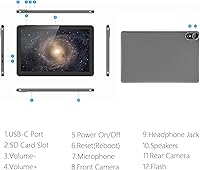
  • Ports & Slots: Includes one USB Type-C port, one 3.5mm headphone jack, and one microSD card slot along the tablet chassis.
  • Speakers: Dual built-in speakers are positioned for stereo-style audio output during media playback.
  • Dimensions: The tablet measures 9.5 x 6.2 x 0.28 inches, making it a slim-profile device suited for one-handed holding or carrying in a bag.
  • Weight: Weighs 2.01 lbs, which is on the heavier side for a 10-inch budget tablet and may cause fatigue during extended one-handed use.
  • Color: Available in Black as the standard color option.
  • Warranty: Covered by a one-year manufacturer warranty with customer support accessible via the seller's Amazon storefront messaging channel.
  • In Box: The package includes the tablet unit and a charging cable; a microSD card, case, and screen protector are not included.
  • GMS Certified: Google Mobile Services certification is confirmed, ensuring compatibility with Google Play, Gmail, YouTube, and other core Google apps.

Related Reviews

ITMEIPC T-10 Android Tablet 10.1-inch, 6GB RAM, 64GB Storage
80%
91%
Value for Money
85%
Display Quality
74%
Battery Life
78%
Build Quality
88%
Performance for Light Use
More
YYSWIE 10.1-inch Kids Tablet 64GB
85%
91%
Value for Money
88%
Durability
94%
Battery Life
85%
Parental Controls
89%
Ease of Use
More
Maxsignage EP103A 10.1-inch Tablet, 64GB Storage
82%
84%
Display Quality
88%
Battery Life
78%
Performance
91%
Storage Flexibility
79%
Build Quality
More
JREN JR-J10 Kids Tablet 10.1″ 64GB
84%
85%
Overall Performance
90%
Durability & Build Quality
92%
Parental Controls
88%
Battery Life
70%
Display Quality
More
Trayoo K12 Kids Tablet 10.1-inch 64GB
85%
88%
Build Quality & Durability
92%
Battery Life
91%
Parental Controls
79%
Performance
85%
Display Quality
More
ITDULCET J10 Plus Kids Tablet 10.1-inch 64GB
87%
85%
Performance
92%
Battery Life
88%
Display Quality
90%
Build Quality & Durability
91%
Parental Controls
More
WXUNJA C3-EVA-2 Kids Tablet 10.1-inch, 64GB
83%
84%
Performance
92%
Build Quality/Durability
78%
Display/Visuals
80%
Battery Life
88%
Parental Controls
More
ZZB ZBCP20 10.1-inch Tablet, 8GB RAM, 64GB Storage
78%
89%
Value for Money
78%
Performance
83%
Battery Life
80%
Display Quality
72%
Build Quality
More
YACXBTK Kids Tablet 10.1-inch Android 14 8GB+64GB
84%
90%
Battery Life
88%
Display Quality
85%
Parental Controls
91%
Storage Expandability
87%
Ease of Use
More
Lenovo Yoga Book 10.1″ Android Tablet (64GB, 4GB RAM)
82%
91%
Portability
88%
Battery Life
85%
Display Quality
70%
Performance
84%
Keyboard Experience
More

FAQ

There is a catch worth knowing upfront. Only 4GB of that total is physical RAM — the remaining 8GB is virtual extended memory, which is essentially a portion of the internal storage temporarily acting as RAM. It helps the tablet juggle a few background apps, but it does not perform the same as true physical RAM. For light use it is fine, but do not expect it to handle heavy multitasking the way a device with genuinely 8GB or 12GB of physical RAM would.

Yes, you can. The tablet is GMS certified, which means it has legitimate access to the Google Play Store and all the major streaming apps work without any workarounds. Netflix, YouTube, Disney Plus, and similar platforms install and run normally — though keep in mind that HD or higher-resolution streaming will depend on your Wi-Fi speed and the app's own certification tier for the device.

Realistically, you should expect somewhere around 48 to 52GB of free space after the Android 15 operating system and pre-installed apps take their share. If you plan to store a lot of videos or offline content, picking up a microSD card is a smart move — the slot supports cards up to 1TB, which gives you plenty of room to grow.

The tablet has a USB Type-C port, so a wired USB-C keyboard or an OTG adapter with a standard keyboard would work. Bluetooth keyboards are also compatible thanks to Bluetooth 5.0. There is no official stylus support or active digitizer, so precision drawing apps are not a realistic use case here.

Simple and older titles should run adequately, but do not set high expectations. The RK3562 processor is built for basic everyday use, and demanding 3D games will likely show frame drops or sluggishness. Roblox may run at lower graphic settings, and lightweight arcade-style games will generally be fine, but graphically intensive titles are better suited to a more powerful device.

It is actually one of the better use cases for this tablet. The setup is straightforward, Android 15 is familiar enough for most users, and apps like WhatsApp, FaceTime alternatives, and Google Meet install easily from the Play Store. The 2MP front camera is basic but adequate for video calls in decent indoor lighting.

No — this is a Wi-Fi-only tablet. There is no SIM card slot and no cellular data capability. You will need an active Wi-Fi connection to browse, stream, or use online apps. If you need mobile data on the go, you would need to hotspot through a smartphone.

The 8-hour claim is achievable under moderate conditions — streaming a movie at medium brightness with Wi-Fi on tends to land around that range for most users. Push the screen brightness up, run background apps, and stream at higher quality, and you will realistically see that drop closer to five or six hours. It is still a solid battery for a budget device, just do not rely on the maximum figure under heavy use.

There are some pre-installed apps beyond the standard Android and Google suite, which is common with budget tablets from smaller brands. Some can be disabled or uninstalled through the settings menu, but a few may be baked in more deeply. It is a minor annoyance rather than a serious problem, but if a clean OS experience matters to you, it is worth factoring in.

For casual reading it is comfortable enough. The 1280x800 IPS panel handles text rendering well at typical reading distances, and the 10.1-inch size gives you good page coverage. It is not the sharpest display in its class, but for Kindle, Google Play Books, or PDF reading in good indoor lighting, most users find it perfectly pleasant for extended sessions.