
Overview

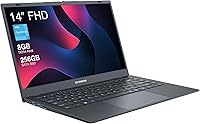
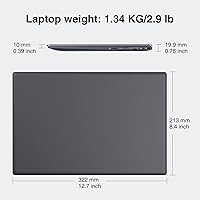
The ECOHERO Gamma 14-inch Laptop is a no-frills ultraportable released in early 2024, aimed squarely at buyers who want a functional machine without spending a lot. At under three pounds and just 0.39 inches thin, it genuinely earns the portable label — toss it in a bag and you barely notice it. ECOHERO is not a household name, and that is fine; this is a value-focused brand targeting practical buyers rather than enthusiasts. It ships with Windows 11 Pro out of the box, which sounds impressive until you factor in the entry-level Celeron processor underneath. Keep expectations realistic and this budget Celeron laptop can comfortably handle light daily tasks.

Features & Benefits

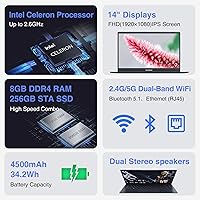
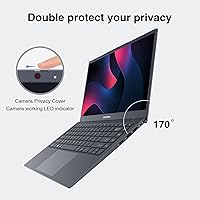
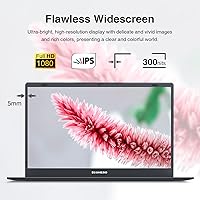
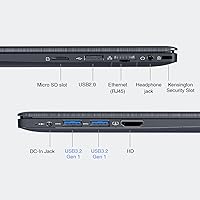
The screen is a genuine highlight here. A 14-inch IPS panel at 1920x1080 resolution delivers crisp, readable text and decent color for everyday use — better than you might expect at this price. The Celeron N4000 handles web browsing, document editing, and YouTube without complaint, but push it further and you will feel the lag. Thankfully, the 256GB SSD helps considerably; app load times are snappy even when the CPU is the bottleneck. The physical camera privacy switch is a small but appreciated touch for privacy-minded users. Port variety is surprisingly solid for such a slim machine: HDMI, ethernet, USB 3.2, and Micro SD are all present.

Best For

The Gamma 14 fits a specific kind of buyer well. Students who need something light for taking notes, following along in class, or working from a cafe will find it perfectly adequate. It also works as a dedicated travel laptop for remote workers who don't want to risk their primary machine on the road. Seniors or anyone whose computing needs stay within email, video calls, and light document work will likely never feel limited by it. It also appeals to anyone who needs Windows 11 Pro for basic workplace compliance on a tight budget. Just don't bring it to a video editing session or expect it to multitask heavily — that's not what this ultraportable notebook was built for.

User Feedback

Buyers tend to appreciate the build quality and display given the asking price — the screen sharpness and lightweight feel earn consistent praise from those who just need a basic machine. The Gamma 14 is not a bestseller, sitting mid-tier in its category rankings, so the user pool is smaller than with mainstream brands. Where frustration surfaces, it centers on two things: battery life and responsiveness. Four hours of real-world use is genuinely limiting, especially for a full day out. And while the SSD keeps things moving, Windows 11 Pro on Celeron hardware can feel sluggish under heavier system loads. Go in knowing those trade-offs and satisfaction is far more likely.

Pros

  • The 14-inch IPS display delivers sharp 1080p visuals that punch well above the price point.
  • At under three pounds and less than half an inch thick, the Gamma 14 is genuinely easy to carry daily.
  • An SSD keeps app load times fast, compensating noticeably for the slower processor.
  • The physical camera privacy switch is a practical, thoughtful feature for privacy-conscious users.
  • Dual-band WiFi and Bluetooth 5.1 provide reliable, modern wireless connectivity.
  • The port selection is surprisingly complete: HDMI, ethernet, USB 3.2, and Micro SD are all included.
  • Windows 11 Pro out of the box adds real value for users who need that specific edition.
  • The slim, lightweight build makes it one of the more travel-friendly options in the budget category.

Cons

  • The Celeron N4000 processor struggles noticeably once you move beyond basic single-task use.
  • Roughly four hours of real-world battery life means you will need a charger close by most of the day.
  • Windows 11 Pro can feel sluggish on this hardware, especially after background updates run.
  • ECOHERO is a little-known brand, which raises fair questions about long-term support and warranty service.
  • The Micro SD card slot supports only up to 256GB, limiting affordable storage expansion options.
  • Multitasking with several applications open simultaneously leads to noticeable slowdowns.
  • No dedicated graphics means any visually intensive task, even light photo editing, is a poor experience.
  • The 8GB RAM is not upgradeable on most configurations, so what you buy is what you keep.

Ratings

The ratings below for the ECOHERO Gamma 14-inch Laptop were generated by our AI after analyzing verified purchase reviews from buyers worldwide, with spam, bot-submitted, and incentivized feedback actively filtered out. Scores reflect the honest consensus of real users across a range of everyday use scenarios — from student dorms to home offices to travel bags. Both the genuine strengths and the recurring pain points are factored in transparently, so you get the full picture before deciding.

Value for Money
81%
19%
Most buyers who understood what they were purchasing feel they got a fair deal for the price. A full HD IPS screen, an SSD, Windows 11 Pro, and a sub-three-pound chassis at this budget tier is a combination that is genuinely hard to match, and users frequently mention feeling the price was justified for light daily use.
Buyers who expected mid-range laptop performance and compared this to similarly priced refurbished models from established brands sometimes felt shortchanged. The value perception drops significantly for users who only discovered the Celeron's limitations after purchase rather than before.
Performance
44%
56%
For truly basic tasks — typing a document, streaming a video, or attending a single video call — the Gamma 14 does what it promises without crashing or overheating. The SSD makes a real difference here, keeping the system from feeling completely unresponsive during routine tasks.
The Celeron N4000 is the most consistently criticized aspect of this laptop across user feedback. Opening more than five or six browser tabs, running a desktop app alongside a browser, or letting Windows Update run in the background all produce noticeable slowdowns that frustrate users quickly.
Display Quality
78%
22%
The 1920x1080 IPS panel draws consistent praise from users who find text sharp and colors reasonably accurate for reading, video streaming, and casual photo browsing. Several buyers specifically noted that the screen looked better than expected given the price, which made long reading sessions noticeably more comfortable.
Brightness levels are average at best, and users trying to work in well-lit rooms or near a window often report needing to crank the display to maximum just to see clearly. There is no mention of any anti-glare coating performing exceptionally well in those conditions.
Battery Life
38%
62%
Under very light use — basic document editing with WiFi off and screen dimmed — some users manage to push past the four-hour mark. For short study sessions or quick work blocks close to an outlet, the battery is adequate enough to not be an immediate crisis.
This is the most common dealbreaker cited in negative reviews. Four hours in real-world conditions is genuinely limiting for students in all-day classes or travelers without easy outlet access. Users on longer commutes or full workdays consistently report needing to carry the charger everywhere, which undermines the portability appeal.
Portability & Design
84%
The slim profile and under-three-pound weight are two of the most praised physical attributes across buyer feedback. Commuters, students walking between classes, and travelers all highlight how easy this ultraportable notebook is to carry in a standard backpack without adding noticeable weight to the load.
A few users noted that the plastic chassis, while light, does not feel particularly rigid when picked up by one corner or subjected to regular bag jostling. The gray finish is also described as plain and unremarkable by buyers who care about aesthetics.
Build Quality
63%
37%
For the price bracket, the assembly quality is considered acceptable by most buyers, with no widespread reports of loose hinges, flexing keyboards, or rattling panels out of the box. The slim chassis holds together reasonably well under normal daily handling.
The materials are clearly budget-grade plastics, and users with hands-on experience with mid-range laptops will notice the difference immediately. Some longer-term users have raised concerns about whether the build holds up past the one-year mark with frequent travel use.
Keyboard & Trackpad
61%
39%
The keyboard layout covers the full standard key set and is usable for extended typing sessions without causing immediate fatigue. Buyers using this laptop for light document work or note-taking find it functional enough for the purpose.
Key travel is shallow and feedback is soft, which typists accustomed to better keyboards will notice right away. The trackpad receives more criticism, with users citing inconsistent click response and occasional jitter during precise cursor movements.
Connectivity & Ports
79%
21%
Buyers consistently express pleasant surprise at the port selection for such a thin machine. Having HDMI, an ethernet jack, two USB 3.2 ports, and a Micro SD slot means most users can connect their peripherals without needing a hub, which is a genuine advantage over similarly priced competitors.
The absence of USB-C for charging is a recurring frustration, particularly for users who already carry USB-C chargers for other devices and wanted a single-cable travel setup. The Micro SD slot's 256GB cap also limits its usefulness as a storage expansion option for some users.
Wireless Performance
74%
26%
Dual-band WiFi with 5GHz support means users on modern routers can get a stable, faster wireless connection rather than being stuck on a congested 2.4GHz band. Bluetooth 5.1 pairing with mice and headphones is reported as reliable with minimal dropout complaints.
WiFi range at the edges of a home network gets mixed feedback, with some users noting signal drops further from the router compared to other devices. Nothing catastrophic, but not class-leading wireless performance either.
Software & OS Experience
55%
45%
Having Windows 11 Pro pre-installed is a legitimate selling point for users who need features like BitLocker or remote desktop for work compliance purposes. Out of the box, the system is set up and usable without requiring extra licensing purchases.
Windows 11 Pro running on Celeron hardware creates a mismatch that users feel in practice — the OS itself is designed for more capable machines, and background system processes and automatic updates consume a meaningful share of the processor's limited resources. Several users report the laptop feeling sluggish shortly after boot while Windows settles.
Privacy Features
82%
18%
The physical camera privacy switch is one of the most appreciated design details among buyers who work in shared spaces or have privacy concerns. Unlike software-only solutions, a hardware disconnect is genuinely trustworthy, and users in professional or educational environments specifically call it out as a deciding factor.
The privacy switch covers only the camera, with no equivalent hardware control for the microphone. Users looking for full hardware-level privacy controls will find this a partial solution rather than a comprehensive one.
Audio Quality
52%
48%
The built-in speakers are adequate for solo video calls and quiet background audio in a private room. The noise-canceling microphone receives moderate praise from users on basic video calls where ambient noise is not extreme.
Speaker volume is low and the sound quality is thin and tinny by most accounts — not suitable for enjoying music or watching movies without headphones. Users in slightly noisy environments also report that the microphone noise cancellation does not perform particularly well under real meeting conditions.
Storage Adequacy
71%
29%
256GB is enough for a light user who keeps their files in cloud storage and does not install many local applications. The SSD format means the storage that is there feels fast and responsive, which matters more day-to-day than raw capacity for this user profile.
Power users or anyone who downloads media, works with local files, or installs several applications will find 256GB fills up faster than expected, especially after Windows 11 Pro takes its portion. The Micro SD slot provides some relief, but it is not a seamless substitute for internal storage.
Setup & Ease of Use
77%
23%
Out-of-box setup is straightforward, and the Windows 11 Pro experience is familiar enough for most users to get started without any technical knowledge. Non-technical buyers, including seniors and first-time laptop owners, mention in feedback that getting up and running was uncomplicated.
Initial Windows setup and the first round of system updates can take a surprisingly long time on Celeron hardware, and a handful of users expressed frustration at the perceived slowness during those first hours. It normalizes once the system is fully updated, but the first impression is not always great.

Suitable for:

The ECOHERO Gamma 14-inch Laptop is a solid fit for buyers whose daily computing stays within a well-defined, modest range. Students who spend their days in Google Docs, a browser, and a video call or two will find it handles that workload without complaint. It also makes a compelling secondary travel machine for remote workers who want something light and low-stakes to carry on trips, leaving their primary laptop safely at home. Seniors or casual home users who check email, stream YouTube, and write the occasional letter are exactly the audience this machine was designed for. The included Windows 11 Pro license adds quiet value for small business users who need that edition for workplace compliance but cannot justify a higher spend to get it.

Not suitable for:

The ECOHERO Gamma 14-inch Laptop is genuinely not the right tool for anyone who needs real computing muscle. The Celeron N4000 processor is entry-level by any measure — it will frustrate users who open a dozen browser tabs, run desktop software simultaneously, or expect snappy system responsiveness throughout the day. Video editors, graphic designers, and anyone working with large files should look elsewhere entirely. Gamers, even casual ones hoping to run older or lighter titles, will likely be disappointed by the integrated Intel UHD 600 graphics. The roughly four-hour battery life is also a meaningful constraint — buyers who need an all-day machine for school or long work sessions without a nearby outlet will find that figure limiting in practice.

Specifications

  • Display: 14-inch IPS panel with a 1920x1080 full HD resolution, offering good clarity and viewing angles for everyday use.
  • Processor: Intel Celeron N4000 with a 1.1GHz base clock and a maximum burst frequency of 2.9GHz, suited for light computing tasks.
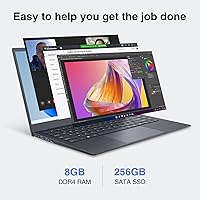
  • RAM: 8GB LPDDR4 memory provides enough headroom for basic multitasking such as browsing with several tabs and running office applications.
  • Storage: 256GB solid-state drive delivers fast read and write speeds, keeping boot times and application launches noticeably quicker than older hard-disk alternatives.
  • Operating System: Ships with Windows 11 Pro pre-installed, which includes business-oriented features such as BitLocker encryption and remote desktop support.
  • Graphics: Intel UHD Graphics 600 integrated GPU handles standard video playback and light image viewing but is not designed for gaming or rendering workloads.
  • Battery Life: Rated at approximately 4 hours of real-world use, which is best suited for short commutes or desk sessions with a charger nearby.
  • Weight: The laptop weighs 2.86 pounds (approximately 1.3 kg), making it one of the lighter options in the budget 14-inch category.
  • Dimensions: Measures 12.68 x 8.5 x 0.39 inches, giving it a notably slim profile that fits easily into standard laptop sleeves and backpacks.
  • WiFi: Supports dual-band 802.11 wireless connectivity across both 2.4GHz and 5GHz bands for flexible and reasonably fast network access.
  • Bluetooth: Bluetooth 5.1 enables stable, low-latency pairing with peripherals such as wireless mice, headphones, and keyboards.
  • Ports: Includes 2x USB 3.2 Gen 1, 1x USB 2.0, 1x HDMI, 1x RJ45 ethernet, 1x Micro SD card slot (up to 256GB), and 1x 3.5mm headphone jack.
  • Camera Privacy: A physical hardware switch allows the user to cut power to the built-in webcam independently of software, preventing unauthorized camera access.
  • Microphone: Features a built-in noise-canceling microphone intended to reduce ambient background noise during calls and voice recordings.
  • Color: Available in gray, with a matte-style finish that resists minor smudging and keeps the exterior looking clean during regular portable use.
  • Power Source: Powered by a built-in lithium-ion battery pack and charges via a dedicated DC power port rather than USB-C.
  • Chipset: Built on the Intel platform with an integrated chipset that manages system functions and supports the Celeron N4000 processor architecture.
  • Release Date: First made available in February 2024, making it a relatively recent entry in the budget ultraportable laptop segment.

Related Reviews

HP 14-dq0020nr 14-inch Laptop 64GB
80%
72%
Performance
94%
Portability
88%
Battery Life
81%
Build Quality
75%
Display Quality
More
HP 14 Celeron 14-inch Touchscreen Laptop

68%
74%
Value for Money
52%
Performance
43%
Storage Adequacy
91%
Portability
61%
Display Quality
More
Dell Inspiron 14 5440 Laptop, 14-inch, Intel Core i5, 8GB RAM, 512GB SSD
86%
88%
Performance
91%
Build Quality
94%
Portability
81%
Battery Life
75%
Display Quality
More
Dell 14 Plus Laptop DB14250-14-inch 2.5K, Intel Core Ultra 7, 16GB RAM, 1TB SSD


85%
91%
Performance
94%
Display Quality
85%
Battery Life
88%
Build Quality
86%
Keyboard Usability
More
HP 14 Inch Laptop
HP 14 Inch Laptop
83%
92%
Value for Money
89%
Portability & Weight
90%
Battery Life
80%
Performance
84%
Build Quality
More
ASUS Chromebook CM14 (CM1402CM2A-DS44)
72%
83%
Value for Money
88%
Build Quality & Durability
74%
Performance & Speed
58%
Display Quality
84%
Battery Life
More
VECAVE Travel Backpack 14-inch Laptop Backpack

86%
88%
Durability
85%
Water Resistance
87%
Laptop Protection
91%
Size and Portability
89%
Organization and Compartments
More
Alecewey F2 14-inch Laptop Screen Extender
85%
85%
Portability
90%
Display Quality
88%
Ease of Use
92%
Setup Time
63%
Weight
More
KYY X90A 14-inch Portable Laptop Monitor
84%
91%
Display Quality
88%
Portability
94%
Ease of Setup
86%
Viewing Angles
82%
Compatibility
More
HP Chromebook 14a-nf0009nr 14-inch Laptop
82%
91%
Battery Life
88%
Portability & Weight
92%
Value for Money
80%
Performance for Everyday Tasks
85%
Display Quality
More

FAQ

For most college use, yes — with realistic expectations. The ECOHERO Gamma 14-inch Laptop handles note-taking apps, cloud-based tools like Google Docs, video lectures, and web research without issue. Where it falls short is anything compute-heavy, like running local data analysis software or heavy multitasking with many applications open at once.

Yes, video calling apps like Zoom and Teams work on this laptop for standard one-on-one or small group calls. Expect things to slow down if you try to share your screen while simultaneously running other applications, as the Celeron processor has limited headroom for that kind of load.

No, Microsoft Office is not bundled with the purchase. The laptop does come with Windows 11 Pro, and you can use the free browser-based versions of Word, Excel, and PowerPoint through Microsoft 365 Online without paying anything extra.

In most configurations of this class of laptop, the RAM is soldered directly onto the motherboard and cannot be upgraded after purchase. The SSD may be replaceable depending on the internal layout, but this is not officially documented, so treat the 8GB RAM as a fixed ceiling when deciding if this machine suits your needs.

Honestly, expect around 3.5 to 4 hours of practical use doing everyday tasks like browsing and document work at moderate screen brightness. The rated figure assumes light conditions, so heavy browsing or video playback will drain it faster. Plan to have a charger available for anything longer than a short session away from a desk.

Not really. The Intel UHD Graphics 600 is a very basic integrated chip, and the Celeron processor compounds that limitation. Very old or extremely lightweight browser-based games may run, but anything released in the last several years with real graphical demands will either run poorly or not at all.

No, the Gamma 14 uses a traditional DC barrel connector for charging rather than USB-C. That means you will need to carry the included proprietary charger — you cannot top it up with a standard USB-C power bank or laptop charger.

The IPS panel has reasonable screen quality for an indoor environment, but like most budget laptops it lacks high-brightness certification, so direct sunlight will make it harder to see clearly. Shaded outdoor use, like a cafe patio, is generally fine at higher brightness settings.

It physically disconnects power to the built-in webcam at the hardware level, meaning no software or application can activate the camera when the switch is in the off position. It is a simple but genuinely useful privacy feature that removes the need to cover the lens with tape.

The Pro edition does add legitimate features — BitLocker drive encryption, remote desktop, and domain join capabilities — which matter to certain users like small business owners or IT-managed environments. That said, Windows 11 Pro runs noticeably heavier than Windows 11 Home, and on a Celeron chip you may occasionally feel that extra overhead, especially right after startup when background processes are active.