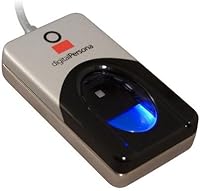
DigitalPersona U.are.U 4500HD USB Fingerprint Reader
Overview
The DigitalPersona U.are.U 4500HD USB Fingerprint Reader has been a fixture in the biometric identity space since 2009, and that track record alone signals something meaningful about its reliability. This is not a consumer gadget you plug in and forget. No software is included, which catches a surprising number of buyers off guard. To actually do anything with this biometric scanner, you need the DigitalPersona SDK, compatible third-party middleware, or an application already built around its API. For developers and IT professionals who arrive prepared, it sits comfortably in the mid-range — well above hobbyist modules but without the overhead of full enterprise systems.
Features & Benefits
The optical sensor in the U.are.U 4500HD is where this fingerprint reader genuinely earns its keep. It handles dry, rough, and moist fingers with consistent accuracy — a real advantage in deployments where you cannot control environmental conditions. Fingerprint data is encrypted on-device before transmission, which reduces the attack surface at the host interface. The latent print rejection system is especially useful in high-traffic settings, preventing residual smudges from triggering false reads. Solid ESD resistance protects the hardware in electrically noisy environments, and the compact USB form factor integrates cleanly into kiosks, access terminals, and portable workstation builds.
Best For
This biometric scanner is squarely built for a technical audience. Software developers constructing custom authentication workflows will find it a dependable capture device backed by well-documented DPFJ library support. IT administrators managing workstation access control or time-and-attendance systems will value its enrollment consistency in daily use. System integrators already within the DigitalPersona ecosystem face the least friction, since driver and API support is mature. It is a poor fit for anyone expecting a self-contained solution — if you want plug-and-play fingerprint login for a personal computer, this device assumes you arrive with your own software stack already in place.
User Feedback
Across verified reviews, the U.are.U 4500HD draws consistent praise for read accuracy across varied finger conditions, with users running real enrollment stations reporting few failed captures. Longevity comes up repeatedly — multiple buyers describe units working reliably for years without noticeable degradation. The main frustration is the missing software, which catches unprepared buyers and accounts for a disproportionate share of low ratings. Linux compatibility is workable for many configurations but uneven; some distributions need extra driver effort, and certain newer OS versions introduce occasional friction. The 3.8-out-of-5 overall score reflects a device that performs well in the right hands but generates real disappointment when it lands in the wrong ones.
Pros
- Optical sensor reads dry, rough, and moist fingers reliably — a genuine advantage in real-world deployments.
- On-device encryption protects fingerprint data before it ever reaches the host system.
- Latent print rejection cuts down on false reads in high-traffic enrollment scenarios.
- The U.are.U 4500HD has been on the market since 2009, reflecting mature, stable hardware engineering.
- Compact USB form factor integrates cleanly into kiosks, access terminals, and portable workstation builds.
- Strong ESD resistance helps the device survive electrically noisy environments without hardware degradation.
- Units frequently reported still functioning accurately after years of continuous daily use.
- Well-documented SDK support makes integration straightforward for developers already in the DigitalPersona ecosystem.
- Ranked in the top tier of its biometric category, signaling sustained adoption among professional buyers.
Cons
- No software is included — buyers must source compatible SDK tools or third-party middleware independently.
- Setup complexity is high enough to frustrate or block buyers without a technical background.
- Linux compatibility is inconsistent across distributions and requires manual driver work on some configurations.
- Newer operating system versions have caused compatibility friction for a subset of users.
- The lack of a bundled enrollment application makes it unsuitable for straightforward consumer use cases.
- At its price point, the absence of any software bundle feels like an incomplete package for first-time buyers.
- Limited official support documentation for edge-case OS environments can slow down deployment timelines.
- Buyers unfamiliar with biometric SDKs may underestimate the integration effort required before the device is functional.
Ratings
Our AI-generated scores for the DigitalPersona U.are.U 4500HD USB Fingerprint Reader were produced by analyzing verified global buyer reviews, with spam, incentivized, and bot-generated feedback actively filtered out before scoring. The results reflect a wide cross-section of real-world deployment experiences — from enterprise IT rollouts to individual developer projects — and both the hardware strengths and the recurring frustrations are transparently represented in every category.
Scan Accuracy
Build Quality
Read Speed
Software & Setup
OS Compatibility
Value for Money
Encryption & Security
Latent Print Handling
Form Factor & Portability
Long-term Durability
Developer Experience
Finger Condition Tolerance
Documentation & Support
Suitable for:
The DigitalPersona U.are.U 4500HD USB Fingerprint Reader is purpose-built for technical buyers who already have a software environment waiting for a reliable capture device. Developers building custom biometric authentication into enterprise applications will find it a dependable hardware foundation, backed by mature DPFJ and DigitalPersona SDK documentation. IT administrators rolling out access control at secure workstations or managing time-and-attendance systems benefit from its consistent enrollment accuracy and proven durability in daily operational use. System integrators working within existing DigitalPersona ecosystems face minimal setup friction, since driver support and API compatibility are well-established. Organizations that need a stable, long-lived fingerprint enrollment station — not a flashy new gadget — will appreciate that this hardware has been refined over many years in real-world deployments.
Not suitable for:
The DigitalPersona U.are.U 4500HD USB Fingerprint Reader is a poor fit for anyone expecting a self-contained, ready-to-run solution. No software ships with the unit, meaning a buyer without access to compatible SDK tools, middleware, or a pre-integrated application will have an expensive piece of hardware that does nothing useful out of the box. Everyday consumers hoping to add fingerprint login to a personal Windows or Mac computer should look elsewhere — there are purpose-built consumer readers that include their own enrollment software and require zero coding knowledge. Linux users should approach with caution, as driver support varies noticeably across distributions and some newer kernel versions have introduced compatibility friction that requires manual effort to resolve. If your deployment timeline is tight and you cannot absorb any troubleshooting overhead, this biometric scanner assumes a level of technical readiness that not every buyer has.
Specifications
- Brand: Manufactured by Digital Persona, a company with a long-established reputation in biometric identity verification hardware.
- Model: The U.are.U 4500HD is the specific model designation for this high-definition USB fingerprint capture device.
- Interface: Connects via standard USB, making it compatible with a wide range of host systems without proprietary connectors.
- Dimensions: The unit measures 2.56 x 0.61 x 1.42 inches, giving it a slim, low-profile footprint suitable for tight installation spaces.
- Weight: Weighs 6.4 ounces, light enough for portable deployment while remaining stable during repeated finger placements.
- Sensor Type: Uses an optical sensing element to capture fingerprint images directly from the finger surface.
- Image Quality: Produces high-definition fingerprint images, enabling accurate ridge detail capture for reliable matching and enrollment.
- Data Encryption: Fingerprint data is encrypted on the device itself before transmission to the host, reducing interception risk at the communication layer.
- Latent Rejection: Built-in latent print rejection technology actively discards residual smudge data from previous contacts to prevent false reads.
- ESD Resistance: Rated for superior electrostatic discharge resistance, extending operational lifespan in electrically demanding environments.
- Finger Conditions: Designed to capture accurate images from dry, moist, and rough finger surfaces without requiring ideal skin conditions.
- Software Included: No software is included in the box; buyers must supply compatible SDK tools, middleware, or an integrated application independently.
- SDK Compatibility: Officially compatible with the DPFJ library and the broader DigitalPersona SDK ecosystem for application development and integration.
- OS Support: Supports Windows environments broadly, with Linux compatibility available on many distributions though results vary by kernel version.
- Market Ranking: Holds a Best Sellers Rank of number 110 in the Security and Surveillance Biometrics category on Amazon.
- Launch Date: First made available on October 8, 2009, reflecting over fifteen years of continuous market presence and hardware refinement.
- Discontinued: The device has not been discontinued by the manufacturer and remains in active production and distribution as of the latest available data.
Related Reviews
Verifi P2000 Desktop USB Fingerprint Reader
Kensington VeriMark Gen2 USB-A Fingerprint Key Reader
SecuGen Hamster Pro 20 USB Fingerprint Reader
AUTHENTREND ATKey.Pro FIDO2 Fingerprint Security Key
Behringer UM2 USB Audio Interface
USRobotics USR5637 56K USB Dial-Up Modem
Verbatim Fingerprint Secure 64GB USB Flash Drive
awatrue EH05-U USB Headset