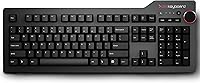
Das Keyboard 4 Professional Mechanical Keyboard
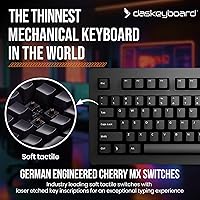
Das Keyboard 4 Professional Mechanical Keyboard — image 1
Das Keyboard 4 Professional Mechanical Keyboard — image 2
Das Keyboard 4 Professional Mechanical Keyboard — image 3
Das Keyboard 4 Professional Mechanical Keyboard — image 4
Das Keyboard 4 Professional Mechanical Keyboard — image 5
Das Keyboard 4 Professional Mechanical Keyboard — image 6
76%
24%

Overview

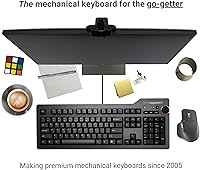
The Das Keyboard 4 Professional Mechanical Keyboard has earned its place over a decade as one of the most respected full-size boards in the enthusiast community. Built around an aluminum top panel and a no-frills black aesthetic, it signals immediately that it was designed for people who type a lot, not people who want a light show. The choice of Cherry MX Brown switches is deliberate — tactile feedback without the sharp click that irritates coworkers. This typing workhorse has been around long enough that its track record speaks for itself, which counts for a lot when you're spending serious money on a keyboard.

Features & Benefits

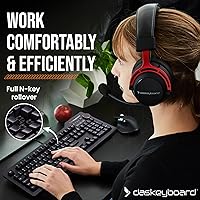
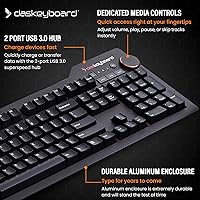
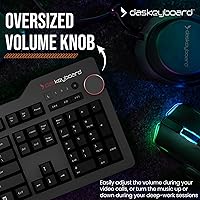
Cherry MX Brown switches sit at the core of the experience — they deliver a tactile bump mid-travel that confirms each keystroke without the loud crack of blues, making this mechanical keyboard far more bearable in shared offices. Full N-key rollover over USB means every key press registers even when multiple keys are held simultaneously, which matters for fast typists and gamers alike. The built-in two-port USB 3.0 hub adds real desk utility, letting you plug in peripherals without reaching around to your tower. The oversized volume knob feels satisfying to use, laser-etched keycaps resist fading through years of abuse, and the magnetic footbar snaps on and off cleanly for a slight typing angle.

Best For

The Das Keyboard 4 is a natural fit for developers and programmers who spend the bulk of their workday at a keyboard and need something that keeps up without demanding attention. Writers who want tactile confirmation without audible distraction will find the Browns a solid match. Office professionals get genuine value from the USB hub and media controls — small conveniences that add up across a long day. It also makes a compelling step-up for enthusiasts moving on from budget mechanical options. One caveat worth stating plainly: this typing workhorse has no backlighting whatsoever, which may be a dealbreaker depending on your working environment.

User Feedback

Across thousands of long-term reviews, the typing feel and build quality are the reasons people stick with this mechanical keyboard for years rather than months. The volume knob gets specific shoutouts — buyers notice it more than you might expect from such a simple feature. On the other side, the absence of backlighting is a recurring complaint from users who work in low-light conditions, and there is no workaround. The large desk footprint frustrates buyers with tighter workspaces, and a handful note that full USB 3.0 hub speeds require a 3.0 port on the host machine. The price draws scrutiny, but most long-term owners feel the durability justifies it.

Pros

  • Cherry MX Brown switches offer satisfying tactile feedback without the sharp click that disrupts open offices or shared spaces.
  • Full N-key rollover ensures every keystroke registers accurately, even at high typing speeds with multiple keys held simultaneously.
  • Laser-etched keycaps are genuinely fade-resistant — expect the legends to remain crisp after years of heavy daily use.
  • The built-in two-port USB 3.0 hub adds real desk utility without requiring an extra adapter or powered hub.
  • The analog volume knob is one of those small details that buyers consistently praise once they have used it daily.
  • Aluminum top panel gives the keyboard a solid, premium feel that budget and mid-range boards simply cannot replicate.
  • The magnetic footbar mechanism for tilt adjustment is clean and tool-free, snapping on and off without any fuss.
  • Broad plug-and-play compatibility with Windows, Linux, and Chrome OS means zero driver setup time out of the box.
  • The 6.5-foot cable is long enough to route cleanly in virtually any desktop configuration without extension cables.
  • Switch lifespan rated to 50 million keystrokes makes this a genuinely long-term investment for heavy typists.

Cons

  • No backlighting of any kind — a hard dealbreaker for users who regularly work in dim environments.
  • The full-size 104-key layout occupies significant desk space, leaving little room for a large mousepad on smaller surfaces.
  • Getting full USB 3.0 hub transfer speeds requires an available USB 3.0 port on the host machine, which older systems may lack.
  • No wireless option exists, so users who prefer a cable-free desk setup should look elsewhere.
  • macOS users will encounter missing Mac-specific keys and limited native media control support without remapping.
  • The premium price is difficult to rationalize for casual or light typists who simply do not need this level of durability.
  • There is no onboard memory or macro programming, which limits customization compared to newer feature-rich competitors.
  • The keyboard ships with no wrist rest included, and the typing angle without the footbar is nearly flat, which some users find uncomfortable over long sessions.

Ratings

The scores below were generated by our AI system after analyzing thousands of verified global user reviews for the Das Keyboard 4 Professional Mechanical Keyboard, with bot submissions, incentivized responses, and outlier spam actively filtered out before any scoring was applied. Both the genuine strengths and the recurring frustrations are reflected here without softening either side — this is what real long-term owners actually report after months or years of daily use.

Typing Feel
93%
This is where the Das Keyboard 4 earns its reputation without argument. Cherry MX Brown switches deliver a tactile bump that gives typists clear confirmation of each actuation, and after extended coding or writing sessions, the consistency across every key remains notable. Long-term users regularly describe this as the reason they keep coming back to this board after trying others.
Browns are not for everyone — users who prefer the crisp snap of blues or the silent linearity of reds find the tactile bump underwhelming without enough audio feedback to match. A small segment of heavy typists also note that the switch feel, while good, is not dramatically different from other Cherry MX Brown boards at lower price points.
Build Quality
91%
The aluminum top panel is immediately apparent when you pick this typing workhorse up — there is no flex, no creaking, and no hollow plastic rattle that plagues cheaper keyboards. Reviewers who have owned the board for three or more years consistently note that the chassis shows minimal wear even under daily professional abuse.
The underside and internal chassis are still largely plastic, which some buyers find inconsistent with the premium positioning of the top panel. A small number of users have reported that the USB hub housing feels slightly less solid than the main typing surface over time.
Keycap Durability
89%
Laser-etched legends hold up exceptionally well across years of use — this is one of the most consistent praise points in long-term reviews, with users noting that keys used hundreds of times daily show no visible fading. For touch typists and programmers who rarely look at the keys anyway, this is a non-issue entirely.
The keycap profile and texture can feel slightly grainy compared to PBT double-shot keycaps found on some competing boards in the same price range. A portion of enthusiasts replace the stock keycaps with aftermarket sets within the first year, suggesting the originals are functional but not exceptional by hobbyist standards.
USB Hub Utility
78%
22%
Having two USB 3.0 ports built into the keyboard is genuinely convenient for desk setups where reaching around a tower becomes annoying — plugging in a USB drive, charging a phone, or connecting a secondary mouse without leaving the keyboard is a small quality-of-life improvement that buyers notice daily.
Full 5 Gbps transfer speeds require that the host machine also has a USB 3.0 port available, which limits the hub's usefulness on older systems still running USB 2.0. The hub also draws power from the same connection, so users on USB-limited systems occasionally report bandwidth sharing issues when transferring large files simultaneously.
Media Controls
86%
The analog volume knob is the kind of feature that sounds minor until you have used it for a week — adjusting audio levels without alt-tabbing, unlocking your screen, or clicking through a taskbar tray is a real workflow improvement that even skeptical buyers end up appreciating. Dedicated media keys round out the control set cleanly.
The media control layout is fixed with no remapping support, which limits flexibility for users with non-standard workflows or those who primarily use streaming platforms with custom hotkeys. There is no per-application volume control or software layer to extend the functionality beyond the hardware defaults.
Noise Level
82%
18%
In shared office environments or open-plan workspaces, the Das Keyboard 4 with Cherry MX Browns sits in a comfortable middle ground — audible enough to give the typist tactile confirmation, but quiet enough that coworkers a few desks away are not distracted. This is one reason office professionals specifically choose Browns over blues for this board.
Browns are not a silent switch, and in very quiet environments like libraries or shared bedrooms, the typing sound is still noticeable enough to bother nearby people. Users who need near-silent input should look at linear switches with dampening rather than expecting Browns to disappear acoustically.
Backlighting
12%
88%
There is genuinely nothing positive to say about the backlighting on this board because there is none. If a buyer specifically prefers a clean, distraction-free desk aesthetic with no lighting at all, the absence of LEDs is intentional and appreciated by that narrow group.
The complete lack of any key illumination is a hard dealbreaker for a significant portion of buyers who work in dim conditions, use secondary monitors in dark rooms, or simply type after hours with overhead lights off. This is not a budget omission — it is a deliberate design choice that disqualifies this board entirely for a large subset of potential buyers.
Ergonomics
74%
26%
The magnetically detachable footbar is a well-executed solution for raising the rear of the keyboard to a 4-degree positive tilt, and the magnetic connection is clean and secure without tools. Users who prefer a slight angle for wrist comfort find the mechanism reliable and easy to attach or remove when switching between desk setups.
The base typing angle without the footbar is nearly flat, which some users find uncomfortable over long sessions without a wrist rest — and no wrist rest is included at this price. The positive tilt angle the footbar creates is also a fixed value with no intermediate positions, so users with specific ergonomic requirements may find the single option limiting.
Software & Compatibility
88%
Plug-and-play operation on Windows and Linux with no driver installation is exactly what technical users want — the keyboard identifies itself to the operating system immediately, and the N-key rollover toggle works directly from the hardware without any software dependency whatsoever.
macOS users are effectively unsupported, with no Mac-specific key labels and limited native media key function without third-party remapping tools. Chrome OS is listed as compatible but some function key behaviors differ from the documented Windows experience, which requires minor workarounds.
Value for Money
67%
33%
For users who type heavily every single day — developers, writers, data entry professionals — the long-term cost per keystroke calculation works in this typing workhorse's favor, especially given the switch lifespan, keycap durability, and chassis quality that holds up over multiple years without degradation.
For casual typists or buyers who do not spend significant hours at a keyboard, the price is difficult to justify against solid mid-range competitors that offer tactile switches, acceptable build quality, and even RGB lighting at considerably lower cost. The market has evolved since this board launched, and newer options at lower prices now offer competitive typing experiences.
Desk Footprint
61%
39%
The full 104-key layout gives users a complete set of keys including a numpad and dedicated navigation cluster, which data entry professionals and number-heavy workflows genuinely depend on as a practical daily necessity.
At 18 inches wide, this board dominates smaller desks and leaves limited room for a large mousepad, notebook, or secondary device alongside it. Users who have shifted to tenkeyless or 75-percent layouts for space efficiency will find the full-size footprint a step backward rather than a neutral trade-off.
Cable Design
71%
29%
The 6.5-foot cable is long enough to route cleanly through cable management solutions in virtually any desktop configuration, reaching tower PCs placed on the floor without needing an extension.
The cable is permanently attached with no detachment mechanism, which creates unnecessary bulk when transporting the keyboard and makes cable management more rigid than it would be with a detachable solution. For users who move between workstations or pack the keyboard for travel, a fixed 6.5-foot cable is more hassle than help.
Long-Term Reliability
92%
The track record here is strong — this board has been on the market for over a decade and the community of long-term owners consistently reports that units purchased years ago still perform at the same level as new. Gold-plated switch contacts resist corrosion, which is a meaningful durability factor in humid climates.
Because this is an older design, some buyers report that customer support response times can vary and that finding replacement parts for edge-case hardware issues is less straightforward than with newer products from more active product lines.

Suitable for:

The Das Keyboard 4 Professional Mechanical Keyboard is built for people who treat their keyboard as a serious work tool rather than an accessory. Developers and programmers who log six or more hours of typing daily will get the most out of Cherry MX Brown switches, which provide consistent tactile feedback without the fatigue that comes from heavier or noisier switch types. Writers and content creators who prefer a distraction-free setup will appreciate that there are no software dependencies, no RGB profiles to manage, and no driver installations standing between them and getting to work. Office professionals running a tighter desk setup benefit from the two-port USB 3.0 hub, which cuts down on cable clutter and keeps peripherals within reach. This typing workhorse also suits mechanical keyboard enthusiasts who have outgrown budget options and want a full-size daily driver that will still be performing years from now without keycap legends wearing off or switches becoming inconsistent.

Not suitable for:

The Das Keyboard 4 Professional Mechanical Keyboard is a poor fit for anyone who relies on backlighting, and that point deserves to be stated plainly rather than buried in the fine print. If you frequently work in low-light conditions or at night, the complete absence of any key illumination is a functional problem, not just an aesthetic preference. Buyers looking for a compact or tenkeyless layout will also find the full 104-key footprint frustrating, particularly on smaller desks where every inch matters. The Das Keyboard 4 is not designed for macOS users who want native media key support or Mac-specific key labeling, so that platform is better served elsewhere. Gamers chasing per-key RGB lighting, onboard macro programming, or a lighter, faster switch profile should look at boards built specifically around those priorities. Finally, buyers who are price-sensitive and primarily do light or casual typing will find it difficult to justify the premium when solid mid-range alternatives exist at a significantly lower cost.

Specifications

  • Switch Type: Cherry MX Brown mechanical switches provide a tactile bump at the actuation point without an audible click, making them well-suited for office environments and long typing sessions.
  • Key Rollover: Full N-key rollover (NKRO) is supported natively over USB, meaning every simultaneous keypress is registered without ghosting or dropped inputs.
  • Keycap Printing: All keycap legends are laser-etched directly into the surface, so they will not wear off or fade regardless of how heavily the keyboard is used.
  • Switch Lifespan: Cherry MX Brown switches are rated for up to 50 million keystrokes per key, providing a very long functional lifespan under daily professional use.
  • USB Hub: A built-in two-port USB 3.0 hub supports data transfer speeds up to 5 Gbps and can charge connected USB devices simultaneously.
  • Cable: The attached cable measures 6.5 ft (201 cm) in length and terminates in a single USB-A connector, giving enough reach for most desktop configurations.
  • Top Panel: The keyboard's top panel is constructed from anodized aluminum, contributing to its rigid feel and resistance to flex under heavy use.
  • Layout: This is a full-size 104-key QWERTY layout with a dedicated numpad, function row, and navigation cluster — no keys are omitted or combined.
  • Tilt Mechanism: A magnetically detachable footbar attaches to the underside of the keyboard to raise the rear edge to approximately 4 degrees for a positive typing angle.
  • Media Controls: Dedicated media control keys and a large analog volume knob are built into the top-right corner for quick audio adjustments without alt-tabbing or using software.
  • Dimensions: The keyboard measures 18″ long by 6.8″ wide by 1.3″ tall, which is a standard full-size footprint and will occupy a meaningful portion of a typical desk.
  • Weight: At 2.87 pounds, this typing workhorse is substantially heavier than most membrane or budget mechanical keyboards, which contributes to its stability during use.
  • OS Compatibility: The keyboard works plug-and-play on Windows, Linux, and Chrome OS; macOS is not listed as a supported platform and native Mac key functions are not mapped.
  • Power Source: The keyboard draws power entirely from the host computer via USB and requires no external power supply for standard operation.
  • Backlighting: There is no key backlighting of any kind on this model — the keycaps are not illuminated, which is an intentional design decision rather than a budget omission.

Related Reviews

Satechi SM3 Full-Size Mechanical Keyboard
79%
91%
Build Quality
88%
Typing Experience
86%
Multi-Device Connectivity
89%
Mac Compatibility
83%
Battery Life
More
Merdia Wireless Mechanical Keyboard
83%
90%
Connectivity Options
88%
Typing Experience
86%
RGB Customization
84%
Build Quality
91%
Battery Life
More
Redragon K710 Wireless Typewriter Mechanical Keyboard
76%
88%
Build Quality
84%
Wireless Reliability
81%
Typing Experience
52%
Noise Level
77%
RGB & Lighting
More
Pauroty 60% Wireless Mechanical Keyboard
86%
88%
Connectivity Options
75%
Battery Life
93%
Portability
84%
Ergonomics
91%
RGB Customization
More
Logitech MX Mechanical
81%
88%
Typing Feel & Switch Quality
91%
Noise Level
86%
Build Quality & Materials
93%
Battery Life
87%
Multi-Device Connectivity
More
BOYI K104Pro Retro Mechanical Keyboard
78%
88%
Typing Feel
84%
Switch Performance
71%
Wireless Reliability
79%
Battery Life
86%
Keycap Quality
More
Womier SK71 75% Mechanical Keyboard
87%
88%
Performance
93%
Build Quality
90%
Ergonomics/Typing Comfort
85%
Battery Life
91%
Connectivity (Wired/Bluetooth/2.4GHz)
More
MageGee Typewriter Mechanical Keyboard
77%
93%
Aesthetic & Visual Design
81%
Build Quality
78%
Typing Feel & Switch Performance
61%
Sound Level
83%
Keycap Quality & Durability
More
RYMEK Typewriter Style Mechanical Keyboard
72%
93%
Visual Design
74%
Typing Feel
58%
Bluetooth Reliability
62%
Value for Money
49%
Noise Level
More
LOFREE DOT Foundation Mechanical Keyboard
84%
88%
Design & Aesthetic
85%
Typing Experience
91%
Customization Options
83%
Battery Life
87%
Build Quality
More

FAQ

Technically it will connect and type, but it is not officially supported on macOS. You will not have Mac-specific key labels, and some media functions may not map correctly without third-party remapping software. If you are primarily on a Mac, you would be better served by a keyboard designed with that platform in mind.

No, and this is worth being clear about before you buy. The Das Keyboard 4 Professional Mechanical Keyboard has no backlighting whatsoever — not white, not RGB, nothing. If you work in a dim room or type after hours with the lights off, this will be a genuine problem rather than a minor inconvenience.

Browns are noticeably quieter than blues because they lack the audible click layer — you get a tactile bump but not a sharp snap sound. They are not silent like reds, but most coworkers in an open office will not find them disruptive. If you need true silence, you would want a linear switch with an O-ring dampener instead.

Yes, both ports on the built-in USB 3.0 hub are general-purpose, so you can plug in a mouse, a USB drive, a phone for charging, or any other USB device. Keep in mind that to get the full 5 Gbps transfer speed, your computer also needs a USB 3.0 port — plugging into a USB 2.0 port on the host machine will limit speeds accordingly.

No software installation is required. The keyboard is plug-and-play on supported operating systems, and the N-key rollover mode can be toggled directly from the keyboard using a key combination. This is one of the things that makes it attractive to Linux users in particular.

You toggle NKRO by pressing Shift and the Mute key simultaneously. The keyboard will switch between standard 6-key rollover and full NKRO modes without any software. This works on Windows and Linux; Chrome OS behavior may vary.

The keycaps use a standard Cherry MX stem, so they are compatible with most aftermarket keycap sets. However, the layout is standard full-size with no unusual key sizes that would cause fitting issues, which makes finding replacement sets straightforward.

For routine cleaning, a can of compressed air works well for dislodging debris between keys. The keycaps can be pulled with a standard keycap puller and washed with mild soapy water — just make sure they are fully dry before reinstalling. Avoid spraying any liquid directly onto the keyboard itself.

No, the cable is permanently attached to the keyboard. It is long at 6.5 ft, which helps with routing flexibility, but if cable management or portability is a priority, the fixed cable is worth factoring into your decision.

That depends entirely on how much you type. If you are at a keyboard for six or more hours a day, the build quality, switch consistency, and laser-etched keycaps justify the investment over time because cheaper boards tend to degrade noticeably within a couple of years. If you type casually or occasionally, the price premium is harder to justify when solid mid-range mechanical keyboards exist at a fraction of the cost.

Where to Buy