
Overview

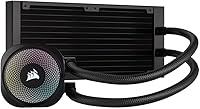
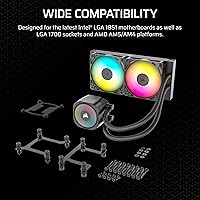
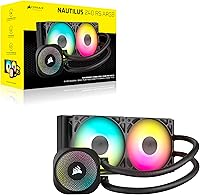
The Corsair Nautilus 240 AIO Liquid CPU Cooler arrived in late 2024 as a straightforward option for builders who want reliable liquid cooling without juggling proprietary software or extra hardware. It shot to the top of its category quickly, and that momentum makes sense once you see what it gets right. Unlike older Corsair AIOs that demanded an iCUE hub for fan management, the Nautilus 240 connects directly into your motherboard, keeping the whole setup clean. It covers current Intel LGA 1851 and AMD AM5 platforms, plus their predecessors. Think of it as a mid-range cooler done well — capable and practical, not a flagship.

Features & Benefits

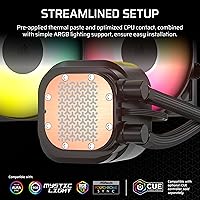
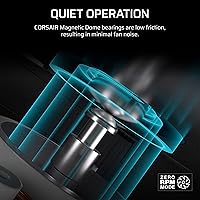
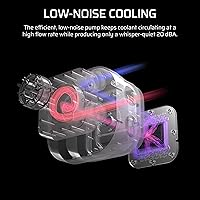
Two things stand out immediately. First, the daisy-chain fan wiring — both RS120 ARGB fans connect through a single 4-pin PWM header and one ARGB header, which keeps cable runs surprisingly tidy. Second, the cold plate has a slight convex curve with pre-applied thermal paste in an optimized pattern, so you spend less time prepping and more time booting. The fans use Magnetic Dome bearings, which tend to last longer and run quieter than standard sleeve bearings. AirGuide vanes on the fan frame direct airflow more precisely at the radiator fins. The pump runs at just 20 dBA — genuinely quiet. That 36 dB spec on the box reflects fans under full load, not everyday use.

Best For

If you're building around an Intel Core Ultra 200 series, an older LGA 1700 chip, or any current AMD Ryzen 7000 CPU and want a tidy build, this 240mm AIO is worth a close look. It's also a natural fit if you're upgrading from air cooling for the first time — setup is about as uncomplicated as AIO cooling gets, with no extra software to install. Tight on case space? A 360mm radiator often just doesn't fit in a mid-tower, and this Corsair cooler bridges that gap comfortably. If you're chasing extreme overclocks, a larger AIO or custom loop makes more sense. For clean, capable everyday cooling, it earns its place.

User Feedback

With over 3,000 ratings and a 4.6-star average, the overall reaction is hard to argue with. Buyers consistently call out easy installation and noticeably lower CPU temperatures compared to whatever air cooler they replaced. The ARGB lighting also gets positive mentions — it holds up well against competitors in this price range. That said, not every experience is flawless. In tighter cases, some users find the pump head's rotation range limited, which can make routing the tubes awkward. A smaller number of reviews raise questions about long-term pump durability, though this appears to be a minority concern rather than a pattern. For most builders, it performs exactly as hoped.

Pros

  • Direct motherboard connection replaces the old iCUE hub requirement, keeping installation cleaner and the parts list shorter.
  • The Corsair Nautilus 240 AIO Liquid CPU Cooler ships with thermal paste pre-applied in an optimized pattern, saving real setup time.
  • Daisy-chaining both ARGB fans through a single PWM and one ARGB header dramatically cuts down on cable clutter.
  • Pump noise sits at a near-inaudible 20 dBA, making the Nautilus 240 genuinely quiet during everyday use.
  • RS120 fans with Magnetic Dome bearings are built to last longer and run quieter than standard sleeve-bearing alternatives.
  • Broad socket support covers Intel LGA 1851, LGA 1700 and AMD AM5, AM4 — no adapter hunting required.
  • A 4.6-star average across more than 3,000 buyers signals consistent, reliable performance across a wide variety of builds.
  • The convex cold plate improves surface contact with modern CPU heat spreaders, which often have a slight curve themselves.
  • No proprietary software is needed for basic operation — ARGB syncs natively with your motherboard's own lighting controls.
  • At this price tier, the ARGB lighting quality holds up well against similarly priced competing coolers.

Cons

  • The pump head's rotation range is limited, which can make tube routing genuinely awkward inside compact or tight cases.
  • A minority of long-term users have raised concerns about pump durability — worth acknowledging honestly, even if not a widespread trend.
  • A 240mm radiator has real thermal limits; sustained heavy all-core workloads on high-TDP CPUs can push it to its ceiling.
  • No iCUE software integration means users wanting centralized Corsair lighting control across multiple devices will need a workaround.
  • The included fans reach 36 dB at full speed, which is audible in cases without solid sound dampening.
  • Case compatibility is not guaranteed just because the radiator is a standard 240mm size — always verify clearances before buying.
  • The daisy-chain wiring supports only the two included fans, with no official path to expanding that chain further.
  • There is no LCD screen or display element on the pump head for builders who prioritize a visually premium aesthetic.

Ratings

Our AI-generated scores for the Corsair Nautilus 240 AIO Liquid CPU Cooler were produced by analyzing thousands of verified global user reviews, with algorithmic filters applied to remove incentivized, duplicate, and bot-generated submissions. The ratings below reflect both the genuine strengths driving the strong buyer consensus and the honest pain points that keep certain categories from scoring higher. Every category is scored transparently so you can weigh what matters most for your specific build.

Thermal Performance
83%
For a 240mm AIO at this price point, the Nautilus 240 delivers genuinely capable cooling on mainstream Intel and AMD CPUs. Users running Core Ultra 200 and Ryzen 7000 chips consistently report meaningful temperature drops compared to their previous air coolers, especially during sustained gaming sessions or extended rendering workloads.
Where it falls short is with high-TDP processors under heavy, sustained all-core loads — builders running aggressively overclocked chips or CPU-intensive workstation tasks will find the 240mm radiator surface starts to plateau faster than a 360mm alternative. It cools competently, but there is a ceiling that enthusiast users will eventually hit.
Noise Level
91%
The pump's 20 dBA operation is genuinely hard to detect even in a quiet room, and the RS120 fans stay whisper-quiet under typical gaming or productivity loads. Builders who keep their systems near a desk or in a home office particularly appreciate not battling cooler noise during late-night sessions or video calls.
At full fan speed the 36 dB ceiling is audible, and some buyers feel misled expecting near-silence at all times based on the pump spec alone. That 36 dB figure reflects fans running at their absolute maximum — but if your system frequently pushes them hard under heavy all-core loads, you will notice the difference.
Installation Ease
93%
The pre-applied thermal paste, direct motherboard connection, and daisy-chain fan wiring combine to make this one of the more straightforward AIO installs available at this price tier. First-time liquid cooling adopters consistently rate the setup process highly, with most reporting a complete installation in under 30 minutes without consulting a manual.
The main friction point reported by users comes during tube routing in tighter cases — the pump head's limited rotational range can force awkward tube bends that complicate installation in compact mid-tower builds with less clearance. It is a minor issue in a roomy full-tower but worth verifying before buying for a tight build.
Build Quality
78%
22%
The radiator feels solid and the fan frames are sturdy without flex under handling. The metal construction of the core components gives a reassuring feel during installation, and the overall fit and finish is appropriate for a mid-range product — nothing feels cheap or insubstantial straight out of the box.
The plastic elements on the pump head are noticeably less premium-feeling than what you find on higher-end AIOs from the same brand. A small but consistent thread of long-term user reviews flags concerns about pump mechanism durability over time, which prevents this cooler from scoring in the outstanding range for build quality.
Value for Money
88%
Sitting in the mid-range price bracket, the Nautilus 240 delivers a feature set — daisy-chain wiring, pre-applied paste, Magnetic Dome fan bearings, and hub-free operation — that would have cost noticeably more in previous product generations. Buyers repeatedly describe it as one of the better-value 240mm AIOs currently on the market, and its top-seller ranking backs that perception up.
Users stretching toward a 360mm AIO or a premium tower air cooler note that the gap in outright thermal performance per dollar can narrow at certain price points. For pure cooling output relative to spend, the very best budget tower air coolers still present legitimate competition, particularly if aesthetics and noise are secondary priorities.
Cable Management
89%
The daisy-chain fan design is a genuine quality-of-life improvement that experienced builders notice immediately. Running both RS120 fans off a single PWM header and a single ARGB header means two fewer cable runs compared to standard setups, resulting in a visibly cleaner interior that makes tidy, photo-ready builds much easier to achieve.
While the fan daisy-chain reduces header usage nicely, the pump head cable and radiator tubes still require thoughtful routing, particularly if your case has a front-mounted radiator position with limited slack. Users in tighter builds report that managing tube length and pump cable together can partially offset the cable-tidying benefit the daisy-chain provides.
ARGB Lighting
82%
18%
The RS120 ARGB fans produce clean, even lighting that holds its own against competing AIOs at a similar price point. Users running motherboards with native ARGB sync report that colors render consistently and the lighting integrates naturally into existing RGB setups without noticeable mismatch or flickering under sustained operation.
The pump head itself carries no lighting element, limiting visual impact to the two fan rings rather than the illuminated head display found on more premium AIOs. Users who want a full-system Corsair lighting profile via iCUE will also be disappointed, since this cooler operates entirely outside that software ecosystem.
Software-Free Operation
94%
Being able to install and run a complete AIO cooling solution without touching any third-party software is a major advantage for many builders, especially those running lightweight Windows installs or Linux systems. The direct motherboard connection model means ARGB control, fan curve management, and pump monitoring all work through tools the builder already has.
The absence of iCUE integration is a genuine trade-off for Corsair loyalists who have built synchronized RGB setups around that platform, since this cooler cannot participate in those lighting scenes at all. Buyers who purchased expecting iCUE compatibility without reading the product details carefully will find themselves caught off guard by the omission.
Fan Performance
84%
The RS120 fans move air effectively through the radiator fins, and the Magnetic Dome bearings contribute to a quieter, more consistent spin over time compared to cheaper sleeve-bearing designs. AirGuide vanes on the fan frame reduce tip turbulence and keep airflow focused efficiently at mid-range speeds where most users actually run them.
At maximum RPM the fans are audible enough to be distracting in an otherwise quiet setup, and there is no standout airflow advantage over competing fan sets bundled with similarly priced AIOs. Builders wanting to swap in higher-performance aftermarket fans will also lose the proprietary daisy-chain wiring benefit that makes the cable setup distinctive.
Cold Plate Design
87%
The slight convex curvature on the cold plate is a thoughtful engineering detail — modern CPUs often carry a marginally bowed IHS, and a matching convex surface improves physical contact across the full area. Paired with pre-applied paste in an optimized spread pattern, most users report solid thermal transfer results from the very first boot.
Thermal enthusiasts who prefer applying their own high-end compound will need to clean off the factory paste first, adding an unnecessary extra step for anyone with a preferred thermal interface material already on hand. There are also no visual indicators of paste coverage quality before mounting, which can leave first-timers uncertain about whether full contact was achieved.
Socket Compatibility
91%
Covering Intel LGA 1851 and LGA 1700 alongside AMD AM5 and AM4 means this 240mm AIO is relevant across virtually every modern mainstream desktop build currently being assembled. The all-included mounting hardware approach avoids the frustration of hunting for separate bracket kits, a recurring pain point with AIOs from competing brands.
The cooler does not support older Intel LGA 1200 or AMD AM3 platforms, which matters to anyone reusing parts from a previous-generation build. There is also no compatibility with HEDT sockets like Intel LGA 2066 or AMD TR4, ruling it out entirely for workstation and prosumer configurations on those platforms.
Pump Reliability
67%
33%
For the large majority of buyers — reflected in the 4.6-star aggregate — the pump operates without audible issues or functional problems throughout the ownership period. Many builders running this Corsair cooler in continuous gaming rigs report no pump noise increase or performance degradation after extended months of daily use.
A recurring minority thread in long-term reviews raises questions about pump durability past the one-year mark, with some users reporting increased whine or outright failure. While not a statistically dominant pattern, it is consistent enough to acknowledge honestly and is the single biggest factor preventing a higher score in this category.
Case Compatibility
76%
24%
The 240mm radiator dimensions are standard enough to mount in the vast majority of modern mid-tower and full-tower enclosures without modification or adapter hardware. Most builds with top or front mounting positions accommodate this cooler cleanly, and the 2.87-pound assembly weight puts minimal stress on case mounting brackets.
The limited rotational range of the pump head is the primary case compatibility pain point, creating real tube routing challenges in compact ITX or mATX builds where flexibility is constrained. Buyers with side-mounted radiator positions or unconventional internal layouts should plan the installation carefully, as repositioning the pump head mid-build is not straightforward.
Aesthetic Design
85%
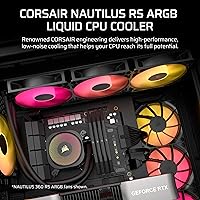
The uniform black finish across the radiator, fan frames, and pump head creates a clean, understated look that integrates naturally into both minimalist and RGB-heavy builds alike. Builders chasing a blacked-out or dark-theme interior consistently highlight the Nautilus 240 as one of the sharper-looking options available at this price tier.
The pump head lacks the illuminated display or mirrored finish found on more premium AIOs, giving it a plain appearance that some buyers find underwhelming in person. Only a black colorway is currently available, leaving builders working with a white-themed or custom-color build with no matching option to select.

Suitable for:

The Corsair Nautilus 240 AIO Liquid CPU Cooler is a strong match for builders who want a meaningful thermal upgrade over air cooling without the complexity of hub-dependent ecosystems or premium-tier pricing. If you're running a current Intel Core Ultra, an LGA 1700-era chip, or any AMD Ryzen 7000 or AM4 processor and want your build to look clean, this 240mm AIO delivers on both performance and aesthetics without demanding extra software. It's particularly well-suited to first-time AIO buyers — installation is straightforward, thermal paste comes pre-applied, and ARGB lighting is handled directly through your motherboard header. Mid-tower and small-tower builders who physically cannot fit a 360mm radiator will also find the Nautilus 240 covers that middle ground comfortably. Gamers, casual overclockers, and content creators running mainstream CPUs will get reliable, quiet cooling day-to-day without paying for capability they simply don't need.

Not suitable for:

If you're pushing a high-TDP processor hard with aggressive all-core overclocking, the Corsair Nautilus 240 AIO Liquid CPU Cooler is probably not the right choice — a 240mm radiator has meaningfully less thermal headroom than a 360mm unit or a custom loop when sustained loads climb. Enthusiasts chasing maximum performance margins on flagship CPUs will likely hit the thermal ceiling under extended heavy workloads. Builders with cramped cases should also be aware that the pump head has a limited rotation range, which some users have found makes tube routing genuinely awkward when clearance is tight. Anyone deeply invested in Corsair's iCUE software ecosystem for unified device lighting may find the native-only ARGB approach limiting if centralized cross-device control is important to them. And if absolute long-term reliability is non-negotiable — say, for a workstation running around the clock — the minority reports around pump longevity are worth weighing carefully before committing.

Specifications

  • Radiator Size: The radiator is a standard 240mm form factor, compatible with the vast majority of mid-tower and full-tower PC cases.
  • Radiator Dimensions: Physical radiator measurements are 10.87 x 4.72 x 1.06 inches, consistent with standard dual-fan 240mm mounting points.
  • Total Weight: The complete cooler assembly weighs 2.87 pounds, typical for a 240mm AIO inclusive of two fans and a pump head.
  • Pump Noise: The pump operates at 20 dBA, a level most users would consider inaudible in a normally ventilated room.
  • Fan Noise: The two included RS120 ARGB fans produce up to 36 dB at maximum speed, though typical everyday use sits well below this ceiling.
  • Included Fans: Two RS120 ARGB fans are included, each equipped with Magnetic Dome bearings and Corsair AirGuide vanes for directed, efficient airflow.
  • Fan Connector: Fan speed is controlled through a single 4-pin PWM header, with both fans linked via a daisy-chain arrangement.
  • ARGB Connector: Lighting is managed through a standard +5V 3-pin ARGB header, compatible with major motherboard RGB control ecosystems.
  • Power Draw: The cooler draws 15 watts at 12 volts, placing a modest and unproblematic load on any modern PC power supply.
  • Cold Plate: The cold plate has a slight convex profile with thermal paste pre-applied in an optimized pattern, improving IHS contact and simplifying installation.
  • Socket Support: Supported sockets include Intel LGA 1851 and LGA 1700, as well as AMD AM5 and AM4, covering all current mainstream platforms.
  • Materials: The radiator and pump housing are built from a combination of metal and plastic, balancing weight, durability, and cost at this tier.
  • Bearing Type: Both included fans use Magnetic Dome bearings, engineered for a longer operational lifespan and lower vibration-induced noise compared to sleeve bearings.
  • Wiring System: The daisy-chain fan design lets both RS120 units share a single PWM header and a single ARGB header rather than requiring separate connections.
  • Cooling Method: Cooling is delivered through a sealed, closed-loop liquid system comprising a pump, radiator, flexible tubes, and a direct-contact cold plate.
  • Color: The cooler ships in black, covering the radiator frame, pump head housing, and both fan frames for a uniform appearance.
  • Model Number: The official model identifier is CW-9060092-WW, used for warranty registration, support queries, and parts verification.

Related Reviews
Cooler Master 240 Elite Liquid CPU Cooler
81%
78%
Thermal Performance
82%
Noise Level
91%
Ease of Installation
76%
Build Quality
88%
RGB & Aesthetics
More
NZXT Kraken 240 AIO CPU Liquid Cooler
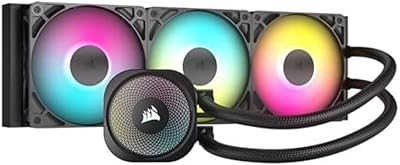
81%
78%
Thermal Performance
81%
Noise Level
83%
LCD Display
52%
Software Experience
91%
Installation Ease
More
Corsair Nautilus 360 RS ARGB 360mm AIO
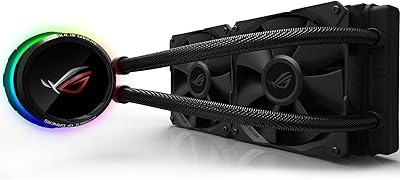
88%
88%
Thermal Performance
91%
Noise Level
93%
Installation Experience
92%
Cable Management
87%
Pump Quality & Reliability
More
Asus ROG RYUO 240 RGB AIO Liquid CPU Cooler
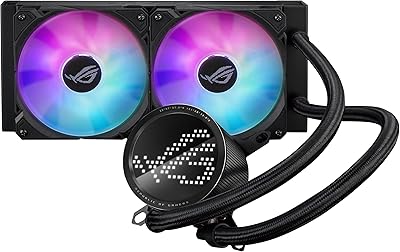
84%
94%
Cooling Performance
88%
Noise Levels
73%
Ease of Installation
90%
RGB Lighting and Visual Appeal
85%
Build Quality and Durability
More
ASUS ROG RYUO III 240 ARGB AIO Liquid CPU Cooler
88%
94%
Cooling Performance
88%
Noise Level
91%
Aesthetic Appeal
75%
Ease of Installation
92%
RGB Customization
More
Cooler Master MasterLiquid Atmos 240 Liquid Cooler
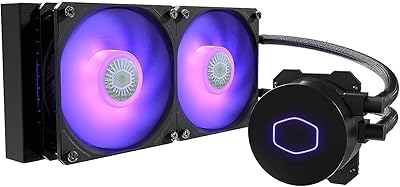
82%
76%
Thermal Performance
88%
Noise Level
82%
Build Quality
84%
Pump Performance
91%
RGB & Lighting
More
Cooler Master MasterLiquid ML240L V2 AIO Cooler
77%
78%
Thermal Performance
91%
Installation Experience
63%
Pump Noise & Vibration
82%
Fan Performance
88%
ARGB Lighting
More
AUSDOM S360 360mm AIO Liquid CPU Cooler
78%
83%
Thermal Performance
81%
Noise Level
76%
Build Quality
88%
Installation Experience
79%
RGB & Lighting Quality
More
upHere P360K 360mm AIO Liquid CPU Cooler
77%
78%
Thermal Performance
67%
Noise Level
71%
Build Quality
88%
Installation Experience
86%
Compatibility
More
SAMA Q70 360mm AIO Liquid CPU Cooler
80%
83%
Cooling Performance
88%
LCD Display Quality
61%
Display Software & Setup
79%
Fan Noise Level
72%
Pump Noise & Reliability
More

FAQ

No, and that is one of the things that sets the Nautilus 240 apart from older Corsair AIOs. The pump and fans connect directly to your motherboard headers, so everything works out of the box without any additional software. ARGB lighting is controlled through your motherboard's own utility, whether that is ASUS Aura Sync, MSI Mystic Light, Gigabyte RGB Fusion, or similar.

It covers Intel LGA 1851 and LGA 1700, plus AMD AM5 and AM4, so it works with current-generation platforms from both manufacturers as well as the most popular recent previous-gen chips. All necessary mounting hardware for these sockets is included in the box.

In practice, it is very quiet. The pump runs at just 20 dBA, which is barely perceptible even in a silent room. The fans can reach 36 dB at their absolute maximum speed, but under typical gaming or desktop workloads they operate well below that threshold. Most buyers describe the overall noise profile as one of the quieter AIOs they have used.

Thermal paste is pre-applied to the cold plate in an optimized pattern before it leaves the factory, so there is nothing extra to buy or prepare. Just mount the cooler and you are ready to go — no spreading or applying required.

Yes. The fans use a standard +5V 3-pin ARGB connector, which is compatible with RGB headers on motherboards from ASUS, MSI, Gigabyte, ASRock, and most other major brands. You manage the lighting through your motherboard's own software rather than through Corsair's ecosystem.

You need a case with a 240mm radiator mounting position, which is extremely common on mid-tower and full-tower enclosures. The radiator measures 10.87 x 4.72 x 1.06 inches, so cross-reference those figures against your case's specifications before buying. Front, top, and side panel mounting are all possible depending on your case layout.

The pump head does offer some rotational adjustment, but several users have noted the range is more limited than on certain competing coolers. In a standard mid-tower with a front or top radiator mount, most builders do not hit any issues. If you are working inside a compact ITX case or have an unusual layout, it is worth planning your tube routing before finalizing the purchase.

Both RS120 ARGB fans link together in a chain, then the whole setup runs to your motherboard using just one 4-pin PWM header for speed control and one +5V ARGB header for lighting. Compared to wiring each fan to its own header independently, you end up with two fewer cable runs, which makes a noticeable difference to interior cable management.

For most mid-range CPUs, the Corsair Nautilus 240 AIO Liquid CPU Cooler will outperform a comparably priced air cooler, particularly under sustained loads where air coolers tend to plateau as heat soaks into the heatsink. The main advantages are lower acoustics at similar thermal output and a cleaner visual result inside the case. That said, a premium dual-tower air cooler can sometimes match a 240mm AIO in raw cooling, so if simplicity and zero liquid risk are your priorities, air cooling remains a fully legitimate option.

Like any closed-loop liquid cooler, there is a small inherent risk of pump wear over a long service period. A minority of reviews for this Corsair cooler have raised questions about pump longevity, though it does not appear to be a systematic or widespread problem. If you are building a workstation running around the clock for many years, it is worth factoring in that all AIOs have a finite service life — most quality units are typically rated for five to seven years of normal use.

Where to Buy