Overview

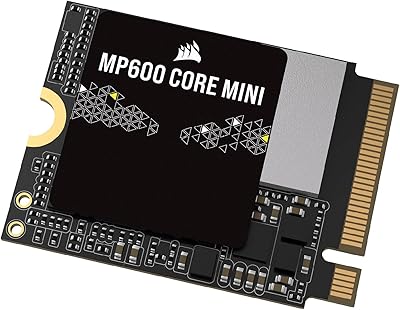
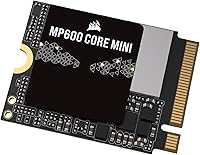
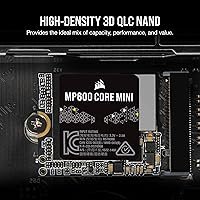
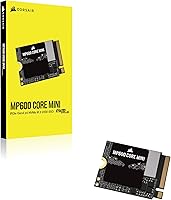
The Corsair MP600 CORE MINI 2TB NVMe SSD is built for a specific and underserved need: high-performance storage in devices that physically cannot fit a standard M.2 2280 drive. The M.2 2230 form factor — roughly half the length of the common 2280 — is what makes this drive relevant to handheld gaming PCs and ultra-thin laptops rather than traditional desktop builds. Corsair has a solid track record in storage, and the MP600 CORE MINI sits firmly in their performance-oriented lineup. One honest caveat worth flagging upfront: this 2230 NVMe upgrade uses 3D QLC NAND, which delivers excellent capacity at this size but can throttle under prolonged heavy writes compared to TLC-based alternatives.

Features & Benefits

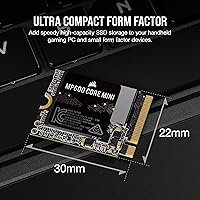
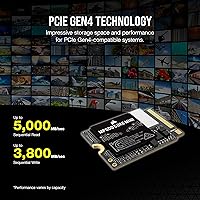
At the heart of what makes this compact 2TB drive stand out is its PCIe Gen4 x4 interface, which pushes sequential reads up to 5,000MB/s — fast enough that loading a large open-world game feels noticeably snappier than on a typical Gen3 drive. Writes top out at 3,800MB/s under ideal conditions. Because it is also backward compatible with Gen3 slots, you are not locked into Gen4 hardware to use it. The physical size is genuinely impressive: at under 0.1 oz and roughly the footprint of a large postage stamp, it installs cleanly into tight chassis without needing a heatsink or clearance modifications.

Best For

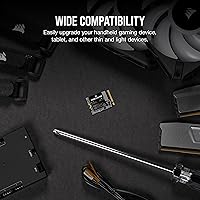
The MP600 CORE MINI is almost purpose-built for Steam Deck upgrades, where the 2230 slot is the only option and 2TB of storage means carrying your full library without microSD juggling. ASUS ROG Ally users will find the same benefit: more local storage without any compromise on physical fit. Microsoft Surface Pro owners replacing a cramped OEM drive also have a compelling use case here. Beyond handheld gaming, anyone building in a compact chassis that only supports 2230 slots — think certain NUC-style or mini-ITX boards — will appreciate having a high-capacity Gen4 option in this size class.

User Feedback

With a 4.7-out-of-5 rating across close to 1,000 reviews, the reception for this 2230 NVMe upgrade has been strongly positive. Buyers frequently highlight how painless the installation is, and many report real-world improvements — faster boot times, quicker game launches — particularly on the Steam Deck, where cloning from the original drive reportedly goes smoothly with standard tools. The more critical feedback centers on QLC endurance concerns and occasional write speed dips during large sustained transfers, a known characteristic of QLC NAND regardless of drive size. A handful of users on fanless devices also noted thermal throttling under heavy load, so intensive workloads are worth considering before purchasing.

Pros

  • At 2TB in an M.2 2230 footprint, storage capacity this large is genuinely rare in this form factor.
  • Gen4 PCIe x4 speeds make a noticeable real-world difference in game load times on the Steam Deck.
  • Backward compatibility with Gen3 slots adds flexibility for older or budget host devices.
  • Installation is straightforward — no heatsink, no adapter, no clearance headaches.
  • Near-1,000 reviews averaging 4.7 out of 5 reflects consistently positive real-world outcomes.
  • Cloning from an original Steam Deck or Surface Pro drive is widely reported as smooth and reliable.
  • At under 0.1 oz, this 2230 NVMe upgrade adds effectively zero weight to portable devices.
  • Corsair’s brand backing provides reasonable confidence in quality control and warranty support.

Cons

  • QLC NAND can throttle significantly during sustained large writes, which TLC-based drives handle better.
  • Per-gigabyte cost is higher than 2280 drives of comparable spec — the 2230 premium is real.
  • No included heatsink or thermal pad, which may matter in certain compact or thermally constrained builds.
  • Some users in fanless devices have reported thermal throttling under prolonged heavy workloads.
  • QLC NAND carries lower write endurance ratings over its lifespan compared to TLC alternatives.
  • The MP600 CORE MINI offers no hardware encryption support, which may matter for business or Surface Pro users.
  • No bundled cloning software is included, so migration requires sourcing a third-party tool independently.

Ratings

The Corsair MP600 CORE MINI 2TB NVMe SSD earned its scores through AI-driven analysis of verified global buyer reviews, with spam, bot activity, and incentivized feedback actively filtered out before scoring. Ratings reflect the honest consensus of real owners across handheld gaming, ultra-thin laptop upgrades, and compact PC builds — strengths and frustrations weighted equally. Every category below captures what buyers genuinely praised or pushed back on, with no score inflated to protect a brand reputation.

Read Performance
91%
Owners consistently report faster game load times and snappier OS boot sequences compared to the stock drives in Steam Deck and ROG Ally units. The Gen4 interface delivers real, felt improvements during day-to-day handheld gaming sessions, not just in benchmark tools.
A small group of users noted that on Gen3-only devices, the speed advantage over cheaper alternatives narrows considerably, making the premium feel less justified in those specific configurations.
Write Performance
74%
26%
For typical gaming workloads — installing titles, saving game states, moving moderate-sized files — write speeds are more than adequate and rarely become a bottleneck in real handheld use.
QLC NAND’s write cache exhaustion is a documented limitation here: users transferring large game libraries or doing bulk file moves in one session have reported noticeable speed drops once the cache fills, which TLC-based competitors handle more gracefully.
Form Factor Fit
97%
The 2230 footprint is a precise match for Steam Deck, ROG Ally, and Surface Pro internals, and buyers repeatedly emphasize how cleanly it seats without requiring any adapter or bracket modification. It simply fits where almost nothing else at this capacity does.
The narrow compatibility is, by design, also its constraint — if your device uses a 2280 slot, this drive offers no meaningful advantage and requires an aftermarket bracket to even secure properly.
Installation Ease
89%
The physical swap is widely described as beginner-friendly, even by first-time upgraders on the Steam Deck. The drive requires no tools beyond a small screwdriver, and community guides make the process well-documented and repeatable.
A portion of buyers flagged that Corsair includes no migration software or installation guide in the box, meaning users unfamiliar with cloning tools need to source and learn third-party software independently before attempting the swap.
Thermal Behavior
68%
32%
Under typical gaming loads and general use, the drive runs within acceptable temperature ranges without throttling, and the vast majority of owners report no heat-related issues during normal handheld play sessions.
In fanless or passively cooled enclosures running sustained heavy workloads, a recurring minority of reviewers reported thermal throttling, which can temporarily reduce performance without any warning to the user.
Storage Capacity
94%
Two terabytes in an M.2 2230 stick is genuinely remarkable, and Steam Deck owners in particular describe the upgrade as liberating — no more microSD juggling or deleting titles to make room for new ones.
The high-density QLC approach that makes 2TB possible in this size comes with the endurance trade-offs noted elsewhere; buyers expecting TLC-level longevity at this capacity will need to temper expectations slightly.
Value for Money
78%
22%
Within the narrow 2230 NVMe market, this compact 2TB drive is competitively priced, and buyers frequently cite the capacity-to-size ratio as justification for the cost over smaller alternatives.
Compared to 2280 drives of similar spec, the per-gigabyte cost is noticeably higher — a premium that is only worthwhile if you actually need the 2230 format, which frustrates buyers who did not check compatibility before purchasing.
Compatibility Range
86%
Gen3 backward compatibility means this 2230 NVMe upgrade is not locked to cutting-edge hardware, and it has been confirmed working across a broad range of handheld and compact devices beyond just the three officially listed.
Buyers occasionally discover mid-purchase that their specific Surface Pro generation or mini-PC variant requires firmware or BIOS acknowledgment of the new drive, adding an unexpected troubleshooting step for a small subset of users.
Build & Reliability
83%
Corsair’s manufacturing quality control is reflected in a low reported failure rate across the review base, and the drive feels solid and well-constructed for its minuscule size.
QLC NAND carries inherently lower write endurance than TLC or MLC alternatives, and while Corsair’s warranty provides a reasonable safety net, buyers doing heavy daily writes should factor in the longer-term endurance ceiling.
Migration & Cloning
81%
19%
Steam Deck and Surface Pro users broadly report successful drive cloning using free tools, with the process described as smooth when following community-vetted guides — original data and game libraries transfer intact.
The absence of any bundled cloning utility means the experience varies depending on the user’s comfort with third-party software, and a handful of reviewers encountered compatibility issues between cloning tools and specific device firmware.
Packaging & Unboxing
62%
38%
The drive arrives adequately protected and in compact, no-frills packaging that is appropriate for a bare internal component rather than a consumer retail product.
At this price tier, buyers noted that Corsair includes nothing beyond the drive itself — no screwdriver, no adapter bracket, no cloning license — which feels sparse compared to some competing brands that bundle at least a basic accessory.
Brand & Warranty Support
77%
23%
Corsair’s five-year warranty coverage and generally responsive support team give buyers reasonable peace of mind, particularly for an internal upgrade where installation voids the host device’s warranty anyway.
Some users reported slower-than-expected warranty resolution times, and the requirement to register the product to access full warranty benefits is an extra friction point that not all buyers notice at the point of purchase.

Suitable for:

The Corsair MP600 CORE MINI 2TB NVMe SSD was clearly designed with a focused audience in mind, and if you fall into that group, it is hard to argue against it. Steam Deck owners are the most obvious match — the 2230 slot leaves no other option for an internal upgrade, and jumping to 2TB means you can finally stop rationing storage or swapping microSD cards mid-session. ASUS ROG Ally users are in the same boat, and the drive slots in without any chassis modifications. Microsoft Surface Pro owners who feel boxed in by a small OEM drive will also find this a practical and well-performing internal upgrade. More broadly, anyone building or upgrading a compact system — think mini-PCs or small form factor boards — that only accommodates the shorter 2230 footprint will appreciate having a Gen4 option at this capacity.

Not suitable for:

If your device uses a standard M.2 2280 slot, skip the Corsair MP600 CORE MINI 2TB NVMe SSD entirely — there are faster, cheaper TLC-based options in that format that will serve you better. Anyone planning to use this drive for sustained heavy workloads — large video exports, continuous bulk file transfers, or intensive backup jobs — should be aware that QLC NAND can throttle meaningfully once it exhausts its write cache, which is a real limitation compared to TLC drives in a similar price range. If long-term endurance under constant write pressure is a priority, a TLC alternative is the smarter pick. Users in fanless or passively cooled devices should also check thermal headroom carefully, as some owners have reported throttling under sustained loads in tight, heatless enclosures.

Specifications

  • Form Factor: Uses the M.2 2230 format, measuring 0.87 x 1.18 x 0.12 inches — roughly half the length of a standard 2280 drive.
  • Capacity: Offers 2TB of usable flash storage, making it one of the highest-capacity options available in the 2230 form factor.
  • Interface: Connects via PCIe Gen4 x4 using the NVMe 1.4 protocol, delivering maximum bandwidth on compatible host platforms.
  • Sequential Read: Rated for sequential read speeds of up to 5,000MB/s under optimal, manufacturer-tested conditions.
  • Sequential Write: Rated for sequential write speeds of up to 3,800MB/s, with real-world sustained performance dependent on workload and cache state.
  • NAND Type: Built on high-density 3D QLC NAND flash, which prioritizes storage capacity per physical chip over write endurance.
  • Backward Compat.: Fully backward compatible with PCIe Gen3 x4 slots, though peak speeds will be limited by the host interface in that configuration.
  • Weight: Weighs just 0.099 oz, making it effectively weightless in the context of portable devices like handheld gaming PCs.
  • Color: Available in black with no exposed components or RGB lighting, keeping the aesthetic clean and unobtrusive.
  • Model Number: Corsair’s official model identifier for this drive is CSSD-F2000GBMP600CMN, useful for warranty registration and cross-referencing compatibility lists.
  • Compatible Devices: Officially compatible with Valve Steam Deck, ASUS ROG Ally, and Microsoft Surface Pro, as well as any device that accepts M.2 2230 NVMe drives.
  • Installation Type: Designed as an internal drive replacement, requiring physical installation into the host device’s M.2 2230 slot.
  • Heatsink: No heatsink is included or required; the drive is designed to operate within the thermal constraints of compact and fanless enclosures.
  • Brand & Series: Manufactured by Corsair under the MP600 CORE MINI series, which is positioned as their compact, high-performance 2230 storage line.
  • Market Rank: Holds a top-250 ranking in the Internal Solid State Drives category on Amazon, reflecting strong and consistent sales volume.

Related Reviews
Corsair MP600 PRO XT 2TB NVMe SSD
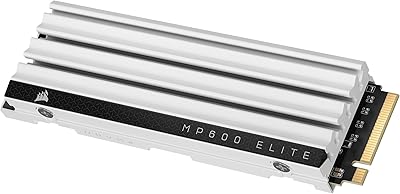
83%
94%
Sequential Read Speed
91%
Sustained Write Performance
93%
Thermal Management
88%
Build & Installation Quality
92%
Endurance & Longevity
More
Corsair MP600 Elite 2TB NVMe SSD
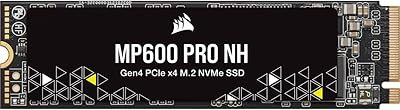
87%
93%
Sequential Read Performance
88%
Sequential Write Performance
96%
PS5 Compatibility & Integration
84%
Thermal Management & Heatsink
91%
Installation Experience
More
Corsair MP600 PRO NH 2TB PCIe Gen4 x4 NVMe M.2 SSD
88%
94%
Performance for Gaming
92%
Write Speed
94%
Read Speed
88%
Ease of Installation
89%
Compatibility with Desktops
More
Corsair MP600 CORE MINI 1TB
90%
96%
Sequential Read Speed
92%
Sequential Write Speed
89%
Random Read/Write Performance
95%
Form Factor Compatibility
91%
Installation Ease
More
Corsair MP600 MINI 1TB SSD
89%
95%
Performance
93%
Compatibility
92%
Speed (Read/Write)
88%
Build Quality
90%
Ease of Installation
More
Corsair MP600 Elite 1TB NVMe SSD
87%
94%
Performance
92%
Speed (Sequential Read/Write)
88%
Durability and Endurance
72%
Thermal Management
90%
Installation Ease
More
Corsair MP600 CORE XT 1TB SSD
86%
92%
Performance
90%
Speed (Read/Write)
88%
Value for Money
95%
Ease of Installation
91%
Compatibility
More
Corsair MP600 PRO LPX 2TB SSD
87%
96%
Performance
88%
Installation Ease
85%
Thermal Management
93%
PS5 Compatibility
91%
PC Compatibility
More
Corsair MP600 PRO NH 4TB NVMe SSD
88%
93%
Performance
91%
Speed
89%
Capacity for Heavy Workloads
85%
Build Quality
87%
Ease of Installation
More
Satechi ST-E2230M M.2 NVMe 2230 SSD Enclosure
82%
91%
Build Quality
88%
Transfer Speed
86%
Active Cooling Effectiveness
67%
Fan Noise Level
94%
Portability & Size
More

FAQ

Yes, it fits directly into the Steam Deck’s M.2 2230 slot without any adapters or modifications. You will need a small Phillips-head screwdriver to open the back panel, but the drive itself drops in just like the original. Most users report the whole swap taking under 15 minutes.

You have both options. Cloning is generally the easier route — tools like Clonezilla work well for this, and several community guides walk through the process step by step. If you prefer a clean start, Valve’s recovery image is freely available and straightforward to flash onto the new drive via a USB stick.

Yes, the MP600 CORE MINI fits the ROG Ally’s 2230 slot and the Ally does support PCIe Gen4, so you should get close to the drive’s rated speeds in practice. Just make sure you have a reliable backup of your Windows installation or a recovery image before you swap, since the process is a bit more involved than on the Steam Deck.

For most users, QLC NAND is not a practical concern. Day-to-day tasks like loading games, booting an OS, or transferring moderate-sized files will feel fast and responsive. Where QLC can fall behind TLC drives is during very large, sustained writes — think copying hundreds of gigabytes in one go — where speeds can drop once the write cache fills. If your primary use is gaming and general file storage, it’s unlikely to cause issues.

The Corsair MP600 CORE MINI 2TB NVMe SSD is compatible with Surface Pro models that use an M.2 2230 NVMe slot, which includes several recent generations. That said, Microsoft does not officially support user-serviceable storage upgrades on all Surface models, and accessing the internal slot typically requires careful disassembly. Check iFixit’s teardown guides for your specific Surface Pro generation before committing.

Technically, a 2230 drive can physically fit in a 2280 slot if you use an adapter bracket to support the shorter length — some motherboards include these. However, if your device natively supports 2280, you would get more performance per dollar from a 2280 drive. This compact 2TB drive is best suited to situations where 2230 is the only available format.

A minority of users have reported thermal throttling in tightly enclosed, passively cooled devices under sustained heavy workloads. For typical gaming sessions or general use, heat is not a reported problem. If you plan to run long, intensive tasks on a fanless device, it is worth monitoring temperatures with a tool like CrystalDiskInfo after installation.

Corsair covers this drive with a limited warranty — typically five years for this product line, though you should verify the current terms on Corsair’s official site at the time of purchase. Corsair’s customer support is generally regarded as responsive, and warranty claims can be initiated through their online portal using the model number CSSD-F2000GBMP600CMN.

It works in Gen3 devices without any issues — backward compatibility is built in. You just won’t reach the Gen4 peak speeds; the drive will operate within the bandwidth limits of the Gen3 interface instead. For handheld gaming and light productivity tasks, the difference is unlikely to be something you notice day to day.

No cloning software or accessories are included in the box. You will need to source a screwdriver appropriate for your device and choose a third-party cloning tool independently. Free options like Macrium Reflect or Clonezilla are widely used and well-documented for exactly this kind of drive migration, so the lack of bundled software is not a major hurdle.

Where to Buy