Overview

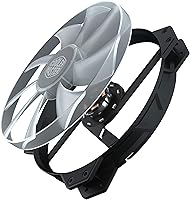
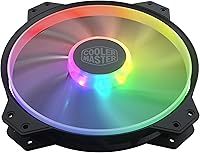
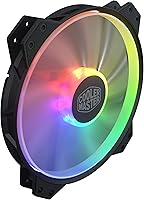
The Cooler Master MasterFan MF200R ARGB 200mm occupies a niche most builders overlook — the large-format case fan market, where moving serious air quietly is the actual priority. While 120mm and 140mm fans dominate most builds, 200mm fans spin at much lower RPMs to push comparable or greater airflow volume, which naturally keeps noise in check. Cooler Master built this fan around a hybrid blade design borrowing from both jet engine and helicopter rotor geometry, balancing static pressure with raw airflow rather than sacrificing one for the other. It targets the mid-range segment, competing against similar large-format options from other established cooling brands.

Features & Benefits

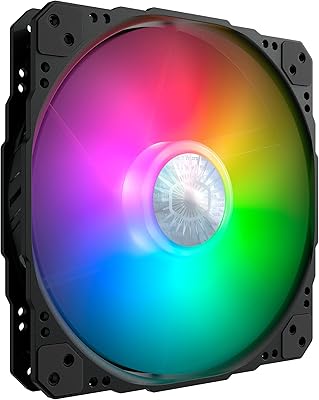
The MF200R ARGB's headline feature is its addressable RGB lighting, certified to work natively with Asus Aura Sync, ASRock Polychrome, and MSI Mystic Light — so if your motherboard supports any of those ecosystems, setup is straightforward. The hybrid blade pushes 90.3 CFM at a maximum of 950 RPM, and that low rotational ceiling is a big reason the fan barely registers at 28 dB under load. Rubber pads on each mounting corner absorb vibration before it transfers to the chassis, and a built-in sensor shuts the fan down if a cable snags the blade. Worth flagging: the 3-pin non-PWM connector means motherboard fan curve control is simply not available.

Best For

This large case fan is best suited for full-tower and large mid-tower builds that include a dedicated 200mm mount — check your case specs before ordering, because that compatibility step is non-negotiable. It works especially well as a front intake, where its high-volume, lower-pressure airflow pattern plays to its strengths. Builders prioritizing a quiet system over raw thermal throughput will feel right at home here, and ARGB users with Asus, ASRock, or MSI boards will get clean lighting integration out of the box. Where this fan falls short is anywhere demanding real static pressure — radiators, dense heatsinks, or restricted airflow paths are simply not its territory.

User Feedback

Across several hundred verified ratings, the MF200R ARGB holds a 4.5-star average, and the pattern in the reviews is fairly consistent. Buyers repeatedly highlight how quiet it runs — many describe it as practically inaudible under load, which is the fan's biggest real-world selling point. The ARGB output earns strong marks for color accuracy and smooth transitions when synced properly. On the downside, the non-PWM connector is the single most common complaint, frustrating users who want granular speed control through BIOS. A number of buyers also stress verifying case compatibility before purchase, and several suggest mounting this as an intake rather than exhaust for the best airflow results.

Pros

  • Runs at a near-inaudible 28 dB under sustained load — genuinely one of the quieter fans in its size class.
  • Moves 90.3 CFM of air at just 950 RPM, making it highly efficient for large open-airflow intake positions.
  • ARGB lighting is vibrant and visually impactful across the full 200mm blade surface.
  • Native sync with Asus Aura Sync, ASRock Polychrome, and MSI Mystic Light works reliably out of the box.
  • Rubber vibration-dampening corner pads eliminate chassis buzz even during long sessions.
  • Built-in cable snag sensor provides a layer of protection that most competing fans skip entirely.
  • Slim 0.98-inch profile fits tight mounts without blocking adjacent components or wiring.
  • Strong 4.5-star average across hundreds of verified global buyers reflects consistent real-world satisfaction.
  • Straightforward installation — light, simple 3-pin connection, and no software required to get it running.

Cons

  • No PWM support means zero fan curve control through BIOS, which limits tuning options for enthusiast builders.
  • Requires a dedicated ARGB controller for users outside the three officially supported motherboard ecosystems.
  • Two separate cables for power and lighting add cable management complexity in tighter builds.
  • 200mm format is a hard compatibility gating factor — a significant portion of popular cases simply do not support it.
  • Performs poorly in static pressure roles; do not expect good results on radiators or restrictive front panels.
  • Included mounting hardware is basic and can feel fiddly with non-standard or thicker case walls.
  • Fixed operating speed offers no whisper-quiet idle mode for users in very low-noise environments.
  • Works best as an intake; using it as an exhaust fan produces noticeably weaker results.

Ratings

The Cooler Master MasterFan MF200R ARGB 200mm earned its 4.5-star standing through consistent real-world performance across hundreds of verified buyer builds — and the scores below reflect that. Our AI rating engine analyzed confirmed global purchases, actively filtering out incentivized, duplicate, and bot-generated submissions, so what you see is grounded in genuine user experience. Both the strengths that make this large case fan a recurring recommendation and the friction points that give some buyers pause are reflected transparently here.
Noise Level
93%
This is where the MF200R ARGB genuinely impresses. Spinning at a ceiling of 950 RPM, it runs so quietly during sustained workloads that many users report forgetting the fan is running at all. Builders who work from home or game in quiet rooms specifically call out how much of a difference it made replacing a louder stock fan.
Because the fan runs at a fixed voltage without PWM control, there is no way to drop it below its baseline speed on a quiet night when even 28 dB feels noticeable. Users in very silent environments occasionally wish they had a lower floor to work with.
Airflow Performance
82%
18%
At 90.3 CFM from a fan barely under an inch thick, the volume of air this moves is genuinely strong for its size class. Users who installed it as a front intake on full-tower cases noticed measurable temperature improvements across their components under gaming loads.
This fan is built for volume, not pressure, and users who tried mounting it against a radiator or behind a mesh-dense front panel reported underwhelming results. It simply is not the right tool for restricted or high-resistance airflow paths.
ARGB Lighting Quality
89%
The addressable RGB output consistently draws praise for its color vibrancy and smooth transitions. Given the fan's large surface area, the lighting effect is visually impactful — especially when paired with a tempered glass side panel and a synced motherboard ecosystem.
Out-of-ecosystem users — those without Asus Aura, ASRock Polychrome, or MSI Mystic Light — will need a separate ARGB controller to get full customization, which adds cost and cable management complexity. A few buyers were caught off guard by this dependency.
Motherboard Compatibility
86%
Within the three supported ecosystems, setup is clean and reliable. Users running Asus or MSI boards reported instant recognition and full lighting control through their existing software without any driver conflicts or extra steps.
The 3-pin non-PWM power connector is the most polarizing spec on this fan. Buyers wanting to set fan curves through BIOS simply cannot do it here, and that limitation pushes some enthusiasts toward competing options that offer PWM control at similar price points.
Case Compatibility
71%
29%
For builds that support 200mm mounts natively — certain Fractal, Corsair, and NZXT cases among them — this fan drops in without hassle and immediately improves airflow character across the chassis. Users upgrading from stock fans in compatible cases are consistently satisfied.
The 200mm format is a hard compatibility gating factor, and it affects a meaningful portion of interested buyers. Several reviewers admitted they had to return the fan after overlooking their case specs, making compatibility verification a critical step that is easy to skip.
Build Quality
84%
The frame feels solid and the rubber vibration-dampening pads on each mounting corner do real work — chassis buzz is noticeably absent even after long hours of operation. The overall construction holds up well for a product in its price tier.
A handful of users reported minor cosmetic imperfections on the blade or frame straight out of the box, though functional issues were rare. It is not a premium-feeling product at close inspection, but it is built well enough to do its job reliably.
Vibration & Mounting
88%
The rubber corner pads absorb vibration at the source before it ever transfers to the case, and users consistently note the absence of any hum or rattle during operation. Installation itself is standard and uncomplicated.
The mounting hardware included in the box is basic, and users with non-standard fan mounts or thick case walls occasionally found it fiddly to secure tightly. Nothing deal-breaking, but a slightly more versatile screw kit would be welcome.
Value for Money
76%
24%
For builders who specifically need a quiet, large-format ARGB fan with native motherboard sync, the MF200R ARGB delivers on its core promises without requiring additional investment in a controller or adapter — which makes the price feel justified.
For users who discover after purchase that their case lacks a 200mm mount, or who wanted PWM control, the value equation falls apart quickly. The fan competes in a narrow niche, and buyers outside that niche are unlikely to feel they got a good deal.
Installation Experience
81%
19%
Setup is physically simple — the fan is light for its size at 9 ounces, the cable is a reasonable length, and connecting to a 3-pin header is as basic as it gets. Most users had it running within minutes of opening the box.
Routing the ARGB cable alongside the power cable can get tight depending on how a case's interior is laid out, particularly in mid-towers without dedicated cable management channels near the front panel mount.
Cable Management
67%
33%
The fan ships with a reasonably tidy cable length that handles most standard installations without excess slack bunching up behind the motherboard tray. Users with well-planned builds found it easy enough to route cleanly.
Having two separate cables — one for power, one for ARGB — means two headers and two routing paths to manage. In tight cases or builds already dense with wiring, this added just enough complexity to frustrate a few users.
Fan Speed Control
52%
48%
For users who simply want to plug in and forget, the fixed-speed 3-pin operation is frictionless — no software setup, no fan curve tuning required. It runs consistently at its operating point and does not fluctuate.
The absence of PWM support is a genuine limitation that comes up repeatedly in user feedback. You cannot slow this fan down through a motherboard header, which means no whisper-quiet mode at idle and no automated speed ramp under load.
Static Pressure
44%
56%
The hybrid blade design does produce some measurable static pressure relative to a pure high-volume fan, which helps it handle mildly restricted mounts better than a straight axial design would. A few users found it adequate behind a loosely filtered front panel.
This is not a static pressure fan and should not be evaluated as one. Users who tested it against radiators or on CPU coolers with dense fin stacks were disappointed, and the scores in specialized cooling benchmarks confirm it is built for open airflow scenarios only.
Lighting Sync Reliability
83%
Within supported motherboard ecosystems, sync behavior is stable and consistent across reboots and sleep cycles. Users running Asus Aura Sync in particular reported that the lighting remembered settings reliably without needing to be reconfigured.
A small number of users experienced sync dropouts or color mismatches when running the fan alongside ARGB strips or other peripherals on the same header. The issue appears intermittent and hardware-specific rather than a systematic flaw.
Thermal Impact
78%
22%
As a front intake fan in a well-ventilated case, this large case fan contributes meaningfully to overall chassis temperature. Users with GPU-intensive gaming rigs noted CPU and GPU thermals both improved after switching to it from a smaller stock fan.
Users expecting dramatic temperature drops were sometimes let down. The fan moves a lot of air efficiently, but without static pressure it cannot compensate for poor case airflow design or heavy dust filter restriction on its own.

Suitable for:

The Cooler Master MasterFan MF200R ARGB 200mm is a well-matched choice for PC builders working with large mid-tower or full-tower cases that include a dedicated 200mm fan mount — that case compatibility is the single most important box to check before buying. It particularly suits builders who have already grown tired of noisy stock fans and want a quieter intake solution without taking on a major cooling overhaul. ARGB enthusiasts running Asus, ASRock, or MSI motherboards will get clean, plug-and-play lighting integration that holds up across reboots and sleep cycles without fiddling with extra controllers. If you work or game in a quiet space and thermal noise is genuinely bothering you, this large case fan addresses that problem better than almost any same-sized competitor in its price range. It also makes practical sense for users upgrading cases that shipped with a mediocre 200mm fan from the factory, where swapping in the MF200R ARGB delivers an immediate and noticeable improvement in both acoustics and airflow volume.
Not suitable for:

The Cooler Master MasterFan MF200R ARGB 200mm will frustrate buyers who need granular speed control, because the 3-pin non-PWM connector means you cannot set fan curves through your motherboard BIOS — what you get is a fixed operating speed and nothing more. Builders working with compact or mainstream mid-tower cases that lack a 200mm mount will find this fan simply does not fit, and no amount of adapter creativity changes that fundamental constraint. If your build relies on a radiator or a heatsink with a dense fin stack, this is the wrong fan entirely — it is optimized for moving large volumes of air through open, unobstructed paths, not for pushing air through high-resistance cooling hardware. Users outside the three supported motherboard ecosystems who want full ARGB customization will need to budget for a separate controller, which adds cost and cable clutter. Finally, buyers hoping this fan will carry the thermal load of a high-wattage gaming rig on its own should recalibrate expectations — it works best as part of a balanced airflow strategy, not as a standalone solution.
Specifications

  • Fan Diameter: The fan measures 200mm across, making it one of the larger standard case fan sizes available for compatible full-tower and mid-tower builds.
  • Thickness: At 0.98 inches (25mm) deep, the fan maintains a slim profile that fits standard 200mm mounts without conflicting with nearby components.
  • Airflow: The hybrid blade design delivers a maximum airflow of 90.3 CFM, providing strong volume-based cooling suited for open intake positions.
  • Noise Level: Maximum operating noise is rated at 28 dB, placing this fan firmly in the near-silent category during typical sustained workloads.
  • Max Speed: The fan spins at a fixed maximum of 950 RPM, a deliberately low ceiling that keeps acoustic output minimal across all operating conditions.
  • Power Connector: Uses a standard 3-pin DC connector, which means fan speed is voltage-controlled and not adjustable via PWM motherboard headers.
  • Voltage: Designed to operate at 12V, consistent with standard desktop PC power delivery through a motherboard fan header or fan hub.
  • Wattage: Power draw is rated at 3.84W, which is low enough to run comfortably off a standard motherboard fan header without strain.
  • Lighting Type: Equipped with Addressable RGB (ARGB) LEDs that support individual color control per LED zone, enabling dynamic lighting patterns and effects.
  • Sync Compatibility: Certified compatible with Asus Aura Sync, ASRock Polychrome RGB, and MSI Mystic Light for native motherboard lighting synchronization.
  • Vibration Dampening: Rubber pads are integrated into each of the four mounting corners to absorb vibration before it transfers to the case chassis.
  • Blade Design: The blade geometry combines principles from jet engine fan and helicopter rotor designs to balance static air pressure with high-volume airflow output.
  • Cable Snag Sensor: A built-in smart sensor detects blade obstruction caused by snagged cables and can halt the fan to prevent damage.
  • Dimensions: Overall unit dimensions are 7.87″ L x 7.87″ W x 0.98″ H, consistent with standard 200mm fan mounting specifications.
  • Weight: The fan weighs 9 ounces, making it lightweight and easy to handle during installation even in cramped case interiors.
  • Model Number: The official item model number is R4-200R-08FA-R1, useful when cross-referencing warranty claims or sourcing replacement parts.
  • Series: Part of Cooler Master's MasterFan MF200R ARGB line, which is positioned as a mid-range large-format cooling solution within the brand's fan portfolio.
  • Compatible Devices: Designed exclusively for use in desktop PC cases and is not rated or recommended for use in laptops, servers, or non-standard enclosures.

Related Reviews
Cooler Master MasterFan SF240R ARGB 240mm Case Fan
83%
89%
Airflow Performance
78%
Noise Levels
92%
RGB Customization
85%
Build Quality
91%
Ease of Installation
More
Cooler Master GM34-CWQA 34” ARGB Curved Monitor
85%
93%
Performance
91%
Display Quality
89%
Gaming Experience
88%
Color Accuracy
84%
Build Quality
More
Cooler Master MasterBox MB320L ARGB Micro-ATX Case
82%
89%
Cooling Performance
87%
Build Quality
91%
Ease of Installation
85%
ARGB Lighting Customization
65%
Space for Larger GPUs
More
Cooler Master SickleFlow 200 ARGB Gen 2 Fan
86%
89%
Cooling Performance
86%
Noise Level
91%
ARGB Lighting Customization
87%
Build Quality
92%
Ease of Installation
More
Cooler Master Hyper 212 Black CPU Air Cooler
83%
89%
Cooling Performance
92%
Value for Money
85%
Noise Level
88%
Installation Ease
80%
Build Quality
More
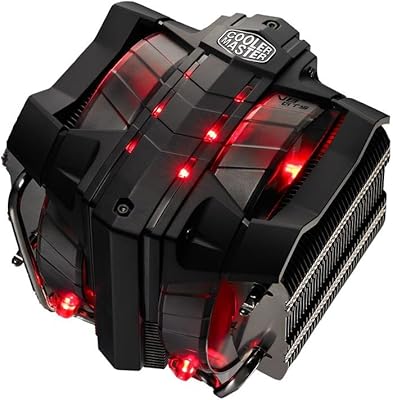
Cooler Master V8 GTS High Performance CPU Cooler
84%
90%
Cooling Performance
88%
Ease of Installation
65%
Fan Noise
92%
Build Quality
85%
Aesthetic Appeal (LED Lighting)
More
Cooler Master Hyper 212 Halo CPU Air Cooler
84%
88%
Cooling Performance
91%
Noise Level
85%
Ease of Installation
89%
Build Quality
80%
RGB Aesthetics
More
Cooler Master MasterLiquid 360L Core 360mm
82%
88%
Thermal Performance
74%
Pump Quality & Reliability
91%
Installation Experience
83%
Noise Level
86%
Value for Money
More
Cooler Master MasterLiquid Atmos 240 Black CPU Liquid Cooler
86%
91%
Cooling Performance
88%
Noise Levels
72%
RGB Lighting Customization
93%
Installation Ease
89%
Build Quality
More
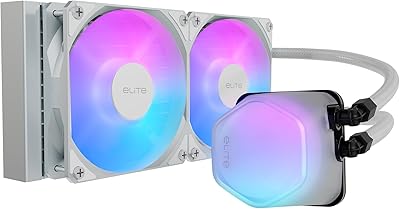
Cooler Master 240 Elite Liquid White CPU Liquid Cooler
85%
91%
Cooling Performance
84%
Noise Levels
92%
Ease of Installation
89%
Build Quality
88%
aRGB Lighting Effect
More

FAQ

Yes, the MF200R ARGB is officially certified for Asus Aura Sync, so if your board has a 3-pin ARGB header, it should recognize the fan and let you control the lighting directly through Armoury Crate. Just make sure you are connecting to the ARGB header, not the older 4-pin RGB header — those are not cross-compatible.

Unfortunately, no. This fan uses a 3-pin DC connector rather than a 4-pin PWM connector, which means the motherboard cannot send a PWM signal to vary the speed. It runs at a fixed voltage and will operate at or near its maximum speed whenever it has power. If fan curve control is important to your build, you will need to look at a PWM-capable alternative.

That is the most important question to answer before purchasing. You need a case with a dedicated 200mm fan mount — not all cases have one, even full-towers. Check your case manual or manufacturer spec page and look specifically for a 200mm mounting position, usually located at the front or top of the chassis. Do not assume based on case size alone.

Intake is strongly recommended. The fan's hybrid blade design is optimized for moving high volumes of air through unobstructed paths, which is exactly what a front intake position provides. Several users who tried it as a rear or top exhaust found the performance less satisfying, since those positions often involve more restriction or require directional precision that this fan is not built around.

Yes, basic mounting hardware is included in the box. That said, a few users with thicker case walls or non-standard mounts have found the included screws slightly short, so it is worth having a few spare M3 fan screws on hand just in case.

In practice, it is remarkably quiet. The 28 dB rating holds up well in real-world use, and many builders describe it as effectively inaudible once other system components — GPU fans, CPU coolers — are also running. It is genuinely one of the quieter large-format fans you can buy in this price range.

Yes, MSI Mystic Light is one of the three officially certified ecosystems for this fan, alongside Asus Aura Sync and ASRock Polychrome RGB. Connect the ARGB cable to your board's 3-pin ARGB header and MSI's Mystic Light software should detect and control it without any additional setup.

Technically you can mount it if the radiator dimensions match, but it is not recommended and you will likely be disappointed with the results. This fan excels at moving large volumes of air through open, low-resistance paths. Radiators require static pressure to push air through densely packed fins, and that is not what this blade geometry is optimized for. A dedicated static pressure fan will perform meaningfully better in that role.

The built-in smart sensor is designed to detect blade obstruction and stop the fan before serious damage occurs. It is a genuinely useful safety feature, especially in builds where cable management behind the front panel can get crowded. That said, it is still good practice to route cables carefully during installation rather than relying on the sensor as a safety net.

If you have a compatible Asus, ASRock, or MSI motherboard with a 3-pin ARGB header, no extra hardware or software beyond what you already use for your board is needed. If your motherboard does not support any of those three ecosystems, or lacks an ARGB header entirely, you will need a separate ARGB controller — which adds a small amount of cost and an extra cable to manage.