Overview

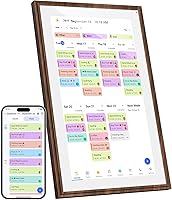
The Canupdog 15.6-Inch Smart Family Calendar Display is built for households that have finally had enough of the paper calendar tucked behind a magnet on the fridge. It mounts on a wall or sits on a desk, and the distressed wood frame gives it enough visual warmth that it actually looks at home in a kitchen rather than like a piece of office equipment. The all-in-one pitch — calendar, chore chart, meal planner, and photo frame — is ambitious, and at this price point buyers rightly expect all four to work well. Launched in mid-2025, it has already climbed to a top ranking in its category, which suggests real early traction.
Features & Benefits

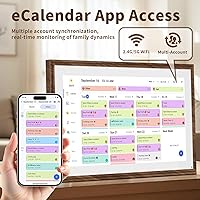
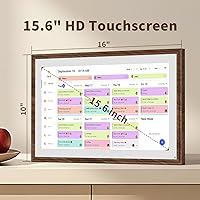
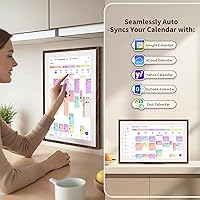
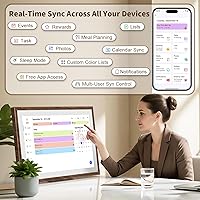
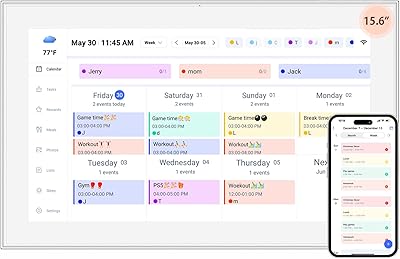
The 15.6-inch touchscreen is crisp at 1080p — big enough to read from across a kitchen without squinting. Syncing connects with Google Calendar, iCloud, Outlook, Cozi, and Yahoo, so most families won't need to change how they already manage schedules. Each family member gets a color-coded profile, which makes chore assignments and activity tracking quick to scan at a glance. The built-in meal planner is a small but practical addition — it removes that nightly guessing game about dinner. When the calendar sits idle, the display switches to a photo frame, pulling in images uploaded through the free companion app, so the screen never just goes dark and unused.

Best For

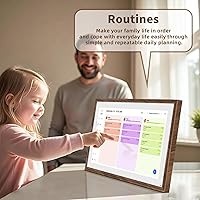
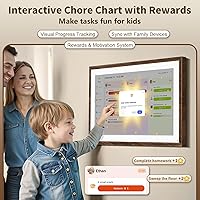
This digital family planner suits households with school-age kids the most — the visual chore chart gives children something concrete to check off, and parents can update assignments remotely through the app. It also works well for anyone already deep in the Google Calendar or iCloud ecosystem, since real-time sync means no manual entry on the display itself. A kitchen wall or home office corner where everyone passes throughout the day is the ideal spot. It also makes a thoughtful gift for a parent or caregiver who will genuinely use all the functionality. Less ideal for tech-shy users who prefer offline, low-maintenance tools.

User Feedback

Early buyers tend to praise how quick the setup is — plug in, connect to Wi-Fi, and the calendar syncs within minutes. The wood frame design draws consistent compliments for looking more like decor than a gadget. On the less enthusiastic side, some users report that touchscreen sensitivity can be inconsistent near the edges, and a handful have noted the companion app has a noticeable learning curve. Display brightness in sun-filled rooms has come up as a minor concern. Most buyers feel the price is justifiable when the whole family commits to using every feature, but those who only need a basic calendar view may find it harder to rationalize.

Pros

  • Real-time calendar sync with Google, iCloud, Outlook, Cozi, and Yahoo means schedules stay current without manual updates.
  • The distressed wood frame looks like intentional decor rather than a tech gadget stuck on the wall.
  • Color-coded family profiles make it easy to see at a glance who has what responsibility on any given day.
  • The meal planner is a small but genuinely useful addition that removes a daily friction point for busy households.
  • Setup is fast — most users report being up and running within minutes of plugging it in.
  • The photo frame mode keeps the screen purposeful even when no one is actively checking the calendar.
  • Wall and desk mounting options give real flexibility for different home layouts.
  • The free companion app lets parents update schedules and upload photos without touching the display itself.
  • At 15.6 inches and 1080p resolution, the screen is large and clear enough to read from across a room.
  • Early sales rankings suggest strong market traction for a product that only launched in mid-2025.

Cons

  • Full functionality requires a reliable Wi-Fi connection — any outage disrupts syncing and remote updates.
  • The companion app has a noticeable learning curve that less tech-comfortable users may find off-putting.
  • Touchscreen sensitivity near the edges can be inconsistent, which gets frustrating with frequent daily use.
  • Display brightness may fall short in sun-drenched kitchens or rooms with large windows.
  • Buyers who only need one or two of the features may struggle to justify the mid-to-premium price.
  • At 7.15 pounds, wall mounting requires proper hardware and a bit more effort than lighter frames.
  • The product is brand new, so long-term durability and software support remain unproven.
  • Heavy reliance on a smartphone app for key functions reduces the appeal for users who prefer standalone devices.

Ratings

Based on AI analysis of verified global buyer reviews for the Canupdog 15.6-Inch Smart Family Calendar Display — with spam, bot activity, and incentivized feedback actively filtered out — the scores below reflect where this touchscreen calendar board genuinely earns its reputation and where real households have hit friction. Both the standout strengths and the honest pain points are captured transparently so you can make the most informed decision possible.
Ease of Setup
88%
Most buyers describe the initial setup as refreshingly painless — plug in, connect to Wi-Fi, and authorize a calendar account within minutes. For a device with this many features, the onboarding flow is notably approachable even for users who are not particularly tech-forward.
A small but vocal group of users ran into hiccups when linking less common calendar accounts or when their home network required manual configuration. The companion app also has a few extra steps that first-time users did not expect from what looked like a simple device.
Calendar Sync Reliability
91%
Day-to-day sync performance is one of the most praised aspects of this digital family planner. Events pushed from Google Calendar or iCloud appear on the display quickly, and most households report that the schedule stays accurate without needing manual intervention.
A subset of users noted occasional lag after Wi-Fi interruptions, where the display did not automatically re-sync until the app was opened manually. Outlook sync has also drawn a few complaints about events not reflecting changes made on the desktop version promptly.
Touchscreen Responsiveness
73%
27%
The center of the 15.6-inch screen handles taps and swipes well during typical daily use — checking off chores, scrolling the calendar, or updating meal plans all feel fluid enough for regular household interactions without frustrating delays.
Edge sensitivity is a recurring complaint, particularly for users who rest the device on a desk where they interact with it at an angle. Several reviewers noted that tapping near the screen border sometimes required two or three attempts, which adds up over a day of frequent use.
Display Quality
84%
At 1080p on a 15.6-inch screen, text is sharp and color-coded family profiles are easy to distinguish from several feet away — which matters when the whole point is a glanceable household hub mounted in a busy kitchen. Photo frame mode also benefits noticeably from the crisp resolution.
Brightness in sun-drenched rooms is a legitimate weak point. Buyers in homes with large windows or direct afternoon light report that the screen washes out enough to make reading small calendar text genuinely difficult, and there is no automatic ambient brightness adjustment mentioned in user feedback.
Design & Aesthetics
89%
The distressed wood frame consistently earns compliments for looking intentional rather than gadget-like. Multiple reviewers specifically mentioned that houseguests did not immediately recognize it as a tech device, which is exactly the blend the product aims for.
The wood finish is a fixed visual style, so buyers with modern minimalist or all-white kitchen aesthetics may find it clashes slightly. There is currently only one frame color option, which limits flexibility for different interior design preferences.
Chore Chart Usability
78%
22%
Families with kids between roughly ages 6 and 13 report genuine engagement with the color-coded chore system. Having a visible, shared display where children can see their own tasks — distinct from siblings — gives the feature a practical authority that a phone app simply does not replicate.
Parents of younger children note that the interface requires adult setup and ongoing maintenance to stay useful. A few reviewers also flagged that the chore chart does not send push notifications to kids, meaning the display only works if children are physically near it and motivated to look.
Meal Planner
72%
28%
For households that struggle with the nightly dinner decision, having a meal plan visible on the same screen as the family calendar is a small but meaningful quality-of-life improvement. Users who commit to filling it in weekly report it becomes a genuine household habit.
The meal planner is fairly basic in its current form — it stores planned meals but does not integrate with grocery lists or recipe apps, which limits its usefulness for buyers expecting a more connected cooking ecosystem. Several users hoped for more depth in this module.
Companion App Experience
67%
33%
Remote photo uploads work reliably through the app, and being able to nudge a schedule update from a smartphone without walking to the display is a convenience that frequent users appreciate once they get past the initial learning curve.
The app interface drew criticism for feeling less polished than the display itself, with some users describing the navigation as unintuitive on first use. A handful of Android users also reported stability issues requiring the app to be force-closed and reopened to push changes successfully.
Photo Frame Mode
83%
The automatic transition to a photo slideshow during idle periods keeps the screen from feeling like dead weight when no one is actively managing schedules. Families report that seeing rotating photos of vacations or milestones throughout the day is a genuinely pleasant side effect of the device being on all day.
Users cannot set fine-grained controls over how long each photo displays or define specific time windows for when photo mode activates versus calendar mode. A few buyers also noted that uploading large photo libraries through the app is slower than expected.
Value for Money
69%
31%
For households that actively use all four core features — calendar, chore chart, meal planner, and photo frame — the price feels more defensible, and several long-term owners say it replaced a combination of tools that collectively cost more than this single device.
Buyers who only need one or two of the features consistently flag the price as hard to justify. The mid-to-premium cost also raises the bar for software reliability and app polish, areas where this digital family planner has not yet fully delivered for all users.
Mounting & Installation
77%
23%
The dual mounting system — wall or desk — gives households genuine flexibility, and the hardware included in the box is adequate for most standard drywall installations. Desk placement works well in home office corners where a shared household schedule needs to stay visible.
At 7.15 pounds, the device is heavier than it looks, and buyers who attempted to mount it without finding a wall stud reported the included anchors felt underpowered for the weight. A clearer installation guide with weight-bearing recommendations would help less experienced buyers.
Durability & Build
74%
26%
The physical construction feels solid for a device in this category, and the touchscreen surface has held up to daily use without visible scratching for most reviewers in the first months of ownership. The wood-finish frame shows no peeling or discoloration in normal indoor conditions.
Because the product only launched in mid-2025, there is no meaningful long-term data on how the internal hardware or software holds up beyond six months. A few early buyers also noted that the power cable junction at the device feels less robust than the rest of the build.
Family Adoption Rate
81%
19%
Households that placed the display in a high-traffic area — typically the kitchen near the entrance — report that most family members started checking it organically within the first week. The visual clarity of color-coded schedules lowers the barrier to engagement compared to shared digital calendars on phones.
Adoption drops noticeably in homes where the display ended up in a less central location, such as a home office or hallway. Some parents also noted that teenagers were the hardest family members to bring onto the system, preferring their own phone calendars over a shared household display.

Suitable for:

The Canupdog 15.6-Inch Smart Family Calendar Display is a strong fit for households that are genuinely ready to centralize their daily logistics in one visible spot. Families with school-age children will get the most out of it — the color-coded chore chart gives kids a clear visual of their responsibilities, and parents can adjust tasks or check progress without being in the same room. If your household already runs on Google Calendar, iCloud, or Outlook, the real-time sync means this becomes a shared window into schedules everyone can glance at while walking past the kitchen. It also works well in home office setups where a dedicated family display keeps personal and work schedules from colliding. Gift-givers looking for something functional and decorative for a busy parent or caregiver will find this hits both marks better than most options in its category.
Not suitable for:

The Canupdog 15.6-Inch Smart Family Calendar Display is not the right buy for households that want something simple, offline, or low-maintenance. The entire experience depends on a stable Wi-Fi connection and a willingness to work through a companion app — if either of those feels like a barrier, frustration will set in quickly. Buyers who only need a basic digital calendar and have no interest in chore tracking or meal planning will have a hard time justifying the price for features they will never use. The touchscreen interface, while generally capable, has drawn some criticism around edge sensitivity, which matters if you plan to use it heavily throughout the day. Anyone who prefers physical planners or finds smart home devices more hassle than help should look elsewhere.
Specifications

  • Screen Size: The display measures 15.6 inches diagonally, providing enough surface area to read calendar entries and chore assignments from across a typical kitchen.
  • Resolution: The screen runs at 1080p Full HD, delivering sharp text and clear images suitable for both calendar data and photo frame mode.
  • Touchscreen: The display features an interactive capacitive touchscreen that responds to direct finger input for navigating menus, assigning tasks, and updating schedules.
  • Dimensions: The overall unit measures 10 x 10 x 16 inches, accounting for the frame and any desk stand hardware.
  • Weight: The device weighs 7.15 pounds, which means wall mounting requires appropriate wall anchors rated for that load.
  • Frame Material: The outer frame is finished in a distressed wood style, designed to blend with home and kitchen decor rather than read as pure technology hardware.
  • Mounting Options: The unit supports both wall mounting and freestanding desk placement, giving households flexibility in where they install it.
  • Calendar Sync: Compatible calendar services include Google Calendar, iCloud, Outlook, Cozi, and Yahoo, with events updating automatically over Wi-Fi.
  • Connectivity: Wi-Fi is required for all sync and remote update functions; no offline or Bluetooth-only mode is available for scheduling features.
  • Companion App: A free smartphone-compatible app is available for uploading photos and managing schedules remotely without touching the display.
  • Chore Chart: The built-in chore chart supports color-coded profiles assigned per family member, allowing visual differentiation of tasks at a glance.
  • Meal Planner: A dedicated meal planning module is built into the interface, allowing households to schedule meals ahead of time directly on the display.
  • Photo Frame Mode: When the calendar is idle, the screen automatically transitions to a digital photo frame that displays images uploaded via the companion app.
  • Brand: Manufactured and sold under the Canupdog brand, with the product first made available in June 2025.
  • Compatibility: The companion app is designed for use with smartphones, enabling remote management from both iOS and Android devices.

Related Reviews
FMC 15.6-Inch Wireless Portable Monitor
73%
74%
Wireless Connectivity
83%
Display Quality
89%
Portability
71%
Ease of Setup
67%
Build Quality
More
SYLVOX 15.6-inch Kitchen Smart TV
81%
88%
Ease of Installation
91%
Smart TV Platform (Google TV)
79%
Picture Quality
58%
Audio Performance
67%
Build Quality & Durability
More
YENOCK 15.6-inch Touchscreen Digital Family Calendar
74%
88%
Display Quality
83%
Ease of Setup
76%
Calendar Sync Reliability
84%
Color-Coded Task System
63%
Companion App Experience
More
Supersonic SC-1520VTV 15.6-inch Smart LED TV

74%
74%
Picture Quality
67%
Smart Platform (VIDAA)
88%
Portability & Form Factor
86%
AC/DC Power Versatility
83%
Connectivity & Ports
More
ASUS ProArt Display PA169CDV 15.6” 4K Pen Display

87%
94%
Color Accuracy
89%
Portability
90%
Touchscreen Responsiveness
85%
Build Quality
92%
Wacom Pen Precision
More
Topmonitor P15.6/2.5K 15.6-inch Portable Monitor

77%
91%
Image Sharpness
87%
Color Accuracy
93%
Portability
82%
Connectivity
88%
Value for Money
More
HP 15.6-inch Laptop 15-ef0021nr, Ryzen 3 3200U, 8GB RAM, 256GB SSD

82%
92%
Value for Money
85%
Performance
83%
Build Quality
89%
Portability
81%
Battery Life
More
Dell Inspiron 3593 15.6-inch Laptop
68%
74%
Everyday Performance
81%
SSD Speed & Storage
52%
Display Quality
63%
Battery Life
57%
Build Quality
More
UPERFECT DS15607 15.6-inch 4K Portable Monitor
67%
88%
Color Accuracy
91%
Image Sharpness
57%
Brightness & Visibility
86%
Connectivity
79%
Portability & Weight
More
SKitphrati 15.6-Inch BNC Surveillance Monitor
65%
78%
Value for Money
88%
Connectivity
84%
Setup & Installation
57%
Image Quality
53%
Brightness & Visibility
More

FAQ

Most users report being fully set up in under 15 minutes. You plug it in, connect to your home Wi-Fi, download the companion app, and authorize whichever calendar service you use. The sync happens automatically after that, so you are not manually entering events.

Not fully. The display can still show previously synced data when offline, but any new calendar events, chore updates, or photo uploads require an active Wi-Fi connection. If your internet goes down for an extended period, the information on screen will get stale.

Yes, that is actually one of the core strengths of this digital family planner. Each person gets a color-coded profile, and you can connect individual calendar accounts to each profile so everyone's schedule appears in a distinct color on the shared display.

For most school-age children, yes. The interface is designed to be visual and straightforward, so kids can check off chores or view their schedule without parental help. Very young children may need some guidance, and the edge sensitivity has been noted by some users as slightly less responsive than the center of the screen.

The screen switches to photo frame mode automatically during idle periods, cycling through images you have uploaded through the companion app. It is a nice way to keep the display useful rather than having it go dark or show a screensaver.

Yes, Outlook is one of the supported calendar services alongside Google Calendar, iCloud, Cozi, and Yahoo. This makes it practical for households where one or both parents use a work calendar they want visible on the family display.

The unit comes with wall mounting hardware. Given that it weighs just over 7 pounds, you will want to mount it into a stud or use drywall anchors rated for that weight. The process is similar to hanging a moderately heavy picture frame.

Yes, the free companion app lets you select photos from your phone's camera roll and push them to the display remotely. You do not need to be near the device to update the photo library.

This is one area where user feedback is mixed. The display performs well in average indoor lighting, but in kitchens with direct sunlight or large south-facing windows, some users find the brightness falls short. Positioning it on a wall away from direct sunlight helps considerably.

It is a useful visual tool, but it is not a guaranteed solution on its own. Kids who respond well to visual checklists and color-coded systems tend to engage with it. Think of it as a structured reminder system rather than a complete behavior management tool — parental reinforcement still matters.