YENOCK 15.6-inch Touchscreen Digital Family Calendar


Overview
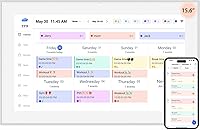
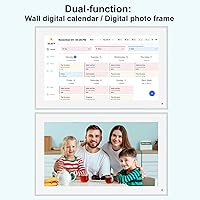
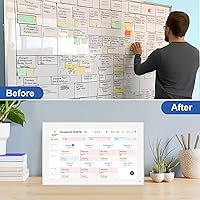
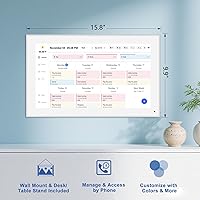
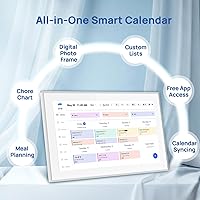
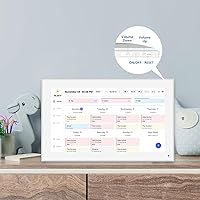
The YENOCK 15.6-inch Touchscreen Digital Family Calendar is a wall-mounted smart display built for households that have outgrown sticky notes and shared phone calendars. At its core, it's a 15.6-inch IPS touchscreen that acts as a central coordination point for everyone in the house — kids, parents, even grandparents. When nobody's actively using it, the screen shifts into a photo slideshow, which is a thoughtful secondary function. That said, this is a purpose-built device for a specific kind of chaos: the multi-child, multi-schedule household. If your family runs on a single shared calendar and everyone checks their phones, you probably don't need this.
Features & Benefits
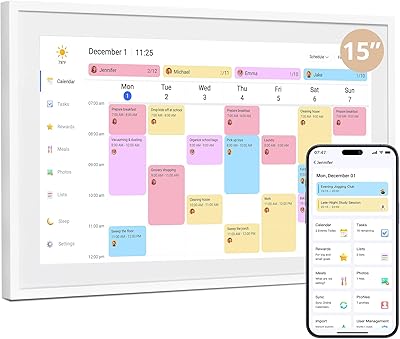
The display itself is worth leading with — a Full HD IPS panel with auto-dimming and an anti-glare coating makes it genuinely readable in bright kitchens or near windows, without the washed-out look you get from cheaper screens. The real workhorse feature is the color-coded scheduling system: each family member gets their own color, so kids can glance up and immediately know what belongs to them. The display pulls from Google, iCloud, Outlook, Yahoo, and Cozi via WiFi, and the companion app lets parents push updates remotely. Worth noting: some advanced automation, including reminder alerts, may sit behind a paid subscription tier.
Best For
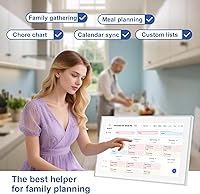
This wall-mounted planning display makes most sense for large, busy families — specifically households juggling three or more kids across school pickups, sports, homework, and chores. If you're already running on Google Calendar or iCloud, getting up and running is relatively painless. Parents who've tried the shared-phone-calendar approach and found that nobody actually looks at it will appreciate having something physically visible in the kitchen or hallway. It's also a reasonable fit for homes with older relatives who find phone apps frustrating. Conversely, if you're a couple or a smaller family with a relaxed routine, this touchscreen family organizer is likely overkill.
User Feedback
With a 4.4-star rating drawn from close to 2,000 reviews, this smart family calendar has a strong and broadly positive track record. Buyers consistently highlight screen clarity and how approachable the initial setup is, and multi-member sync draws particular praise from parents who had previously given up on digital coordination tools. On the flip side, some reviewers flag app reliability issues — WiFi reconnection hiccups and occasional sync delays appear in lower-rated feedback. A handful of buyers also express frustration about unclear distinctions between base features and what requires an upgraded plan. Long-term software support, as with any connected device, remains an open and legitimate question.
Pros
- Large 15.6-inch IPS screen is genuinely readable from across a room, even in bright kitchens.
- Color-coded scheduling makes it immediately clear whose task is whose without any explanation needed.
- Syncs with four major calendar platforms, so most families can connect existing schedules without starting from scratch.
- The companion app lets parents update the display remotely, which is useful during a workday.
- Auto-dimming and anti-glare coating reduce eye strain in rooms with variable lighting throughout the day.
- Doubles as a photo and video slideshow frame when idle, making it useful even on low-activity days.
- Setup is consistently described by buyers as approachable, even for less tech-savvy household members.
- Wall and desk mounting options give flexibility for different room layouts and living situations.
- A 4.4-star average across nearly 2,000 ratings reflects a broadly satisfied and sizable user base.
- One-year warranty with live support provides a reasonable safety net for a connected household device.
Cons
- WiFi reconnection issues appear in multiple lower-rated reviews and can disrupt daily sync reliability.
- It is unclear from base product materials which features require a paid subscription upgrade to unlock fully.
- Long-term software update commitment from a smaller brand like YENOCK is difficult to verify or guarantee.
- The companion app has drawn some criticism for inconsistent performance across different phone operating systems.
- At this price tier, buyers expect a more polished app experience than some users report receiving.
- The device is entirely dependent on a stable internet connection, making offline functionality essentially nonexistent.
- No third-party integrations beyond the listed calendar platforms, which limits flexibility for some workflows.
- Physical setup and wall mounting, while straightforward in theory, may require tools or assistance given the unit weight.
Ratings
The scores below for the YENOCK 15.6-inch Touchscreen Digital Family Calendar were generated by AI after analyzing thousands of verified global buyer reviews, with spam, incentivized, and bot-driven feedback actively filtered out. Each category reflects the honest balance of what real households praised and where they ran into friction — nothing is glossed over.
Display Quality
Ease of Setup
Calendar Sync Reliability
Color-Coded Task System
Companion App Experience
Photo Frame Mode
Build Quality
Wall Mounting Experience
Senior-Friendliness
Subscription Transparency
Value for Money
Long-Term Software Support
Multi-Child Household Fit
Interface Responsiveness
Suitable for:
The YENOCK 15.6-inch Touchscreen Digital Family Calendar is built for households where coordination genuinely breaks down without a central system — think three or more kids with overlapping sports schedules, homework deadlines, and chore rotations that no single person can track alone. Families already using Google Calendar or iCloud will find the sync setup relatively painless, since the display pulls from those platforms automatically over WiFi. Parents who have tried the shared-notes-app approach and found that kids simply ignore their phones will appreciate having something large and physically visible mounted in a kitchen or hallway. It also works well in multigenerational homes where older relatives struggle with smartphone apps, since the on-screen interface is designed to be approachable without much technical confidence. If your household runs on managed chaos and you want one place where everyone can see what is happening today, this wall-mounted planning display addresses that problem directly.
Not suitable for:
The YENOCK 15.6-inch Touchscreen Digital Family Calendar is genuinely not the right fit for smaller households or couples who manage their schedules comfortably through shared phone apps. At its price point, buyers reasonably expect polished, long-term software support, and the honest reality is that any WiFi-connected display from a smaller brand carries some risk of firmware stagnation over a multi-year lifespan. Buyers who want hands-off automation — such as meal planning reminders or advanced recurring alerts — should clarify before purchasing whether those features are included in the base version or locked behind a subscription upgrade. If your home only has one or two people to coordinate, a free shared calendar app on an existing tablet mounted to the wall would likely cover your needs at a fraction of the cost. Those who dislike app dependency in general, or who live in areas with unreliable WiFi, may find the connected features frustrating to maintain consistently.
Specifications
- Screen Size: The display measures 15.6 inches diagonally, providing a large viewing area suitable for reading from across a room.
- Display Type: Uses an IPS Full HD panel with a 1080p resolution, delivering accurate colors and wide viewing angles.
- Touch Input: The screen supports direct touchscreen interaction, allowing on-screen calendar editing without any external input device.
- Auto-Dimming: Built-in auto-dimming adjusts screen brightness automatically based on ambient light conditions.
- Anti-Glare: The panel features an anti-glare coating to reduce reflections in bright or naturally lit rooms.
- Connectivity: Connects to home networks via WiFi to enable real-time calendar synchronization and remote app control.
- Calendar Sync: Compatible with Google Calendar, iCloud, Microsoft Outlook, and Yahoo Calendar for automatic schedule integration.
- Family App: Supports Cozi family management platform integration for shared household scheduling beyond standard calendar apps.
- Companion App: A dedicated mobile app allows parents to view and update the display remotely from a smartphone.
- Task System: Offers a color-coded task assignment system that visually distinguishes each family member's responsibilities on screen.
- Photo Frame Mode: Switches to a digital photo and video slideshow when the display is idle, functioning as a secondary picture frame.
- Mounting Options: Supports both wall mounting and desk placement, giving flexibility for different room configurations.
- Dimensions: The unit measures 16.93 x 12.95 x 2.8 inches, making it a substantial but manageable wall panel.
- Weight: Weighs 4.2 pounds, which should be accounted for when selecting appropriate wall anchors or mounts.
- Warranty: Backed by a one-year manufacturer warranty with access to live expert support for troubleshooting.
- Brand: Manufactured and sold by YENOCK, a dedicated producer of smart home display solutions.
- Device Compatibility: The companion app is designed to work with smartphones, enabling cross-platform remote management of the display.
- Idle Behavior: When not actively used as a planner, the screen automatically transitions to displaying user-uploaded photos and videos.
Related Reviews
Canupdog 15.6-Inch Smart Family Calendar Display

Nethgrow 15.6-Inch WiFi Digital Picture Frame
Dragon Touch TM15 15.6″ Smart Family Calendar Display
KODAK 15.6-inch 32GB WiFi Digital Photo Frame

Humblestead 15.6-inch Digital Picture Frame with 64GB Storage

Visual Beat V15T 15.6-inch Portable Touch Monitor

Topmonitor P15.6/2.5K 15.6-inch Portable Monitor

HP 15.6-inch Laptop 15-ef0021nr, Ryzen 3 3200U, 8GB RAM, 256GB SSD

Dell Inspiron 15 3520 Laptop
