Overview

The BiTECOOL NikoBook 15.6″ Laptop enters a crowded budget segment with a straightforward pitch: a large-screen Windows 11 machine at a price that won’t cause regret. The processor inside is Intel’s Core i3-5005U, a 5th-generation chip that dates back to 2015 — and that context matters. It sets a clear performance ceiling, making this a capable machine for everyday tasks but not for anything demanding. What softens that reality is the 16GB RAM and 512GB SSD pairing, which is genuinely impressive at this tier. BiTECOOL isn’t a household name, so weighing warranty terms and support availability is a smart step before buying.
Features & Benefits

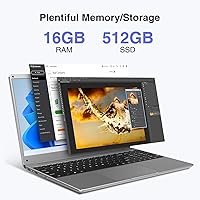
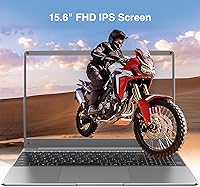
The 15.6-inch FHD IPS panel is one of this budget laptop’s stronger suits — colors are reasonably vibrant, viewing angles are decent, and 1080p resolution keeps text sharp enough for hours of reading or spreadsheet work. Multitasking holds up well thanks to the 16GB of LPDDR4 memory, which keeps Chrome tabs, Office apps, and a video call running without obvious slowdown. Boot times are quick courtesy of the M.2 SATA3 SSD. The Intel HD Graphics 5500 handles media playback and light image work but draws a hard line at gaming or video rendering. Connectivity is a real strength — dual-band Wi-Fi, Bluetooth 5.0, two USB 3.0 ports, HDMI, RJ45, and a Micro SD slot cover most real-world needs. Windows 11 Pro comes pre-installed, adding features like BitLocker and Remote Desktop that most budget machines skip entirely.

Best For

This Windows 11 machine makes the most sense for students who need a reliable daily driver for essays, research tabs, and Zoom lectures — the screen size alone makes studying more comfortable than on a cramped 13-inch. Remote workers handling email, documents, and browser-based tools will find it more than adequate. It also suits budget-conscious buyers who want solid storage and memory without paying extra for a faster chip they may not actually need. Seniors upgrading from an aging or sluggish PC will notice an immediate improvement. Just be clear about what it isn’t: the NikoBook isn’t built for video editing, gaming, or juggling multiple resource-heavy apps at once.

User Feedback

Buyers who’ve lived with the NikoBook tend to highlight two things: the screen performs better than expected, and Windows 11 Pro working right out of the box feels like a genuine bonus at this price. The SSD’s speed draws consistent praise too. Criticism centers mainly on the processor — users doing anything beyond browsing or light document work notice the i3-5005U struggling, particularly with video calls running alongside other apps. Build quality is a mixed bag; the plastic chassis feels functional but not sturdy, and a few verified buyers flagged hinge wobble over time. Battery life is harder to pin down — the listing makes broad claims, and real-world reports vary considerably. Overall sentiment leans positive among buyers whose expectations matched the machine’s actual capabilities.

Pros

  • The 15.6-inch FHD IPS display offers genuinely good color and sharpness for the price bracket.
  • 16GB of RAM means real multitasking headroom — tabs, Office apps, and calls can run together without drama.
  • The 512GB SSD keeps boot times short and storage anxiety lower than most budget rivals deliver.
  • Windows 11 Pro comes pre-loaded, adding BitLocker, Remote Desktop, and other features that cost extra elsewhere.
  • Dual-band Wi-Fi and Bluetooth 5.0 cover wireless needs without requiring dongles or adapters.
  • Port selection is strong — RJ45, HDMI, USB 3.0 ×2, Micro SD, and a headphone jack cover most real-world setups.
  • At 4.8 pounds, the NikoBook is portable enough for commuting students or workers who move between spaces.
  • SSD storage is expandable up to 1TB, giving room to grow without replacing the machine.
  • Windows 11 Pro out of the box is genuinely rare at this price point and adds practical enterprise-grade utility.

Cons

  • The Intel Core i3-5005U is a decade-old processor that limits headroom for anything beyond light workloads.
  • Build quality feels functional but basic — the plastic chassis lacks the rigidity buyers expect from sturdier machines.
  • Hinge durability has drawn concern from some verified buyers, raising questions about long-term wear.
  • Battery life claims in the listing are vague, and real-world reports vary enough to make it hard to rely on for all-day use.
  • Intel HD Graphics 5500 cannot handle gaming, GPU-accelerated tasks, or modern creative software at usable speeds.
  • BiTECOOL is a little-known brand with limited visibility on after-sales support and warranty responsiveness.
  • No optical drive is included, which is expected but worth noting for users with legacy media needs.
  • The chiclet keyboard and trackpad feel adequate but fall short of the tactile quality found on pricier competitors.

Ratings

The scores below reflect AI-driven analysis of verified global buyer reviews for the BiTECOOL NikoBook 15.6″ Laptop, with spam, bot-generated, and incentivized feedback actively filtered out to ensure the results reflect genuine ownership experiences. Both the highlights and the honest frustrations are baked into every score, so what you see is a balanced picture rather than a curated one. This machine earns real praise in several areas and real criticism in others — and the numbers below reflect exactly that.

Value for Money
78%
22%
For buyers who understand what they’re getting, the combination of 16GB RAM, a 512GB SSD, and Windows 11 Pro at this price point is genuinely difficult to argue with. Students and home users consistently note that competing machines at a similar price offer far less memory or storage, making this Windows 11 machine feel like a stronger deal on paper and in practice.
The value calculation shifts once buyers factor in the aging i3-5005U processor, which dates back to 2015. Those who later discover the CPU is a generation behind where they expected often feel the trade-off wasn’t communicated clearly enough upfront, leading to a sense of buyer’s remorse even when the machine technically does what they need.
Display Quality
74%
26%
The IPS panel earns consistent praise from users doing extended reading, document editing, and casual media consumption. Viewing angles are noticeably better than the cheaper TN screens that dominate this budget tier, and 1080p resolution keeps text sharp enough for long work sessions without eye fatigue.
Brightness levels are a frequent talking point — the screen struggles in well-lit rooms or near windows, and some buyers find it underwhelming compared to what they expected from a 15.6-inch FHD panel. Color accuracy is adequate but not impressive, and anyone coming from a higher-end display will feel the step down quickly.
Processing Performance
47%
53%
For genuinely light tasks — browsing, email, streaming, and document work — the processor keeps up without obvious stuttering. Users who buy this budget laptop as a dedicated web and office machine, rather than a general-purpose workhorse, tend to report being satisfied with day-to-day responsiveness.
The Core i3-5005U is a decade-old processor, and that age surfaces clearly the moment workloads step beyond the basics. Video calls with screen sharing, background software updates running simultaneously, or any media encoding task expose the CPU’s ceiling fast, and several buyers note that the machine slows to a frustrating crawl under those conditions.
RAM & Multitasking
83%
The 16GB of LPDDR4 memory is the single specification that most overdelivers relative to the price, and buyers notice. Keeping a dozen browser tabs open alongside a spreadsheet and a video call is manageable without the machine grinding — a scenario where most rivals at this price tier would already be struggling.
The RAM’s effectiveness is capped by the processor it works alongside, so the headroom it theoretically provides is not always fully realized under demanding conditions. A small number of buyers also report uncertainty about whether the RAM is soldered or user-upgradeable, which creates hesitation for those planning future upgrades.
Storage & Speed
81%
19%
Boot times are quick and file access feels responsive — users upgrading from older HDD-based laptops consistently describe the difference as dramatic. The 512GB capacity comfortably holds years of documents, photos, and software for most student and home-office users without requiring external drives.
The M.2 SATA3 interface, while fast, is a step behind the NVMe drives now standard in mid-range laptops, meaning sequential read and write speeds lag behind what buyers might see benchmarked elsewhere. The SSD also cannot be hot-swapped, so expansion requires opening the chassis, which not all buyers are comfortable doing.
Build Quality
54%
46%
The chassis is slim at 0.78 inches thick and comes in at a manageable 4.8 pounds, making it easy enough to carry between a desk and a bag without discomfort. For stationary or light-travel use, the overall construction feels adequate and holds together well under normal desk conditions.
Plastic construction is the norm at this price, but several verified buyers flag that the NikoBook’s chassis feels on the flimsier side even within that category. Hinge wobble is a recurring complaint, with users noting it becomes more pronounced over time with regular open-and-close cycles, raising questions about longevity beyond the first year.
Battery Life
51%
49%
Users doing light browsing and document work with Wi-Fi on and brightness turned down report getting through a solid half-day before needing to plug in. For occasional desk use where a charger is always nearby, the battery is a non-issue in practice.
The manufacturer’s vague battery claims — no specific hour rating is provided — leave buyers without a meaningful baseline, and real-world reports vary enough to suggest significant inconsistency. Heavy users report needing a charger within three to four hours, making this a machine that’s difficult to rely on away from a power source for extended periods.
Keyboard & Trackpad
62%
38%
The chiclet-style keyboard layout has a reasonable key pitch that most buyers adapt to quickly, and typing feedback is described as acceptable for light document work and email. The key travel is modest but not uncomfortable for extended sessions.
The trackpad receives mixed feedback — tracking accuracy is adequate but the surface responsiveness is inconsistent, particularly in the corners, which frustrates users who rely on it heavily. The keyboard also lacks backlighting, which is a notable omission for buyers who work in dim environments or at night.
Connectivity & Ports
86%
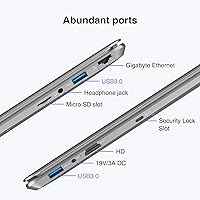
The port lineup is one of the stronger selling points for everyday users — having RJ45 Ethernet, HDMI, two USB 3.0 ports, a Micro SD slot, and a headphone jack means most peripherals and setup scenarios are covered without reaching for a hub. Dual-band Wi-Fi and Bluetooth 5.0 round out a connectivity suite that outpunches the price.
There is no USB-C port, which is increasingly standard even on budget machines and limits forward compatibility with newer monitors, docks, and charging accessories. Buyers who have already migrated their workflow to USB-C devices may find the omission inconvenient enough to matter.
Display Size & Usability
79%
21%
The 15.6-inch screen size is a consistent draw for this budget laptop, particularly among buyers who use it as a desktop replacement or who find smaller screens fatiguing during long work or study sessions. Seniors and students transitioning from older desktops frequently cite the screen size as the deciding factor in their purchase.
The larger footprint means this is not a truly portable ultrabook — it works best on a desk or table rather than a tray or lap. At 14.1 inches wide, fitting it comfortably on economy airline trays or smaller workspaces can be a mild challenge.
Software & Setup
82%
18%
Windows 11 Pro arriving pre-installed and fully activated is a legitimately pleasant surprise for buyers at this price. Most users report a clean setup experience with no significant driver issues, and features like BitLocker and Remote Desktop work out of the box without additional licensing.
Some buyers note the presence of pre-installed Microsoft apps and potential trial software that requires manual removal, which adds minor friction to the initial setup. A small number of users also report that Windows updates in the first few days of use slow the system noticeably, which can create a poor first impression.
Graphics & Media Playback
55%
45%
For casual media consumption — Netflix, YouTube, and basic photo browsing — the Intel HD Graphics 5500 does its job without obvious artifacts or lag. Users who primarily use the NikoBook as a media and browsing machine report that video playback is smooth at 1080p under normal conditions.
Anything beyond passive media consumption exposes the integrated GPU’s limitations quickly. Gaming is essentially off the table, and even GPU-accelerated tasks in lightweight creative software like photo editors can feel sluggish. Users who assumed the listed graphics capability implied more versatility tend to be disappointed.
Brand Trust & Support
44%
56%
Buyers who purchase through established platforms like Amazon benefit from standard return protections that partially offset concerns about the brand itself. A subset of satisfied users report smooth experiences with returns or replacements handled through the retailer rather than directly through BiTECOOL.
BiTECOOL has minimal brand recognition, and verified buyers who needed direct manufacturer support report inconsistent and sometimes slow response times. The absence of a well-documented warranty process or established service network is a genuine concern for buyers who want reassurance beyond the retailer’s return window.
Webcam Quality
57%
43%
The built-in webcam gets the job done for standard video calls on Zoom or Teams, and for buyers who only need to join a meeting from home or a dorm room, it removes the need for an external camera purchase. Image quality is sufficient in reasonably lit rooms.
In low-light conditions, the webcam image degrades quickly, producing grainy and washed-out video that makes a poor impression in professional settings. Users who rely heavily on video conferencing for work or client calls may find the webcam a weak link that eventually pushes them toward an external option.
Portability
71%
29%
At 4.8 pounds and under an inch thick, the NikoBook is portable enough to commute with daily without causing significant bag strain. Students carrying it to campus or remote workers switching between home and a coffee shop find the size-to-portability trade-off reasonable for a 15.6-inch machine.
Compared to 13-inch or 14-inch budget alternatives, the extra bulk adds up over longer commutes or when packed alongside textbooks and accessories. The charger adds additional weight and bulk to the bag, and the battery’s unpredictability means it’s rarely left behind.

Suitable for:

The BiTECOOL NikoBook 15.6″ Laptop is a practical pick for anyone whose computing needs stay firmly in everyday territory. College students juggling research tabs, word processors, and video calls will find the large FHD screen and ample storage genuinely useful without the financial strain of a premium brand. Remote workers who spend most of their day in a browser, email client, or spreadsheet app will rarely feel constrained by what this machine offers. Seniors trading in a slow, aging PC will notice a real improvement in boot times and general responsiveness, courtesy of the SSD. Parents looking for a capable homework and family browsing machine that doesn’t demand a steep investment will also find solid value here. The pre-installed Windows 11 Pro is an unexpected bonus at this price tier, opening up features most budget-range machines simply don’t offer.
Not suitable for:

Buyers expecting modern CPU performance should look elsewhere — the BiTECOOL NikoBook 15.6″ Laptop is built around an Intel Core i3-5005U, a processor released in 2015, and that heritage shows the moment tasks get demanding. Video editors, even casual ones working in software like DaVinci Resolve or Adobe Premiere, will run into frustrating slowdowns and rendering delays. Gamers should skip this entirely — the integrated Intel HD Graphics 5500 simply isn’t built for it. Power users who run virtual machines, compile code regularly, or work with large datasets will find the aging CPU a constant bottleneck regardless of how much RAM is available. Those who need confidence in brand-backed support and a proven warranty track record may also want to consider established names, since BiTECOOL’s after-sales infrastructure is still largely unproven for many buyers.
Specifications

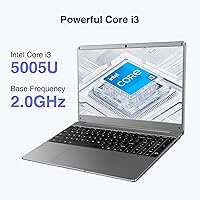
  • Processor: Powered by an Intel Core i3-5005U running at 2GHz with a 3MB cache, a 5th-generation dual-core chip suited for light to moderate computing tasks.
  • RAM: Comes with 16GB of LPDDR4 memory running at 2400MHz, providing comfortable headroom for multitasking across browser tabs, office applications, and video calls.
  • Storage: Includes a 512GB M.2 SATA3 SSD that supports expansion up to 1TB, delivering faster boot times and file access compared to traditional hard drives.
  • Display: Features a 15.6-inch FHD IPS panel with a 1920×1080 pixel resolution, offering wider viewing angles and more consistent color reproduction than standard TN screens.
  • Graphics: Integrated Intel HD Graphics 5500 with 2GB of shared video memory handles everyday media playback and basic image tasks but is not suited for gaming or GPU-intensive work.
  • Operating System: Ships with Windows 11 Pro pre-installed, including enterprise-grade features such as BitLocker encryption and Remote Desktop access.
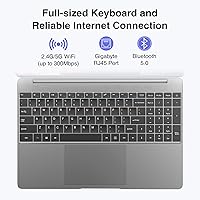
  • Wireless: Supports 802.11ac dual-band Wi-Fi across both 2.4GHz and 5GHz bands for flexible and reasonably fast wireless connectivity.
  • Bluetooth: Bluetooth 5.0 is built in, enabling low-latency connections to peripherals such as wireless mice, keyboards, and headphones.
  • Ports: Includes 2× USB 3.0, one standard-size HDMI output, a 3.5mm headphone jack, a Micro SD card reader, an RJ45 Ethernet port, and a DC charging port.
  • Keyboard: Uses a chiclet-style keyboard layout with standard key spacing and a touchpad input device for navigation.
  • Battery: Powered by a built-in Lithium Polymer battery; the manufacturer does not specify rated capacity or guaranteed hours, so real-world life will vary by workload.
  • Weight: Weighs 4.8 pounds, making it portable enough for daily commuting or moving between rooms without significant fatigue.
  • Dimensions: Measures 14.1×9.5×0.78 inches, fitting within a standard 15-inch laptop footprint that works on most desks and larger bags.
  • Chassis Color: Available in gray, with a plastic build that keeps weight down but trades off some structural rigidity compared to aluminum-bodied alternatives.
  • Memory Type: Uses DDR4 SDRAM in LPDDR4 configuration, a low-power variant that balances performance with energy efficiency for mobile use.
  • SSD Interface: The solid-state drive uses the M.2 SATA3 interface, which is faster than older HDD connections but slower than NVMe-based drives found in higher-end laptops.
  • Webcam: A built-in webcam is included, supporting standard video call resolutions suitable for Zoom, Teams, and Google Meet sessions.
  • Audio: Equipped with HD Audio output and a 3.5mm headphone jack; no discrete speakers specification is listed beyond standard stereo output.

Related Reviews
HP 15 Intel N100 16GB/256GB
77%
88%
Value for Money
83%
Everyday Performance
91%
RAM & Multitasking
67%
Display Quality
72%
Build Quality & Portability
More
HP Laptop 15-fc0099nr
71%
83%
Value for Money
71%
Performance
88%
Battery Life
61%
Display Quality
84%
Touchscreen Responsiveness
More
Dell Inspiron 15 3520 Laptop
74%
76%
Performance & Speed
81%
Display Quality
83%
Touchscreen Responsiveness
89%
Storage & Memory
62%
Battery Life
More
HP 15-DY1031WM Laptop 15.6″ Intel Core i3-1005G1 8GB RAM 256GB SSD
74%
75%
Performance
92%
Value for Money
55%
Battery Life
60%
Build Quality
85%
Portability
More
HP 15.6-inch Laptop 15-ef0021nr, Ryzen 3 3200U, 8GB RAM, 256GB SSD
82%
92%
Value for Money
85%
Performance
83%
Build Quality
89%
Portability
81%
Battery Life
More
Dell Inspiron 3593 15.6-inch Laptop

68%
74%
Everyday Performance
81%
SSD Speed & Storage
52%
Display Quality
63%
Battery Life
57%
Build Quality
More
HP 2020 15 15.6″ HD Touchscreen Laptop, Intel Core i5-1035G1, 16GB RAM, 512GB SSD
82%
89%
Performance
75%
Display Quality
90%
Portability
80%
Battery Life
85%
Build Quality
More
HP 15 G9 16GB 1TB Laptop
71%
88%
Value for Money
54%
Performance
83%
RAM & Multitasking
86%
Storage
74%
Display Quality
More
Tzowla Canvas Laptop Backpack 15.6″
85%
91%
Value for Money
86%
Durability
88%
Comfort & Ergonomics
89%
Storage & Organization
94%
Charging Port Convenience
More
Bluboon 15.6 Inch Laptop Backpack
84%
89%
Organization & Storage
84%
Comfort & Ergonomics
90%
Portability & Weight
78%
USB Charging Port Convenience
85%
Laptop Protection
More

FAQ

For the majority of everyday computing — web browsing, word processing, spreadsheets, and video calls — the NikoBook handles things without much complaint. The 16GB of RAM is the real workhorse here and keeps common multitasking scenarios running smoothly. Where you’ll notice the processor’s age is if you start stacking heavier applications on top of each other or push into media editing territory.

The storage can be expanded — the M.2 SATA3 slot supports SSDs up to 1TB, so swapping in a larger drive is a realistic option down the line. RAM upgradability depends on whether the slots are soldered, which BiTECOOL hasn’t clearly documented, so it’s worth confirming before purchase if that matters to you.

Yes, comfortably. The combination of 16GB RAM and a 512GB SSD means Office applications open quickly and Zoom calls run without the stuttering you’d expect from a machine with less memory. Just avoid running multiple heavy video streams simultaneously, and you’ll be fine.

Honestly, this is one of the harder questions to answer with confidence. The manufacturer uses vague language around battery life rather than citing specific hours, and buyer reports vary quite a bit depending on screen brightness and workload. Light usage with Wi-Fi on might get you through a half-day, but bringing a charger to work or school is the safer habit with this machine.

It’s one of the more practical options at this price point for students who need a large screen, enough storage for years of coursework, and a proper Windows environment. The FHD display makes reading and writing comfortable over long sessions, and Windows 11 Pro handles school-issued software well. Just keep expectations grounded around the processor if your coursework involves video production or data-heavy applications.

Not really. The integrated Intel HD Graphics 5500 is capable of very light, older titles at reduced settings, but anything released in the past several years will either refuse to run or perform poorly. This machine was not designed with gaming in mind, and pushing it in that direction will only lead to frustration.

The IPS panel does a decent job for casual media consumption. Colors are reasonably accurate, viewing angles are better than on cheaper TN displays, and 1080p resolution keeps things looking sharp. It won’t rival a premium entertainment display, but for Netflix or YouTube it’s perfectly watchable.

Windows 11 Pro is the base install, and like most pre-built Windows machines it may include some Microsoft-bundled apps and potentially a few third-party trials. These are generally easy to uninstall in the first setup session if you prefer a cleaner environment.

The chassis is plastic, which is standard for budget laptops in this class. It feels functional and sturdy enough for desk use and casual travel, but it does not feel premium in the hand. A few buyers have noted that the hinge can feel slightly loose over time, so handling it gently and not frequently opening it one-handed will help with longevity.

BiTECOOL is a relatively new and lesser-known brand, and their customer support track record is not as established as larger manufacturers. Before purchasing, it’s worth checking the warranty terms carefully and making sure you’re comfortable with the return and repair process through whichever platform you buy from. Buying through Amazon gives you some buyer protection that can partially offset concerns about direct brand support.