Overview

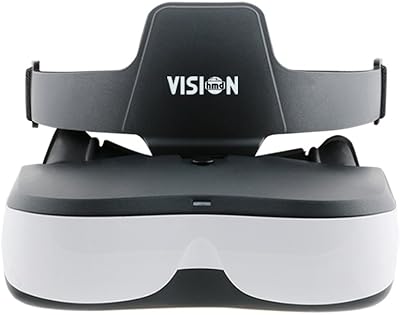
The VISIONHMD Bigeyes H3 Video Display Glasses are a personal cinema headset — not VR goggles, and that distinction matters enormously before you buy. These video display glasses function purely as an external HDMI display, meaning they need a connected source device to do anything at all. Think of them as a wearable monitor, not a standalone gadget. The built-in lithium-ion battery gives you genuine portability, which is a real advantage over tethered alternatives. First available in 2020 and still actively sold, the Bigeyes H3 headset has held its ground longer than many competitors in a category that turns over quickly.
Features & Benefits

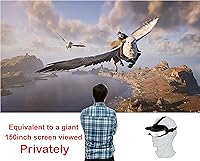
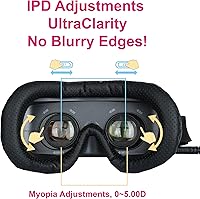
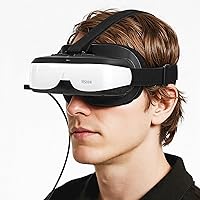
Each eye gets its own independent 720p LCD panel running at 1280x720, and while that spec sounds modest on paper, the close proximity to your eyes creates a surprisingly immersive feel — closer to a large screen in a dark room than a small phone display. The myopia adjustment spanning 0 to 500 degrees is genuinely useful; near-sighted users can ditch their glasses entirely. Interpupillary distance is also adjustable, which helps with long wear comfort. At 1.5 pounds, this personal cinema device is light enough for extended sessions. It handles 720p, 1080i, and 1080p HDMI input and works with consoles, streaming boxes, and Blu-ray players.

Best For

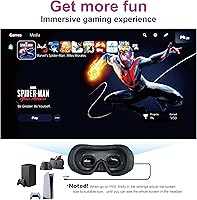
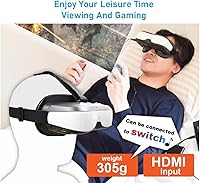
This headset earns its place for a specific type of buyer. Frequent travelers who want a private screen on planes or trains will appreciate the compact build and battery independence. It pairs well with the Nintendo Switch in TV mode, making it a decent heads-up display for portable gaming. People sharing apartments who want to watch something without disturbing a roommate will also find real value here. Near-sighted viewers who struggle with screen use are another natural fit, given the built-in correction. Retro AV fans connecting a DVD or Blu-ray player can get a genuinely dedicated cinema feel without a projector setup.

User Feedback

With a 3.3-star average across 33 reviews, reception is genuinely mixed and worth understanding honestly. On the positive side, buyers frequently mention that image clarity and the compact form factor exceeded their expectations given the price. The negatives, though, are consistent: connecting to smartphones trips people up because adapter requirements are poorly communicated upfront, and Samsung DeX users face a specific multi-step workaround just to get a signal. A handful of buyers also report occasional signal drops requiring a paperclip reset through a small port on the unit — not a dealbreaker, but an annoyance. Go in with clear expectations and it delivers; go in blind and frustration is likely.

Pros

  • Built-in battery makes the Bigeyes H3 headset genuinely portable without needing a wall outlet nearby.
  • Myopia adjustment up to 500 degrees lets near-sighted users watch comfortably without prescription glasses.
  • Dual independent 720p screens create a surprisingly immersive feel relative to the hardware specs on paper.
  • Adjustable interpupillary distance means the fit can be dialed in for a wide range of face shapes.
  • Compact and lighter than product photos suggest — easy to slip into a carry-on bag.
  • Works reliably with plug-and-play HDMI sources like Roku boxes, Apple TV, and Blu-ray players.
  • Nintendo Switch compatibility in TV mode makes it a solid travel gaming display option.
  • Included accessory kit covers several cable configurations, reducing the need for immediate extra purchases.
  • HDCP-compatible with support for 720p, 1080i, and 1080p input — handles most standard content formats.

Cons

  • USB-C to HDMI adapter is not included, despite USB-C being the dominant port on modern smartphones.
  • Samsung DeX users must follow a cumbersome multi-step workaround just to get a stable signal.
  • Signal drops requiring a paperclip reset have been reported frequently enough to be a real reliability concern.
  • The bundled earphone delivers thin, underwhelming audio that most serious viewers will want to replace immediately.
  • Instruction manual is unclear on adapter selection, leaving many buyers confused during initial setup.
  • Not all smartphones support video output via HDMI — compatibility is not guaranteed and requires pre-purchase research.
  • Extended wear beyond an hour or two can cause pressure discomfort around the nose and temples.
  • At 3.3 out of 5 stars, the mixed review record reflects a meaningful share of buyers who hit frustrating dead ends.
  • No battery life specification is officially published, making it hard to plan use around longer trips or sessions.

Ratings

The VISIONHMD Bigeyes H3 Video Display Glasses have been scored by our AI system after analyzing verified buyer reviews from global markets, with spam, bot-generated, and incentivized feedback actively filtered out. Scores reflect the honest spread of real user experiences — strengths and frustrations alike — so you get a clear picture before committing. Both the genuine highlights and the recurring pain points are transparently baked into every category below.
Display Clarity
71%
29%
Several buyers were genuinely surprised by how crisp the image looked in practice, particularly when watching movies in a dark room. The dual 720p panels, while modest on paper, create a sense of screen size that feels much larger than the raw resolution implies when the headset is properly fitted.
At 720p per eye, fine text and high-detail scenes can look soft compared to modern phone screens. Users coming from high-resolution displays will notice the step down, especially during daytime use or in brighter environments where contrast is less forgiving.
Build Quality & Durability
63%
37%
The physical footprint is notably compact and lighter than photos suggest, which buyers consistently appreciated upon unboxing. For the price tier, the overall shell feels sturdy enough for regular travel use and daily commutes without feeling dangerously fragile.
The plastic construction does not inspire long-term confidence, and a few users reported fit tolerances feeling slightly loose after extended use. The reset button — accessible only via paperclip — is a design choice that hints at reliability concerns baked into the hardware itself.
Comfort & Fit
67%
33%
At 1.5 pounds and with adjustable interpupillary distance, the Bigeyes H3 headset fits a reasonable range of face shapes without immediate discomfort. Users who dialed in the IPD and myopia settings reported being able to watch for an hour or more without significant fatigue.
Longer sessions — two hours or more — tend to produce pressure points around the nose and temples for a meaningful subset of users. The headset lacks padded facial cushioning comparable to dedicated VR or media headsets in a similar price range.
Myopia Adjustment
82%
18%
The 0 to 500 degree diopter adjustment is one of the genuinely useful features here. Near-sighted users who normally rely on prescription glasses found they could watch movies or game sessions without any eyewear at all, which significantly improved comfort during extended use.
The adjustment mechanism is manual and can be fiddly to calibrate precisely, especially for users with significant astigmatism that diopter correction alone cannot address. People with correction needs outside the supported range will still need to wear glasses underneath.
Connectivity & Compatibility
54%
46%
When connected to straightforward HDMI sources like Blu-ray players, Roku boxes, or Apple TV, this personal cinema device works reliably with minimal fuss. The included accessory kit covers several common cable configurations, which is a thoughtful touch for plug-and-play setups.
Smartphone connectivity is a recurring frustration. USB-C to HDMI adapter requirements are not clearly communicated, and Samsung DeX users face a multi-step configuration process just to get a signal. This is one of the most cited complaints across verified reviews and cannot be dismissed as an edge case.
Setup & Ease of Use
51%
49%
Connecting to a standard HDMI source like a game console or streaming box is relatively painless for users familiar with basic AV setups. Once configured correctly, day-to-day operation is simple — power on, plug in, and watch.
Getting there is the problem. Many buyers struggled with the initial setup, particularly around choosing the right adapter for their device. The paperclip reset requirement for signal loss adds a layer of friction that feels out of place for a consumer product in this category.
Gaming Performance
69%
31%
These video display glasses work reasonably well with the Nintendo Switch in TV mode, offering a heads-up, private screen experience that suits portable gaming sessions on planes or in hotel rooms. The 60Hz refresh rate handles most casual gaming content without noticeable lag.
Fast-paced or competitive gaming exposes the 60Hz ceiling and 720p resolution more noticeably. The lack of head tracking or any spatial audio integration means this is purely a display solution — not an immersive gaming upgrade in the way some buyers might expect.
Portability
77%
23%
The built-in lithium-ion battery is a genuine differentiator for travel use, removing the need for a constant wall connection. The compact dimensions make it packable in a carry-on bag without dominating space, which frequent commuters and long-haul travelers noted as a real practical benefit.
Battery life specifics are not well documented, and buyers have reported varying runtime depending on source device and brightness. Traveling with the right adapter configuration also adds cable management complexity that undercuts some of the portability appeal.
Value for Money
61%
39%
For buyers who connect it to a compatible HDMI source and get it working smoothly, the experience delivers more than the price might suggest — particularly the myopia adjustment and dual-screen setup, which are not common at this tier.
The mixed 3.3-star average tells a clear story: value is highly dependent on your specific use case and device ecosystem. Buyers who hit adapter incompatibilities or signal issues without a technical background often feel the purchase was not worth the cost.
Audio Quality
58%
42%
The included earphone handles basic movie audio adequately for private listening during travel or quiet-hour viewing. For straightforward content consumption, most users found it functional enough not to require an immediate upgrade.
The bundled earphone is clearly an afterthought — audio quality is thin, with limited bass and narrow soundstage. Anyone serious about the cinematic experience this device promises will want to pair it with their own earphones or headphones instead.
Samsung DeX Compatibility
39%
61%
A working configuration does exist for Samsung DeX users, and the manufacturer has documented a multi-step workaround involving specific connection sequencing and display mirroring settings that some technically patient users have successfully followed.
The fact that a paperclip-and-sequence troubleshooting process is required at all reflects a genuine compatibility gap. Multiple verified buyers gave up before completing setup, and this specific pain point is one of the clearest drivers of negative reviews for the Bigeyes H3 headset.
Refresh Rate & Motion Handling
66%
34%
At 60Hz, standard video content — streaming, movies, and casual gaming — renders smoothly without obvious motion artifacts. For the core use case of watching films during travel, the refresh rate is appropriate and not a noticeable limitation.
Users who gravitated toward this device for fast-action gaming or sports content found the 60Hz ceiling limiting. There is no option to push higher refresh rates even when the source device supports them, which narrows the appeal for performance-focused buyers.
Accessory Completeness
73%
27%
The included kit — HDMI female-to-female adapter, Mini HDMI cable, Micro USB charge cable, cleaning wipe, and earphone — covers more connection scenarios than many competitors bundle. For standard setups, buyers often found they did not need to purchase additional cables immediately.
USB-C to HDMI adapters are notably absent from the box, despite USB-C being the dominant port on modern smartphones and laptops. This omission is a consistent source of confusion and adds an unexpected immediate cost for a significant portion of buyers.
Reliability & Signal Stability
48%
52%
When the connection is stable and the source device is fully compatible, the headset maintains a consistent signal without frequent interruptions. Users with straightforward setups — dedicated media players or consoles — generally reported fewer stability issues.
Signal drops requiring a manual reset via paperclip are reported with enough frequency to be a genuine concern. This is not a rare edge case; it is a documented enough issue that the manufacturer addresses it in the product listing itself, which is telling.
Packaging & Unboxing
74%
26%
First impressions at unboxing are generally positive — the headset arrives compact and better-looking in person than product images convey. The included accessories are organized and the overall presentation is appropriate for the price point.
The instruction manual has been flagged by multiple buyers as unclear, particularly around adapter selection and initial device pairing. Better documentation at this stage could meaningfully reduce setup frustration and likely improve the overall rating.

Suitable for:

The VISIONHMD Bigeyes H3 Video Display Glasses are a genuinely practical pick for a narrow but well-defined group of buyers. Frequent travelers and long-haul commuters will get the most out of the built-in battery and compact form factor — wearing these on a plane while connected to a streaming stick or tablet dock is exactly the use case they were designed around. Near-sighted users are another strong fit, since the 0 to 500 degree myopia adjustment means you can watch a full movie without hunting for your glasses first. People living in shared spaces — dorm rooms, studio apartments, or shared bedrooms — will also appreciate the inherently private viewing experience these display glasses provide without disturbing anyone nearby. Nintendo Switch owners looking for a heads-up display for travel gaming, and retro AV enthusiasts who want to connect a Blu-ray or DVD player for a dedicated personal cinema setup, round out the ideal audience.
Not suitable for:

Anyone expecting a VR or augmented reality experience should stop here — the VISIONHMD Bigeyes H3 Video Display Glasses are a passive 2D HDMI display and nothing more. Buyers who primarily use modern smartphones as their source device will likely hit a wall fast: USB-C to HDMI adapters are not included in the box, and not every phone supports video output at all, so compatibility homework is essential before purchasing. Samsung DeX users face a documented multi-step workaround just to get a signal, which is a frustrating barrier for what should be a plug-and-play experience. Tech-averse users or anyone who gets rattled by adapter confusion and troubleshooting steps will find the setup curve steeper than expected. And if you are coming from a high-resolution display background expecting sharp 1080p visuals, the 720p per-eye output will feel like a visible compromise — especially for content with fine text or detailed graphics.
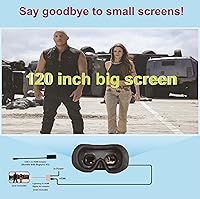
Specifications

  • Display Type: Each eye features an independent HD 720p LCD panel running at 1280x720 resolution for a dual-screen personal viewing experience.
  • Refresh Rate: Both displays operate at a standard 60Hz refresh rate, suitable for movies, streaming, and casual gaming content.
  • Video Input: Input is provided exclusively via HDMI, with HDCP compatibility ensuring support for copy-protected content from Blu-ray players and streaming devices.
  • Supported Resolutions: The headset accepts 720p, 1080i, and 1080p video input signals from connected source devices.
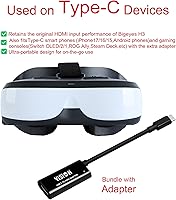
  • Connectivity: Connection is made through a standard HDMI port; USB-C devices require a separately purchased USB-C to HDMI adapter with video output support.
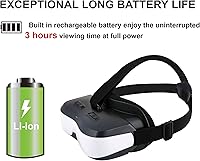
  • Battery: A built-in rechargeable lithium-ion battery is included and pre-installed, charged via the included Micro USB cable.
  • Weight: The headset weighs 1.5 pounds, making it lighter than many competing wearable display units in this category.
  • Dimensions: Physical dimensions measure 6.81 x 3.15 x 2.24 inches, keeping the overall footprint compact enough for travel bags and carry-on luggage.
  • Myopia Adjustment: Built-in diopter correction covers 0 to 500 degrees (0 to 5.0 D), allowing near-sighted users to watch without prescription glasses.
  • IPD Adjustment: Interpupillary distance is manually adjustable to accommodate different eye spacings for a more comfortable and accurate viewing fit.
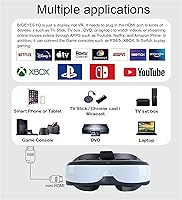
  • Compatible Devices: Works with game consoles, smartphones with HDMI video output, televisions, Blu-ray players, DVD players, and HDMI-equipped streaming boxes.
  • Included Accessories: Package contents include one earphone, one cleaning wipe, one HDMI female-to-female adapter, one HDMI to Mini HDMI cable, and one Micro USB charge cable.
  • Age Recommendation: The manufacturer recommends this product for users aged 13 and above.
  • Operating System: The headset has no onboard operating system and functions purely as a passive external display dependent on the connected source device.
  • Manufacturer: Designed and produced by VISION ELECTRONICS CO., LTD, which also markets the device under the Bigeyes and VISIONHMD brand names.
  • Market Rank: Currently ranked #29 in the Video Display Glasses category on Amazon, where it has been listed since September 2020.
  • Color Option: Available in white as the standard colorway for the H3 model.
  • Reset Mechanism: A recessed reset button accessible via a standard paperclip is available to reboot the headset if a signal drop or connection failure occurs.

Related Reviews

Bigeyes H1 3D Video Display Glasses
82%
88%
3D Viewing Experience
84%
Comfort for Extended Use
79%
Device Compatibility
85%
Ease of Setup
87%
Display Quality
More
ZTCOLIFE Video Glasses with Bluetooth 1080P HD Camera
83%
88%
Video Quality
91%
Battery Life
85%
Ease of Use
82%
Comfort
78%
File Transfer Speed
More
ASUS ProArt Display PA169CDV 15.6” 4K Pen Display
87%
94%
Color Accuracy
89%
Portability
90%
Touchscreen Responsiveness
85%
Build Quality
92%
Wacom Pen Precision
More
Calibrite ColorChecker Video Color Calibration Chart
78%
93%
Color Accuracy
91%
Gray Scale Precision
89%
White Balance Reliability
67%
Build Quality
84%
Usability On Set
More
YFDSPSM QY360 Mini Projector
74%
83%
Image Clarity
61%
Brightness
91%
Setup Experience
74%
Portability
77%
Smart OS & App Access
More
Emerhome E13 Bluetooth Smart Glasses
70%
83%
Ease of Pairing
79%
Call Clarity
58%
Audio Volume & Quality
54%
Battery Life
71%
Touch Control Accuracy
More
TnoxHD Smart Glasses
85%
85%
Audio Quality
90%
Battery Life
80%
Comfort and Fit
78%
Sound Clarity for Calls
88%
Ease of Use
More
Meagtlva Bluetooth Glasses Mk1
82%
82%
Audio Quality
88%
Comfort and Fit
90%
Battery Life
84%
Build Quality
79%
Ease of Use
More
Calibrite Display Plus HL
88%
93%
Calibration Accuracy
89%
Ease of Setup
88%
Software Functionality
91%
Portability & Size
87%
Build Quality
More
QZTELECTRONIC Bone Conduction Glasses
80%
78%
Audio Quality
84%
Comfort for Extended Wear
72%
Battery Life
90%
Waterproof Durability
82%
Ease of Use
More

FAQ

No, it is not VR in any sense. The VISIONHMD Bigeyes H3 Video Display Glasses are a passive 2D display — essentially a wearable monitor. There is no motion tracking, no spatial computing, and no standalone app environment. You plug in an HDMI source and it shows you whatever that source is playing, nothing more.
It depends on your specific phone. The headset only accepts HDMI input, so your phone needs to support video output — typically via a USB-C to HDMI adapter. Many Android phones support this, but iPhones require a Lightning to HDMI adapter. Crucially, not every phone model supports video output even if it has a USB-C port, so check your device specs before buying.

That is correct for most users in that range. The built-in myopia adjustment goes up to 5.0 D, so a 3.5 D prescription should fall comfortably within the supported range. Keep in mind this only corrects near-sightedness — if you also have significant astigmatism, the diopter adjustment alone may not fully compensate for that.

You need to use the Switch in TV mode, either through its original dock or via a compatible USB-C to HDMI adapter — and the Switch must also be connected to its original charger during use. Once in TV mode with HDMI output active, the Bigeyes H3 headset will pick up the signal normally. Handheld mode does not output video through HDMI.

A small number of users have reported this. The fix is to use a paperclip to press the recessed reset button on the unit, which reboots the headset. After it restarts, press the power button again and reconnect your source device. It is not a common everyday occurrence, but it is worth knowing the reset option exists before you panic.

Yes, as long as your laptop has a working video output — either a full-size HDMI port or a USB-C port that supports DisplayPort Alt Mode. If your laptop only has USB-C, you will need a USB-C to HDMI adapter that explicitly supports video output. Standard USB-C charging adapters will not work for this purpose.

In practice, it looks better than the spec suggests. Because the displays sit very close to your eyes, the perceived screen size is much larger than a 720p phone display, and the image tends to appear crisp rather than pixelated in normal viewing conditions. That said, fine text and very high-detail content will look softer than you would see on a modern 1080p or 4K screen, so manage expectations accordingly.

Yes, and this is important to know upfront. You need to connect your Samsung phone to the headset via a USB-C to HDMI adapter first, then power the headset on. From there, go into your phone settings, navigate to Connected Devices, then Samsung DeX, then Connected Display, and select Mirrored. Finally, disconnect and reconnect the adapter. It sounds involved because it is — but following those steps in order does resolve the issue for most users.

Unfortunately, the manufacturer has not published a specific battery runtime figure, and user reports vary. Runtime appears to depend on the brightness of the content and how active the connected source device is. For travel planning purposes, it is worth having the Micro USB charge cable accessible, especially for very long flights or extended sessions.

Bring your own if audio quality matters to you. The included earphone is functional — it will get the job done for basic movie audio — but the sound is thin and lacks any real bass or depth. Most users who care about a proper cinematic experience swap it out for their preferred earphones fairly quickly.